

How to Present to C-Level Executives Without Losing the Room
You've got 20 minutes on the CEO's calendar. You spent two weeks building a 30-slide deck. By slide three, she's checking her phone and the CFO is asking a question about slide 27. The meeting ends with "let's circle back" - which means you lost the room and probably the decision.
Presenting to C-level executives isn't a presentation problem. It's a communication architecture problem. Most people build decks bottom-up - context, then analysis, then recommendation - when executives consume information top-down: recommendation, "prove it," decision. We've watched teams go from "let's circle back" to same-day approvals just by flipping that order.
The Three Rules That Cover 80%
If you're short on time, these three rules handle most of what matters:
- State your recommendation in the first 30 seconds. Everything after that is supporting material. If you can't say what you want in one sentence, you haven't thought hard enough.
- Use the Pyramid Principle. Answer first, three supporting points, evidence underneath. It matches how executives actually process information.
- Tailor by role. A CFO and a CTO care about completely different things on the same slide. One deck doesn't fit all.
The rest of this guide breaks down each of these, plus a 12-slide template, design rules, virtual presentation tactics, and the five mistakes that kill your credibility fastest.
Why the C-Suite Attention Environment Is Different
The people you're presenting to don't have the same attention environment you do. Gloria Mark's research at UC Irvine found that average attention on a single screen has dropped to 47 seconds - down from 2.5 minutes in 2004. Microsoft's Work Trend Index puts the number at roughly 275 interruptions per day during core hours, with the average worker fielding 117 emails and 153 Teams messages daily. Your CEO isn't ignoring you because she's rude. She's triaging a firehose.
That's the core tension: too detailed and you lose them, too vague and you look unprepared. In r/consulting, one poster described doing fine with working-level audiences but having "fallen flat" with executives because they couldn't find the balance. A solution architect in r/ExperiencedDevs asked how to convert detailed Confluence docs into "easy powerpoint format for non-technical people" without overwhelming. The consensus in both threads was the same - don't simplify, restructure.
Executives don't want less information. They want the right information in the right order, with the ability to drill down when they choose.
The Pyramid Principle - Structure Top-Down
Barbara Minto joined McKinsey in 1963 as their first female consultant and developed the Pyramid Principle during her time there. Six decades later, it's still the default structure for executive communication at most consulting firms and Fortune 500 companies.
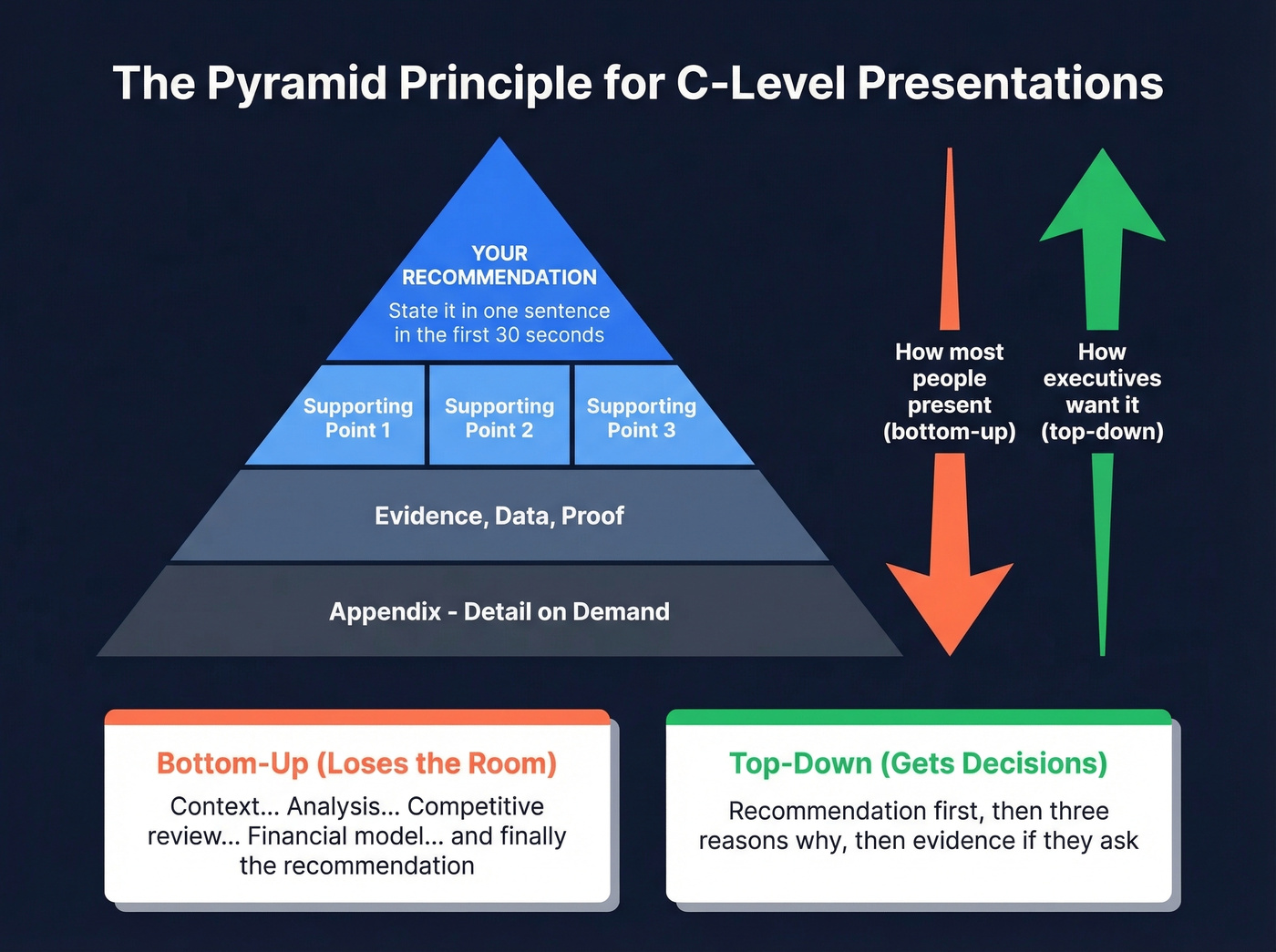
The concept is simple: start with your answer, support it with three points, and back each point with evidence. Top-down, not bottom-up. The reason it works isn't just stylistic - it's cognitive. The widely cited "7 plus or minus 2" rule for working memory has been largely debunked; current consensus puts the number closer to about four chunks, which maps perfectly to one main idea plus three supporting points.
Here's how that translates to slides:
- Slide 1 - The Answer. One sentence, direct, specific. "We should expand into DACH in Q3 because the market is underserved, our product is localized, and the ROI model shows breakeven in 9 months."
- Slides 2-4 - Supporting Points. Each slide covers one point with its evidence. These should be MECE - mutually exclusive, collectively exhaustive. No overlap, no gaps.
- Slide 5 - Implications. Risks, dependencies, timeline considerations. What could go wrong and what needs to be true.
- Slide 6 - Next Steps. One clear ask. Not three asks. One.
The before/after difference is dramatic:
Bottom-up deck: "Let me walk you through the market analysis, competitive analysis, product readiness assessment, financial model, and then I'll share my recommendation."
Pyramid deck: "Here's what I recommend and why. Let me show you the three reasons."
In our experience, the pyramid version gets interrupted with questions faster - and that's exactly what you want. The executive can stop you at any point and drill into what matters to them.
The 12-Slide Executive Deck Template
The 6-slide pyramid works for focused recommendations. For larger strategic proposals - new market entry, major investment, organizational change - you need more room. Here's a 12-slide structure that covers the full decision space:
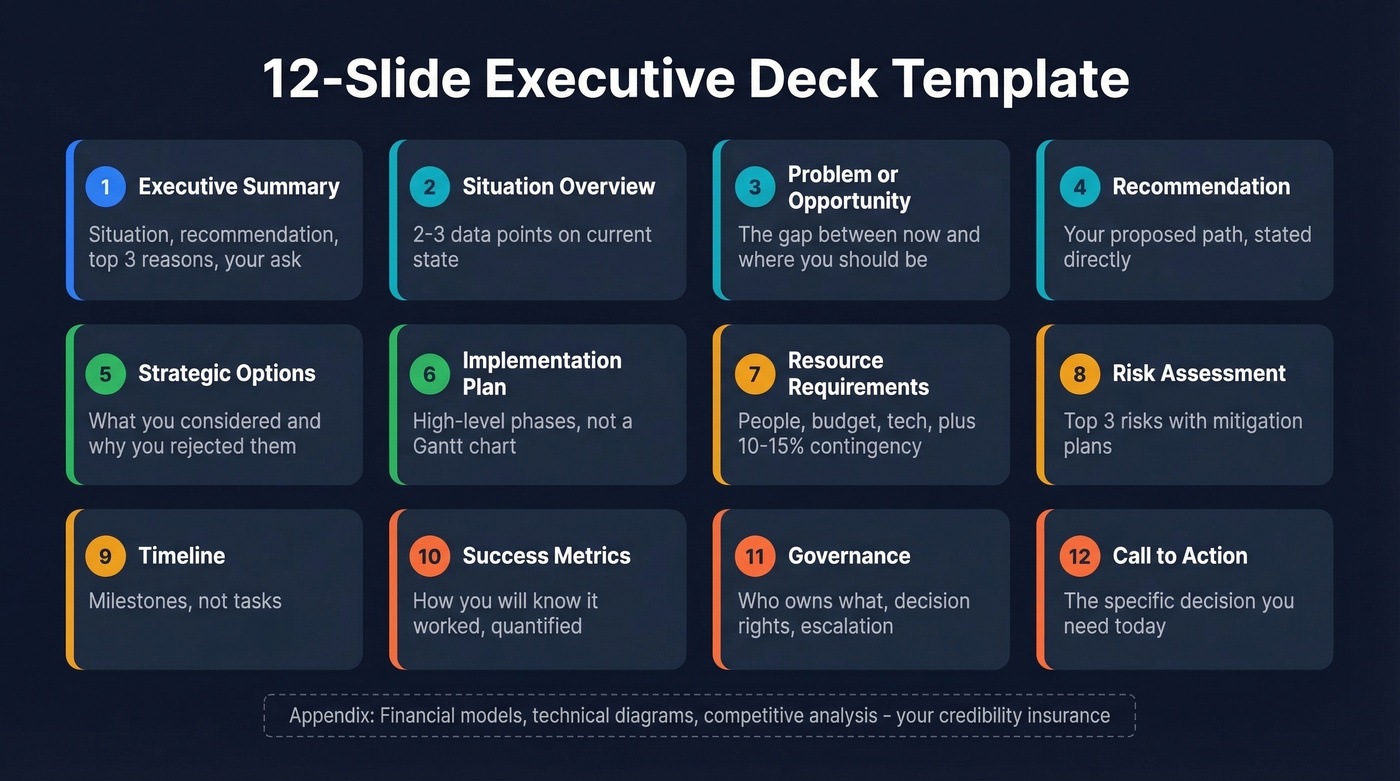
- Executive Summary - answers four questions in 60 seconds: what's the situation, what do you recommend, what are the top three reasons, and what do you need from them.
- Situation Overview - current state in 2-3 data points. No history lessons.
- Problem or Opportunity - the gap between where you are and where you should be.
- Recommendation - your proposed path, stated directly.
- Strategic Options - what you considered and why you rejected the alternatives.
- Implementation Plan - high-level phases, not a Gantt chart.
- Resource Requirements - people, budget, technology. Include a 10-15% contingency and label it.
- Risk Assessment - top 3 risks with mitigation plans.
- Timeline - milestones, not tasks.
- Success Metrics - how you'll know it worked. Quantified.
- Governance - who owns what, decision rights, escalation path.
- Call to Action - the specific decision you need today.
Everything that doesn't fit in these 12 slides goes in an appendix. Detailed financial models, technical architecture diagrams, competitive analysis matrices - all appendix material. It's your credibility insurance when someone asks "did you consider X?" and you can flip to slide A-7 with the answer ready.
For recurring updates like monthly business reviews or project status meetings, you don't need 12 slides. A 1-2 slide format works: RAG status for key workstreams, top 3 risks, and the decisions you need.
Tailor Your Message by Role
The same proposal needs different emphasis depending on who's in the room. Here's what each executive role is actually accountable for - and therefore what they're listening for:
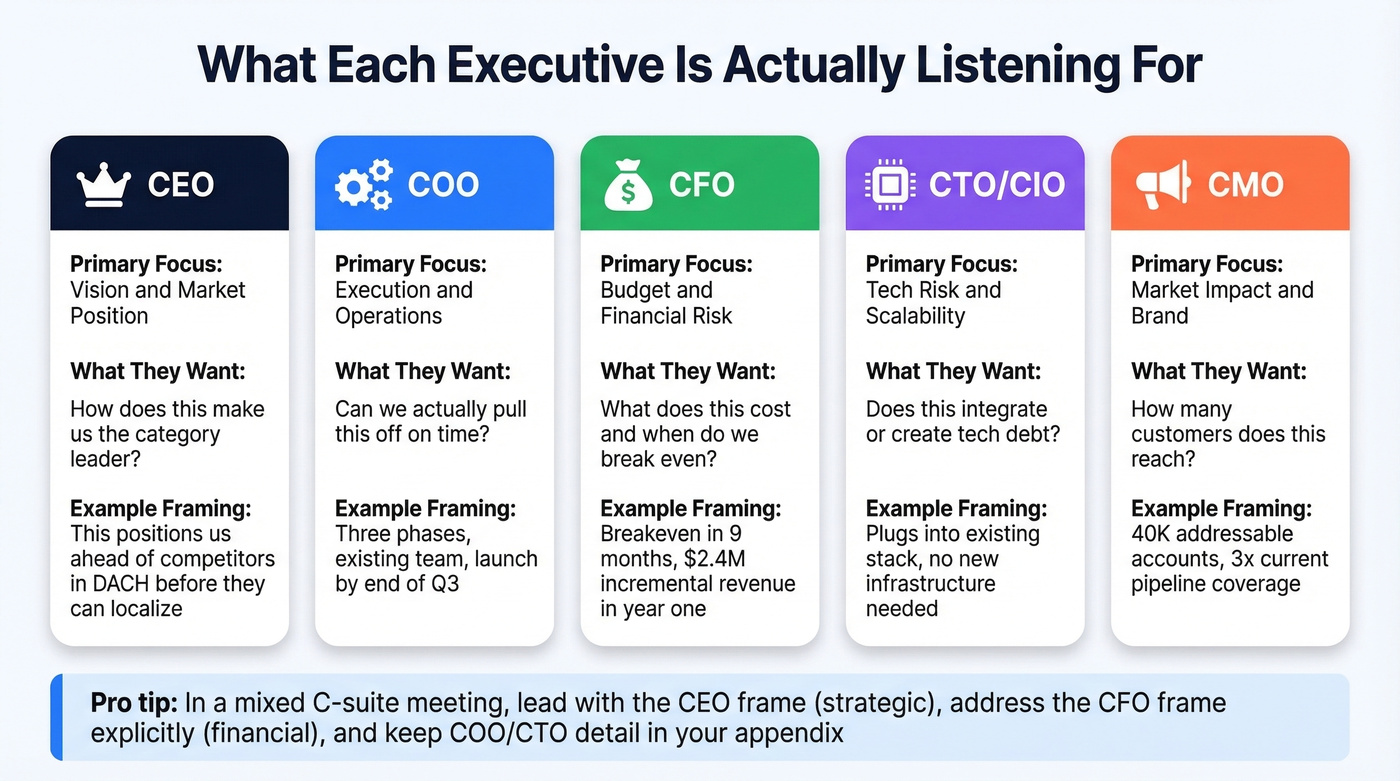
| Role | Primary Focus | What They Want on Your Slide |
|---|---|---|
| CEO | Vision, market position | Long-term strategic fit |
| COO | Execution, operations | Timelines, resource needs |
| CFO | Budget, financial risk | ROI, compliance, cash flow |
| CTO/CIO | Tech risk, scalability | Integration, architecture |
| CMO | Market impact, brand | Customer acquisition, reach |
A product launch framed for a CEO sounds like: "This positions us as the category leader in DACH before competitors can localize." The same launch framed for a CFO sounds like: "Breakeven in 9 months, $2.4M incremental revenue in year one, funded from existing budget reallocation." Same facts, different emphasis.
When you're presenting to a mixed C-suite audience, lead with the CEO frame (strategic), address the CFO frame explicitly (financial), and have COO/CTO detail ready in your appendix. Don't try to serve all five perspectives on every slide - you'll dilute every one of them.

Tailoring your pitch by role only works if you're presenting to the right person. Prospeo gives you 30+ filters - job title, department, seniority, buyer intent - so you walk into every executive meeting knowing you've reached the actual decision-maker. 98% email accuracy means your follow-up lands, too.
Stop perfecting decks for executives who can't sign off.
Pre-Wire Stakeholders Before You Walk In
This is the single highest-leverage tactic most presenters skip.
Meet individually with key executives before the presentation. Share your recommendation, surface their concerns, and address those concerns in your deck. The presentation itself should be a confirmation of alignment, not the first time anyone hears your idea.
We've seen the pre-wiring step alone eliminate most Q&A surprises. A board member who already agrees with your recommendation becomes an ally in the room. A CFO whose concern you've already addressed in slide 8 nods instead of derailing. Pre-wiring turns a pitch into a ratification - and ratifications get approved.
Build a simple checklist: identify the two or three stakeholders whose support you need, schedule 15-minute one-on-ones in the week before, share a one-page summary of your recommendation, and ask "what would make you uncomfortable with this?" Then bake their answers into your deck.
Slide Design Rules Executives Respect
Executives scan slides. They don't read them. If a slide doesn't answer "what do I need to know?" within a few seconds, you've lost that moment.
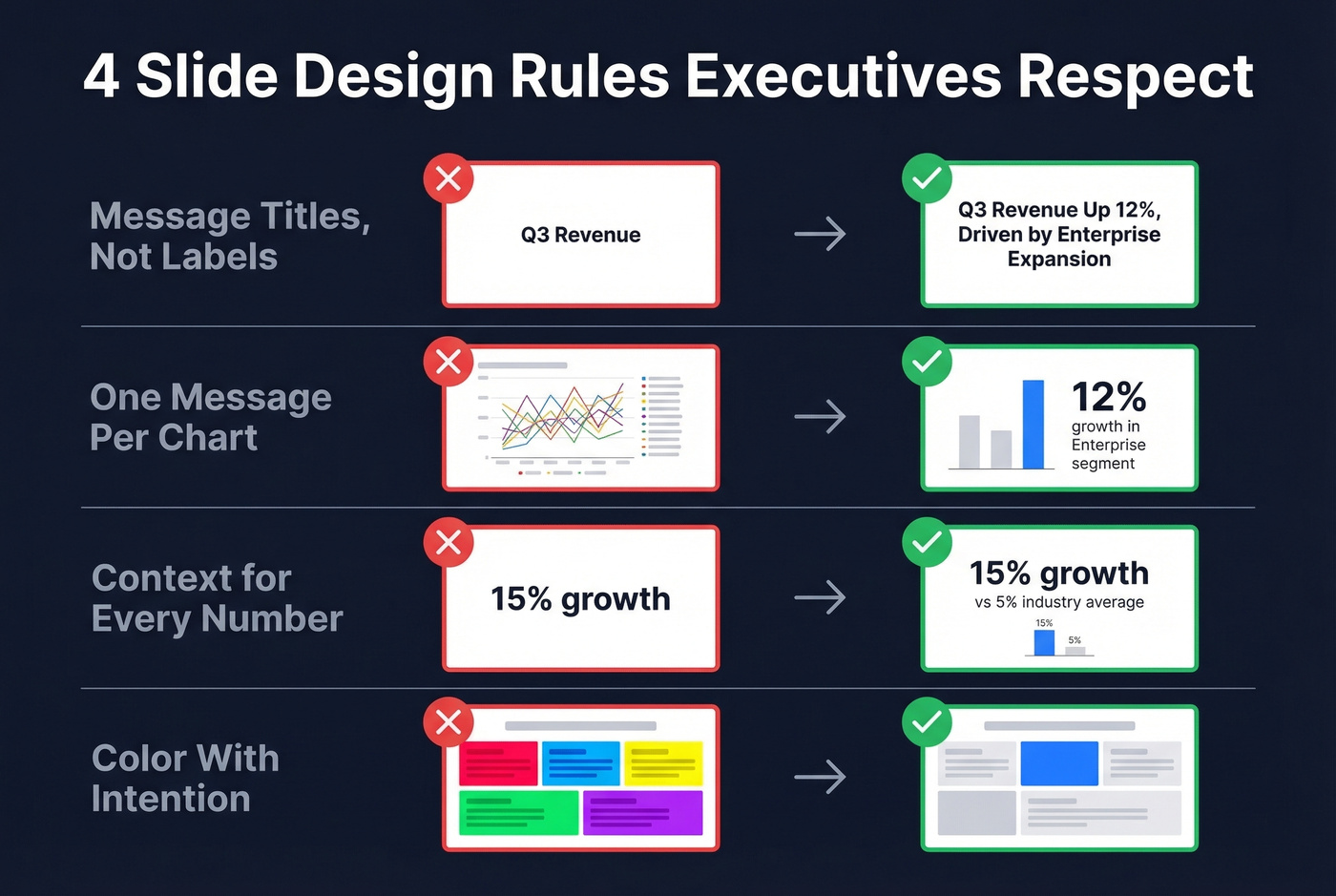
Message titles, not label titles. "Q3 Revenue" is a label. "Q3 Revenue Up 12%, Driven by Enterprise Expansion" is a message. Every slide title should be a complete sentence that tells the story even if the executive never looks at the body of the slide. This single change - replacing labels with messages - transforms most decks.
One message per chart. If you need 30 seconds to explain what a chart shows, it's too complex. Split it or simplify. Executives aren't going to study your visualization - they're going to glance at it and either get the point or tune out.
Context for every number. "15% growth" means nothing without a benchmark. 15% against a 5% industry average is impressive. 15% against a 25% target is a miss. Always provide the comparison point - executives think in relative terms, not absolutes.
Color with intention. Gray for context data, your brand color for the number you want them to focus on, red only for genuinely urgent problems. When everything is highlighted, nothing is.
Virtual Executive Presentations
Stanford GSB research found that audiences lose attention after roughly 10 minutes of hearing from the same presenter. In a virtual setting, that window shrinks because the distractions are literally one tab away.
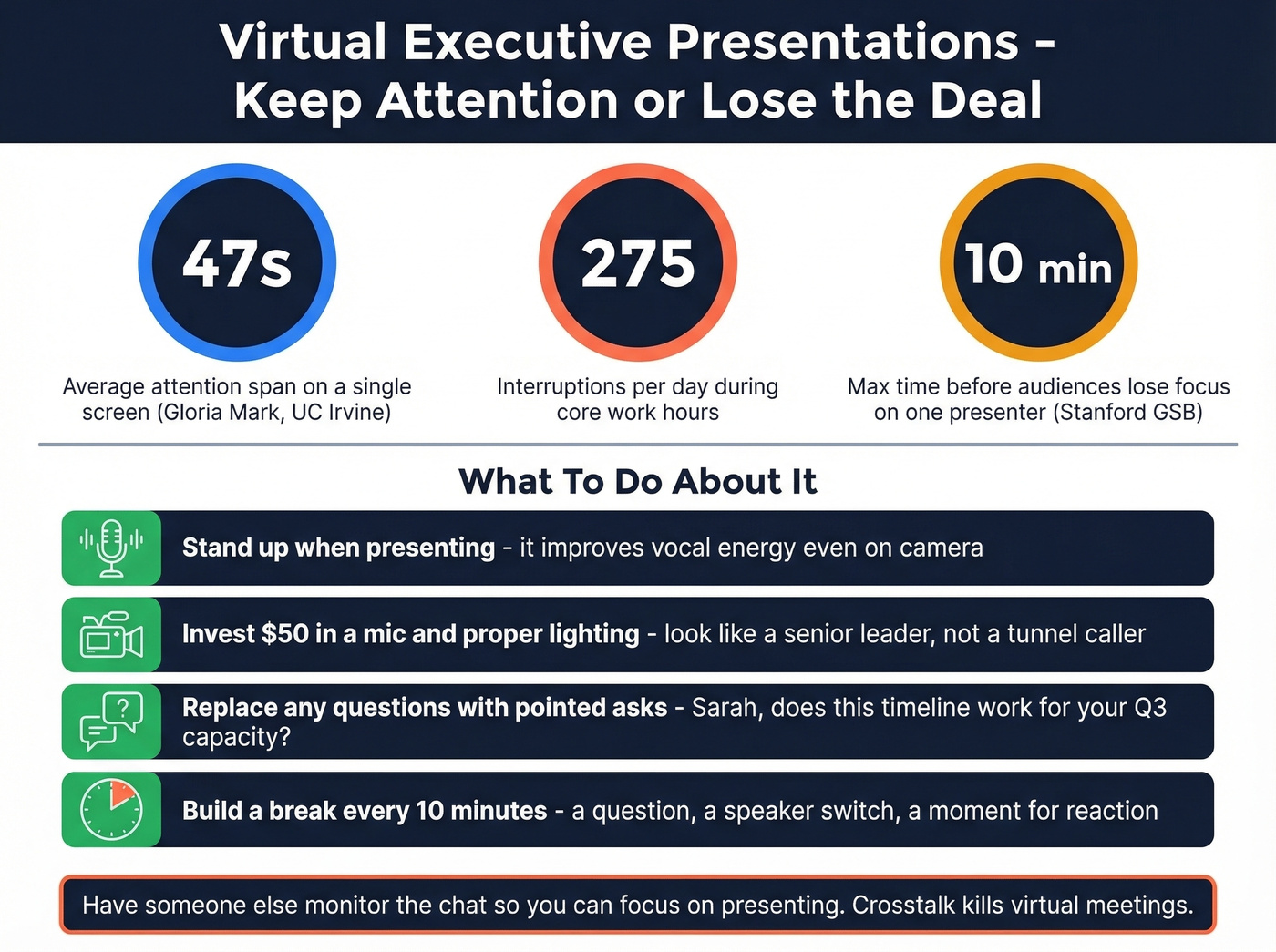
Stand up when you present. It improves vocal energy and presence, even on camera. A $50 external microphone and proper lighting make you look and sound like a senior leader - built-in laptop audio makes you sound like you're calling from a tunnel.
Here's the thing about virtual Q&A: "any questions?" gets silence. Replace it with pointed questions. "Sarah, does this timeline work for your team's Q3 capacity?" forces engagement. Set a ground rule at the start that people state names before speaking - it prevents the crosstalk that makes virtual meetings feel chaotic. And if possible, have someone else monitor the chat so you can focus on presenting.
If your presentation runs longer than 10 minutes, build in a natural break - a question, a shift to a different speaker, a moment where you ask for a specific reaction. Don't power through 25 slides and hope attention holds.
Five Mistakes That Kill Credibility
Burying your recommendation on slide 11. The most common mistake and the most damaging. By the time you get to your ask, the executive has already formed their own conclusion - and it won't match yours. State your recommendation in the first 30 seconds.
Using hedge words. "I think we should maybe consider..." signals uncertainty. Executives want conviction. Say "I recommend Option B" and be prepared to defend it. They remember people who had a point of view, not people who had the most data.
Over-explaining before anyone asks. When you preemptively address every possible objection, you create doubts that didn't exist. Present your case, stop, and let questions emerge. The silence feels uncomfortable. That's fine - it means they're thinking.
Reading slides verbatim. Executives read faster than you speak. The moment you start reading your slide aloud, they've already finished it and are waiting for you to catch up. Slides are visual aids, not scripts.
Treating Q&A as an attack. A pointed question from the CFO isn't an attack - it's engagement. It means they're taking your proposal seriously enough to probe it. Pause before answering, answer exactly what was asked, then stop. Don't ramble into adjacent territory. The pause alone signals confidence.
Let's be honest about what actually kills most executive presentations: it isn't bad data or weak analysis. It's that the presenter showed up without energy, hid behind a corporate mask, and played it safe. Conviction is a skill. Practice having a point of view and defending it before you walk into the room.
Back Up Your Numbers First
Executives will probe your data. If you're presenting pipeline numbers, outbound results, or market targeting, the accuracy of your underlying prospect data determines whether your recommendation survives the first question. I've watched a VP of Sales get grilled for ten minutes because the CFO noticed the pipeline forecast was built on a contact list with a 35% bounce rate - the entire recommendation collapsed under that one data point.
Skip this section if your presentation doesn't involve pipeline or outbound metrics. But for sales leaders presenting revenue forecasts, tools like Prospeo with 98% email accuracy and a 7-day data refresh cycle mean your contact data is current when you present it. Verify your lists before you build your slides, not after someone questions them. If you're running outbound, tighten your sales prospecting techniques and keep a clean process for lead enrichment so your numbers hold up under scrutiny.
Your 12-slide deck is ready. Your pyramid structure is tight. But none of it matters if you can't get on the CEO's calendar. Prospeo's 300M+ verified profiles and 125M+ direct dials give you a direct line to the C-suite - no gatekeepers, no generic inboxes.
Get the meeting before you build the deck.
FAQ
How long should an executive presentation be?
Five to ten minutes of talk time plus Q&A. Most C-suite meetings are 30 minutes - your presentation should fill less than half. The rest is discussion and decisions.
Should I send the deck before the meeting?
Yes. A pre-read lets executives arrive with context and spend meeting time on decisions instead of absorbing background. Send it 24-48 hours ahead with a one-paragraph summary of your recommendation and what you need from them.
What's the biggest mistake when presenting to C-level executives?
Burying the recommendation. Most presenters build context for 10 slides before stating what they want. Executives need the answer on slide one - they'll ask for context if they need it.
How do I present technical topics to non-technical executives?
Translate everything into business impact. Not "reduced API latency by 40ms" but "checkout page loads 30% faster, reducing cart abandonment." Keep technical detail in an appendix for drill-down questions.
How do I handle tough questions I don't have answers to?
Say "I don't have that number right now, but I'll get it to you by end of day." Then actually do it. Executives respect honesty far more than a bluffed answer they can see through. What they won't forgive is the same gap twice.