


slug: primeforge-pricing-reviews-pros-and-cons
Primeforge Pricing, Reviews, Pros & Cons (2026)
You're scaling cold email infrastructure and the Primeforge pricing math isn't adding up. Some sources say $6-10/mailbox, the calculator shows $4.5, and "mailbox slots" is a concept nobody explains well. Here are real numbers, actual user reviews, and a clear verdict on the pros and cons.
What Is Primeforge?
Primeforge is a cold email infrastructure tool in the Salesforge ecosystem, sitting alongside Mailforge (shared SMTP) and Infraforge (dedicated IP). It provisions legitimate Google Workspace and Microsoft 365 mailboxes engineered for cold outreach - not repurposed daily-use accounts. You get automated DNS configuration covering SPF, DKIM, and DMARC, US-based IP addresses, profile picture and GIF headshot support, and mailboxes ready to send in roughly 30 minutes.
30-Second Verdict
Primeforge is a strong pick for agencies and teams scaling 25+ cold email mailboxes who want legitimate Google Workspace and MS365 accounts with automated DNS. Pricing starts at $4.5/mailbox/month, with annual billing offering "2 months free" - bringing the effective cost to about $3.75/mailbox/month. It's pricier than shared SMTP tools like Mailforge, but it can be cheaper than managing everything yourself once you factor in setup time.
Not ideal for solo SDRs or anyone needing fewer than 10 mailboxes - that's the minimum purchase.
Pricing Breakdown
The pricing model trips people up because Primeforge bills by mailbox slots, not active mailboxes. You buy capacity. Purchase 25 slots and you're paying for 25 whether you've provisioned 8 or 25 mailboxes. The upside: slots are reusable. Delete a burned mailbox, spin up a fresh one, no extra charge.
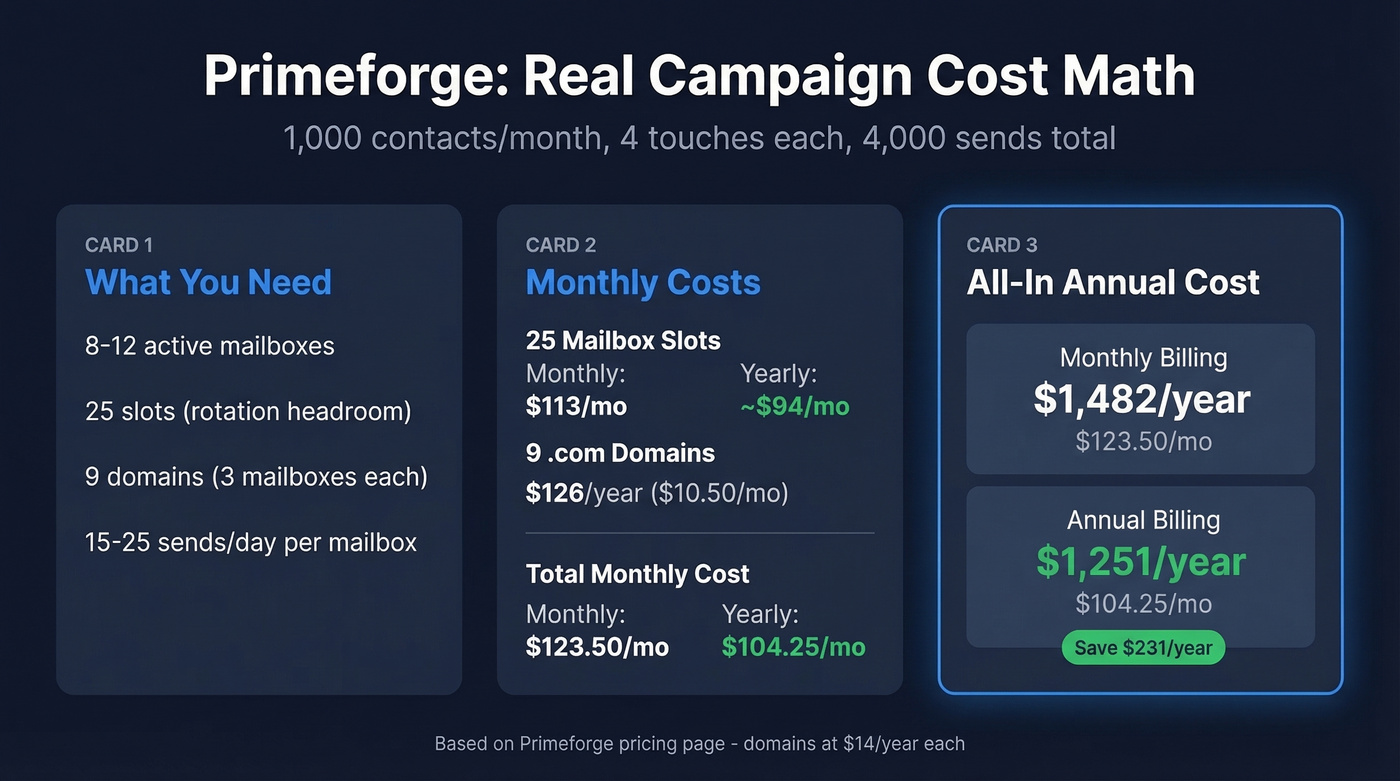
The listed yearly rate is $4.5/mailbox/month, but the "2 months free" annual discount brings the effective cost down to roughly $3.75/mailbox/month. That discount is real - and it's where most of the price confusion starts.
| Item | Monthly billing | Yearly billing (effective) |
|---|---|---|
| 25 mailbox slots | $113/mo ($4.52/ea) | ~$94/mo (~$3.75/ea) |
| .com domains | $14/year each | $14/year each |
The minimum purchase is 10 slots. Expect $45/month on monthly billing, or about $38/month equivalent on annual.
Now let's model a real campaign scenario. Say you're emailing 1,000 contacts per month at 4 touches each - that's 4,000 sends. At 15-25 sends per day per mailbox, you need roughly 8-12 active mailboxes. Buying 25 slots gives you headroom for rotation when mailboxes burn out. Across 9 domains with about 3 mailboxes per domain (the deliverability sweet spot), you're paying approximately $94-113/month for slots plus $126/year for domains. That's $1,251-1,482/year all-in.
For context, typical Google Workspace and MS365 reseller pricing runs $2.50-$3.50/mailbox. Primeforge charges a premium for the automated DNS, US-based IPs, and reusable slot model. Whether that premium is worth it depends on how much you value your time - and for anyone managing 25+ mailboxes, the DNS automation alone pays for itself.
Some third-party comparison sites quote $6-10/mailbox. That's wrong. Anchor your math to the actual pricing page.
There's no free trial. You can explore the app, but provisioning anything requires a paid purchase.

You're optimizing mailbox costs at $3.75-$4.50 each - but bad data burns those mailboxes faster than anything. Prospeo's 98% email accuracy and 5-step verification keep bounce rates under 4%, so your Primeforge slots last longer and your domains stay clean.
Stop burning mailboxes on unverified data. Start at $0.01/email.
Primeforge vs. Mailforge vs. Infraforge
All three live in the Salesforge ecosystem but serve different infrastructure needs:
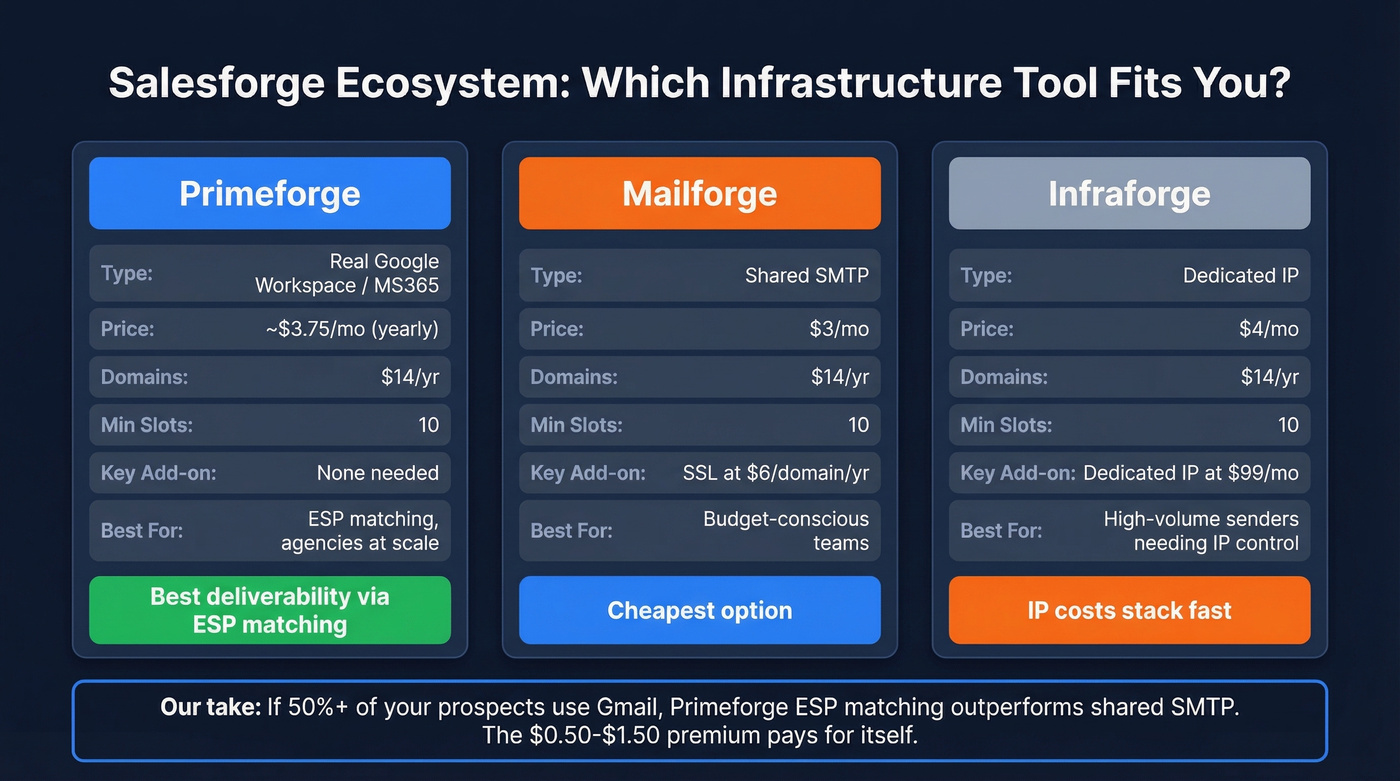
| Feature | Primeforge | Mailforge | Infraforge |
|---|---|---|---|
| Type | Real GW/MS365 | Shared SMTP | Dedicated IP |
| Mailbox price (yearly) | ~$3.75/mo effective | $3/mo | $4/mo |
| Domains | $14/yr | $14/yr | $14/yr |
| Key add-on | None | SSL: $6/domain/yr | Dedicated IP: $99/mo |
| Min. slots | 10 | 10 | 10 |
Mailforge is cheapest but runs on shared SMTP - your deliverability depends partly on neighbors. Infraforge gives you dedicated IPs, but those $99/month IP add-ons stack fast. Primeforge's advantage is ESP matching: sending from the same ESP as your recipients can boost deliverability. The Salesforge founder reports 10-30% better reply rates when diversifying across 3-4 ESPs.
Here's our take: most teams overthink the Mailforge vs. Primeforge decision. If more than half your prospects use Gmail, ESP matching will outperform shared SMTP every time. The $0.50-$1.50/mailbox premium pays for itself with even a marginal deliverability lift.
Pros and Cons
Pros:
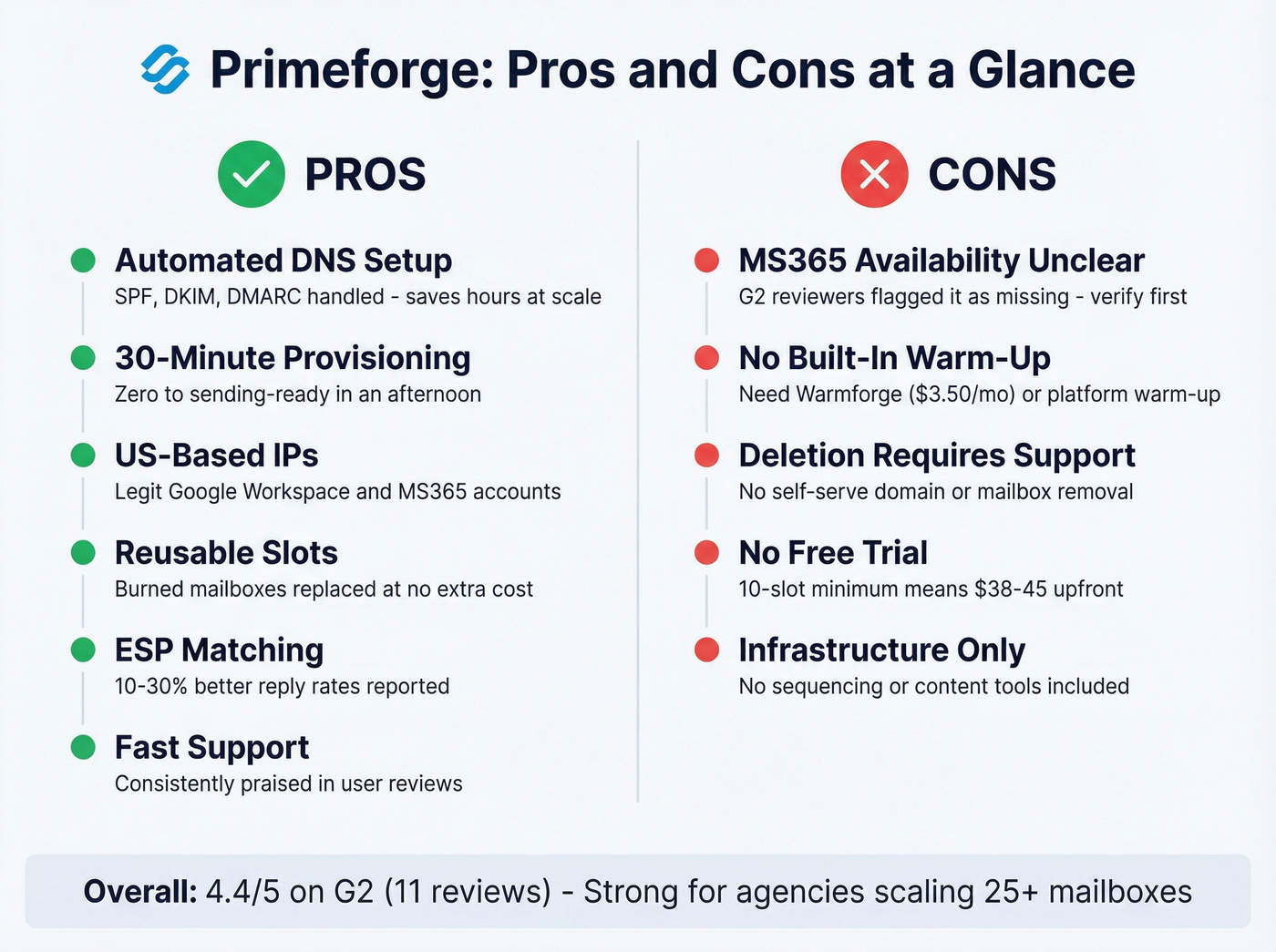
- Automated DNS setup handles SPF, DKIM, and DMARC - no manual TXT record editing. This alone saves hours at scale.
- Fast provisioning. Mailboxes are ready in about 30 minutes. We've seen teams go from zero to sending-ready in an afternoon.
- US-based IP addresses on legitimate Google Workspace and MS365 accounts - not EDU tricks or sketchy reseller panels.
- Reusable slots mean burned mailboxes don't cost extra to replace.
- ESP matching improves inbox placement, with reported 10-30% better reply rates when diversifying sends across 3-4 ESPs.
- Customer support gets consistently positive reviews - fast chat responses, even for domain deletion requests.
- API access and whitelabel options for agencies managing client infrastructure.
Cons:
- The MS365 situation is murky. Product pages and founder posts position it as supported, but G2 reviewers have flagged it as missing. Verify directly before buying if MS365 matters to you.
- Warm-up isn't included natively. You'll need Warmforge or your sending platform's built-in warm-up. Plan for a 14-day minimum warm-up period.
- Deleting domains or mailboxes sometimes requires contacting support rather than self-serve removal.
- No free trial and a 10-slot minimum means you're spending $38-45 before sending a single email.
- Infrastructure only - no sequencing, no content tools. You still need a separate sending platform.
What Real Users Say
The review sample is small but directionally useful. G2 shows a 4.4/5 rating from 11 reviews, with 72% giving 5 stars. Trustpilot sits at 4.1/5 from 7 reviews. With sample sizes this small, don't over-index on exact numbers.
Praise themes are consistent: smooth onboarding, zero headaches, fast customer support. In our testing, the DNS automation genuinely saves hours compared to manual configuration - and that tracks with what reviewers highlight most.
Complaint themes cluster around MS365 availability confusion, limited visibility into warm-up progress and IP reputation metrics, and the friction of needing support to delete old domains. Reddit discussion is thin - the tool is still young. The broader community discusses the Salesforge ecosystem frequently, though direct Primeforge comparisons remain sparse.
Is Primeforge Worth It?
Use Primeforge if you're an agency or team scaling 25+ cold email mailboxes and want legitimate Google Workspace and MS365 accounts with zero DNS headaches. The slot model makes sense at scale - rotating burned mailboxes costs nothing extra. Stick to 3-5 mailboxes per domain, 15-25 sends per day per mailbox after warm-up, and you'll get solid deliverability.
Skip it if you need fewer than 10 mailboxes. At that scale, buy Google Workspace directly at ~$7/user/month and configure DNS yourself - it's cheaper and you avoid the slot minimum. For shared SMTP on a budget, Mailforge at $3/mailbox/month is the obvious choice.
Look, infrastructure is only half the equation. If 15% of your emails bounce because your contact data is stale, your sender reputation tanks regardless of how clean your mailbox setup is. Stack Optimize built from $0 to $1M ARR running 94%+ deliverability across all client accounts by pairing clean infrastructure with verified data from Prospeo - 98% email accuracy on a 7-day refresh cycle, so the contacts hitting your mailboxes are actually valid. Free tier available, no contracts.

Infrastructure is half the equation. The other half is sending to real, verified contacts. Prospeo delivers 143M+ verified emails with a 7-day refresh cycle - so your carefully warmed Primeforge mailboxes hit real inboxes, not spam traps and dead addresses.
Protect your cold email infrastructure with data that's verified weekly.
FAQ
Does Primeforge offer a free trial?
No. You can explore the app without purchasing, but provisioning mailboxes or domains requires a paid plan. The minimum is 10 mailbox slots at $4.5/mailbox/month billed yearly (~$3.75/mailbox/month effective with the annual discount) or $45/month billed monthly.
Does Primeforge support Microsoft 365?
Product pages and founder posts position MS365 as supported, but some G2 reviewers reported it wasn't available at sign-up. If MS365 is critical for your ESP-matching strategy, confirm availability directly with Primeforge support before purchasing.
How do I warm up Primeforge mailboxes?
Primeforge doesn't include warm-up natively. Use Warmforge ($3.5/mailbox/month) or your sending platform's built-in warm-up - Instantly and Smartlead both offer this. Plan for a 14-day minimum warm-up period before ramping send volume past 5-10 emails per day.
How do I prevent bounces from tanking my new mailboxes?
Verify every contact before sending. A bounce rate above 5% damages sender reputation fast - especially on fresh domains. Keeping bounce rates under 3% is the standard we've seen across high-performing outbound teams, and it starts with data quality, not infrastructure tweaks.