

Sender Domain Reputation: How to Check & Fix It in 2026
A practitioner on r/coldemail described it perfectly: deliverability "plummeted overnight." Sender Score looked fine. But Google Postmaster Tools told the real story - sender domain reputation had dropped from High to Low. The culprit was a spam trap buried in a list that a basic verifier completely missed.
That story plays out constantly, and it's almost always preventable.
The Short Version
- Check your reputation weekly with Google Postmaster Tools (free) - keep your spam rate below 0.1%.
- Authenticate everything: SPF + DKIM + DMARC. For bulk senders pushing 5,000+/day, DMARC is required, and SPF/DKIM must pass and align.
- Verify your list with a tool that catches spam traps and honeypots - not just hard bounces.
What Is Domain Reputation?
It's not one thing. It's a composite score that mailbox providers build from every domain touchpoint in your email: the From address, the Return-Path, the DKIM signing domain, and even the domains in your links and tracking pixels. Each is evaluated independently.
There's no single universal score. Gmail scores you differently than Microsoft, which scores you differently than Yahoo. And Gmail increasingly weights sending domain reputation over IP reputation - you can't outrun a bad domain by switching providers.
Why It Matters More in 2026
Gmail and Yahoo started requiring DMARC for anyone sending more than 5,000 emails per day back in February 2024. Microsoft followed in early 2025. By now, non-compliant messages face SMTP-level rejection - they don't even make it to spam.
Here's the thing: domain reputation is portable. Switch your ESP, change your IP, move infrastructure - your reputation follows. That makes it the single most important deliverability asset you own.
Domain vs. IP Reputation
| Factor | IP Reputation | Domain Reputation |
|---|---|---|
| Portability | Tied to IP | Follows your domain everywhere |
| Recovery time | 2-4 weeks | 6-12 weeks |
| Gmail weight | Important | More important |
| Shared-sender risk | High (shared IPs) | Low (yours alone) |
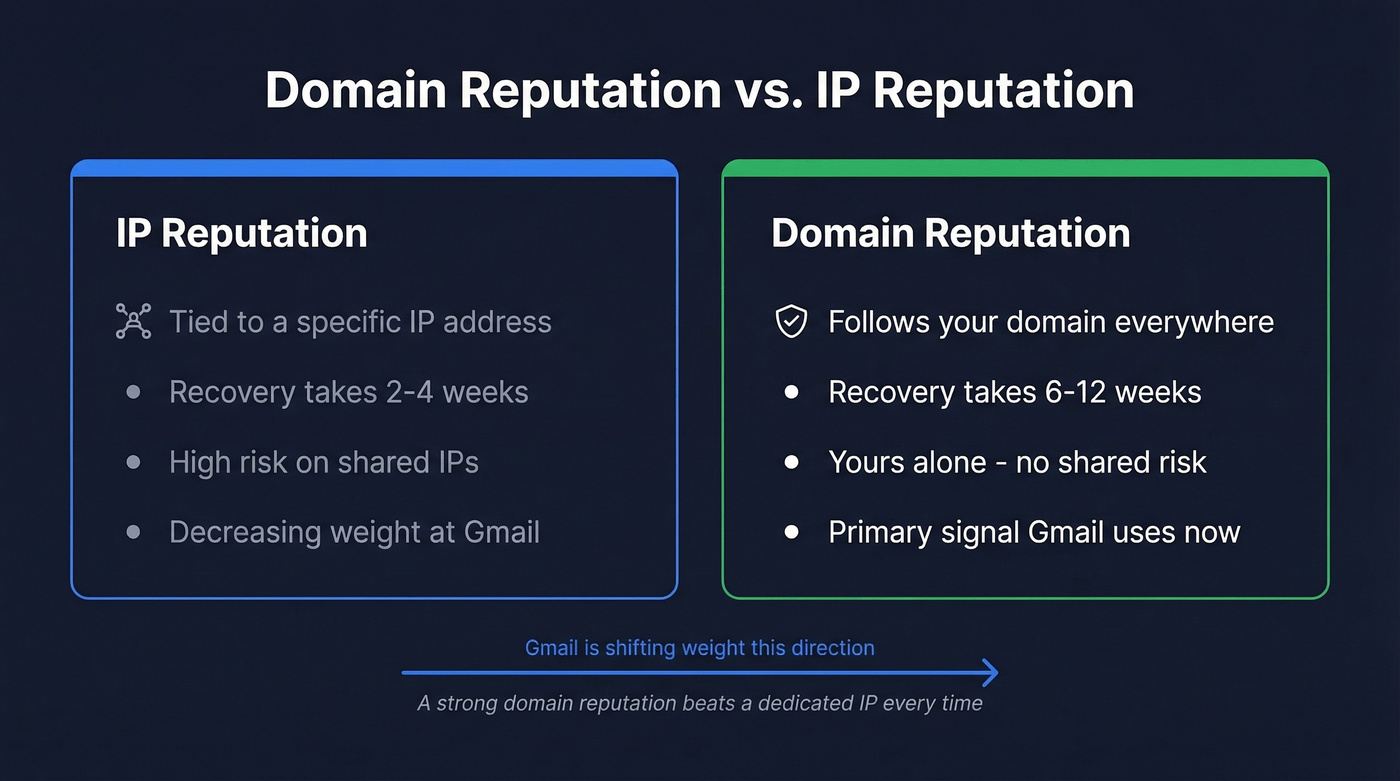
Gmail cares more about your domain than your IP. A dedicated IP isolates you from other senders' behavior, but domain-level signals are what actually determine inbox placement. If you're on a shared IP and your domain reputation is strong, you'll still land in the inbox. The reverse isn't true.

Bad data is the fastest way to tank your sender domain reputation. Prospeo's 5-step verification removes spam traps, honeypots, and catch-all risks - delivering 98% email accuracy on a 7-day refresh cycle so your lists never go stale between campaigns.
Stop guessing which emails are safe to send. Verify before you hit send.
How to Check Your Reputation
You need three tools, not ten. Everything else is noise.
Google Postmaster Tools is the clearest window into how Gmail sees you. It assigns four reputation levels: High (likely inbox), Medium (mostly inbox, some filtering), Low (significant spam filtering), and Bad (mostly spam or blocked). Updates come daily but reflect the last 24-48 hours. No numeric score - you reverse-engineer from spam rates and bounce data.
Spam-rate thresholds to memorize: healthy is below 0.1%. Warning zone is 0.1%-0.3%. Above 0.3%, you're in active trouble.
Talos Intelligence gives you signal outside Gmail. A "neutral" rating often just means low volume - don't panic over it.
Blocklist aggregators like MxToolbox tell you if you've landed on any real-time blocklists. We check weekly and recommend you do the same.
Benchmarks You Need to Hit
| Metric | Healthy | Warning | Danger |
|---|---|---|---|
| Spam rate | <0.1% | 0.1%-0.3% | >0.3% |
| Bounce rate | <2% | 2%+ | 5%+ |
| Complaints | <0.3% | - | >0.3% |
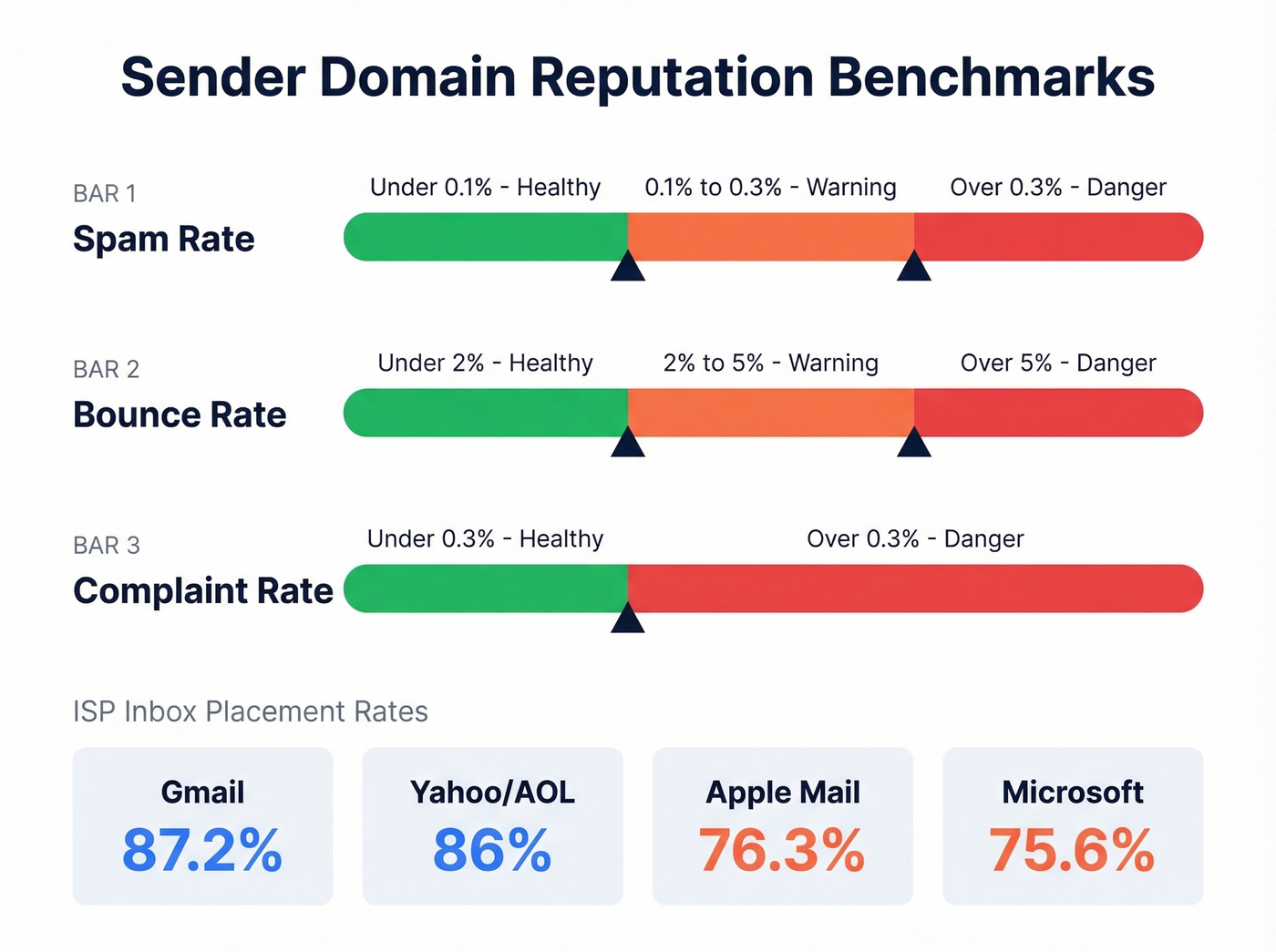
ISP inbox placement varies more than most senders realize:
| Provider | Inbox Placement Rate |
|---|---|
| Gmail | 87.2% |
| Yahoo/AOL | 86% |
| Apple Mail | 76.3% |
| Microsoft | 75.6% |
One-click unsubscribe (List-Unsubscribe + List-Unsubscribe-Post, RFC 8058) is now mandatory for bulk senders. Skip it and you're handing mailbox providers a reason to throttle you.
What Destroys Sending Reputation
Spam traps and honeypots are the threats that basic verifiers completely miss - the exact scenario from our opening story. Sending to unverified lists compounds the problem fast, even when only a small percentage of addresses are bad. The consensus on r/coldemail is that spam-trap detection is non-negotiable because the damage is invisible until it's already done.
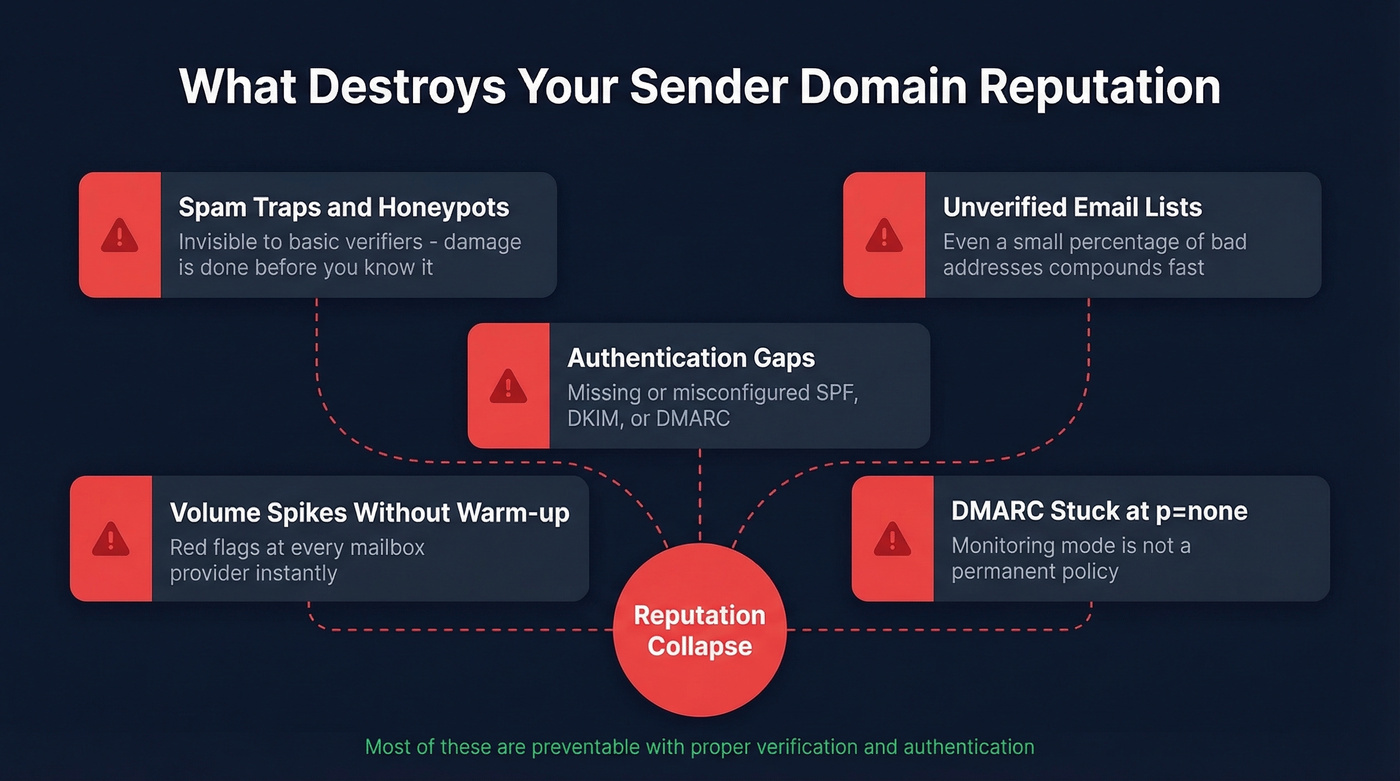
Authentication gaps - missing or misconfigured SPF, DKIM, or DMARC - are the other major category. Volume spikes without warm-up raise red flags at every mailbox provider. And leaving DMARC stuck at p=none indefinitely defeats its purpose; that's monitoring mode, not a permanent policy.
How to Fix and Protect It
Step 1: Lock down authentication. Set up SPF, DKIM, and DMARC. Start DMARC at p=none to collect reports, move to quarantine, then reject once you're confident. Non-negotiable. (If you want the technical nuance, DMARC alignment is where most setups go wrong.)
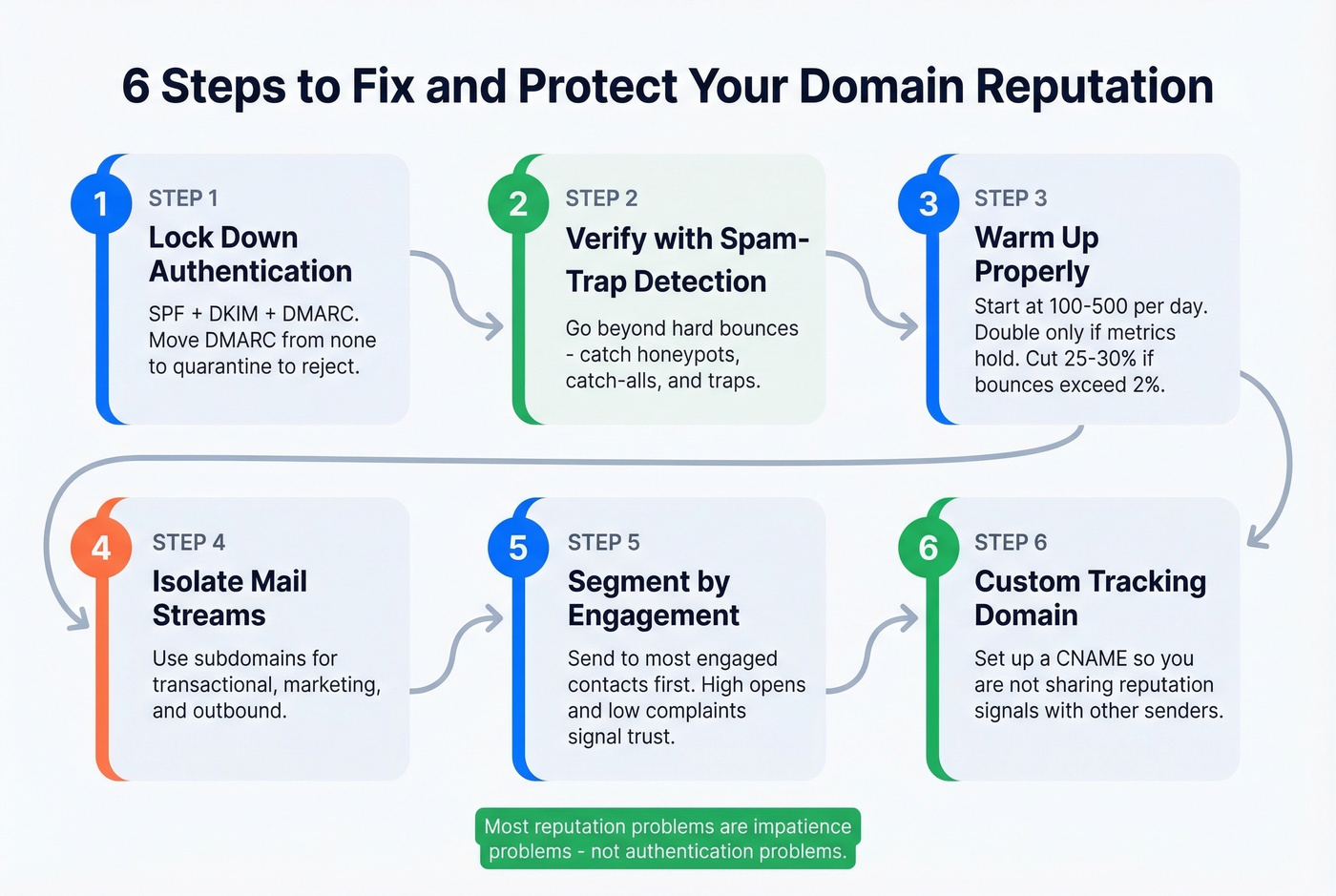
Step 2: Verify your list with spam-trap detection. Basic verification catches hard bounces - that's not enough. Prospeo runs a 5-step verification process with catch-all handling, spam-trap removal, and honeypot filtering, maintaining 98% email accuracy on a 7-day data refresh cycle so lists don't rot between campaigns. Stack Optimize built to $1M ARR running client campaigns through that verification pipeline with 94%+ deliverability, under 3% bounce, and zero domain flags across all clients.
Step 3: Warm up properly. In our experience, this is where most senders get impatient and pay for it. (For a deeper playbook, see unlimited email warmup tools and workflows.)
| Phase | Daily Volume | Duration |
|---|---|---|
| Start | 100-500 per provider | First couple of days |
| Scale | Double if metrics hold | Next 1-2 weeks |
| Cruise | +20-50% daily | Weeks 3-6 |
If open rates drop below 20% or bounces climb above 2%, cut volume by 25-30% immediately. No exceptions.
Let's be honest: most reputation problems aren't authentication problems - they're impatience problems. Senders who warm up properly and verify beyond hard bounces almost never end up in recovery mode. (If you're troubleshooting bounces, use this email bounce rate guide.)
Steps 4-6 (quick wins):
- Isolate mail streams - use subdomains for transactional, marketing, and outbound so a cold email problem doesn't contaminate your transactional delivery. (Related: return path email setup details.)
- Segment by engagement - send to your most engaged contacts first during warm-up. High opens and low complaints signal trust. (More on sequencing in cold email marketing.)
- Set up a custom tracking domain via CNAME - shared tracking domains mix reputation signals across senders on the same ESP, and that's a risk you don't need. (Full walkthrough: tracking domain.)
If you're only doing outbound and don't have transactional email to protect, skip the subdomain isolation. But for teams running both, it's critical.
Stack Optimize built a $1M agency with 94%+ deliverability and zero domain flags - all running on Prospeo-verified data. Bounce rates dropped from industry-average levels to under 3%. Your domain reputation is too valuable to risk on unverified contacts.
Get 75 free verified emails and see what clean data looks like.
How Long Recovery Takes
IP reputation recovers in 2-4 weeks. Domain reputation takes 6-12 weeks of disciplined sending. There's no shortcut - mailbox providers need sustained good behavior before they'll trust your domain again. (If you need a broader framework, see how to improve sender reputation.)
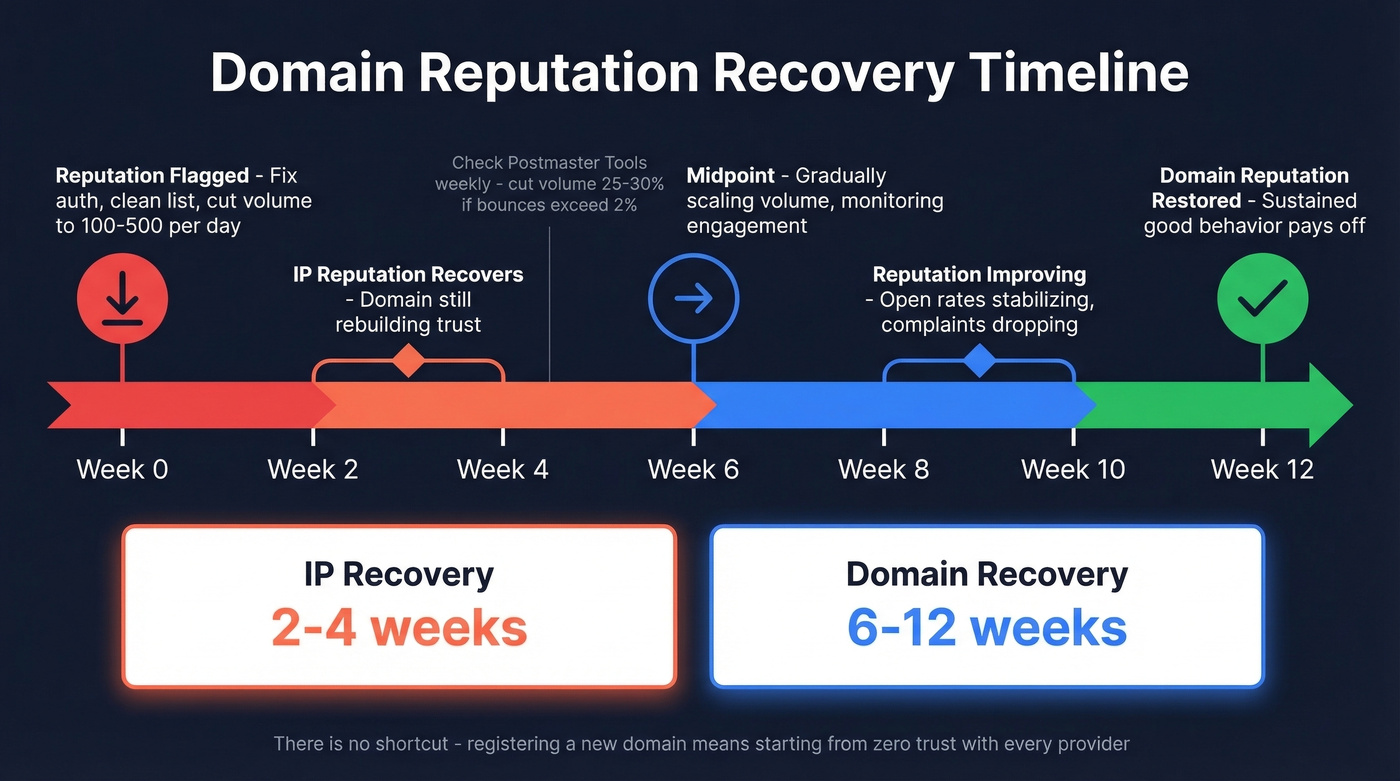
I've seen teams try to rush this by registering a new domain and starting fresh. It works short-term, but you lose all the positive reputation equity you'd built, and you're starting from zero trust with every provider. Run a reputation check at least weekly during recovery so you can spot setbacks before they compound.
FAQ
How often should I check my domain's sending reputation?
Weekly via Google Postmaster Tools is the minimum. By the time you notice deliverability problems in campaign metrics, the reputation damage is already weeks old. Pair Postmaster Tools with a weekly MxToolbox blocklist scan for full coverage.
Can I recover a "Bad" rating in Google Postmaster Tools?
Yes, but expect 6-12 weeks of disciplined work. Fix authentication first, clean your list to remove spam traps, reduce volume to 100-500/day, and warm back up gradually. Cut volume by 25-30% any time bounces exceed 2%.
Does email verification actually protect deliverability?
Only if your verifier catches spam traps and honeypots - not just hard bounces. Basic verification gives you a false sense of security while the real threats slip through untouched. That's the difference between preventing overnight reputation collapses and just checking a box.