

Cold Email Marketing in 2026: Benchmarks, Infrastructure, and the Playbook That Actually Works
A RevOps lead we work with ran 12,000 cold emails last month across three domains. Reply rate: 3.1%. Meetings booked: roughly 90. Cost: about $250-$500 in tools and data. That's the math that keeps cold email marketing alive - and it's the math most "ultimate guides" never show you.
The gap between teams that get results and teams that burn domains isn't copy or subject lines. It's infrastructure, data quality, and a willingness to do the boring technical work before hitting send.
What Cold Email Is (and Isn't)
Cold email is 1:1 outbound to prospects who haven't opted in. You're reaching someone who doesn't know you, with a message relevant to their role, company, or situation. That's it.
It's not email marketing, which is bulk messaging to an opt-in list - newsletters, drip campaigns, product updates. And it's not spam, which is unsolicited bulk email with no targeting, no relevance, and no opt-out. Some people confuse cold email newsletters with legitimate outbound. Mass-blasting newsletter-style content to cold lists is spam, not strategy.
The legal distinction matters. Under CAN-SPAM, cold email operates on an opt-out model: you can email anyone as long as you include a clear way to unsubscribe, a physical address, and truthful headers. You don't need prior consent. GDPR and CASL are stricter, but both have pathways for B2B cold outreach.
The practical distinction matters more. Spam is a volume play - blast 100,000 addresses and hope. Cold outreach is a precision play - send 200 targeted messages to people who fit your ICP and measure what happens. If you're treating a cold email like a newsletter with a different subject line, you're going to torch your domain reputation within a week.
What You Need (Quick Version)
- Monthly cost: $75-$250 for a solo operator. $300-$1,500 for a team of 3-5 reps.
- What "good" looks like: 3.43% average reply rate across the 2026 benchmark. Top quartile hits 5.5%+. Elite campaigns exceed 10.7%.
- The three things that matter most: verified data (bad emails = bounces = dead domain), proper sending infrastructure (domains, DNS, warmup), and relevant personalization (context about the prospect, not just
{{first_name}}).
Everything below is the how and why behind each of those bullets.
Does Cold Email Still Work in 2026?
Yes, but the bar is higher than it was two years ago. The teams that treat outbound email as a system - infrastructure, data, copy, follow-up - are printing pipeline. The teams that buy a list and blast it are getting filtered to spam before lunch.
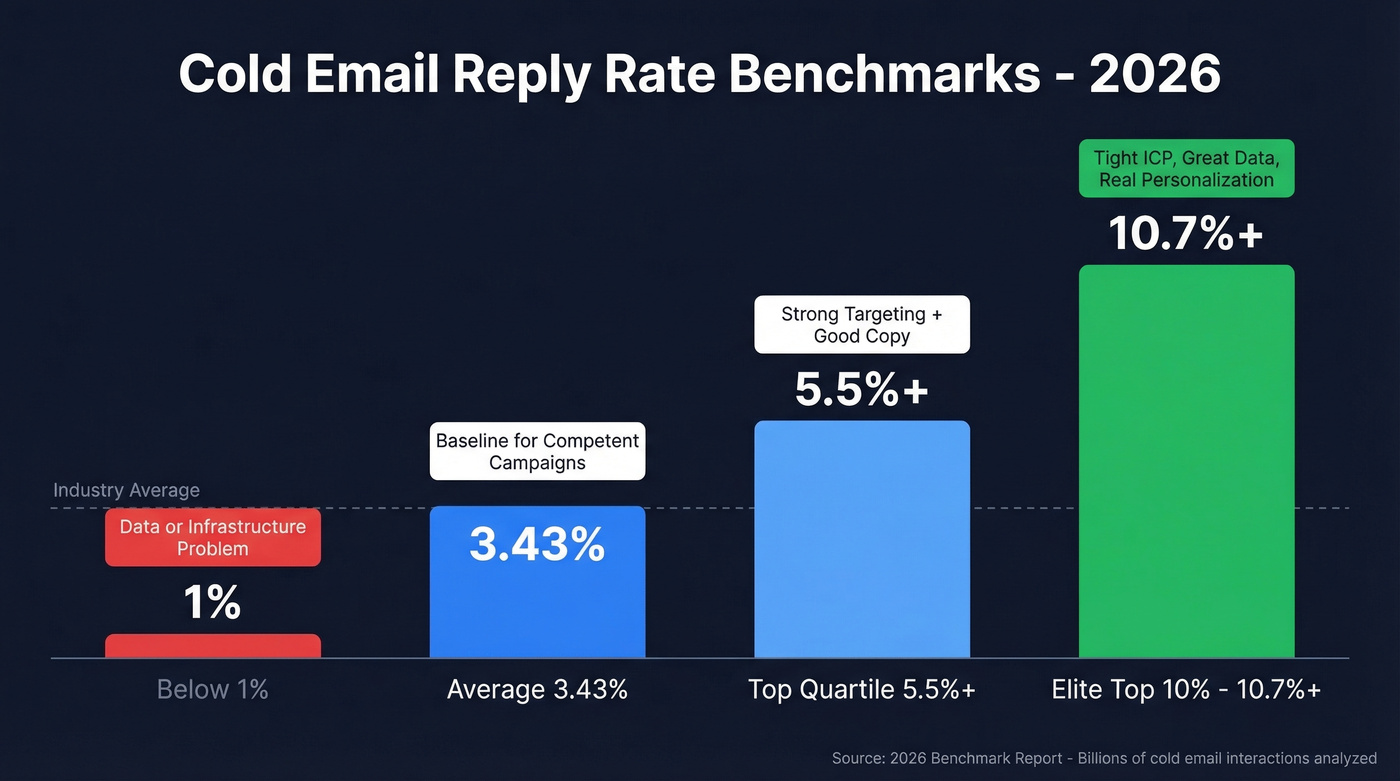
The 2026 benchmark report analyzed billions of cold email interactions across thousands of active workspaces:
| Tier | Reply Rate | What It Means |
|---|---|---|
| Average | 3.43% | Baseline for competent campaigns |
| Top Quartile | 5.5%+ | Strong targeting + good copy |
| Elite (Top 10%) | 10.7%+ | Tight ICP, great data, real personalization |
| Below 1% | Poor | Data or infrastructure problem |
GMass reports a 1-5% range across thousands of campaigns, which tracks with the benchmark data. The variance is enormous - some campaigns hit 25%+, others flatline below 1%.
The economics are where it gets interesting. SendIQ published ROI data from 500+ client campaigns:
- Manufacturing client: 12,000 emails/month, 3.2% response rate, 8 new clients, £224,000 revenue - 730% ROI.
- SaaS client: 2.8% response rate over 3 months, £340,000 pipeline, £127,000 closed - 520% ROI.
The practitioner math from r/coldemail backs this up: 400 emails/day at 3% reply rate yields roughly 360 replies per month. About 50-60% of those are usable, converting to 90-100 booked meetings from one well-run operation.
Here's the thing: if your average deal size is above $5k and you're not running cold outbound, you're leaving the highest-ROI channel on the table. No other channel gets you 500%+ ROI at this cost. For B2B teams especially, the unit economics are unmatched by paid ads, events, or content syndication.
SendIQ's follow-up distribution shows where those replies come from: Email 1 generates 35% of qualified responses, Email 2 adds 28%, Email 3 contributes 22%, and Email 4+ picks up the remaining 15%. The benchmark data's "58% from first email" figure includes all reply types - negative responses, auto-replies, and out-of-office messages. SendIQ's numbers reflect qualified responses from agency campaigns. Either way, stopping after one email leaves nearly half your results on the table.
The Deliverability Shift
If you ran cold email in 2023 and stepped away for a year, the rules changed under your feet. The industry calls it "Yahoogle" - Google and Yahoo simultaneously enforcing new bulk sender requirements starting in early 2024, with Microsoft following on May 5, 2025.
Three non-negotiable changes:
- Full email authentication - SPF, DKIM, and DMARC on every sending domain. No exceptions.
- One-click unsubscribe - RFC 8058 compliance with
List-Unsubscribeheaders. Requests honored within two days. - Spam complaint rate below 0.3% - realistically, stay under 0.1%.
Yahoo's Marcel Becker put it bluntly: "If you send 4,999 messages, you still have to follow the requirements... If you're sending the same email to a lot of people, you're a bulk sender."
A Mailgun survey found that only 49.5% of senders who knew about the requirements actually made changes. That means a huge chunk of senders either didn't know or didn't bother - they're the ones filling spam folders, and the reason compliant senders are seeing better inbox placement than ever. Average deliverability sits at 83.1% globally, meaning nearly 1 in 5 emails never reaches an inbox even under normal conditions. Proper authentication flips those odds in your favor.
As of 2026, Google, Yahoo, and Microsoft all enforce these requirements. There's no grace period left.
Cold Email Infrastructure Setup
This is the section most guides skip. It's also the section that determines whether your emails land in inboxes or spam folders.
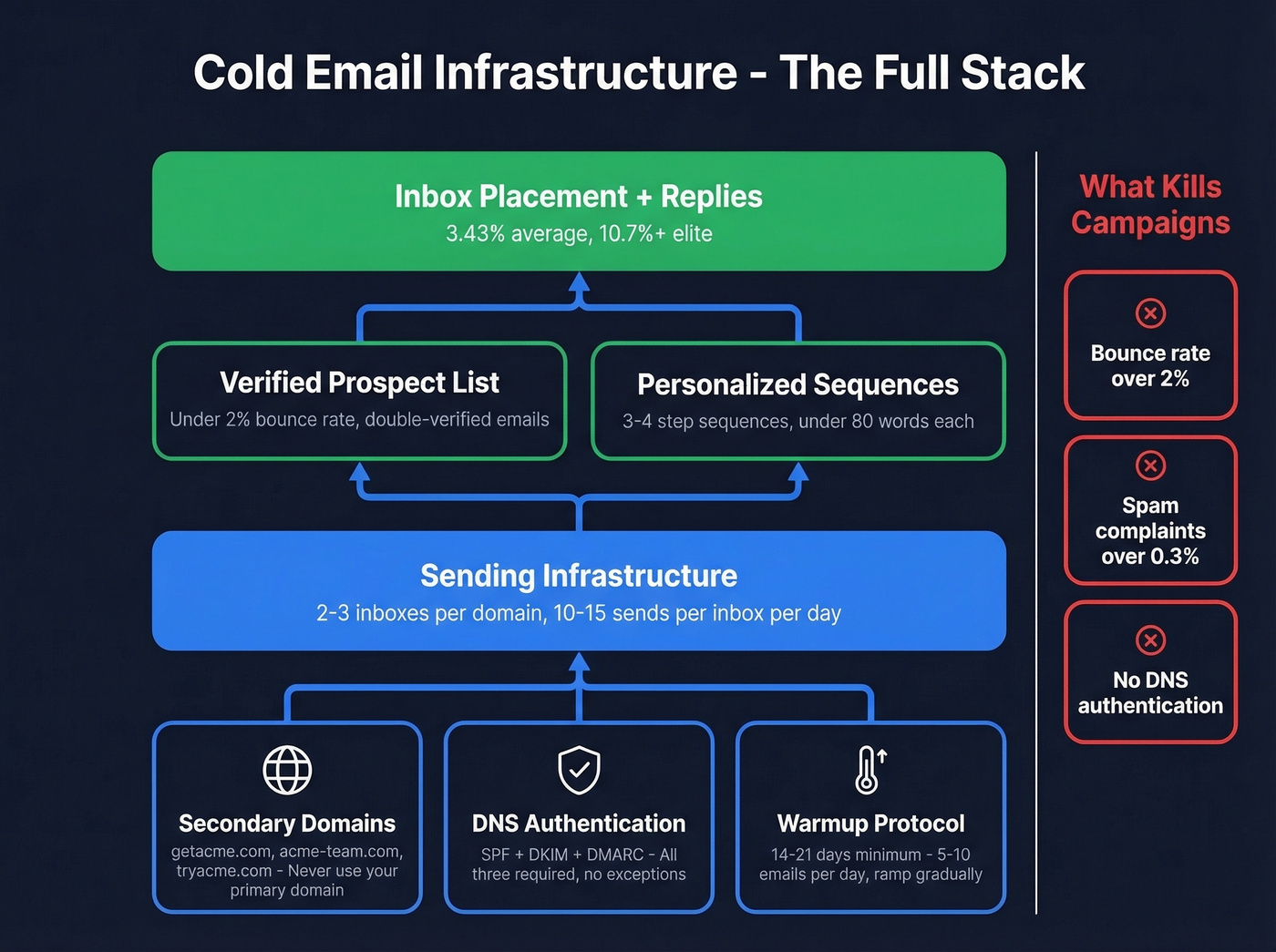
Domains, Inboxes, and Scaling
Never send cold email from your primary domain. Buy secondary "lookalike" domains (e.g., if your company is acme.com, use getacme.com or acme-team.com) to protect your core domain reputation.
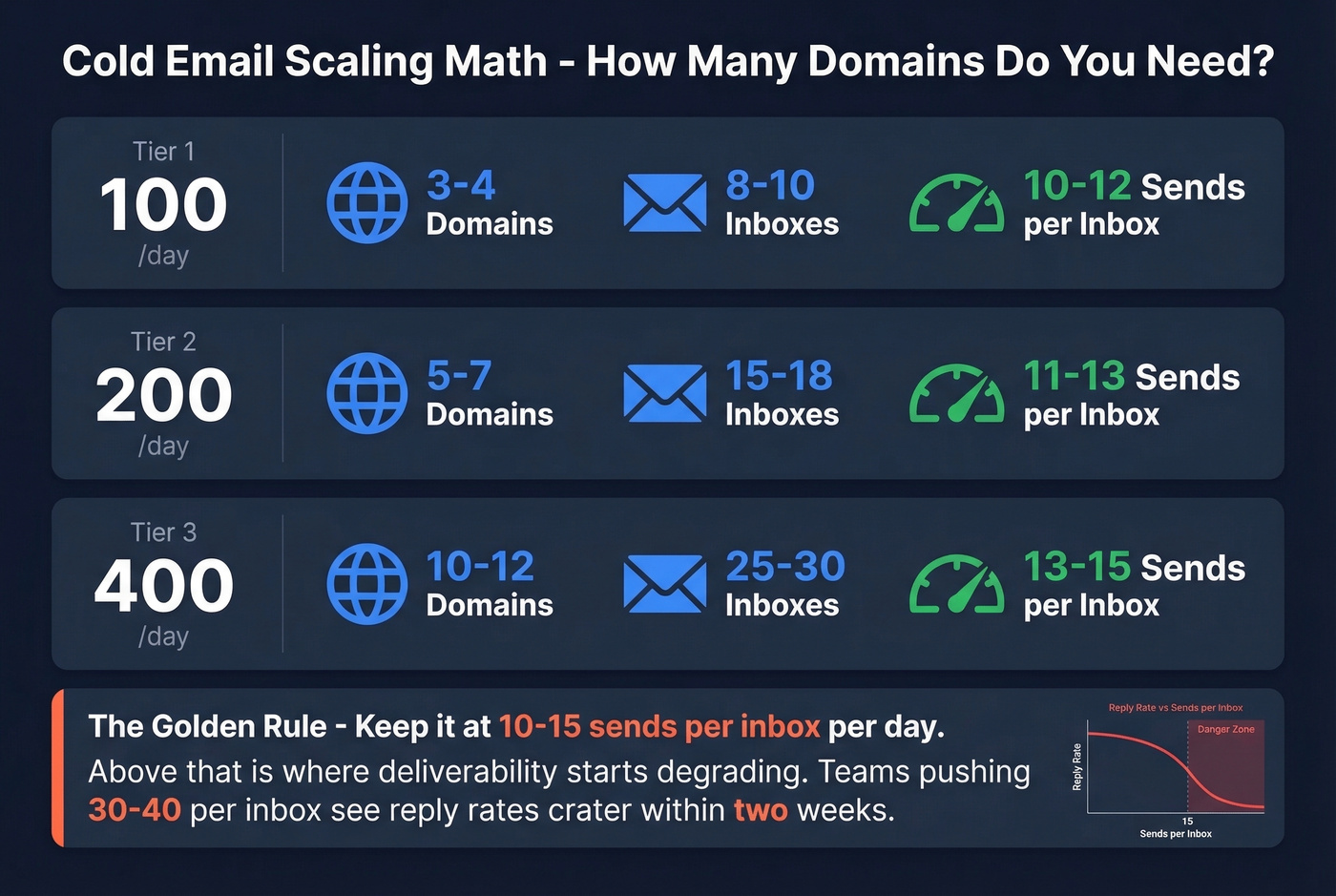
The scaling math: 2-3 inboxes per domain, 10-15 emails per day per inbox.
| Daily Volume | Domains Needed | Inboxes | Sends/Inbox/Day |
|---|---|---|---|
| 100/day | 3-4 | 8-10 | 10-12 |
| 200/day | 5-7 | 15-18 | 11-13 |
| 400/day | 10-12 | 25-30 | 13-15 |
These aren't arbitrary numbers. Keep it at 10-15 sends per inbox per day; above that is where deliverability starts degrading. We've seen teams push 30-40 per inbox and watch reply rates crater within two weeks.
DNS Authentication
Every sending domain needs SPF, DKIM, and DMARC configured before you send a single email.
SPF tells receiving servers which IP addresses are authorized to send on your behalf. Critical gotcha: SPF has a 10 DNS lookup limit. Every include: mechanism counts, and nested includes count too. If you're using Google Workspace, a sending tool, and a CRM that sends email, you can hit 10 lookups fast. Exceeding it causes SPF to fail silently - your emails look unauthenticated and get filtered.
DKIM adds a cryptographic signature to your emails. Most sending platforms handle this automatically, but verify it's working with tools like MxToolbox. If you want a step-by-step checklist, see how to verify DKIM is working.
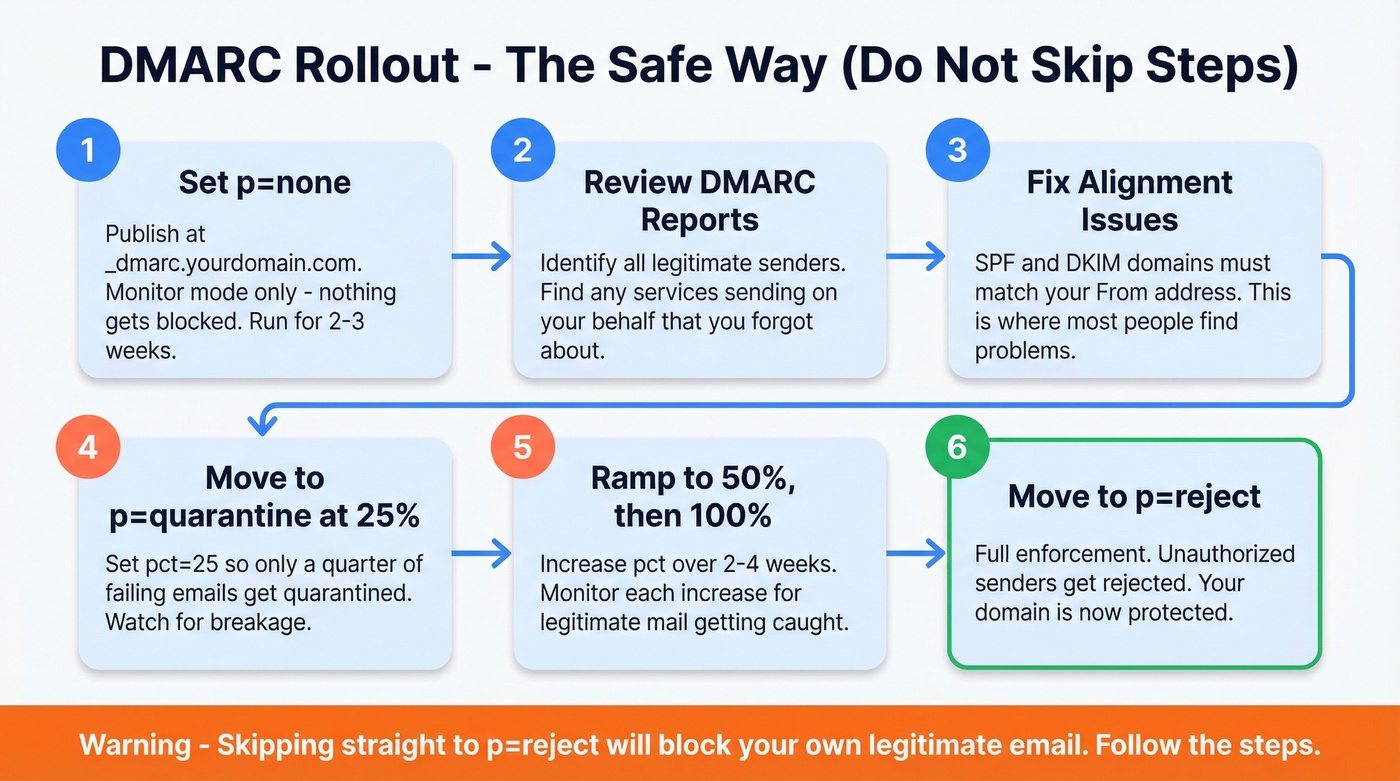
DMARC ties SPF and DKIM together. Most guides say "set up DMARC" and move on. The actual rollout that won't break your legitimate email:
- Publish
p=noneat_dmarc.yourdomain.com- monitor for 2-3 weeks - Review DMARC reports to identify all legitimate senders
- Fix alignment issues (SPF and DKIM domains must match your From address)
- Move to
p=quarantinewithpct=25 - Ramp
pctto 50, then 100 over 2-4 weeks - Move to
p=rejectonce all legitimate mail is aligned
Don't skip straight to p=reject. You'll block your own email. If you keep getting stuck on alignment, read DMARC alignment.
Warmup Protocol
New domains need warmup before production volume. Start at 5-10 emails per day and increase gradually over 4-6 weeks. Most sending platforms have built-in warmup that simulates real conversations - opens, replies, and removes from spam.
Some practitioners argue that automated warmup networks are detectable by providers. GMass discontinued its own warmup tool for this reason. The counterargument: platforms like Instantly use real inboxes with genuine engagement patterns, not bots. We've seen both approaches work. The key is monitoring your placement scores regardless of method.
Keep warmup running even after you start campaigns. The minimum warmup period is 14 days, but 21 days is safer. Patience here saves you from rebuilding a burned domain later. If you're comparing options, see unlimited email warmup tools.

Bad data is the #1 reason cold email campaigns fail. Bounces kill domain reputation, and dead domains kill pipeline. Prospeo's 98% email accuracy and 7-day data refresh cycle mean your sends hit real inboxes - not spam traps.
Stop burning domains. Start with verified data at $0.01 per email.
Building a Clean Prospect List
None of the infrastructure work matters if you're sending to bad email addresses. The causal chain is brutal: bad data leads to bounces, bounces tank your domain reputation, tanked reputation means the spam folder, and the campaign is dead. We watched an SDR torch a brand-new domain in three days by uploading an unverified purchased list. Bounce rate hit 14% on day one. By day three, Gmail was filtering everything to spam.
The threshold: keep your bounce rate under 2%. Ideally under 1%. (If you want the deeper breakdown, see email bounce rate.)
Building a clean list starts with a tight ICP definition - industry, company size, job title, geography. The more specific, the better your targeting and the higher your reply rates. "VP of Marketing at B2B SaaS companies with 50-200 employees" is a list worth building. "Marketing people" is not. If you need a template, use an ideal customer profile.

Verify every email before sending - even if your data source says it's already verified. Double verification catches the small percentage of addresses that go bad between collection and send. If you're evaluating vendors, start with data enrichment services and email reputation tools.
The playbook above works - if your contact data connects you to real buyers. Prospeo's 300M+ profiles with 30+ filters let you build ICP-matched lists with verified emails and direct dials. Teams using Prospeo book 35% more meetings than Apollo users.
Build the list that turns 3.43% reply rates into booked meetings.
Writing Emails That Get Replies
The best-performing cold emails share one trait: they're under 80 words. Not 80 words of fluff - 80 words of relevant, specific messaging that gives the prospect a reason to respond.
A good cold email follows the PAS framework - name the problem, agitate with a consequence, offer a solution - compressed into under 80 words:
Subject: Quick question about [specific initiative]
Hi {{first_name}},
Saw that {{company}} just {{specific trigger - hiring, funding, expansion}}. When teams hit that stage, {{specific problem}} usually becomes a bottleneck.
We helped [similar company] solve that by [one-sentence result]. Worth a quick look?
{{your name}}
The version that gets ignored:
Subject: Revolutionize Your Sales Pipeline with Our AI-Powered Platform
Dear {{first_name}}, I hope this email finds you well. I'm reaching out because I believe our solution could significantly impact your organization's revenue growth... [300 more words]
And one more variation for when you're not sure you have the right contact - this works surprisingly well because it's low-pressure and often gets forwarded:
Subject: Who handles [function] at {{company}}?
Hi {{first_name}},
Not sure if you're the right person for this - trying to connect with whoever manages {{specific function}} at {{company}}. We just helped [similar company] cut [metric] by [result]. Mind pointing me in the right direction?
Personalization means context, not merge tags. Dropping {{first_name}} and {{company}} into a template isn't personalization - it's mail merge. Real personalization references something specific: a recent hire, a product launch, a conference talk. The consensus on r/coldemail is clear: context-based personalization outperforms first-name tokens by a wide margin. Personalized emails get more than twice as many replies as non-personalized. For more examples, see emails that get responses.
Soft CTAs outperform hard asks. "Worth a quick look?" or "Should I send more details?" consistently beats "Book 15 minutes on my calendar." The soft CTA lowers the commitment threshold - the prospect doesn't have to decide to buy, just to be curious. If you're refining asks, use these email call to action rules.
Subject lines: keep them short (6-8 words), lowercase, and conversational. They should read like something a colleague would send. "Quick question about your hiring push" beats "Unlock 3X Pipeline Growth Today." If you want a swipe file, use these cold email subject line examples.
AI Personalization at Scale
Manual personalization works beautifully at 20 emails a day. At 200, it's unsustainable.
The AI-assisted workflow is more straightforward than most people think. Practitioners on r/SaaS run this approach:
- Set up CRM fields: Create
prospect_contextandcustom_messagefields in your CRM or spreadsheet. - Scrape prospect context: Pull recent activity - posts, company news, funding announcements, role changes.
- Generate custom openers: Feed the context into GPT-4o mini: "Write a 1-2 sentence cold email opener referencing this prospect's recent [activity]. Be specific, conversational, no flattery."
- Export to CSV: Map the generated openers to your
{{custom_message}}merge field. - Inject into sequences: Your sending platform pulls the custom opener into the first line of each email.
Practitioners report roughly 3x response lift compared to template-only approaches. The key is using real-time events as triggers - funding rounds, job changes, product launches. These give the AI something genuinely specific to reference, not just "I noticed you work in SaaS." The cost is minimal: GPT-4o mini runs fractions of a cent per generation. For a deeper system, see AI cold email outreach.
Follow-Up Strategy
The data is unambiguous: 4-7 touchpoints is the sweet spot. Under 4 and you're leaving replies on the table. Beyond 7 and you hit diminishing returns hard.
The benchmark data shows 58% of all replies come from the first email, with 42% from follow-ups. But practitioners on Reddit consistently report that 60-70% of their positive replies come after email #3 or #4. The discrepancy makes sense - early replies include a lot of "not interested" and auto-responses. The qualified conversations come later.
| Share of Qualified Responses | |
|---|---|
| Email 1 | 35% |
| Email 2 | 28% |
| Email 3 | 22% |
| Email 4+ | 15% |
Tuesday and Wednesday are peak engagement days. Space follow-ups 2-4 days apart for the first three touches, then stretch to 5-7 days for later ones. If you need copy you can paste, use these cold email follow-up templates.
The multi-channel angle matters too. Combining email with phone and social touches yields roughly 3x better reply rates than email alone when done well. Adding one phone call after email #2 and one social touch after email #4 can meaningfully change your results without tripling your effort.
Compliance by Region
Cold email is legal in most jurisdictions, but the rules vary by where your prospect sits. Getting this wrong isn't a slap on the wrist - it's five- and six-figure penalties per violation.
| Requirement | GDPR (EU/EEA) | CASL (Canada) | CAN-SPAM (US) |
|---|---|---|---|
| Consent Model | Opt-in (or legitimate interest) | Express or implied | Opt-out |
| Max Penalty | EUR 20M or 4% global revenue | $10M CAD per violation | $51,744-$53,088 per email |
| Unsubscribe | Without undue delay | 10 business days | 10 business days |
| Key Requirement | Documented LIA | Business relationship | Physical address + opt-out |
CAN-SPAM is the most permissive. You can email anyone as long as you include a functioning unsubscribe mechanism, your physical mailing address, and truthful header information. No prior consent required. This opt-out framework is what makes direct cold outreach viable in the US - you have the right to reach out, and the recipient has the right to stop it.
GDPR is where most teams get nervous, but B2B cold email is defensible under Article 6(1)(f) - legitimate interest. You need a documented Legitimate Interest Assessment covering three tests: purpose (why you're emailing), necessity (why email is the right channel), and balancing (whether the prospect's privacy rights outweigh your interest). Keep your LIA on file. If a regulator asks, you need to produce it. UK PECR rules work the same way.
CASL sits in the middle. Implied consent covers several cold email scenarios: an existing business relationship within 24 months, a conspicuously published email address, and messages relevant to the recipient's role. Keep opt-out records for at least 3 years - 5+ years for high-risk industries.
Let's be honest: compliance isn't just about avoiding fines. A clean unsubscribe link and fast opt-out handling actually improve your deliverability. Spam complaints are the fastest way to kill a domain.
Best Tools for Cold Outreach in 2026
The tool market has consolidated around a few clear winners. We've tested most of these across client campaigns, and the differences are real.
Instantly
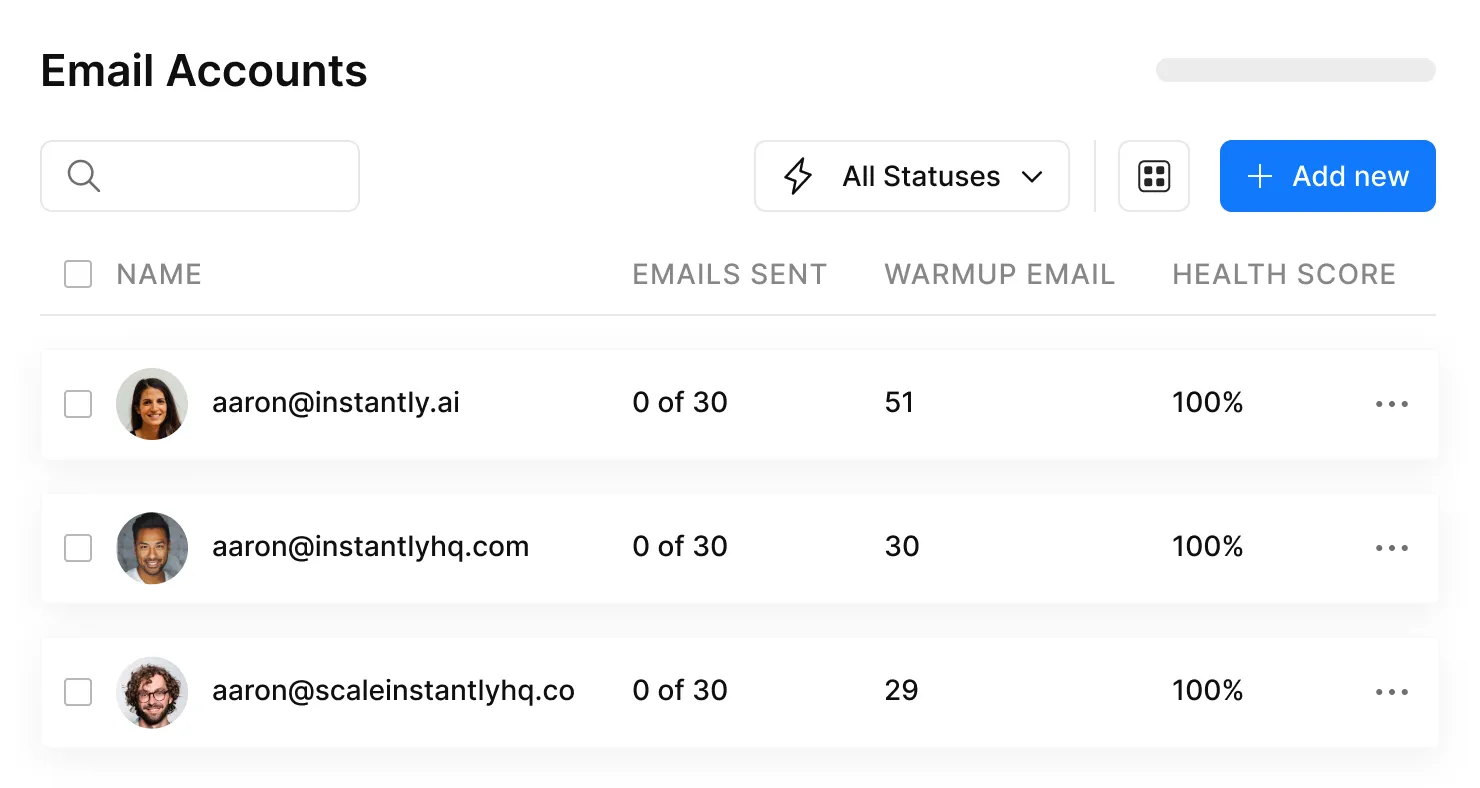
Instantly is the default cold email sending platform for a reason. The warmup tooling is best in class - a network of real inboxes that open, reply, and move emails out of spam, building sender reputation automatically. The campaign builder handles A/B testing, sequence logic, and multi-inbox rotation. Pricing starts around $30/month, with higher tiers adding more capacity. If you're picking one sending platform, this is the safe bet. The UI has gotten more complex as they've added features, but the warmup infrastructure justifies the price.
Saleshandy
The best value play for teams that want sending and a built-in lead database in one tool. Plans start at $25/month with a 7-day free trial, and sequencing automation and A/B testing are included.
Skip this if you need advanced warmup (Instantly's is better) or you're running 20+ inboxes. For solo operators or small teams that want one tool from prospecting to sending, it's hard to beat.
Apollo
Apollo's free plan (100 credits/month) makes it the obvious starting point for teams testing cold outreach before committing budget. Paid plans start at $59/user/month. The platform tries to do everything - prospecting, sequencing, analytics, enrichment - and does most of it adequately. Use it as a starting point, not a final destination. The data accuracy (around 79% for emails) doesn't match dedicated verification tools, and we've seen bounce rates climb when teams rely on Apollo data alone at scale.
Smartlead, GMass, Lemlist, Woodpecker
Smartlead starts around $39/month and is built for agencies managing multiple client campaigns from one dashboard. Genuinely useful multi-client inbox management. For single-company teams, Instantly or Saleshandy is a better fit.
GMass lives inside Gmail and starts at $25/month - great for power users who want campaigns without leaving their inbox, but no warmup tooling limits scaling. Lemlist starts around $39/user/month and leans into creative personalization features. Woodpecker runs $30-$60/month and is popular with agencies for its deliverability monitoring.
Pricing Comparison
| Tool | Starting Price | Free Tier | Best For |
|---|---|---|---|
| Instantly | ~$30/mo | No | Warmup + scaling |
| Saleshandy | $25/mo | 7-day trial | All-in-one value |
| Prospeo | ~$0.01/email | Yes (75 emails/mo) | Data + verification |
| Apollo | $59/user/mo | Yes (100 credits) | Getting started |
| Smartlead | ~$39/mo | No | Agency multi-client |
| GMass | $25/mo | Free trial | Gmail power users |
| Lemlist | ~$39/user/mo | No | Creative personalization |
| Woodpecker | $30-$60/mo | No | Agency deliverability |
FAQ
Is cold email legal?
Yes, in most jurisdictions. CAN-SPAM allows cold email with an opt-out mechanism and physical address. GDPR permits B2B outreach under legitimate interest with a documented LIA. CASL allows implied consent for relevant business contacts. Penalties range from ~$53K per email under CAN-SPAM to EUR 20M under GDPR.
What's a good reply rate?
The 2026 average is 3.43%. Top quartile hits 5.5%+, and elite campaigns exceed 10.7%. Consistently below 1%? The problem is almost always data quality or targeting - fix those before rewriting copy.
How many follow-ups should I send?
Four to seven touchpoints is the sweet spot. Practitioners report 60-70% of qualified replies arrive after email #3, and stopping after one email leaves nearly half your results on the table. Space early follow-ups 2-4 days apart, then stretch to 5-7 days.
How is cold outreach different from newsletter marketing?
Cold outreach targets specific prospects with personalized, 1:1 messages tied to their role or situation. Newsletter marketing broadcasts the same content to an opted-in subscriber list. The infrastructure, compliance rules, and success metrics are completely different - outbound measures reply rates and meetings booked, while newsletters track open rates and click-throughs.