

Cold Email Deliverability: The Practitioner's Playbook for 2026
A RevOps lead we work with watched his reply rate bleed from 8% to 3% over 18 months. Same copy framework, same ICP, same sequencer. The inbox just stopped cooperating. It took 62 days, 7 domains, a 26/day sending cap, and a bounce rate rebuild from 11% to under 2% to claw back to 6%. Total stack cost: $420/month. That rebuild - and the cold email deliverability lessons behind it - is the backbone of this playbook.
What You Need (Quick Version)
The average cold email reply rate is 3.43%. If you're below that, something's broken. Five priorities, in order:
- Fix authentication. SPF, DKIM, DMARC - with actual DNS records, not just "yeah, we set that up." (If you want the full breakdown, see our email deliverability guide.)
- Fix your data source. Bounce rates above 2% destroy sending domains. This is the lever most teams ignore. (Start with email bounce rate benchmarks and fixes.)
- Set up infrastructure correctly. Domains x inboxes x daily cap = total volume. The math matters. (Related: email velocity.)
- Write shorter emails in plain text. Under 80 words. No tracking pixels. No HTML templates. (More on this in email copywriting.)
- Monitor weekly. Inbox placement, spam complaints, bounce rates. Not monthly. Weekly. (Use a dedicated set of email reputation tools.)
Here's the thing most guides won't tell you: this is a data quality problem disguised as a technical problem. Authentication and infrastructure are table stakes. The teams hitting 5.5%+ reply rates are winning on list quality upstream. If your average deal size is under $10k, you probably don't need a $2,000/month tech stack - you need cleaner data and more sending domains.
The Enforcement Timeline That Changed Everything
Inbox providers spent two years tightening the screws. Here's what actually happened and why reaching the inbox has gotten harder:
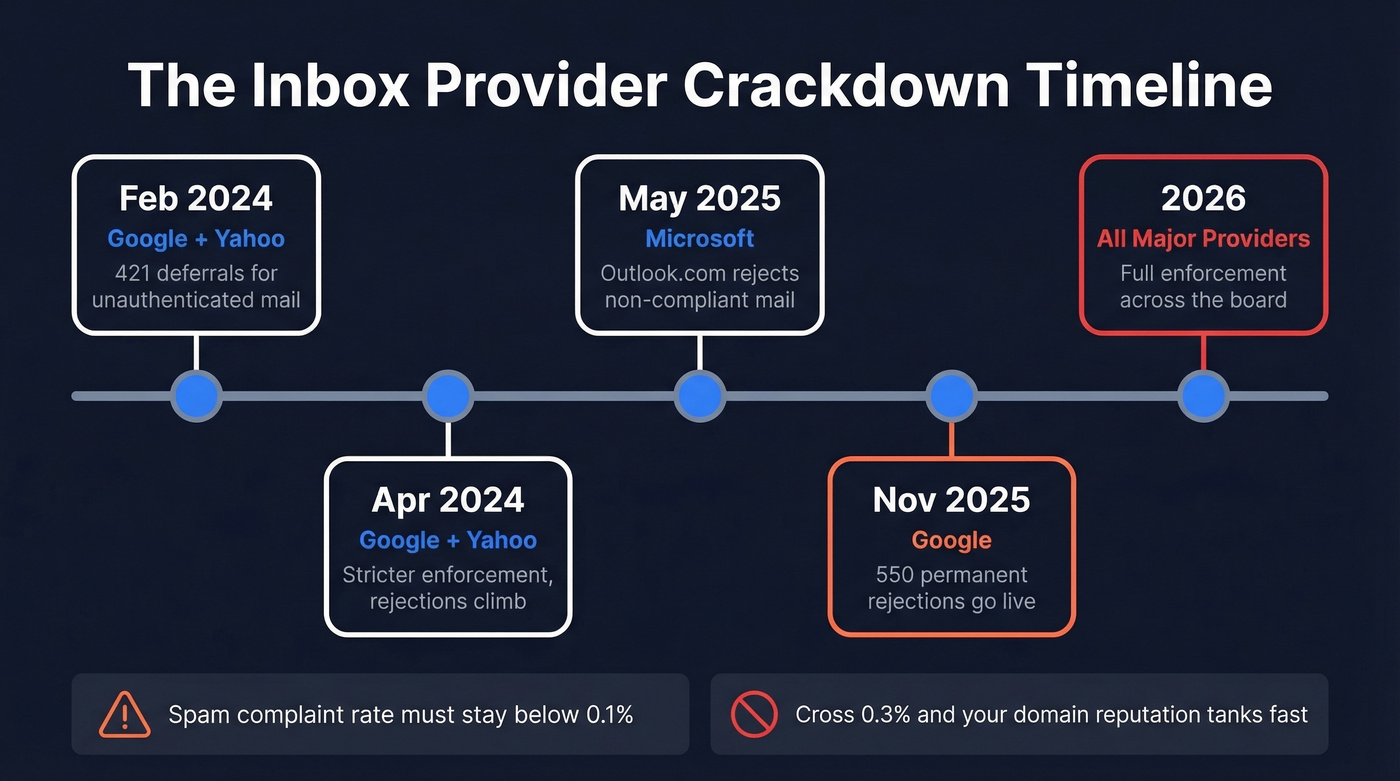
| Date | Provider | What Changed |
|---|---|---|
| Feb 2024 | Google, Yahoo | 421 deferrals for unauthenticated mail |
| Apr 2024 | Google, Yahoo | Stricter enforcement, rejections climb |
| May 2025 | Microsoft | Outlook.com rejects non-compliant mail |
| Nov 2025 | 550 permanent rejections go live | |
| 2026 | All three | Full enforcement across the board |
The bulk sender threshold is 5,000+ emails per day - that's when you're officially in the crosshairs. But even low-volume senders get hit if authentication is broken or spam complaints spike. Microsoft mailbox providers remain the hardest inbox to crack at just 75.6% inbox placement, so if your ICP skews enterprise, plan your volume accordingly.
Two numbers to memorize: keep spam complaint rates below 0.1% and never let them touch 0.3%. Cross that line and your domain reputation tanks fast, regardless of volume. (If you’re already in trouble, use a step-by-step spam trap removal process.)
Authentication - The Actual Records
Most "deliverability guides" tell you to "set up SPF and DKIM" without showing what the records look like. That's useless.
SPF
Your SPF record is a single TXT record that tells receiving servers which mail servers can send on your behalf:
v=spf1 include:_spf.google.com include:mailgun.org ~all
The include: directives authorize specific senders. The ~all is a soft fail for everything else, while -all is a hard fail - stricter, but it can cause issues during migration.
Here's the constraint most people learn the hard way: SPF has a 10 DNS lookup limit. Every include: triggers lookups, and nested includes count too. Exceed 10 and your SPF breaks entirely - mail gets treated as unauthenticated. You also can't publish multiple SPF records for the same domain. One record, all includes merged. If you're running multiple sending services, use dedicated subdomains for each to keep SPF clean. (More examples: SPF record example.)
DKIM
DKIM signs your outgoing emails cryptographically. Your sending provider generates the keys - you publish the public key as a TXT record in DNS:
selector._domainkey.yourdomain.com  TXT
v=DKIM1; k=rsa; p=MIGfMA0GCSqGSIb3DQEBAQUAA4GNA...
The selector is provider-specific. Google uses google, Mailgun uses a unique string. To verify it's working, inspect any sent email's headers and look for the DKIM-Signature header - the d= field shows the signing domain and s= shows the selector. (If you want a checklist, see how to verify DKIM is working.)
DMARC
DMARC ties SPF and DKIM together and tells receivers what to do when alignment fails. Alignment means the domain in your visible From address must match the domain authenticated by SPF or DKIM. Start here:
v=DMARC1; p=none; rua=mailto:dmarc-reports@yourdomain.com
The p=none policy means "don't do anything yet, just send me reports." Once you've confirmed all legitimate mail passes alignment, progress to p=quarantine, then p=reject. Most teams set p=none and never move forward. That's a mistake - the whole point of DMARC is to reach p=reject, which protects your domain from spoofing and signals to inbox providers that you take authentication seriously. (Deep dive: DMARC alignment.)
Also confirm Forward-Confirmed reverse DNS and TLS encryption are enabled on your sending server. Both are now expected by major providers.
Infrastructure Math
Provider caps and recommended volumes are very different numbers:
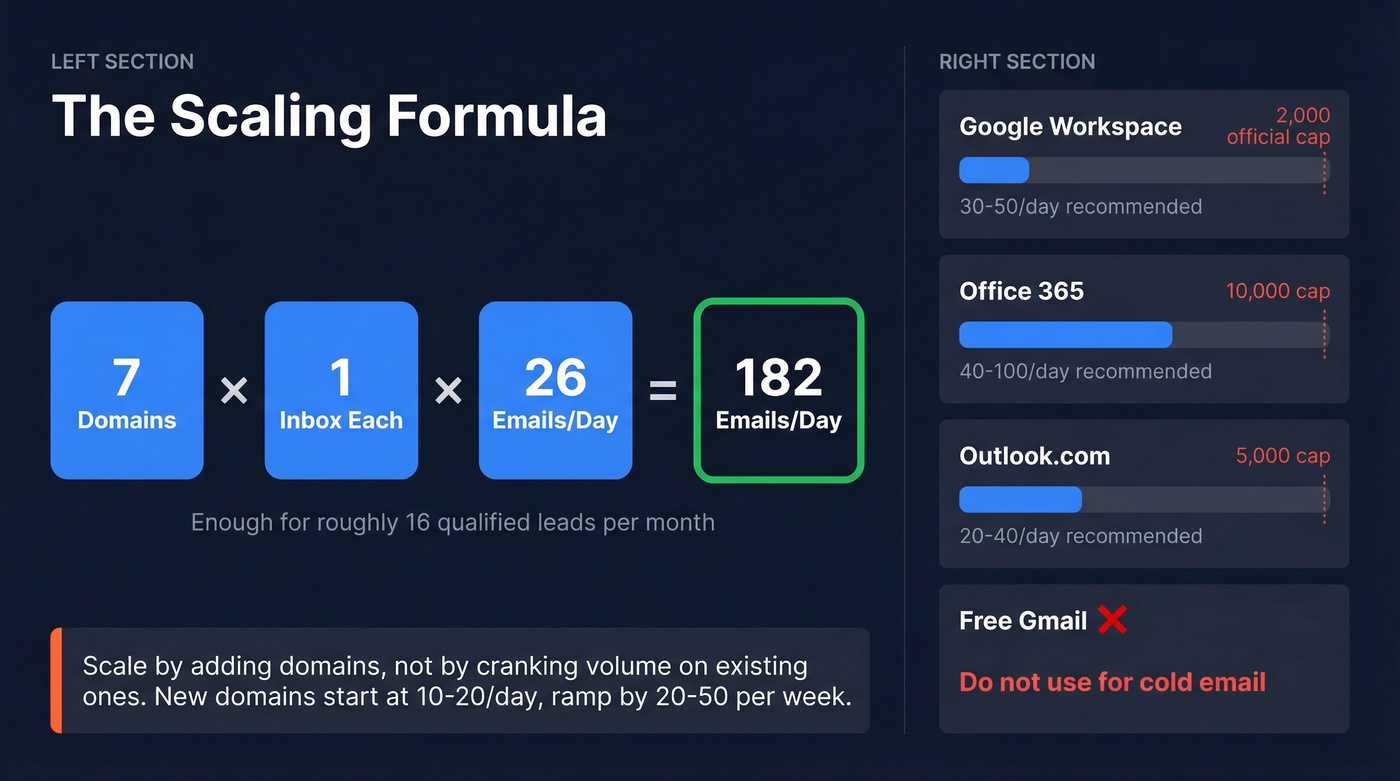
| Provider | Official Cap | Recommended Cold Volume | Notes |
|---|---|---|---|
| Google Workspace | 2,000/day | 30-50/day | Watches patterns closely |
| Office 365 | 10,000/day | 40-100/day | 30/min rate limit |
| Outlook.com | 5,000/day | 20-40/day | Stricter than O365 |
| Yahoo | 500/day | 20-40/day | 100/hour hard cap |
| Free Gmail | 100-500/day | Don't use for cold | Seriously, don't |
The scaling formula: domains x inboxes per domain x daily cap per inbox = total daily volume. The case study that opened this article used 7 domains at 26 emails/day each - roughly 182 emails per day total. That's enough to generate 16 qualified leads per month without tripping any filters.
For new domains, start at 10-20 emails per day and ramp by 20-50 per week. Scale by adding domains, not by cranking up volume on existing ones. We've seen teams push 200+ emails through a single domain - it works for about three weeks before inbox placement craters.

You just read that bounce rates above 2% destroy sending domains. Prospeo's 5-step verification and 7-day data refresh cycle keep your lists clean - 98% email accuracy, not the 6-week-old data that's tanking your inbox placement.
Stop rebuilding domains. Start with data that doesn't bounce.
List Quality Is the Real Deliverability Lever
Look, you can nail authentication, set up 10 domains, warm them perfectly, and still land in spam. The reason is almost always bad data. (If you’re rebuilding lists, consider a structured lead enrichment workflow.)
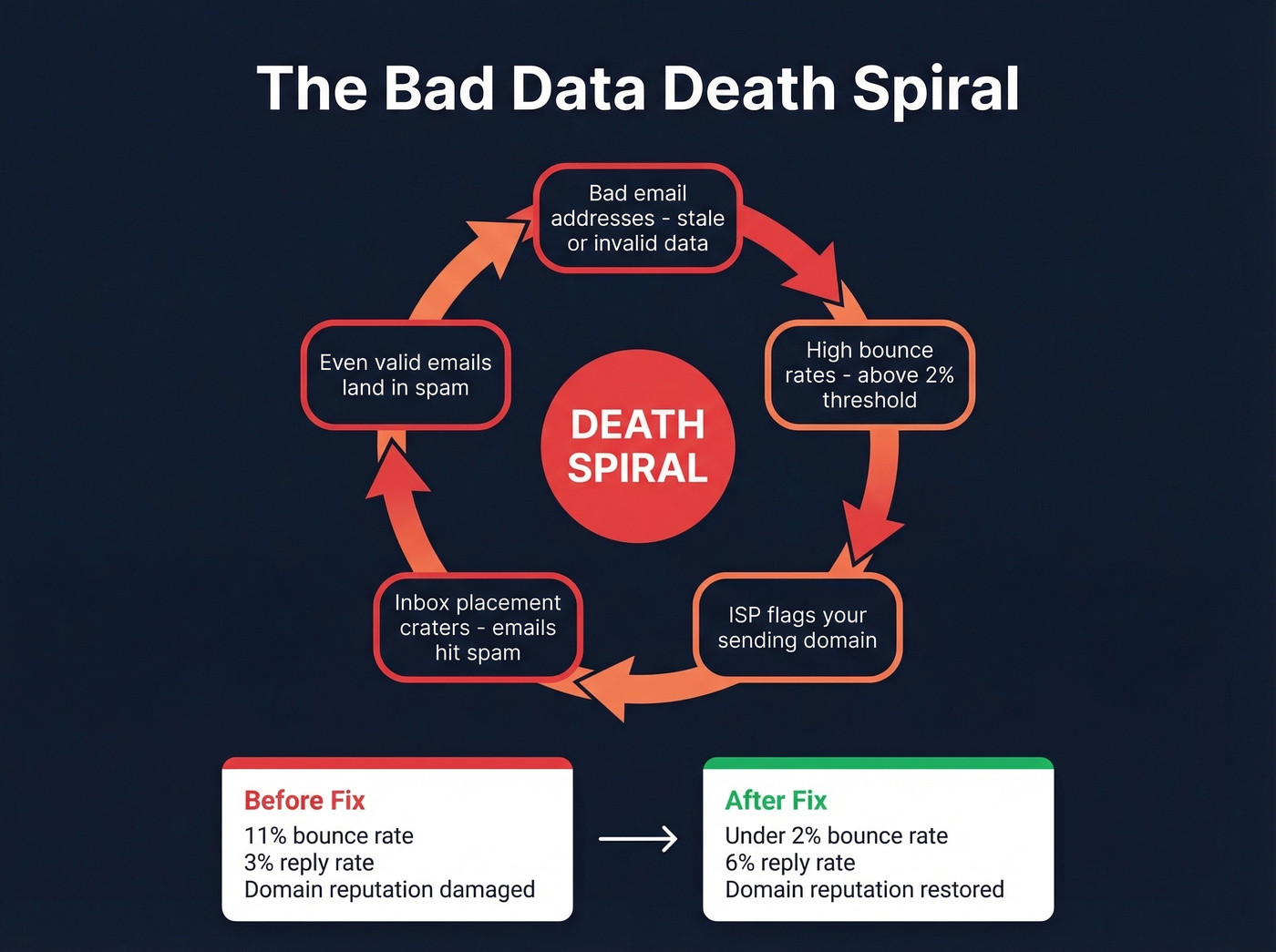
Bad email addresses lead to high bounce rates, which trigger ISP flags on your domain, which tank inbox placement, which means even your valid emails hit spam. It's a death spiral. The industry average data refresh cycle is 6 weeks, which means a significant chunk of any purchased list is already stale by the time you send. The consensus on r/coldemail mirrors this - practitioners report data quality, not copy, as the primary bottleneck in 2026.

The case study that rebuilt from 3% to 6% reply rates? The single biggest lever was bounce rate - from 11% down to under 2%. That isn't a copy change or a subject line test. That's a data quality fix.
Prospeo runs a 7-day data refresh cycle across its 143M+ verified emails, with a 5-step verification process that catches invalid addresses, handles catch-all domains, and strips spam traps before you ever hit send. Stack Optimize built to $1M ARR using that data with 94%+ client deliverability, sub-3% bounce rates, and zero domain flags across all clients. Meritt cut bounce rates from 35% to under 4%.
The rebuild from 11% to under 2% bounce rate was a data quality fix, not a copy change. Prospeo verifies 143M+ emails with catch-all handling, spam-trap removal, and honeypot filtering - at $0.01 per email, no contracts.
Clean data is the cheapest deliverability fix you'll ever make.
The Warmup Debate, Settled
The anti-warmup case is real. GMass shut down its warmup service after sending 1.3 billion warmup emails across 236,000 accounts. Google actively detects pool-based engagement patterns - accounts replying to each other from the same warmup network is exactly the kind of artificial signal that triggers flags. (If you’re evaluating options, compare unlimited email warmup tools carefully.)
The pro-warmup case has a narrow lane. SMTP/IMAP-based warmup tools still function and are genuinely useful for new domains with zero sending history, recovering from deliverability damage, or scaling volume from 20 to 200 emails per day.
Our position: warmup is a band-aid with a specific use case. If you need warmup to sustain deliverability, something upstream is broken - your authentication, your data quality, or your sending patterns. Fix those first. Use warmup only for the cold-start problem on new domains, then wean off it. If you're already sending 50+ emails a day with clean data and good authentication, skip warmup entirely.
Email Content That Reaches the Inbox
Not every "best practice" matters equally. These do:
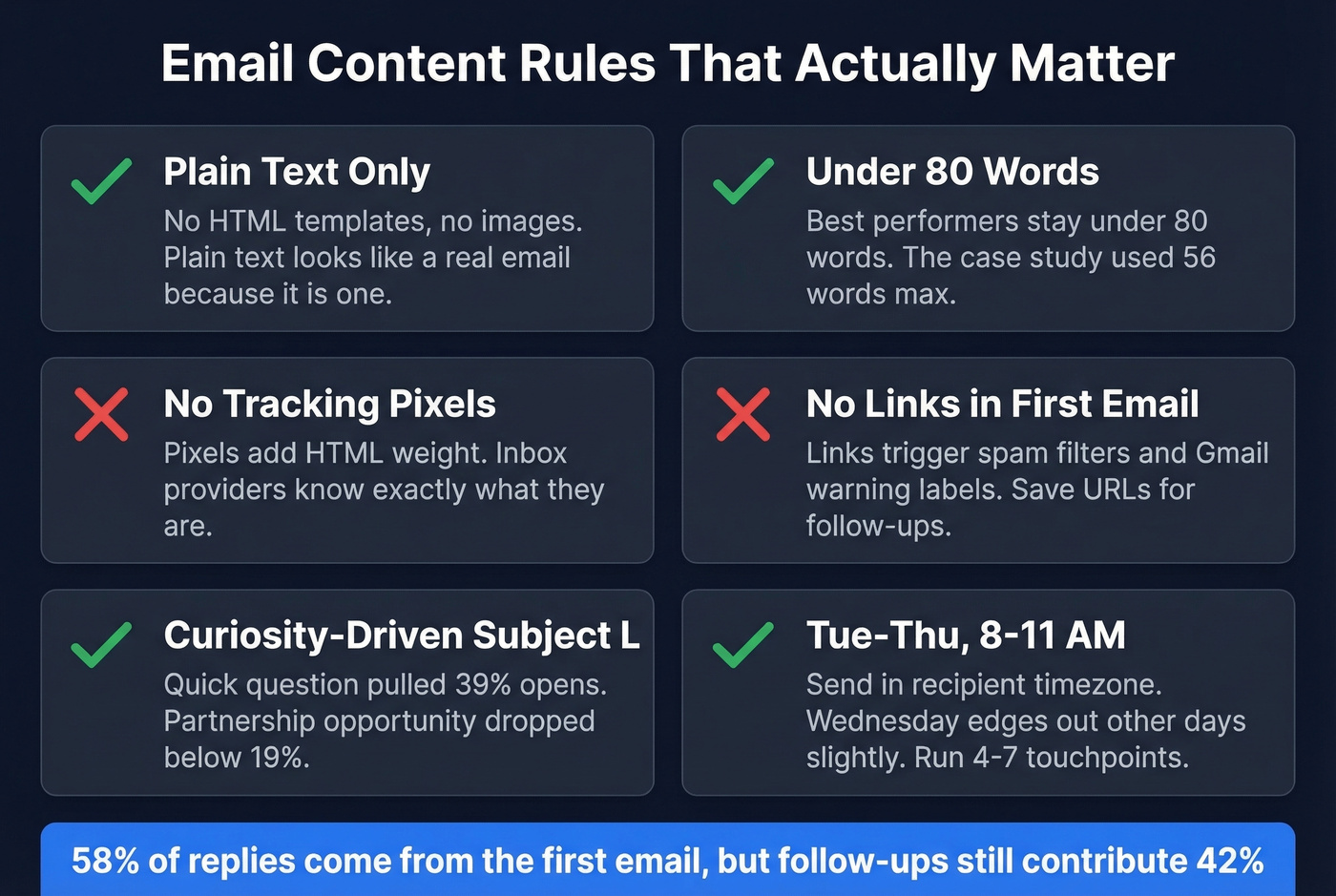
Plain text wins. No fancy templates, no images. Plain text emails look like real emails because they are. The Instantly benchmark report confirms best-performing campaigns stay under 80 words. The practitioner case study went even shorter - 56 words max.
Kill tracking pixels and first-email links. Tracking pixels add HTML weight and inbox providers know what they are. Links trigger spam filters and Gmail's warning labels. Save URLs for follow-ups after a reply. (Related: email tracking pixel.)
Subject lines matter more than you think. "Quick question" pulled 39% opens. Company-name subject lines hit 33%. "Partnership opportunity" and similar salesy lines dropped below 19%. Let's be honest - most subject line advice is recycled garbage. Test your own, but start with short and curiosity-driven. (If you need a swipe file, use these cold email subject line examples.)
Timing and cadence. Send Tue-Thu, 8-11 AM recipient timezone. Wednesday edges out the other days slightly. Run 4-7 touchpoints per sequence - 58% of replies come from the first email, but follow-ups still contribute 42%. (More data: best time to send cold emails.)
Include unsubscribe headers. Add List-Unsubscribe and List-Unsubscribe-Post headers per RFC 8058. Required for bulk senders and signals legitimacy even at lower volumes. Non-negotiable in 2026.
Benchmarks for 2026
Know your numbers. Here's what good, great, and elite look like:
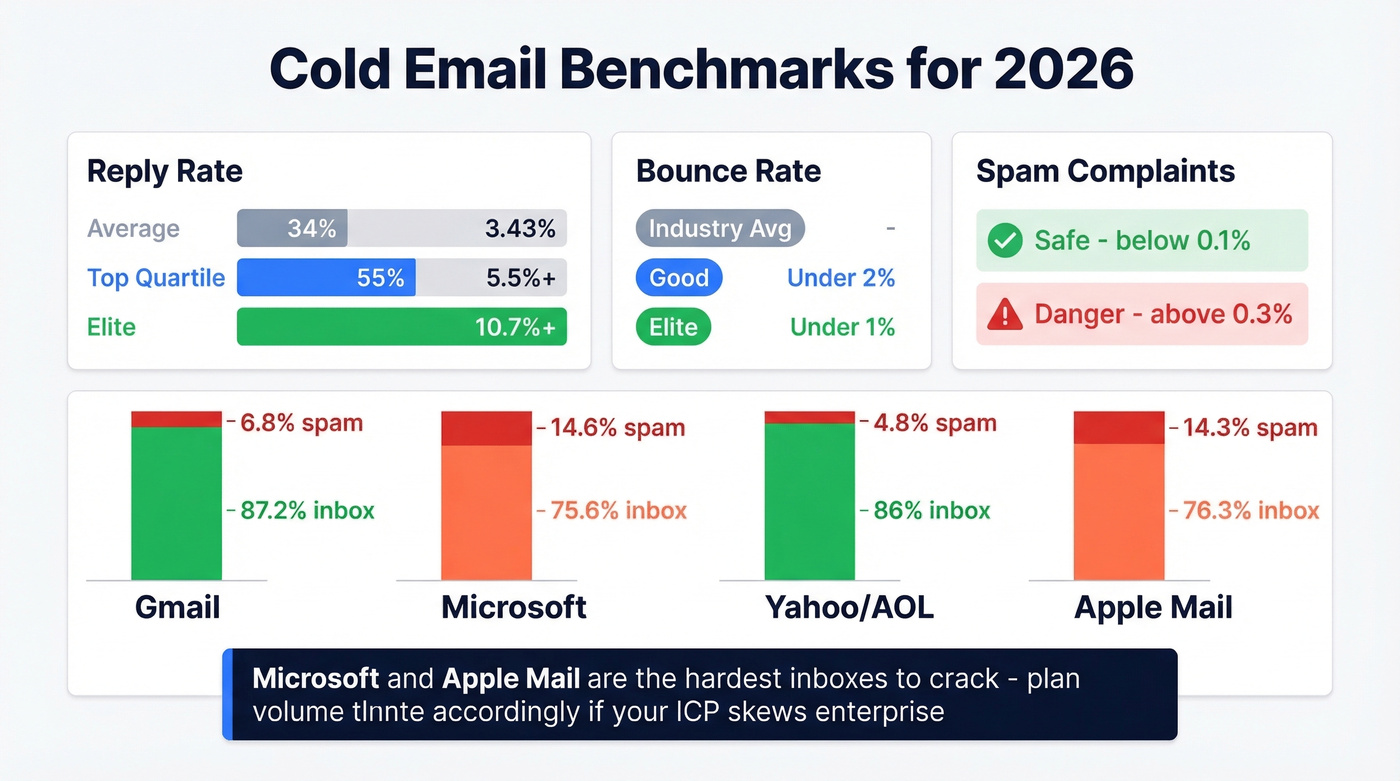
| Metric | Average | Top Quartile | Elite |
|---|---|---|---|
| Reply rate | 3.43% | 5.5%+ | 10.7%+ |
| Bounce rate | - | <2% | <1% |
| Spam complaints | - | <0.1% | <0.05% |
Inbox placement varies dramatically by provider:
| Provider | Inbox % | Spam % | Missing % |
|---|---|---|---|
| Gmail | 87.2% | 6.8% | 6.0% |
| Microsoft | 75.6% | 14.6% | 9.8% |
| Yahoo/AOL | 86.0% | 4.8% | 9.2% |
| Apple Mail | 76.3% | 14.3% | 9.4% |
Global inbox placement averages roughly 84% - one in six emails never reaches the inbox. Gmail declined from 89.8% to 87.2% after enforcement ramped up. If your ICP is enterprise-heavy with lots of Outlook, expect lower placement and compensate with more sending domains.
Tools to Test and Monitor
You need one tool per function, not a dozen:
- Inbox placement: GlockApps - free plan includes 2 spam test credits, Essential plan at $59/month for serious monitoring.
- Spam checking: Unspam.email or Mailtrap for pre-send content analysis. (More options: email spam checker.)
- Authentication: MxToolbox - free, instant SPF/DKIM/DMARC validation.
- Reputation: Spamhaus and Talos for blacklist status and IP/domain reputation.
- Email verification: Prospeo finds and verifies emails in one flow at ~$0.01 per email, so you only pay for valid addresses - no separate "upload and verify" step.
The Reddit consensus on cold email in 2026 is that performance feels down, but the teams posting strong numbers all share the same pattern: lower volume, more domains, strict caps, and obsessive data hygiene. The tools matter less than the discipline.
FAQ
What's a good cold email reply rate in 2026?
The average is 3.43%, top quartile hits 5.5%+, and elite campaigns exceed 10.7%. If you're consistently below 2%, fix deliverability and targeting before optimizing copy.
How many cold emails can I send per day?
30-50 per inbox on Google Workspace, 40-100 on established Office 365 domains. Scale by adding domains and inboxes, not by increasing volume per account. Seven domains at 26 emails each gives you ~182 per day safely.
Does email warmup still work?
SMTP/IMAP-based warmup works for new domains and recovery scenarios, but Google detects pool-based engagement patterns. Warmup won't fix bad authentication, stale data, or spammy content - it's a cold-start tool, not a permanent crutch.
How do I test inbox placement before sending?
Use GlockApps or a similar seed-testing tool to check where emails land across Gmail, Outlook, and Yahoo. Google Postmaster Tools shows domain reputation and spam complaint rates for Gmail specifically. Check both weekly to catch problems before they compound.
How does email verification improve deliverability?
Verified emails keep bounce rates below the 2% threshold that protects domain reputation. A 5-step verification process that catches invalid addresses, catch-all domains, and spam traps before you send means your domain never takes the hit from bad data. For teams running high-volume outreach, clean data prevents the problem instead of forcing recovery.