

Email Tracking Pixels: The Complete Technical Guide for 2026
Your marketing team is celebrating a 45% open rate on last week's campaign. Feels great - except a huge chunk of those "opens" are Apple Mail pre-fetching images before anyone touches the email. Meanwhile, an SDR on the sales floor just marked a big batch of leads as "engaged" because a corporate security scanner tripped every tracking pixel in the sequence. The open rate isn't a metric anymore. It's a hallucination.
The Short Version
- If you're a sender: Stop optimizing on open rates. Track reply rates (8.5% average) and CTR (2.05% median) instead. Use a custom tracking domain if you must track opens.
- If you're a recipient: Disable remote image loading in your email client. Takes 30 seconds, blocks virtually all pixel tracking.
- If you're building one: Use the PHP or Node.js code examples below. Set cache-busting headers and serve from your own infrastructure.
What Is an Email Tracking Pixel?
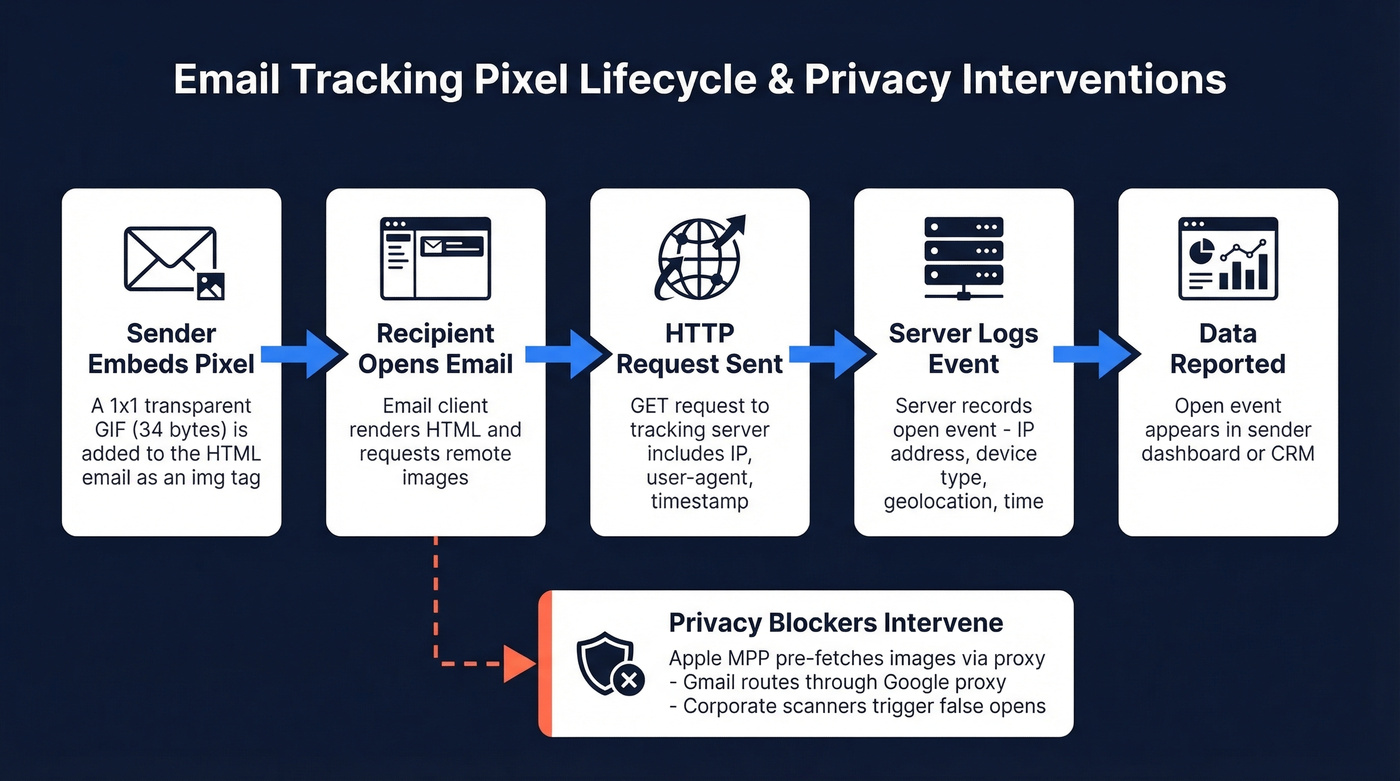
An email tracking pixel is a 1x1 transparent GIF embedded in an HTML email. When the recipient's email client renders the message, it requests that image from a remote server, and that request is the tracking event - the server logs the IP address, device type, user-agent string, timestamp, and approximate geolocation derived from the IP.
Here's the base64 string for the entire "image" behind a standard 1x1 tracking GIF:
R0lGODlhAQABAIAAAAAAAP///ywAAAAAAQABAAACAUwAOw==
That's 34 bytes. Invisible to the reader. It tells the sender when the email was opened and can provide an approximate location based on IP, unless proxies or privacy features mask it. Some senders also use pixel requests to detect dark mode rendering and inform email design decisions.
What pixels can't collect: email body content, keystrokes, browsing history, other open tabs, or anything beyond the HTTP request metadata. The common confusion is conflating pixels with cookies:
| Tracking Pixel | Browser Cookie | |
|---|---|---|
| Mechanism | Server-side image request | File stored in browser |
| Works in email | Yes | No |
| User can clear it | No (already logged) | Yes |
| Data collected | IP, device, timestamp | Cross-session browsing data |
| Blocking difficulty | Moderate (disable images) | Easy (browser settings) |
One r/email user described discovering tracking pixels in a routine newsletter as feeling like being watched. That visceral reaction is exactly why regulators are paying attention.
How Do Tracking Pixels Work?
Here's a minimal PHP implementation. This endpoint serves the 1x1 GIF and logs the open event:
<?php
header('Content-Type: image/gif');
header('Cache-Control: no-cache, must-revalidate');
header('Expires: Mon, 01 Jan 1990 00:00:00 GMT');

$uid       = $_GET['uid'] ?? 'unknown';
$ip        = $_SERVER['REMOTE_ADDR'];
$userAgent = $_SERVER['HTTP_USER_AGENT'];
$timestamp = date('Y-m-d H:i:s');

file_put_contents('opens.log',
  "$timestamp | $uid | $ip | $userAgent\n", FILE_APPEND);

echo base64_decode(
  'R0lGODlhAQABAIAAAAAAAP///ywAAAAAAQABAAACAUwAOw=='
);
Embed it in your email HTML:
<img src="https://yourdomain.com/pixel.php?uid=abc123"
     width="1" height="1" alt="" style="display:none;" />
Two details most tutorials skip. The Cache-Control: no-cache, must-revalidate header plus a unique query parameter per recipient prevents the client from serving a cached version on subsequent opens - without this, you'll undercount. If you don't want to maintain application code, parse your web server's access logs for requests to a static pixel file. Same data, less code.
Node.js teams can replicate this with an Express route that reads query params, logs to a database, and returns the base64 GIF buffer - about 15 lines of code total.
Why Open Tracking Is Broken
Apple Mail Privacy Protection launched September 20, 2021, and it fundamentally broke open tracking. MPP pre-loads remote images - including embedded pixels - through Apple's proxy servers before the recipient ever sees the email. Once a recipient enables it, every email "opens" whether the person reads it or not. IPs are masked. Timestamps become meaningless.
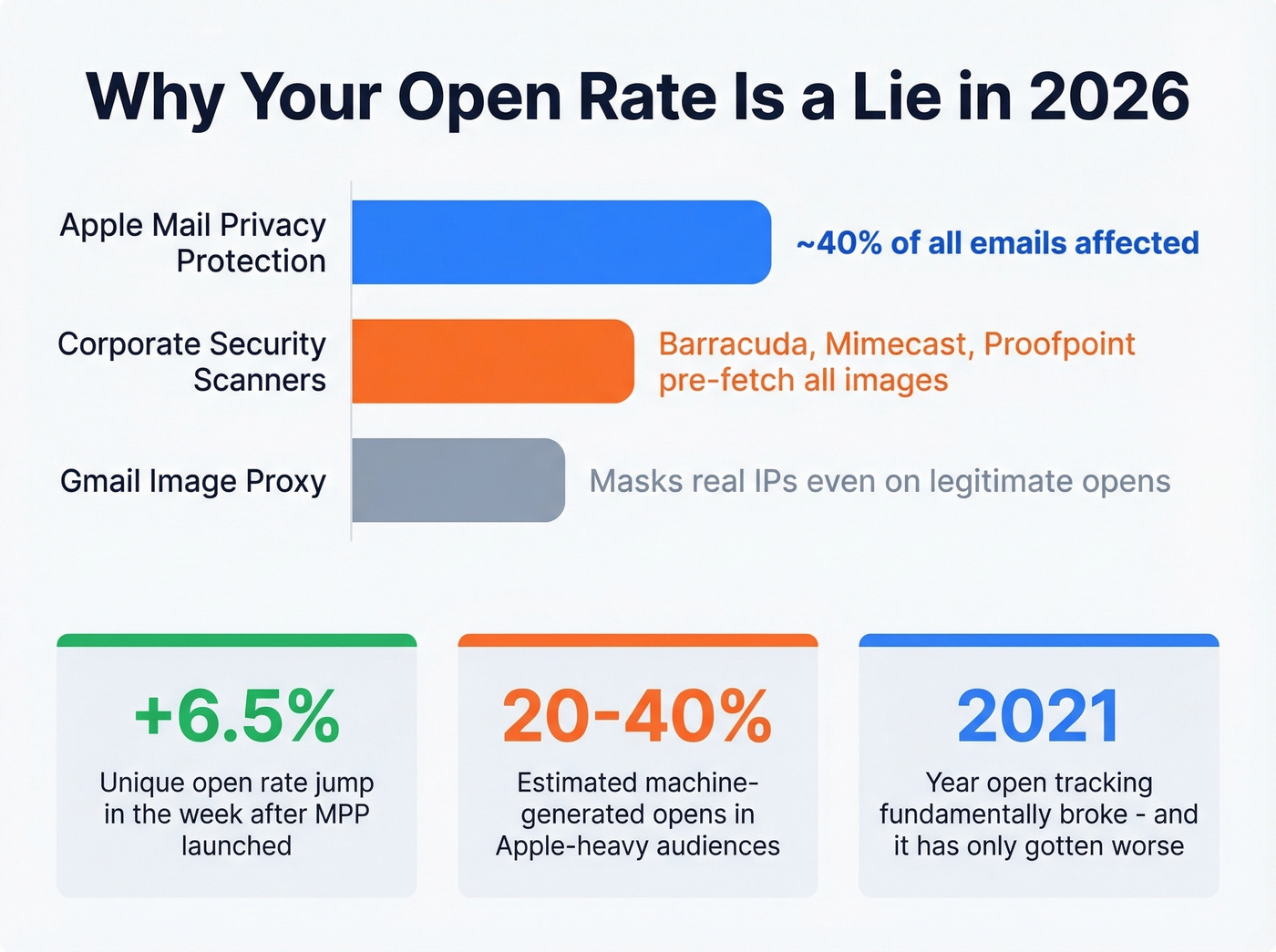
The scale is staggering. MPP affects roughly 40% of all emails, and unique open rates jumped 6.5% in the week after launch - pure inflation from machine opens. Corporate security scanners like Barracuda, Mimecast, and Proofpoint inflate open data further by pre-fetching links and images in inbound emails. In Apple-heavy audiences - B2C, creative industries, any list skewing toward iPhone users - we estimate 20-40% of reported opens are machine-generated.
Apple's Link Tracking Protection strips tracking parameters, including UTMs, in Mail and Safari, breaking attribution chains entirely. Gmail routes images through Google's proxy servers, masking recipient IPs even when the open is legitimate.
Here's the thing: the open rate was always an approximation. But in 2026, it's closer to random noise than a signal. If you're making pipeline decisions based on who "opened" your email, you're building on sand.

Machine opens inflated your data. Bad emails destroy your sender reputation. Prospeo's 5-step verification delivers 98% email accuracy - so your bounce rate stays under 4% and every reply you track is from a real human.
Stop tracking phantom opens. Start tracking real replies.
What to Measure Instead
Replace open rates with metrics that reflect actual human behavior.
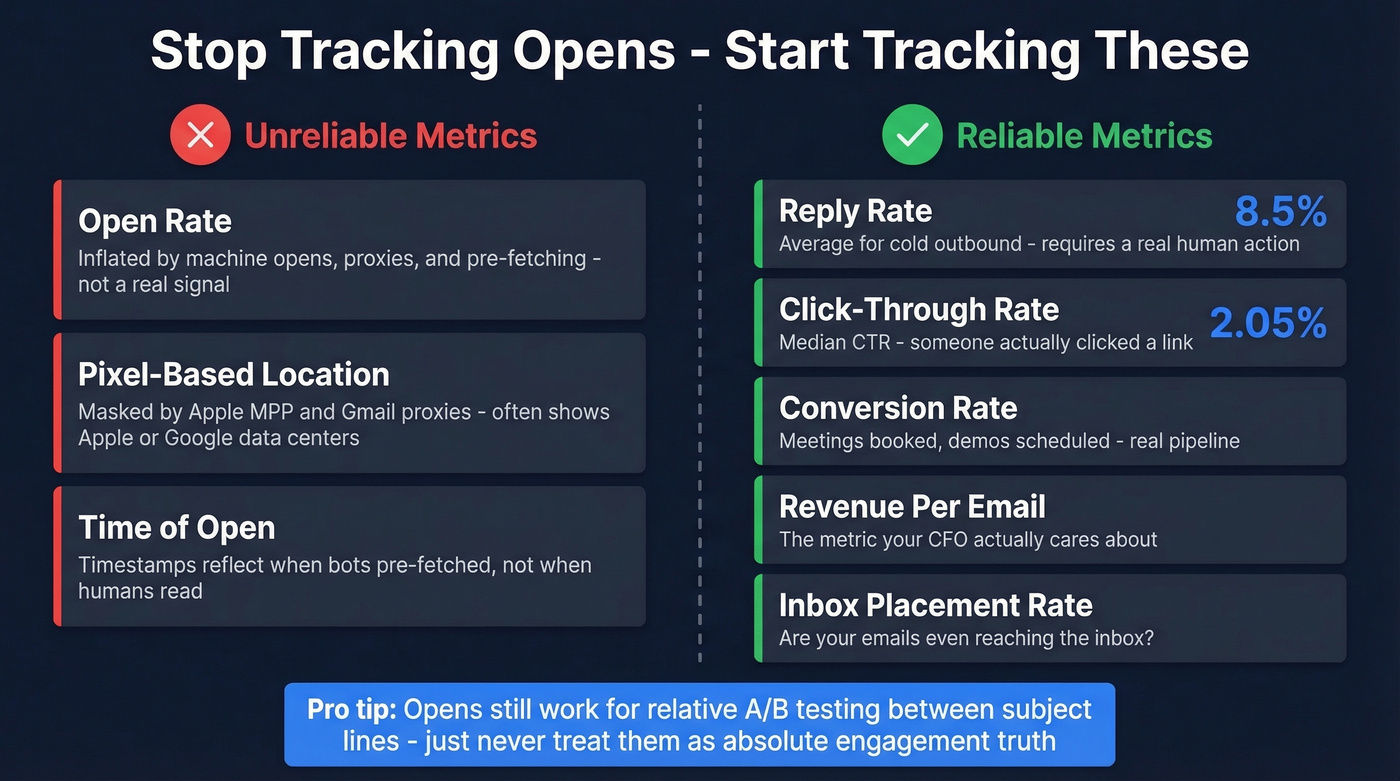
Reply rate is the gold standard for cold email - 8.5% average across outbound. Click-through rate sits at a 2.05% median and requires a real action from a real person. Beyond those, track conversion rate (meetings booked, demos scheduled), revenue per email sent (the metric your CFO actually cares about), and inbox placement rate.
Opens still have one narrow use: think of them like a weather forecast. If subject line A gets 35% opens and subject line B gets 52% in the same audience, the relative difference is real even if the absolute numbers are inflated. Just don't treat open rates as engagement truth.
For teams with average deal sizes under $10k, you don't need open-rate obsession at all. Reply rate and booked meetings tell you everything. Start with verified contact data and measure what matters.
Do Pixels Hurt Deliverability?
No. Tracking pixels don't automatically trigger spam placement. Modern filtering evaluates hundreds of signals - sender reputation, content quality, authentication, engagement patterns - and a 1x1 GIF usually isn't the deciding factor.
The real risk is your tracking domain's reputation. If you're hosting pixels on a domain that's been flagged or blocklisted, that association drags your deliverability down. The fix: use a custom tracking domain on your own infrastructure, keep SPF/DKIM/DMARC properly configured, and focus on list hygiene over pixel paranoia.
Clean lists matter more than pixel presence. High bounce rates will destroy your sender reputation faster than any tracking pixel ever could.
Compliance in 2026
Regulators now treat email tracking pixels the same way they treat cookies. The EDPB Guidelines 2/2023, adopted October 7, 2024, explicitly clarify that URL and pixel tracking fall under ePrivacy Directive Article 5(3) on a technology-neutral basis - regardless of whether personal data is ultimately processed.
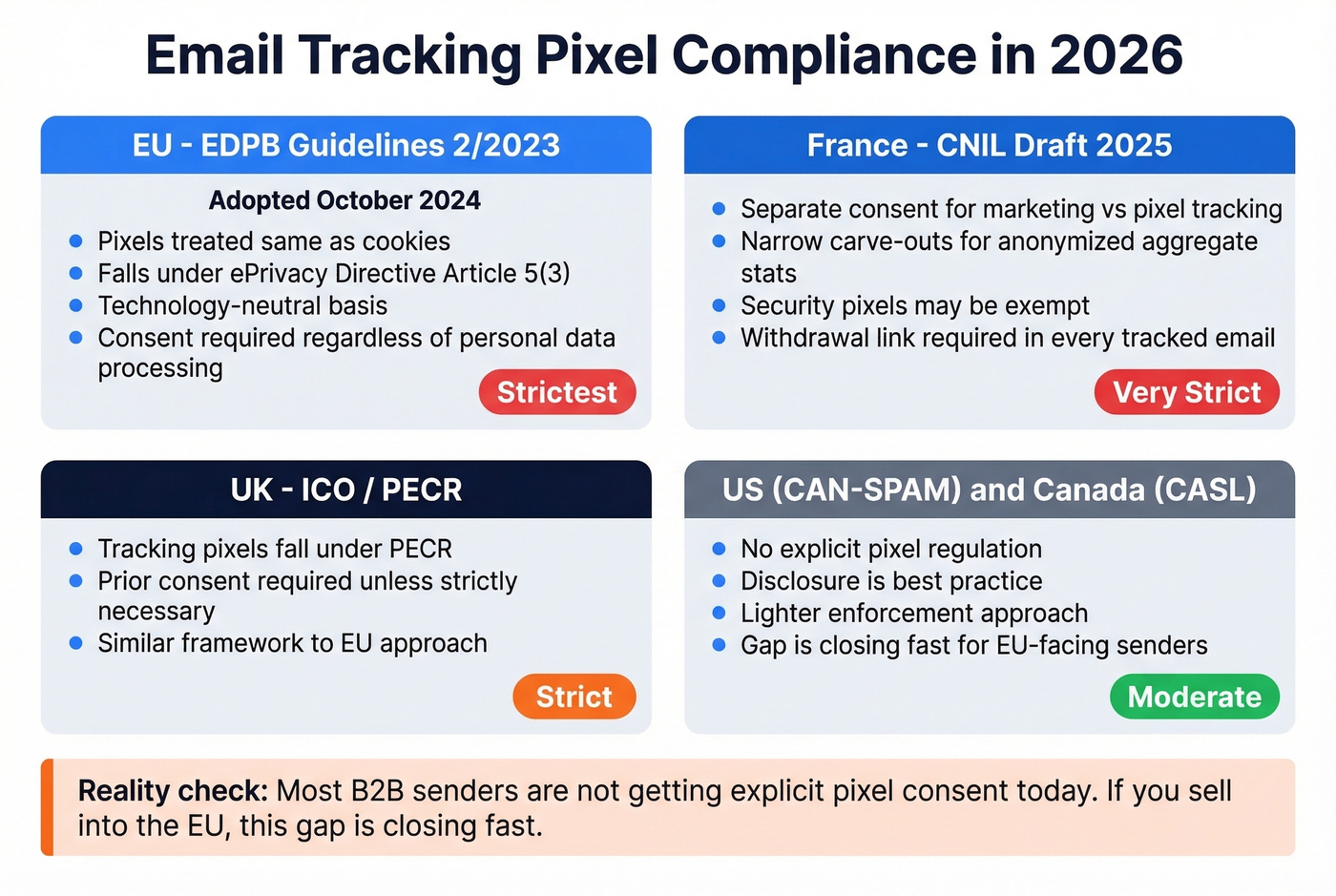
France's CNIL went further. Their June 2025 draft recommendations propose separating marketing consent from pixel tracking consent, with narrow carve-outs for anonymized aggregate stats and security pixels. The practical requirements:
- Inform recipients about tracking purposes and parties involved
- Obtain consent at email collection or via a first message sent without tracking pixels
- Include a withdrawal link in every tracked email with immediate effect
- Demonstrate consent as the data controller
The UK's ICO confirms tracking pixels fall under PECR, requiring prior consent unless "strictly necessary." US CAN-SPAM and Canada's CASL take a lighter touch - neither explicitly regulates pixels - but disclosure is best practice regardless.
Real talk: most B2B senders aren't getting explicit pixel consent today. That gap is closing fast, especially for anyone selling into the EU.
How to Block Tracking Pixels
If you're on the receiving end, blocking pixels is straightforward. Disable remote image loading in your email client:
| Client | Path |
|---|---|
| Gmail (web) | Settings > General > Images > "Ask before displaying" |
| Gmail (mobile) | Settings > [account] > Images > "Ask before displaying" |
| Apple Mail (iOS) | Settings > Mail > Privacy Protection > "Block All Remote Content" |
| Apple Mail (macOS) | Mail > Preferences > Viewing > uncheck "Load remote content" |
| Outlook (Windows) | File > Options > Trust Center > Automatic Download |
| Outlook.com | Settings > Privacy and data > External images > route via Outlook |
| Thunderbird | Settings > Privacy & Security > disable remote content |
To spot tracking pixels before loading images, use Gmail's "Show Original" option to inspect the raw message for remote image URLs pointing to external servers.
For browser-based email, extensions like Ugly Email, PixelBlock, and Trocker detect and strip tracking pixels from Gmail before they load. Proton Mail blocks known tracking pixels by default - it's one of the most privacy-forward mainstream providers. Skip the extensions if you're already on Proton or a similar privacy-first client; they won't add much.
The Real Problem: Bad Data
Let's go back to that SDR marking leads as "engaged." A security scanner at a prospect's company tripped every pixel in a big sequence. Now hundreds of contacts show as "opened" in the CRM. Lead scoring bumps them up. Sales prioritizes them. Reps burn hours calling people who never saw the email.
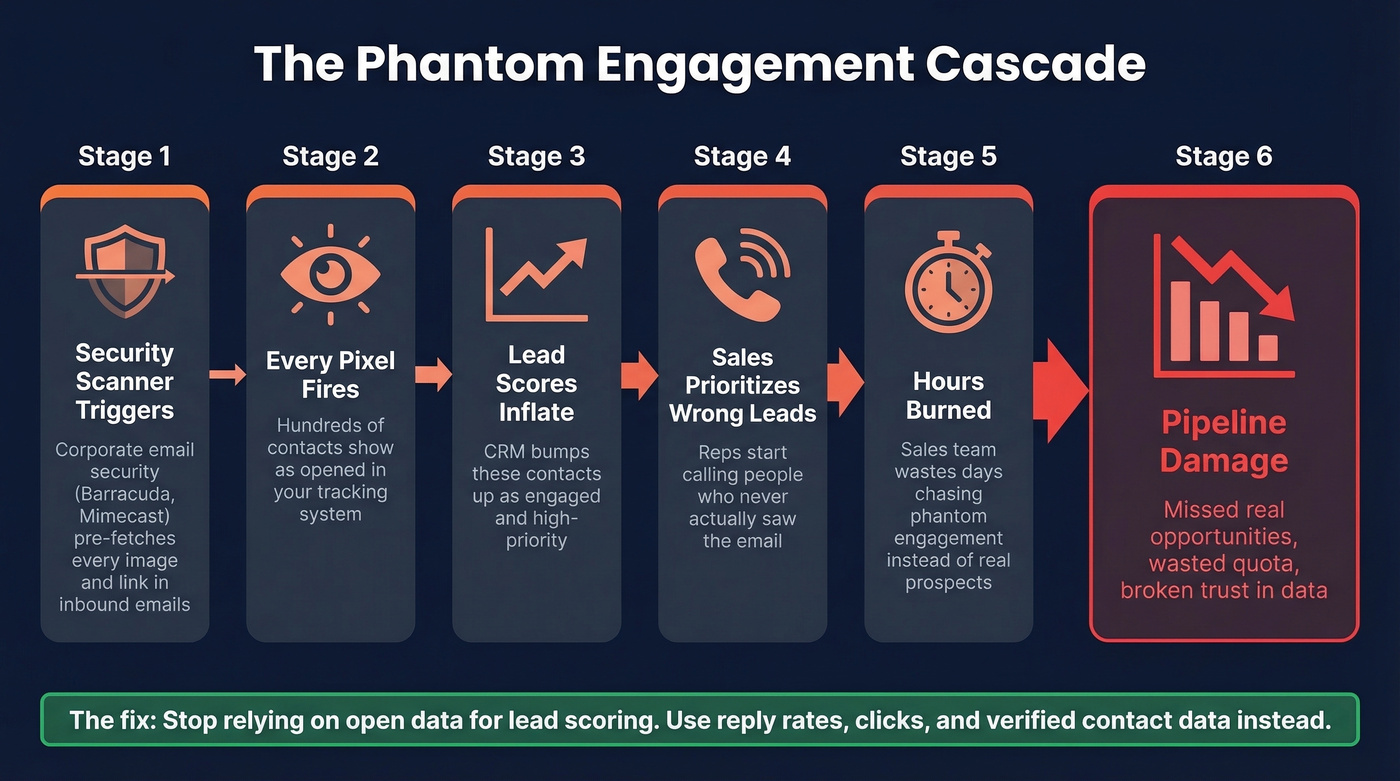
Inflated opens lead to wrong lead scoring, which leads to sales chasing the wrong accounts, which leads to pipeline damage. We've seen this play out firsthand with teams that came to us after months of chasing phantom engagement. One r/sysadmin thread describes an IT department appending tracking pixels to every outbound email via Wisestamp - tied to employee identity, not individual messages. The "engagement data" this generates is noise dressed up as insight.
Clean lists matter more than pixel presence. Prospeo refreshes 300M+ profiles every 7 days - not every 6 weeks - with spam-trap removal and catch-all verification built in. Your deliverability stays intact because the data is actually current.
Protect your sender reputation with data that's never stale.
FAQ
Can an email tracking pixel see what I type?
No. A pixel only detects that the embedded image was loaded. It can't read email content, capture keystrokes, or access anything beyond the HTTP request metadata - IP address, device type, and timestamp.
Does a tracking pixel work in plain-text emails?
No. Pixels require HTML rendering to load the image tag. Plain-text emails strip all HTML, so there's no mechanism for the image request to fire. If you need open tracking, you must send HTML-formatted messages.
Does Gmail block tracking pixels by default?
Gmail routes images through Google's proxy servers, masking your IP but still registering an "open" on the sender's server. To fully block pixels: Settings > General > Images > "Ask before displaying external images."
Are tracking pixels legal in 2026?
Under GDPR and ePrivacy rules - as clarified by EDPB Guidelines 2/2023 - tracking pixels generally require prior consent. France's CNIL draft proposes separate pixel consent. US CAN-SPAM doesn't explicitly regulate pixels, but disclosure is best practice everywhere.
How do I get accurate engagement data without open tracking?
Focus on reply rate (8.5% outbound average) and click-through rate (2.05% median) - both require real human action. Pair those metrics with verified contact data so you know your messages reach real inboxes, not dead addresses inflating your bounce rate.