


Relevance AI in 2026: Pricing, Reviews, and Honest Pros & Cons
Most Relevance AI reviews online are reviewing a product that no longer exists. The September 2025 pricing overhaul replaced the old single "credits" system with a split model, sunset the $599/mo Business plan, and introduced a dual-meter setup that's easy to misread - the pricing page itself shows a few inconsistent numbers. Here's what Relevance AI pricing actually looks like now, what real users say, and the honest pros and cons.
30-Second Verdict
Rating: 4.3/5 on G2 (21 reviews) - 4.0/5 on Capterra (1 review, too thin to draw conclusions)
One-line take: Powerful no-code AI agent builder with confusing pricing and a real learning curve.
Best for: Non-technical teams building AI sales or support agents who can tolerate usage-based billing.
Skip if: You need predictable monthly costs, you're a solo founder on a tight budget, or you want deep community troubleshooting resources.
What Is Relevance AI?
Relevance AI is a no-code platform for building and managing autonomous AI agents - what they call an "AI Workforce." One of their best-known products is Bosh (the AI BDR), positioned around outbound workflows: prospect research, personalized outreach, two-way conversations, CRM integration, and meeting scheduling.
It integrates with Salesforce, HubSpot, Slack, Notion, and 2,000+ other apps. It's SOC 2 Type II and GDPR compliant.
Describe what you want an agent to do, and the platform builds it without code. For single-agent automations, that promise mostly holds. For complex multi-agent workflows? Expect to fight the UI more than you'd like.

Current Plans and Prices
You have to cross-reference multiple sections on their site to piece together what you'll actually pay. That tells you something.
Actions + Vendor Credits Breakdown
The current "AI Workforce" pricing is usage-based, limited primarily by Actions and Vendor Credits:
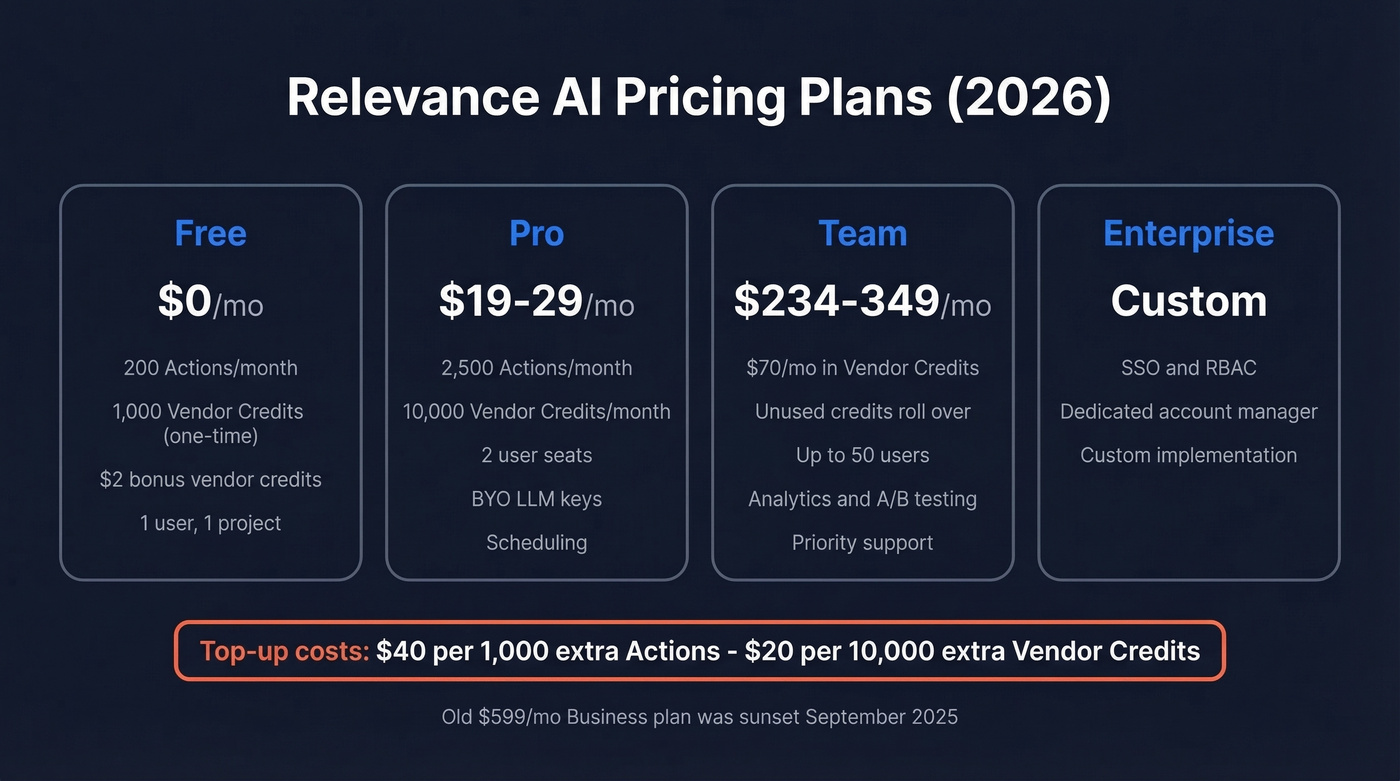
| Plan | Price | Included Usage | Key Details |
|---|---|---|---|
| Free | $0 | 200 Actions/month + $2 bonus vendor credits (plus 1,000 vendor credits one-time) | 1 user, 1 project/workforce |
| Pro | $29/mo monthly or $19/mo annual | 2,500 Actions/month + 10,000 Vendor Credits/month | 2 user seats, scheduling, BYO LLM |
| Team | $349/mo monthly or $234/mo annual | Vendor credits worth $70/month; unused Vendor Credits roll over | Up to 50 users, analytics, A/B testing, priority support |
| Enterprise | Custom | Custom | SSO, RBAC, dedicated account manager, custom implementation |
The old $599/mo Business plan is gone under the new model.
Top-ups: Extra Actions cost $40 per 1,000 Actions, and extra Vendor Credits cost $20 per 10,000 credits.
Why Old Reviews Don't Match
On September 8, 2025, Relevance AI split the old "Credits" system into two meters:
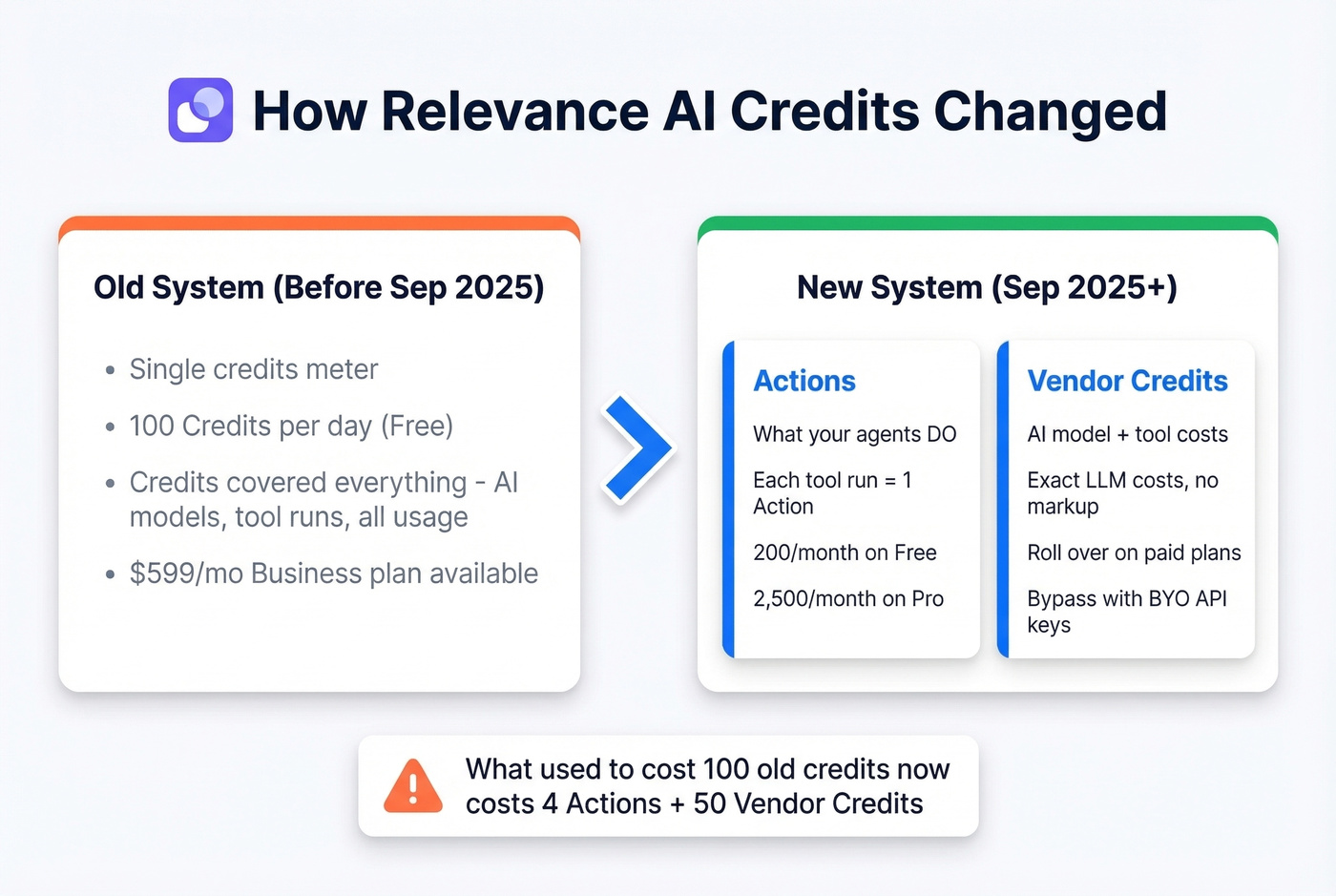
- Actions = what your agents do (each tool run counts as an action)
- Vendor Credits = AI model + tool costs
Existing paid customers were grandfathered until their first renewal on or after December 1, 2025. Under the new system, the platform passes through exact LLM costs with no markup on Vendor Credits. Paid subscribers keep Vendor Credits rolling over while subscribed, while base plan Actions reset each renewal.
If any review you've read mentions "100 credits/day" on the free plan, it's outdated. The free plan moved from 100 Credits/day to 200 Actions/month, and free users get 1,000 Vendor Credits once.
What You'll Actually Pay
Relevance AI published a worked example: what used to cost 100 old credits now breaks down to 4 Actions + 50 Vendor Credits. Each discrete step - like sending an email or updating a CRM - counts as 1 Action.
The real cost-control lever is BYO API keys. On paid plans, you can plug in your own OpenAI or Anthropic keys to bypass Vendor Credits entirely and pay the LLM provider directly. You'll still burn Actions, but you're not double-paying for model usage through the platform. BYO keys aren't available on the Free plan, so Free is great for learning and testing but not where you'll want to run anything serious on a schedule.
Here's the thing: if your average deal size is under $5k, usage-based billing will eat your margins before the agents generate enough pipeline to justify the spend. Start with the free plan, prove ROI on one workflow, then upgrade.

Relevance AI builds the agents - but agents need accurate contact data to actually book meetings. Prospeo delivers 98% verified emails and 125M+ direct dials on a 7-day refresh cycle, so your AI BDR isn't burning credits on bounced emails and dead numbers.
Feed your AI agents data that actually connects. Start free today.
Pros and Cons
What Users Like
We dug through G2 reviews to find the patterns that actually repeat, not just cherry-picked quotes.
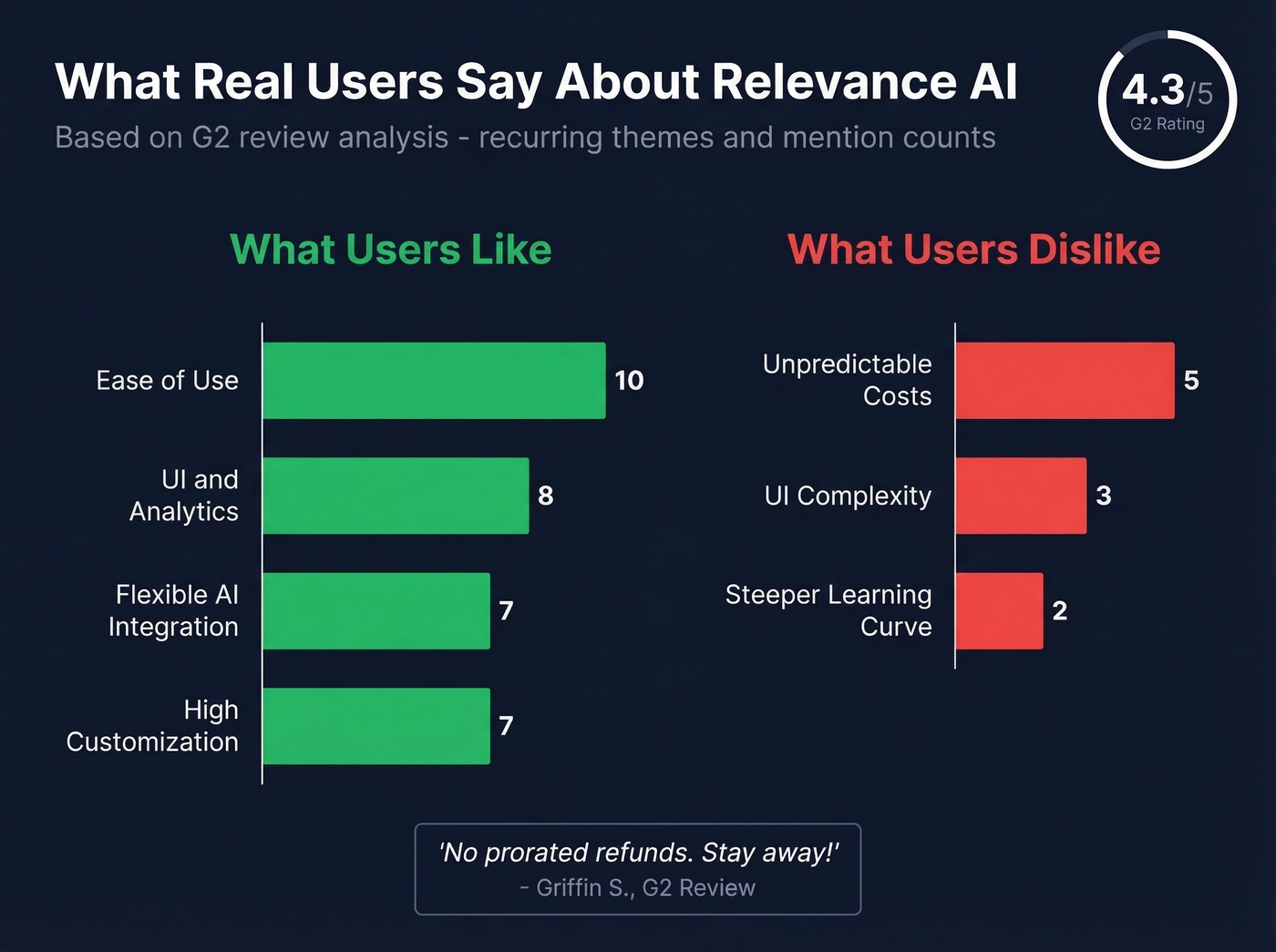
- Ease of use is the most-cited positive (10 mentions). For single-agent automations, the no-code builder genuinely delivers.
- Flexible AI integration (7 mentions) - the platform is model-agnostic across OpenAI, Anthropic, and Google.
- High customization (7 mentions) - custom skills, prompt chains, and API calls without writing code.
- UI + analytics (8 mentions) - dashboards give real visibility into usage and performance.
What Users Dislike
- Unpredictable costs (5 mentions). Reviewer Griffin S. put it bluntly: "No prorated refunds. Stay away!" On a usage-based platform where an agent loop can drain your balance overnight, the no-refund policy is a real risk.
- UI complexity contradicts the no-code promise. Reviewer Jarie B. described the interface as "busy" and flagged that it "sometimes does not fully sync your latest edits."
- Steeper learning curve than marketed (2 mentions). The gap between "build a simple chatbot" and "orchestrate a multi-step sales workflow" is wider than the landing page suggests.
- The community forum has a thread titled "Sudden Credits Burn," which is exactly the kind of issue that makes usage-based billing feel scary when you're new.
Who Should (and Shouldn't) Use It
Use Relevance AI if you're a non-technical team that needs AI agents for sales, support, or marketing workflows, you're willing to invest time learning the platform, and you can tolerate usage-based billing.
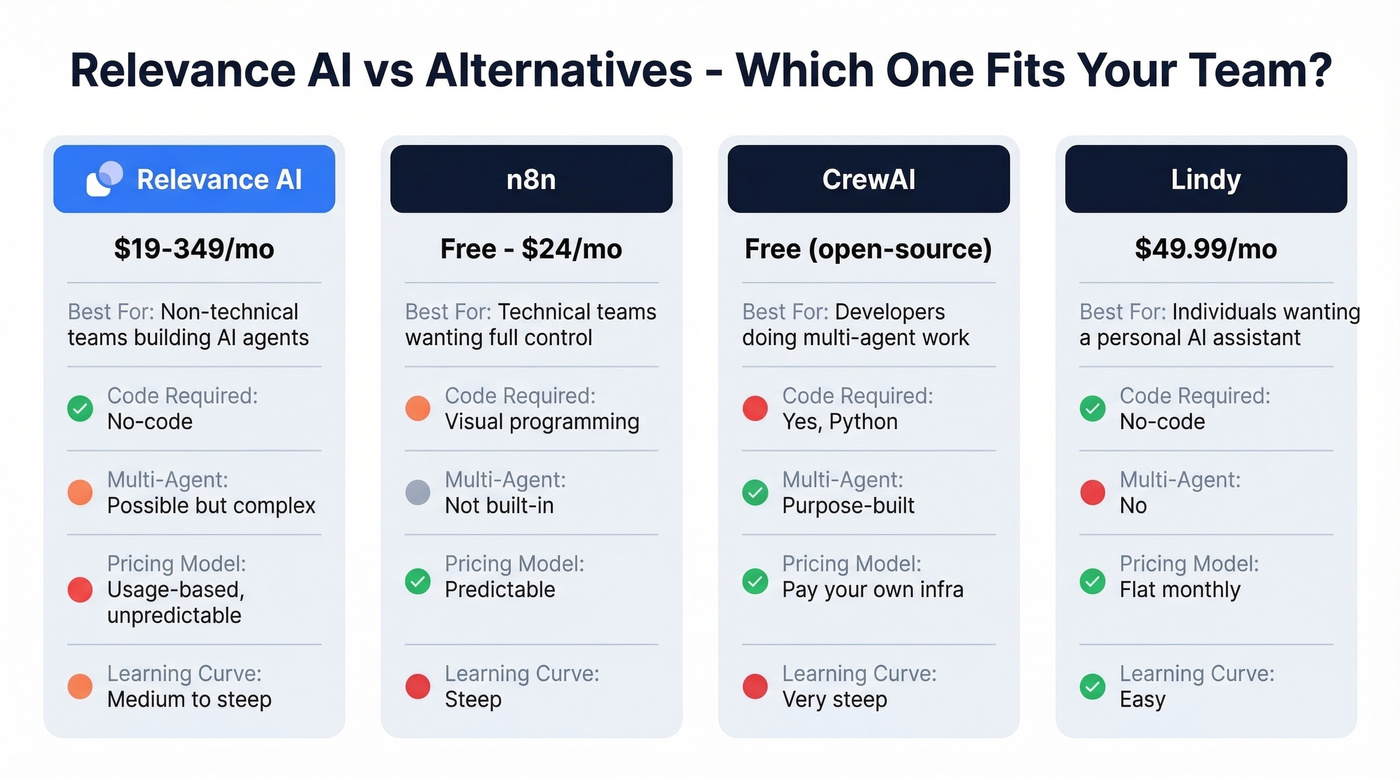
Skip it if you need predictable monthly costs, you're a solo founder watching every dollar, or you need advanced multi-agent orchestration with developer-level control. Look at n8n for workflow automation or CrewAI for multi-agent orchestration instead.
Alternatives Worth Considering
| Tool | Starting Price | Best For | Key Tradeoff |
|---|---|---|---|
| n8n | Free (self-host) / ~$24/mo cloud | Teams wanting full workflow control | Steep learning curve |
| Lindy | $49.99/mo | Individuals wanting a personal AI assistant | Not fully self-serve for custom agents |
| CrewAI | Free (open-source) | Multi-agent orchestration | Zero hand-holding |
n8n - The Technical Team's Pick
Free if you self-host, ~$24/mo for cloud. n8n gives you full control over every workflow step, but calling it "no-code" is generous - you're still programming, just visually. Our team has found it's best suited for engineers or technically confident ops people who want granular control over every API call and conditional branch.
CrewAI for Multi-Agent Work
On r/automation, CrewAI is one of the tools practitioners consistently recommend for multi-agent orchestration. It's open-source, free to use (you pay for your own infrastructure), and purpose-built for agents that collaborate on complex tasks. The tradeoff: no visual builder and no hand-holding. Other tools that come up in those threads include LangGraph/LangChain for developer control and Zapier Central for simpler set-and-forget automations.
Lindy for the Non-Builder
$49.99/mo gets you a personal AI assistant that handles scheduling, research, and email triage out of the box. Simpler than Relevance AI for basic automations, but custom agents require an implementation call - it's not fully self-serve. Good for individuals, frustrating for teams.
The Data Problem Nobody Talks About
Let's be honest about something: AI agents burning Actions on bounced emails and dead phone numbers is the fastest way to blow your budget. Every invalid contact is a wasted Action, and those add up fast at $40 per 1,000. We've seen teams burn through their monthly allotment in days because their contact lists were stale.
Prospeo solves that with 300M+ professional profiles, 98% email accuracy, and 125M+ verified mobile numbers on a 7-day refresh cycle. The free tier gives you 75 verified emails per month to test, and paid plans run ~$0.01 per email with no contracts. Without verified data feeding your agents, you're paying for runs that go nowhere.
If you want to tighten the rest of your outbound stack, pair verified data with better sales prospecting techniques and a repeatable lead generation workflow.
Worried about unpredictable costs? Prospeo charges ~$0.01 per verified email with transparent credit-based pricing - no usage surprises, no annual contracts. Pair it with any AI agent platform and know exactly what your data costs before you spend.
Predictable data pricing your AI workflow budget won't hate.
FAQ
Is Relevance AI really free?
The free plan includes 200 Actions per month and a one-time allotment of 1,000 Vendor Credits. That's enough to explore the builder and test simple agents, but not enough for production workloads. You'll need Pro ($19/mo annual) to run scheduled workflows.
Does the old $599/month Business plan still exist?
No. Relevance AI sunset it on September 8, 2025. Current plans are Free, Pro, Team, and Enterprise. Any review still listing the $599 tier is outdated - the Team plan at $234-$349/mo is the closest equivalent.
How do I control costs on Relevance AI?
Bring your own API keys on paid plans to bypass Vendor Credits - that's the single biggest cost lever. Monitor Action usage weekly, and start on Pro to validate workflows before committing to Team. Feed your agents verified contact data so you're not burning Actions on invalid emails and disconnected numbers.
What's the best free alternative to Relevance AI?
CrewAI is the strongest free option for multi-agent orchestration - it's open-source and you only pay for your own infrastructure. For simpler workflow automation, n8n's self-hosted version is also free and gives you full control over every step.