

How to Remove Your IP from a Blacklist - The Complete 2026 Delisting Playbook
You wake up to a flood of bounce-backs. Half your outbound sequence failed overnight, and the NDRs all say some variation of "rejected - listed on Spamhaus." Your IP landed on a blacklist, and every email you send is hitting a wall.
If you need to remove your IP from a blacklist, the fix isn't complicated - but the order of operations matters. A DNSBL (DNS-based Blackhole List) is a real-time database that flags IP addresses associated with spam. Mail servers query these lists before accepting inbound messages, and if your IP shows up, your emails get rejected or routed straight to junk. Get the sequence wrong and you'll end up re-listed within hours.
The Five-Step Delisting Playbook
- Check which blacklists you're on - run your IP through MxToolbox, which checks 30+ lists in one query.
- Prioritize - Spamhaus first, then Barracuda, then SpamCop. Ignore the tiny lists.
- Fix the root cause before requesting removal. Open relay? Compromised account? Bad contact list? Fix it now.
- Run the pre-delisting technical checklist - SPF, DKIM, DMARC, PTR records, postmaster@ alias.
- Submit provider-specific delisting requests using the exact steps below.
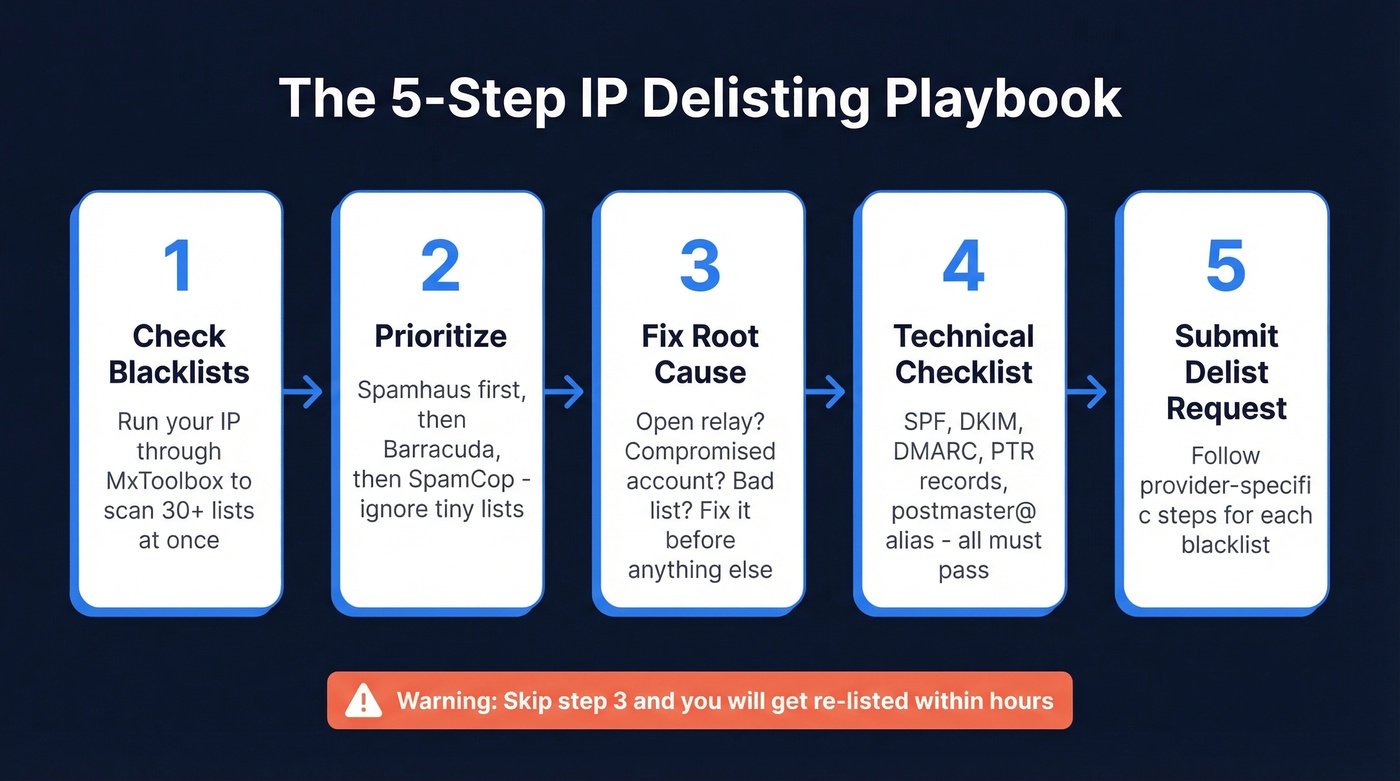
Bookmark this timeline cheat sheet:
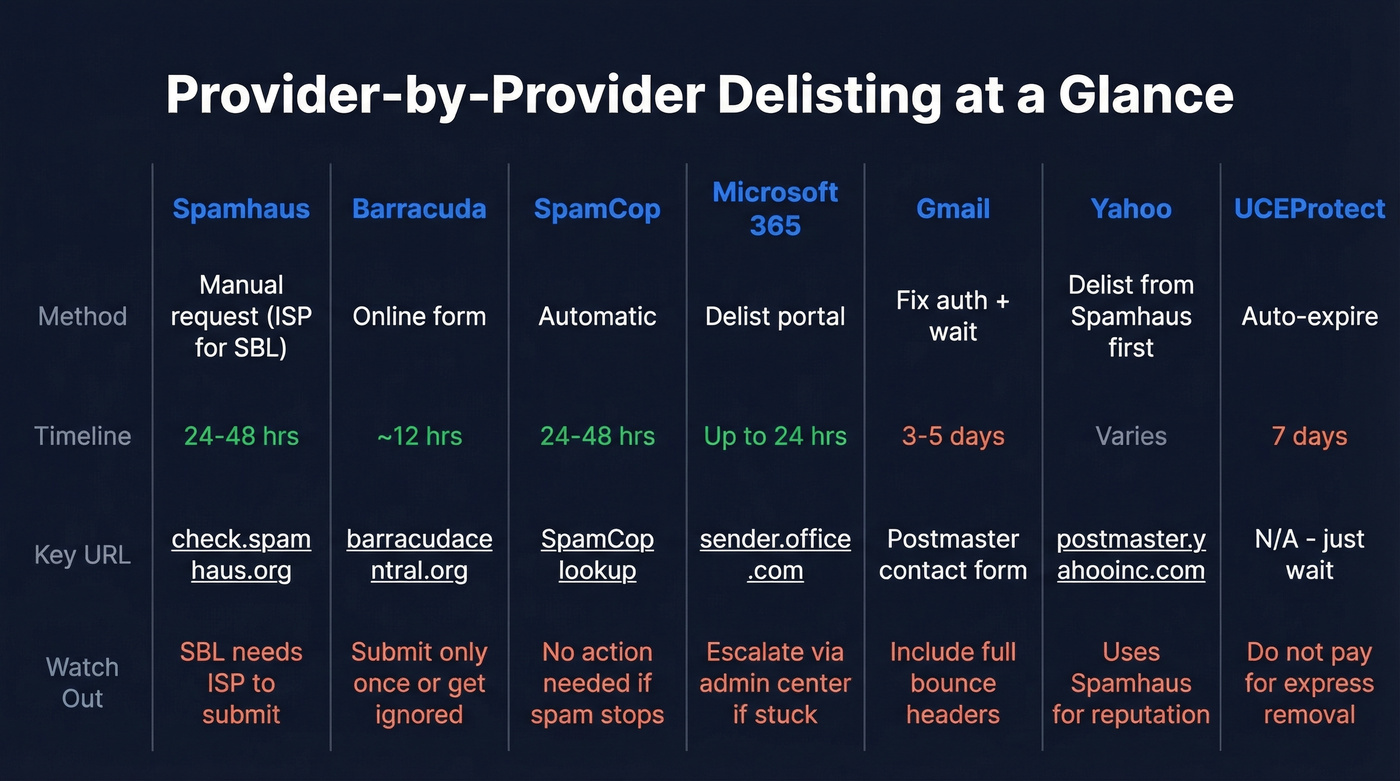
| Blacklist | Removal Type | Typical Timeline |
|---|---|---|
| SpamCop | Automatic | 24-48 hrs |
| Spamhaus | Manual request | 24-48 hrs (once valid) |
| Barracuda | Manual form | ~12 hrs |
| Gmail | Fix + form | 3-5 days |
| Microsoft 365 | Portal delist | Up to 24 hrs |
| UCEProtect L1 | Auto-expire | 7 days |
| PSBL | Auto-expire | 24-48 hrs |
Check If You're Actually Blacklisted
Before submitting removal requests, confirm which lists flagged you. MxToolbox is the fastest option - enter your sending IP and it queries 30+ blacklists simultaneously. In our experience, about 80% of the lists MxToolbox flags have zero real impact on deliverability, so don't panic at a long results page.
The bounce message itself often tells you exactly which list caught you. Look at the NDR for phrases like "listed on zen.spamhaus.org" or "blocked by b.barracudacentral.org." That string is the blacklist identifier - copy it, search it, and you'll land on the right removal page.
For Spamhaus specifically, go to check.spamhaus.org and enter your IP or domain. It'll tell you which Spamhaus list you're on - SBL, DBL, PBL, or XBL - and each one has a different removal path.
Which Blacklists Actually Matter
Not all blacklists carry the same weight. Spamhaus helps protect over 3 billion mailboxes worldwide. If you're on Spamhaus, your deliverability is effectively dead. That's your priority.
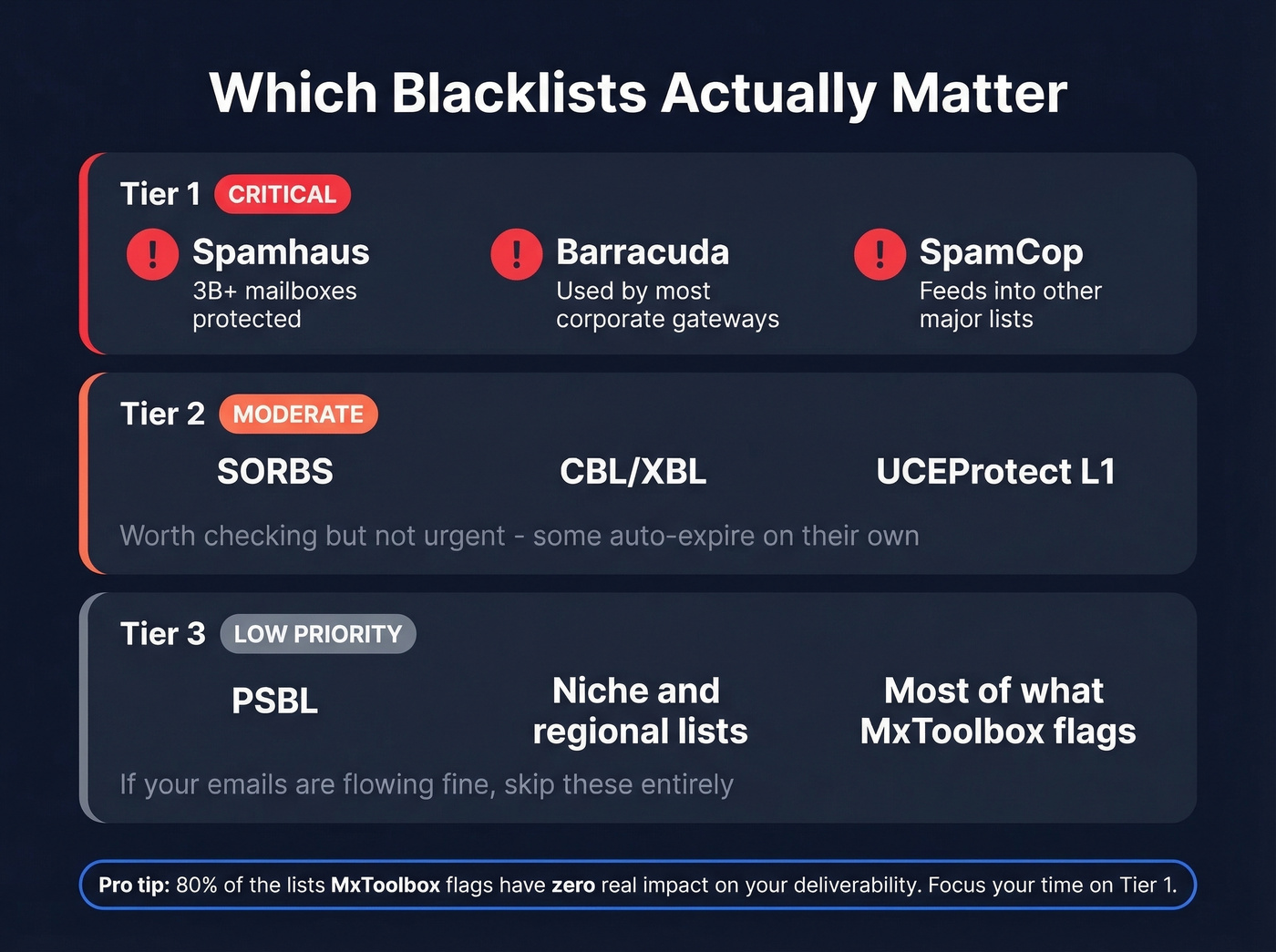
After Spamhaus, focus on Barracuda (widely used by corporate mail gateways) and SpamCop (which feeds into other lists). Everything else - SORBS, PSBL, the dozens of niche lists MxToolbox flags - is secondary. Here's the thing: you don't need to delist from every blacklist. We've seen teams spend days chasing removal from lists that protect a few thousand mailboxes total. If it's not Spamhaus, Barracuda, or SpamCop, and your emails are flowing fine, move on. Your time is better spent fixing the root cause than playing whack-a-mole with obscure blocklists.
Pre-Delisting Technical Checklist
Don't submit a single removal request until you've verified every item here. Delisting without fixing the underlying problem gets you re-listed within hours - and subsequent removal requests are harder.
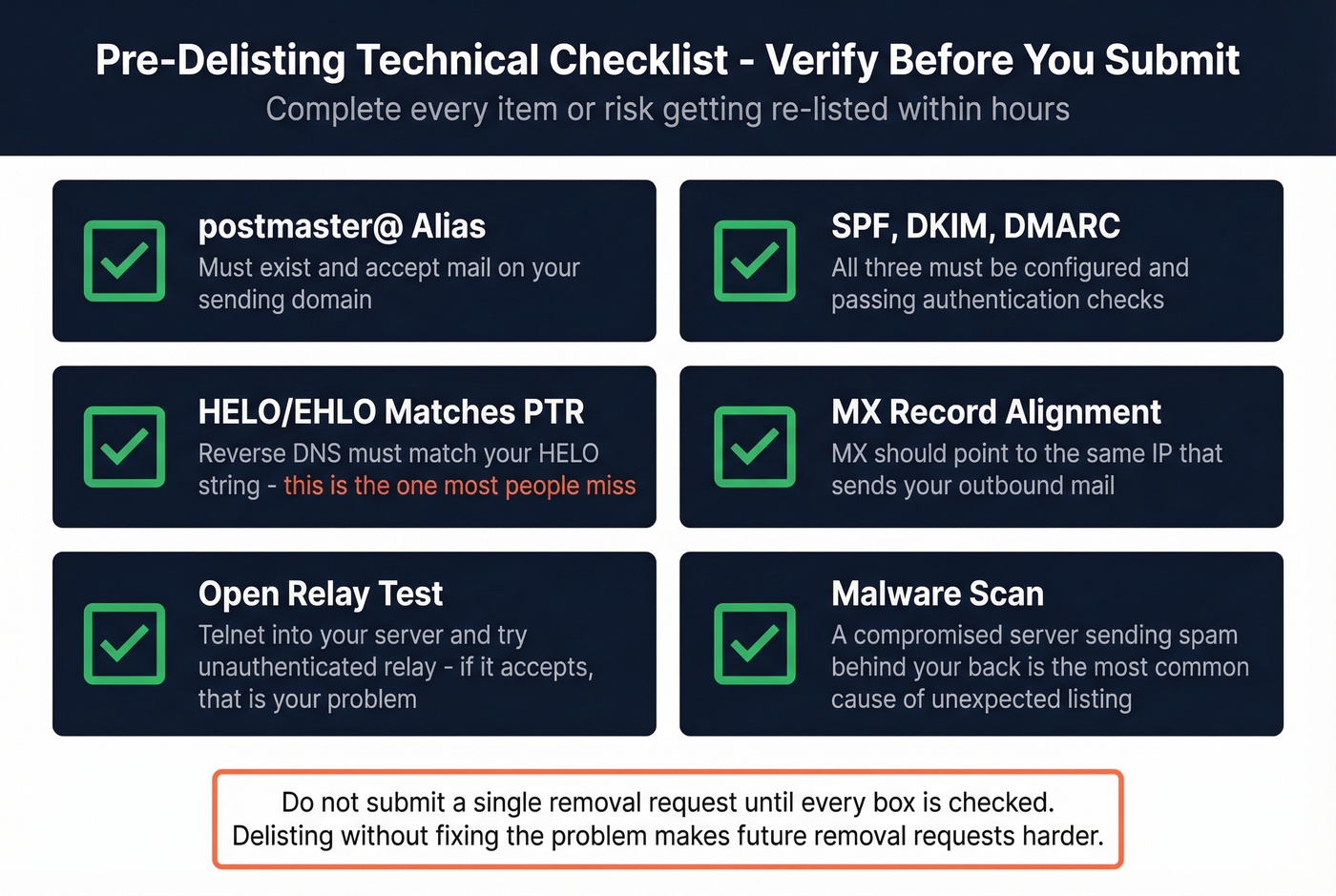
- postmaster@ alias exists and accepts mail on your sending domain
- If you run your own mail server: MX points to the same IP that sends your outbound mail
- SPF, DKIM, and DMARC are all configured and passing
- HELO/EHLO matches your IP's PTR record (also called reverse DNS) - this is the one most people miss
- Open relay test - telnet into your server and try the EHLO, MAIL FROM, RCPT TO sequence with an external address. If it accepts unauthenticated relay, you've found your problem.
- Malware scan - a compromised server sending spam behind your back is the most common reason for unexpected blacklisting
This checklist comes straight from practitioners who've successfully delisted from Spamhaus and kept their IP clean for months afterward. Once you've cleared every item, move on to the provider-specific steps.

Most IP blacklistings start with bad contact data - invalid emails that spike your bounce rate and trigger spam filters. Prospeo's 5-step email verification and 98% accuracy keep bounce rates under 4%, so your sending IP stays clean.
Fix the root cause of blacklisting: replace your data source.
Provider-by-Provider Delisting Steps
Spamhaus
Start at check.spamhaus.org. Enter your IP, identify which list you're on, and follow the path for that specific list:
- SBL (Spamhaus Block List): You can't request removal yourself. Your ISP or network owner must submit it. Contact your hosting provider and have them handle the request.
- DBL (Domain Block List): Domain owners can request removal directly, but you must use an email address associated with the listed domain. Gmail or Yahoo addresses won't work.
- PBL (Policy Block List): Self-removable if you run a mail server from the entered IP. Use the Spamhaus lookup tool to find your listing, then follow the removal link.
- CSS and XBL: These can auto-expire if no new spam is registered from your IP. You can request earlier removal via the Spamhaus form, but patience often works.
Spamhaus typically responds within a day or two once your request is valid. There's no paid fast-track option - anyone offering one is running a scam.
Barracuda
One warning before you start: submit exactly one request. Multiple submissions get ignored, and requests without valid information are discarded.
Go to barracudacentral.org/rbl/removal-request. Fill in three required fields - your mail server IP, your email address, and your phone number. Add a brief explanation of what you fixed. Removal requests are typically investigated and processed within 12 hours.
SpamCop
SpamCop is the forgiving one. If spam from your IP stops, removal happens automatically within 24-48 hours. You can speed it up by visiting the SpamCop lookup, checking the box that says "I've resolved the issue," and clicking delist.
Microsoft 365
Head to sender.office.com, Microsoft's official delist portal. Enter your email address and the blocked IP. Microsoft sends a verification email - click the link, then follow the delist instructions. Expect up to 24 hours for propagation. If it doesn't resolve, escalate through the Microsoft 365 admin center by opening a support ticket.
Gmail
Gmail doesn't have a one-click delist. Fix your authentication - SPF, DKIM, DMARC - first, then wait 3-5 days. Gmail's systems typically lift the block once they see clean traffic from your IP.
If it persists, use Google's contact form for bulk senders (search "Gmail postmaster bulk sender contact form" for the current URL, as Google rotates these pages). You'll need a short summary of the issue, a description of what you fixed, and full email headers from a recent bounced message. Include the complete headers - not just the subject line and sender.
Yahoo
Yahoo relies on Spamhaus for IP reputation, so delist from Spamhaus first and Yahoo mail should start flowing again. For persistent issues, Yahoo has a bulk sender form accessible through their postmaster page at postmaster.yahooinc.com that asks for your sending IPs, rDNS, DKIM configuration, volume estimates, and unsubscribe practices.
CBL/XBL
CBL provides an automatic removal link if spam from your IP has stopped. Visit the CBL lookup, and if you're eligible, click the removal link. One catch: if you've been re-listed too many times in the last 24 hours, the removal option gets blocked. Fix the root cause and wait.
SORBS, UCEProtect, PSBL
SORBS requires you to look up your IP, identify the specific list, and follow the delist link. You'll likely need to create an account. Timeline varies from a few hours to several days.
UCEProtect Level 1 auto-expires after 7 days. Don't pay for their "express removal" option - the consensus on r/sysadmin and deliverability forums is that it's a racket. Just wait it out.
PSBL removes automatically within 24-48 hours once spam stops.
The Recycled IP Problem
Sometimes you didn't do anything wrong. You spun up a new VPS and it's already blacklisted because the previous tenant was sending spam from that IP.
This is a real and frustrating problem. I've seen it hit roughly 1 in 5 new VPS setups. OVH, for example, has told customers they can't rotate primary IPs and can't guarantee clean IPs because IPv4 addresses are recycled due to the global shortage. You inherit whatever reputation the last tenant left behind.
Look, if your hosting provider won't swap a dirty IP, switch providers. Life's too short to fight someone else's spam reputation.
How to Stay Off Blacklists
Delisting is a one-time fix. Prevention is the actual strategy.
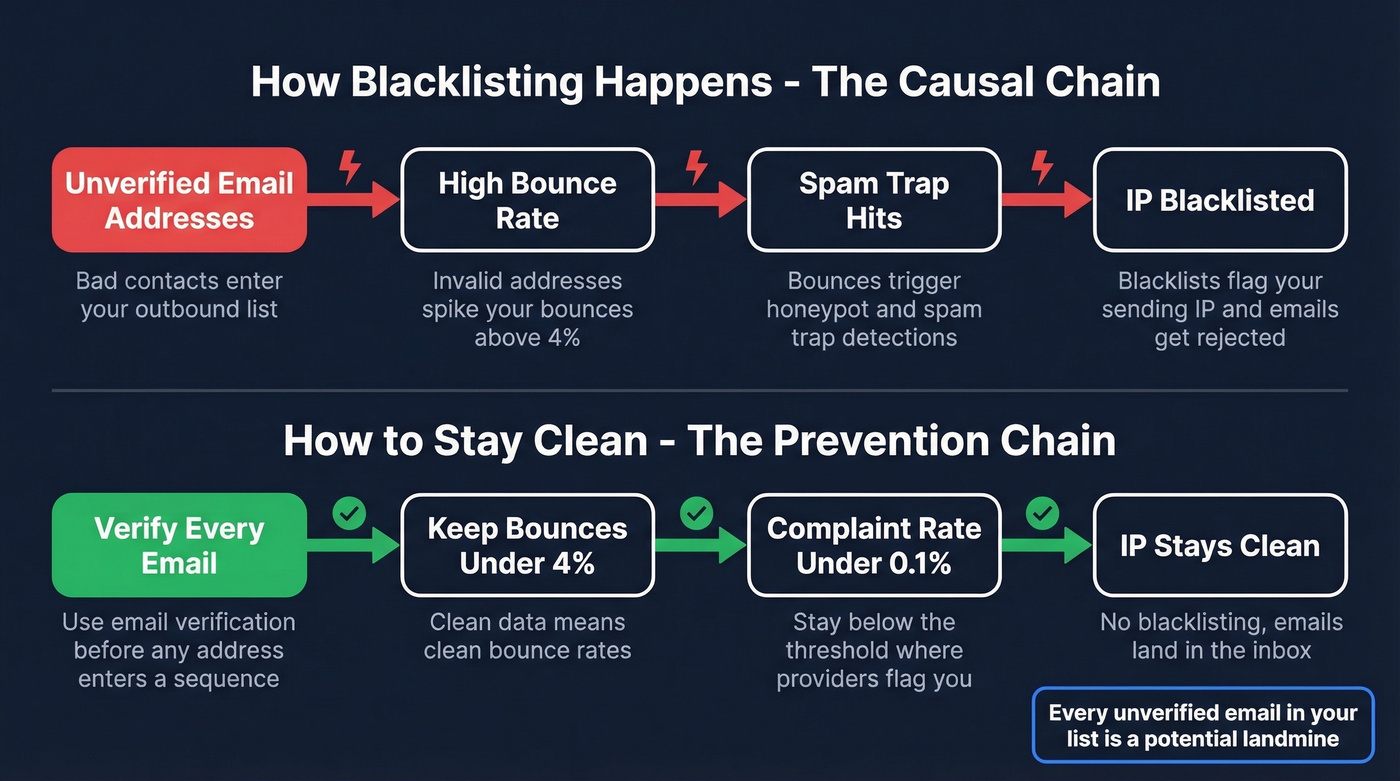
Keep your complaint rate under 0.1% - that's the threshold where major providers start flagging you. Above that, you're on borrowed time. The causal chain runs like this: bad contact data leads to bounces, bounces trigger spam trap hits, and spam trap hits cause blacklisting. Every unverified email address in your outbound list is a potential landmine.
For outbound teams, use a dedicated SMTP service like Postmark, SendGrid, or Amazon SES instead of self-hosting. Send from a dedicated IP so your reputation isn't affected by other senders. And verify every address before it enters a sequence - Prospeo's 5-step email verification catches the addresses that cause blacklisting, including spam traps, honeypots, invalid mailboxes, and catch-all domains, at 98% accuracy and roughly $0.01 per email.

Mistakes That Get You Re-Listed
Delisting before fixing the root cause. This is the number one mistake. Your compromised server or dirty list immediately triggers a re-listing, and Spamhaus and Barracuda both scrutinize repeat offenders more heavily.
Submitting multiple removal requests. Barracuda explicitly ignores duplicates. Spamhaus flags impatient requesters. Submit once, correctly, and wait.
Blaming the blacklist instead of investigating. The blacklist isn't the problem - it's a symptom. If you're listed, something on your end is generating spam signals. Find it.
Treating all blacklists equally. Spending two hours getting off a list that protects 500 mailboxes while ignoring your Spamhaus listing is backwards. Prioritize by impact.
Let's be honest about what we see most often: the majority of teams that get blacklisted don't have a server security problem - they have a data quality problem. A compromised server is dramatic but rare. Sending cold email to an unverified list full of spam traps? That happens every day, and it's entirely preventable.
You just spent hours delisting your IP. Now prevent it from happening again. Prospeo refreshes all 300M+ contact records every 7 days - not every 6 weeks like competitors - so you're never sending to stale, invalid addresses that destroy sender reputation.
Teams using Prospeo keep bounce rates under 4% and domains off blacklists.
FAQ
How long does it take to remove an IP from a blacklist?
SpamCop auto-removes in 24-48 hours once spam stops. Spamhaus processes manual requests in 24-48 hours. Barracuda typically resolves within 12 hours. Gmail is the slowest at 3-5 days. UCEProtect Level 1 auto-expires after 7 days with no action needed.
Can I remove my IP from Spamhaus myself?
PBL listings are self-removable through the Spamhaus lookup tool if you operate a mail server on that IP. DBL listings can be removed by the domain owner using a domain-associated email. SBL listings require your ISP or hosting provider to submit the request - Spamhaus won't accept end-user requests for those.
Why does my IP keep getting blacklisted after delisting?
The root cause isn't fixed. Common culprits include an open relay, a compromised account sending spam, or outbound campaigns hitting spam traps from unverified contact lists. It can also be a recycled IP inherited from a previous hosting tenant. For outbound teams, verify every address before sending - one spam trap hit can undo a successful delist.
What's the best free tool to check IP blacklist status?
MxToolbox checks 30+ blacklists in a single query and is the industry standard for free IP blacklist lookups. For Spamhaus specifically, use check.spamhaus.org to identify which exact list (SBL, DBL, PBL, XBL) flagged your IP, since each has a different removal process.