

5 Sales Demonstration Examples With Scripts You Can Steal
It's Tuesday morning. Your demo is in two hours. The prospect's a VP of Ops at a mid-market SaaS company, and your SDR's discovery notes are three bullet points and a prayer. You're about to wing it - and 59% of buyers already think sales pros don't bother understanding them. That stat isn't a coincidence. It's the result of thousands of demos just like the one you're about to give.
What follows are five sales demonstration examples - with scripts - so you never wing it again.
The Quick Version
- The universal demo arc: Context, Problem, Impact, Solution, Proof. Every great demo follows this sequence, whether you're selling $30 spray coating or a $3M gas turbine.
- The starter script: Problem-Solution format. It's the only demo call script a new AE needs for their first six months. Works for 80% of B2B deals and takes 20 minutes to learn.
- The biggest mistake: Demoing without discovery. Confused customers don't buy. If you don't know their top three problems before you share your screen, you're just giving a product tour.
What a Sales Demo Actually Is
A sales demo isn't a product demo, and it isn't a sales presentation. Those distinctions matter. A product demo walks through features - it's what your product team does at a conference booth. A sales presentation is a pitch deck with slides and a narrative arc. A sales demo sits between the two: it's a live or async walkthrough of your product, tailored to a specific buyer's problems, designed to move a deal forward.
"Tailored" is the key word. 86% of buyers prefer to buy from companies that deeply understand their goals. A generic feature tour doesn't demonstrate understanding - it demonstrates that you didn't do your homework.
The best demos feel like a conversation where the product happens to be on screen.
The Universal Demo Structure
Every high-performing demo follows a five-beat arc. The specifics change by deal size and industry, but the skeleton stays the same:
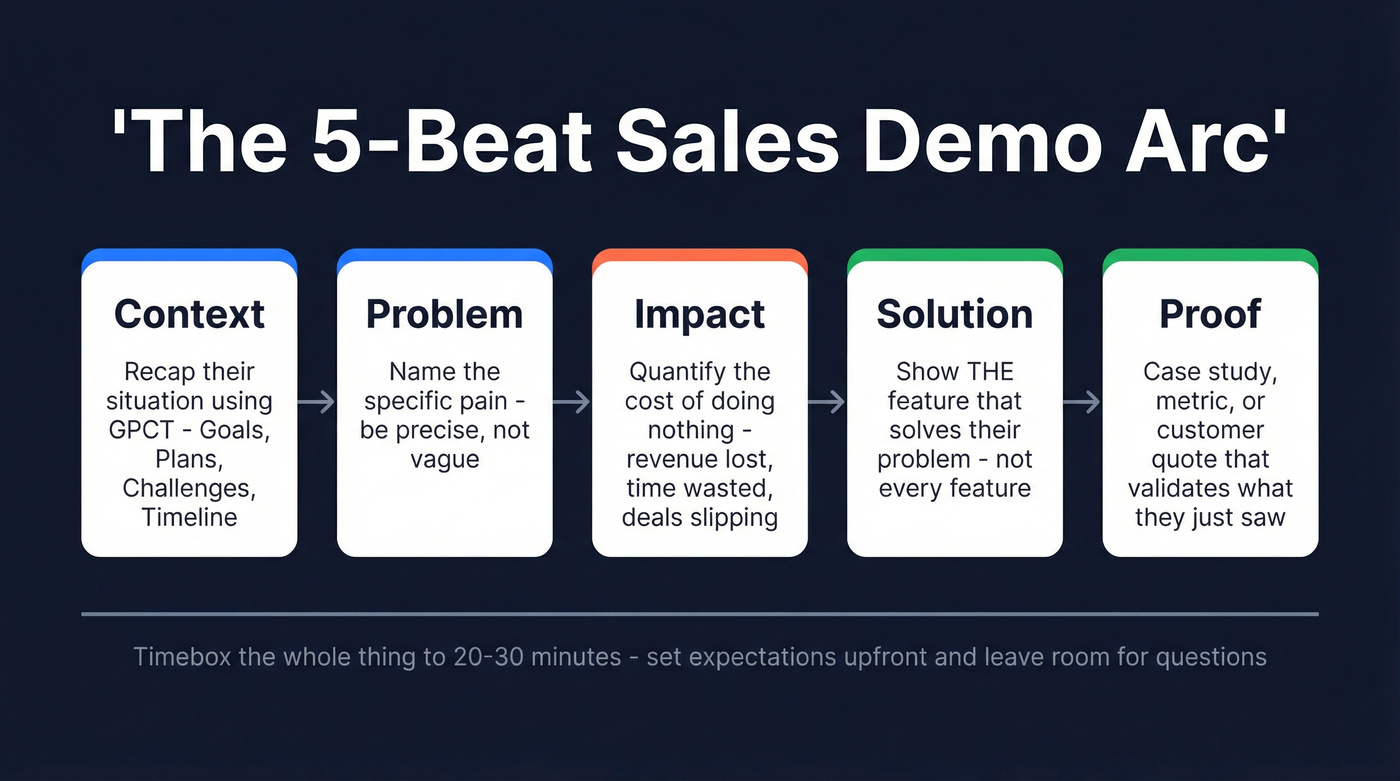
- Context - Recap what you know about their situation. Use the GPCT framework - Goals, Plans, Challenges, Timeline - and repeat it back: "So you're looking to achieve [this] by doing [this]. You need it done by [when], but you've got to overcome [this]. Sound right?"
- Problem - Name the pain. Be specific. "Manual data entry is eating 12 hours a week" hits harder than "inefficiency."
- Impact - Quantify the cost of inaction. Revenue lost, time wasted, deals slipping.
- Solution - Show the feature that solves the problem. Not every feature. The one that matters.
- Proof - Case study, metric, or customer quote that validates what they just saw.
Timebox the whole thing. "We'll cover A, B, and C in 25 minutes, then leave time for questions" sets expectations and keeps you from rambling. The content sweet spot is 20-30 minutes.
5 Sales Demo Examples That Close Deals
1. Problem-Solution Demo (SaaS)
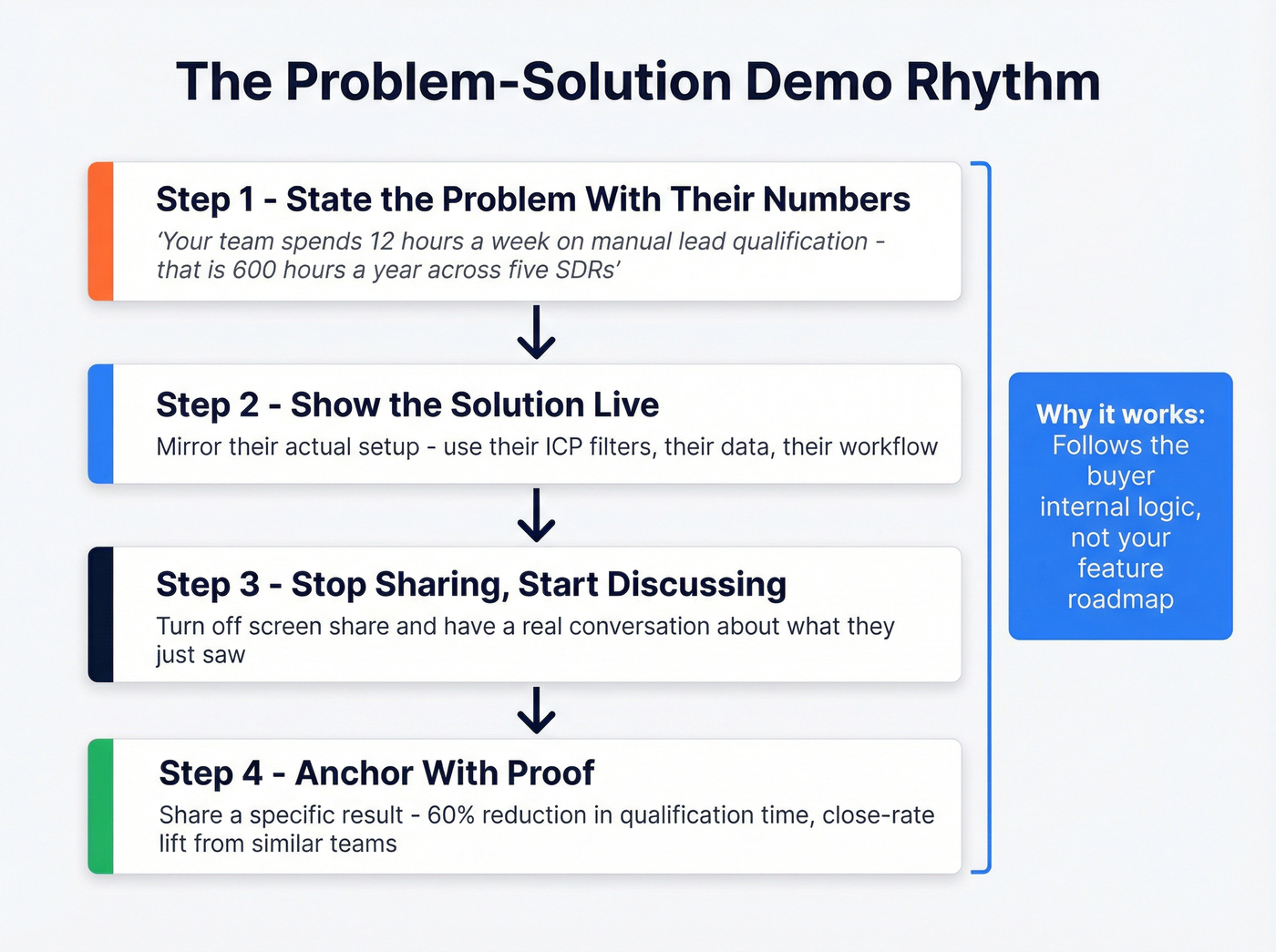
Start here if you're building your first demo call script template. This mirrors how buyers actually think: I have a problem, does this solve it?
Sample script:
"Thanks for joining, Sarah. Based on our last call, your team's spending about 12 hours a week on manual lead qualification - pulling data from three different tools, cross-referencing it, then entering it into HubSpot. That's roughly 600 hours a year across your five SDRs.
Let me show you how [Product] automates lead qualification, reducing manual data entry by 60%. Here's your dashboard - I've set it up to mirror your current ICP filters...
[Shows feature, stops screen share]
So that's the scoring engine. Teams using this approach often cut qualification time dramatically and see close-rate lift when reps spend more time selling and less time cleaning data. Does that match the kind of improvement you're looking for?"
The rhythm is deliberate: state the problem with their numbers, show the solution, stop sharing, discuss. Then anchor with proof. This sales demonstration example works because it follows the buyer's internal logic rather than your feature roadmap.
2. Value-Focused Exec Demo (Enterprise)
Exec demos aren't about features. They're about money.
We've watched reps spend 55 minutes walking a CFO through dashboards and then wonder why the deal stalled. When you're presenting to a CFO or CRO alongside a champion, lead with ROI and let the champion validate the technical details. Think of this less as a product walkthrough and more as a business case with a live product as evidence.
| What most reps do | What top performers do |
|---|---|
| Open with product overview | Open with three business outcomes the champion already validated |
| Show 8-10 features | Show 3 features, each tied to a dollar amount |
| End with "any questions?" | End with a pre-close commitment question |
The pre-close that works:
"Before we go into plans and pricing - based on everything you've seen today, do you feel this is what you're looking for? If not, it may not make sense to go over pricing."
That question - from a practitioner on r/sales - forces a commitment before the price conversation and saves everyone time if the fit isn't there.
3. Competitive Bake-Off Demo
When the prospect says "we already use X," don't panic. But here's what NOT to say:
❌ "Oh yeah, [Competitor] is terrible at reporting. Let me show you why we're better."
This insults their judgment. They chose that tool. Instead, reframe:
"Totally fair - [Competitor] is solid for [specific use case]. The teams that switch to us usually aren't unhappy with the core functionality. They're hitting limits on [specific gap - reporting, integrations, scale].
Let me show you the difference in practice...
[Side-by-side comparison of the specific workflow, not a feature dump]
The net result for [Customer Name] was a 40% reduction in [metric]. They were on [Competitor] for two years before switching."
Acknowledge the competitor's strengths, then show where you win. That earns trust. If you're looking for product demo examples to study, competitive bake-offs are some of the most instructive - they force you to be precise about differentiation rather than hiding behind a feature list.
4. Physical Product Demo (Non-SaaS)
Skip this section if you're purely SaaS, but the principles translate to any price point.
At the low end, Rust-Oleum's NeverWet demo is legendary: spray the coating on a shoe, pour chocolate sauce on it, and watch it slide off. No slides. No feature list. Just a visceral "holy crap" moment. At the high end, Siemens demos the SGT 750 gas turbine - a product worth millions - by preemptively addressing objections: emissions compliance, extreme-condition performance, ease of repair. They don't wait for the buyer to raise concerns. They build the answers into the demo flow.
The lesson is the same at $30 and $3M+: show the product solving a real problem, and preemptively address the objections that would stall the deal.
5. Async / Pre-Recorded Demo
Not every demo needs to be live. The async hybrid model - send a pre-recorded walkthrough for discovery, then tailor the live demo based on what the prospect engages with - is the most underrated format in B2B sales right now.
Here's the workflow:
- Record a 5-minute Loom covering your product's top three use cases.
- Send it before the live call with a note: "Watch whichever section is most relevant - we'll dive deeper on that in our call."
- Structure the live demo around what they watched.
- Keep the live session tight: Intro 5 min, Solution overview 15, Q&A 10, Next steps 5.
DemoBoost's analysis found narrative-driven demos produce 22x greater information retention than feature lists. Pre-recorded content lets you nail the narrative once and reuse it, while the live portion stays focused on their specific questions.

Your SDR's discovery notes shouldn't be "three bullet points and a prayer." Prospeo gives you 50+ data points per contact - job changes, tech stack, funding signals, and buyer intent - so every demo opens with context that makes prospects lean in.
Walk into every demo knowing more than your prospect expects.
Demo Conversion Benchmarks
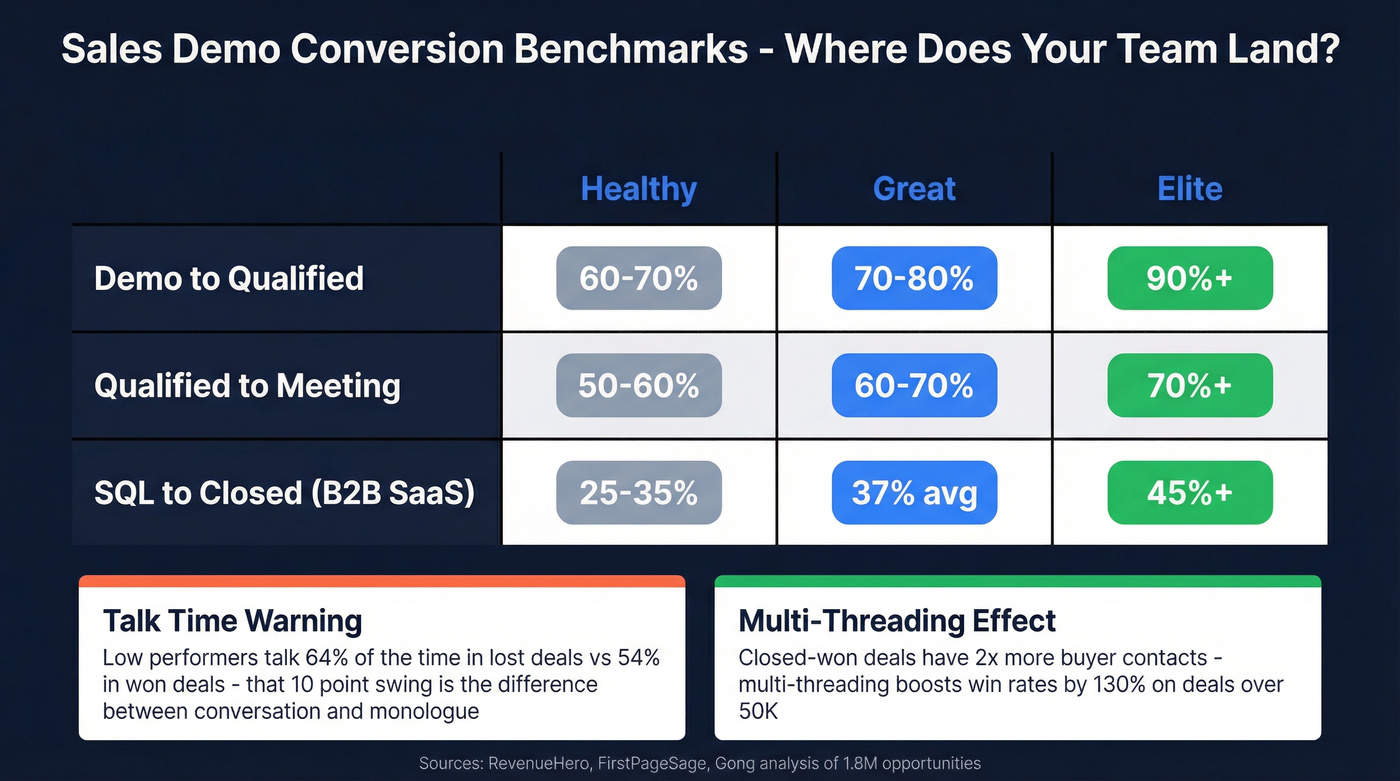
Knowing what "good" looks like prevents you from optimizing the wrong thing.
| Metric | Healthy | Great | Elite |
|---|---|---|---|
| Demo to Qualified | 60-70% | 70-80% | 90%+ |
| Qualified to Meeting | 50-60% | 60-70% | 70%+ |
| SQL to Closed (B2B SaaS) | 25-35% | 37% avg | 45%+ |
These inbound funnel benchmarks from RevenueHero cover the Demo Request to Qualified Lead to Booked Meeting pipeline. For demo-to-close specifically, most B2B teams land in the 10-30% range depending on ICP fit and deal size.
Gong's analysis of 1.8M opportunities adds texture. Low performers' talk time swings wildly - 54% in won deals versus 64% in lost deals. That 10-point swing is the difference between a conversation and a monologue.
The multi-threading data is equally striking: closed-won deals have 2x as many buyer contacts as closed-lost, and multi-threading boosts win rates by 130% on deals over $50K. If you're only demoing to one stakeholder on an enterprise deal, you're leaving money on the table. In our experience, teams that track demo-to-qualified religiously outperform those that only measure close rate - because the upstream metric is the one you can actually fix.
Bringing in a sales engineer lifts win rates by up to 30% on enterprise deals, and selling teams for closed-won deals are 67% larger than those for lost deals. Demos aren't a solo sport.
10 Demo Mistakes That Kill Deals
Here's the thing: most demo failures happen before the demo starts.
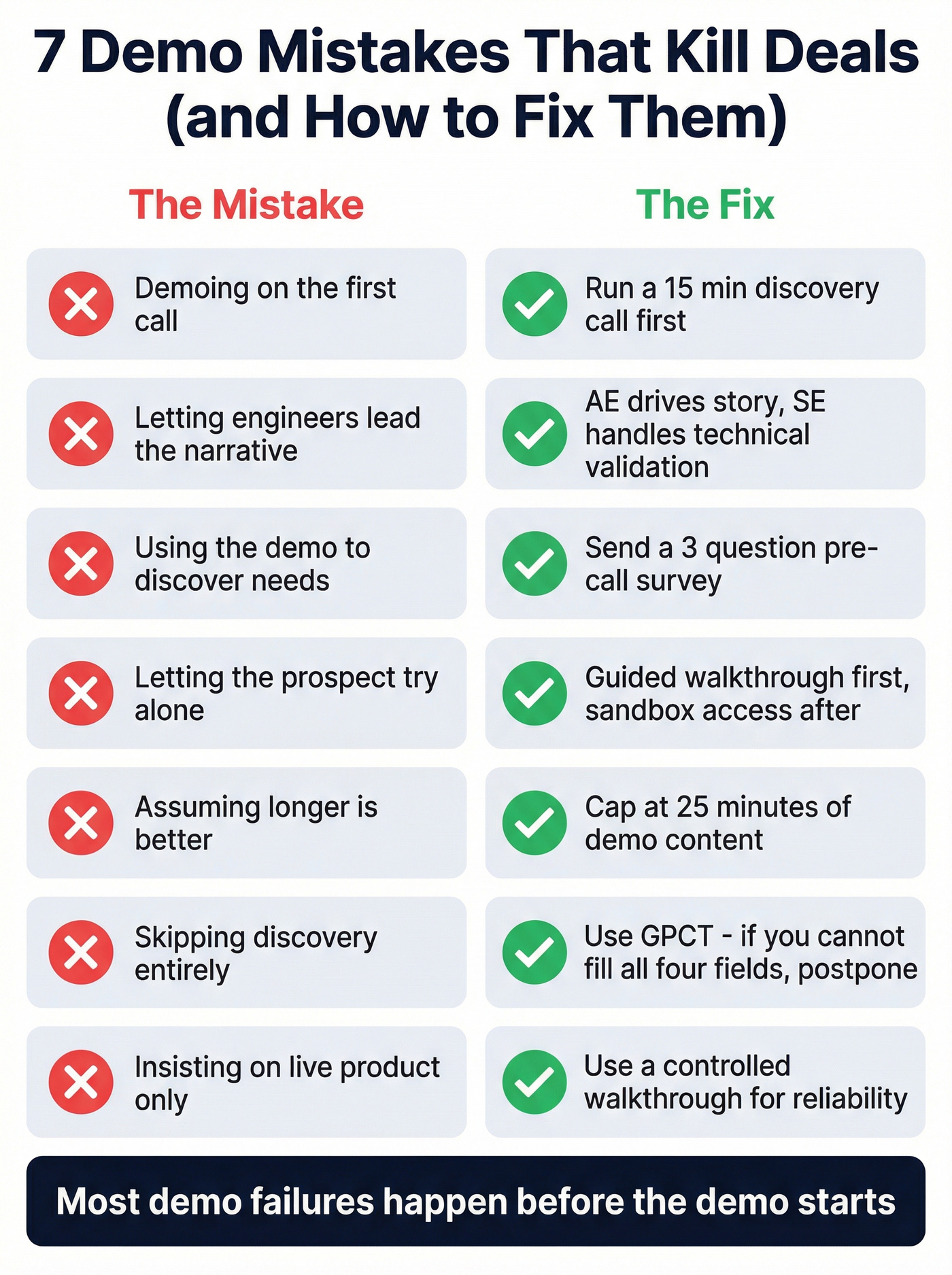
- Demoing on the first call. You haven't earned the right. Fix: Run a 15-minute discovery call first - even if the prospect insists on seeing the product.
- Letting engineers lead. They'll go deep on architecture when the buyer wants outcomes. Fix: Have the AE drive the narrative; bring the SE in for technical validation only.
- Using the demo to discover needs. That's backwards. Fix: Send a 3-question pre-call survey or run discovery in a separate session.
- Letting the prospect try alone. They'll get lost, confused, and ghost you. Fix: Guided walkthrough first, sandbox access after with a follow-up call scheduled.
- Assuming longer is better. Fix: Cap at 25 minutes of demo content. If you can't make your case by then, you're showing too many features.
- Skipping discovery entirely. No budget, authority, or timeline context means a wasted demo. Fix: Use GPCT. If you can't fill in all four fields, postpone.
- Insisting on live product. A controlled walkthrough with screenshots is sometimes safer than a live environment that crashes. Fix: Pre-record the risky sections and have them ready as a backup.
- Showing everything. Fix: Three features tied to their top problem. That's it. Keep two backups ready to swap in if the conversation shifts.
- Demoing future updates. You're giving them a reason to delay the purchase. Fix: Only demo what's live in production today.
- Comp plans that reward demos, not closes. This is the single most destructive incentive in B2B sales. It creates a demo factory, not a revenue engine. Fix: Tie at least 60% of variable comp to closed revenue, not activity.
The screen-share discipline from Factor 8 reinforces this - share a feature, stop sharing, discuss the benefit, repeat. When you screen share continuously, you talk more and the buyer talks less. Gong's data is clear that buyers who talk more end up buying more.
Pre-Demo Checklist
Run through this before every demo. It takes 15 minutes and prevents the most common failures.
- Discovery recap: Confirm their top 2-3 problems using GPCT. If you can't fill in all four fields, you're not ready to demo.
- Stakeholder map: Who's on the call? What does each person care about? If there's a technical evaluator and an exec, prep different talking points for each.
- Tech setup: Keep navigation to five clicks or less. Pre-load tabs. Close Slack. Hide bookmarks. Demo hygiene is professionalism.
- Agenda sent: Email the agenda 24 hours before. Include timing and topics. It sets expectations and reduces no-shows.
Let's be honest - teams lose demo slots every week because meetings get booked with bad contact data. A simple rule: if you aren't verifying emails and titles before the invite goes out, you're gambling with your calendar. Fifteen minutes of data verification saves an hour of wasted demo time.
The article's #1 rule: know their top three problems before you share your screen. Prospeo tracks 15,000 intent topics so you know exactly what buyers are researching - before the call. Pair that with 98% accurate emails to book the demo in the first place.
Stop winging discovery. Let intent data do the homework for you.
Demo Tools Worth Knowing
You don't need all of these. Pick one from each category that matches your deal complexity.
Real talk: skip the interactive demo platform entirely if your average deal is under $25K. A Loom recording and a good script will outperform a $30K/year tool every time at that price point.
| Category | Tool | Starting Price | Best For |
|---|---|---|---|
| Interactive Tours | Storylane | ~$40/mo | Product tours and leave-behinds |
| Interactive Tours | Navattic | ~$500-1,000/mo | HTML capture tours |
| Interactive Tours | Walnut | ~$15K+/yr | Mid-market click-throughs |
| Interactive Tours | Reprise | ~$30K+/yr | Enterprise environment clones |
| App Cloning | Demostack | ~$25K+/yr | Full app cloning for enterprise |
| Live Data Injection | Saleo | ~$20K+/yr | Clean data in live demos |
| Async Video | Loom | Free / ~$12.50/user/mo | Pre-recorded walkthroughs |
Storylane is the easiest on-ramp if you're just getting started with product tours. Navattic takes a similar approach with HTML-based captures - solid for mid-market teams that want interactive demos without engineering resources. Demostack and Reprise are the heavy hitters for enterprise teams that need full environment clones with data injection; expect to spend $25K-$30K+ per year for either. Saleo takes a different approach by injecting clean, realistic data into your live product so you never demo with "Test Account 47" on screen.
For async workflows, Loom's free tier is genuinely enough for most teams.
FAQ
How long should a sales demo be?
20-30 minutes of demo content plus 10 minutes for Q&A. Gong data shows shorter, focused demos outperform 60-minute marathons. If you can't make your case in 30 minutes, you're showing too many features.
Should I use slides or a live product?
Live walkthrough for most B2B deals - but use the screen-share-then-stop technique. Slides work best for exec-level value framing before the product portion. Many reps combine a brief presentation with a live product walkthrough for the strongest results.
How many demos to close a B2B deal?
Typically 1-3. SMB deals often close after one demo. Enterprise deals with 6+ stakeholders usually need a discovery demo, a technical deep-dive, and an exec presentation.
Where can I find a good demo call script?
Start with the Problem-Solution sales demonstration example in this article - it's the most versatile format for B2B. Customize it by replacing the pain points and metrics with your prospect's specific numbers from discovery, and you'll have a working script in under 20 minutes.
What tools verify prospect data before a demo?
We use Prospeo for this. It verifies emails at 98% accuracy on a 7-day refresh cycle across 300M+ professional profiles. Running your list through verification prevents bounced invites and wasted prep on contacts who've changed roles.