

SMTP Testing: The Complete Guide for 2026
Your staging environment passed every test. Green lights across the board. Then production went live, and 14% of your emails bounced - because the SMTP testing never validated TLS negotiation, and your cloud provider blocks port 25 by default. Nobody caught it because the catch-all test server accepted everything without complaint.
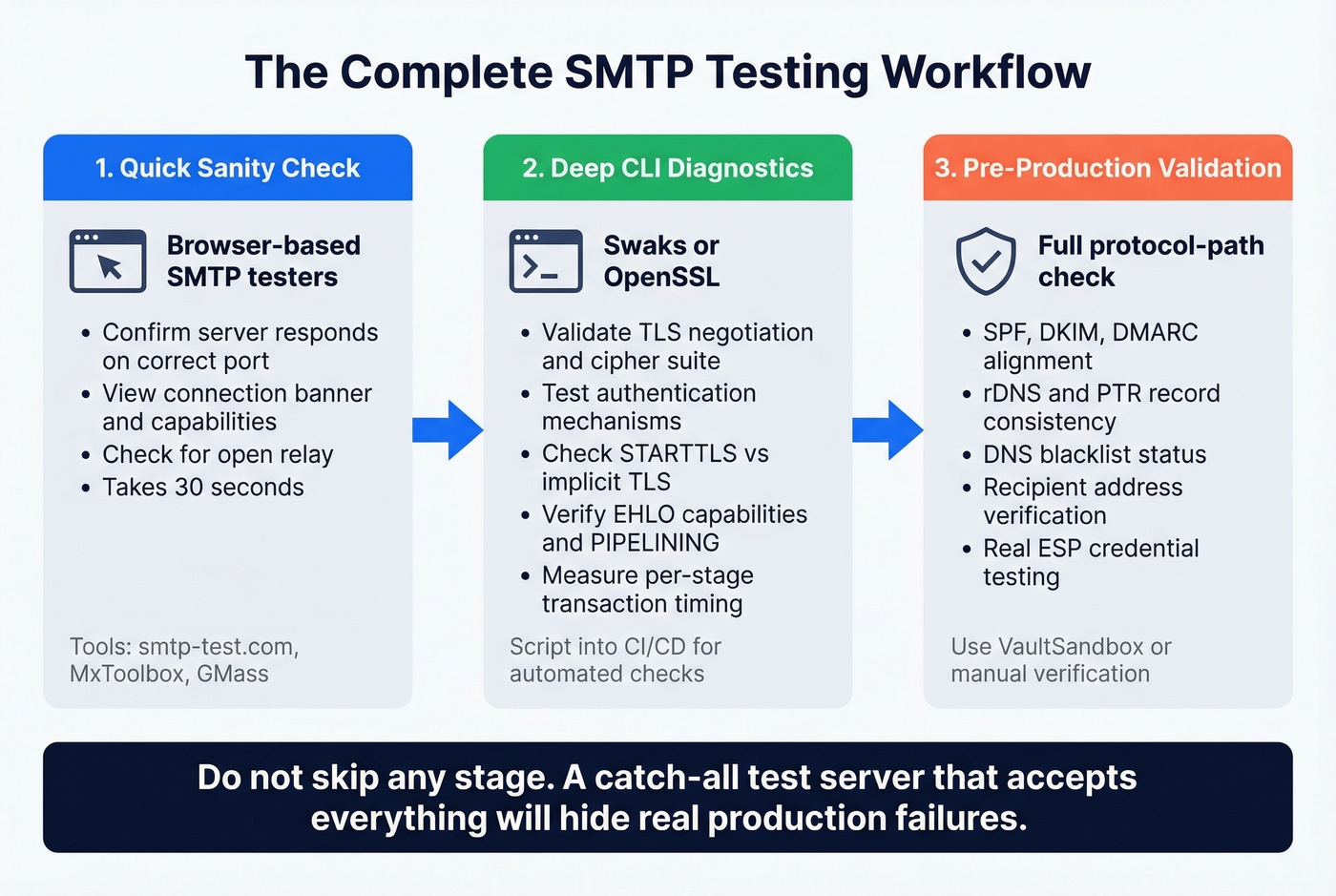
We've seen this exact scenario tank a product launch. It happens because most guides show you a Telnet transcript, tell you to type EHLO, and call it a day. A proper SMTP test covers connectivity, TLS negotiation, authentication mechanisms, relay configuration, rDNS/PTR records, DNS blacklist status, MX records, response time, hostname validity, and PIPELINING behavior. Skip any of those, and you're flying blind.
Here's what a complete workflow actually looks like - from quick browser checks to production-grade troubleshooting - plus every error code you'll hit along the way.
What You Need (Quick Version)
- Quick browser check? Use an online SMTP test tool like smtp-test.com or MxToolbox - free, instant, shows full connection logs.
- Serious CLI diagnostics? Install Swaks. It replaces Telnet, handles TLS, and scripts into CI pipelines.
- Dev/staging sandbox? Mailtrap for visual testing; add protocol-path validation before production.
And once your server checks out, verify the addresses you're sending to. Bad recipient data tanks sender reputation just as fast as a misconfigured server.
Ports and TLS Modes
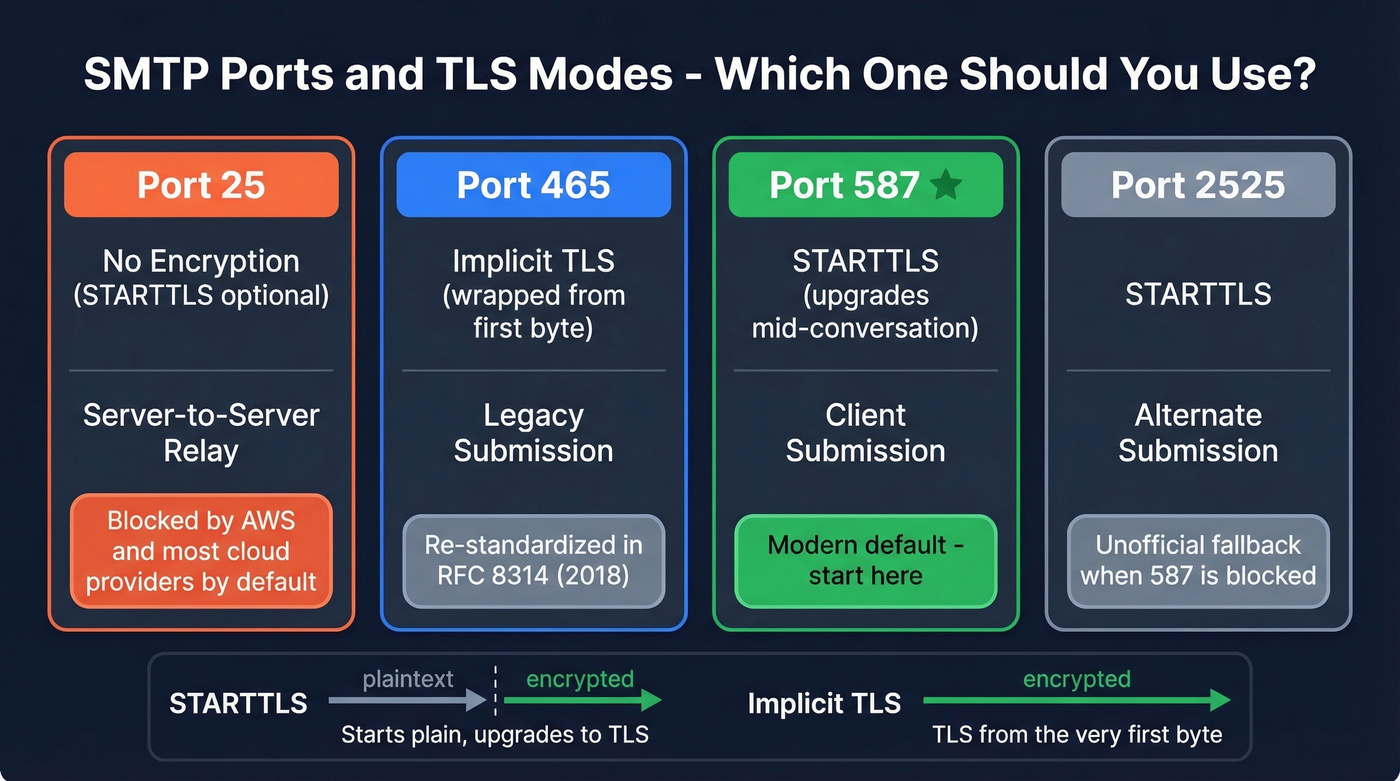
Every session starts with a port decision, and picking the wrong one is the fastest way to waste an hour debugging a non-problem.
| Port | Encryption | Typical Use | Notes |
|---|---|---|---|
| 25 | None (STARTTLS optional) | Server-to-server relay | Blocked by AWS by default; other cloud providers often restrict it too |
| 465 | Implicit TLS | Legacy submission | Re-standardized by RFC 8314 (2018); wraps TLS immediately |
| 587 | STARTTLS | Client submission | Modern default for authenticated sending |
| 2525 | STARTTLS | Alternate submission | Unofficial; used when 587 is blocked |
The distinction between STARTTLS and implicit TLS matters more than most guides let on. STARTTLS starts as a plaintext connection and upgrades to TLS mid-conversation - the server advertises the capability, and the client opts in. Implicit TLS on port 465 wraps the entire session in TLS from the first byte. Both are secure once negotiated, but they require different client configurations.
Here's the thing: every guide tells you to test on port 25 without mentioning that many cloud environments restrict it by default. AWS requires you to request removal from the EC2 port-25 throttle. If your test fails immediately on port 25, check your provider's firewall policy before touching your SMTP config. Port 587 with STARTTLS is the modern default for a reason - start there.
Online SMTP Test Tools
Most online testers are glorified ping tools. They'll confirm your server responds on port 587 and maybe show a banner, but they skip TLS certificate depth, DKIM/SPF validation, and authentication mechanism checks. That said, they're perfect for quick sanity checks - and they eliminate the friction of firing up a terminal.
| Tool | Free? | Shows Full Log | Notes |
|---|---|---|---|
| smtp-test.com | Yes | Yes | Real-time diagnostics and full connection logs |
| MxToolbox | Yes | Partial | Includes an open relay test, PTR/rDNS checks, and response-time measurements |
| GMass | Yes | Yes | Shows the exact SMTP "conversation" and supports ports 25/2525/465/587 |
| SMTPer | Yes | Yes | Browser-based sender; supports SSL/TLS options |
| DNS Checker | Yes | Partial | Simulates an email transfer and supports common ports including custom ones like 2525 |
MxToolbox is worth running if you're configuring a new mail server because it includes an open relay test. Any of these tools can help you run a quick server connection check before diving into CLI diagnostics.
A privacy note worth taking seriously: browser-based testers require you to enter SMTP credentials into a third-party web app. Always use a test account with a disposable password, and rotate credentials after testing.
Provider Settings Reference
If you're testing against a specific provider, here are the settings you need:
| Provider | SMTP Host | Port | Auth Method | Notes |
|---|---|---|---|---|
| Gmail | smtp.gmail.com | 587 | OAuth2 / App Password | Requires app password if 2FA enabled |
| Office 365 | smtp.office365.com | 587 | OAuth2 (preferred) | Basic auth disabled for new tenants |
| Amazon SES | email-smtp.*.amazonaws.com | 587 | SMTP credentials (IAM) | Must verify sender identity first |
| SendGrid | smtp.sendgrid.net | 587 | API key as password | Username is always "apikey" |
| Mailgun | smtp.mailgun.org | 587 | Domain credentials | Sandbox domain for testing |
| Postmark | smtp.postmarkapp.com | 587 | Server API token | Strict sender signature required |
To check your rDNS record - which many mail systems expect to be consistent with your hostname/HELO - run nslookup -type=ptr YOUR.IP.ADDRESS before testing.
How to Test SMTP from the Command Line
Telnet (Legacy, No TLS)
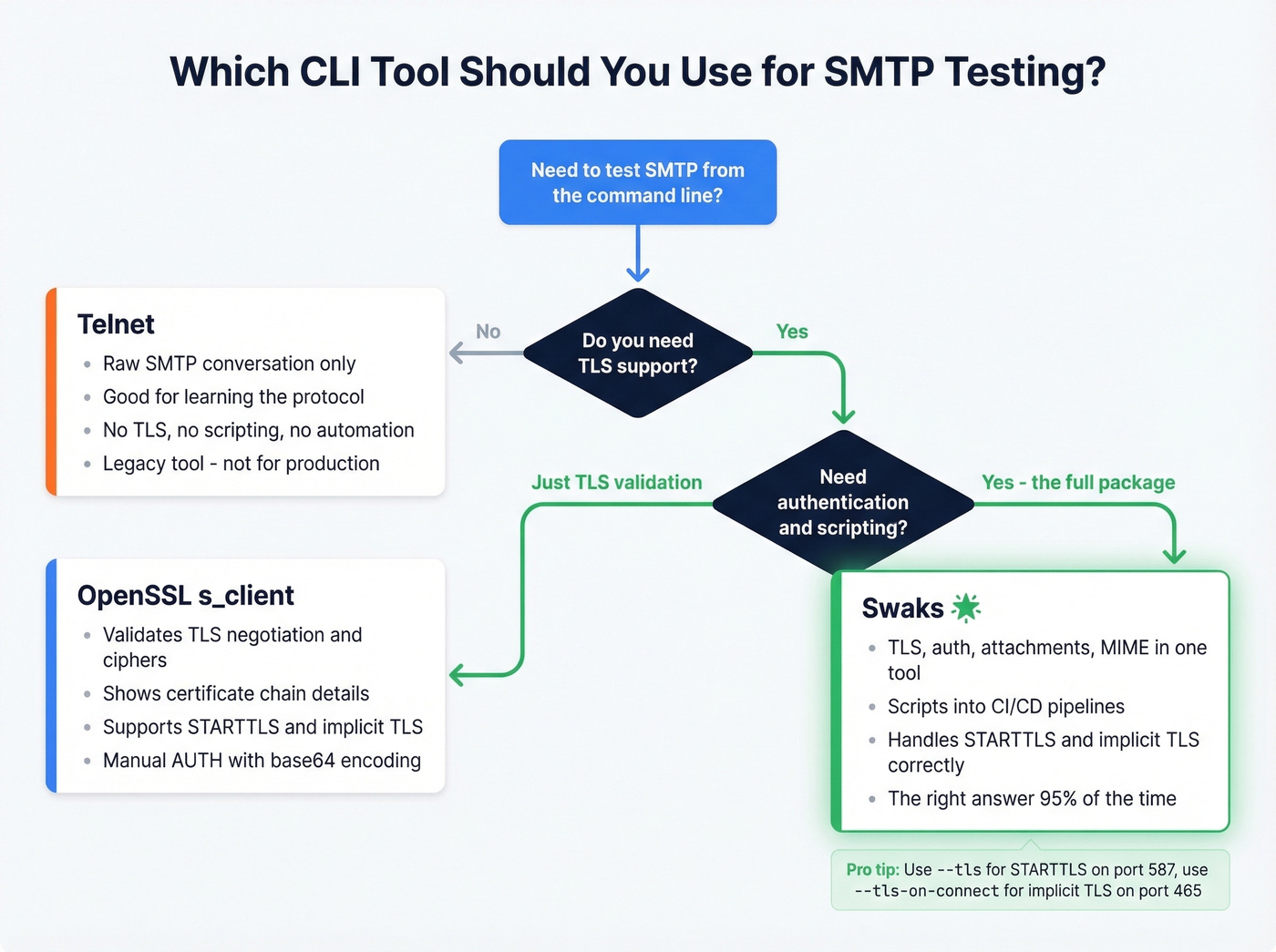
Look, using Telnet for protocol diagnostics in 2026 is absurd. No TLS support, no backspace key, no scripting, no automation. But understanding the raw SMTP conversation helps you debug everything else, so it's worth walking through once.
On Windows, enable it first:
dism /online /Enable-Feature /FeatureName:TelnetClient
Then walk through the handshake:
telnet smtp.example.com 25
220 smtp.example.com ESMTP ready
EHLO myclient.example.com
250-smtp.example.com Hello
250-PIPELINING
250-SIZE 52428800
250-STARTTLS
250-AUTH LOGIN PLAIN
250 ENHANCEDSTATUSCODES
MAIL FROM:<sender@example.com>
250 2.1.0 OK
RCPT TO:<recipient@example.com>
250 2.1.5 OK
DATA
354 Start mail input; end with <CRLF>.<CRLF>

Subject: Test message
This is a test.
.
250 2.0.0 OK
QUIT
221 Bye
The difference between HELO and EHLO matters. HELO starts a basic session without extension support. EHLO (Extended HELO) triggers the server to list its capabilities - PIPELINING, STARTTLS, AUTH, ENHANCEDSTATUSCODES. Always use EHLO.
A note on PIPELINING: some servers won't respond the way you expect until you issue DATA. If you send MAIL FROM and RCPT TO and get silence, the server is waiting for the next stage of the transaction, not failing.
OpenSSL for TLS and Auth
When you need to validate TLS negotiation - which is most of the time - OpenSSL replaces Telnet:
openssl s_client -connect smtp.example.com:25 -starttls smtp
The output shows the TLS version and cipher negotiated, such as TLSv1.3 with TLS_AES_256_GCM_SHA384. If you see "didn't found starttls in server response" or "no peer certificate available," the server either doesn't support STARTTLS or something in the path is breaking negotiation.
For authenticated testing, base64-encode your credentials:
echo -n "username@example.com" | base64
echo -n "yourpassword" | base64
Then inside the OpenSSL session:
AUTH LOGIN
334 VXNlcm5hbWU6
dXNlcm5hbWVAZXhhbXBsZS5jb20=
334 UGFzc3dvcmQ6
eW91cnBhc3N3b3Jk
235 2.7.0 Authentication successful
Critical warning for Microsoft 365: Microsoft disabled basic auth for new tenants, and SMTP AUTH is off by default. If your AUTH LOGIN test fails, enable SMTP AUTH for the mailbox/tenant or switch to OAuth2.
Swaks - Just Use This
Swaks is the best CLI tool for this job. Period. If you test mail servers more than once a month and you're still using raw Telnet or piping commands through OpenSSL, you're wasting time. Swaks handles TLS, authentication, attachments, MIME construction, and scripting in a single binary.
It supports SMTP, ESMTP, and LMTP protocols, plus extensions including TLS, authentication, pipelining, PROXY, and XCLIENT. Available on GitHub, licensed GPLv2.
Install it everywhere:
# macOS
brew install swaks

# Debian/Ubuntu
sudo apt-get install swaks

# Fedora/Arch
sudo dnf install swaks  # or pacman -S swaks
Windows users: run it through WSL.
A typical authenticated test with STARTTLS:
swaks - from sender@example.com \
      --to recipient@example.com \
      --server smtp.example.com:587 \
      --auth plain \
      --tls \
      --auth-user sender@example.com \
      --auth-password 'yourpassword'
The --tls flag triggers STARTTLS on a plaintext port. For implicit TLS on port 465, use --tls-on-connect instead. This distinction trips people up constantly - using --tls on port 465 fails because the server expects TLS from the first byte, not an upgrade.
Reading Swaks output: > means data sent to the server, < means data received, * flags unexpected responses. For CI pipelines, Swaks scripts cleanly into shell workflows - run it after deployment, parse the exit code, and fail the build if mail delivery is broken. You can also resend saved .eml files with --data @/path/message.eml or attach files with --attach @/path/file.pdf.
For measuring per-stage transaction timing - connect, helo, mailfrom, rcptto, data, quit - the smtpping utility provides granular latency data.

A perfectly configured SMTP server still bounces when you're sending to bad addresses. Prospeo's 5-step email verification - with catch-all handling, spam-trap removal, and honeypot filtering - ensures the data on the other end is just as solid as your server config.
Fix the server, then fix the list. Start with 75 free verified emails.
Dev and Staging Environments
MailHog gives you false confidence.
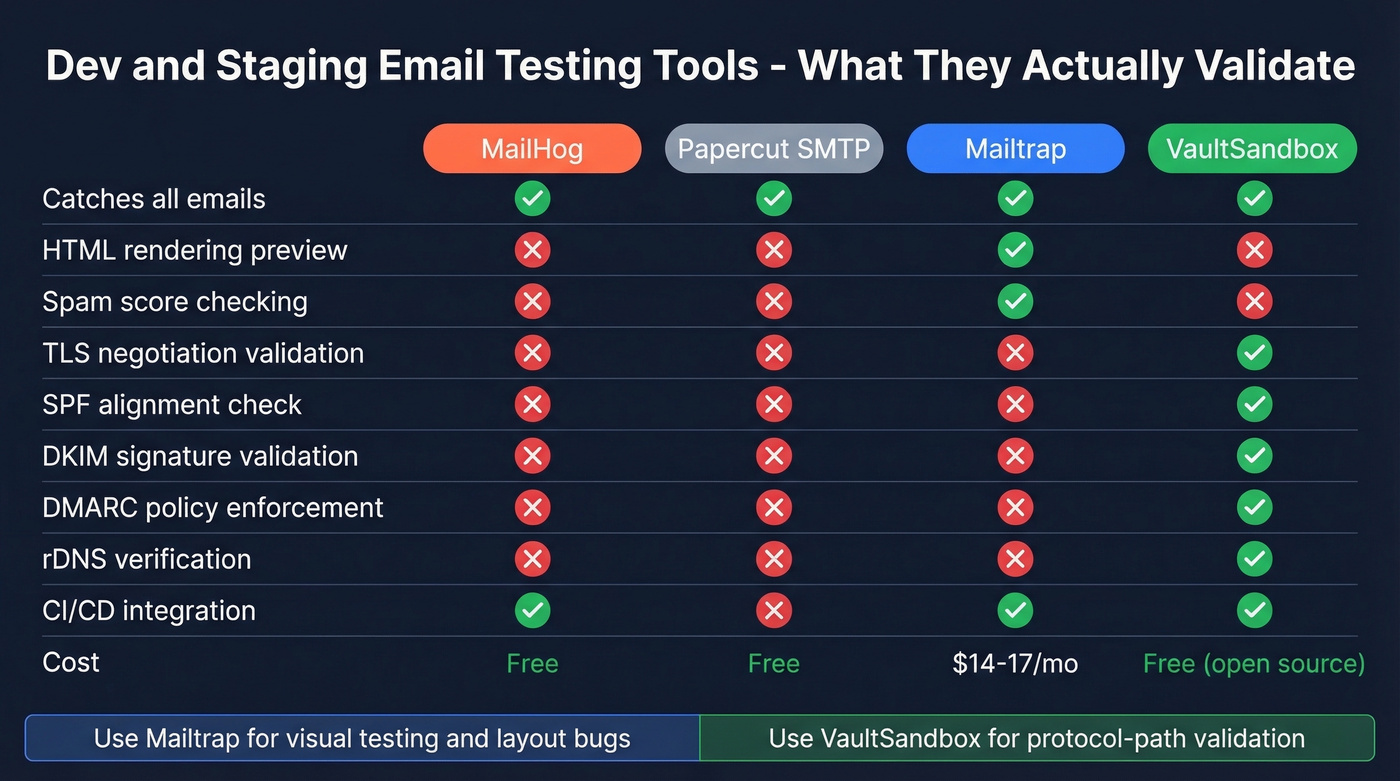
It catches every email your application sends, displays them in a nice web UI, and validates absolutely nothing. TLS negotiation? Skipped. SPF alignment? Ignored. DKIM signatures? Not checked. DMARC policy? Doesn't exist. Your CI pipeline passes with flying colors, and then production bounces because the real mail server actually enforces these things. On r/devops, developers consistently echo this frustration - MailHog "isn't quite what I'm looking for" when they need realistic email validation beyond a basic catch-all.
Use Mailtrap if you need visual email testing - preview HTML rendering, check headers, inspect spam scores. It's the most polished sandbox option at $17/month (or $14/month billed annually) for Email Sandbox, and it catches layout bugs that CLI tools miss entirely.
Skip Mailtrap if you need protocol-path validation. For that, look at VaultSandbox - an open-source SMTP gateway (AGPLv3) that validates the real protocol path including TLS, SPF, DKIM, DMARC, and rDNS verdicts. It's designed to let you test real ESP integrations using the same credentials you use in production, but routes everything through a validation layer. SDKs available for Node, Python, Go, Java, and .NET.
Use Papercut SMTP if you just need a lightweight local catch-all for development and don't want to configure anything.
The decision framework is simple: catch-all servers for visual testing and application-level debugging, protocol-path validators for pre-production confidence. You don't need 10 tools. You need two - one browser-based tester for quick checks, Swaks for everything else. Add a sandbox if you're testing email templates.
Real talk: if your average deal size is under $10k and you're sending fewer than 5,000 emails a month, MailHog plus Swaks is all you need. VaultSandbox and Mailtrap are for teams where a deliverability failure costs real money.
SMTP Error Codes Reference
Error codes follow a predictable structure. The first digit tells you the category: 2xx means success, 4xx is a temporary failure (retry later), and 5xx is permanent (stop trying). 3xx means the server needs more input. The second digit narrows the scope: x0z is syntax, x1z is informational, x2z is connection-related, and x5z is mail-system status.
| Code | Meaning | What to Do |
|---|---|---|
| 220 | Server ready | Connection successful - proceed with EHLO |
| 235 | Auth successful | Credentials accepted |
| 250 | Action completed | Command succeeded - continue sequence |
| 354 | Start mail input | Enter message body, end with . on its own line |
| 421 | Service unavailable | Server busy or shutting down - retry later |
| 450 | Mailbox unavailable | Temporary - mailbox full or disabled |
| 451 | Local error | Server-side processing failure - retry |
| 452 | Insufficient storage | Server disk full - contact admin |
| 454 | TLS not available | STARTTLS failed - check certificate config |
| 530 | Auth required | Server requires authentication before sending |
| 535 | Auth failed | Bad credentials or disabled auth mechanism |
| 550 | Mailbox not found | Address doesn't exist - permanent bounce |
| 553 | Bad mailbox name | Address format rejected - check syntax |
| 554 | Transaction failed | Spam filter, policy block, or blacklisted IP |
Enhanced status codes add a second layer of detail using the format class.subject.detail. The class mirrors the first digit (2/4/5). Subject families include X.1 for addressing issues, X.2 for mailbox problems, X.5 for mail system status, and X.7 for security and policy. Three you'll see constantly:
- 5.1.1 - bad destination mailbox address (the recipient doesn't exist)
- 5.7.8 - authentication credentials invalid (wrong password or disabled auth)
- 4.7.0 - temporary authentication failure (often greylisting or rate limiting)
Read enhanced codes left to right: permanent or temporary, then what category, then specific cause. That three-part structure tells you exactly where to look.
Troubleshooting Playbook
When a test fails, resist the urge to start changing settings randomly. We've debugged enough mail server failures to know: the problem is almost never where you think it is. Follow a diagnostic sequence that narrows things systematically.
Step 1: Capture the full log. Every tool in this guide - Swaks, OpenSSL, browser testers - produces a transaction log. Save it. The log tells you exactly which stage failed.
Step 2: Identify the failing stage. Failures fall into five buckets:
- Connection failure - can't reach the server at all. Check DNS resolution, port availability, firewall rules, and whether your cloud provider blocks port 25.
- Authentication failure - connection works, but credentials are rejected. Verify username/password, confirm the auth mechanism (PLAIN vs LOGIN vs OAuth2), and check whether your provider has disabled basic auth.
- Recipient rejection - auth passes, but the server rejects the recipient address. The address doesn't exist, or the server won't relay to that domain.
- Post-acceptance filtering - the server returns
250 OKbut the email never arrives. This is the sneakiest category. Acceptance doesn't equal delivery. Content filters, spam scoring, and policy engines all operate after the transaction completes. - Application workflow failure - the email sends fine from CLI but fails from your app. Check your application's library configuration, connection pooling, timeout settings, and error handling.
Step 3: Narrow the cause. Once you know the bucket, dig deeper. Auth failure alone could be wrong credentials, a disabled mechanism, an expired token, or an IP-based restriction. Don't fix four things at once.
Step 4: Fix the smallest proven cause. Change one variable. Test again.
Step 5: Replay with Swaks. Use Swaks to replay the exact same transaction. If it works in Swaks but fails in your app, the problem is your application code, not your mail server.
Common gotchas that waste hours: rDNS mismatch where your sending IP's reverse DNS doesn't match your hostname/HELO, greylisting that temporarily rejects the first attempt (retry after 5-10 minutes), and PIPELINING behavior where the server batches responses and you think it's hung. Also, monitor your SMTP server logs - the client-side view only tells half the story.
Verify Recipients Before Sending
Your server is configured, authenticated, and passing every test. But roughly 12% of any email list goes stale within a quarter, and those bounces silently destroy sender reputation. A perfectly configured mail server sending to dead addresses still gets blacklisted.
Prospeo runs a 5-step verification process on every email address - catch-all domain handling, spam-trap removal, honeypot filtering, syntax validation, and real-time mailbox verification. The result is 98% email accuracy across 143M+ verified addresses. Before you launch that outbound campaign, upload your list and let it flag the addresses that'll bounce. Results come back in minutes, even for bulk uploads.

You just validated TLS, checked rDNS, and confirmed your relay config. Don't let bad recipient data undo all that work. Prospeo delivers 98% email accuracy on 143M+ verified addresses - refreshed every 7 days, not every 6 weeks.
Your SMTP is production-ready. Make sure your contact data is too.
FAQ
What's the best port for SMTP testing?
Port 587 with STARTTLS is the modern default for authenticated sending. Port 465 works for implicit TLS. Port 25 is blocked by AWS and often restricted in other cloud environments - always check your provider's firewall policy before testing on it.
How do I test SMTP without Telnet?
Install Swaks - it handles TLS, authentication, and scripting in one command. For browser-based checks, smtp-test.com and MxToolbox work without any CLI setup. Both show full connection logs.
What does SMTP error 535 mean?
Error 535 means authentication credentials are invalid. Check your username and password, confirm the expected auth mechanism (PLAIN, LOGIN, or OAuth2), and verify your provider hasn't disabled basic auth for your tenant.
Can I test SMTP from a browser?
Yes. Tools like smtp-test.com and MxToolbox validate connectivity and TLS from a web interface. Always use a disposable test account and rotate credentials afterward - you're entering them into a third-party app.
How do I verify email addresses before sending?
Use a verification tool like Prospeo, which runs catch-all detection, spam-trap removal, and honeypot filtering across 143M+ verified addresses at 98% accuracy. The free tier covers 75 verifications per month - no credit card required.