

SPF Generator: Build & Publish a Record That Works
An SPF generator takes 30 seconds. Fixing the record it creates takes 3 hours. The generator isn't the hard part - it's knowing which include strings to use, staying under 10 DNS lookups, and publishing the record without breaking what's already there.
Quick answer: Use MxToolbox or EasyDMARC's SPF record generator to build the syntax. Both are free and handle the formatting. PowerDMARC's generator is solid too, especially if you're already in their DMARC workflow. But the tool only writes the record - you still need to know what goes into it, how to combine multiple senders, and how to avoid the mistakes that tank deliverability for weeks.
What Is an SPF Record?
SPF (Sender Policy Framework) authorizes which servers can send email on behalf of your domain. It's stored as a DNS TXT record and evaluated by receiving mail servers every time someone sends a message using your domain. The governing standard is RFC 7208, published in 2014.
SPF authorizes sending servers. DKIM cryptographically signs messages. DMARC tells receivers what to do when either fails. You need all three, but SPF is where most teams start - and where most mistakes happen.
SPF alone doesn't prevent From: address spoofing. It only checks the envelope sender (Return-Path), not the visible From header your recipients see. That distinction matters a lot, and we'll come back to it.
SPF Syntax Explained
Here's what an SPF record actually looks like:
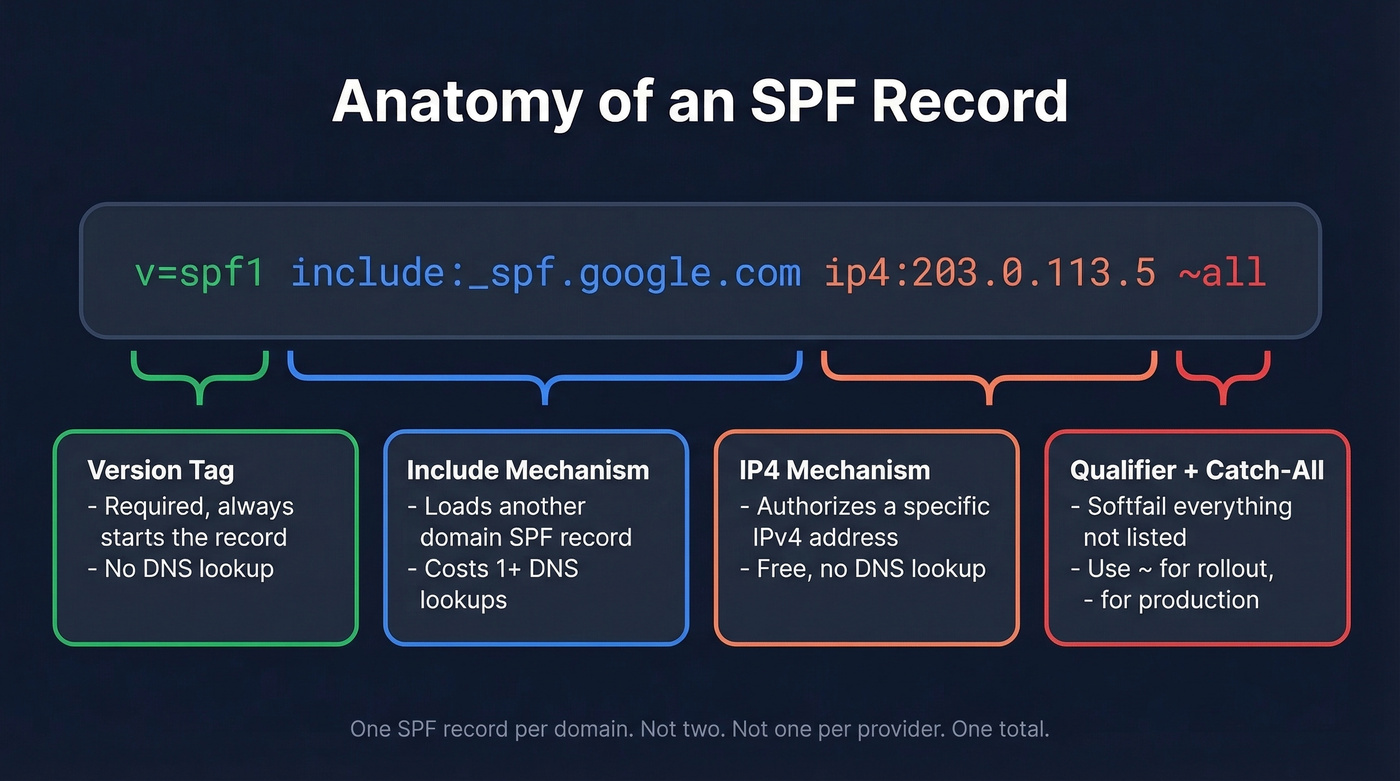
v=spf1 include:_spf.google.com ip4:203.0.113.5 ~all
v=spf1- version tag. Every SPF record starts with this.[include:_spf.google.com](https://knowledge.workspace.google.com/admin/security/set-up-spf)- authorizes all IPs listed in Google Workspace's SPF record.ip4:203.0.113.5- authorizes a specific IPv4 address, like your own mail server.~all- softfail everything else. Anything not explicitly authorized gets flagged but not rejected.
Record Components
| Component | What It Does | Counts as Lookup? |
|---|---|---|
v=spf1 |
Version identifier (not a mechanism) | No |
include: |
Loads another SPF record | Yes |
ip4: |
Authorizes an IPv4 address/range | No |
ip6: |
Authorizes an IPv6 address/range | No |
a |
Authorizes the domain's A record IP | Yes |
mx |
Authorizes the domain's MX IPs | Yes |
exists: |
Checks if a domain resolves | Yes |
redirect= |
Replaces the current SPF with another | Yes |
all |
Catch-all at the end | No |
The ptr mechanism is deprecated per RFC 7208 §5.5. It's slow, unreliable, and some receivers ignore it entirely. Don't use it.
One thing generators won't warn you about: long SPF records can exceed DNS TXT string limits. If your SPF value gets too long, you'll need to split it into multiple quoted strings within a single TXT record - like "v=spf1 include:..." "include:... ~all". Many DNS providers handle this automatically, but if you're editing raw zone files, get it wrong and the entire record breaks silently.
Qualifiers
| Qualifier | Meaning | When to Use |
|---|---|---|
+ (default) |
Pass | Implicit - rarely typed |
- |
Hard fail | Production, once confirmed |
~ |
Soft fail | Rollout / monitoring phase |
? |
Neutral | Testing only |
Include Strings for Popular Providers
Every ESP gives you a different format and none tell you how to combine it with your existing record. Here's the reference table:
| Provider | Include String |
|---|---|
| Google Workspace | include:_spf.google.com |
| Microsoft 365 | include:spf.protection.outlook.com |
| Mailchimp | include:servers.mcsv.net |
| SendGrid | include:sendgrid.net |
| Zoho | include:zoho.com |
| Amazon SES | include:amazonses.com |
Combined Examples (Copy-Paste Ready)
Google + Microsoft 365:
v=spf1 include:_spf.google.com include:spf.protection.outlook.com ~all
Google + Microsoft 365 + Mailchimp:
v=spf1 include:_spf.google.com include:spf.protection.outlook.com include:servers.mcsv.net ~all
Microsoft 365 + SendGrid + Zoho:
v=spf1 include:spf.protection.outlook.com include:sendgrid.net include:zoho.com ~all
Each include: counts as a DNS lookup, and nested includes inside those records count too. Three includes can easily consume 6-7 of your 10 lookups. Keep reading.
How to Build Your Record
Paste your domain into MxToolbox or EasyDMARC's SPF record creator to get the base syntax, then follow these steps:
Audit your existing record. Run
dig TXT yourdomain.comin terminal or paste your domain into MxToolbox's SPF lookup. If you already have an SPF record, you're merging - not creating from scratch.List every service that sends email on your behalf. Corporate email (Google Workspace, M365), marketing automation (Mailchimp, HubSpot), transactional email (SendGrid, SES), CRM notifications, helpdesk tools, invoicing software. Miss one and those emails fail authentication.
Collect the include string from each provider. Check their documentation - search "[provider name] SPF record" and you'll find it.
Combine into one record. One SPF record per domain. Not two. Not one per provider. One total.
Choose your policy. Start with
~all(softfail). Monitor DMARC reports for 2-4 weeks. Then tighten to-all(hardfail) once you've confirmed every legitimate sender is covered. Jumping straight to-allwithout monitoring is how you accidentally block your own invoicing system.

You're setting up SPF to stop bounces and protect your domain. But authentication only works if the emails you're sending to are real. Prospeo's 5-step verification and 98% email accuracy keep bounce rates under 4% - so your SPF record and sender reputation stay clean.
Don't let bad data undo the authentication work you just did.
Publish Your Record in DNS
The record is ready. Now you need to add it to your DNS provider. Set your TTL to 300 seconds temporarily so changes propagate faster. The process is nearly identical everywhere - create a TXT record at the root (@) of your domain - but the UI differs.
Cloudflare
DNS > Add Record > Type: TXT > Name: @ > Content: your SPF string > Save. Propagation often completes within an hour.
GoDaddy
DNS Management > Add > TXT > Host: @ > TXT Value: your SPF string > Save.
AWS Route 53
Hosted zone > Create Record > Type: TXT > Record Name: leave blank for apex domain > Value: your SPF string in quotes > Create Records.
Namecheap
Advanced DNS > Add New Record > TXT > Host: @ > Value: your SPF string > Save.
Common pitfall: some DNS providers automatically wrap TXT values in quotes. If you add your own quotes too, you end up with double-quoted values that break the record. Check the raw DNS output after publishing.
The 10 DNS Lookup Limit
This is where most SPF records break.
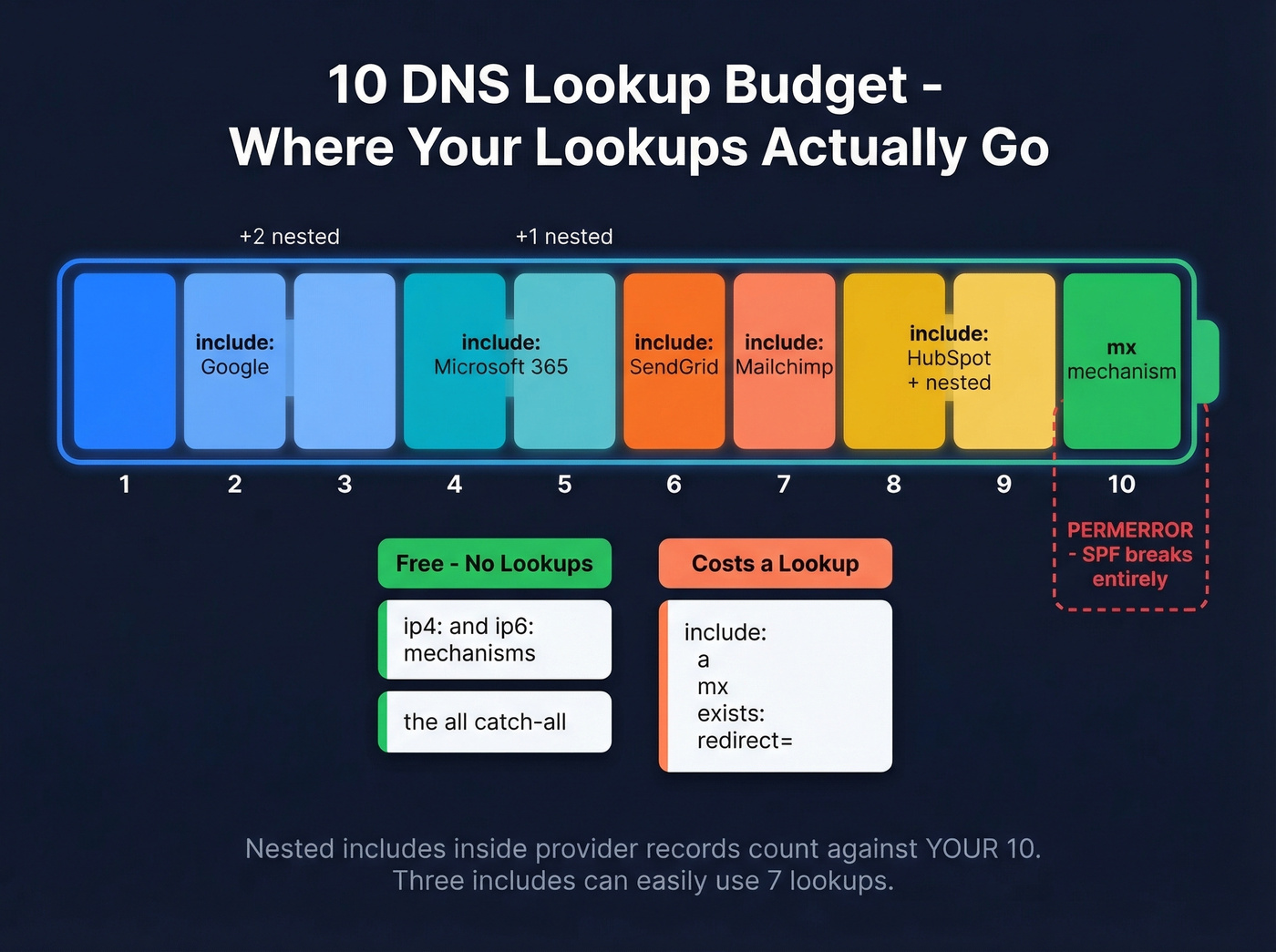
RFC 7208 §4.6.4 imposes a hard limit of 10 DNS lookups per SPF evaluation. Exceed it and the result is a permerror - a permanent SPF failure. Not a softfail. A hard, permanent failure that tells receiving servers your authentication is broken.
What Counts
| Mechanism | Counts? |
|---|---|
include: |
Yes |
a / a: |
Yes |
mx / mx: |
Yes |
redirect= |
Yes |
exists: |
Yes |
ip4: / ip6: |
No |
all |
No |
The critical insight: ip4: and ip6: are free. They don't consume lookups. And nested includes count too - if Google's SPF record contains three more includes internally, those eat into your 10.
There's also a void lookup limit of 2. A void lookup is a mechanism that resolves but returns zero results - like an include: pointing to a domain with no SPF record. Hit that limit and you get a permerror even if you're under 10 total lookups.
Why Flattening Is Fragile
The tempting fix is to "flatten" your SPF record - resolve all includes down to their raw IP addresses. Sounds clean. But when Google or Microsoft rotates their IP ranges (and they do, regularly), your flattened record silently breaks. You won't know until emails start bouncing.
Fix Playbook
1. Remove unused includes. Old ESPs you no longer use, that marketing tool from two years ago, the helpdesk you migrated away from. We've seen records with 3-4 dead includes just sitting there, burning lookups for nothing.
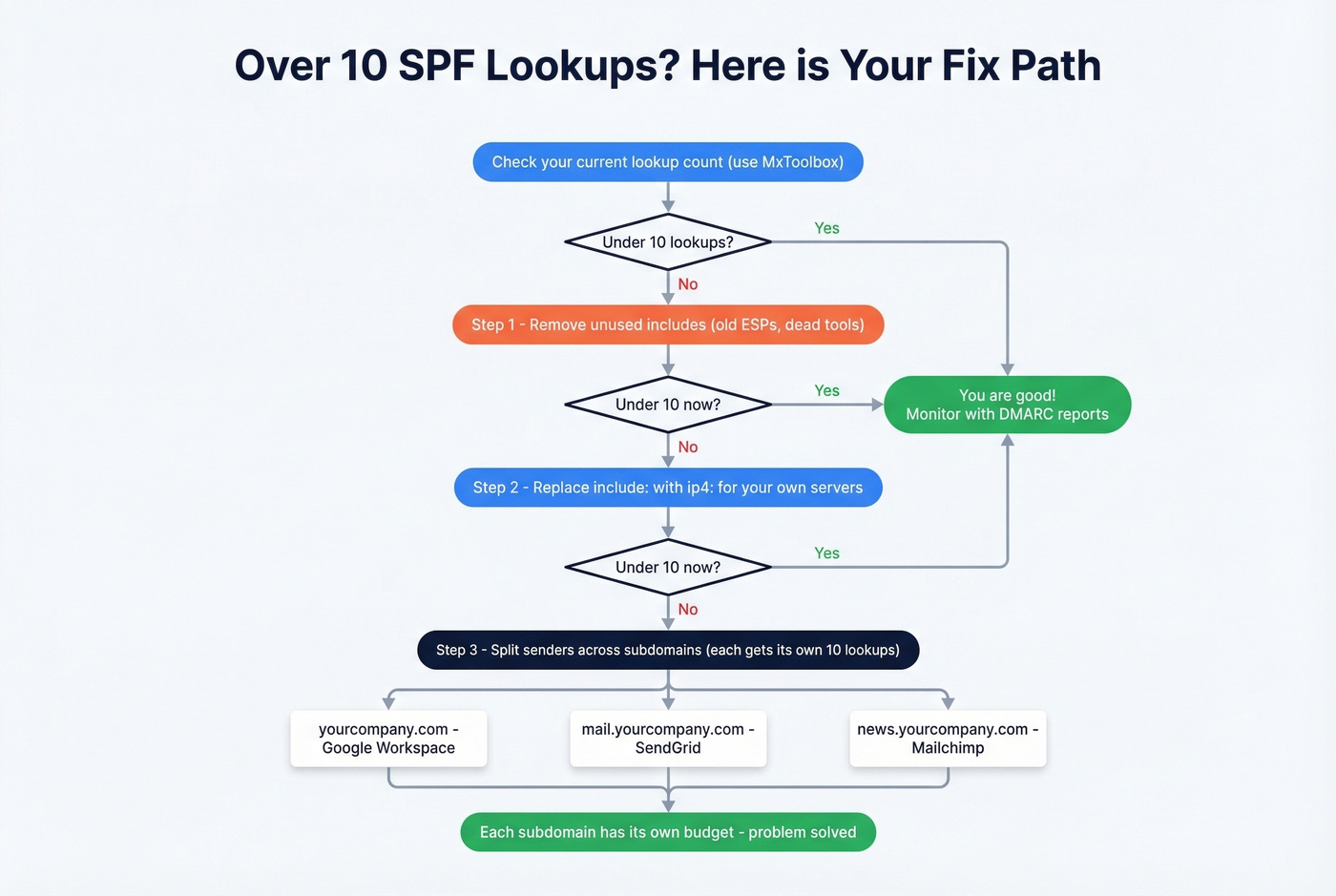
2. Replace include: with ip4: for your own infrastructure. If you run your own mail server with a stable IP, there's no reason to use an include. Swap it for ip4: and save a lookup. Don't do this for third-party providers whose IPs change.
3. Split by subdomain. This is the structural fix. Each subdomain gets its own 10-lookup budget:
yourcompany.com- Google Workspace (corporate)mail.yourcompany.com- SendGrid (transactional)news.yourcompany.com- Mailchimp (marketing)
Configure each service to use the appropriate subdomain as its Return-Path. Under DMARC relaxed alignment (aspf=r), subdomains still align with the apex From: address.
4. SPF macros for per-sender scoping. Advanced but powerful. Your apex record references a macro that resolves per local-part:
v=spf1 include:_spf.google.com include:%{l}._spf.example.com ~all
Then newsletter._spf.example.com resolves to v=spf1 include:servers.mcsv.net ~all. Each sender gets its own scoped record without bloating the apex.
5. Consolidate providers. If you're using SendGrid for transactional and Mailchimp for marketing, ask whether one platform can handle both. Fewer providers means fewer includes.
One sysadmin on r/sysadmin was already at 11 lookups and needed to add another service. The subdomain split was the only clean path forward. This isn't an edge case - it's where most growing companies end up.
Common SPF Mistakes
Your IT vendor told you to "just add this to your SPF record" and now nothing works. We see it constantly.
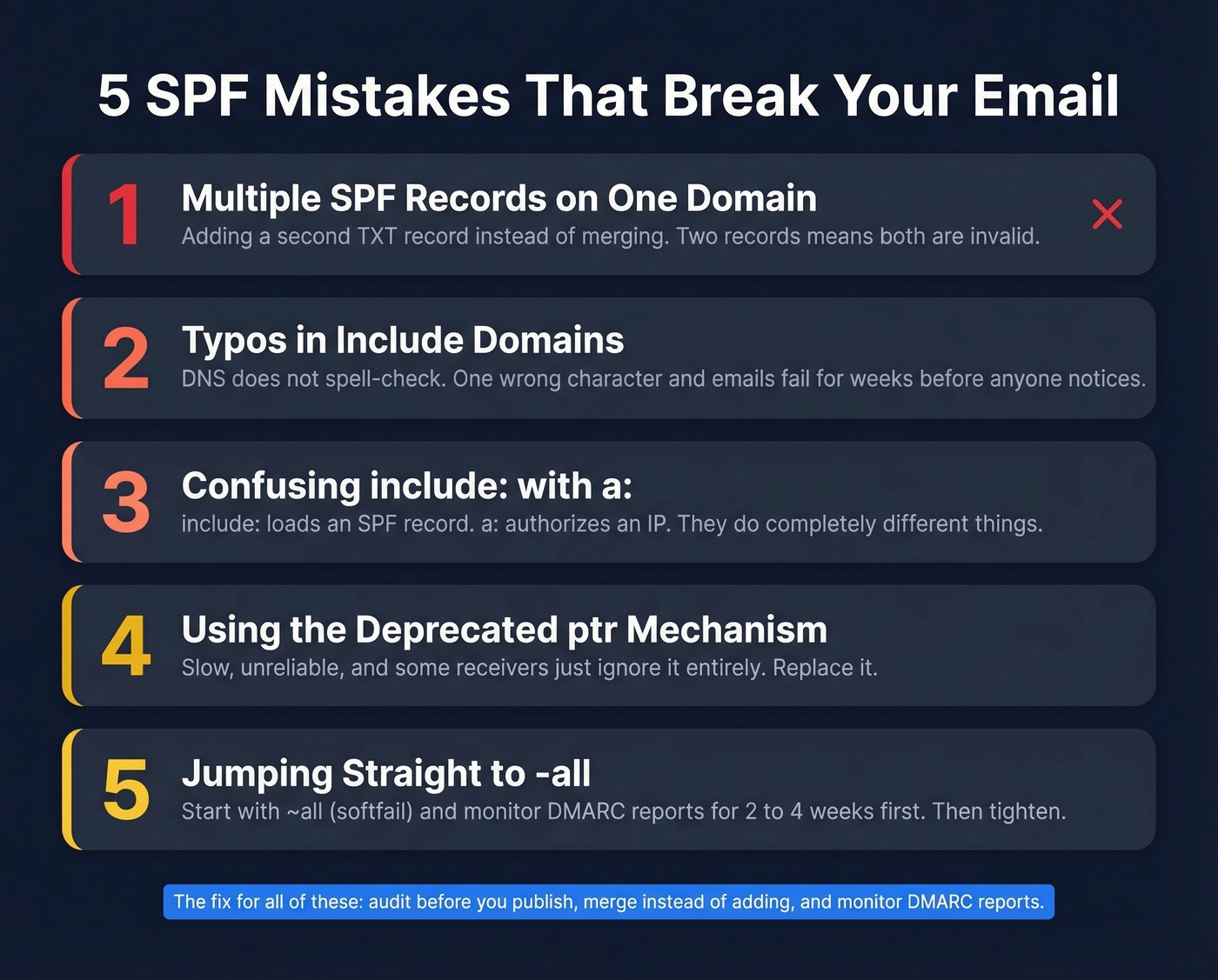
1. Typos in include domains. A real scenario from r/DMARC: an admin typed include:mail.edgedatacetner.com instead of edgedatacenter.com. Gmail rejected their emails for weeks before anyone spotted the misspelling. DNS doesn't spell-check for you.
2. Multiple SPF records on one domain. A vendor says "add this SPF record." The admin creates a second TXT record instead of merging the include into the existing one. RFC 7208 requires exactly one SPF record per domain. Two records = both invalid. This is the single most common mistake we see.
3. Using include: when you mean a:. The mechanism include:mail.example.com tries to load an SPF record published at that domain. The mechanism a:mail.example.com authorizes whatever IP that hostname resolves to. They do completely different things, and mixing them up is easy when a vendor tells you to "add mail.example.com to your SPF."
4. Using the PTR mechanism. Deprecated. Slow. Some receivers ignore it entirely. If you see ptr in your record, replace it.
5. Not updating SPF when switching providers. You moved from Mailchimp to HubSpot six months ago. The old include:servers.mcsv.net is still in your record, eating a lookup for nothing. Meanwhile HubSpot's include was never added, so their sends fail authentication. Let's be honest - this one's embarrassingly common and we've caught it in our own setup before.
Why SPF Passes But DMARC Fails
This trips up even experienced admins. SPF authenticates the Return-Path domain, not the visible From: address. If those two domains don't match, DMARC fails - even with a clean SPF pass.
DMARC alignment checks whether the domain authenticated by SPF or DKIM matches the From: header domain. Under relaxed alignment (aspf=r), subdomains of the From: domain count as a match. Under strict (aspf=s), only an exact match works.
A Zoho user on r/DMARC rewrote their SPF record multiple times, confirmed SPF was passing, but DMARC reports kept showing "not aligned." The issue wasn't SPF syntax - it was that Zoho's Return-Path domain didn't match their visible From: domain. No amount of SPF editing fixes an alignment problem.
Here's the thing: if your deal sizes are under $50k and you're spending more than an hour on email authentication, you're optimizing the wrong thing. Get SPF, DKIM, and DMARC set up correctly once, verify you're sending to real addresses, and move on. The marginal return on tweaking authentication beyond "correct" is near zero compared to improving your actual outreach.
Skip DMARC and you've done half the job. SPF alone doesn't prevent From: address spoofing. You need DMARC with both SPF and DKIM to close that gap.
Verify Your SPF Record
Three ways to confirm everything's working:
Command line: Run dig TXT yourdomain.com +short on Linux/Mac or nslookup -type=TXT yourdomain.com on Windows. You should see your SPF record in the output.
Online checker: Paste your domain into MxToolbox's SPF lookup. It'll parse the record, count your lookups, and flag errors.
Email headers: Send a test email to a Gmail account, open it, click "Show original," and search for spf=pass in the Authentication-Results header. If you see spf=softfail or spf=fail, your record is misconfigured or missing the sending server.
A perfect SPF record won't save your sender reputation if half your list is dead addresses. Tools like Prospeo verify emails in real-time at 98% accuracy - so the emails you authenticated actually reach real inboxes. Pair a clean SPF record with a verified list and your deliverability is covered from both sides.
If you want a deeper set of patterns and fixes, see our SPF record examples guide, plus the broader email deliverability playbook.
SPF, DKIM, and DMARC protect your domain. Bad contact data destroys it. Teams using Prospeo cut bounce rates from 35% to under 4% because every email is verified before it's sent. At $0.01 per email, protecting your sender reputation costs less than one failed campaign.
Ship outbound on data that won't burn your domain.
FAQ
Can I have multiple SPF records on one domain?
No. RFC 7208 requires exactly one SPF record per domain. Multiple TXT records starting with v=spf1 cause a permerror, making both records invalid. Merge all mechanisms into a single record instead of creating separate ones per provider.
Should I use -all or ~all?
Start with ~all while you inventory all sending services and monitor DMARC reports for 2-4 weeks. Once every legitimate sender is confirmed and reports are clean, switch to -all. Most production domains should be on -all by the end of month one.
Does SPF prevent all email spoofing?
No. SPF only checks the envelope sender (Return-Path), not the visible From: address. An attacker can spoof your From: header while passing SPF on their own domain. You need DMARC with both SPF and DKIM alignment to block visible-header spoofing.
How do I stay under the 10 DNS lookup limit?
Replace include: with ip4: for servers you control, remove stale includes from old providers, and split high-volume senders onto subdomains. Each subdomain gets its own 10-lookup budget. MxToolbox counts lookups automatically when you check your record.
Does a correct SPF record guarantee inbox placement?
No. SPF handles authentication, not reputation. Deliverability also depends on sender score and list quality. Sending to invalid addresses spikes bounce rates above 3%, which damages the reputation your SPF record protects. Verify addresses before sending - even a free tier from a verification tool catches the worst offenders.