

Tracking Pixel Email: How It Works, Why It's Broken, and What to Do Instead
Your CMO just pinged you about Q1 results. Open rates are up 20% quarter-over-quarter. Revenue is flat. Pipeline hasn't moved. Something doesn't add up - and the tracking pixel embedded in every marketing email you send is the reason why.
Gmail accounts for 72.1% of global mailboxes, and Apple Mail Privacy Protection inflates a huge share of reported opens. The result: the vast majority of your list is returning degraded pixel data. We've watched teams build entire automation stacks on this broken signal, and it always ends the same way - inflated dashboards, flat pipeline, confused executives.
If you're a recipient who wants to block tracking pixels, disable external images or grab a browser extension like Trocker. If you're a marketer, stop building automations on opens. Track clicks, replies, and conversions - and make sure your list is clean before you do anything else.
What Is a Tracking Pixel?
An email tracking pixel - also called a web beacon, spy pixel, or invisible pixel - is a tiny 1x1 transparent image embedded in an email's HTML. You can't see it. That's the point.
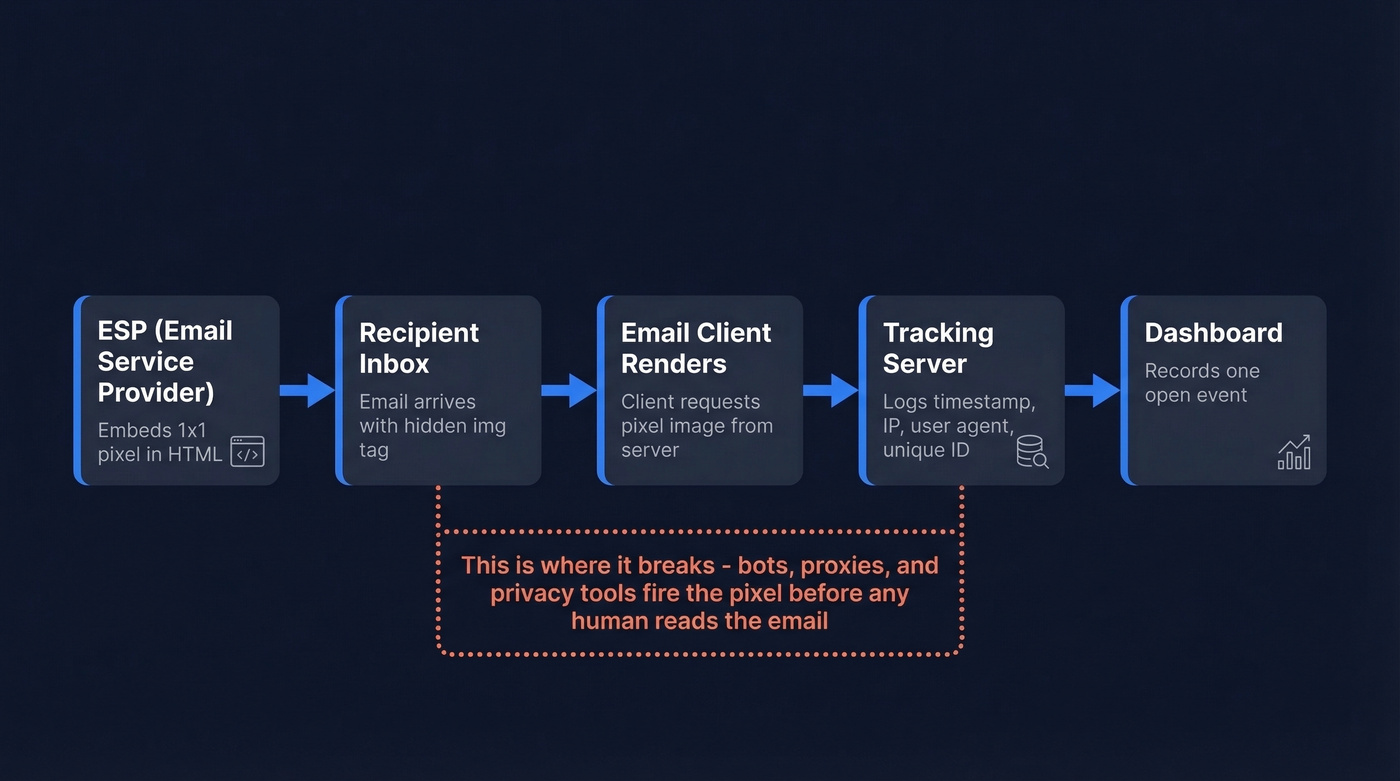
Here's how it works: your ESP (Mailchimp, Constant Contact, whatever you're using) embeds an <img> tag pointing to a tracking server with a unique identifier tied to the recipient. When the email client renders the message, it requests that image from the server. The server logs the request with a timestamp, IP address, and user agent, then returns the invisible image. One "open" recorded. The term "web beacon" shows up often in legal and compliance contexts, and the technique has been used in email analytics for decades.
Most major ESPs enable this by default. Many let you disable open tracking in settings, but almost nobody does.
The problem is that today, the "load" event that fires the pixel increasingly has nothing to do with a human reading your email.
How Email Tracking Pixels Work Under the Hood
Most email marketing guides skip the technical details. Let's fix that.
Inserting a Pixel in HTML
This is what gets injected into your email:
<img src="https://yourdomain.com/pixel.php?uid=12345"
     width="1" height="1" alt=""
     style="display:none;" />
The uid parameter is unique per recipient. When the email client loads this image, it hits your server with that ID attached. That's your open signal.
The Server-Side Endpoint
On the server, a simple PHP script handles the request:
<?php
// Log the open event
$log = date('Y-m-d H:i:s') . " | "
     . $_GET['uid'] . " | "
     . $_SERVER['REMOTE_ADDR'] . " | "
     . $_SERVER['HTTP_USER_AGENT'] . "\n";

file_put_contents('opens.log', $log, FILE_APPEND);

// Return a 1x1 transparent GIF
header('Content-Type: image/gif');
echo base64_decode(
  "R0lGODlhAQABAIAAAAAAAP///ywAAAAAAQABAAACAUwAOw=="
);
The script logs the timestamp, unique ID, IP address, and user agent, then returns a base64-encoded transparent GIF. The recipient sees nothing. Your log file gets a new line.
One implementation detail that trips people up: if your email exceeds Gmail's 102KB size limit, the message gets clipped - and any pixel placed at the end won't load. Keep emails under 102KB or place the pixel early in the HTML.
Click Tracking via Redirects
Click tracking works differently, and it's far more reliable. Instead of embedding a pixel, you wrap every link in a redirect:
[
  Click here
](https://yourdomain.com/track.php?uid=12345&target=https://realpage.com)
The server logs the click, then forwards the user to the real destination. Unlike pixel-based open tracking, click tracking requires deliberate human action. That distinction matters enormously now.
Why Pixel Data Is Unreliable in 2026
Here's the thing: the pixel mechanism itself still works fine. The problem is that machines are triggering it instead of humans.
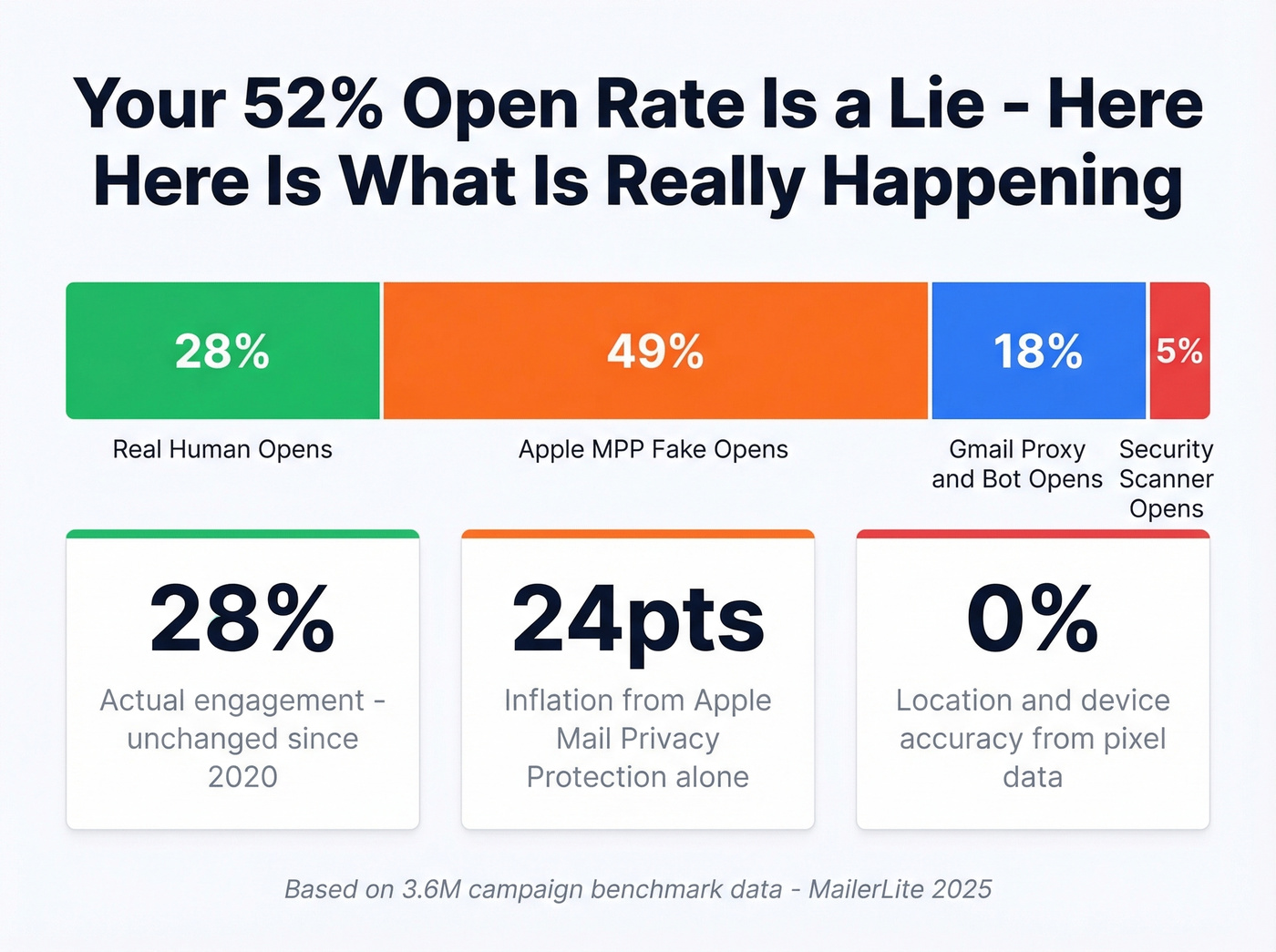
Across a benchmark dataset of 3.6 million MailerLite campaigns, the gap between reported opens and actual engagement has never been wider. On Reddit, recipients describe the experience from the other side. One thread in r/email detailed how learning about open tracking made users hesitant to open any marketing email at all - they described feeling "watched." Another thread discussed workplace concerns about pixels embedded in mandatory email signatures, with employees uncomfortable that their internal communications were being monitored.
This is the invisible cost that never shows up in your dashboard.
Apple Mail Privacy Protection
Apple's MPP, rolled out in iOS 15, preloads open tracking pixels via Apple's own proxy servers. The pixel fires whether or not the recipient ever reads the email. As of early 2025, 49.29% of all email opens come from MPP, inflating reported rates by 15-20 percentage points - and that share has only grown since.
A campaign that legitimately earned a 28% open rate pre-MPP now shows around 52% with identical clicks and conversions. In Apple-heavy audience segments, up to 75% of reported opens are artificial. MPP hides the user's IP address and makes timestamps, geolocation, and device data unreliable. The pixel fires, but the data it returns is meaningless for individual-level behavior.
Gmail's Image Proxy
Gmail routes image requests through Google's proxy servers, from IP ranges like 66.249.x.x. Two consequences: you can't infer precise location or device from the open, and you'll see near-instant opens - sometimes seconds after sending - because Google's proxy fetches the image before the recipient even sees the email. Caching means repeat opens often don't re-fire the pixel, so you're simultaneously overcounting first opens and undercounting re-engagement.
Bot and Scanner Opens
Security scanners prefetch email content - including pixels - before the message is delivered or viewed. These bot opens look identical to human opens in your analytics. VPN usage further muddies location data, routing opens through servers in different countries than the actual recipient. Any dashboard pretending it can give you precise location, device, and read time from pixel data alone is selling snake oil.
| Metric | Pre-MPP (2020) | Post-MPP (2026) |
|---|---|---|
| Reported open rate | ~28% | ~52% |
| Actual human opens | ~28% | ~28% (unchanged) |
| MPP share of opens | 0% | 49%+ |
| Location/device accuracy | Moderate | Unreliable |
| Open-triggered automations | Functional | Broken |
Look - most email teams know open rates are inflated. They report them anyway because the numbers look good in executive reviews. If your team is still using open rate as a KPI in 2026, you're not measuring email performance. You're measuring how many of your subscribers use Apple Mail.

If pixel opens can't tell you who's actually reading, your list quality is the only lever left. Prospeo's 5-step email verification delivers 98% accuracy - so every click, reply, and conversion you track comes from a real person at a real address.
Replace phantom opens with real pipeline. Start with 75 free verified emails.
Legal Landscape for Pixel Tracking
The technical unreliability is one problem. The legal risk is another, and it's accelerating.
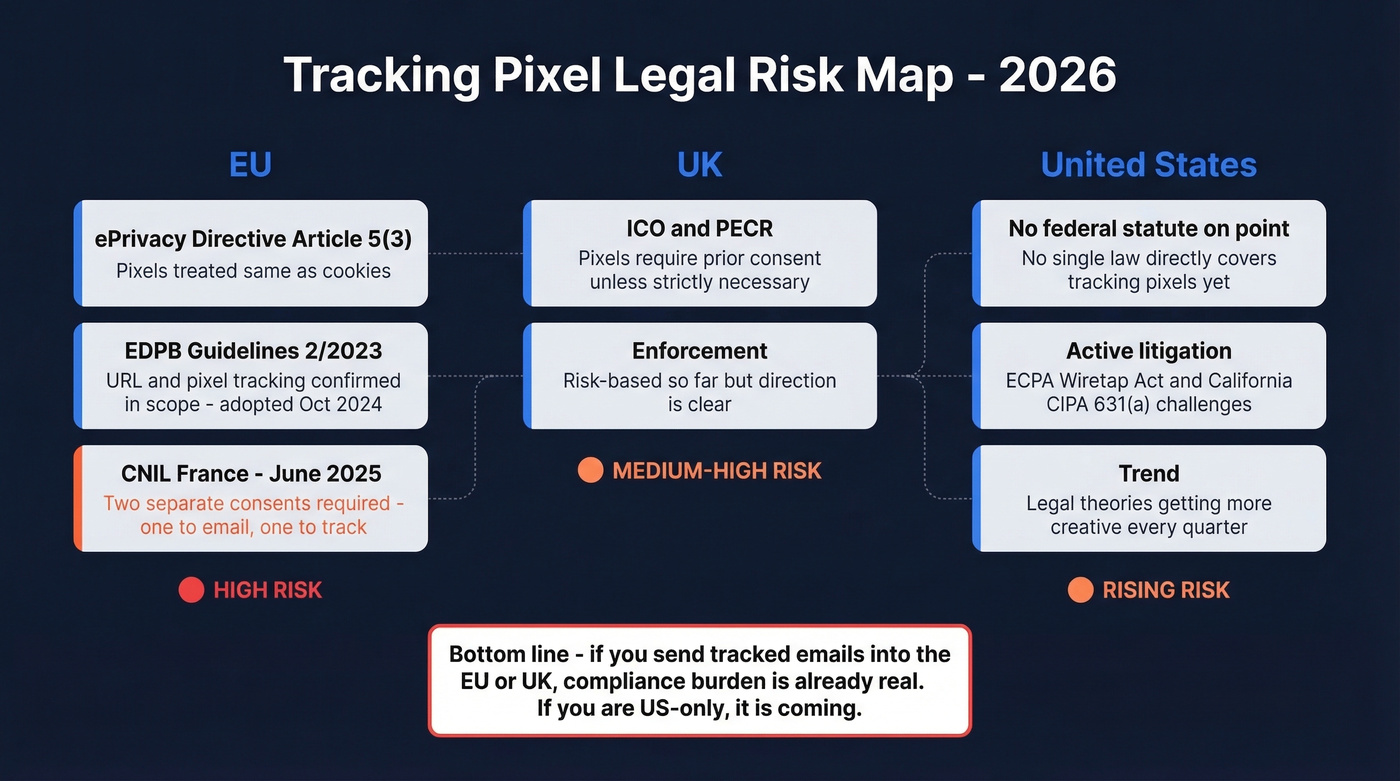
In the EU, the ePrivacy Directive's Article 5(3) treats tracking pixels like cookies. The EDPB's Guidelines 2/2023, adopted 7 October 2024, confirmed that URL and pixel tracking falls under Article 5(3) regardless of whether personal data is ultimately processed. That's a broad net.
France is going further. The CNIL launched a public consultation on 12 June 2025 proposing that marketers need two separate consents: one to send marketing emails under ePrivacy Article 13 and a second, distinct consent to embed tracking pixels under Article 5(3). The draft also suggests consent withdrawal must take effect immediately - potentially disabling pixels in already-sent emails. That retroactive element is unusual and, frankly, a nightmare for compliance teams.
In the UK, the ICO has confirmed that email tracking pixels fall under PECR and require prior consent unless strictly necessary. Enforcement has been risk-based so far, but the direction is clear.
The US has no single federal statute directly on point, but litigation is catching up. Plaintiffs have challenged tracking pixels under the ECPA's Wiretap Act and California's CIPA 631(a), arguing that third-party vendors receiving engagement data constitutes "interception." No landmark ruling yet, but the legal theories are getting more creative every quarter. If you're sending tracked emails into the EU or UK, the GDPR compliance burden is already real. If you're US-only, it's coming.
How to Block Tracking Pixels
If you're on the receiving end and want to stop pixels from firing, you've got three options at different levels of commitment.
Disable External Images
The simplest approach. In Gmail on web or mobile, go to Settings, then General, then Images, and select "Ask before displaying external images." This prevents any pixel from loading until you explicitly allow it. In Apple Mail, enable "Protect Mail Activity" - this loads images via Apple's proxy, hiding your real IP and making timing and location signals far less useful to the sender.
Browser Extensions
For automatic blocking without disabling all images, browser extensions are the move. All of these are free:
| Tool | Platform | Webmail Support | Notes |
|---|---|---|---|
| PixelBlock | Chrome only | Gmail only | Simplest option |
| Ugly Email | Chrome + Firefox | Gmail | Labels tracked emails |
| Trocker | Chrome + Firefox | All webmails | Broadest coverage |
| uBlock Origin | Chrome + Firefox | All webmails | MV3 limits on Chrome |
Trocker is the most versatile - it works across Gmail, Yahoo, and Outlook webmail using heuristic detection and can reveal exactly where the pixel sits in the email. Chrome's Manifest V3 changes have reduced extension capabilities, so uBlock Origin's full feature set is more available on Firefox than Chrome under MV3.
Privacy-First Email Providers
Proton Mail takes a different approach entirely. It blocks known tracking pixels by default, loads other remote images via a proxy with a generic IP and geolocation, strips tracking parameters from URLs, and shows you a count of blocked trackers per email. If pixel tracking is a dealbreaker for you, switching providers is the most thorough solution - skip this if you're happy with Gmail's built-in protections and a browser extension.
What to Track Instead of Opens
Pixels still provide directional signals. If your open rate drops from 50% to 15% overnight, something broke. But building automations triggered by opens - re-send sequences, lead scoring bumps, "engaged" segment filters - is building on sand.
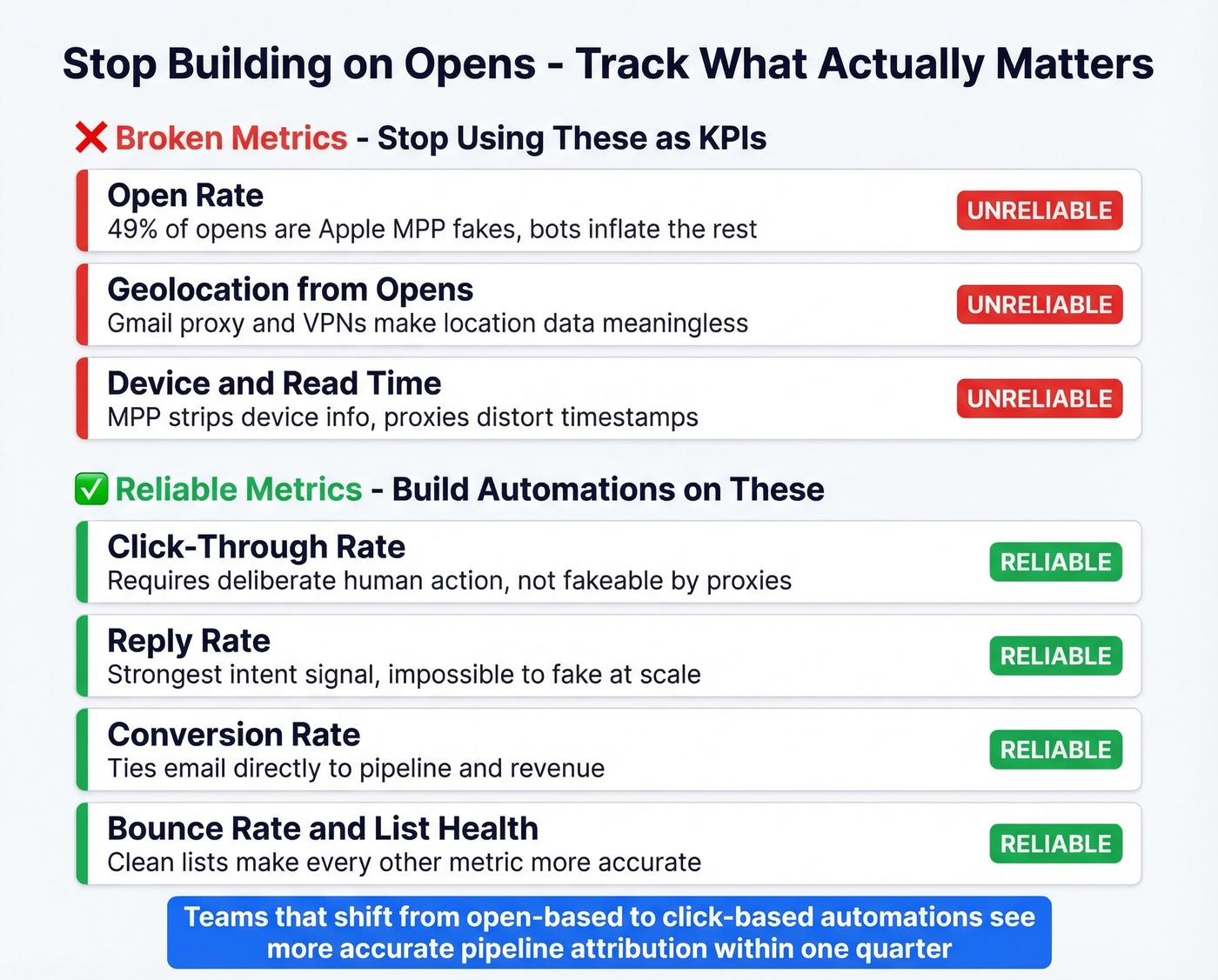
In our experience, teams that shift from open-based to click-based automations see more accurate pipeline attribution within one quarter. The metrics that actually matter:
Track: clicks, replies, conversions, bounce rate, inbox placement rate.
Stop tracking: open rate for automations, location or device from opens, read time.
Deliverability metrics matter too. Bounce rate, inbox placement rate, and spam complaint rate tell you whether your emails are even reaching humans in the first place.
And here's the upstream lever most teams ignore: list quality. I've seen teams obsess over subject line A/B tests while 15% of their list is invalid addresses dragging down their sender reputation. Fixing that moves the needle more than any pixel optimization ever will. One sales team we worked with cut bounce rates from 35% to under 4% after cleaning their list with Prospeo's real-time email verification, which runs on a 7-day refresh cycle with 98% accuracy. Fewer bounces mean better deliverability, which means the metrics you do track - clicks, replies, conversions - actually reflect real engagement instead of noise.

Open-triggered automations are broken. The teams still growing pipeline in 2026 are the ones tracking replies and clicks from verified contacts - not chasing bot opens. Prospeo refreshes 300M+ profiles every 7 days so your outreach hits real inboxes, not dead ends.
Ditch inflated dashboards. Build sequences on data that actually connects.
FAQ
Can tracking pixels tell exactly when and where someone opened my email?
Not anymore. Apple MPP pre-loads pixels via proxy servers, hiding real IP addresses and making timing unreliable. Gmail routes image requests through Google proxies, stripping device and location signals. Pixel data is directional at best - useful for aggregate trends, useless for individual-level precision.
Are email tracking pixels legal?
In the EU, the ePrivacy Directive treats pixels like cookies, requiring prior consent under Article 5(3). France's CNIL is proposing separate consent for tracking beyond email opt-in. In the US, plaintiffs have challenged pixels under the Wiretap Act and CIPA 631(a). Consult legal counsel for your specific market.
Do all email marketing platforms use tracking pixels?
Most major ESPs - Mailchimp, Constant Contact, MailerLite - embed them by default. Many let you disable open tracking per campaign or globally in settings. Check your platform's tracking or analytics preferences to confirm whether pixels are active.
What's a better metric than open rate?
Click-through rate, reply rate, and conversion rate all reflect genuine engagement that proxies and bots can't fake. Bounce rate and inbox placement matter too. Cleaning your list before measuring any of these ensures your downstream metrics reflect real human behavior rather than noise from invalid addresses.
How do I block tracking pixels in Gmail?
Go to Settings, then General, then Images, and select "Ask before displaying external images." For automatic blocking without losing all images, install Trocker (works across all webmails) or PixelBlock (Gmail-only). Both are free Chrome extensions and take under a minute to set up.