

How to Check If an Email Address Is Valid - The Complete 2026 Guide
You load 2,000 prospects into your sequencer, hit send, and watch 400 come back as unknowns or bounces. Your bounce rate spikes past 5%, your sending domain takes a reputation hit, and the next campaign lands in spam - even the emails that were fine. A valid email address check before sending would've caught most of those 400 bad addresses. Nearly 1 in 6 marketing emails never reach the inbox, and most of that waste traces back to list quality, not subject lines or copy.
The 2% bounce rate threshold isn't a suggestion. It's the line where ESPs start throttling you.
What You Need (Quick Version)
Checking one email right now? Use a free verifier like Hunter or Verifalia. Paste the address, get a result in seconds.
Cleaning a list of 500+ emails? You need a bulk verification tool. NeverBounce, ZeroBounce, or DeBounce handle this at scale, with pricing as low as $1.50 per thousand.
What "Valid Email" Actually Means
Most people use "valid" loosely. In practice, there are three distinct layers, and a failure at any one means your message won't arrive.
Syntax validity is the simplest check. Does the address follow the local-part@domain.tld format? No spaces, no missing @ symbol, no illegal characters. This catches typos and garbage entries but tells you nothing about whether the mailbox exists.
Domain existence goes a step further. Does the domain have active MX (mail exchange) records? If someone typed john@gmial.com, the syntax is fine but the domain doesn't resolve. No MX record, no delivery.
Mailbox existence is the real question - does john@company.com actually accept mail? This requires an SMTP-level check, and it's where things get complicated because some servers lie.
Verification tools return results in four buckets: Valid (mailbox confirmed), Invalid (hard reject), Risky (catch-all, role-based, or disposable), and Unknown (server didn't give a clear answer). That last category is where most headaches live.
How Email Verification Works
Here's what happens when a verification tool checks an address. Real-time checks typically complete in 100-500ms for commercial tools, but there's a lot happening under the hood.
The SMTP Handshake
Every verification follows the same protocol pipeline a real email server uses - it just stops before actually sending a message.
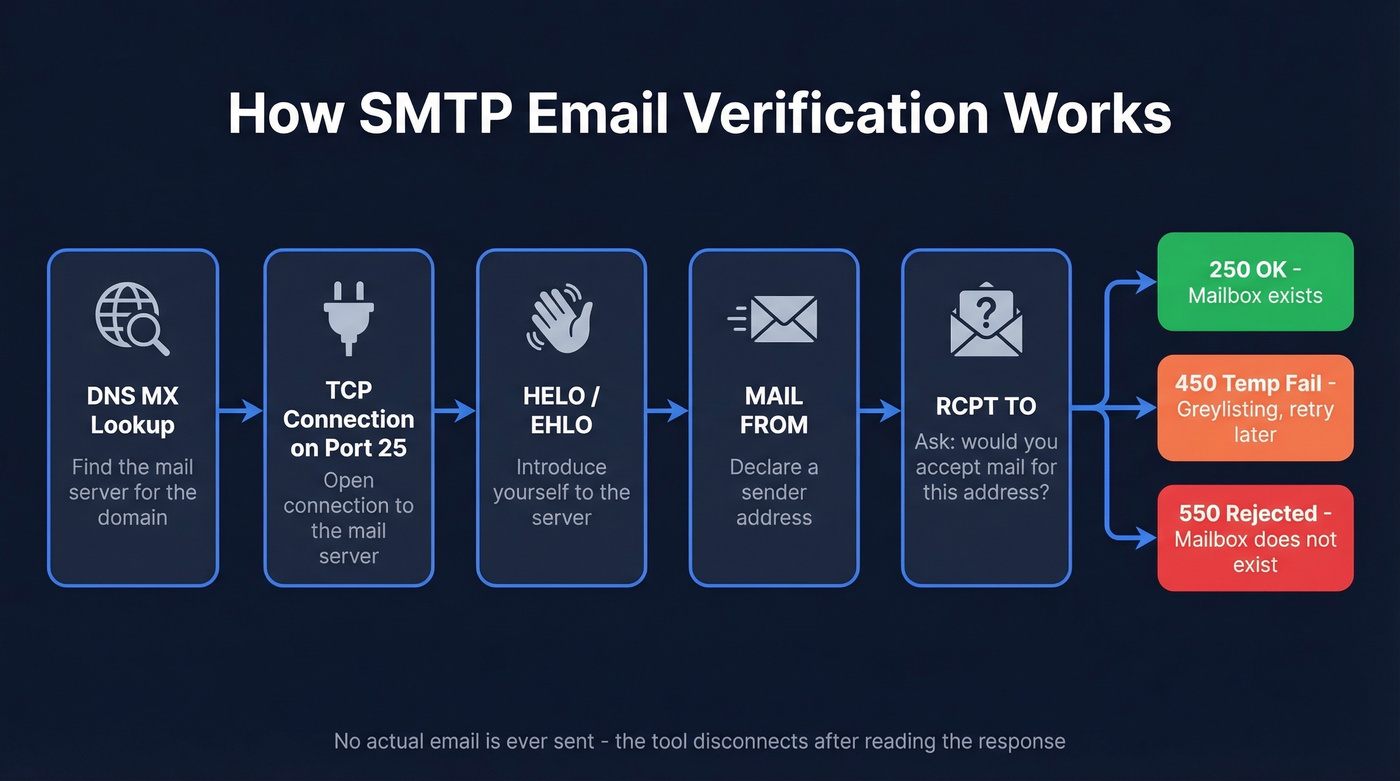
- DNS MX lookup - The tool queries DNS for the domain's MX records to find which mail server handles incoming mail.
- TCP connection on port 25 - It opens a connection to that mail server.
- HELO/EHLO - The tool introduces itself to the server.
- MAIL FROM - It declares a sender address.
- RCPT TO - It asks the server: "Would you accept mail for this address?" The server's response is the whole point.
The tool never sends an actual email. It reads the server's response to that RCPT TO command and disconnects.
What Response Codes Mean
| Code | Meaning | What It Tells You | |------|---------|-------------------| | 250 | OK / Accepted | Mailbox exists (probably) | | 450 | Temporary failure | Greylisting - retry later (often 15-30 min) | | 550 | Rejected | Mailbox doesn't exist |
A 250 response doesn't guarantee delivery - catch-all servers return 250 for everything, including addresses that don't exist. A 450 means the server is deliberately delaying to filter spam; good tools retry with exponential backoff rather than marking the address unknown immediately.
What Commercial Tools Add
Raw SMTP checks are just the starting point. Commercial verification tools layer on 20-30+ additional checks per email: disposable domain detection, spam trap identification, role account flagging for addresses like info@ and admin@, risk scoring, and catch-all detection. This is why a $3/1K tool and a $10/1K tool can produce very different results - the cheaper one might nail the SMTP check but miss the spam trap that tanks your domain reputation.
The Catch-All Problem
Catch-all domains are the single biggest verification headache in B2B. A catch-all server accepts mail for any address at that domain. Send to totally-fake-person@company.com and the server says "250 OK" - even though nobody's reading that inbox.
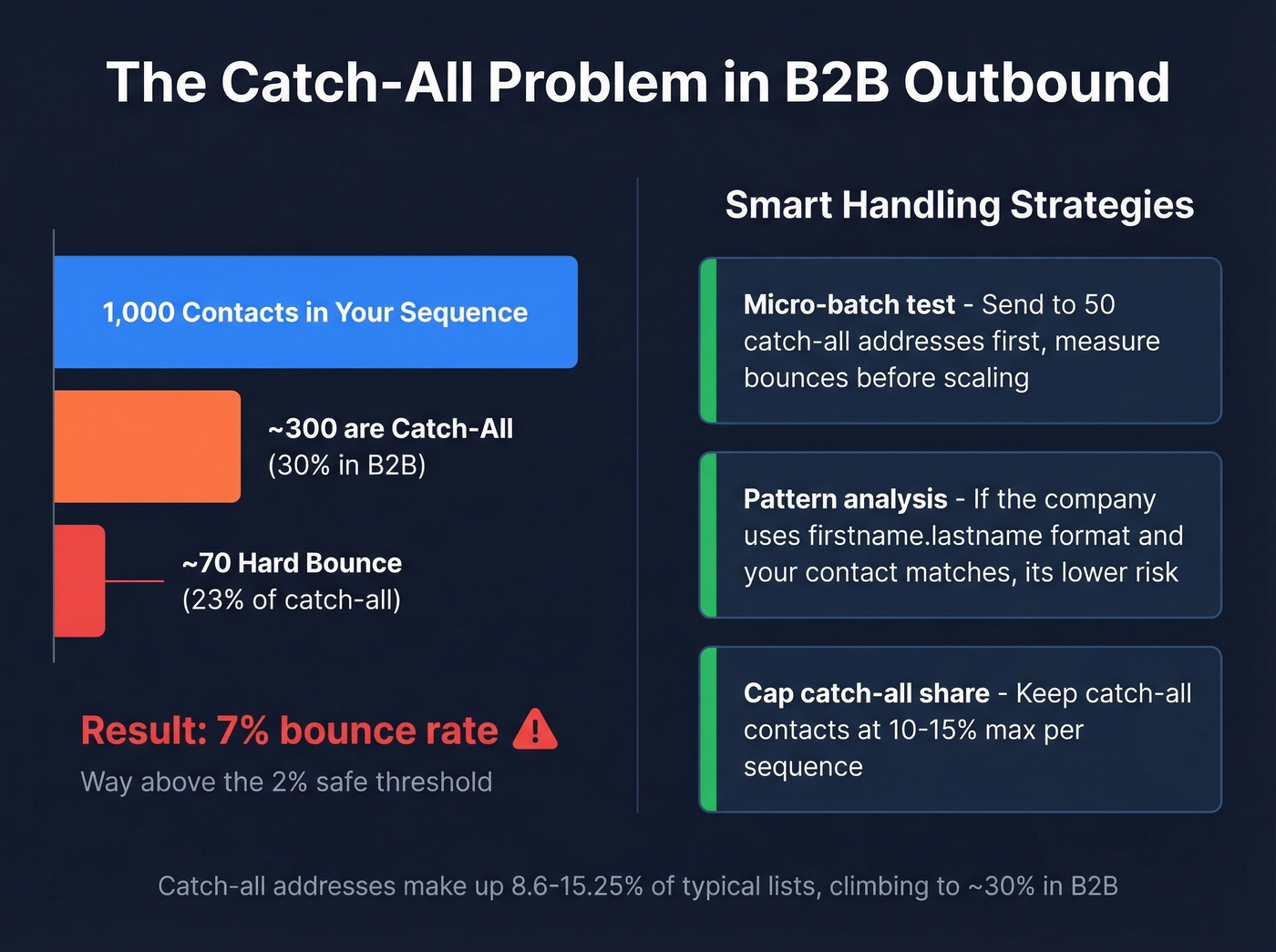
Catch-all addresses represent 8.6-15.25% of typical email lists, and in B2B that figure climbs to roughly 30%. Tools detect catch-all by sending a probe to a random, obviously-fake address at the domain - if the server still returns 250, it's catch-all. When that happens, the tool can't confirm whether a specific mailbox exists, so it returns "unknown" or "risky." That's not a tool failure. It's a protocol limitation.
Here's the thing: 23% of unverified catch-all emails hard bounce when you actually send to them. On a 1,000-contact sequence where 300 are catch-all, that's roughly 70 hard bounces - enough to blow past the 2% threshold and trigger deliverability problems. The consensus on r/coldemail is that catch-all domains are the number one frustration for anyone running outbound at scale.
Smart handling strategies exist, though. Micro-batch testing - send to 50 catch-all addresses first, measure bounces before scaling - is the most practical approach. Pattern analysis helps too: if a company uses firstname.lastname@domain.com and your contact follows that pattern, it's lower risk. Cap catch-all share at 10-15% per sequence and quarantine the rest.

Prospeo's 5-step verification catches catch-all traps, spam traps, and honeypots before you ever export a lead. 98% email accuracy, 7-day data refresh, and catch-all handling built in - so you skip the bulk cleaning step entirely.
Stop cleaning bad lists. Start with clean data at $0.01 per email.
Disposable Emails and Spam Traps
Disposable emails pose a separate challenge. Services like Guerrilla Mail, Mailinator, and Temp-Mail let anyone create a throwaway inbox that self-destructs. The ecosystem now includes 160,000+ active disposable domains, and the major providers operate dozens of alternate domains specifically to evade simple blocklists.
Blocking only the best-known disposable providers still misses a large long tail of smaller and newer domains that rotate constantly. Open-source blocklists like the disposable-email-domains repository on GitHub help, but they require regular updates.
Spam traps are even more insidious - addresses operated by ISPs and anti-spam organizations specifically to catch senders using bad lists. Hit one, and your sending reputation takes immediate damage. Good verification tools maintain their own spam trap databases and flag these before you send. The cheapest tools often skip this layer entirely, which is why per-email price alone is a terrible way to evaluate verifiers.
Bounce Rate Benchmarks for 2026
The benchmarks are straightforward. Under 2% total bounce rate is acceptable. Under 1% is ideal and signals a well-maintained list. Above 5% is a red flag that triggers ESP scrutiny.
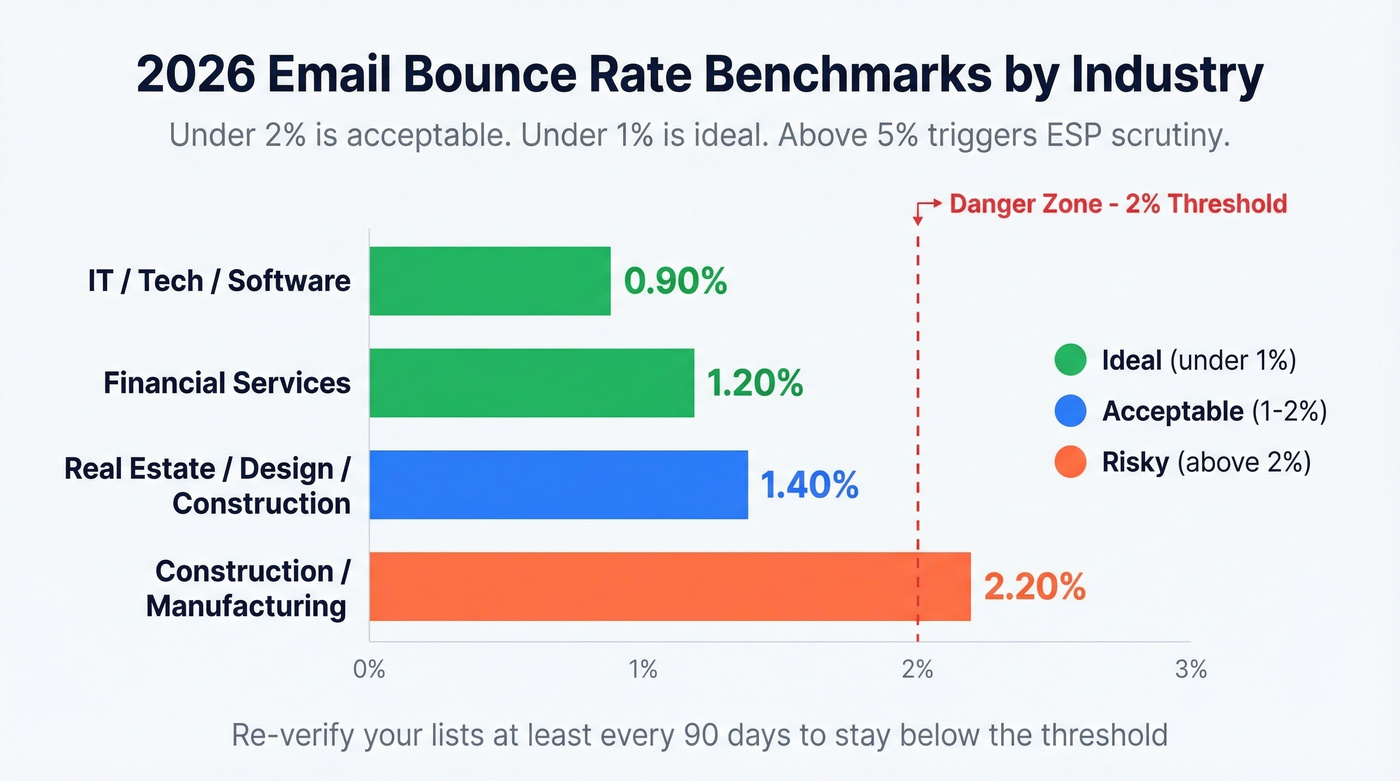
| Industry | Avg Bounce Rate |
|---|---|
| IT / Tech / Software | 0.90% |
| Financial Services | 1.20% |
| Real Estate / Design / Construction | 1.40% |
| Construction / Manufacturing | 2.20% |
On the deliverability side, a good average sits above 89%, with excellent performance above 95%. If you're running outbound sequences, aim for the higher end - your reply rates depend on it.
Email lists decay fast. Job changes, company closures, domain migrations - it all adds up. Re-verify at least quarterly (every 90 days) to keep bounce rates in check.
Best Email Verification Tools in 2026
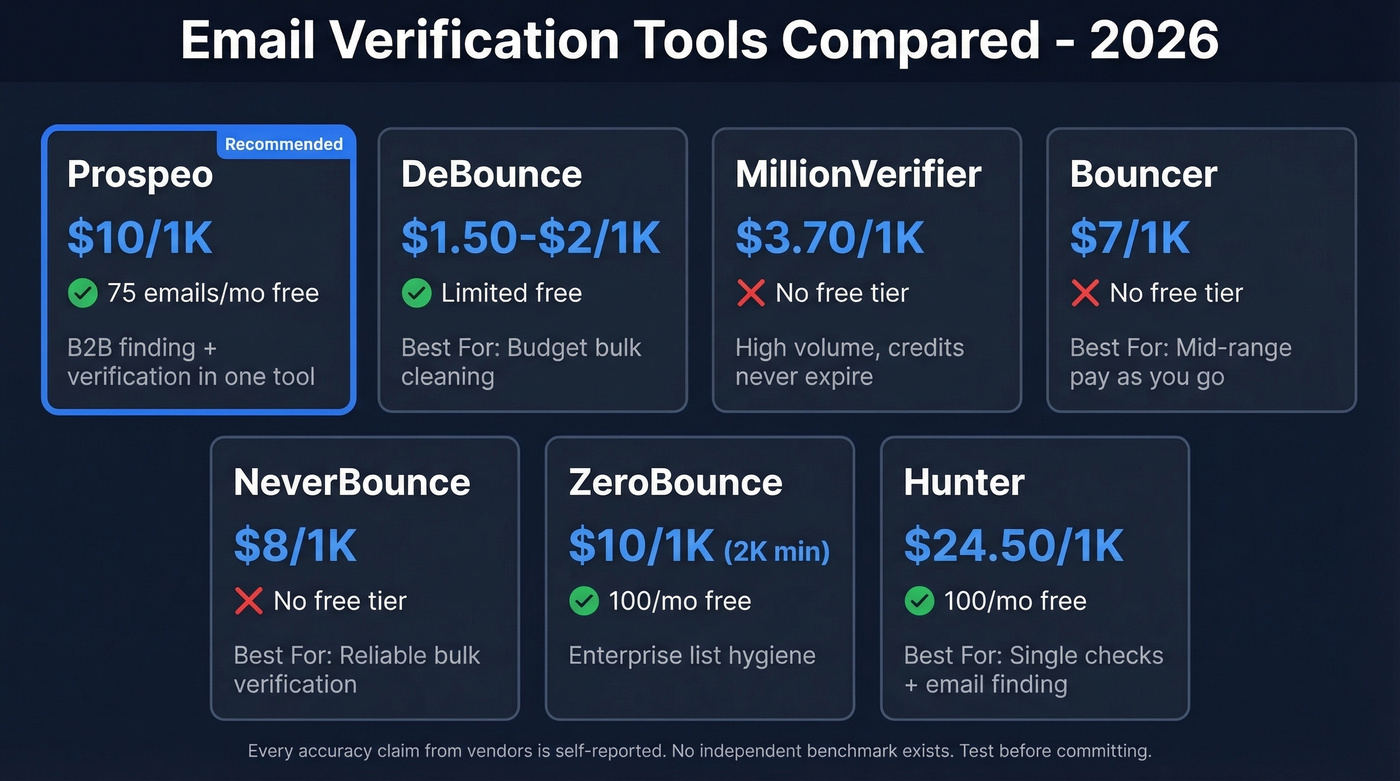
Let's be honest about something: every accuracy number from verification vendors is self-reported. No independent benchmark exists with standardized methodology, sample sizes, and blind testing. The tools below are all solid, but take "99.5% accuracy" claims with a grain of salt.
For teams with an average deal size under $15K sending fewer than 2,000 emails a month, you don't need the most expensive verifier on this list. A mid-tier tool plus clean list hygiene gets you 95% of the way there.
| Tool | Cost per 1K | Free Tier | Best For |
|---|---|---|---|
| Prospeo | ~$10 | 75 emails/mo | B2B finding + verification |
| DeBounce | $1.50-$2 | Limited | Budget bulk cleaning |
| MillionVerifier | ~$3.70 | None | High-volume, no expiry |
| Bouncer | $7 | None | Mid-range pay-as-you-go |
| NeverBounce | $8 | None | Reliable bulk verification |
| ZeroBounce | ~$10 (2K min) | 100/mo | Enterprise list hygiene |
| Hunter | ~$24.50 | 100/mo | Single checks + finding |

Prospeo
Prospeo combines email finding and verification in a single platform. The database covers 300M+ professional profiles with 143M+ verified emails, and the 5-step verification process handles catch-all domains, spam-trap removal, and honeypot filtering to deliver 98% email accuracy. Data refreshes every 7 days, compared to the 6-week industry average, which means the emails you pull today are still good next week.
We've seen teams cut bounce rates from 35%+ down to under 4% after switching their prospecting data source - Meritt, for example, tripled their pipeline from $100K to $300K per week after making that switch. The pricing is credit-based at roughly $0.01 per email, with a free tier of 75 emails/month. No contracts, no sales calls required. The ability to find and verify in one step eliminates an entire tool from your stack, which matters when you're managing five different subscriptions already.
ZeroBounce
Use this if you're an enterprise team cleaning large marketing lists on a regular schedule. ZeroBounce delivers deep validation beyond basic SMTP checks and supports integrations with more than 60 website builders, CRMs, and email delivery service providers. The dashboard is polished, the API is well-documented, and the integration library covers most major ESPs.
Skip this if you're price-sensitive on small volumes. The 2,000-email minimum purchase and ~$10/1K pricing makes it expensive for teams verifying a few hundred contacts at a time. Subscription plans start at ~$18/month. For pure verification without the extras, you're paying a premium for features you won't use.
NeverBounce
NeverBounce has been around long enough that most sales ops teams have used it at some point. It's reliable, the bulk upload process is clean, and the results are consistent across standard domains. At $8 per 1K, it sits in the middle of the pricing spectrum. The real-time API is useful for verification at the point of capture, and it integrates with common CRMs and automation tools including HubSpot and Zapier. No free tier, though, which makes it harder to test before committing.
MillionVerifier
The budget play for high-volume verification. At ~$3.70 per 1K, MillionVerifier is roughly half the cost of NeverBounce, and credits never expire - a genuine differentiator if your verification needs are lumpy. The tradeoff is fewer advanced checks. For cleaning marketing lists and newsletter databases, it's hard to beat on price. For cold outbound where spam trap detection matters more, consider pairing it with a tool that has deeper risk analysis.
DeBounce
The cheapest option on this list at $1.50-$2 per 1K verifications. DeBounce covers the basics well - syntax, domain, SMTP, disposable detection - and the interface is straightforward. For teams running verification as a cost center rather than a strategic function, it gets the job done. Don't expect the same depth of catch-all handling or spam trap coverage you'd get from pricier tools.
Hunter
Hunter's real strength is speed for single checks: free with no signup, and the free plan includes 100 verifications per month. For spot-checking individual addresses before manual outreach, it's one of the fastest options. Bulk verification runs ~$24.50 per 1K, which is expensive compared to dedicated verifiers, but if you're already using Hunter for email finding, keeping verification in the same tool has workflow value. Paid plans start at $49/month.
Other tools worth knowing: Bouncer ($7/1K) is a solid mid-range option with a clean UI and strong European presence - worth a look if GDPR compliance is top of mind. Verifalia offers a free single-email checker for occasional spot-checks, with paid plans in the ~$5-$25 per 1K range depending on volume. Clearout runs ~$21/month at $0.007/credit and has a strong API that developers favor for embedding verification into custom signup flows.
Every email in Prospeo's 143M+ database passes proprietary SMTP verification, spam-trap removal, and honeypot filtering. Teams using Prospeo keep bounce rates under 4% - well below the 2% danger zone that triggers ESP throttling.
Bounce rates drop when your data source does the verification for you.
How to Validate an Email Manually
For developers or anyone who wants to understand the mechanics, you can run a valid email address check without a third-party tool. The process mirrors what commercial verifiers do, just without the scale.
- Syntax check - Run the address against a regex pattern. This catches formatting errors but nothing else.
- DNS/MX lookup - Use
dig MX domain.comornslookup -type=mx domain.comto confirm the domain has mail servers. - SMTP handshake - Connect to the MX server on port 25, issue HELO, MAIL FROM, and RCPT TO commands. Read the response code.
Even passing all three checks doesn't guarantee delivery. Full inboxes, temporary server issues, and spam filtering can all cause post-verification failures. And if you're running this against hundreds of addresses, you'll get rate-limited or blocked quickly. We tried this approach on a list of 500 contacts once and got IP-blocked by three major providers within an hour.
When you control the signup flow for SaaS products or newsletters, double opt-in remains the gold standard. The user confirms their own address by clicking a link. No SMTP guessing required.
Limitations of Email Verification
No verification method is 100% accurate. That's not a cop-out - it's a structural reality of how SMTP works.
Catch-all domains and greylisting drive most "unknown" outcomes. A tool can't tell you whether jane@catch-all-company.com is real because the server accepts everything. Greylisted servers deliberately delay responses, and tools that don't retry will mark valid addresses as unknown.
Accuracy claims across the industry are self-reported. When a tool says "99.5% accuracy," ask what that means - accuracy on which domains, measured how, with what sample? In our experience, established tools deliver mid-to-high 90s on standard domains, with catch-all and temporary server issues accounting for most of the gap. A missed spam trap costs you far more in domain reputation damage than the $5 you saved on verification. Evaluate what checks a tool actually runs, not just the per-email price.
FAQ
What is a valid email address check?
A valid email address check confirms that an email is correctly formatted, belongs to an active domain with MX records, and has a mailbox capable of receiving messages. Commercial tools automate all three layers - syntax validation, DNS lookup, and SMTP verification - in under a second, returning a status of valid, invalid, risky, or unknown.
Is there a free way to verify an email?
Hunter and Verifalia both offer free single-email verification with no signup - ideal for spot-checking individual addresses. Prospeo's free tier includes 75 verified emails per month with full enrichment, which is better for small teams running real outbound. For bulk lists over a few hundred contacts, you'll need a paid service.
What does "catch-all" mean in verification results?
A catch-all domain accepts mail for any address, so the server can't confirm whether a specific mailbox exists. These results appear as "unknown" or "risky" and represent 20-30% of typical B2B lists. Micro-batch testing - sending to 50 catch-all addresses before scaling - is the safest handling strategy.
How accurate are email verification tools?
Established tools generally deliver mid-to-high 90s accuracy on standard domains. All accuracy figures are self-reported with no independent benchmark. The gap between tools shows up most on catch-all domains and spam trap detection, which is why cheaper verifiers often produce worse real-world results than their headline numbers suggest.
How often should I re-verify my email list?
Re-verify at least quarterly. For weekly outbound sequences, monthly re-verification is safer. Platforms with shorter data refresh cycles - like Prospeo's 7-day refresh - reduce decay risk between verifications, keeping your bounce rate consistently under 2%.