

Web Data Scraping: The 2026 Practitioner's Guide
A RevOps lead we know spent three months building a scraper to pull prospect emails from company websites. The scraper broke every two weeks, the proxy bill hit $400/month, and the emails bounced at 31%. Then he signed up for a data platform and had verified contacts in ten minutes. Web data scraping is a powerful capability - but knowing when to scrape and when to skip it entirely is the skill that actually matters.
What Is Web Data Scraping?
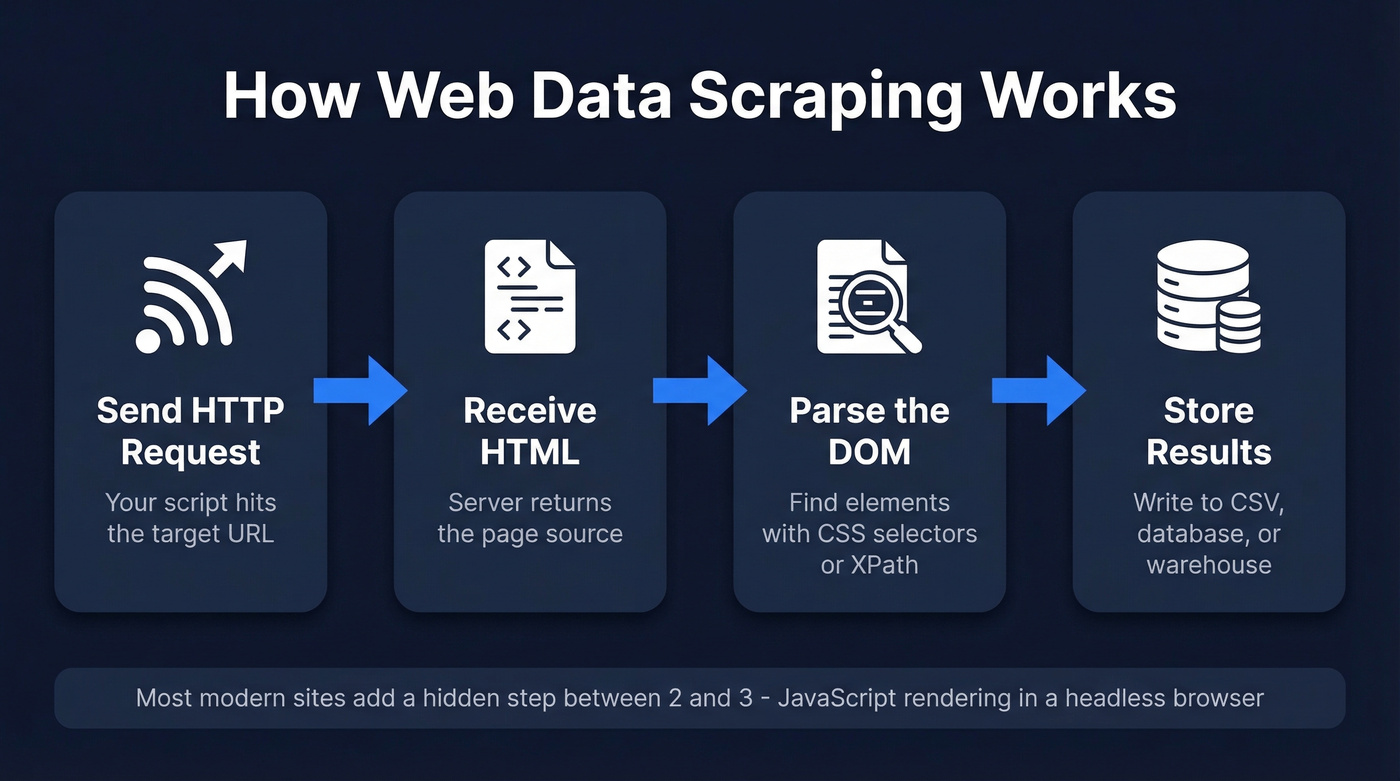
At its core, this is the automated extraction of structured information from websites. You send an HTTP request, get back HTML, parse the parts you care about, and store the results. That's the entire concept in four steps.
The terminology gets muddled, so let's clean it up. Crawling is navigating between pages - following links, building a map of a site. Scraping is extracting specific data from those pages. APIs are structured data endpoints the site intentionally provides. Most real-world projects combine crawling and scraping. APIs are always preferable when they exist, because the data comes pre-structured and the site owner expects the traffic.
The typical pipeline works like this: your script sends a request to a URL, the server returns HTML (or increasingly, a JavaScript shell that renders client-side), your parser walks the DOM to find the elements you need - product prices, article text, contact details - and you write the results to a database, CSV, or data warehouse.
Where it gets interesting is that most modern websites don't serve static HTML anymore. They serve a JavaScript skeleton that builds the page in the browser. That single fact has reshaped the entire scraping stack, and it's why half the tutorials you'll find online are outdated before you finish reading them.
What You Need (Quick Version)
Three paths, depending on what you're actually trying to do:
- Want to learn scraping? Start with Scrapy + Playwright in Python. Skip the BeautifulSoup-only tutorials - they're stuck in 2019 and won't handle modern JS-heavy sites.
- Want data without writing code? Octoparse handles one-off extraction jobs well. For recurring workflows, Apify's prebuilt actors save serious time.
Why Scraping Matters in 2026
The web scraping market is projected to reach $2.45 billion by 2036. This isn't a niche developer hobby anymore - it's core infrastructure for pricing intelligence, competitive analysis, and AI training pipelines.
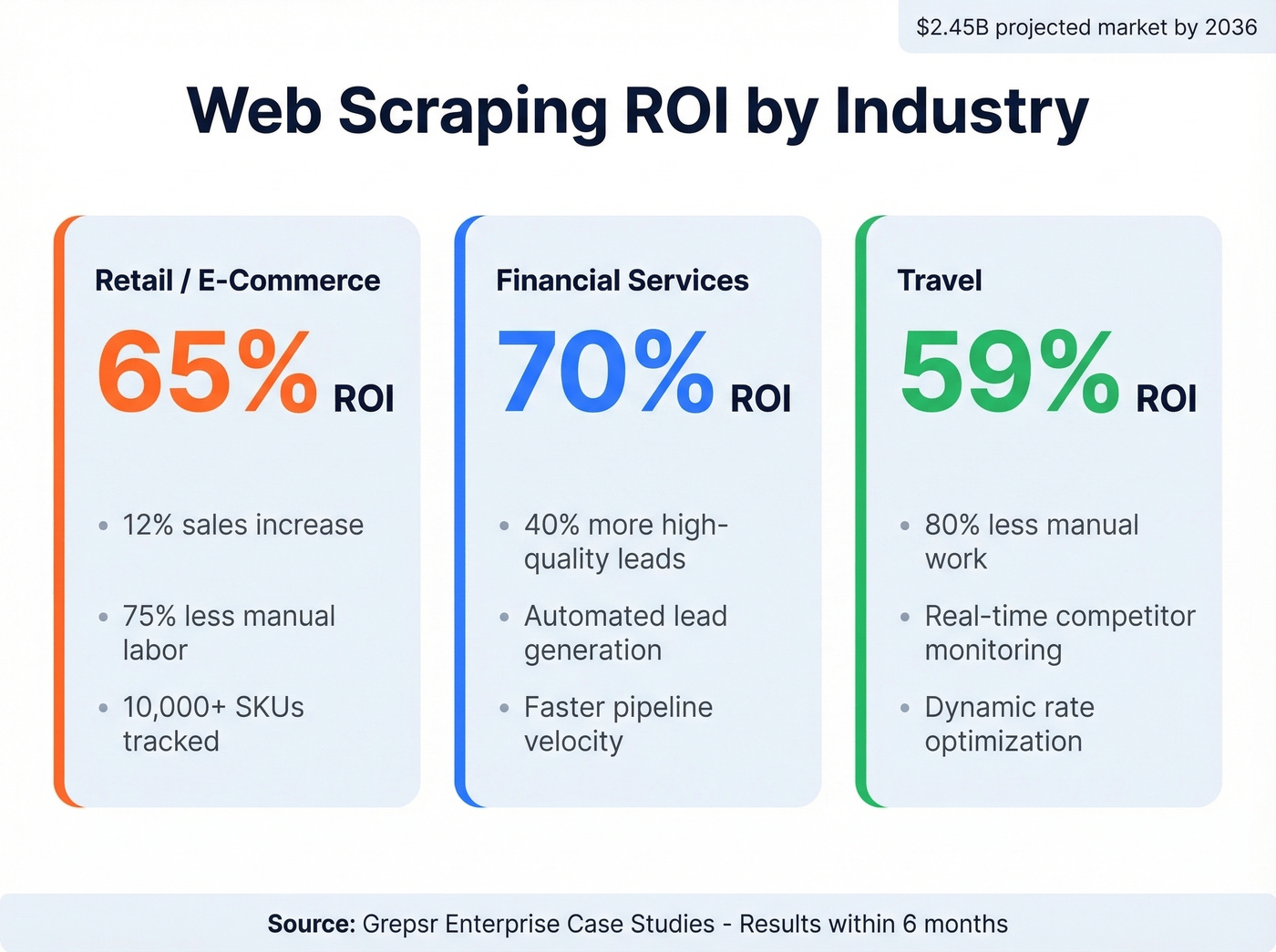
The ROI numbers back this up. A Grepsr analysis of enterprise case studies found retail companies achieving 65% ROI within six months from price optimization scrapers, with a 12% sales increase and 75% reduction in manual labor across 10,000+ SKUs. Financial services firms using scraping for lead generation hit 70% ROI with a 40% increase in high-quality lead conversion. Travel companies monitoring competitor rates saw 59% ROI with 80% less manual work.
But the biggest shift is AI. Scraping now feeds RAG pipelines, recommendation engines, and LLM fine-tuning datasets. If your company is building anything with generative AI, someone on your team is scraping - or should be.
Use Cases Across Industries
The applications span every industry. E-commerce teams track competitor prices in real time. Real estate platforms aggregate listings - one case study showed 54% ROI. Recruiting firms monitor job postings, and research teams build training corpora. B2B web data powers everything from market intelligence dashboards to automated lead enrichment workflows. If the data lives on the public web and you need it structured, scraping is how it gets done.
How the Extraction Process Works
The mechanics are straightforward until they aren't. Your script sends an HTTP GET request to a URL. The server returns an HTML document. Your parser - whether it's BeautifulSoup, lxml, or Scrapy's built-in selectors - walks the document tree to find the elements containing your target data. You extract the text or attributes, clean them, and write to storage.
You've got three main approaches for locating elements in the HTML:
- CSS selectors are the most readable and maintainable -
div.product-card h2.titlegrabs every product title inside a card. - XPath gives you more power for complex traversals but gets brittle fast, especially absolute paths like
/html/body/div[3]/div[1]/ul/li[2]/a. - Regex is a last resort for unstructured text extraction - useful for pulling phone numbers or emails from raw content, terrible for navigating HTML structure.
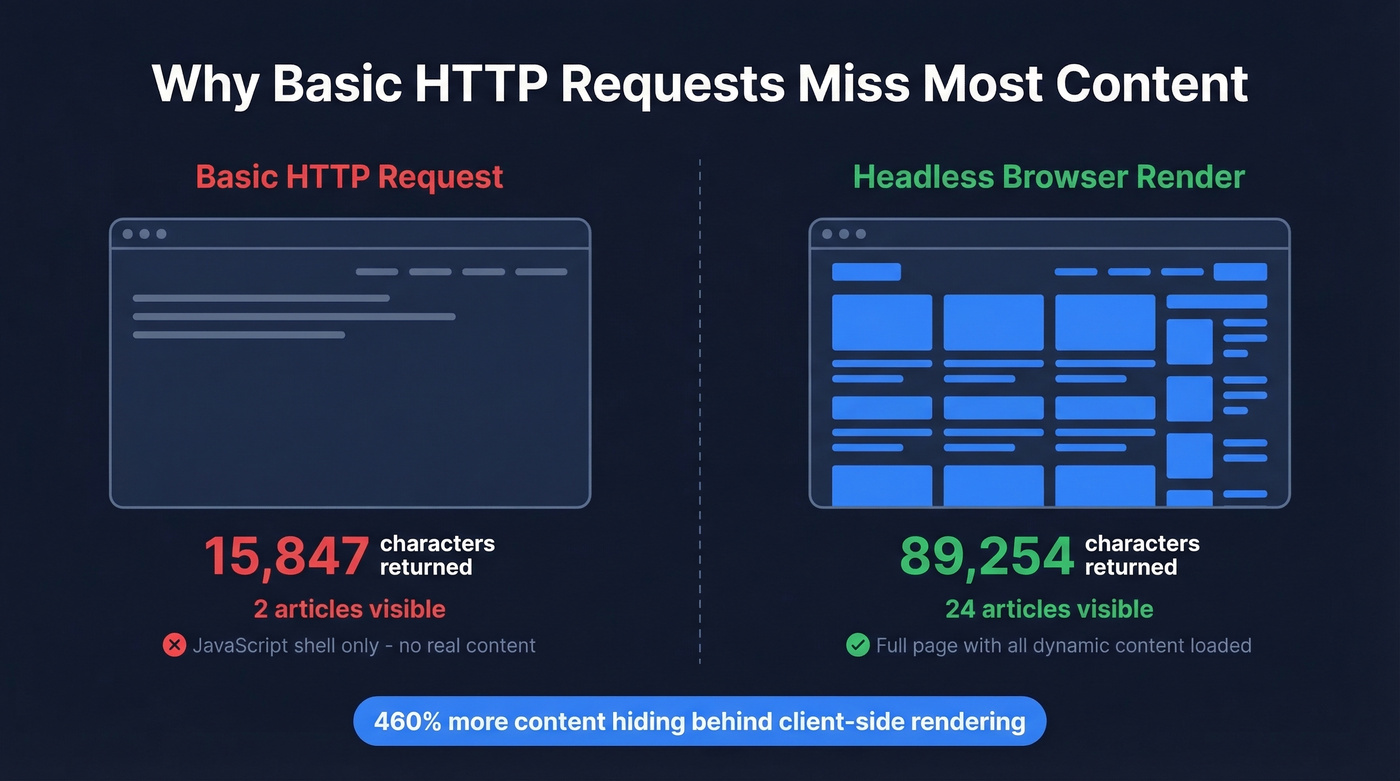
Most beginner tutorials gloss over the JavaScript rendering problem. A basic HTTP request to a modern site like TechCrunch returns 15,847 characters of HTML - mostly a JavaScript shell. Render that same page in a real browser, and you get 89,254 characters with 24 articles visible instead of 2. That's roughly 460% more content hiding behind client-side rendering.
This is why the modern scraping stack has moved beyond simple HTTP libraries. If you're scraping anything built in the last five years - React, Next.js, Vue, Angular - you need a headless browser in the loop.

That RevOps lead spent 3 months building a scraper, $400/month on proxies, and still bounced at 31%. Prospeo delivers 143M+ verified emails at 98% accuracy - refreshed every 7 days, not whenever your scraper survives its next break. At $0.01 per email, the math isn't close.
Skip the scraper. Get verified B2B contacts in ten minutes.
Build Your First Scraper in Python
Beginner: Requests + BeautifulSoup
For static HTML pages, the classic combo still works fine. Here's the minimum viable scraper:
from bs4 import BeautifulSoup

resp = requests.get("https://example.com/products", headers={"User-Agent": "Mozilla/5.0"})
soup = BeautifulSoup(resp.text, "html.parser")
titles = [h2.text.strip() for h2 in soup.select("div.product h2")]
Five lines, and you've got a list of product titles. The caveat: this only works on pages that serve real HTML. The moment you hit a JavaScript-rendered site, resp.text comes back nearly empty.
One pro tip that'll save you from getting blocked during development: save the HTML locally after your first request and parse from the saved file while you're iterating on selectors. Here's the helper pair:
def save_html(path, content):
    with open(path, 'wb') as f:
        f.write(content)

def read_html(path):
    with open(path, 'rb') as f:
        return f.read()
This keeps you to one request per page during development instead of hammering the server every time you tweak a CSS selector.
Production: Scrapy + Playwright
For anything beyond a quick one-off, Scrapy + Playwright is the standard production stack. Scrapy handles crawl orchestration - concurrency, retries, pipelines, rate limiting - while Playwright handles JavaScript rendering and browser interactions.
Setup:
pip install scrapy scrapy-playwright playwright
playwright install chromium
The key settings in your settings.py:
DOWNLOAD_HANDLERS = {
    "http": "scrapy_playwright.handler.ScrapyPlaywrightDownloadHandler",
    "https": "scrapy_playwright.handler.ScrapyPlaywrightDownloadHandler",
}
TWISTED_REACTOR = "twisted.internet.asyncioreactor.AsyncioSelectorReactor"
CONCURRENT_REQUESTS = 8
DOWNLOAD_DELAY = 1
RETRY_TIMES = 3
RETRY_HTTP_CODES = [500, 502, 503, 504, 429]
ROBOTSTXT_OBEY = True
When you need Playwright to render a page, pass it through the request meta:
yield scrapy.Request(
    url,
    meta={
        "playwright": True,
        "playwright_include_page": True,
        "playwright_page_methods": [
            PageMethod("wait_for_selector", "div.product-card"),
        ],
    },
)
Use structured item models with processors to clean data as it's extracted - strip whitespace, normalize prices, handle missing fields. The RETRY_HTTP_CODES list including 429 is important - that's the rate-limit response code, and you want Scrapy to back off and retry automatically rather than crashing.
Best Scraping Tools Compared
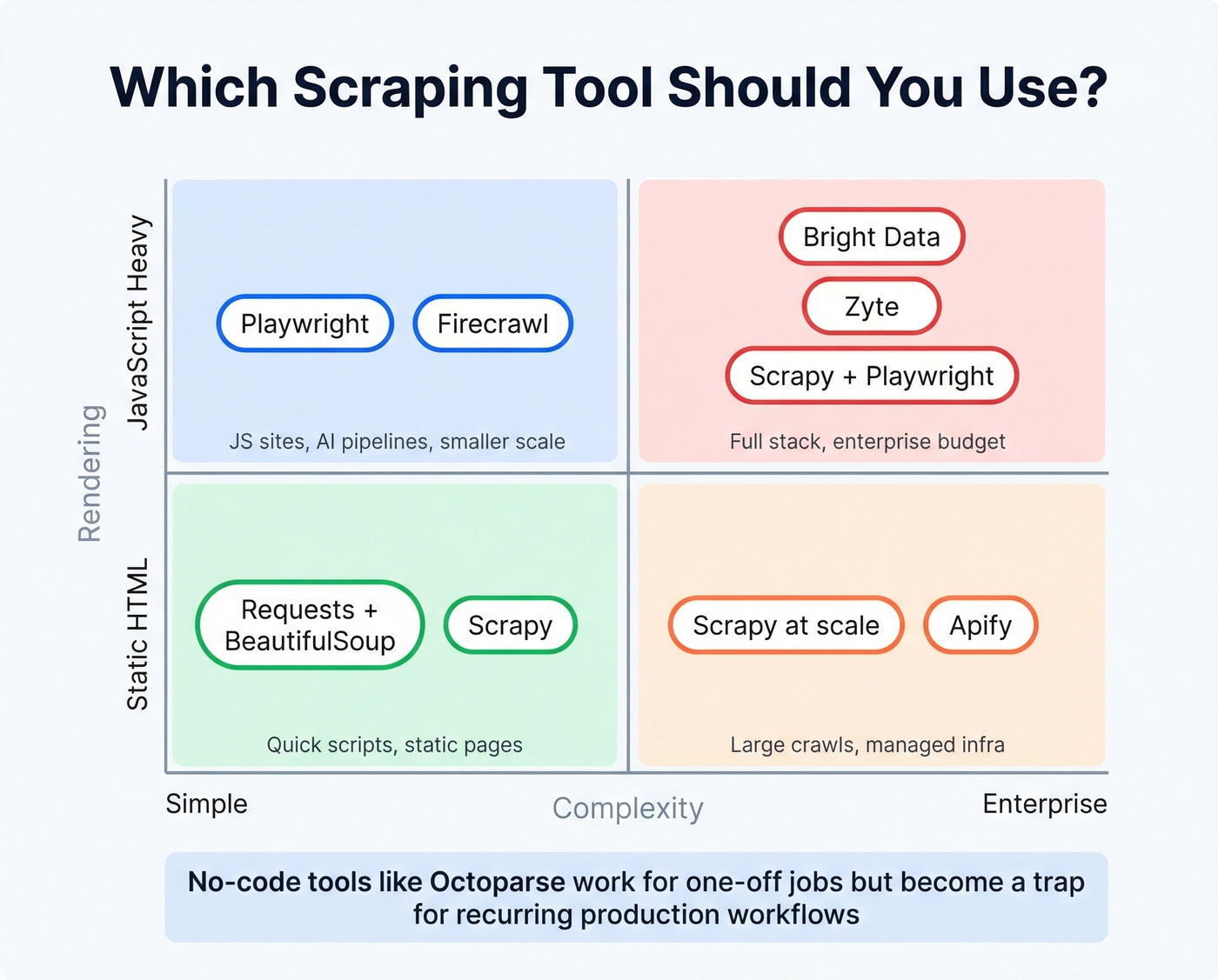
The scraping tool market splits into three tiers: open-source libraries you run yourself, managed platforms that handle infrastructure, and proxy/API services that sit between your code and the target site. Many teams also evaluate whether to partner with a data scraping company instead of managing infrastructure in-house.
| Tool | Best For | JS Rendering | Limitations | Pricing |
|---|---|---|---|---|
| Scrapy | Static crawls at scale | Via plugin | Needs Playwright for JS | Free (open-source) |
| Playwright | JS-heavy sites | Native | Code-heavy for simple jobs | Free (open-source) |
| Selenium | Legacy browser automation | Native | Clunky at scale | Free (open-source) |
| Apify | Managed workflows | Yes (actors) | Heavy for small jobs | Free tier; ~$49/mo+ |
| Octoparse | No-code extraction | Yes | Better for one-offs than pipelines | ~$75-$250/mo |
| Zyte | Enterprise managed scraping | Yes | Steep learning curve | ~$200-$1,000+/mo |
| Firecrawl | AI/LLM pipelines | Yes | Newer, smaller community | Free 500 credits; $19/mo |
| Bright Data | Enterprise proxy + scraping | Yes | Expensive, complex | ~$500-$2,000+/mo |
| ScraperAPI | Proxy rotation API | Via integration | Just proxies, not a full tool | Free tier; ~$49/mo+ |
| Browserless | Headless browser API | Yes | Reliability dips under load | Free tier; ~$50/mo+ |
Code-First vs. No-Code
The consensus on r/automation maps to what we've seen in practice. Selenium is simple to start with but gets clunky once projects grow. Scrapy is blazing fast on static sites but needs Playwright bolted on for dynamic content. Playwright handles JS beautifully but is code-heavy for lightweight scraping. Apify has solid infrastructure and prebuilt actors but feels heavy for smaller jobs. Browserless offers a clean headless browser API, though community reports flag reliability bumps under higher concurrent loads.
Here's the thing: no-code tools like Octoparse are fine for one-off extraction jobs. They're a trap for anything recurring. The moment you need scheduling, error handling, data transformation, or integration with a pipeline, you'll wish you'd written code from the start. If you're evaluating no-code scraping for a "production" workflow, save yourself six months of pain and learn Scrapy now.
For AI/LLM Pipelines
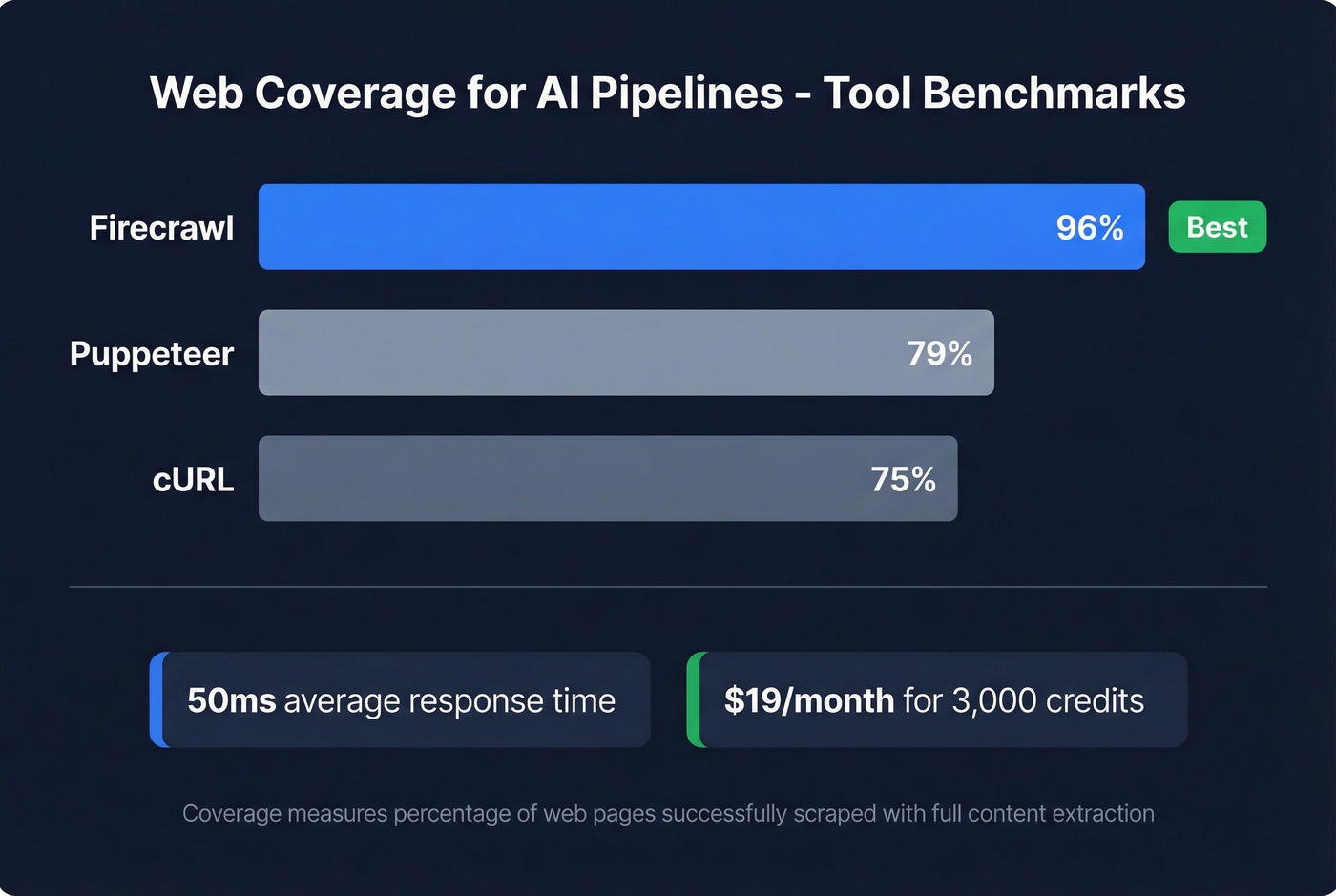
If you're scraping to feed RAG pipelines or LLM training data, Firecrawl deserves a serious look. It outputs clean Markdown and structured JSON - exactly what language models need. Their benchmarks show 96% web coverage versus 79% for Puppeteer and 75% for cURL, with 50ms average response times. At $19/month for 3,000 credits, it's the cheapest way to get AI-ready web data without building the rendering and cleaning pipeline yourself.
Mistakes That Get You Blocked
We've seen the same errors kill scraping projects over and over. Here are the ones that matter most:
Ignoring robots.txt. Set
ROBOTSTXT_OBEY = Truein Scrapy. One line, and it keeps you on the right side of both ethics and increasingly, the law.Default user-agent headers. Sending
python-requests/2.31.0as your user agent is a neon sign that says "bot." Use a realistic browser UA string and rotate them.Fragile absolute XPath selectors.
/html/body/div[3]/div[1]/ul/li[2]/abreaks the moment the site adds a banner. Use relative CSS selectors with fallbacks.Missing pagination. Your scraper grabs page one and stops. Follow "Next" links programmatically, or build page-number iteration into your spider.
No error handling. A single
Nonereturn from a selector crashes your entire run. Guard against missing elements, use try/except blocks, and in Scrapy, implementerrbackhandlers for failed requests.No rate limiting. Hammering a server with 50 concurrent requests gets you blocked in minutes. Set
DOWNLOAD_DELAY = 1andCONCURRENT_REQUESTS = 8as starting points. Be polite.Skipping JS rendering. If you're getting suspiciously thin results, the content is probably rendered client-side. Add Playwright to your stack before assuming the data isn't there.
No local HTML caching. During development, save each page's HTML locally and parse from the file. This follows the one-request-per-page principle and prevents you from getting rate-limited while debugging selectors.
Is Web Scraping Legal in 2026?
The Rule of Thumb
Scraping publicly available data is generally legal. The risk comes from how you scrape, what you scrape, and why. The legal frameworks that matter: CFAA (computer fraud), GDPR and CCPA (privacy), DMCA 1201 (anti-circumvention), copyright law, and contractual terms of service.
Key Cases You Should Know
hiQ v LinkedIn (2017-2022): The Ninth Circuit held that scraping publicly accessible data doesn't constitute "unauthorized access" under the CFAA. A landmark win for scrapers, but narrower than people think - it only addresses CFAA, not copyright, privacy, or ToS claims.
Meta v Bright Data (2023-2024): Meta dropped its remaining claims in February 2024 after the court found insufficient evidence that Bright Data scraped non-public or logged-in content. The takeaway: stay logged out, scrape only public pages.
Reddit v Perplexity (October 2025-present): Still pending and potentially the most consequential case in years. Reddit is alleging DMCA 1201 anti-circumvention - arguing that bypassing rate limits and captchas to scrape content violates the Digital Millennium Copyright Act. If this theory holds, it reshapes everything.
KASPR CNIL fine (France): EUR 240,000 for scraping publicly visible professional data without appropriate consent. This is the case every scraper should know. Public doesn't mean free of privacy law.
What's Changing
The DMCA anti-circumvention angle is the new battleground. Some courts are split on whether the underlying content even needs to be copyrighted for a DMCA claim to stick. One attorney analysis flags that in Texas, even ignoring robots.txt could give rise to a DMCA claim.
Venue matters more than ever. X Corp moved its governing law and jurisdiction to the Northern District of Texas - a court that's been more receptive to platform-friendly arguments. Trespass to chattels, a legal theory that seemed dead, is seeing a revival, with some courts accepting even minor server-capacity impacts as grounds for claims.
The GDPR penalty ceiling remains steep: up to EUR 20M or 4% of global annual revenue. With the KASPR precedent, enforcement agencies have shown they'll apply it to scraped professional data, not just consumer data.
How Anti-Bot Systems Work
Modern anti-bot defenses are multi-layered. The major vendors - Cloudflare, Akamai, DataDome, and PerimeterX (now HUMAN) - deploy a combination of browser fingerprinting, behavioral biometrics, TLS handshake analysis, and ML-based pattern detection. They aren't checking if you're a bot with a single test. They're scoring dozens of signals simultaneously.
On r/webscraping, practitioners discuss techniques like Bezier-curve mouse movement to mimic human motor control, sub-pixel navigation precision, running 12 concurrent browser contexts with bounded randomization, and targeting mobile endpoints where defenses tend to be lighter. One practitioner used these techniques to harvest large property datasets with broker contacts, price history, and investment gap analysis - a real-world example of the lengths serious scraping projects require.
The uncomfortable truth: fighting anti-bot systems puts you squarely on the wrong side of DMCA anti-circumvention claims. The Reddit v Perplexity case is testing exactly this theory. The smarter approach - both legally and practically - is to use official APIs when they exist, negotiate data partnerships for high-value sources, or use purpose-built data platforms that have already done the compliance work. Spending engineering cycles on an arms race with Cloudflare is a losing game for most teams.
Build, Buy, or Skip?
The Decision Framework
Here's the quick decision tree:
Is the data unique to specific websites and unavailable elsewhere? Build a scraper. You'll need Scrapy + Playwright, proxies at $2,000-5,000/month, and a developer maintaining it as sites change.
Is the data a commodity - pricing feeds, job listings, public records? Buy it. Databricks Marketplace, AWS Data Exchange, and Datarade sell pre-structured datasets. It's fast and requires zero engineering. The trade-off: you're limited to what's available, and the data won't always be as fresh or specific as you need.
Is the data B2B contacts - emails, phone numbers, company info? Skip scraping entirely. This is the one category where building a scraper is almost always the wrong call.
Zyte's industry report confirms what we see in practice: most mature teams end up hybrid. They build scrapers for unique data needs, buy commodity datasets, and use specialized platforms for domains where someone else has already solved the hard problems.
When Scraping Is the Wrong Answer
Look, if you're scraping websites to find business emails and phone numbers, you're solving the wrong problem. B2B contact data is the prime example of "skip scraping entirely."
Consider the math. Building and maintaining a contact scraper means developer time, proxy costs, anti-bot circumvention risk, email verification (because scraped emails bounce at horrifying rates), and ongoing legal exposure under GDPR. A scraping setup for B2B contacts runs $2,000-5,000/month in infrastructure alone, before you count developer hours. Or you use a platform like Prospeo - 143M+ verified emails, 125M+ mobile numbers, 98% email accuracy, 7-day data refresh - at roughly $0.01 per email. There's a free tier with 75 emails and 100 Chrome extension credits per month, no contracts, and full GDPR compliance baked in. For B2B data, the "build" option is the wrong answer almost every time.
FAQ
Is web scraping legal?
Scraping publicly available data is generally legal, but legality hinges on your method, the data type, and jurisdiction. Circumventing anti-bot protections risks DMCA claims, and personal data triggers GDPR/CCPA regardless of public visibility. The KASPR CNIL fine of EUR 240,000 proved that public data isn't exempt from privacy law.
What's the best language for scraping?
Python dominates with the Scrapy + Playwright stack handling both static and JavaScript-rendered sites in production. JavaScript via Puppeteer or Playwright for Node is a solid alternative. Non-developers should start with Octoparse or Apify for simpler extraction jobs.
How do I avoid getting blocked?
Respect robots.txt, use realistic browser headers, add delays of at least one second between requests, rotate user agents, and render JavaScript when needed. Save HTML locally during development to avoid hammering servers while iterating on selectors. Start with CONCURRENT_REQUESTS = 8 and scale up cautiously.
When should I buy data instead of scraping it?
When the data already exists in a verified, structured format - especially B2B contacts. Building a scraper for emails and phone numbers costs $2,000-5,000/month in infrastructure, bounces at 20-30%, and carries GDPR risk. Platforms like Prospeo deliver verified emails at ~$0.01 each with a free tier, while outsourcing to a data scraping company works well for niche datasets at scale.
Can I scrape data without coding?
Yes. Tools like Octoparse, WebScraper.io, and DataMiner offer point-and-click interfaces that work well for one-off projects. They become limiting for recurring or large-scale extraction where you need scheduling, error handling, and pipeline integration - at that point, learning Scrapy pays for itself quickly.
Scraping contact data means fighting JavaScript rendering, anti-bot systems, and catch-all domains - then still validating everything yourself. Prospeo's proprietary 5-step verification with spam-trap removal and honeypot filtering handles all of it. 300M+ profiles, 30+ search filters, 92% API match rate.
Let your scrapers handle pricing data. Let Prospeo handle people data.
Web data scraping is one of the most versatile skills in a technical team's toolkit - but the best practitioners know it's a means to an end, not the end itself. Build scrapers for the data nobody else is collecting. Buy commodity datasets when they're available. And for B2B contacts, skip the scraper entirely. The RevOps lead from the intro figured that out the expensive way. You don't have to.