

How to Whitelist an Email in Yahoo Mail (2026)
Yahoo Mail doesn't have a whitelist. Not a real one. Unlike Outlook's Safe Senders list, there's no single toggle that says "always deliver this sender to my inbox." If you want to whitelist email in Yahoo, you're stitching together a few workarounds - and even then, Yahoo's spam filter can override them.
We've tested the main methods people recommend. Here's what actually works.
TL;DR: Yahoo Mail has no dedicated whitelist. Combine three actions: (1) add the sender to Contacts, (2) mark their email as Not Spam, and (3) create a filter routing their address to Inbox. Do all three. Any single method alone isn't reliable.
How to Whitelist Email in Yahoo (Desktop)
Add the Sender to Contacts
Open the email you want to whitelist. Hover over the sender's name and click Add to Contacts, or click the contact icon. If the email is already in your spam folder, move it to your inbox first, then add the contact.
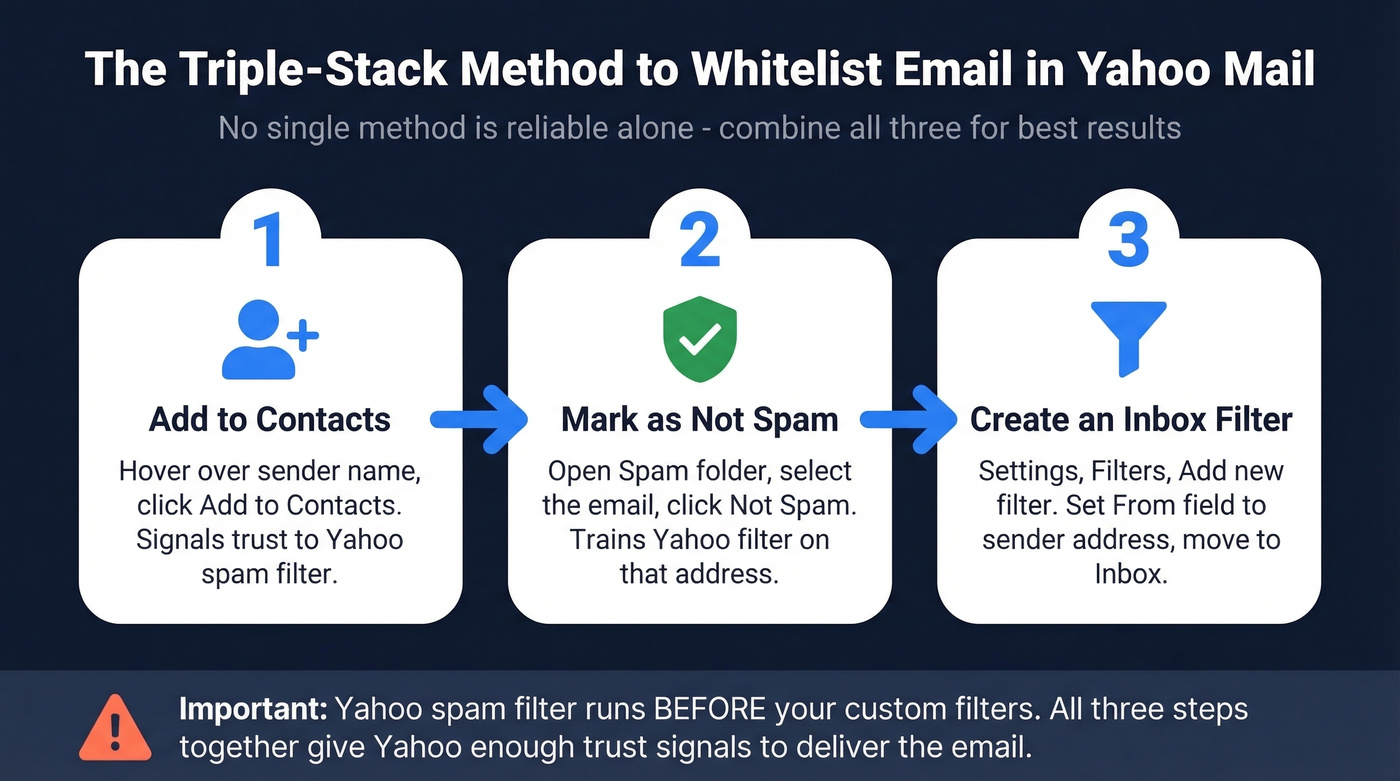
Adding someone to Yahoo Contacts signals to the spam filter that you trust this sender. It helps - but Yahoo's spam filter can still override it, which is why you need the next two steps.
Mark as "Not Spam"
Go to your Spam folder. Select the email from the sender you want to whitelist. Click Not Spam in the toolbar.
This trains Yahoo's filter to recognize future messages from that address as legitimate. It doesn't always stick, especially if the sender has authentication issues. More on that below.
Create a Filter to Route to Inbox
This is the most reliable recipient-side method when the message makes it past Yahoo's initial spam filtering:
- Click the gear icon (top right) -> More Settings
- Select Filters from the left sidebar
- Click Add new filters
- Name the filter something you'll recognize (e.g., "Whitelist - Acme Corp")
- Set the From field to the sender's email address
- Under "Move to," select Inbox
- Click Save
Want to whitelist an entire domain? Use the domain - for example, @domain.com - in the From field instead of a specific address. That's the closest thing to a domain-wide allow rule in Yahoo Mail, though Yahoo's spam filter can still intercept messages before your filter runs.
Yahoo lets you block domains but doesn't give you a simple domain "allow list" feature. That tells you everything about their priorities.
One thing to remember: filters apply only to new incoming mail. They won't retroactively move messages already sitting in your spam folder.
Whitelisting on the Yahoo Mail App
The Yahoo Mail app doesn't let you create filters, so use a desktop browser for that step. But you can move spam messages to your inbox on mobile, which trains the filter. The steps are the same on iOS and Android:
- Open the Yahoo Mail app
- Tap the folder icon (bottom left) -> select Spam
- Open the message from the sender you want to whitelist
- Tap Move -> select Inbox
For the full triple-stack approach - contacts + not spam + filter - switch to Yahoo Mail in a desktop browser. Covering both mobile and desktop ensures you've handled every angle.

Yahoo's spam filter kills emails from senders with poor reputation - and nothing tanks reputation faster than bouncing off invalid addresses. Prospeo's 5-step verification catches bad emails, spam traps, and honeypots before they touch your domain. 98% accuracy, 7-day data refresh.
Stop the death spiral before Yahoo blacklists your domain.
Check Your Blocked Senders List
Before anything else, make sure you haven't accidentally blocked the sender. A blocked sender's mail won't reach your inbox even if you add them to Contacts or mark messages as Not Spam.
Go to Settings (gear icon) -> More Settings -> Security and Privacy -> Blocked Addresses. If the sender or their domain appears here, remove them.
Why Your Yahoo Whitelist Isn't Working
Yahoo's Spam Filter Runs First
Here's what most guides skip entirely. Yahoo's spam filter processes every message before custom filters run. Your carefully crafted filter to route emails to Inbox gets bypassed if Yahoo's spam filter grabs the message first. In practice, Yahoo Mail filters don't prevent email from going to spam - they only act on what the spam filter lets through.
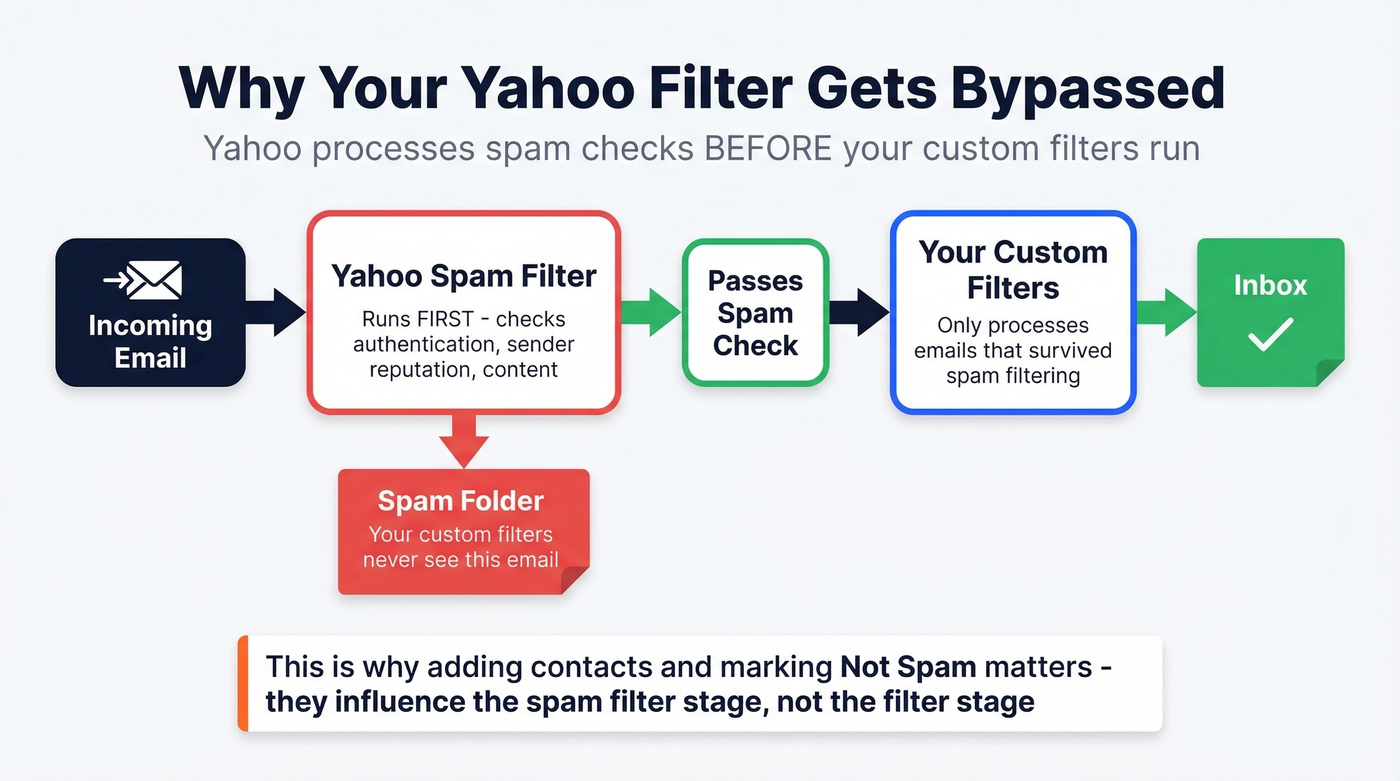
This is the core technical limitation, and it's why the triple-stack approach matters. You need every signal working together to give Yahoo enough reason to trust the sender.
"Inbox" Missing From Filters
Multiple Reddit users have reported that Yahoo removed "Inbox" as a destination option when creating filters, leaving only Trash or Archive. This bug has been reported since 2023 and persisted through 2025 - we've seen it ourselves in early 2026 testing.
If you're hitting this, try clearing your browser cache, using a different browser, or accessing Yahoo Mail in an incognito window. Also double-check your blocked senders list. Sometimes the issue is upstream.
"Not Spam" Doesn't Stick
If you keep marking emails as Not Spam and they keep landing in spam anyway, the problem almost certainly isn't on your end. It usually means the sender is failing authentication checks or has a poor sending reputation with Yahoo. No amount of clicking "Not Spam" fixes broken sender infrastructure.
When the Problem Is the Sender
Let's be honest: most guides stop at "click Not Spam." That's step one, not a solution.
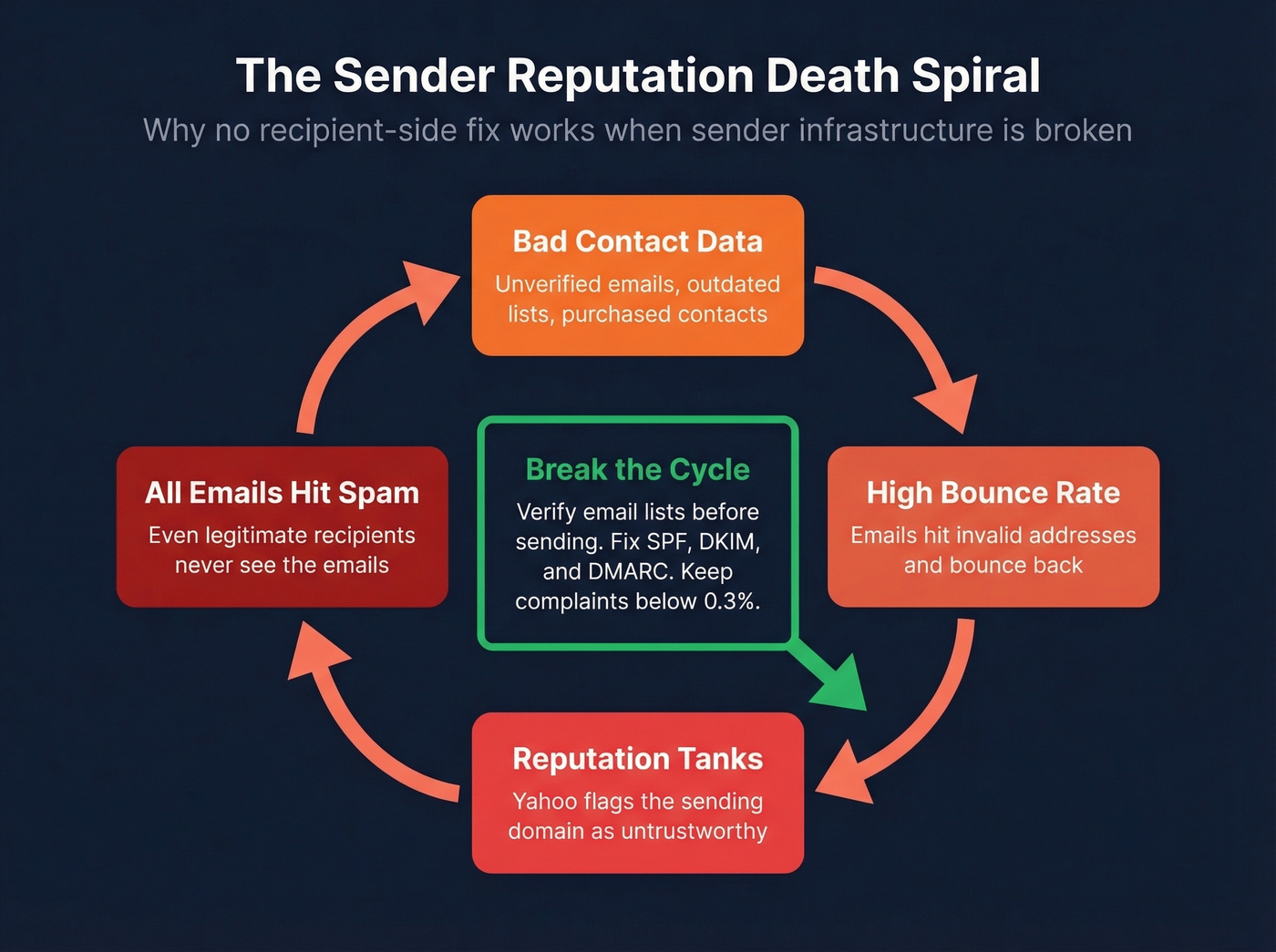
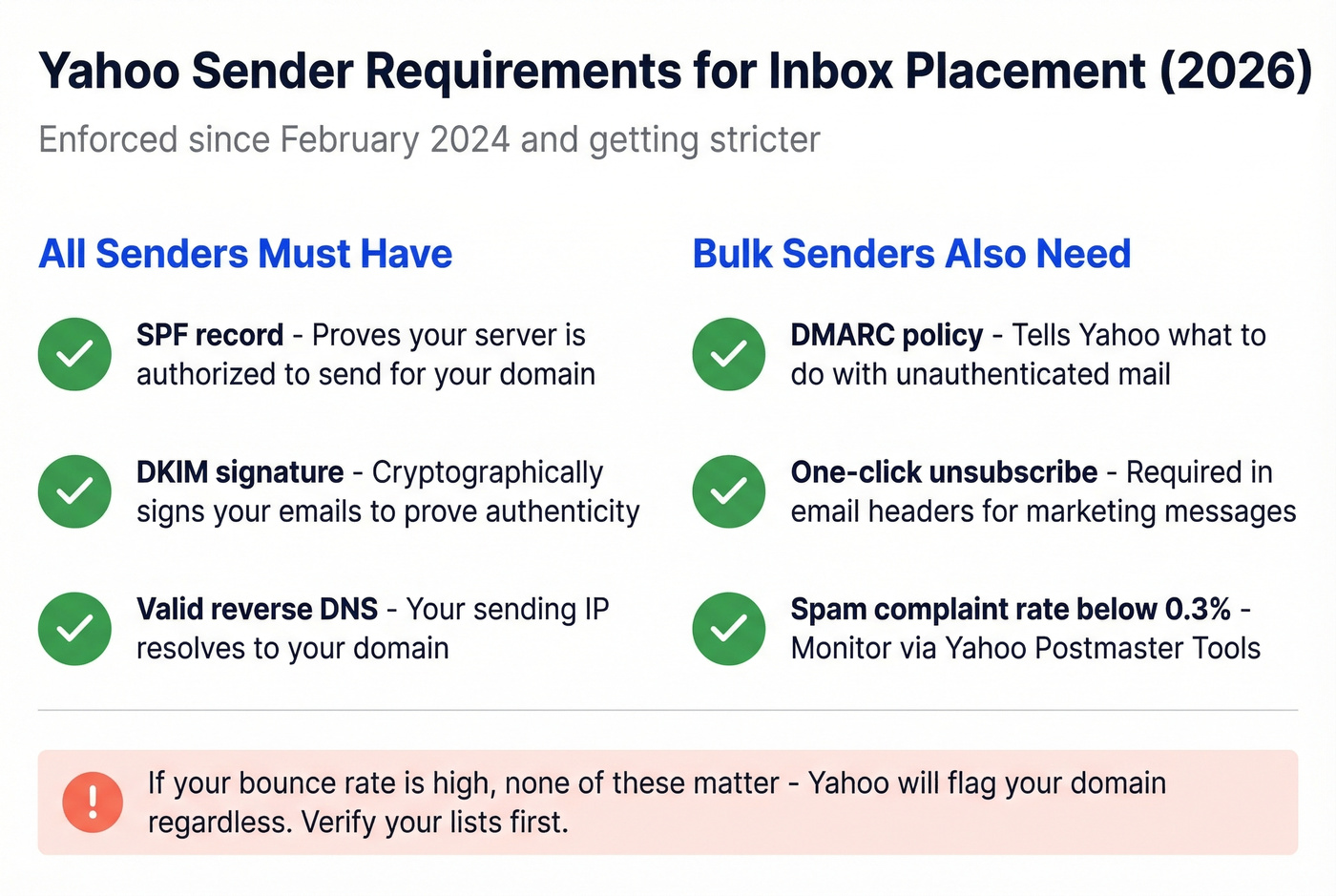
If you've tried all three methods and emails still land in spam, the sender needs to fix their setup. Starting in February 2024, Yahoo began enforcing strict sender authentication requirements, and enforcement has only tightened since. Every sender needs SPF and DKIM at minimum. Bulk senders also need a DMARC policy, one-click unsubscribe support, and spam complaint rates below 0.3%.
Here's the chain reaction we see constantly in our work with outbound teams: a sender uses bad contact data, emails bounce off invalid addresses, sender reputation tanks, and Yahoo's spam filter catches everything from that domain going forward. It's a death spiral that no recipient-side workaround can fix. If you're a sender dealing with this, the first step is verifying your email lists before sending. Prospeo's 5-step verification catches invalid addresses, spam traps, and honeypots before they damage your reputation - 98% email accuracy, with a free tier covering 75 emails per month.
According to Google's own sender guidelines, authentication and list hygiene are the two biggest factors in inbox placement. Yahoo's requirements mirror these closely.
If you want a deeper breakdown of what actually moves the needle, see our email deliverability guide and the practical checklist in how to improve sender reputation.
No recipient-side workaround fixes broken sender infrastructure. The real fix? Clean data from the start. Prospeo verifies 143M+ emails with proprietary infrastructure - no third-party providers, no recycled data. Start with 75 free verifications, no credit card required.
Clean lists land in inboxes. Dirty lists land in spam. Choose.
FAQ
Can you whitelist an entire domain in Yahoo Mail?
There's no dedicated feature for it. Create a filter with @domain.com in the From field and route to Inbox. Yahoo's spam filter still runs first, so this won't override poor sender authentication - it's a best-effort workaround, not a guarantee.
Why do emails keep going to spam after I click "Not Spam"?
The sender likely fails authentication checks or has poor sending reputation. This isn't fixable from the recipient side. The sender needs to fix their SPF, DKIM, and DMARC records and clean up their contact lists.
How can senders avoid Yahoo's spam folder?
Authenticate with SPF, DKIM, and DMARC. Keep spam complaints below 0.3%. Verify your email list before sending - bounces to invalid addresses destroy sender reputation fast. Mailchimp's deliverability guide covers the authentication basics well.