


Workbooks CRM Pricing, Reviews, Pros & Cons (2026)
Workbooks publishes at least three different price points on its own website. Is it £28 or £30? $43 or $45? Depends which page you land on. We dug through every pricing page, ran the calculator ourselves, and cross-referenced user reviews on G2, Capterra, and TrustRadius to give you a straight answer on what Workbooks actually costs - and whether it's worth it.
30-second verdict: Workbooks is a strong pick for 20-50 person professional services or manufacturing companies that need CRM, quoting, and invoicing in one platform. If you're a small sales team that just needs pipeline management, Pipedrive or HubSpot's free CRM will cost less and move faster.
Workbooks Pricing Breakdown
Workbooks sells four tiers across two editions. You can mix and match licenses, so your SDRs might sit on CRM Standard while your ops lead uses Business Pro.
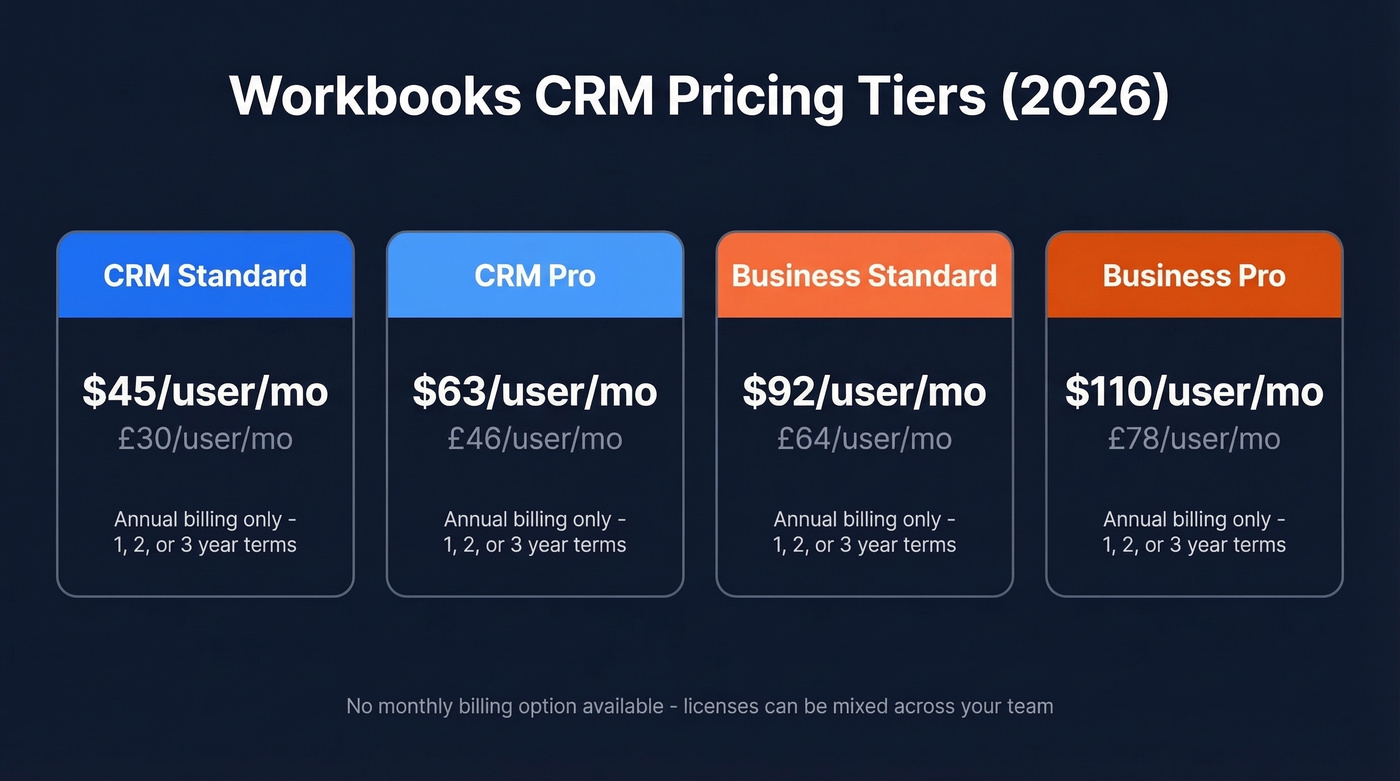
| Tier | GBP/user/mo | USD/user/mo |
|---|---|---|
| CRM Standard | £30 | $45 |
| CRM Pro | £46 | $63 |
| Business Standard | £64 | $92 |
| Business Pro | £78 | $110 |
All subscriptions are 1, 2, or 3-year terms, billed annually. There's no monthly option.
Add-Ons That Stack Up
Extensions apply to every user on your account - you can't cherry-pick. Modules can be assigned per user.
| Extension (all users) | +GBP/user/mo | +USD/user/mo |
|---|---|---|
| Audit Trail | £6.50 | $9 |
| Multi-Currency Docs | £6.50 | $9 |
| Advanced Security | £6.50 | $9 |
| Custom Records | £6.50 | $9 |
| Module (per user) | +GBP/user/mo | +USD/user/mo |
|---|---|---|
| Project Management | £15 | $21 |
| Outlook Integration | £7 | $10.50 |
| Contract Management | £6.50 | $9 |
Additional storage runs £33/$48 per 1GB per year, with 100GB included.
Why the Prices Don't Match
We ran through the pricing calculator and confirmed both the £30/$45 and £28/$43 figures appear on different Workbooks pages. As of early 2026, both pages are live. The calculator consistently shows the higher figures. Use those for budgeting.
What You'll Actually Pay
Here's a real scenario: 15 users on Business Standard, plus Audit Trail for everyone and Outlook Integration for 10 users.
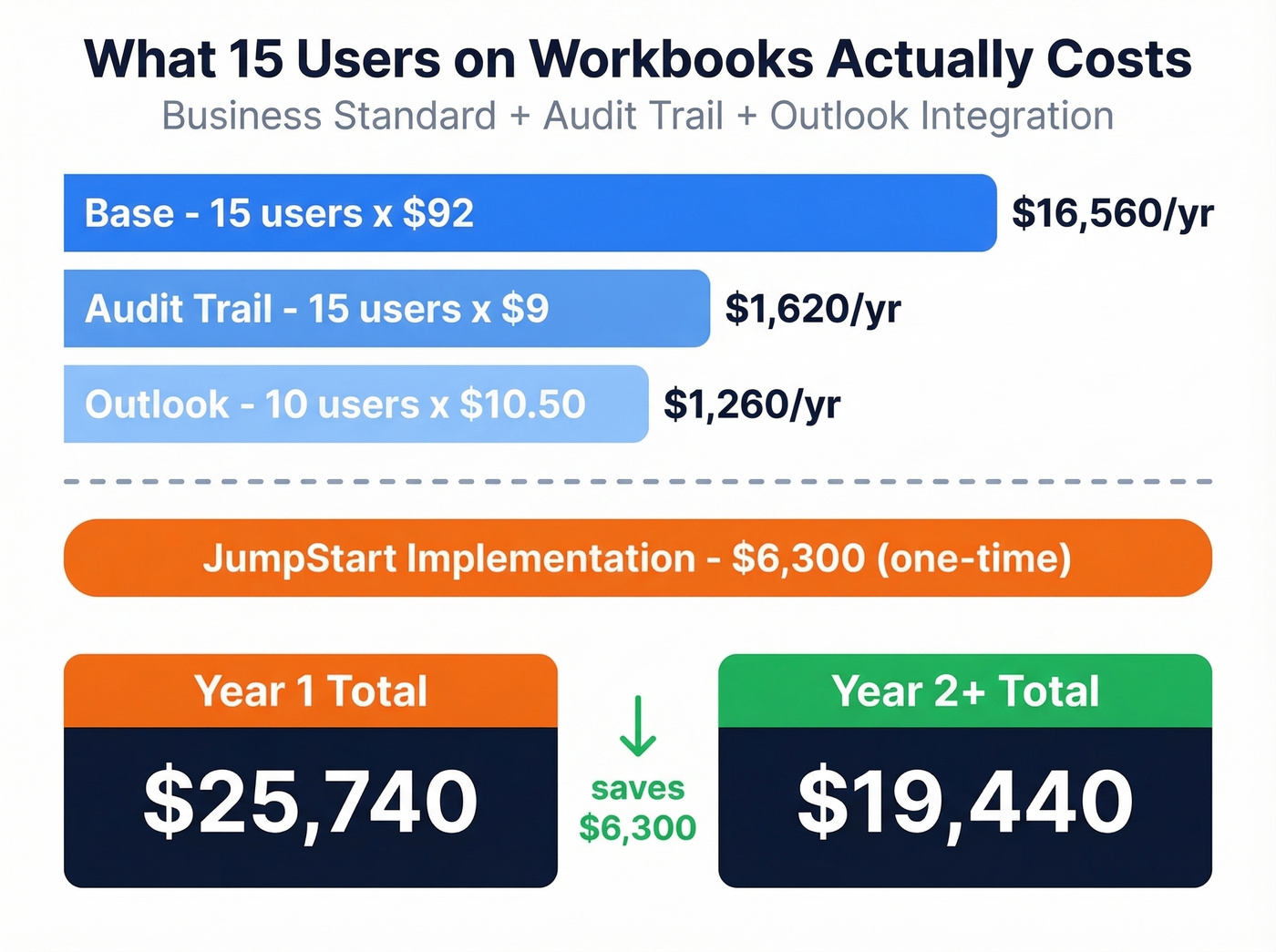
- Base: 15 x $92 = $1,380/mo - $16,560/year
- Audit Trail: 15 x $9 = $135/mo - $1,620/year
- Outlook: 10 x $10.50 = $105/mo - $1,260/year
- JumpStart implementation: $6,300 (one-time)
Year 1 total: ~$25,740. Year 2 onward drops to ~$19,440. That's real money for a mid-market team, so let's talk about whether the product justifies it.
Implementation Options
| Option | Cost | Timeline |
|---|---|---|
| SelfStart | $3,600 | DIY, self-paced |
| JumpStart | $6,300 | ~2-6 weeks |
| Shared Success | $4,020 (workshop) | ~6-16 weeks |
The Shared Success model is genuinely unusual. Complete the workshop, commit to a 3-year deal with >£5K annual license value, and Workbooks matches your investment with free consulting days - capped at 15 days, used within the first 12 months. Additional days run $1,340/day. We haven't seen another mid-market CRM vendor offer anything like it.

Spending $25K+ on Workbooks means nothing if your contact data decays. Prospeo's CRM enrichment returns 50+ data points per contact at 98% email accuracy - refreshed every 7 days, not every 6 weeks. CSV upload works with Workbooks, HubSpot, Pipedrive, or any CRM on your shortlist.
Stop paying for a CRM full of bounced emails.
Where Workbooks Excels
Workbooks earns strong marks in the areas that matter most for mid-market operations teams. TrustRadius reviewers give it 8.8/10 for both pipeline visualization and customizable reporting, which tracks with what we've heard from teams that run complex quoting workflows.
The AI Sales Hygiene feature auto-captures email and meeting data to generate opportunity records, cutting admin time significantly. And the built-in invoicing - quoting-to-cash in one system, no Salesforce CPQ bolt-on needed - is the single biggest differentiator. No other CRM at this price point does it natively.
The Shared Success consulting program deserves a second mention here because it's not just a nice-to-have. For a company spending $19K+/year on CRM, getting 15 free consulting days to nail your setup is a material benefit. TCMM Shutter Group reported £1M revenue growth in year one with no headcount increase after their implementation.
Where Workbooks Falls Short
Here's the thing: performance is the #1 complaint, and it's not close. Users across G2, Capterra, and Software Advice consistently flag slow loading and sluggish saves. In our testing, page loads regularly lagged - and for a tool you're in all day, that friction compounds fast.
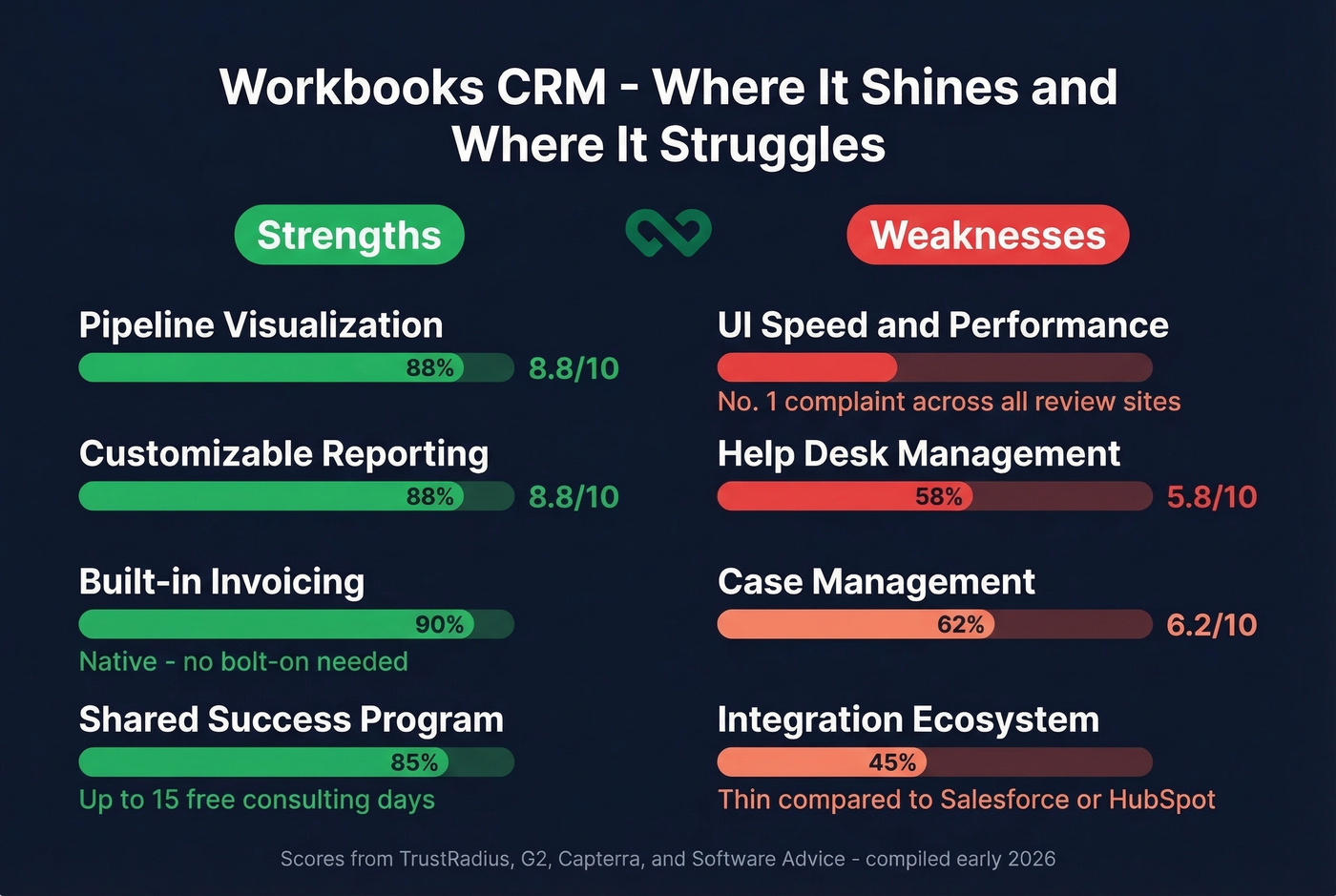
The service desk module is weak. Help desk management scores 5.8/10 on TrustRadius, case management 6.2/10. If support ticketing matters to your team, look at HubSpot Service Hub or Zendesk instead.
Customization cuts both ways. One reviewer nailed it: "if you jump in without clear processes, you can spend hours setting up features you don't need." Others flag clunky workflows and duplication risk. There's no native iOS app for offline access, and the integration ecosystem is thin compared to Salesforce or HubSpot.
Our take: Workbooks is the best all-in-one CRM for UK mid-market companies that need invoicing built in. But "all-in-one" only works if every module is good enough. The service desk isn't. If support is even 20% of your workflow, you'll end up bolting on another tool anyway, which defeats the purpose.
Who Should Buy (and Who Shouldn't)
Use Workbooks if you're a 20-50 person mid-market company in professional services, manufacturing, or media that needs CRM + quoting + invoicing in one system. It's especially strong for UK/EU-based teams - 376 of 573 G2 reviews come from Europe, so the product is clearly built with that market in mind.
Skip Workbooks if you're a sub-10 person team wanting lightweight pipeline management (Pipedrive starts at ~$14/user/mo), you need deep third-party integrations, or you can't tolerate a sluggish UI. Life's too short for slow software.
How Workbooks Compares
| Workbooks | HubSpot | Zoho CRM | Pipedrive | |
|---|---|---|---|---|
| Starting price | $45/user/mo | Free (paid from $20/user/mo) | $14/user/mo | ~$14/user/mo |
| Built-in invoicing | Yes | No | No | No |
| Integration depth | Limited | Extensive | Good | Good |
| UI speed | Slow | Fast | Moderate | Fast |
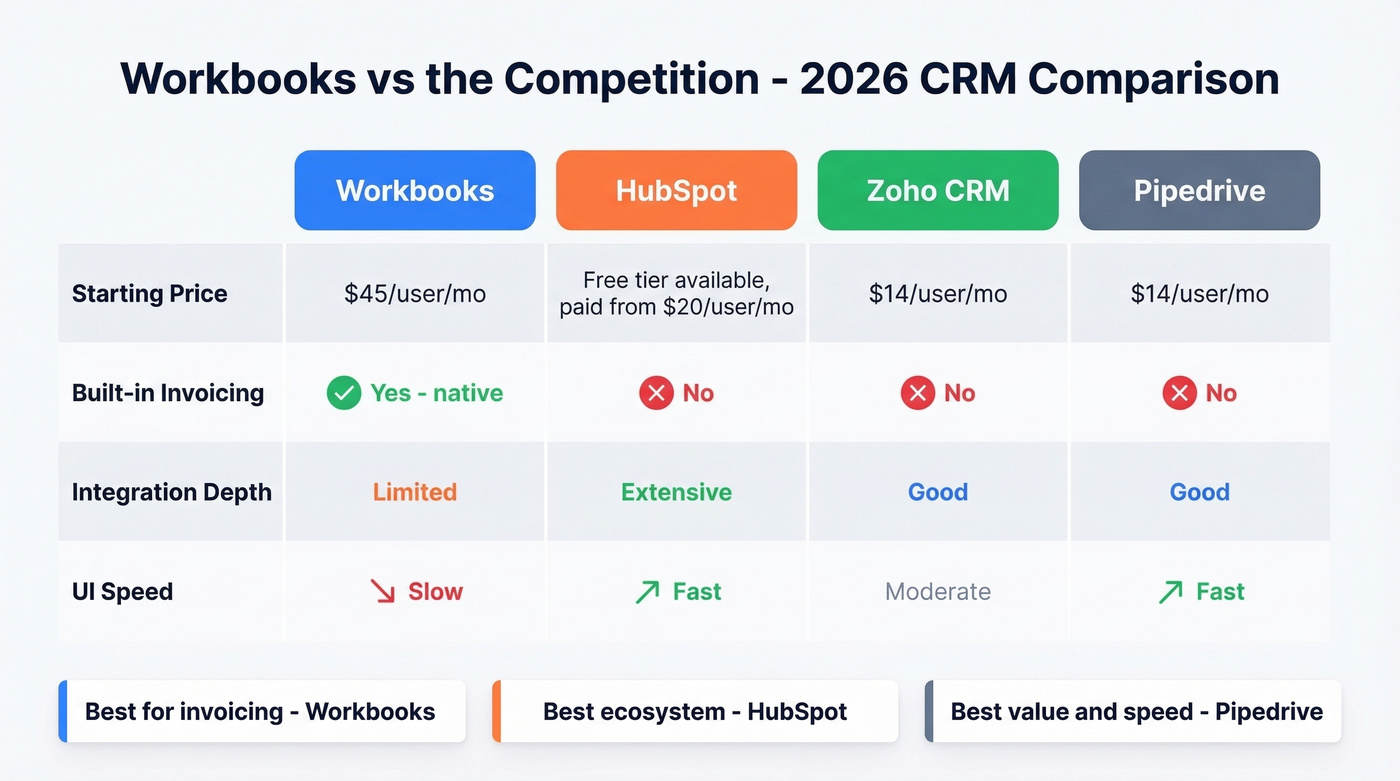
Pipedrive wins on pure value and speed. HubSpot wins on ecosystem. Workbooks wins on invoicing - it's the only one that does it natively.
Whatever CRM you pick, the data inside it determines your ROI. Stale contacts and bad emails will tank any platform. Prospeo's CRM enrichment returns 50+ data points per contact at a 98% email accuracy rate, integrating via CSV upload for any platform - Workbooks included.
FAQ
Does Workbooks offer a free trial?
Yes, no credit card required. Use it to stress-test UI speed - that's the most consistent complaint across every review site we checked.
Is Workbooks better than Salesforce for mid-market?
For CRM + invoicing in one system at a lower price, Workbooks wins. For integrations and scalability past 100 users, Salesforce is the safer bet at 2-3x the cost.
How do I keep CRM data accurate after choosing a platform?
Pair your CRM with a data enrichment tool. Prospeo verifies and refreshes contact records on a 7-day cycle with 98% email accuracy, catching stale records before they tank your deliverability.
Workbooks' thin integration ecosystem means you need tools that work via simple CSV or API. Prospeo enriches any CRM's contact list with verified emails, direct dials, and 50+ data points - 92% match rate, $0.01 per email, no annual contract required.
Fill your new CRM with data that actually connects to real buyers.