

"550 Too Many Invalid Recipients" - What It Means and How to Fix It
You're sending to a real person with a real mailbox, and it bounces. The error says "550 too many invalid recipients," but the address is fine. What gives?
This bounce usually isn't about the one address in front of you being invalid. It's about volume: the receiving server has seen too many invalid recipient attempts from your sending IP within its enforcement window (commonly an hour). Once you cross that threshold, the receiving system starts rejecting further mail from you - including messages addressed to perfectly valid mailboxes. It's one of the most misunderstood bounce codes in email operations, and we've watched it confuse entire IT teams.
Immediate fix: Clean your recipient list, reduce batch sizes, or ask the receiving admin to whitelist your IP.
Permanent fix: Verify every email address before it enters your CRM. Catch the invalid addresses that trigger this error before they ever cause a bounce.
Why This Error Happens - DHAP Explained
The error commonly comes from a feature called Directory Harvest Attack Prevention (DHAP). DHAP exists to stop spammers from guessing valid addresses by firing lots of RCPT TO commands at a mail server and seeing which ones stick.
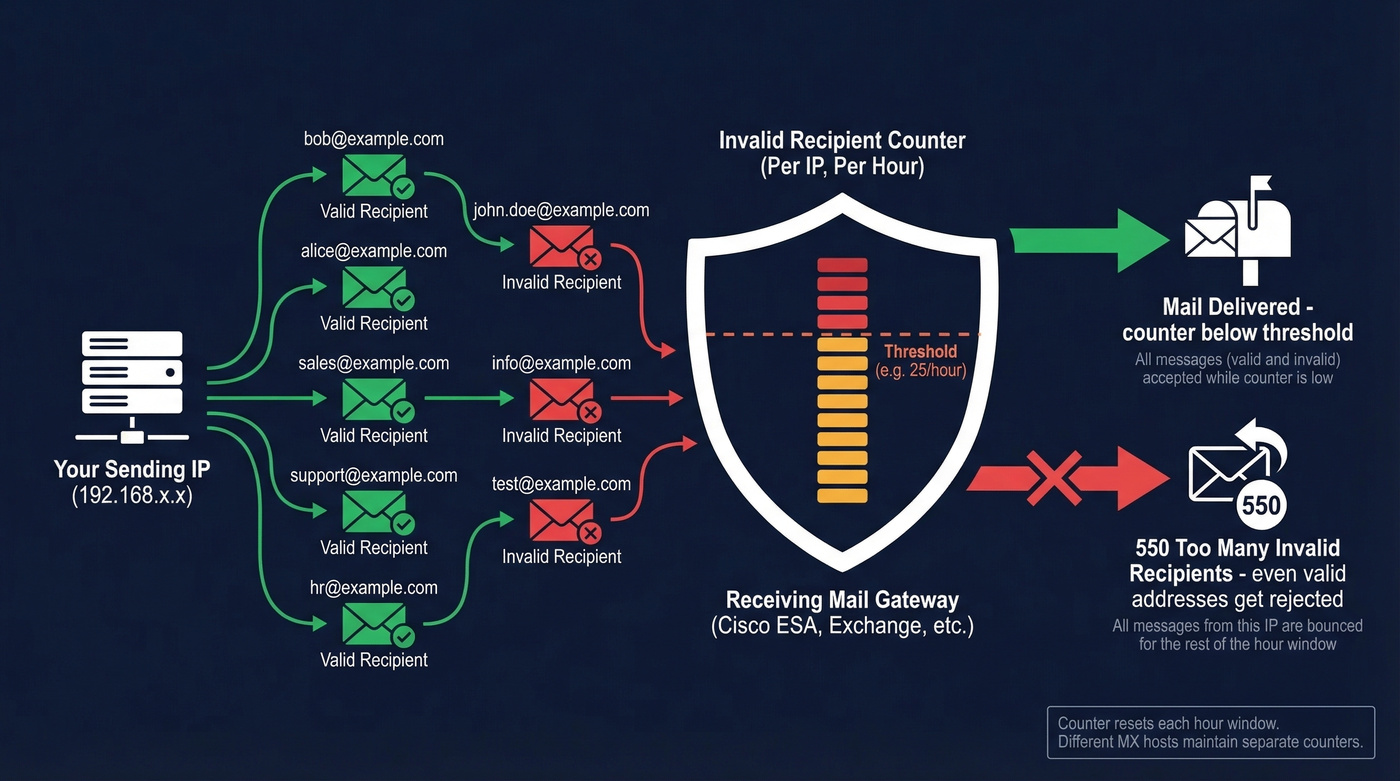
On Cisco Email Security Appliances (ESA), the receiving server keeps a running count of invalid recipients sent from each IP. "Invalid" includes addresses rejected by the Recipient Access Table (RAT), addresses rejected by SMTP call-ahead verification, and messages sent to invalid LDAP recipients. When the count from your IP crosses the threshold - Cisco's own DHAP documentation shows 25 invalid recipients per hour as an example - the gateway starts rejecting further mail from your IP with a 550 bounce code.
Here's the thing: the counter is cumulative and per-IP. If your mail server already burned through the invalid-recipient allowance earlier in the window, the next connection gets blocked even if the recipient exists. The threshold typically clears on the next hourly window, but exact behavior depends on the receiving system's configured action.

Why It Feels Random
Different MX hosts can maintain independent counters.
A thread on r/exchangeserver describes exactly this scenario: a sender's mail to an external partner failed with this error, but only when one of the partner's four MX hosts handled the connection. The other three accepted mail fine. Your mail client retries, hits a different MX, and it works. Then it hits the flagged one again and fails. It's not random - it's stateful, and the state differs per receiving host.
How to Read the Bounce Header
Here's an annotated bounce header showing the three fields that matter:
Remote-MTA: dns; gateway.example.com

Status: 5.x.x

Diagnostic-Code: smtp; 550 Too many invalid recipients
Remote-MTA tells you which server rejected the message, often a security gateway rather than the destination mailbox server. Status 5.x.x means a permanent failure - one that won't resolve on retry. Diagnostic-Code is the human-readable reason.
The key diagnostic question: is the Remote-MTA a gateway (a Cisco ESA, Barracuda, or Microsoft-hosted filtering layer), or the destination mail server itself? That tells you where the policy lives and who to contact.
Is This Your Problem or Theirs?
Let's be honest - this error message is badly designed. It should say "your sending IP exceeded the invalid recipient threshold in this time window." But it doesn't, and that's why people misdiagnose it.
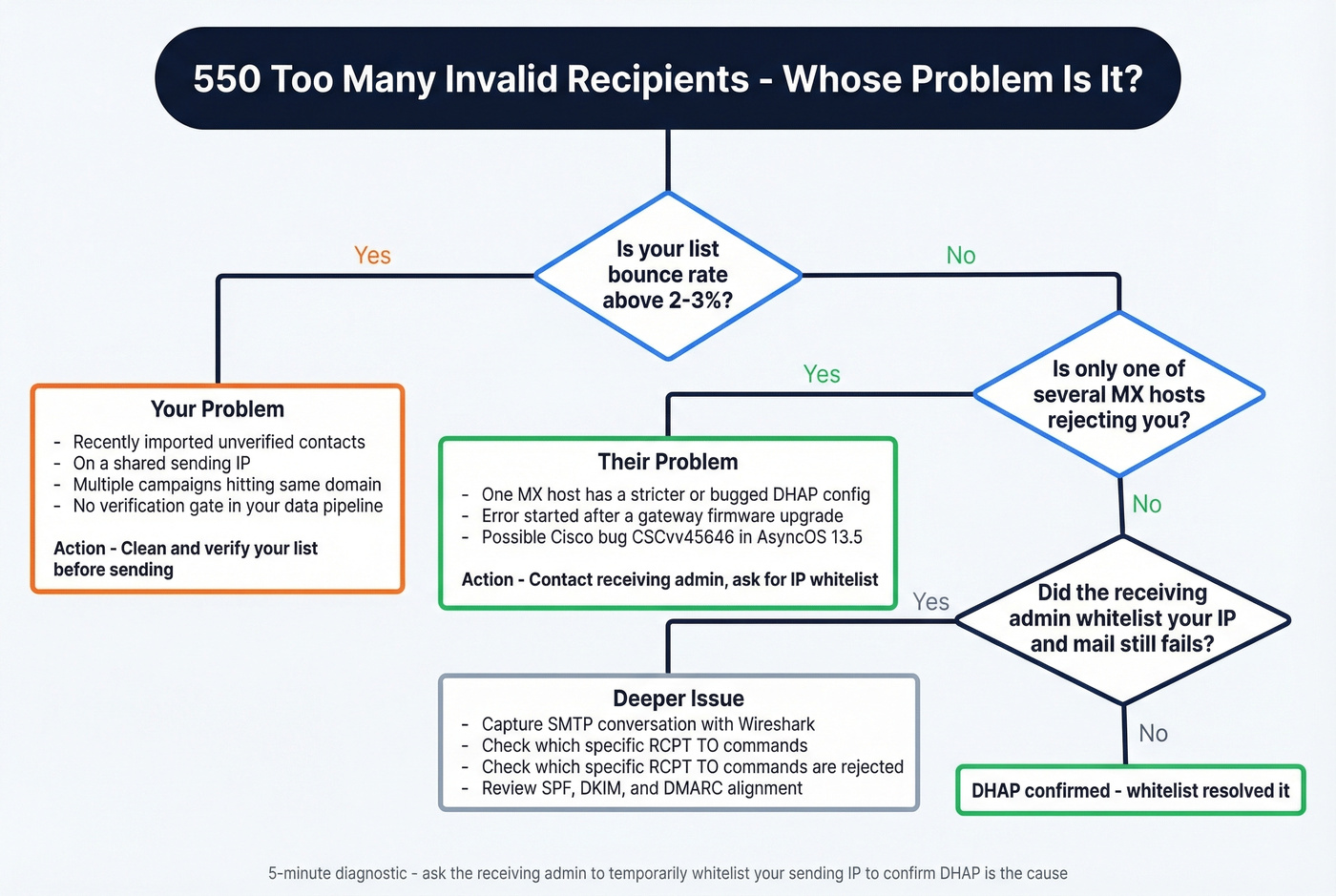
It's your problem if:
- Your list has a bounce rate above 2-3% (see bounce rate benchmarks)
- You recently imported a new batch of contacts
- You're on a shared sending IP (on platforms like Marketo, multiple instances using the same sender IP can collectively burn through thresholds)
- Multiple campaigns are running simultaneously to the same domain
It's their problem if:
- Only one of several MX hosts is rejecting you
- The error started after the receiving org upgraded their gateway firmware (Cisco bug CSCvv45646 is a known cause of false positives in certain AsyncOS 13.5 DHAP handling scenarios)
- Your list is clean and you're sending to known-valid addresses
The 5-minute diagnostic: Ask the receiving admin to temporarily whitelist your sending IP. In practice, this resolves the issue immediately when DHAP is the cause. If mail still fails, dig deeper - capture the SMTP conversation with Wireshark to confirm exactly which RCPT TO commands are being rejected.

Every invalid recipient counts against your IP's DHAP threshold. Prospeo's 5-step email verification catches bad addresses before they ever hit a mail server - with 98% accuracy across 143M+ verified emails. At $0.01 per email, cleaning your list costs less than a single bounced campaign.
Fix the data, not the threshold. Verify before you send.
How to Fix This Error by Platform
Cisco ESA / Secure Email Gateway
If you're the receiving admin, navigate to Mail Policies > Mail Flow Policies > [your policy] > Mail Flow Limits / Directory Harvest Attack Prevention. You'll see the max invalid recipients per hour setting.
Don't raise the global threshold. That's the lazy fix. Instead, create a sender group in the Host Access Table (HAT) for trusted sending IPs, then apply a relaxed mail flow policy to that group only. This keeps DHAP active for unknown senders while letting legitimate partners through.
One heads-up: Cisco bug CSCvv45646 can cause false DHAP triggers after certain upgrades, notably in AsyncOS 13.5 contexts. If the error started right after a gateway update, check Cisco's bug search tool for your AsyncOS version and apply the recommended workaround or fixed release.
Microsoft 365 / Exchange Online
Exchange Online Protection performs recipient filtering at the edge. Microsoft's recipient filtering documentation confirms that messages to invalid recipients can be rejected before they ever reach the mailbox.
If you're seeing this 550 error when sending to a Microsoft 365 recipient, the most reliable lever is still sender-side: fix list hygiene and reduce invalid recipient attempts. On the receiving side, the recipient's admin can review their protection settings and open a Microsoft support case if they believe filtering is misfiring.
If You're the Sender (Not the Admin)
Reduce batch sizes - around 30 recipients per send is a practical rule of thumb - and space sends across hours so you don't burn through the threshold in one burst. Contact the receiving admin with your sending IP and ask them to whitelist it or relax the invalid-recipient controls for your sender group.
Here's our strong opinion on this: if your outbound list is triggering DHAP errors, the problem isn't the receiving server's threshold. It's that your data pipeline has no quality gate. Fixing the threshold is a band-aid. Fixing the data is the cure (more in our email deliverability guide).
Don't Confuse It With Other 550 Errors
| Error | Meaning | Cause | Fix |
|---|---|---|---|
| 550 Too many invalid recipients | Invalid-recipient threshold hit (DHAP) | Cumulative invalid RCPT TO attempts from your IP |
Clean list, whitelist IP |
| 550 5.1.1 User unknown | Mailbox doesn't exist | Typo or deactivated account | Remove from list |
| 550 5.7.26 Unauthenticated email | DMARC/authentication failure | Broken SPF, DKIM, or DMARC alignment | Fix DNS auth records |
| 550 5.7.1 Relaying denied | Server won't relay | Misconfigured relay permissions | Fix relay settings |
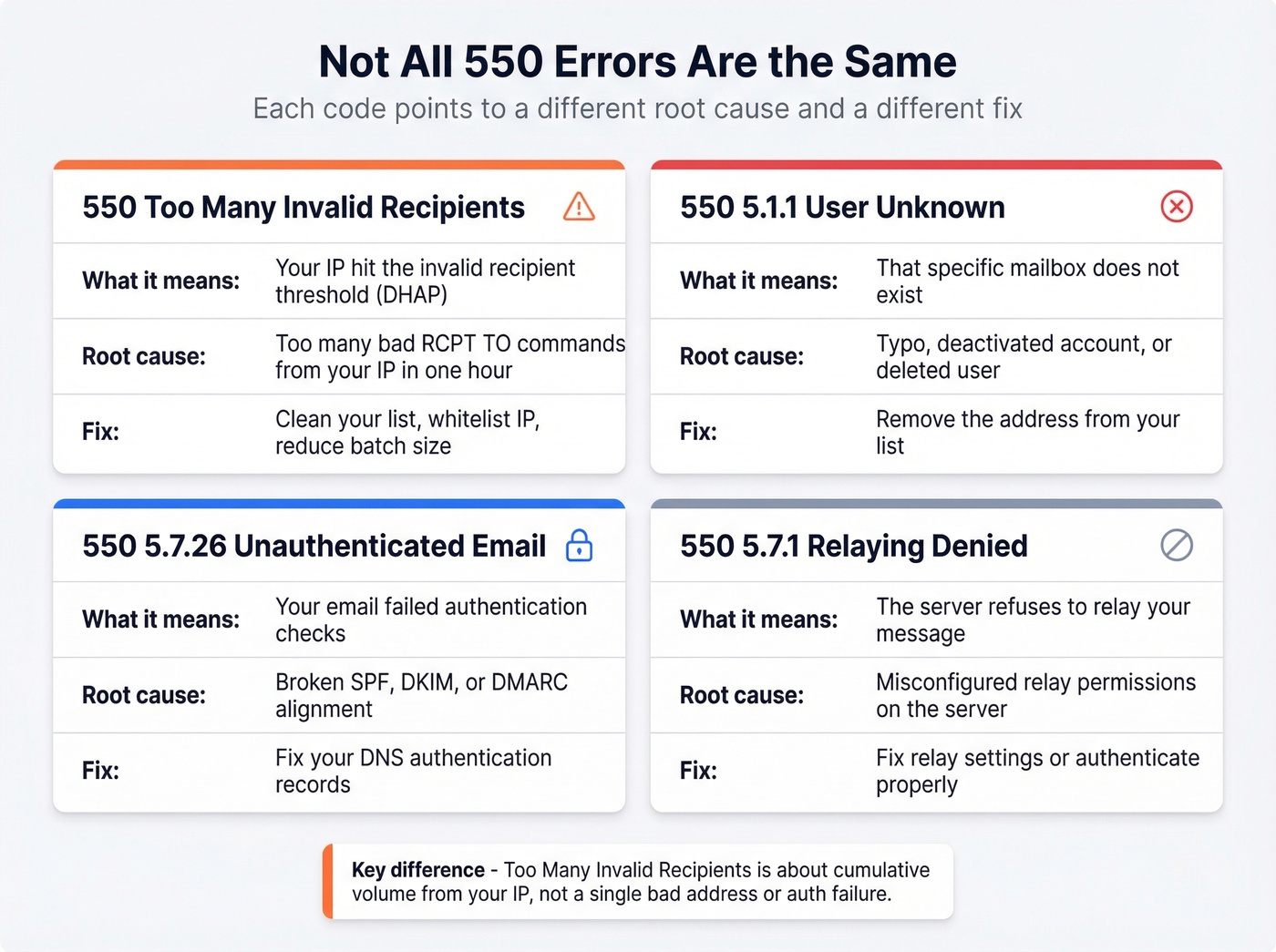
The critical distinction: "too many invalid recipients" is about the volume of bad recipient attempts from your IP, not about a single bad address or an authentication failure. Other 550 sub-codes signal that the receiving server refused your message for a different, specific reason.
Prevention - Stop It Before It Happens
Most guides tell you to "clean your list." That's like telling someone with a flat tire to drive better. The real question is why invalid addresses are getting into your list in the first place (and how to improve sender reputation while you fix it).
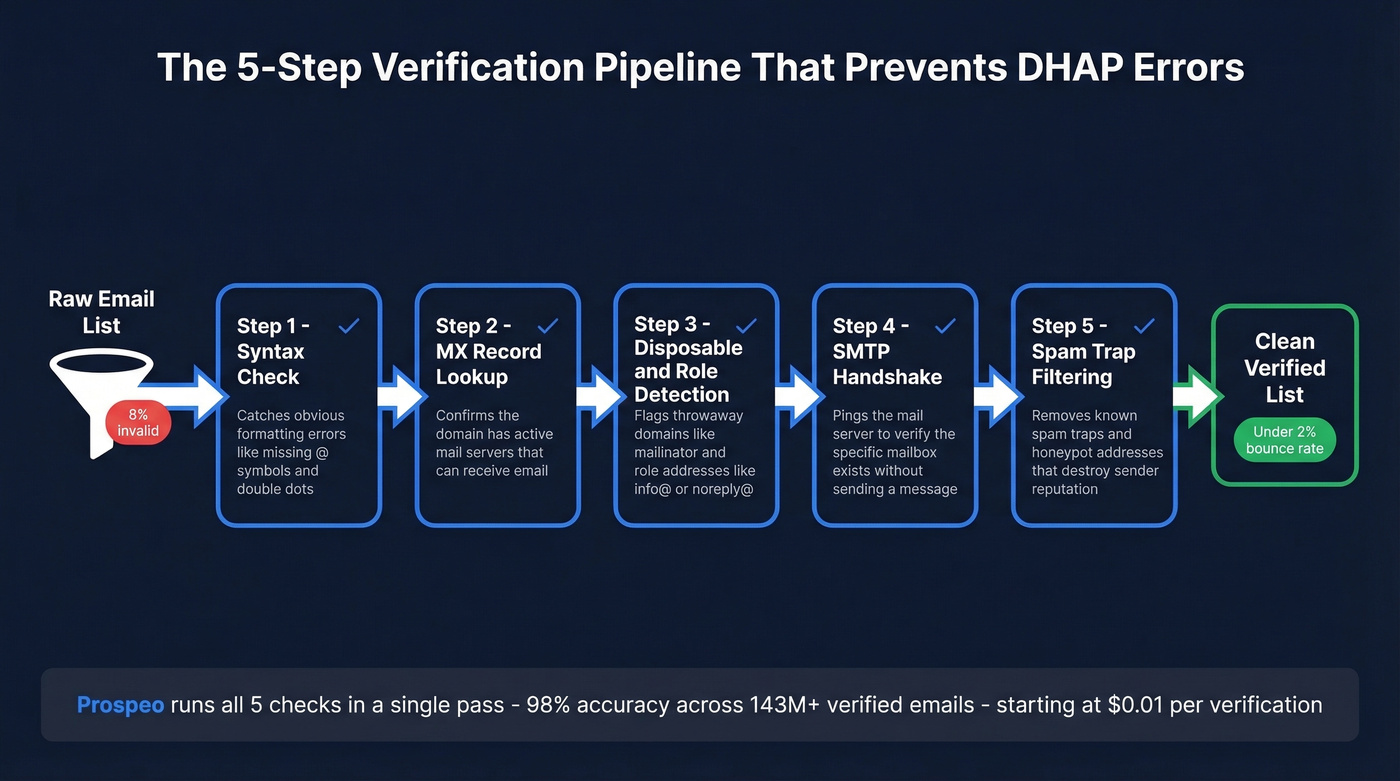
A proper email verification pipeline runs five checks in sequence: syntax validation, MX record lookup, disposable and role-based address detection, SMTP handshake verification, and spam-trap filtering. Skip any step and you're leaving bad addresses that accumulate toward invalid-recipient thresholds - and every bounce chips away at your sender reputation. We've seen teams go from 8% bounce rates to under 2% just by adding verification at the point of entry rather than after the damage is done.
Prospeo runs all five checks in one pass with 98% email accuracy across 143M+ verified emails, including catch-all detection and spam-trap removal. The free tier gives you 75 verifications per month to spot-check a suspect list, and paid plans run about $0.01 per email with no contracts (compare options in our email verification guide).
Even with verification at entry, lists decay. People change jobs, companies shut down mailboxes, domains expire. Re-verify your list after switching ESPs, after importing new batches, and whenever your bounce rate climbs above 2%. Real-time verification at signup and web forms prevents the worst offenders - typos, disposable addresses, and fake entries - from ever entering your database. MXToolbox's blacklist checker is worth bookmarking for quick reputation checks when something feels off (and our email reputation tools roundup covers more options).
You said it yourself: if your outbound list triggers DHAP, the problem is your data pipeline has no quality gate. Prospeo is that gate. 300M+ profiles verified on a 7-day refresh cycle, so you never send to stale or invalid addresses. Teams using Prospeo see bounce rates drop from 35%+ to under 4%.
Replace the band-aid. Build a pipeline that only sends to real people.
FAQ
Does "550 too many invalid recipients" mean I'm blacklisted?
No. This error is triggered by the receiving server's invalid-recipient counter, not a blacklist. Your IP exceeded the threshold in that system's time window. That said, repeatedly triggering these controls will damage your sender reputation over time. Check MXToolbox for blacklist status to confirm you're in the clear.
How long until the block lifts?
On systems enforcing an hourly threshold (like Cisco ESA DHAP), it typically clears on the next hourly window. Some gateways use different intervals or escalating actions. If waiting an hour doesn't work, contact the receiving admin to confirm their reset interval.
Can smaller batches prevent this error?
Smaller batches slow the rate you hit the threshold but don't eliminate the root cause. If 8% of your list is invalid, you'll still accumulate rejected RCPT TO commands - just over more hours. The permanent fix is removing invalid addresses before sending so every command hits a real mailbox.
Will this error affect my sender reputation long-term?
Yes, if it recurs. Each trigger tells receiving systems your IP sends a lot of mail to nonexistent addresses - exactly what spammers do. Over time, this erodes your IP reputation across multiple receiving systems and leads to broader deliverability problems beyond just this one error code.
My recipient is valid but I still got this bounce - why?
This is the most common source of confusion, and it's the whole reason we wrote this article. The "too many invalid recipients" rejection is cumulative per IP. Your valid recipient's message was rejected because earlier sends from your IP already exhausted the allowance. The address itself is fine - your IP's standing with that specific receiving server is the problem. Clean the rest of your list and valid messages will start going through again.