

Best AI Email Assistants in 2026: Inbox, Outbound, and Everything Between
You've got 147 unread emails, a sequence that needs to go out by noon, and a calendar that's already lost. 45% of workers now use AI on the job, and email is where that adoption shows up first. The right AI email assistant saves you two to three hours a week. But here's what most guides get wrong: they only cover inbox management. Half the battle is outbound - making sure the emails you send actually reach real people.
Our Top Picks at a Glance
| Use Case | Pick | Why |
|---|---|---|
| Best for outbound accuracy | Prospeo | 98% verified emails - outreach that actually lands |
| Best AI-powered inbox | Shortwave | Deepest AI (Claude Opus 4.6), semantic search, Gmail |
| Best for inbox speed | Superhuman | Fastest email client, keyboard-first, Gmail + Outlook |
| Best free option | Gemini for Gmail | Built into Workspace, no extra install |
| Best filtering (no AI drafting) | SaneBox | Smart triage without touching email content |
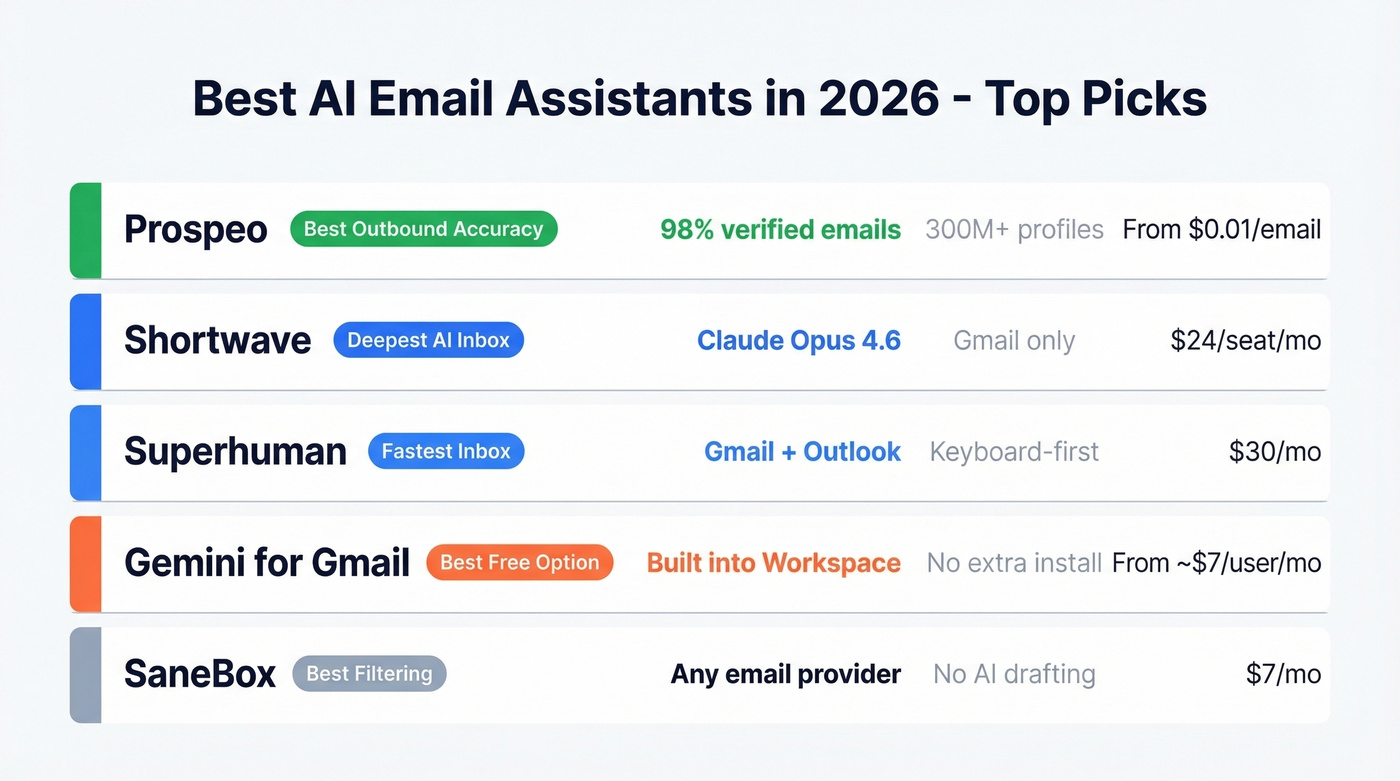
Shortwave is the deepest AI inbox on the market, running Anthropic's latest models. Superhuman wins on raw speed and keyboard shortcuts. Gemini is the no-brainer free option for Gmail users. And SaneBox is for people who want a cleaner inbox without an AI drafting anything on their behalf.
How AI Email Tools Actually Work
Not all AI email tools do the same thing. The market breaks into four categories, and understanding them saves you from buying the wrong tool.
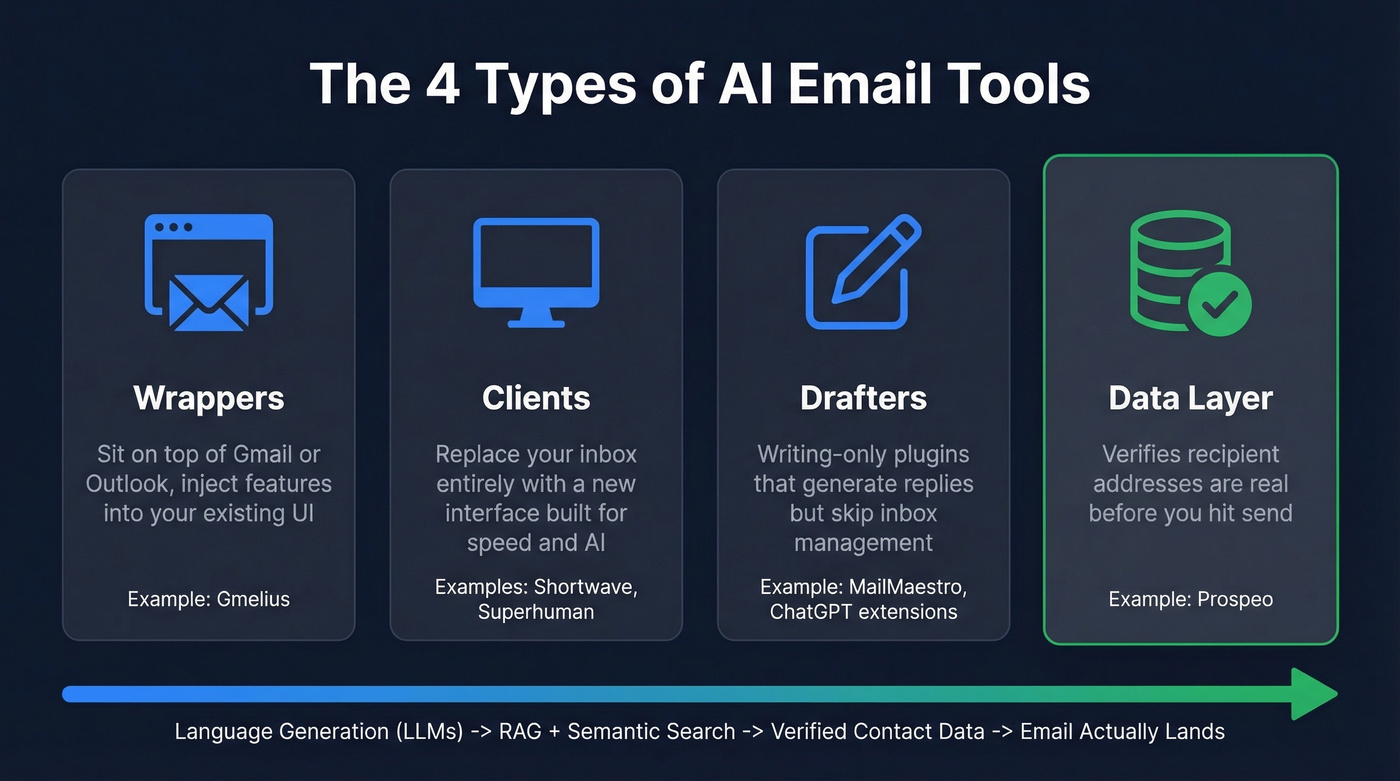
Wrappers sit on top of your existing Gmail or Outlook UI, injecting features into the interface you already use - Gmelius is a good example, adding shared inboxes and basic AI without replacing your email client. Clients replace your inbox entirely. Shortwave and Superhuman pull email via API/IMAP and give you a completely new interface built around speed and AI. Drafters are writing-only plugins: think ChatGPT extensions that generate replies but don't touch inbox management.
Then there's the category nobody talks about: the data layer. Before any AI-powered email tool drafts your outbound message, someone needs to verify that the recipient's address is real. The LLMs powering these tools - GPT-4o, Claude, Gemini - handle language generation. RAG architectures ground responses in your actual email history. Semantic search lets you query your inbox in natural language. And emerging protocols like MCP (Model Context Protocol) promise hyper-personalized automation by connecting AI models directly to your data sources. None of that matters if the email bounces.
Best AI Email Assistant Tools Reviewed
Shortwave
Best for: Deepest AI integration (Gmail)
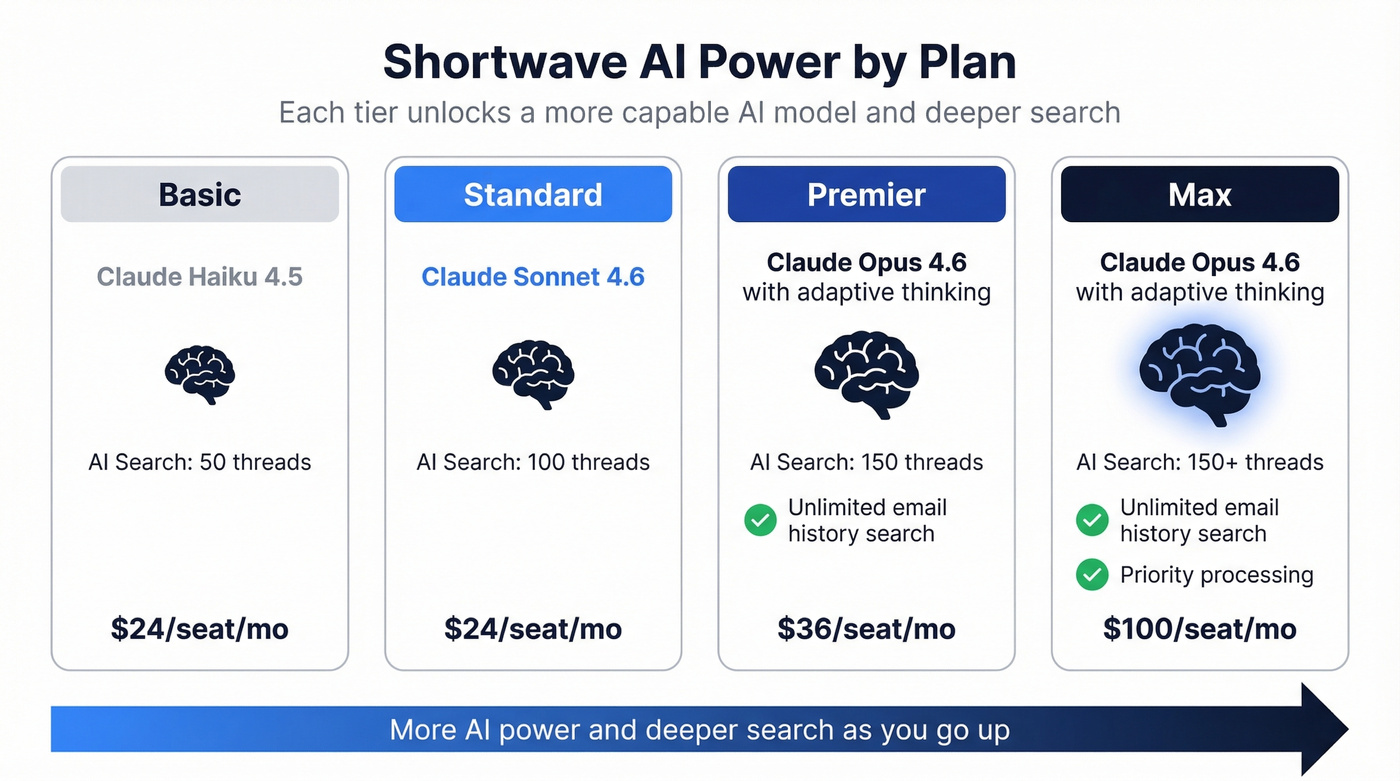
Shortwave is the most technically impressive AI email client we've tested. It runs on Anthropic's Claude models - from Haiku 4.5 on Basic up through Sonnet 4.6 on Standard and Advanced, and Claude Opus 4.6 with adaptive thinking on Premier and Max. AI search pulls 50-150 threads depending on your plan, and you can ask natural-language questions about your email history going back five years (unlimited on Premier and Max).
In our testing, Shortwave's AI search felt noticeably more capable than anything else in the category - it actually understands context across threads rather than just matching keywords. Daily AI usage is generous but not unlimited: on the Business plan, expect roughly 150-300 Standard intelligence requests per day, varying by complexity. Shortwave is CASA Tier 2 compliant, blocks spy trackers by default, and offers a privacy mode that proxies image loading. It also has a native Windows client, which gives it a practical edge over Superhuman's platform constraints.
The catch? It's Gmail-only. Outlook support has been in testing, but it's not live yet.
Pricing: Business $24/seat/month, Premier $36, Max $100 (annual billing). Enterprise is custom.
Verdict: The best option for deep intelligence features, full stop. Gmail-only in 2026 is a real limitation for mixed-environment teams.
Superhuman
Best for: Raw inbox speed
Superhuman isn't trying to be the smartest AI - it's trying to be the fastest email client. It succeeds. The keyboard-first design, split inbox, and instant search make it feel noticeably faster than any competitor, and it supports both Gmail and Outlook, giving it a practical edge over Shortwave.
Here's the thing about Superhuman's pricing: the Starter plan at $30/month includes most AI features, but the good stuff - Auto Drafts, Ask AI, Custom Auto Labels, and CRM integrations with HubSpot and Salesforce - is locked behind the Business plan at $40/month. You also get live 1:1 onboarding, which is rare in this category.
Pricing: Starter $30/month ($300/year), Business $40/month ($396/year).
Verdict: Fastest email client money can buy. But $30-40/month is hard to justify unless you're processing 200+ emails daily.
Prospeo
Best for: Outbound email accuracy and verified contact data
Every other tool on this list helps you write or manage email. Prospeo makes sure the email you're sending reaches a real person - the tool you use before your AI-powered assistant drafts the message.
The database covers 300M+ professional profiles with 143M+ verified emails and 125M+ verified mobile numbers. The 98% email accuracy rate comes from a 5-step verification process with catch-all handling, spam-trap removal, and honeypot filtering. Data refreshes every seven days, compared to the six-week industry average. The Chrome extension (40,000+ users) lets you pull verified contact data from any website in one click, and the API returns 50+ data points per contact at a 92% match rate. Intent data covers 15,000 topics via Bombora, so you can layer buyer signals on top of contact data. Native integrations with Salesforce, HubSpot, Lemlist, Instantly, and Clay mean the data flows straight into your stack.
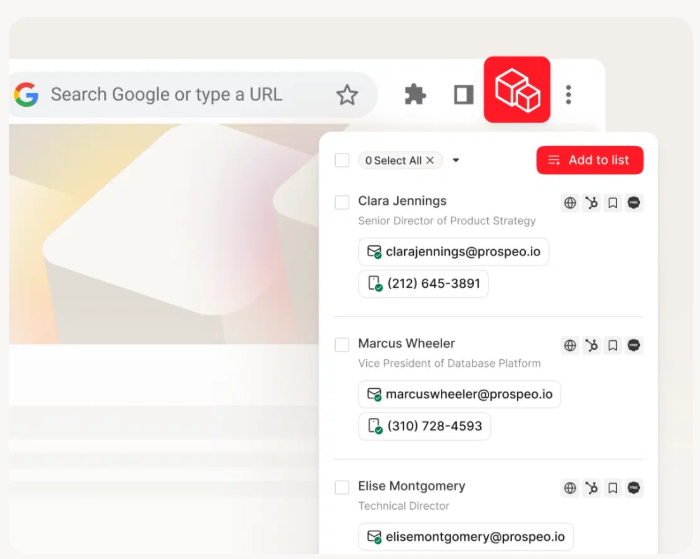
Pricing: Free tier gives you 75 verified emails per month. Paid plans run about $0.01 per email - no contracts, cancel anytime.
Verdict: If your problem is reaching the right people, not managing your inbox, this is where you start.
Microsoft Copilot for Outlook
Best for: Teams already on Microsoft 365
Use this if you're an Outlook shop and want AI without adding another vendor. Skip it if you want a standalone AI email experience - Copilot feels bolted on, not built in.
Thread summaries, draft generation, and meeting prep all work reasonably well. The problem is pricing: what you get depends entirely on your existing M365 license. The free tier has limited daily usage. Copilot Pro starts at $20/user/month on top of your existing subscription, and feature availability varies by plan in ways that aren't always clear until you're already paying.
Pricing: Free tier with limits; Pro from $20/user/month depending on M365 license.
Verdict: Should be the obvious choice for Outlook users, but the pricing maze and inconsistent feature gating hold it back.
Gemini for Gmail
Best for: Free or low-cost AI in Gmail
Use this if you're on Google Workspace and don't want another subscription. Skip it if you need deep AI search or advanced drafting - Gemini's email features are good, not great.
Help Me Write, smart replies, and thread summaries come built into Workspace starting around $7/user/month (billed annually). Consumer users can access Gemini features through Google One AI Premium at around $20/month. No extra install, no new interface to learn.
Pricing: From ~$7/user/month in Workspace; ~$20/month via Google One AI Premium for personal accounts.
Verdict: Good enough for most Gmail users who don't want another subscription.
MailMaestro
Best for: Outlook + Gmail drafting with multi-model AI
MailMaestro carries a 4.8/5 on G2 and uses a blend of models from OpenAI, Hugging Face, AI21 Labs, and Google. It summarizes threads and attachments, detects meeting requests automatically, and generates one-click replies. G2 reviewers consistently note that AI drafts occasionally need tone adjustments - which is true of every AI drafting tool right now. We've found this "last mile" editing problem is the single biggest barrier to full AI email adoption across every tool we tested.
Pricing: Pro $15/user/month ($144/year annual).
Verdict: Strong Outlook option at a reasonable price. The small user base (15 G2 reviews) means less community support than Shortwave or Superhuman.
SaneBox
Best for: Email filtering without AI drafting
SaneBox isn't generative AI. It doesn't write emails, extract tasks, or act autonomously. It's a filter - and a very good one.
SaneLater moves non-urgent email out of your inbox. SaneBlackHole permanently blocks senders. SaneReminders follow up on emails that don't get replies. It works with any email provider, which is a genuine advantage over Gmail-only or Outlook-only tools.
Pricing: Snack $7/month (1 account), Lunch $12/month (2 accounts), Dinner $36/month (4 accounts). Annual billing saves ~20%.
Verdict: Great if you want a cleaner inbox without an AI touching your email content. Don't buy it expecting draft generation.
Lindy
Best for: Workflow automation beyond email
Lindy is an AI agent platform where email is one of many automations. It handles follow-up sequences, meeting scheduling, CRM updates, and more. The free tier gives you 400 credits/month to experiment. If you just want email help, it's overkill. If you want an AI agent managing email plus calendar plus CRM, it's worth exploring.
Pricing: Free (400 credits/month), Pro $49.99/month, Business $299.99/month.
Verdict: Overkill for email-only needs. Powerful if you want a multi-channel AI agent.
Quick Mentions
Proton Scribe - Privacy-first AI drafting built into Proton Mail. Runs on-device or on Proton's servers, never third-party. Free for Proton Visionary users; included in Proton Business plans starting ~$13/user/month. The best option if regulatory compliance or zero-trust privacy is non-negotiable.
Apple Intelligence for Apple Mail - Free on compatible Apple hardware. Summaries, smart replies, and priority inbox built into Apple Mail. Limited to Apple devices with no third-party integrations. Fine for personal use, not a serious business tool.
Notion Mail - AI-powered inbox tied to Notion's workspace. Free personal tier; ~$10/user/month for business AI features. Still early-stage, best if you already live in Notion and want everything in one place.
Gmelius - Shared inbox, email delegation, and basic AI features for Gmail teams. From ~$19/user/month. More of a collaboration tool than an AI assistant.
Full Comparison Table
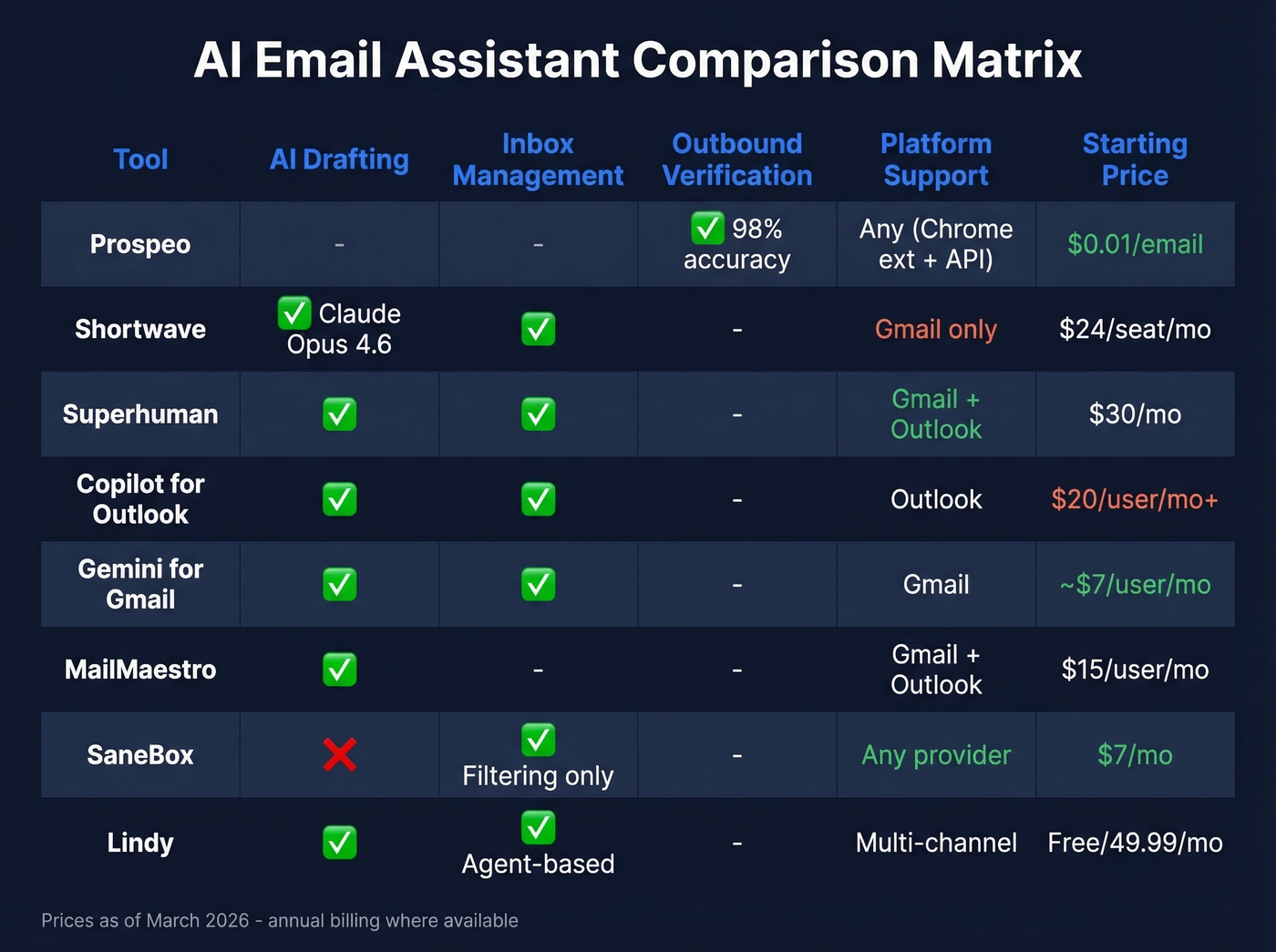
| Tool | Best For | AI Engine | Platform | Starting Price |
|---|---|---|---|---|
| Prospeo | Outbound accuracy | Proprietary + Bombora | Web/Chrome/API | Free (75 emails/mo) |
| Shortwave | Deep AI inbox | Claude (Haiku-Opus) | Gmail only | $24/seat/mo |
| Superhuman | Inbox speed | Proprietary AI | Gmail + Outlook | $30/mo |
| Copilot | M365 teams | Copilot | Outlook | Free w/ limits |
| Gemini | Free Gmail AI | Gemini | Gmail | ~$7/user/mo |
| MailMaestro | Multi-model drafts | OpenAI + others | Outlook + Gmail | $15/user/mo |
| SaneBox | Filtering only | ML (not generative) | Any provider | $7/mo |
| Lindy | Agent automation | Multi-model | Web/integrations | Free (400 credits) |
| Proton Scribe | Privacy-first drafting | On-device/Proton | Proton Mail | ~$13/user/mo |
| Apple Mail | Apple ecosystem | Apple Intelligence | Apple devices | Free |
| Notion Mail | Notion users | Notion AI | Web/app | Free |

AI email assistants draft faster replies and clean up your inbox. But none of them verify whether the address you're sending to is real. Prospeo's 5-step verification delivers 98% email accuracy across 143M+ verified addresses - refreshed every 7 days, not every 6 weeks.
Fix the data layer before you automate the writing layer.
The Outbound Gap Nobody Talks About
Every tool on this list except one focuses on what happens after an email lands in your inbox. Let's be honest about a scenario we've seen play out dozens of times: a sales team drafts beautiful AI-generated sequences, sends them to 500 prospects, and 87 bounce. That's a 17% bounce rate. Their domain reputation tanks. Deliverability drops across the board - even for legitimate replies to warm leads.
The problem isn't the AI draft. It's the data underneath it.

Here's my hot take: if your deal sizes are under $10K, you probably don't need a $100/seat AI inbox. What you need is verified data feeding a $30/month email tool. Meritt went from a 35% bounce rate to under 4% after switching to verified contact data - their pipeline tripled from $100K to $300K per week. That's not an inbox management story. It's a data quality story, and it's the piece the consensus on r/sales keeps circling back to: your fancy tools don't matter if half your emails never arrive.
Your AI assistant handles the words. Who handles the data? Prospeo gives you 300M+ professional profiles, intent signals across 15,000 topics, and a Chrome extension used by 40,000+ people - all at roughly $0.01 per verified email. No contracts, no sales calls.
Stop letting great AI copy bounce off bad email addresses.
Privacy and Security Checklist
AI email assistants process your most sensitive communications. Before you connect one, run through this.
For regulated industries - healthcare, legal, finance - you need HIPAA-compliant safeguards: encryption, access controls, audit logging, data retention limits, and a signed Business Associate Agreement. Most consumer AI email tools don't qualify. The FBI has warned that attackers use AI to craft convincing phishing emails, which makes the security surface even more important.
Data retention matters more than you think. Mailmeteor, for example, discloses that OpenAI retains prompts for up to 30 days. If your emails contain client data, NDAs, or financial details, that retention window is a liability.
What to check before connecting any AI email tool:
- SOC 2 Type II certification
- GDPR compliance and data processing agreements
- Encryption in transit and at rest
- Audit logging for admin visibility
- Explicit data retention and deletion policies
- CASA Tier 2 compliance (Shortwave has this; most don't)
- Tracker blocking and privacy mode options
Most teams skip this checklist entirely and regret it six months later when compliance asks questions.
What These Tools Can't Do Yet
The "learn your tone" promise is the biggest gap between marketing copy and reality. Every tool claims it'll match your writing style. In practice, expect two weeks of editing every single draft before the AI gets close - and even then, there's an uncanny valley where replies are technically correct but feel slightly off. G2 reviewers of MailMaestro consistently flag this, and it's no different with Shortwave or Superhuman.
AI usage caps are another hidden frustration. Marketing pages say "unlimited AI" but the fine print reveals daily request limits, thread-count caps on AI search, and intelligence-level restrictions by plan. Shortwave is refreshingly transparent about this. Most tools aren't.
Hallucination risk in email context is real. An AI that confidently references a meeting that never happened or a commitment you never made can damage relationships faster than a typo. Always review before sending - even the best tools still require a human in the loop for anything high-stakes.
How to Choose the Right Tool
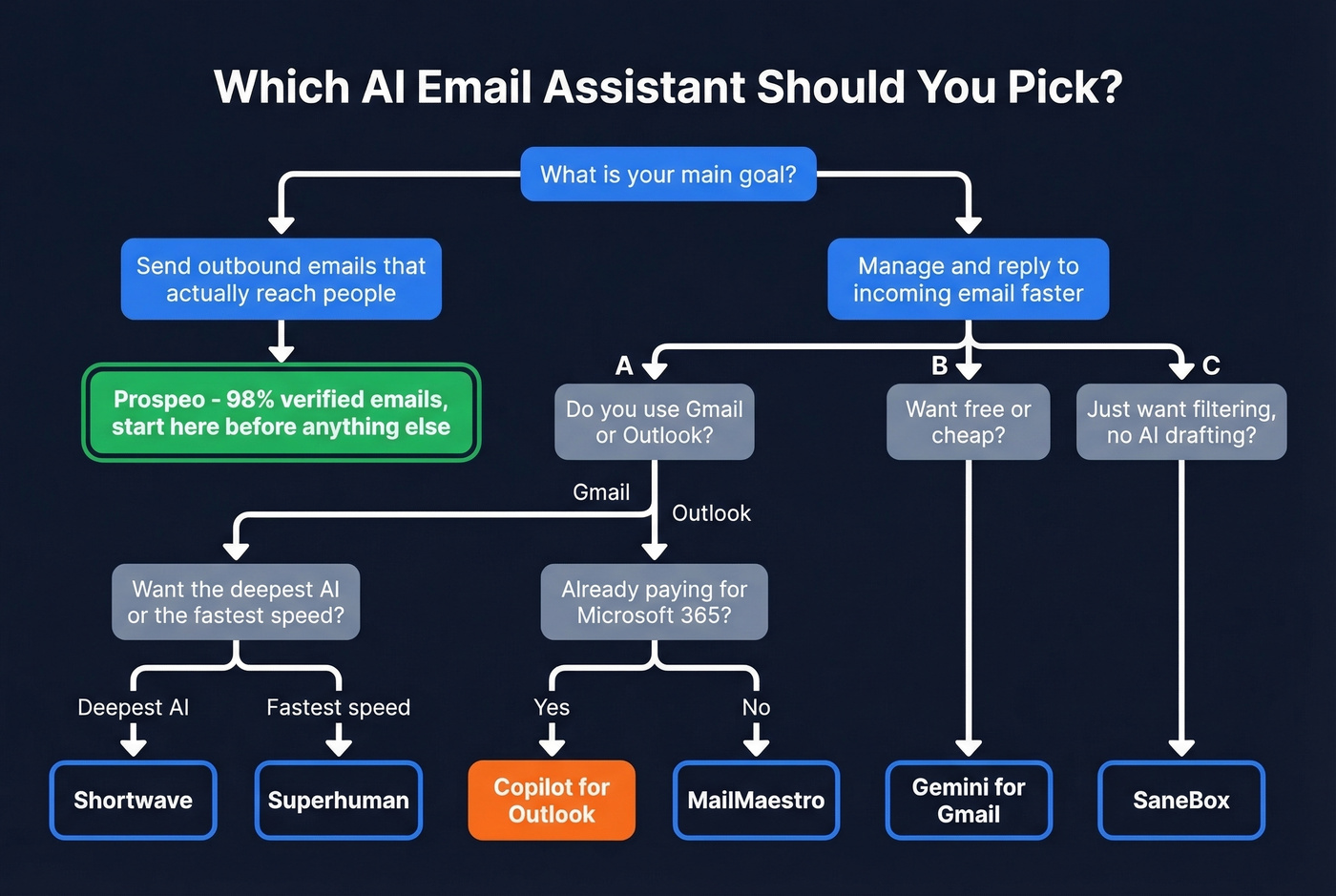
Gmail power users who want the deepest AI should go with Shortwave. Nothing else comes close on AI sophistication.
Speed-obsessed professionals will prefer Superhuman - keyboard-first, blazing fast, works with both Gmail and Outlook.
For teams whose real problem is outbound, not inbox, you need verified data before the AI draft, not after the bounce. If you're building a prospecting stack, start with an email verifier and a verified contact database.
Budget-conscious teams: Gemini for Gmail or Apple Intelligence. Both are free and good enough for basic needs.
- Want a cleaner inbox without AI drafting? SaneBox. Works everywhere, no privacy concerns.
- On Outlook? MailMaestro is simpler; Copilot is deeper if you're already paying for M365.
- Need shared inboxes? Gmelius for Gmail, Copilot for Outlook.
- Privacy is non-negotiable? Proton Scribe. On-device AI, zero third-party data sharing.
For individuals, start with the free tier of whichever AI email assistant matches your provider. For teams, run a two-week pilot with 3-5 users before committing to annual billing. The tool that feels fastest on day one usually wins adoption.
If you're sending cold outreach at scale, pair your assistant with outbound email automation and a deliverability-first setup like sender authentication.
FAQ
What's the best free AI email assistant?
Gemini for Gmail is the strongest free option - built into Google Workspace with no extra install, covering summaries, smart replies, and Help Me Write. Apple Intelligence is solid for Apple device users. For outbound, Prospeo's free tier gives you 75 verified emails per month.
Do AI email assistants read all my emails?
Most process email content server-side to generate summaries and drafts. Some underlying AI providers retain prompts for up to 30 days. If your emails contain sensitive client data, that retention window matters. Proton Scribe is the notable exception - it can run entirely on-device with zero third-party access.
Can AI email tools work with Outlook?
Superhuman, Microsoft Copilot, and MailMaestro all support Outlook natively. Shortwave is Gmail-only, though Outlook support is in testing. SaneBox works with any email provider, making it the most flexible filtering option.
Are AI email assistants safe for healthcare or legal teams?
Only if the tool offers HIPAA-compliant safeguards: encryption, access controls, audit logging, data retention limits, and a signed Business Associate Agreement. Most consumer-grade tools don't qualify - verify compliance documentation before connecting any tool to regulated inboxes.
What's the difference between an inbox assistant and an outbound email tool?
Inbox assistants like Shortwave and Superhuman manage incoming email - summaries, drafts, triage, and search. Outbound tools find and verify contact data so your AI-drafted outreach reaches real people instead of bouncing and damaging your domain reputation.