

Sender Authentication: Everything You Need to Know in 2026
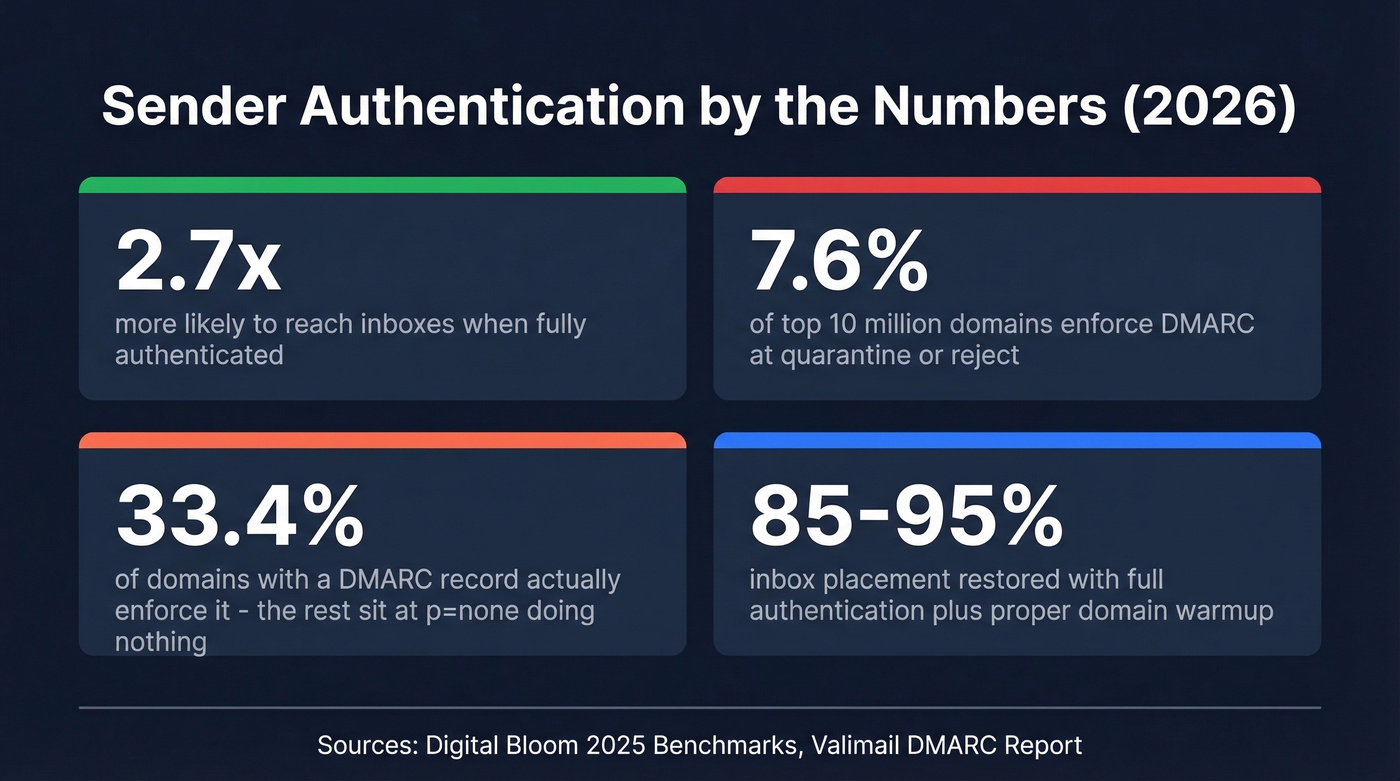
Authenticated senders are 2.7x more likely to reach inboxes than unauthenticated ones. That's not a marginal edge - it's the difference between a functioning outbound program and one that's dead on arrival. Google, Yahoo, and Microsoft now all enforce sender authentication requirements for bulk senders. "I'll get to it later" stopped being an option a year ago.
What You Need (Quick Version)
Authenticating your sending domain means publishing three DNS records - SPF, DKIM, and DMARC - so mailbox providers can verify your domain actually authorized the email. The major inbox providers enforce these for bulk senders, and unauthenticated email gets rejected or junked.
The implementation order: SPF, then DKIM, then DMARC at p=none, then escalate to p=reject. The rest of this guide walks through exactly how, with copy-paste DNS examples and fixes for the five most common failures.
What Is Sender Authentication?
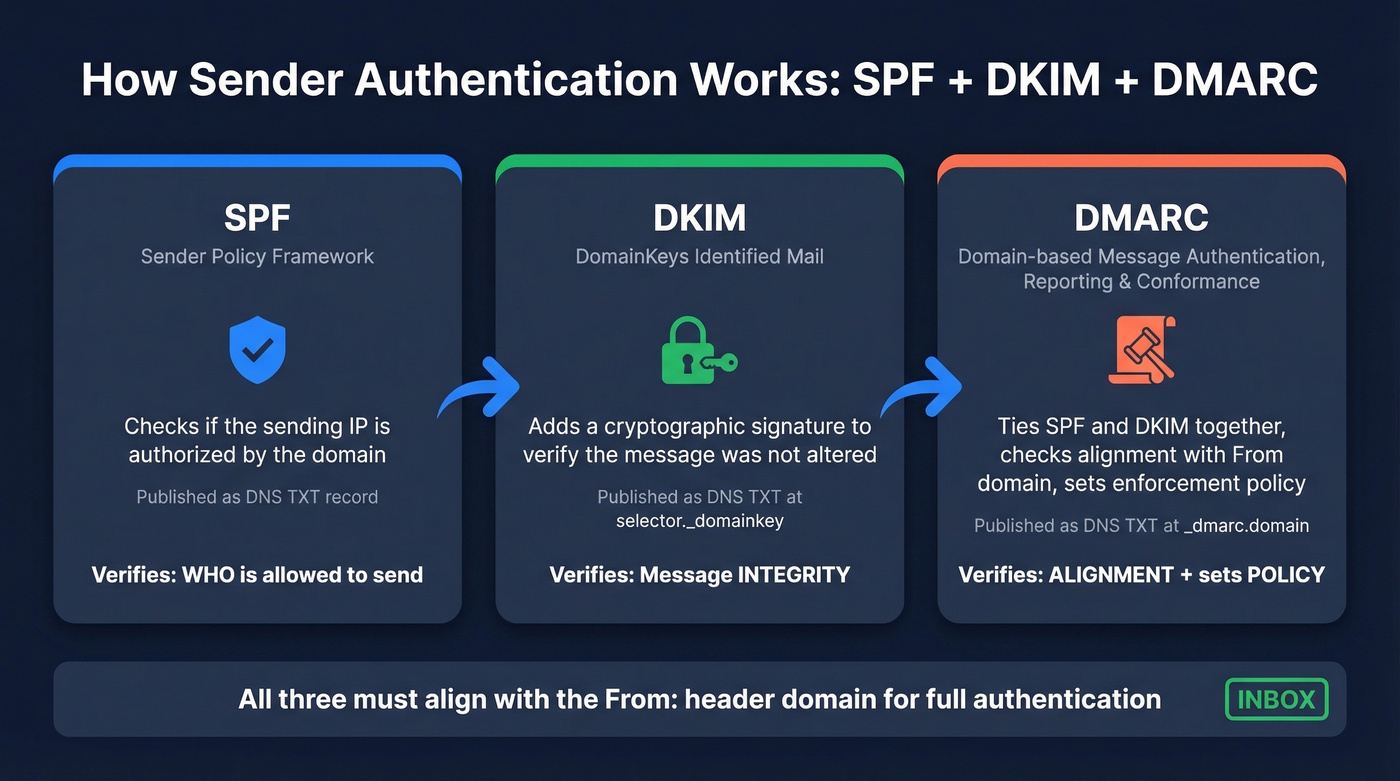
The term refers to three email protocols - SPF, DKIM, and DMARC - that prove to receiving mail servers a message was actually sent by someone authorized to use the domain in the "From" address. Each protocol handles a different piece of the trust equation. SPF declares which IP addresses can send on your domain's behalf. DKIM attaches a cryptographic signature proving the message wasn't tampered with in transit. DMARC ties the two together and tells receivers what to do when a message fails both checks. Together, they form the backbone of email spoofing prevention and phishing protection.
Quick disambiguation: if you've seen "sender authentication" in the context of SendGrid's setup, Salesforce's Sender Authentication Package, or Beamery's sender authentication workflow, those are vendor-specific implementations of these same underlying protocols. This guide is protocol-first and vendor-neutral. The DNS records are the same regardless of which platform you're sending from.
Why Authentication Is Mandatory in 2026
The enforcement timeline moved fast. Google and Yahoo started enforcing authentication requirements in February 2024. Microsoft followed in May 2025. A common practitioner framing we've heard: SPF/DKIM/DMARC in 2026 is like HTTPS was a few years ago - table stakes, not a differentiator.
The requirements split into two tiers based on sending volume:
| < 5K emails/day | 5K+ emails/day | |
|---|---|---|
| SPF | Must pass (or DKIM) | Must pass |
| DKIM | Must pass (or SPF) | Must pass |
| DMARC | Optional | Required (min p=none) |
| Alignment | Not required | SPF or DKIM must align |
| Enforced by | Google, Yahoo, Microsoft | Google, Yahoo, Microsoft |
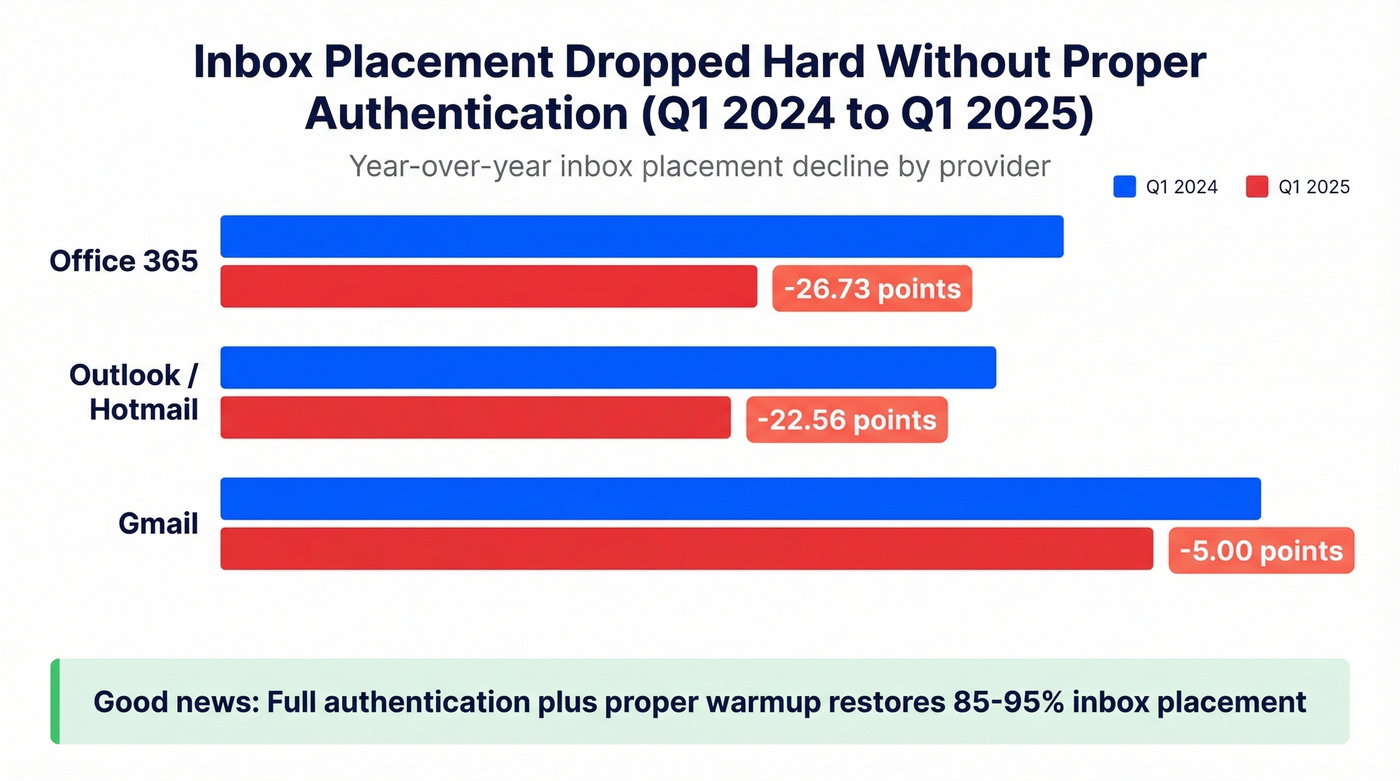
The consequences of ignoring this aren't theoretical. Inbox placement at Office 365 dropped 26.73 percentage points year-over-year from Q1 2024 to Q1 2025. Outlook and Hotmail dropped 22.56 points. Even Gmail dipped 5 points. The good news: full authentication plus proper warmup restores 85-95% inbox placement for domains that had enforcement in place.
Here's the stat that should worry you: only 7.6% of the top 10 million domains enforce DMARC at quarantine or reject. Among domains that have published a DMARC record at all, Valimail puts enforcement at 33.4%. The overwhelming majority are either unauthenticated or stuck at p=none - monitoring-only mode that doesn't protect anything. If you set up enforcement, you're already ahead of almost everyone.
SPF, DKIM, and DMARC Explained
Before we get into each protocol, it helps to understand the core terms you'll encounter: envelope sender, alignment, selector, and policy enforcement. Each maps to a specific mechanism within the protocols below.
SPF (Sender Policy Framework)
SPF answers one question: is this IP address allowed to send email for this domain? It works by checking the envelope sender (the MAIL FROM address, not the visible "From" header) against a DNS TXT record you publish.
Here's what an SPF record looks like:
v=spf1 ip4:192.168.1.0/24 include:_spf.google.com include:amazonses.com ~all
v=spf1 declares the version. ip4:192.168.1.0/24 authorizes a specific IP range. Each include: statement authorizes another domain's SPF record - in this case, Google Workspace and Amazon SES. The ~all at the end is a softfail, telling receivers that IPs not listed should be treated with suspicion but not outright rejected.
The critical constraint: SPF has a maximum of 10 DNS lookups, as defined in RFC 7208. Every include:, a:, mx:, and redirect: mechanism counts as a lookup, and nested includes count too. Exceed 10 and your SPF record returns a permerror - effectively broken, with most receivers treating it as if you have no SPF at all.
This is the single most common SPF failure we see. Your marketing team adds Mailchimp, your product team adds SendGrid, someone adds a transactional email service, and suddenly you're at 11 lookups with no error message telling you something broke. It's infuriating because nothing alerts you - your emails just quietly start failing.
One more rule that trips people up: you can only have one SPF TXT record per domain. Publishing two separate SPF records causes a permerror. If you need to add a new sending service, modify your existing record - don't create a second one. Start with ~all while you're getting everything configured, then switch to -all once you've confirmed all legitimate senders are included. If you want more syntax patterns, see these SPF record examples.
DKIM (DomainKeys Identified Mail)
DKIM adds a cryptographic signature to every outgoing email. The receiving server uses a public key published in your DNS to verify that the message wasn't altered in transit and that it came from an authorized sender.
The DNS record lives at a selector-specific subdomain:
s1._domainkey.yourdomain.com TXT "v=DKIM1; k=rsa; p=MIIBIjANBgkqhkiG9w0BAQEFAAOCAQ8AMIIBCgKCAQEA..."
The s1 is the selector - a label that lets you have multiple DKIM keys active simultaneously, which is useful during key rotation. The p= value is your public key. Use 2048-bit keys minimum; 1024-bit keys are considered weak and some providers flag them. Rotate your DKIM keys every 6-12 months by publishing a new selector in DNS, waiting for propagation, switching your sending infrastructure to sign with the new selector, then retiring the old record after a grace period.
The most common DKIM pitfall is alignment failure. If your ESP signs emails with its own domain - say, d=sendgrid.net - instead of your domain, DKIM will technically pass but DMARC alignment will fail because the signing domain doesn't match your From address. Always configure custom DKIM signing with your own domain. If you need a quick validation workflow, use this guide on verify DKIM is working. Mailing lists and forwarders can also break DKIM by modifying message headers or body content, which is a known limitation and one of the reasons ARC was created.
DMARC (Domain-based Message Authentication, Reporting & Conformance)
DMARC is the policy layer that ties SPF and DKIM together. It tells receiving servers how to check alignment - does the authenticated domain match the From domain? - and what to do when authentication fails.
Here's a full DMARC record:
_dmarc.yourdomain.com TXT "v=DMARC1; p=reject; rua=mailto:dmarc-reports@yourdomain.com; ruf=mailto:dmarc-forensic@yourdomain.com; adkim=s; aspf=s; pct=100"
The p=reject tells receivers to reject messages that fail alignment. The rua and ruf tags specify where to send aggregate and forensic reports. adkim=s and aspf=s enforce strict alignment - the domains must match exactly, not just share an organizational domain.
Alignment is the concept most people misunderstand. For DMARC to pass, at least one of SPF or DKIM must pass and align with the domain in the From header. SPF alignment means the envelope sender domain matches the From domain. DKIM alignment means the d= signing domain matches the From domain. If SPF passes for sendgrid.net but your From is yourdomain.com, that's a pass without alignment - and DMARC fails.
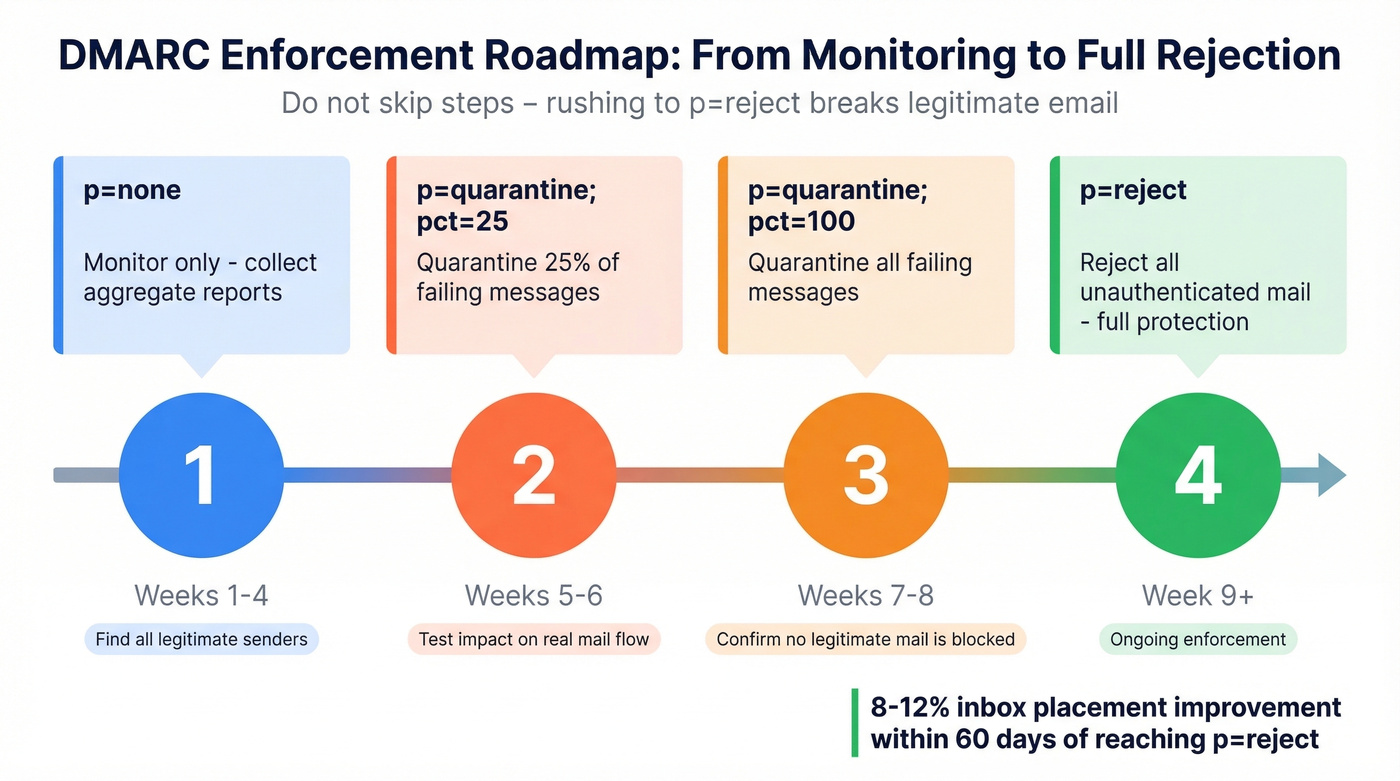
Don't jump straight to p=reject. Follow this progression:
| Phase | Policy | Duration | Purpose |
|---|---|---|---|
| 1 | p=none; rua=... | 2-4 weeks | Collect reports, find failures |
| 2 | p=quarantine; pct=25 | 2 weeks | Quarantine 25% of failing mail |
| 3 | p=quarantine; pct=100 | 2 weeks | Quarantine all failing mail |
| 4 | p=reject | Ongoing | Reject unauthenticated mail |
Moving from p=none to p=reject with proper alignment yields roughly 8-12% inbox placement improvement within 60 days. That's a meaningful lift for what amounts to a DNS configuration change.
Set a subdomain policy with sp=reject in your root DMARC record. Without it, attackers can spoof subdomains you've never configured, and receivers won't know to reject them.
How Receivers Evaluate Your Email
Understanding the receiver's perspective helps you debug failures. Here's the flow when a message hits an inbound mail server.
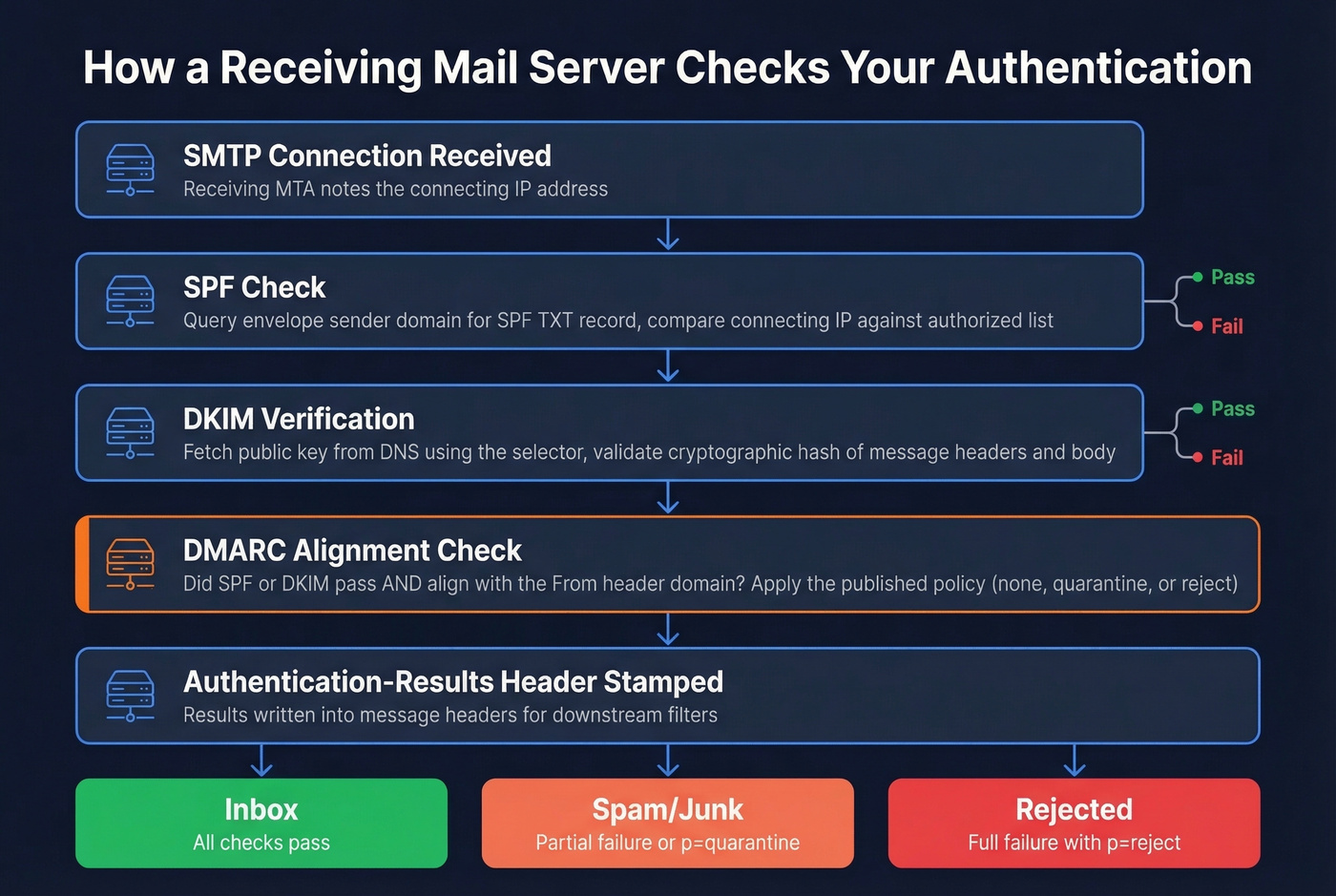
The receiving MTA accepts the SMTP connection and notes the connecting IP. It checks SPF by querying the envelope sender's domain for an SPF record and comparing the connecting IP against the authorized list. Next, it verifies the DKIM signature by fetching the public key from DNS and validating the cryptographic hash. Then it evaluates DMARC - checking whether SPF or DKIM passed with alignment to the From domain, and applying the sender's published policy.
The results get stamped into an Authentication-Results header that downstream filters and the recipient's mail client can read:
Authentication-Results: mx.google.com; dkim=pass header.d=yourdomain.com; spf=pass smtp.mailfrom=yourdomain.com; dmarc=pass
One nuance worth knowing: if your mail gateway sits behind a load balancer or relay rather than at the network edge, SPF checks against the connecting IP won't be meaningful because the IP belongs to your internal infrastructure, not the original sender. This is why DKIM is often the more reliable signal in complex architectures.

You just spent hours setting up SPF, DKIM, and DMARC to protect your domain. Now don't waste it by sending to unverified addresses. Prospeo's 5-step email verification - with catch-all handling, spam-trap removal, and honeypot filtering - keeps your bounce rate under 4% so your authenticated domain stays pristine.
Authentication protects your domain. Prospeo protects your deliverability.
Step-by-Step Implementation
Here's the implementation checklist in order:
Audit current DNS records. Query your domain's TXT records for existing SPF, DKIM, and DMARC entries. Look for duplicates, outdated includes, and missing records.
Publish your SPF record. List every IP and service authorized to send on your behalf. Stay under 10 lookups. Use
~allinitially.Configure DKIM signing and publish the public key. Generate a 2048-bit key pair through your ESP or mail server. Publish the public key at the correct selector subdomain. Verify with a DNS lookup.
Publish DMARC at
p=nonewithruaandruftags. This starts the monitoring phase without affecting delivery.Monitor reports for 2-4 weeks. Use a DMARC reporting tool - Valimail offers a free monitoring tier - to identify legitimate senders that aren't aligned and unauthorized senders you didn't know about.
Escalate to
p=quarantine. Start atpct=25, then move topct=100over two weeks. In our experience, most teams get stuck between steps 5 and 6 - they collect reports but never act on them. Don't be that team.Escalate to
p=reject. This is the end state. All unauthenticated mail gets rejected.
Platform-specific note: In Google Workspace, authentication settings live under Apps > Google Workspace > Gmail > Authenticate email. In SendGrid, go to Settings > Sender Authentication. In Salesforce Marketing Cloud, look for the Sender Authentication Package (SAP). The DNS records are the same - only the UI differs.
5 Common Failures (and Fixes)
1. SPF Exceeds 10 DNS Lookups
Your marketing team added another ESP include and now you have 11 lookups. SPF silently returns a permerror - no warning, no error email, just broken authentication.
Diagnose it by running your SPF record through MXToolbox and counting the lookups. Flatten your SPF record by replacing include: statements with the actual IP ranges they resolve to, or consolidate sending services. Some teams use flattening services like AutoSPF to automate this, but flattened records need updating when your ESPs change their IPs. Skip flattening services if you only have 2-3 sending services - just manage the record manually.
2. DKIM Selector Mismatch
The DKIM signature in your email headers references selector s1, but your DNS has the public key published under default. Check the s= value in the DKIM-Signature header, then query DNS:
dig s1._domainkey.yourdomain.com TXT
We've seen teams spend weeks debugging DMARC failures that turned out to be a simple selector mismatch - often caused by the "doubled domain name" mistake in DNS management UIs. You enter s1._domainkey.yourdomain.com in a field that auto-appends .yourdomain.com, creating s1._domainkey.yourdomain.com.yourdomain.com. Always check the fully qualified domain name after saving.
3. DMARC Stuck at p=none
You published DMARC months ago but never moved past monitoring. This is compliance theater - you're collecting reports nobody reads while getting zero protection. Only 7.6% of domains enforce DMARC. Don't be part of the 92.4%.
Add rua and ruf reporting addresses if they're missing, actually read the reports for two weeks, then start the quarantine progression. There's no technical reason to stay at p=none for more than a month. The consensus on r/sysadmin is that most teams procrastinate here out of fear they'll break something - but that's exactly what the pct= tag is for. Roll it out gradually.
4. SPF/DKIM Alignment Failures
Everything passes individually but DMARC still fails. Almost always an alignment problem. Here's what proper alignment looks like:
- From: sender@yourdomain.com
- Return-Path: bounce@mail.yourdomain.com (SPF aligned - same organizational domain)
- DKIM d= yourdomain.com (DKIM aligned)
Configure a custom Return-Path domain (most ESPs support this) and custom DKIM signing with your domain rather than the ESP's default. If you're using relaxed alignment with aspf=r and adkim=r, subdomains of your organizational domain will pass. Strict alignment requires exact matches.
5. Conflicting or Outdated DNS Records
Your company switched from Mailchimp to HubSpot six months ago but nobody removed the old Mailchimp SPF include. Now you have two SPF records - one from the old setup and one from the new. Multiple SPF records on the same domain cause an immediate permerror.
Audit your DNS, remove duplicates, and verify from multiple resolvers (Google's 8.8.8.8, Cloudflare's 1.1.1.1) to confirm propagation. Allow 24-48 hours for DNS changes to fully propagate before testing.
How to Test Your Setup
Start with the tools built into your email client. In Gmail, open a message and click "Show original" to see the Authentication-Results header. In Outlook, go to File > Properties > Internet Headers. You'll see pass/fail for SPF, DKIM, and DMARC right there.

For systematic testing, MXToolbox is a common first stop for quick SPF, DKIM, and DMARC checks. Mail-tester.com takes a different approach: you send a test email to their address and get a scored report covering authentication, content, and blacklist status. GlockApps handles pre-send deliverability and authentication verification before launching campaigns.
For the most reliable results, send a real test email through your actual sending infrastructure rather than just checking DNS records - some failures only surface in transit. The open-source mailauth CLI tool supports SPF, DKIM, DMARC, ARC, and BIMI checks from the command line, which is particularly useful for automating validation in CI/CD pipelines.
If you're also troubleshooting broader inboxing issues, this email deliverability guide can help you isolate non-authentication causes.
Authentication Alone Isn't Enough
Let's be honest: sender authentication is the most important thing you can do for email deliverability - and it's also only half the job. You can authenticate everything perfectly and still destroy your sender reputation by sending to invalid addresses, spam traps, or people who left their company two years ago.
Picture this: you've implemented SPF, DKIM, and DMARC at p=reject. Your authentication is flawless. But your bounce rate is 12% because half your contact list is outdated. Mailbox providers see those bounces and start throttling you. Within weeks, even your authenticated emails land in spam. I've watched this exact scenario play out with teams who thought DNS records alone would save them.

This is where data quality becomes the other half of the equation. Prospeo runs every email through a 5-step verification process with catch-all handling, spam-trap removal, and honeypot filtering - delivering 98% email accuracy across 143M+ verified addresses. The platform refreshes data every 7 days, so the list you verified last month is still clean this month. Snyk's sales team dropped their bounce rate from 35-40% to under 5% after switching. Authentication gets you in the door; verified data keeps you there. If you want to benchmark and fix bounces systematically, see email bounce rate.
Bounce rates above 5% destroy the sender reputation you're building with SPF, DKIM, and DMARC. Prospeo refreshes 300M+ contacts every 7 days - not every 6 weeks - so you're never emailing stale data. At $0.01 per email, clean data costs less than one bounced campaign.
Don't let bad data undo your authentication work.
Beyond DMARC: BIMI and What's Next
BIMI (Brand Indicators for Message Identification)
BIMI lets you display your brand logo next to your emails in supported inboxes. It's the visual payoff for doing authentication right - and it drives real engagement, with industry data showing 4-6% higher open rates for BIMI-enabled senders.
The prerequisites are strict: SPF and DKIM aligned, DMARC at p=quarantine or p=reject, and a logo in SVG Tiny-PS format, square, 32KB or smaller, hosted over HTTPS. The DNS record goes here:
default._bimi.yourdomain.com TXT "v=BIMI1; l=https://yourdomain.com/brand/bimi-logo.svg; a=https://yourdomain.com/brand/your-bimi.pem"
Two certificate paths exist. A VMC (Verified Mark Certificate) requires a registered trademark and gets you Gmail's blue checkmark. A CMC (Common Mark Certificate), introduced in early 2025, doesn't require a trademark - you just need to prove your logo has been publicly displayed on your domain for 12 months. Gmail, Yahoo, and Apple Mail all support BIMI logo display.
For most B2B senders, BIMI is a "nice to have" that becomes worth pursuing once your DMARC is at enforcement and your deliverability is stable. Don't chase it before the fundamentals are locked down.
ARC Deprecation and DKIM2
ARC (Authenticated Received Chain) was designed to solve a real problem: email forwarding and mailing lists break SPF and can break DKIM, which causes DMARC to fail for legitimate messages. ARC preserved authentication results through intermediary hops, but the IETF has published a draft recommending it be marked obsolete. The core issue: ARC required an internet-wide reputation system for intermediaries that never materialized.
The learnings from ARC are being folded into DKIM2, a successor concept still in development. The practical guidance is straightforward: keep focusing on SPF, DKIM, and DMARC. Don't deploy new ARC implementations. For teams running mailing lists that break authentication for subscribers, the long-term fix will come from DKIM2 - not from doubling down on ARC.
Sender Authentication FAQ
Do I need authentication if I send fewer than 5,000 emails per day?
Yes. Google and Yahoo require at least SPF or DKIM for all senders regardless of volume. The 5,000-email threshold triggers stricter requirements - both protocols plus DMARC with alignment. Even a company sending 50 emails a day needs basic authentication or risks delivery failures.
Does authentication apply to subdomains?
SPF and DKIM must be configured per sending subdomain. DMARC inherits from the organizational domain unless you publish a separate subdomain record. Use sp=reject in your root DMARC record to cover all subdomains by default, then override with specific subdomain DMARC records where needed.
What happens if I use multiple ESPs?
Add an include: for each ESP in your SPF record, but watch the 10-lookup limit - three ESPs with nested includes can easily push you over. For DKIM, configure custom signing with your domain on each platform to maintain DMARC alignment.
Can email forwarding break my authentication?
Yes. Forwarding typically breaks SPF because the forwarder's IP isn't authorized for your domain. It can also break DKIM if the forwarder modifies headers or body content. When both break, DMARC fails. This is the problem ARC was designed to solve, though ARC is now being deprecated in favor of future DKIM2 work.
How does authentication relate to list quality?
Authentication proves you're a legitimate sender, but it doesn't prevent bounces from invalid addresses. High bounce rates damage domain reputation regardless of how perfect your DNS records are. Verifying emails through a multi-step process before you send keeps bounce rates under 5% and protects the reputation you built with authentication.