

9 Best Avaya Alternatives: Real Pricing, Real Opinions
You probably got the letter months ago and have been putting this off. Or you're just now realizing Avaya isn't coming back for sub-200-seat customers. Either way, the timing is right - the sunset SIP trunking hit in April 2025, the penalty-free exit window closed June 30, 2025, and Avaya's cloud contact center direction now points squarely at enterprises with 200+ seats. If you're smaller than that, you need a new platform. The good news? The replacements are mature, competitively priced, and in most cases easier to manage than what you're leaving behind.
Why Companies Are Leaving Avaya in 2026
Avaya filed Chapter 11 twice (2018 and 2023), eliminating more than $3.75B in debt through restructuring. Under CEO Patrick Dennis, appointed September 2024, the strategy shifted hard toward large enterprises. If you're running fewer than 200 seats, you're no longer their priority - and they've made that explicit.
The practical impact hit fast. Avaya sunset SIP trunking and Communications APIs effective April 28, 2025. Voice recording features went dark March 25, 2025. Customers below 200 seats were told to scale up or terminate without penalty by providing written notice before June 30, 2025. That penalty waiver was generous, but the message was unmistakable: Avaya is a large-enterprise play now.
Here's the thing most teams under 200 seats don't realize yet: you'll almost certainly end up on a better platform than Avaya ever was. The UCaaS market has matured to the point where a $15/user/mo tool does what Avaya charged three times as much for - with less IT overhead and faster feature releases.
Our Picks (TL;DR)
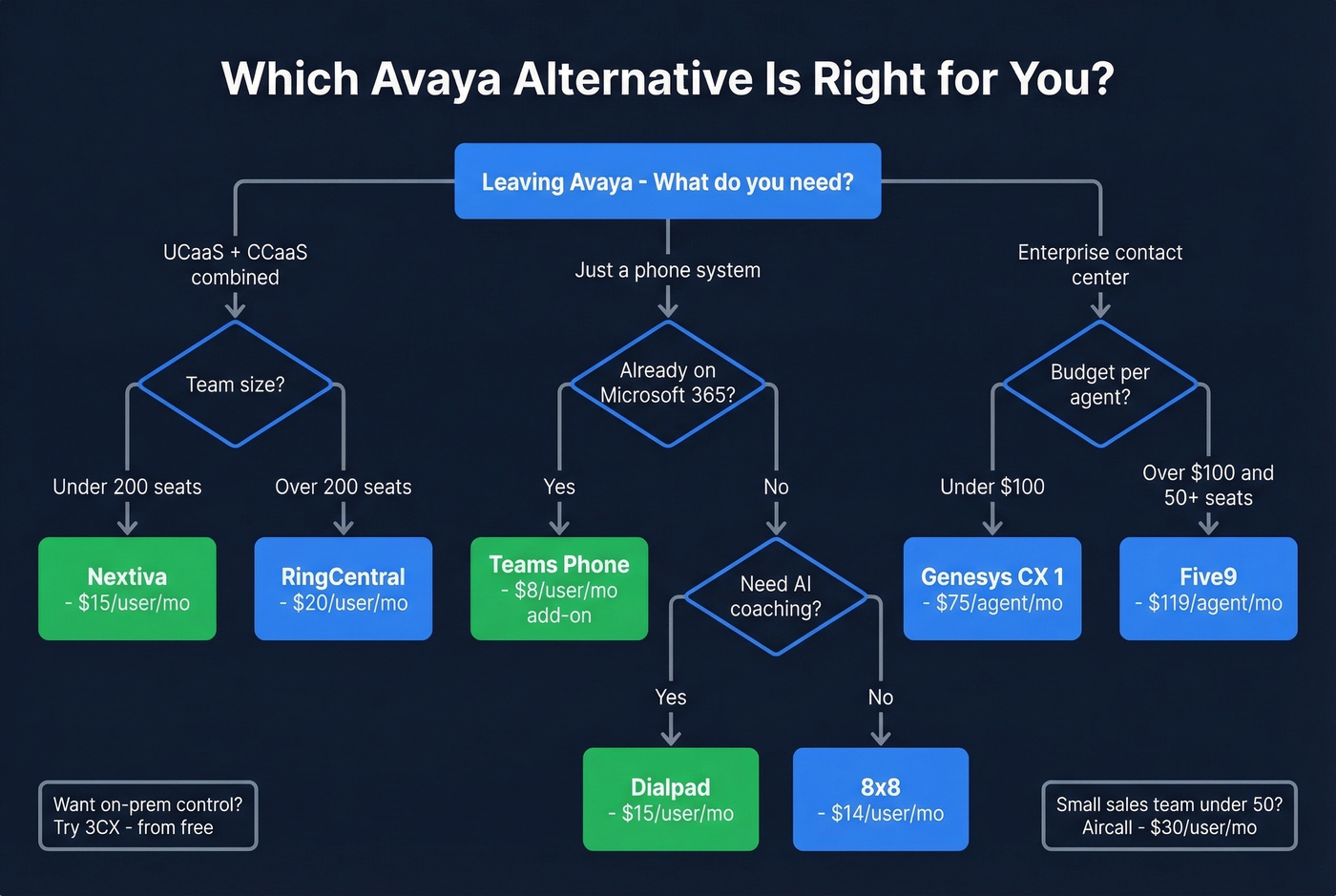
- Best overall for SMB/mid-market: Nextiva - starts at $15/user/mo, UCaaS and CCaaS under one roof
- Best if you're already on Microsoft 365: Microsoft Teams Phone - ~$8/user/mo add-on, lowest migration friction on this list
- Best for outbound sales teams: Dialpad - AI transcription and coaching built into every call, starting at $15/user/mo
Pricing Comparison
Pricing upfront, gotchas included.
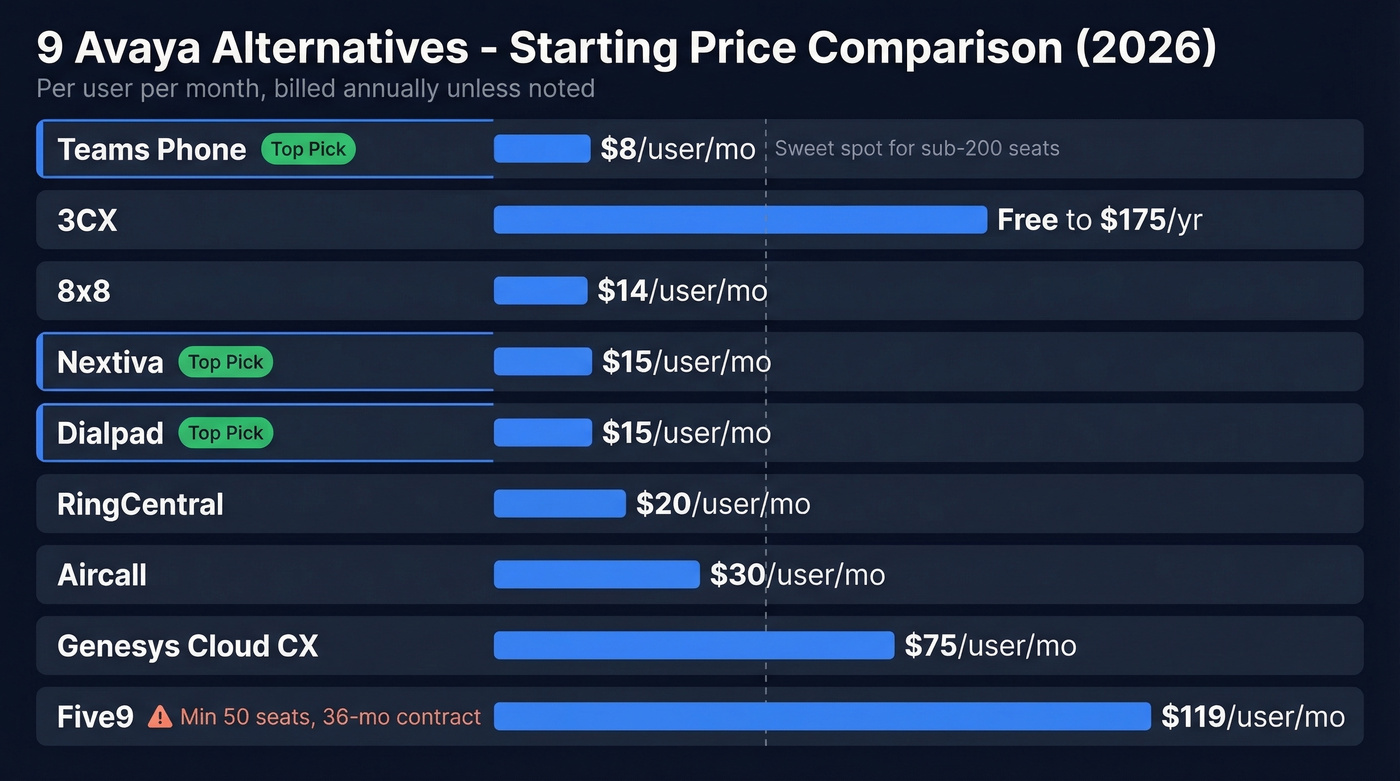
| Tool | Starting Price | Best For | Gotcha |
|---|---|---|---|
| Nextiva | $15/user/mo | SMB UCaaS + CCaaS | Annual term, 1-100 employees |
| 8x8 | ~$14-$20/user/mo | Mid-market UCaaS | Typically quote-based; less transparent |
| RingCentral | $20/user/mo | Large orgs, integrations | SMS caps: 25/user/mo on Core |
| Genesys Cloud CX | $75/user/mo | Enterprise contact centers | Enterprise pricing adds up fast |
| Teams Phone | ~$8/user/mo | M365 shops | Calling Plans extra (~$12/mo) |
| Dialpad | $15/user/mo | Sales teams wanting AI coaching | Pro features need $25 tier |
| 3CX | Free-~$175/yr | Hybrid/on-prem fans | Pricing varies by edition and deployment |
| Five9 | $119/user/mo | Large contact centers | 50-seat min, 36-month contracts |
| Aircall | $30/user/mo | Small sales/support | Limited beyond basic calling |

Migrating off Avaya means rebuilding workflows - don't let bad contact data slow your team down. Prospeo gives you 125M+ verified mobile numbers with a 30% pickup rate, so your reps actually connect when they dial.
New phone system deserves numbers that actually pick up.
The 9 Best Replacements for Avaya
1. Nextiva
Use this if: You want UCaaS and CCaaS from one vendor without stitching together multiple platforms. Nextiva's Core plan starts at $15/user/mo, Engage runs $25, and Power Suite CX hits $75 for the full unified experience. Contact center pricing starts from $75/agent/mo. For an SMB running 50-100 seats, you're looking at roughly $750-$2,500/mo depending on the tier - a fraction of what most Avaya contracts cost.
Nextiva scores a 4.7 on Gartner Peer Insights with 70 ratings, which is strong for the CCaaS category. The admin interface is genuinely intuitive - we've seen teams onboard in under a week without dedicated IT support. Compliance-wise, Nextiva holds SOC 2, PCI, and HIPAA compliance coverage, which matters if you're in healthcare or financial services.
Skip this if: You're an enterprise with 500+ agents needing deep workforce management or custom routing logic. Nextiva's sweet spot is clearly the sub-200-seat range.
2. 8x8
8x8 is the quiet workhorse that doesn't get the marketing buzz of RingCentral but consistently shows up on mid-market shortlists. The X2 tier at $14-$20/user/mo is the sweet spot - call queues, SMS, conferencing, and CRM integrations all included. Tiers range from X1 at $10-$14/user/mo for basic needs up to X8 at $130-$150/user/mo for full omnichannel with outbound dialers. Contact center needs often land on the X6 tier at $60-$64/user/mo with real-time reporting and callbacks.
The international calling coverage is particularly strong if you have offices outside North America. 8x8 doesn't win awards for flashy marketing, but it wins deployments.
Skip this if: You need fully transparent pricing before engaging sales. 8x8 is typically quote-driven, which is frustrating when you're trying to build a business case quickly.

3. RingCentral
RingCentral is one of the market leaders, and for good reason - the integration ecosystem is massive, the platform is battle-tested at scale, and enterprise IT teams trust it. RingEX Core starts at $20/user/mo annual, Advanced at $25, Ultra at $35. RingCX contact center plans run $65-$145/agent/mo.
The deep integration marketplace is a genuine differentiator; if your stack includes Salesforce, HubSpot, Zendesk, or dozens of other tools, RingCentral probably has a native connector. RingCX is a legitimate contact center product, not a bolted-on afterthought.
But the SMS caps are the hidden gotcha. Core tier limits you to 25 texts per user per month - roughly one per business day. Advanced bumps to 100, Ultra to 200. And the add-ons stack: AI Receptionist ($39), SMS Booster ($25), Call Queues Booster ($35), AI Conversation Expert ($60). For SMBs, the per-user cost with necessary add-ons can creep past $40-$50/mo before you realize it.

4. Genesys Cloud CX
Genesys is the enterprise CCaaS play on this list. CX 1 starts at $75/user/mo, CX 2 at $115, CX 3 at $155 - all billed annually with Named licensing. What sets it apart is the licensing flexibility: Named, Concurrent, and Hourly Interacting models let you optimize costs based on how your agents actually work. Genesys also supports FedRAMP authorization and SOC 2 compliance coverage, making it a strong option for regulated industries.
Overkill for a 50-seat phone system migration, but exactly right for enterprise CX teams leaving Avaya's on-prem contact center. Talkdesk is another enterprise CCaaS option in the $85-$145/agent/mo range, but its sales-gated model makes Genesys easier to evaluate quickly.
5. Microsoft Teams Phone
Use this if: You're already paying for Microsoft 365. Teams Phone is an ~$8/user/mo add-on - not a new platform, not a new vendor relationship, not a new login. For organizations already deep in the Microsoft ecosystem, this is the lowest-friction migration path that exists. Add Calling Plans from ~$12/user/mo for PSTN connectivity, and you've got a complete phone system for around $20/user/mo with zero new vendor management overhead.
Skip this if: You need a contact center. Teams Phone is a phone system, not a CCaaS platform. You'll need to layer on a third-party solution like Genesys or Five9 for routing, queuing, and agent management.
6. Dialpad
Dialpad is the AI-forward option. Standard starts at $15/user/mo, Pro at $25. Every call gets transcribed automatically, and reps get live coaching suggestions during conversations - features that competitors gate behind enterprise add-ons. The interface is clean enough that reps actually adopt it without extensive training, which is half the battle with any new phone system.
Standard tier is limited, though. You'll want Pro for CRM integrations and international SMS. And contact center capabilities require a separate Dialpad Ai Contact Center product, so budget accordingly if you need both UCaaS and CCaaS. If you're comparing AI-first dialers, see our Dialpad alternatives.
7. 3CX
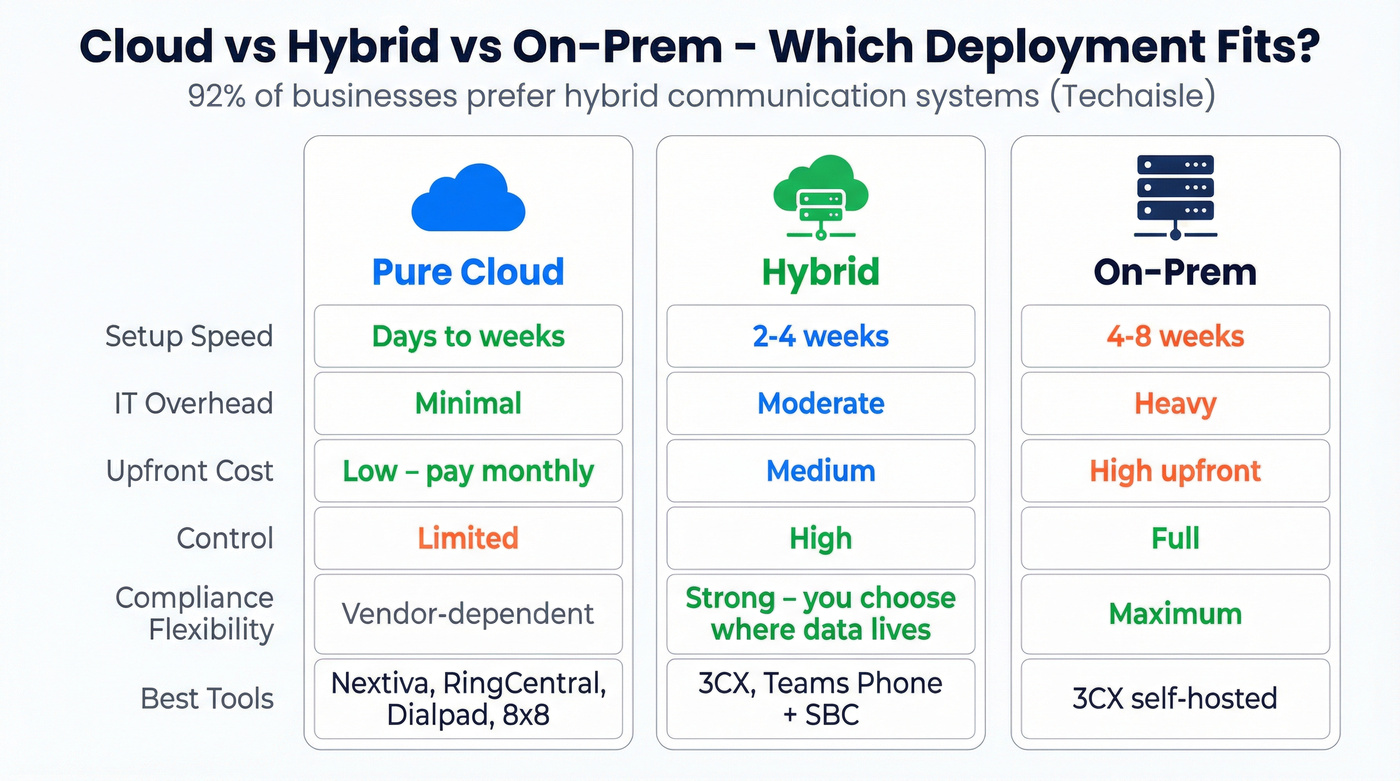
3CX answers a question most cloud-first vendors don't want you to ask: what if I want to keep some infrastructure on-prem? With 92% of businesses prioritizing hybrid communication systems according to Techaisle research, 3CX's self-hosted option fills a real gap. Paid licenses start around $175/year - not per user, per system. For organizations with existing SIP infrastructure and IT teams comfortable managing their own telephony, 3CX offers control that no pure-cloud vendor can match.
8. Five9
Five9 starts at $119/user/mo (Digital) and $159 for Core. The 50-seat minimum, 36-month contracts, no free trial, and extra charges to connect your CRM make this enterprise-only territory - you're committing $214K+ before you've made a single call. If you're running a 200+ seat contact center with complex routing needs, Five9 is a legitimate contender. For everyone else, skip it.
9. Aircall
Aircall's Essentials plan runs $30/user/mo, Professional at $50. It's a clean, simple call center tool built for small sales and support teams under 50 seats. Nothing more, nothing less - and sometimes that simplicity is exactly what you need after years of Avaya complexity. If you're weighing similar lightweight call center tools, compare Aircall vs CloudTalk.

Hidden Costs and Gotchas
Before you sign anything, read the fine print on these:
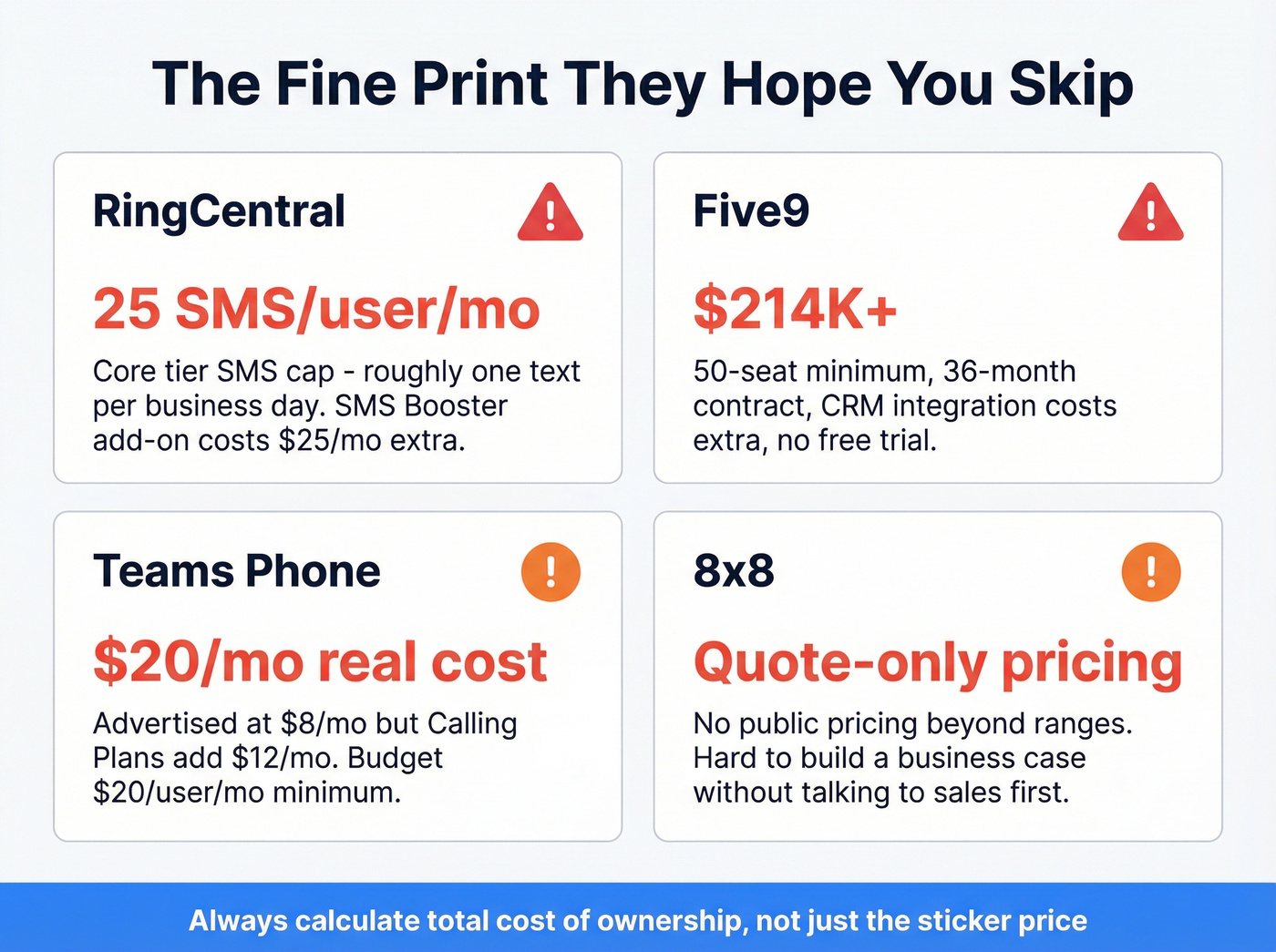
RingCentral SMS caps. 25 texts per user per month on Core. For a team that uses SMS for appointment confirmations or customer follow-ups, that's a dealbreaker hiding in plain sight.
Five9's quadruple lock-in. 50-seat minimum, 36-month contract, extra charge to connect your CRM, and no free trial. That $214K+ commitment before you've made a single call isn't a typo.
8x8 quote opacity. You won't see your exact pricing until you're in a sales conversation. Budget planning becomes guesswork.
Teams Phone's real cost. The ~$8/mo price tag is misleading without Calling Plans at ~$12/mo or a third-party SIP trunk. Budget around $20/user/mo minimum.
Do You Actually Need Pure Cloud?
Let's be honest: not everyone needs to go full cloud. That 92% hybrid preference stat from Techaisle isn't noise - it reflects real operational concerns about latency, compliance, and control. 3CX offers hybrid and on-prem deployments that let you modernize without abandoning existing infrastructure.
The Nelson Mullins case study is instructive. They migrated from Avaya CM 6 to Avaya Cloud Office and discovered that feature parity isn't always exact between on-prem and cloud. If your workflows depend on specific call routing logic or custom integrations, audit feature parity before committing to any pure-cloud platform.
Migration Checklist
We've watched enough phone system migrations to know what trips teams up. Here's the sequence that works:
- Start number porting early. It takes 2-4 weeks and it's the longest lead-time item. Don't wait.
- Run a feature parity audit. List every Avaya feature your team actually uses - not every feature you have, every feature someone touches. Map each one to the new platform. Flag gaps before you sign.
- Assess your hardware. Desk phones, headsets, conference room equipment - what's compatible, what needs replacing?
- Test CRM integrations. Your phone system talks to your CRM. Make sure the new one does too, and test it with real data, not a sandbox.
- Train users before cutover. Not after. The Nelson Mullins team deployed a new location in 10 days - but only because users were prepped ahead of time.
- Pilot with one team first. Roll out to 10-20 users, collect feedback for a week, then expand.
Clean Your Contact Data First
Here's what most migration guides skip entirely: switching phone platforms is the perfect time to audit your CRM data. Stale phone numbers and invalid emails don't magically fix themselves on a new system. They just bounce on a different platform.
Before you port numbers and flip the switch, export your CRM contacts and run them through Prospeo. Flag invalid emails, verify mobile numbers, and enrich records with fresh data - 300M+ professional profiles with 98% email accuracy and 125M+ verified mobiles refreshed every 7 days. Upload a CSV, verify in bulk, and start your new platform with clean data instead of carrying over years of decay. The free tier gets you started without a contract or a sales call. If you're evaluating vendors, see our roundup of data enrichment services and contact management software.

Your new UCaaS platform handles the calls. Prospeo handles who you're calling. 300M+ profiles, 98% email accuracy, and verified mobiles - all at $0.01/email with no contracts.
Stop paying enterprise prices for data that bounces.
FAQ
How much does it cost to replace Avaya?
UCaaS phone systems start at $8-$20/user/mo (Teams Phone, Nextiva, Dialpad). CCaaS contact center platforms start at $65-$75/agent/mo (RingCX, Genesys). A 100-seat UCaaS deployment typically runs $1,500-$3,500/mo - often 40-60% less than a comparable Avaya contract.
Can I keep my phone numbers when switching?
Yes. Every alternative on this list supports number porting. The process typically takes 2-4 weeks depending on your carrier and number count. Start the port request early - it's consistently the longest lead-time item in migrations.
What's the fastest Avaya alternative to deploy?
Microsoft Teams Phone if you're already on M365 - it's an add-on toggle, not a new platform. Nextiva and Dialpad also offer same-week onboarding for teams under 50 seats. The Nelson Mullins case study showed a new location deployed in 10 days with proper preparation.
Is Avaya going out of business?
No, but Avaya shed over $3.75B in debt across two bankruptcy filings (2018 and 2023). Under CEO Patrick Dennis, they're focusing on enterprises with 200+ seats. If you're smaller, you're no longer their target customer - and their product roadmap reflects that.
How do I clean my CRM data during a phone system migration?
Export your contacts before switching, then run them through a bulk verification tool to flag invalid emails and dead phone numbers. Starting your new system with verified data means no bounced outreach or wasted dials on day one.