

AWS SES: How to Verify an Email Address in 2026
It's 11pm, you're pushing a launch, and SES throws [Email address is not verified](https://docs.aws.amazon.com/ses/latest/dg/troubleshoot-verification.html) even though you know you verified it. You check the console. You check again. The problem? A region mismatch buried three clicks deep in AWS docs.
We've hit this exact wall more times than we'd like to admit, so we put together the full walkthrough - console steps, CLI commands, no-inbox workarounds, sandbox escape, and the troubleshooting checklist that would've saved us an hour.
Domain vs. Email Verification
SES lets you verify identities at two levels: the entire domain or a single email address. Most teams should verify the domain first and only add individual email identities when they need per-address configuration.
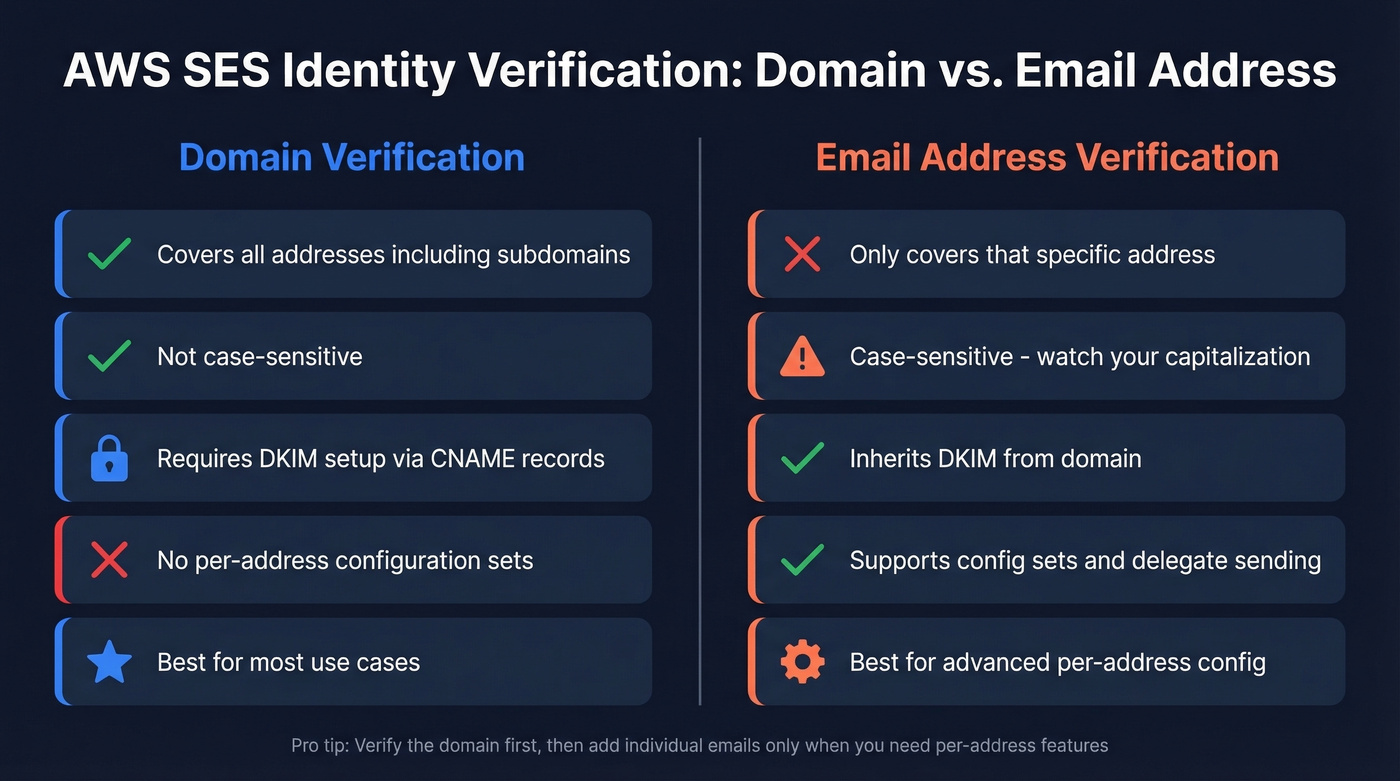
There's a nuance here that trips people up. If an email address is only "inherited" from a verified domain identity, it's limited to straightforward sending. For advanced sending - configuration sets, delegate sending - you must explicitly verify the email address too.
| Aspect | Domain | Email Address |
|---|---|---|
| Covers all addresses | Yes, including subdomains | No, only that address |
| Configuration sets | Not per-address | Yes |
| Delegate sending | Not per-address | Yes |
| DKIM setup | Required (typically CNAME with Easy DKIM) | Inherits from domain |
| Best for | Most use cases | Advanced per-address config |
Email addresses are case-sensitive in SES - verifying ops@Example.com doesn't cover ops@example.com. Domains aren't case-sensitive. Plus-addressing works automatically: if sender@example.com is verified, sender+marketing@example.com sends without extra verification. You can create up to 10,000 identities per region, so limits aren't a practical concern. (If you want the deeper technical nuance, see Are Email Addresses Case Sensitive?.)
How to Verify via the SES Console
- Open the SES console and confirm you're in the correct region first. This is the #1 source of verification headaches.
- Navigate to Verified Identities -> Create Identity -> Email Address.
- Enter the email address and click Create Identity.
- SES sends a verification email with a confirmation link. You've got 24 hours to click it before it expires. If it expires, hit Resend on the identity details page.
- Once clicked, the identity status flips to Verified.
If you don't have access to the inbox, skip to the no-inbox workaround below.
Verify via CLI & Python SDK
AWS CLI
# Trigger verification email
aws ses verify-email-identity - email-address user@example.com

# Check status
aws ses get-identity-verification-attributes - identities "user@example.com"

# List all identities in current region
aws ses list-identities

# Check your sending quota (useful for confirming sandbox limits)
aws ses get-send-quota

# Remove an identity
aws ses delete-identity - identity user@example.com
Always pass --region explicitly or set AWS_DEFAULT_REGION. We've seen teams waste entire afternoons verified in us-east-1 while their app sends from eu-west-1. Don't be that team.
Python (Boto3)
ses = boto3.client('ses', region_name='us-east-1')

# Trigger verification
ses.[ses.verify_email_identity](https://boto3.amazonaws.com/v1/documentation/api/1.35.9/reference/services/ses/client/verify_email_identity.html)(EmailAddress='user@example.com')

# List verified email identities
response = ses.list_identities(IdentityType='EmailAddress', MaxItems=10)
print(response['Identities'])
The region_name in your Boto3 client must match where you're sending from. Mismatch here and you'll get the dreaded "not verified" error with zero useful context in the traceback.

Configuring SES verification is necessary infrastructure work - but it doesn't solve the real problem: finding accurate email addresses for the people you actually need to reach. Prospeo's 143M+ verified emails come with 98% accuracy out of the box, so your SES bounce rate stays under control from day one.
Skip the verification headaches. Start with emails that are already verified.
Verifying Without an Inbox
Need to verify no-reply@yourdomain.com but there's no mailbox behind it? WorkMail runs $4/user, and that adds up fast for a one-time verification click. The SES receiving + S3 approach costs pennies and takes about 10 minutes.
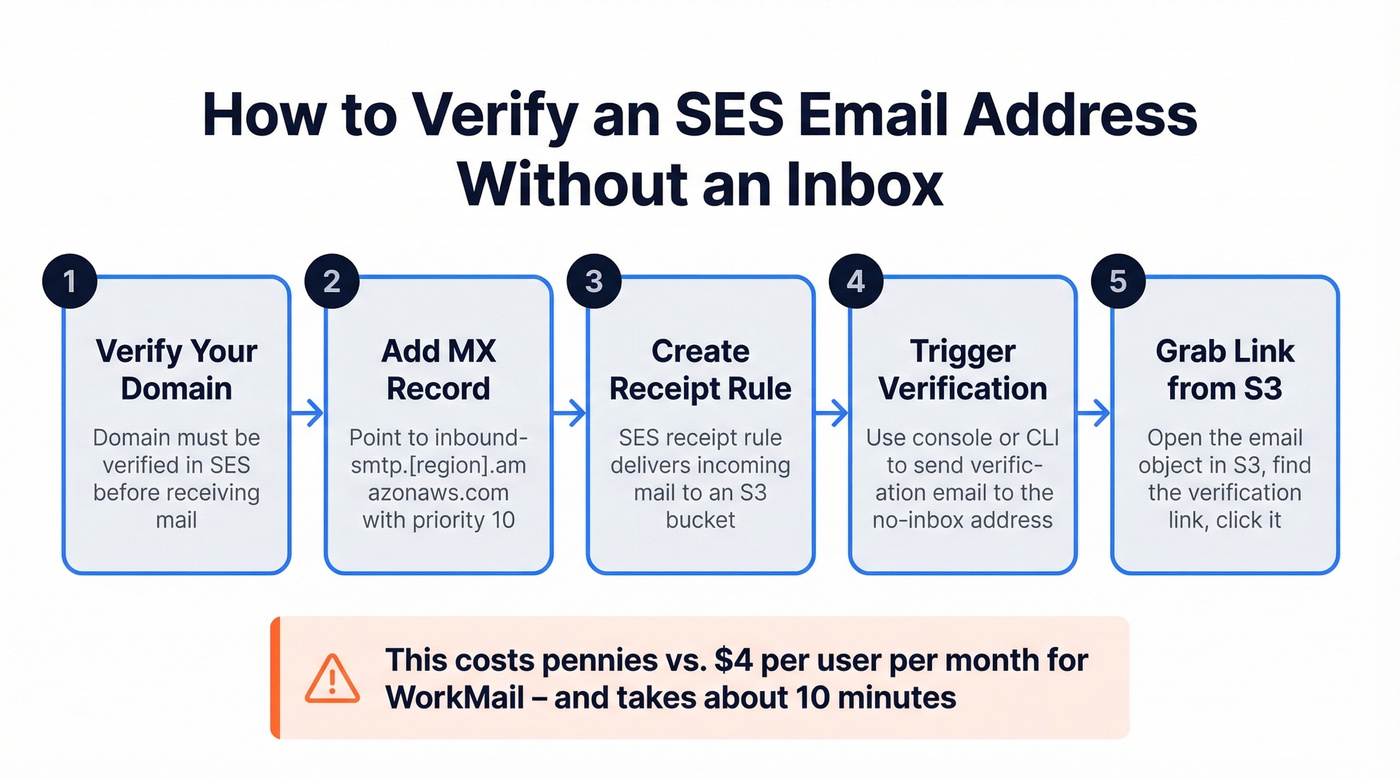
Here's the setup:
- Verify your domain in SES first.
- Add an MX record pointing to the SES inbound endpoint for your region:
| Region | Inbound Endpoint | MX Record Value |
|---|---|---|
| us-east-1 | inbound-smtp.us-east-1.amazonaws.com |
10 inbound-smtp.us-east-1.amazonaws.com |
| us-west-2 | inbound-smtp.us-west-2.amazonaws.com |
10 inbound-smtp.us-west-2.amazonaws.com |
| eu-west-1 | inbound-smtp.eu-west-1.amazonaws.com |
10 inbound-smtp.eu-west-1.amazonaws.com |
- Create an SES receipt rule that delivers incoming mail to an S3 bucket.
- Trigger verification via console or CLI for the no-inbox address.
- Open S3, find the verification email, extract the link, and click it.
The receipt rule doesn't auto-verify anything - you still retrieve the email manually. But it beats paying per-user for a mailbox you'll never touch again.
Escaping Sandbox Mode
By default, SES starts you in the sandbox: 200 emails/day, 1 email/second, and every recipient must be a verified identity unless you use the SES mailbox simulator. That breaks any real signup flow immediately.
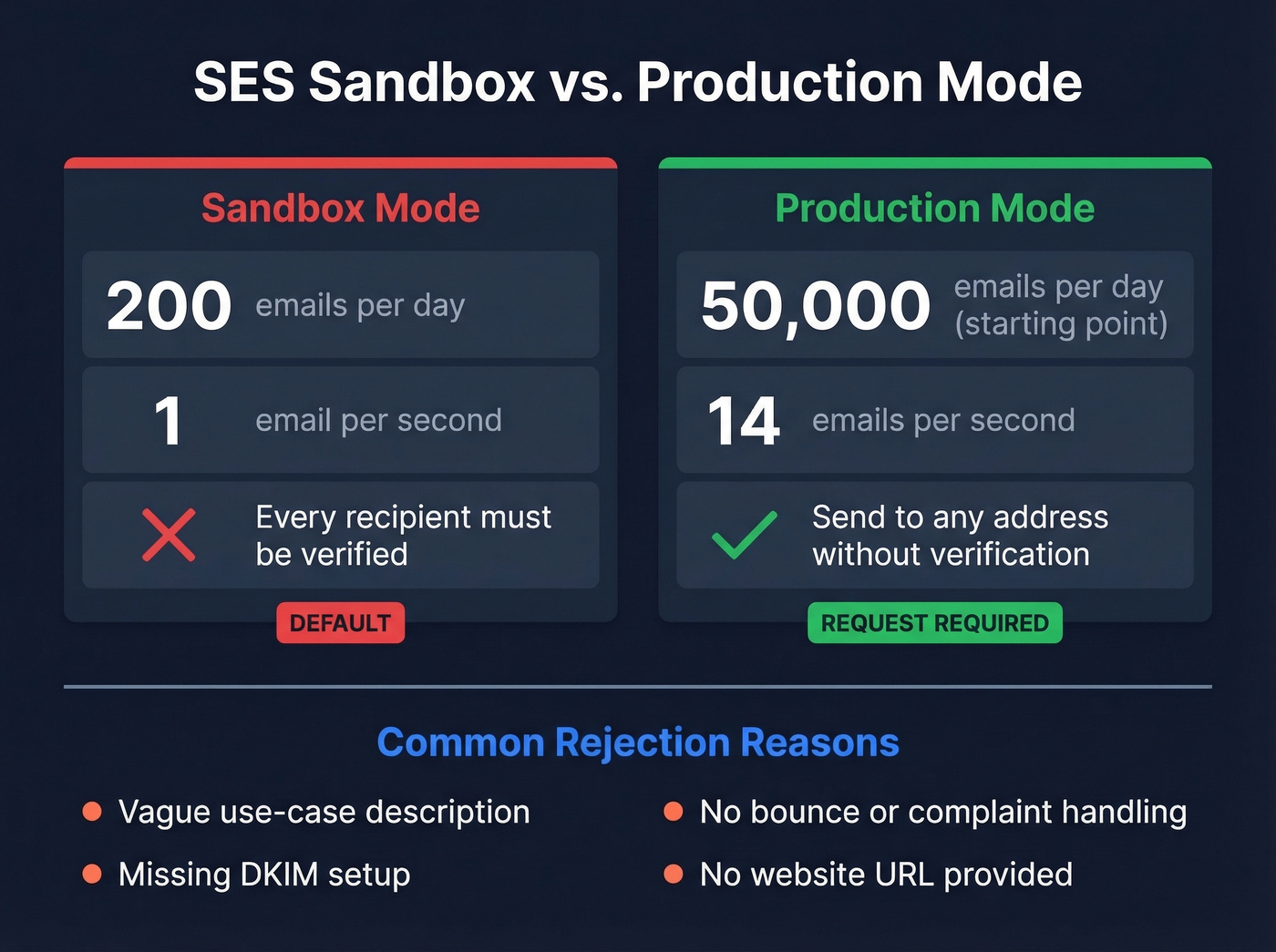
Request production access with the SESv2 CLI:
aws sesv2 put-account-details \
  --mail-type TRANSACTIONAL \
  --website-url https://yoursite.com \
  --use-case-description "Transactional emails for user signups and order confirmations" \
  --production-access-enabled \
  --region us-east-1
Expect roughly one business day for approval. Common rejection reasons:
- Vague use-case description (don't just write "sending emails")
- No bounce/complaint handling configured
- Missing DKIM
- No website URL
Once approved, a common starting point is around 50,000 emails/day at roughly 14 emails/second. You can monitor sending stats and request increases as your volume grows.
Troubleshooting Verification Failures
Look - most SES verification problems aren't verification problems. They're region problems. This is the exact error that floods r/aws threads every week:
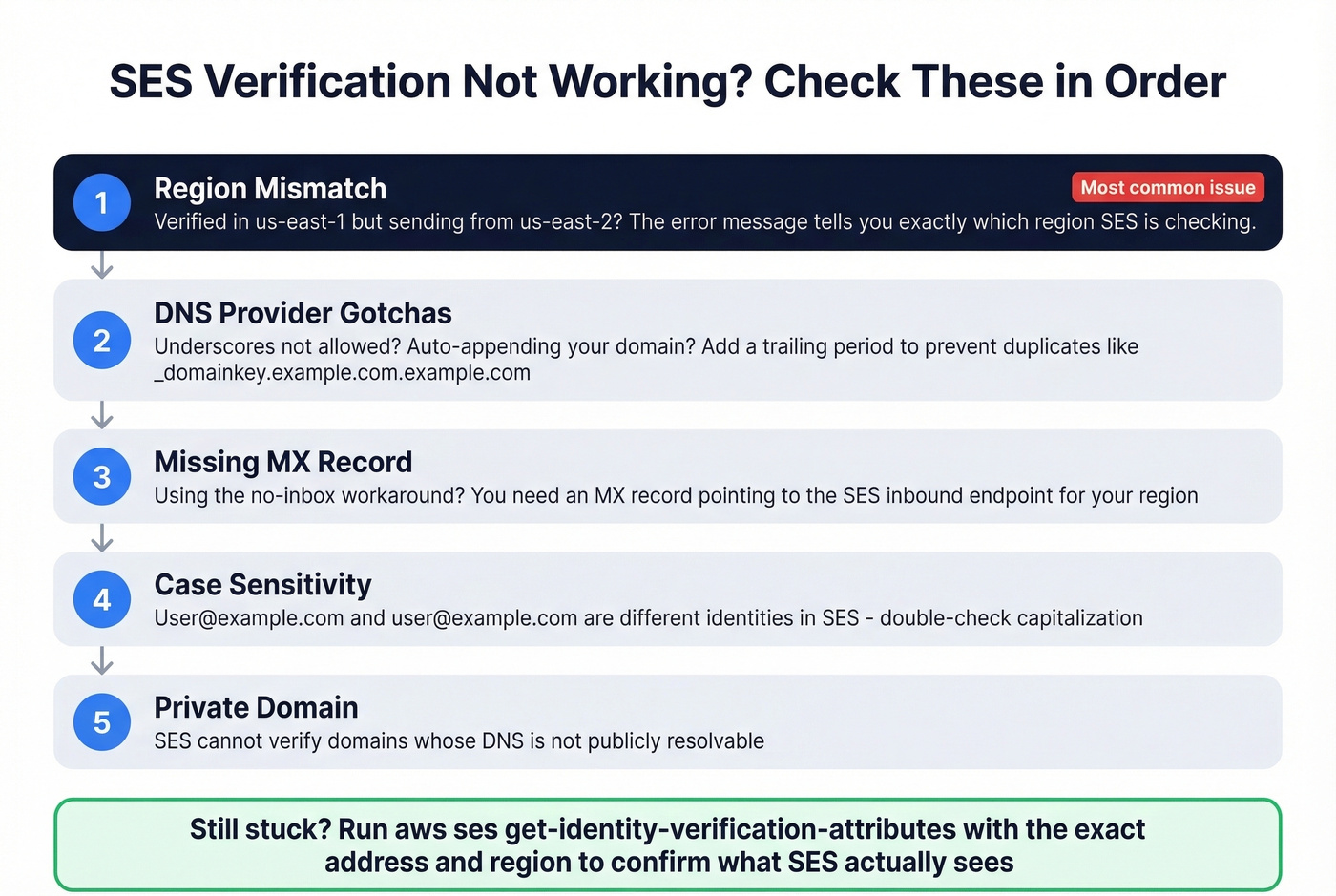
Email address is not verified. The following identities failed the check in region US-EAST-2: sender@example.com
Work through these in order:
Region mismatch. The identity is verified in us-east-1 but your app sends from us-east-2. Check the region in the error message - it tells you exactly where SES is looking.
DNS provider gotchas. Some providers don't allow underscores in record names, but DKIM requires them. Others auto-append your domain, creating duplicates like _domainkey.example.com.example.com. Add a trailing period to prevent this. A few providers also lowercase record values, which breaks SES's exact-match requirement.
Missing MX record. If you're using SES receiving for the no-inbox workaround, you need an MX record pointing to the SES inbound endpoint. As one developer on re:Post discovered, this is the fix people find after hours of debugging.
Case sensitivity. User@example.com and user@example.com are different identities in SES. Double-check capitalization.
Private domain. SES can't verify domains whose DNS isn't publicly resolvable.
Once SES is configured and sending, deliverability depends on list quality. SES monitors bounce and complaint rates closely, and poor metrics can lead to sending pauses or account restrictions. For teams sending B2B outbound through SES, verifying your recipient list before it hits the sending pipeline is non-negotiable. Prospeo catches stale addresses at 98% accuracy on a 7-day refresh cycle, so bad data never generates the bounces that tank your sender reputation. (Related: B2B Email Verification and Email Reputation.)

You're optimizing SES deliverability, which means bounce rates matter to you. Teams using Prospeo's 5-step verified emails cut bounce rates from 35%+ down to under 4% - no catch-all guessing, no spam traps, no honeypots. At $0.01 per email, bad data isn't worth the risk.
Feed SES clean data and watch your sender reputation climb.
FAQ
Can I verify a Gmail or Yahoo address as a sender in SES?
Yes. You can verify any email address you can access. You can't verify the domain itself (gmail.com), only the specific address. This works for testing but isn't practical for production sending since recipients will see "via amazonses.com" and your deliverability will suffer.
Do I need to verify recipients after leaving sandbox?
No. Once in production mode, you send to any address without verifying it first. You only need to verify your sender identities - the From, Source, Sender, and Return-Path addresses.
How do I keep my SES bounce rate below the 5% threshold?
Validate your recipient list before sending. SES pauses accounts that exceed a 5% bounce rate or 0.1% complaint rate. Let's be honest - if you're sending cold outbound at any real volume, you need a verification layer between your list and SES. Run your contacts through a dedicated verification tool before they ever hit the sending queue, and you'll stay well under those thresholds.
Skip this if you're only sending transactional email
If your SES use case is purely transactional - password resets, order confirmations, login codes - you don't need to worry about recipient verification. Your users gave you real addresses during signup. The guidance above about pre-send verification is specifically for outbound and marketing use cases where list quality isn't guaranteed.