

Email Reputation: How to Diagnose, Fix, and Protect It
Your open rates just dropped 30% overnight. Authentication checks out. Content hasn't changed. You're staring at Google Postmaster Tools wondering what went wrong - and the answer is almost always your email reputation.
Mailbox providers stopped trusting you, and now your messages are landing in spam.
What You Need (Quick Version)
Sender reputation is a dynamic trust signal that mailbox providers assign to your sending IP, domain, and overall sending behavior. It determines whether your messages land in the inbox, get filtered to spam, or get rejected outright.
Three things matter most in 2026: full authentication (SPF + DKIM + DMARC, with quarantine or reject strongly recommended), clean data because every bounce chips away at your standing, and consistent sending volume to engaged recipients. If your deliverability just tanked, skip to the recovery section. If you need to protect what you've built, jump to the long-term playbook.
The numbers paint a clear picture. Validity's 2025 benchmarks put average inbox placement at 83.5%, with 6.7% hitting spam and 9.8% going missing entirely - down from just below 87% in February 2024. That's a meaningful decline in barely 14 months. Unspam's testing dataset tells an even rougher story: only 60% of emails reach a visible mailbox, with 36% landing in spam. The gap between "delivered" and "seen" is wider than most teams realize.
What Is Email Reputation?
Sender reputation is the trust signal that mailbox providers - Gmail, Outlook, Yahoo, and others - assign to your sending infrastructure. Think of it as a credit score, except there's no single bureau and every lender runs their own model. Every message you send either builds or erodes that trust, and providers use it to make a split-second decision: inbox, spam folder, or outright rejection.
There's no single universal score. Gmail calculates reputation differently than Microsoft, which calculates it differently than Yahoo. A sender can have strong Gmail placement and terrible Outlook delivery at the same time. Unspam's data makes this painfully concrete: Gmail inbox placement peaked at 87.5% in May 2025 and plummeted to 63.5% by December, while Outlook peaked at just 41.1%. Those aren't small fluctuations - they're entirely different realities depending on where your audience lives.
You'll find this frustration all over Reddit. One ActiveCampaign user described authentication passing perfectly while Yahoo and Hotmail spam-foldered everything. The practical takeaway: you can't check one tool and declare yourself healthy. You need to monitor across providers and understand which layer is actually causing the problem.
The Three Layers of Reputation
IP and Server Reputation
IP reputation is the trust tied to the specific IP address your mail server uses. If you're on a shared IP - which is how most ESPs operate - your reputation is partially determined by your neighbors' behavior. On a dedicated IP, it's entirely yours, for better or worse.
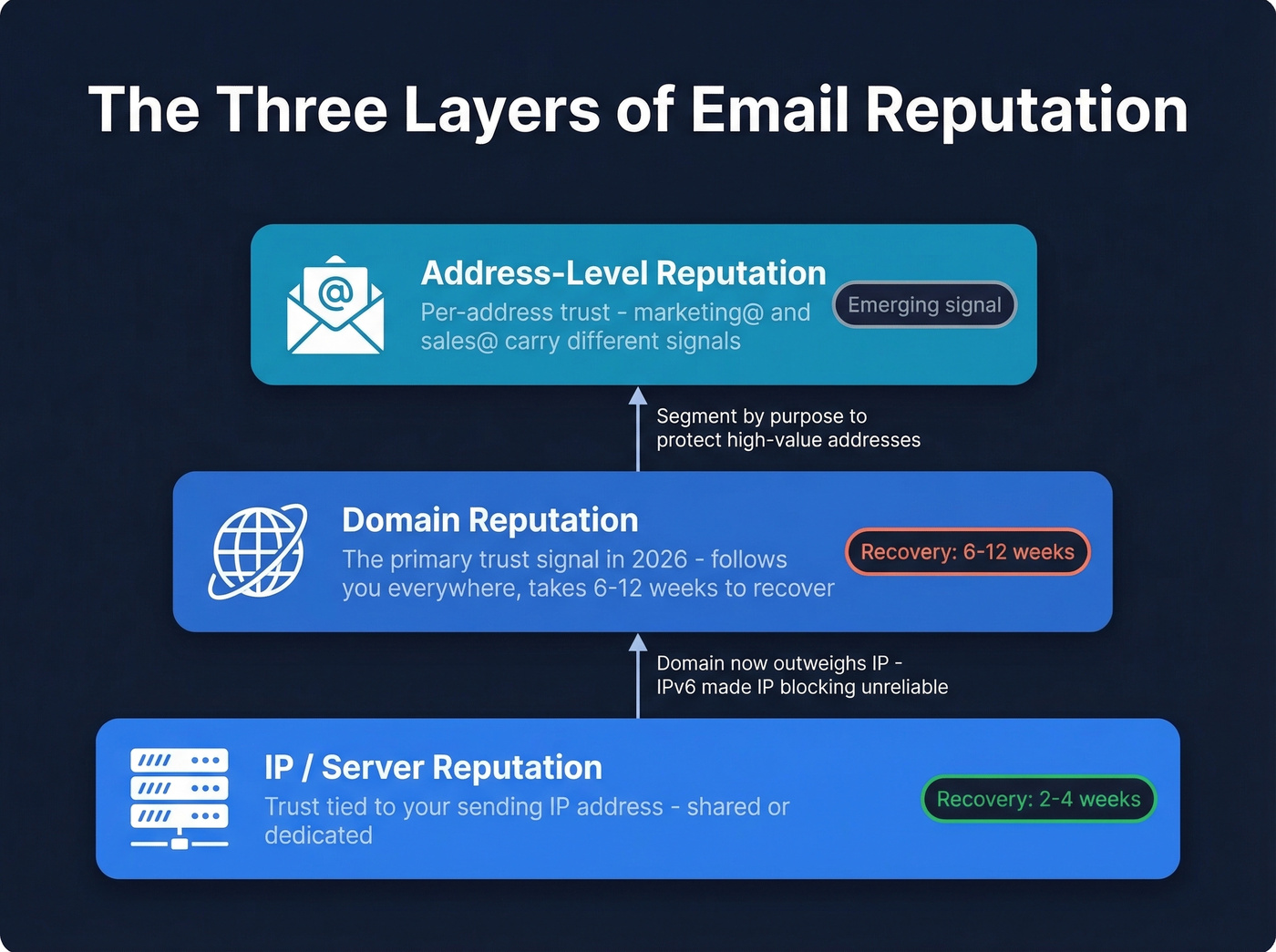
Shared IPs are a double-edged sword. Your ESP pools your sending with hundreds of other senders, which means one bad actor can drag everyone down. We've seen this pattern repeatedly: a sender with clean lists and solid authentication suddenly hits spam because someone else on the same IP started blasting purchased lists. Monitoring your email reputation tools regularly is the only way to catch these issues before they spiral.
Domain Reputation
Here's the thing: IP reputation matters less than it used to. Spamhaus explains why - the IPv6 address space is so massive that spammers can burn through IPs cheaply. Filters can't rely on IP blocking alone anymore, so domain reputation has become the primary trust signal.
Domain reputation is portable. It follows you across ESP migrations, IP changes, and infrastructure swaps. That's why switching providers won't reset a damaged domain - the reputation travels with you. IP reputation typically recovers in 2-4 weeks, but domain reputation takes 6-12 weeks.
Address-Level Reputation
This is the emerging layer. Mailbox providers can track reputation at the specific From-address level, meaning marketing@yourcompany.com and sales@yourcompany.com carry different trust signals. Don't send cold outbound from the same address that handles transactional receipts. Segment your sending streams by purpose, and protect your highest-value addresses.
What Determines Your Sender Score
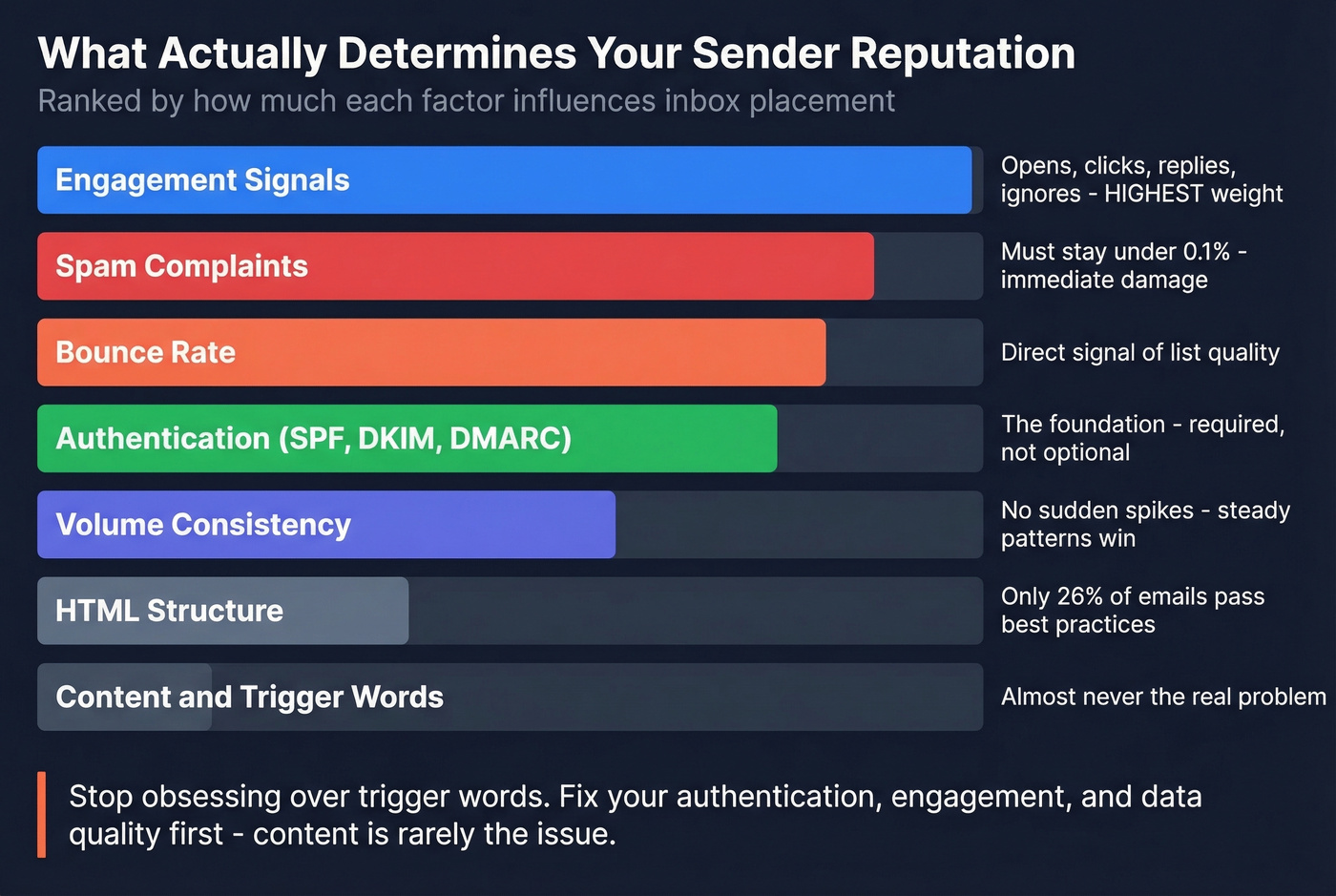
Several factors feed into your reputation, but they aren't weighted equally.
| Factor | Impact | What Providers Look For |
|---|---|---|
| Authentication | Foundation | SPF, DKIM, DMARC in place |
| Engagement | Highest weight | Opens, clicks, replies, ignores |
| Bounce rate | High | List quality signal |
| Spam complaints | Immediate damage | Must stay below 0.1% |
| Volume consistency | Moderate | Steady patterns, no spikes |
| HTML structure | Low-moderate | Clean code, proper formatting |
| Content signals | Lowest | Far less important than teams think |
Authentication is the foundation. SPF and DKIM are required for bulk senders, and DMARC is now a baseline requirement. If you want real protection, move DMARC to quarantine or reject. (If you want to go deeper on alignment, see DMARC.)
Engagement signals carry enormous weight. Opens, clicks, replies, and - critically - ignores. When recipients consistently ignore your emails, providers notice. When they mark you as spam, the damage is immediate. A rising association between your sending and unwanted mail will tank your inbox placement fast. Keep your spam complaint rate below 0.1%. The hard ceiling is 0.3%, and crossing it can trigger enforcement actions from Gmail and Yahoo.
Bounce rate is a direct signal of list quality. High bounces tell providers you're not managing your data. Spam traps and honeypots - invalid addresses planted specifically to catch careless senders - are even worse. If you need a benchmark-driven breakdown, start with bounce rate.
Volume consistency matters more than most teams realize. Bursty sending patterns degrade reputation. If you normally send 5,000 emails a week and suddenly blast 50,000, providers treat that spike as suspicious behavior. For safe ramping, use an email velocity plan.
HTML structure is an underrated factor. Only 26% of emails pass HTML best-practice checks, and poor structure increases spam likelihood by 18%-25%. It's not the biggest lever, but sloppy HTML gives filters one more reason to downgrade you.
Let's be honest about content optimization: it's almost never the real problem. The Reddit threads full of people obsessing over trigger words like "unsubscribe" and "free" are chasing the wrong fix. If your authentication, engagement, and data quality are solid, your content will be fine.

Every bounce chips away at your sender reputation. Prospeo's 5-step email verification delivers 98% accuracy - so you stop feeding spam traps and start hitting inboxes. Teams switching from other providers cut bounce rates from 35% to under 4%.
Stop letting bad data tank your domain reputation at $0.01 per verified email.
2026 Compliance Requirements
The compliance landscape tightened significantly between 2024 and 2026, and enforcement is now real - not theoretical.
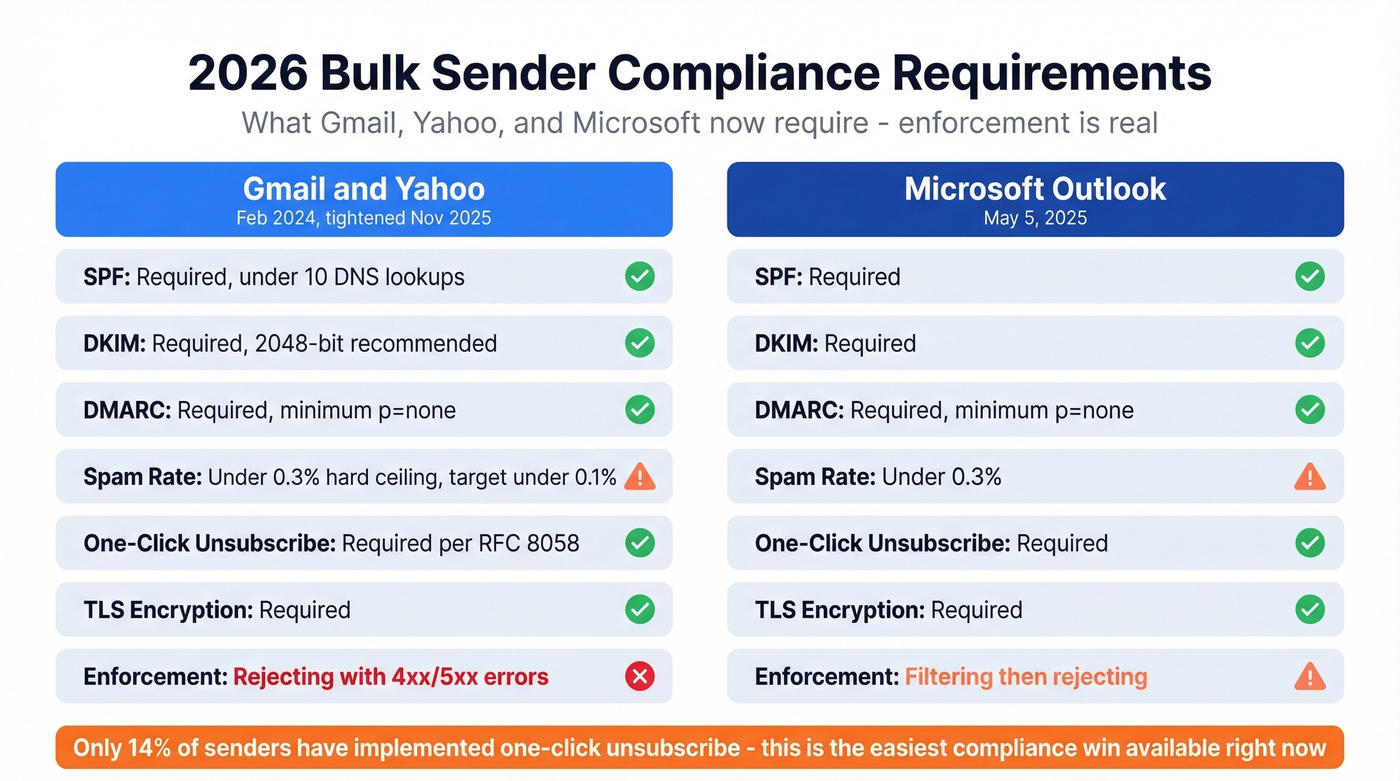
Gmail and Yahoo rolled out bulk sender rules in February 2024 for anyone sending 5,000+ messages per day to their consumer mailboxes. As of November 2025, Gmail tightened enforcement and now rejects non-compliant mail with 4xx/5xx SMTP errors. Microsoft followed with similar requirements effective May 5, 2025 for Outlook.com, Hotmail, and Live.
| Requirement | Gmail/Yahoo | Microsoft Outlook |
|---|---|---|
| Enforcement date | Feb 2024 (Nov 2025 tightened) | May 5, 2025 |
| SPF | Required, under 10 lookups | Required |
| DKIM | Required, 2048-bit recommended | Required |
| DMARC | Required, minimum p=none | Required, minimum p=none |
| Spam complaint rate | Under 0.3%, target under 0.1% | Under 0.3% |
| One-click unsub | Required per RFC 8058 | Required |
| TLS | Required | Required |
| PTR/rDNS | Required | Required |
| Enforcement | Rejecting with 4xx/5xx | Filtering + rejecting |
The one-click unsubscribe requirement deserves special attention. Despite being mandatory, only 14% of senders are actually compliant. That's a massive gap - and an easy win if you're not there yet. Unsubscribes must be processed within 2 business days.
How to Check Your Email Reputation
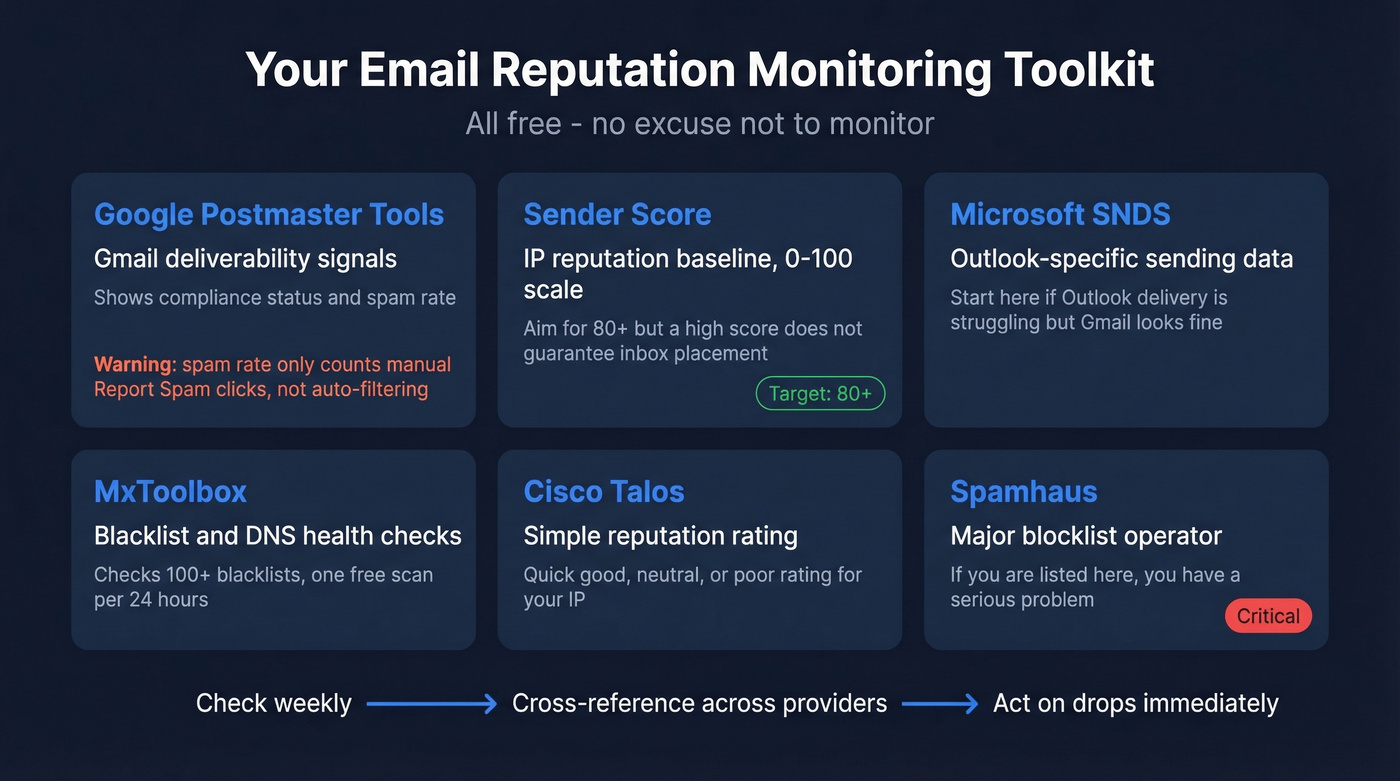
Every tool below has free access. There's no excuse for not monitoring.
Google Postmaster Tools
The most important monitoring tool for anyone sending to Gmail addresses. It shows deliverability signals like compliance status and spam rate, plus reputation indicators where available.
One critical limitation most guides skip: GPT's spam rate only measures manual "Report spam" clicks from recipients. The formula is (user "Report spam" actions / emails delivered to inbox) x 100. It doesn't reflect automatic filtering into Spam or Promotions. You can have a 0.05% spam rate in Postmaster Tools while Gmail is quietly filtering 40% of your mail. Don't mistake a low GPT spam rate for strong inbox placement - they're different metrics entirely.
Sender Score
Sender Score provides an IP-level reputation baseline on a 0-100 scale. Aim for 80+. But don't over-rely on it - a Sender Score of 98 doesn't guarantee inbox placement. It's possible to score high and still have delivery problems because the score only measures IP reputation, not domain reputation or engagement quality.
MxToolbox, Talos, and Spamhaus
MxToolbox runs your domain and IP against 100+ blacklists and a large set of DNS and mail checks. On the free plan, you're limited to one Email Health Check every 24 hours. Cisco Talos provides a free reputation lookup with a simple good/neutral/poor rating. Spamhaus is a major blocklist operator; if you're listed there, you've got a serious problem that needs immediate attention. If you do get listed, follow a dedicated Spamhaus blacklist removal process.
Microsoft SNDS
Smart Network Data Services gives you Outlook-specific sending data. If your Outlook delivery is struggling while Gmail looks fine, this is where you start diagnosing.
| Tool | What It Measures | Provider Coverage | Price |
|---|---|---|---|
| Google Postmaster | Deliverability signals | Gmail | Free |
| Sender Score | IP reputation, 0-100 | Cross-provider | Free |
| MxToolbox | Blacklists + DNS/mail checks | Cross-provider | Free + paid |
| Cisco Talos | Reputation rating | Cross-provider | Free |
| Spamhaus | Blocklist status | Cross-provider | Free |
| Microsoft SNDS | Sending data + complaints | Outlook/Hotmail | Free |
Why Authentication Alone Isn't Enough
Authentication is table stakes, not a strategy. This is the single most important thing to understand about sender deliverability in 2026.
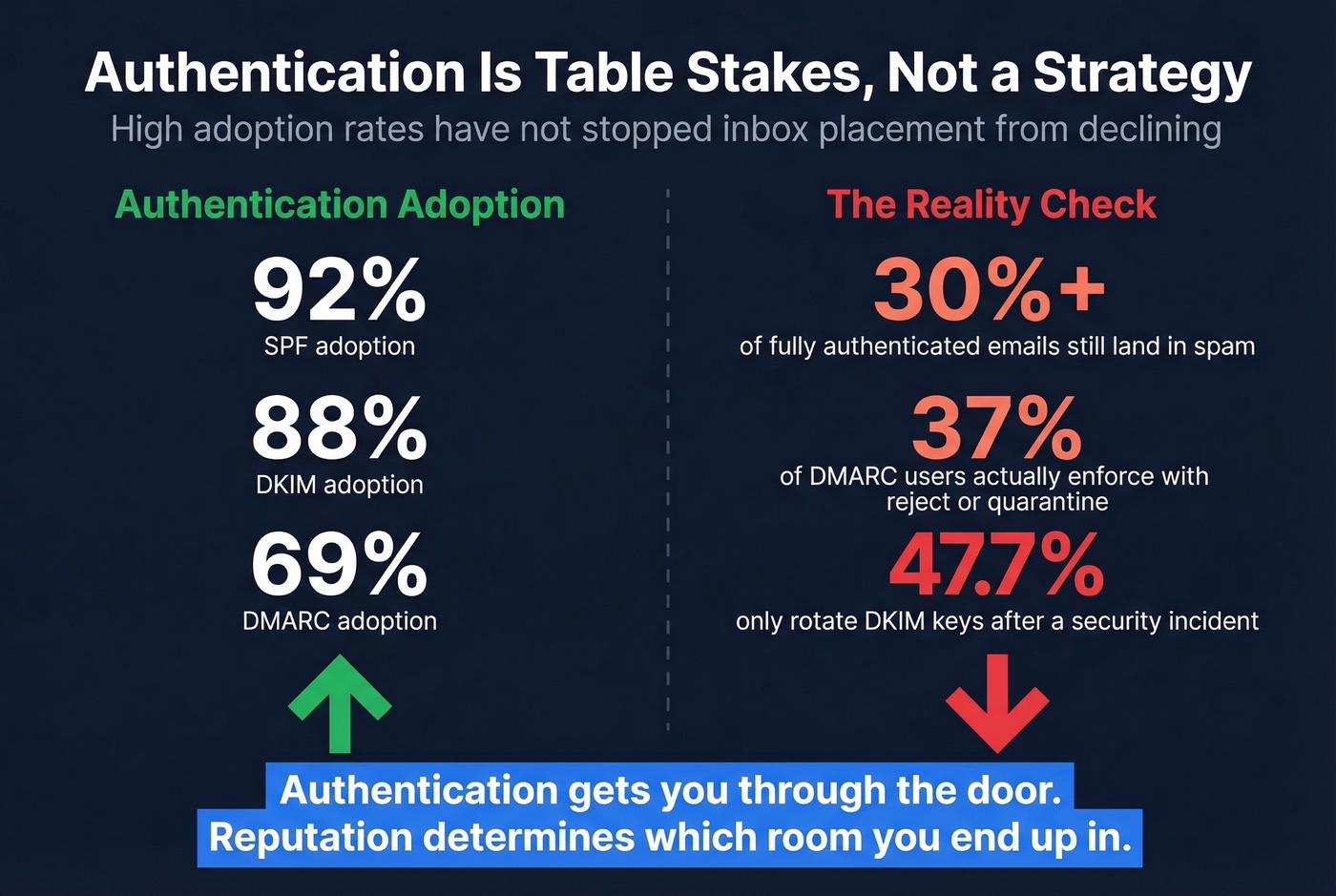
The numbers prove it. Even among fully authenticated senders, over 30% of emails still land in spam. Authentication adoption is high - SPF at 92%, DKIM at 88%, DMARC at 69% - yet inbox placement keeps declining. Authentication gets you through the door. Reputation determines which room you end up in.
The operational gaps are striking. Per Mailgun's 2026 survey, only 37% of DMARC users enforce with reject or quarantine - the rest run p=none, which provides visibility but zero protection. DKIM key rotation is even worse: 47.7% of senders only rotate keys after a security incident, and 40% aren't sure of their rotation schedule at all. Best practice is every 6-12 months. (If you want a quick check, use this guide on verify DKIM is working.)
If you've set up SPF, DKIM, and DMARC and you're still hitting spam, stop tweaking your authentication records. The problem is almost certainly engagement, data quality, or sending patterns - behavioral signals, not configuration gaps.
How to Recover from Reputation Damage
The Recovery Playbook
Recovery follows a predictable sequence. Skip steps and you'll extend the timeline.
Diagnose first. Check Google Postmaster Tools, Sender Score, and blacklists. Identify whether the problem is IP-level, domain-level, or both. Check across providers - Gmail, Outlook, and Yahoo can all behave differently.
Isolate the damage. If you're on shared IPs, talk to your ESP about moving to a dedicated IP or a cleaner pool. Separate transactional and marketing streams immediately if they're on the same infrastructure.
Suppress disengaged recipients. Anyone who hasn't opened or clicked in 90+ days gets removed from active sends. This is painful - your list will shrink - but sending to disengaged recipients is what got you here.
Clean your list. Run your entire database through a verification tool before resuming sends. You need to eliminate invalid addresses, spam traps, and honeypots - every bounce during recovery sets you back further. We use Prospeo's email verification for this, which runs a 5-step process with catch-all handling and spam-trap removal at 98% accuracy. (If you're comparing vendors, see Bouncer alternatives.)
Reduce volume and warm up with engaged segments. Start with your most engaged recipients - people who've opened or clicked in the last 30 days. Send small volumes consistently. Ramp based on results, not a calendar.
Monitor and ramp. Check Postmaster Tools daily during recovery. Increase volume by 20-30% per week as metrics stabilize. In our experience, the biggest recovery mistake is ramping volume too fast because the numbers look good for three days.
Volume Spike Gone Wrong
Stripo's recovery story is a textbook example of how fast things can collapse. They were running at 99.8% delivery with roughly 25% open rates. Then they sent two campaigns to 4x their usual audience size. Delivery dropped to around 80%. Open rates fell to 11%. Bounce rates spiked to roughly 20%. Postmaster Tools showed both IP and domain reputation at "Bad."
The trigger wasn't bad content or authentication failure - it was a volume spike that their domain wasn't prepared for, compounded by shared IP contamination from neighboring senders.
Shared Infrastructure Fallout
Postbox documented an enterprise case where inbox placement fell from 78% to 43% over just three weeks. The root cause was multi-tenant shared infrastructure where one customer's bad practices tanked server reputation for everyone. Recovery took 8 weeks of disciplined warmup, list cleaning, and monitoring - ultimately bringing inbox placement back to 81%. The business impact during the decline: $840K in ARR at risk.
If you're on shared infrastructure and can't explain a sudden drop, this is probably what's happening. Skip the content tweaks and go straight to your ESP.
Protect Your Deliverability Long-Term
The fastest way to destroy your sender reputation is to send to invalid addresses. Every bounce chips away at your domain's trust score. Before any outbound campaign, verify your list - bad data from other providers is one of the most common reasons we see teams come to Prospeo after their domain has already taken a hit. If you need a full framework, follow this guide on improve sender reputation.
Beyond list hygiene, build these habits into your operations.
Engagement segmentation means tiering your recipients by recency and engagement. Your most engaged contacts get priority. Disengaged contacts get re-engagement campaigns or suppression - never the same cadence as active buyers. For teams that run high-volume outbound, this single change often produces the biggest improvement.
Maintain a consistent sending cadence. Warm up new IPs and domains gradually. If you're launching a campaign that doubles your usual volume, ramp over 2-3 weeks instead of sending everything on day one.
Check Google Postmaster Tools weekly. Review Sender Score monthly. Run blacklist checks after any significant campaign. Don't wait for open rates to crash before investigating.
Keep transactional emails - receipts, password resets, order confirmations - on different infrastructure than marketing and outbound. One bad marketing campaign shouldn't take down your transactional delivery.
For context on what "good" looks like by industry:
| Industry | Avg. Inbox Placement |
|---|---|
| Travel & Hospitality | 68% |
| Retail | 62% |
| Software / Tech | 58% |
| Financial Services | 57% |
If you're above your vertical's benchmark, you're doing well. If you're below, start with the diagnosis tools above.
Domain reputation takes 6-12 weeks to recover. Prevention is cheaper than repair. Prospeo refreshes all 300M+ profiles every 7 days - not the 6-week industry average - so your lists never go stale enough to trigger bounces or spam traps.
Clean data is the fastest way to protect what you've built.
FAQ
What's a good email reputation score?
No universal score exists. Google Postmaster rates reputation in broad categories (High, Medium, Low, Bad), and Sender Score uses 0-100 where 80+ is the target. Check multiple tools - strong Gmail reputation doesn't guarantee strong Outlook delivery.
Can I fix my reputation by switching IPs?
Temporarily, maybe. But domain reputation follows you across IPs. If your domain is damaged, a new IP won't help, and it needs its own 2-4 week warmup period. Fix the root cause first: engagement, bounces, complaints.
Why do authenticated emails still land in spam?
Authentication is necessary but not sufficient. Over 30% of fully authenticated emails still hit spam. Inbox placement depends on engagement, bounce rates, complaint rates, and data quality - behavioral signals matter far more than configuration alone.
How long does reputation recovery take?
IP reputation typically recovers in 2-4 weeks with disciplined sending. Domain reputation takes 6-12 weeks. The timeline depends on severity and how quickly you suppress bad contacts, clean your list, and ramp volume gradually.
How can I prevent bad data from hurting deliverability?
Verify every email before sending. Keep bounce rates under 2% and remove addresses that haven't engaged in 90+ days. A verification step before each campaign is the single cheapest insurance policy for your domain's reputation.