

Are Email Addresses Case Sensitive? What the Standard Says vs. What Actually Happens
You just typed a prospect's email with a capital letter, hit send, and now you're staring at your outbox wondering if it'll bounce. The short answer: no, email addresses aren't case sensitive in practice. But the long answer involves a decades-old standard that technically allows the opposite, plus a handful of real-world edge cases that keep the question alive.
The Short Answer
john@gmail.com and JOHN@gmail.com reach the same inbox. The RFC allows case sensitivity in the local-part, but virtually no widely used provider enforces it. If you're worried about deliverability, capitalization isn't your problem - bad data is.
What the RFC Standard Says
You'd think after 40+ years of email, there'd be a simple yes-or-no answer. There isn't, because the standard splits responsibility between two parts of every address.
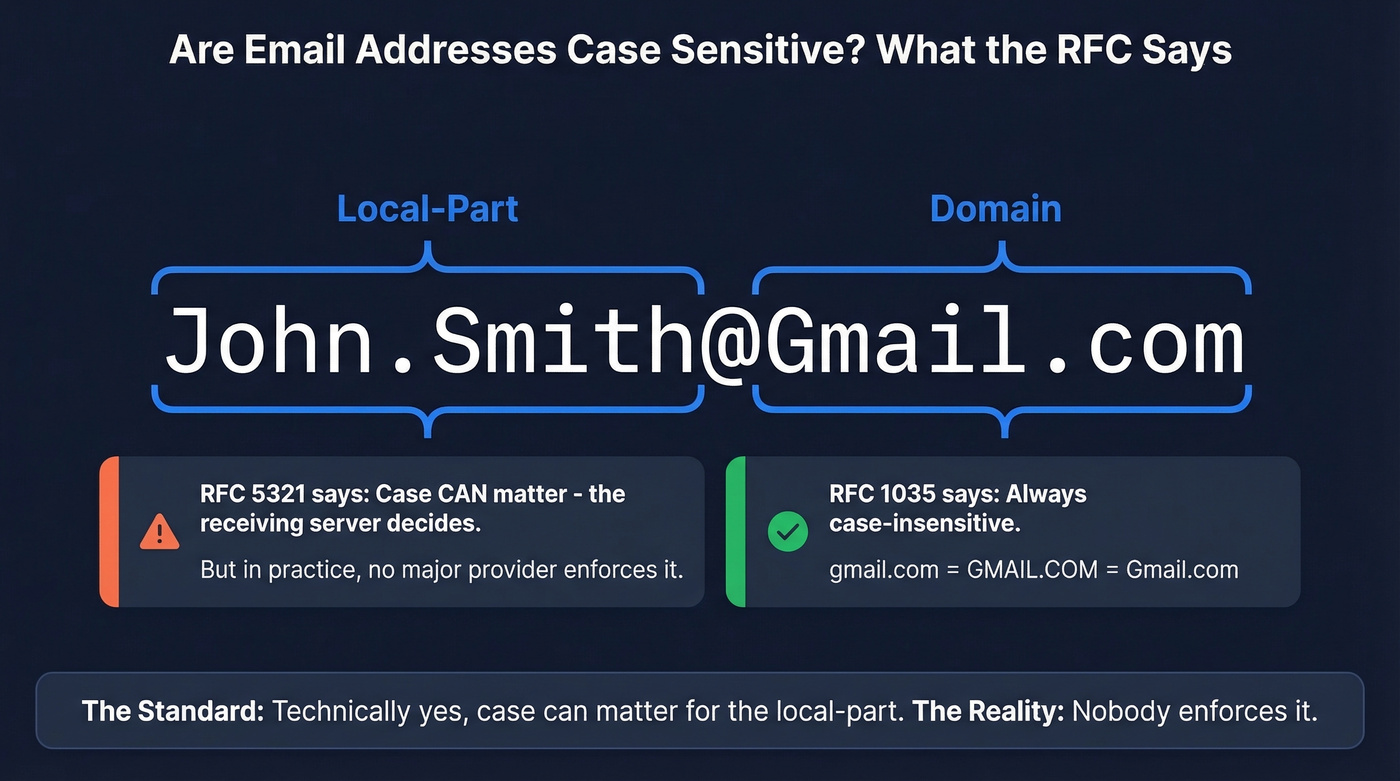
RFC 5321 is the SMTP specification (Oct 2008, Standards Track), updated by RFC 7504. It treats an email address as two parts: the local-part (everything before the @) and the domain (everything after). The rules differ for each.
For the domain, it's straightforward. RFC 1035 §3.1 requires that name servers and resolvers compare domains in a case-insensitive manner. gmail.com, Gmail.com, and GMAIL.COM are identical. No ambiguity.
The local-part is where things get weird. RFC 5321 §2.3.11 says the local-part "MUST be interpreted and assigned semantics only by the host specified in the domain part." The receiving mail server decides what the local-part means, including whether capitalization matters. And RFC 5321 also tells SMTP implementations to preserve the case of mailbox local-parts in transit, because for some hosts, smith is different from Smith.
So the standard says: case can matter, systems must preserve what you typed during transport, but only the receiving host gets to decide what it means. In practice, every major provider ignores case in the local-part. The standard permits case sensitivity. The internet chose not to use it.
How Major Providers Handle It
| Provider | Case Sensitive? | Notes |
|---|---|---|
| Gmail | No | Ignores dots; supports + addressing |
| Outlook / M365 | No | Consistent across consumer and business accounts |
| Yahoo Mail | No | Standard handling |
| iCloud / Apple Mail | No | Standard handling |
| Custom (self-hosted) | Depends | Server admin controls behavior |
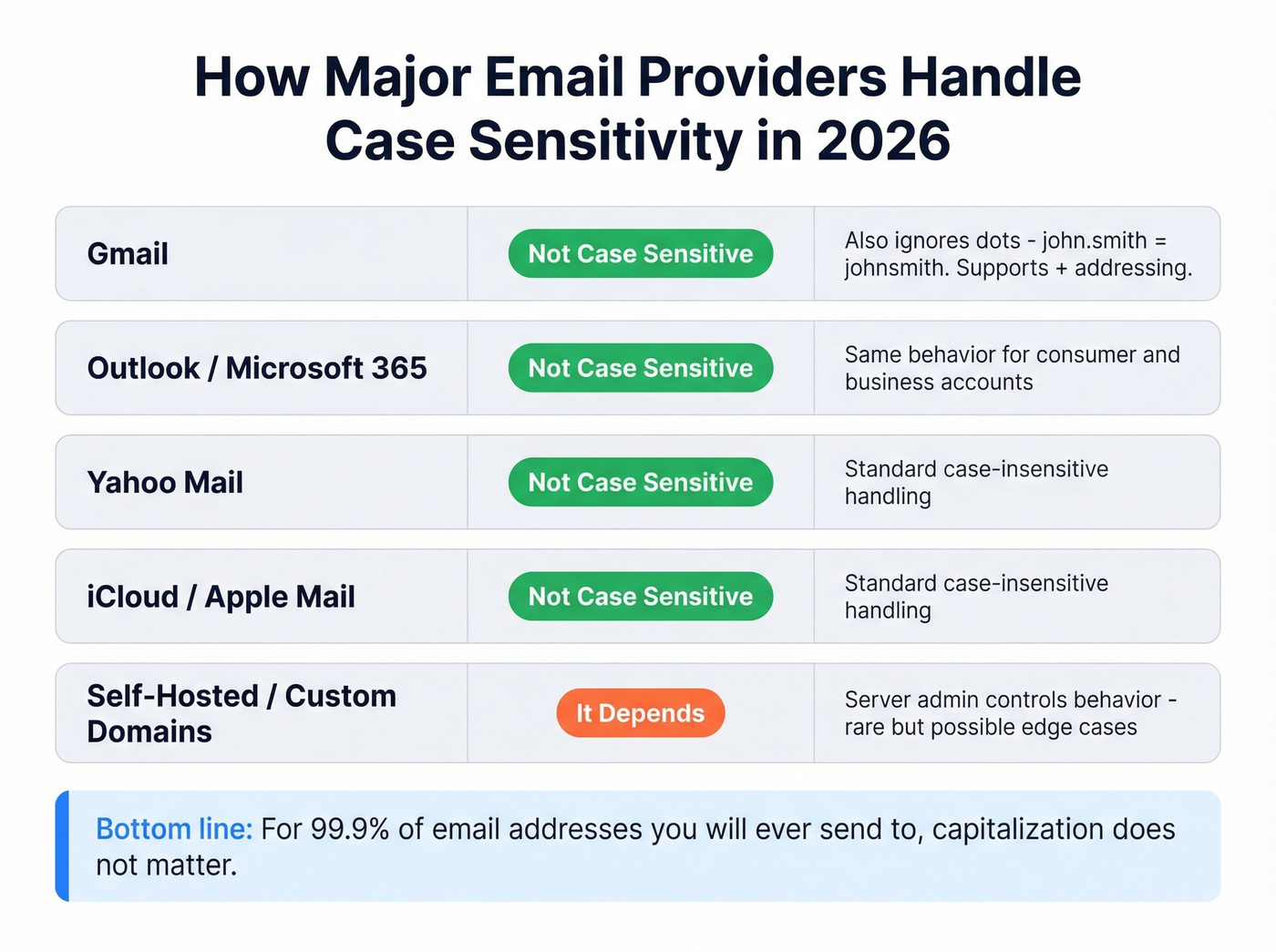
Gmail deserves a special callout. Not only does it ignore capitalization, it also ignores dots in the local-part. That means john.smith@gmail.com and johnsmith@gmail.com land in the same inbox. Gmail also supports plus addressing - john+newsletter@gmail.com routes to john@gmail.com - which is useful for filtering but occasionally breaks poorly coded signup forms.
The only real wildcard is custom domains on self-hosted or legacy mail systems. It's rare, but case-sensitive handling can exist in real organizations, usually because something in the mail flow is matching addresses in a case-sensitive way rather than the mailbox server itself enforcing it.

Capitalization doesn't cause bounces - invalid addresses do. Prospeo's 5-step verification catches spam traps, honeypots, and catch-all domains that slip past basic checks. 98% email accuracy across 143M+ verified addresses, refreshed every 7 days.
Stop worrying about casing. Start verifying your list.
When Casing Actually Broke Email
Theory is one thing. Here's what happens when case sensitivity bites someone in production.
A sysadmin posted on r/sysadmin describing a situation where company emails only arrived when typed in all-lowercase. Mixed-case variants "get sent, but never show up" - despite the org accessing mail through Gmail. The likely culprit wasn't Gmail itself but an upstream gateway, alias, or routing rule matching case-sensitively before messages ever reached Google's servers.
On Stack Overflow, a comment describes an org running MS Exchange where two users had addresses that differed only by capitalization. That's technically valid per the RFC, but it's a support nightmare and exactly the kind of configuration that creates phantom delivery failures nobody can diagnose without digging through transport logs.
Then there's the marketing automation angle. We've watched teams import CSVs into Marketo or HubSpot where half the addresses are in ALL CAPS and the other half are lowercase. The email delivered fine both ways, but the CRM treated them as separate contacts, creating duplicate records everywhere. That's the real cost of ignoring normalization - not bounces, but broken data.
What Actually Affects Deliverability
Now that we've established capitalization won't tank your campaigns, let's talk about what will.
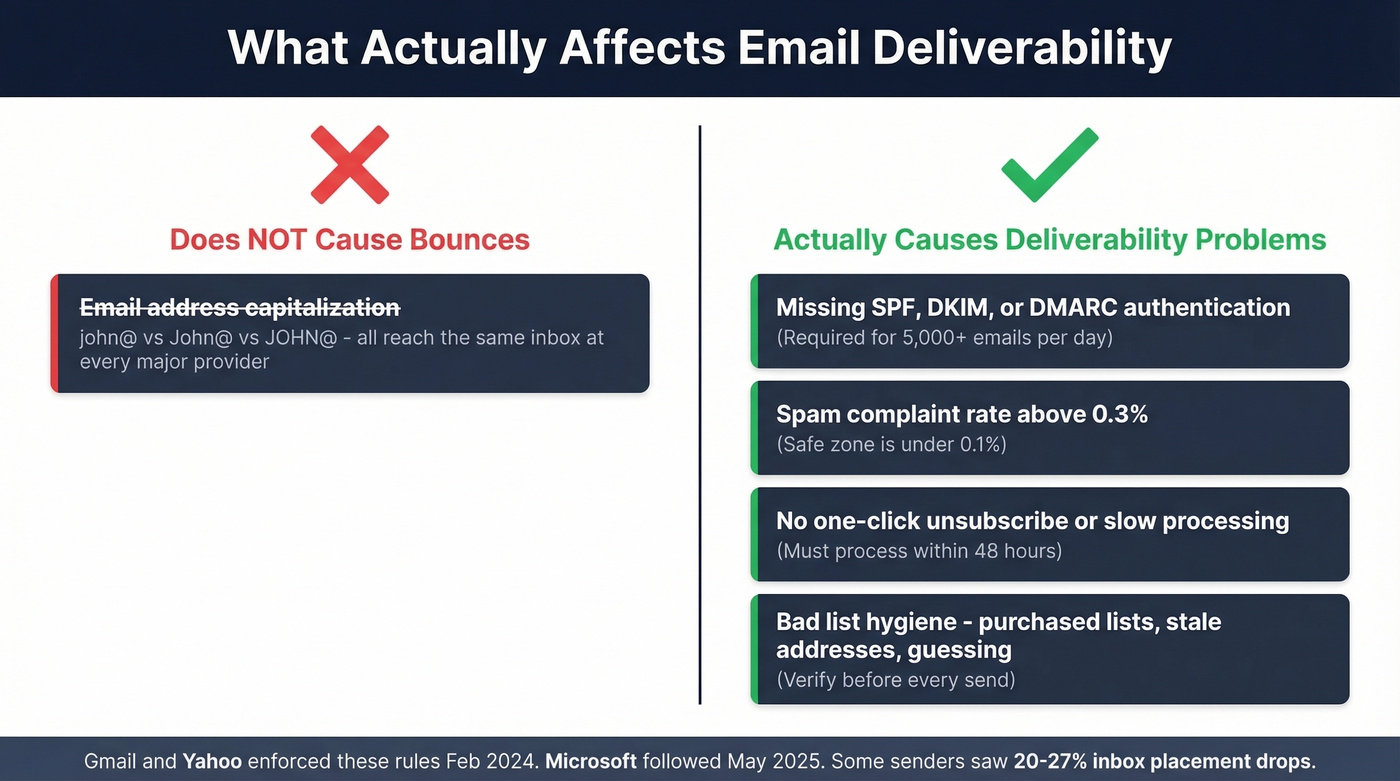
Gmail and Yahoo rolled out bulk sender requirements in February 2024 that reshaped email deliverability. Microsoft joined similar standards in May 2025, and when enforcement tightened, some senders saw Outlook/O365 inbox placement drops in the 20-27% range. All from authentication gaps, not capitalization. Here's what actually determines whether your emails land:
- SPF, DKIM, and DMARC authentication for bulk senders (the guidance commonly uses 5,000+ emails/day as the threshold) - see Bulk Email Threshold
- Spam complaint rate below 0.3% (safe zone is under 0.1%)
- One-click unsubscribe processed within 48 hours
- Proper list hygiene - no purchased lists, no stale addresses, no guessing (use an email deliverability guide to audit your setup)
Bad data causes far more bounces than any formatting issue ever will. Verify your list before every send. That's the fix for the problem you're actually worried about. If you're tracking failures, start with email bounce rate benchmarks and codes.
Here's the thing: if you're spending any time worrying about whether a capital letter will bounce your email, you're optimizing the wrong thing entirely. The teams with deliverability problems almost never have a casing problem. They have a data problem.
What to Do About It
For Marketers
Normalize every email address to lowercase in your database. Do it on import, do it on form submission, do it before every campaign. This isn't about deliverability - it's about deduplication.
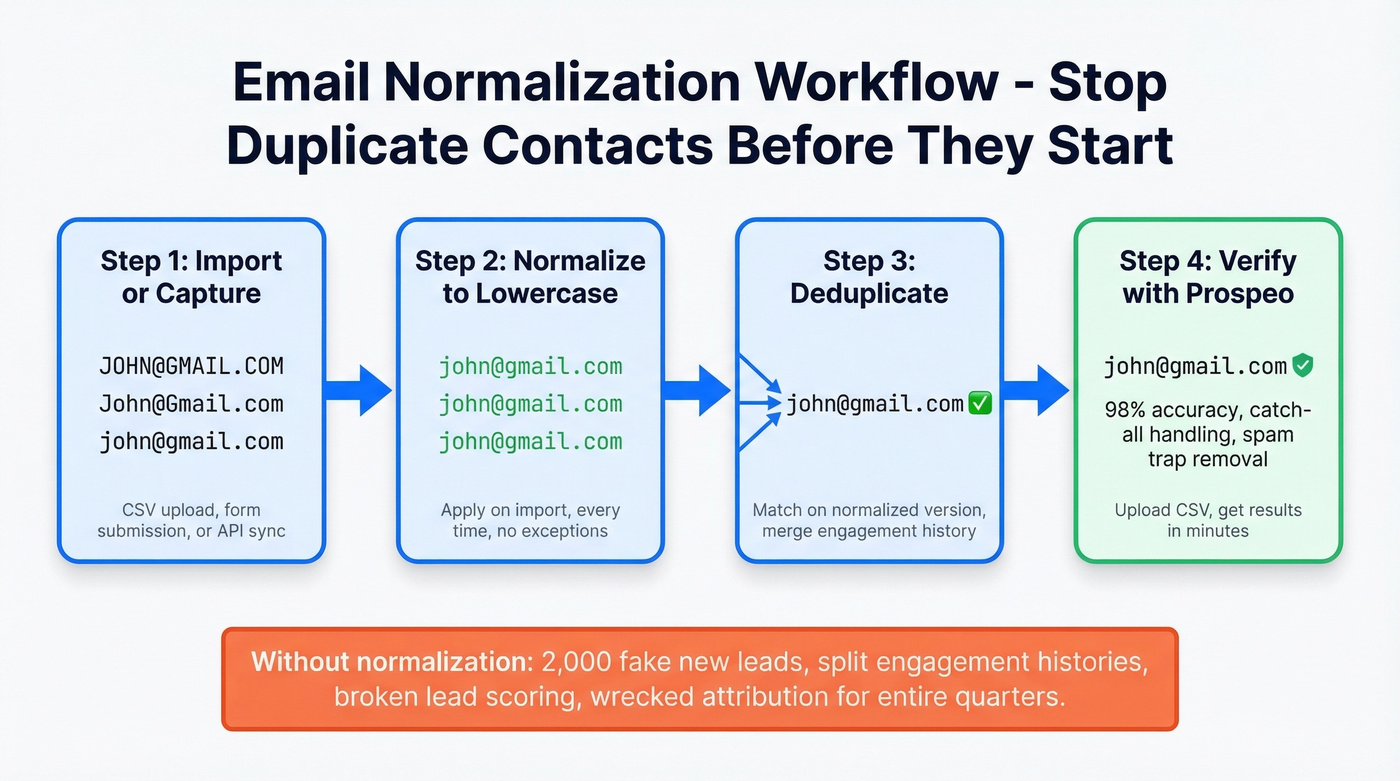
The scenario that burns teams: your marketing ops person imports a CSV where half the addresses are in ALL CAPS. Your CRM shows 2,000 "new" leads that are actually duplicates of existing contacts. Now you've got split engagement histories and broken lead scoring. We've seen this wreck attribution reporting for entire quarters. If you’re cleaning lists at scale, pair normalization with data enrichment services.
Once your list is normalized and deduplicated, verify it. Prospeo's 5-step verification - catch-all handling, spam-trap removal, honeypot filtering - delivers 98% accuracy across 143M+ verified emails. Upload a CSV, get results in minutes, and send with confidence that your bounce rate stays low. If you want to compare options, see Bouncer alternatives.

One more thing: even if you normalize for backend matching, preserving the original casing for display purposes can look more professional in correspondence. John.Smith@company.com reads better in a personalized email than john.smith@company.com - especially in personalized outreach.
For Developers
Store a normalized lowercase version as the canonical key for matching and uniqueness checks. This prevents the classic bug where a user signs up as John@Company.com, then can't log in because they typed john@company.com and your comparison is case-sensitive. We've seen this in production more times than we'd like to admit. If you’re building verification into your product, consider a cold email API approach for automation.
Optionally preserve the original casing for display - some users care about how their address looks. But never use the display version for authentication, deduplication, or lookup.
For IT Admins
If you're troubleshooting a case-sensitivity issue like the r/sysadmin incident above, don't assume the mailbox provider is the problem. Check upstream first:
- Inspect mail flow rules and transport rules for case-sensitive string matching
- Verify alias configurations on your mail gateway
- Check any third-party spam filters or routing appliances sitting between the internet and your mailbox server
- Test with all-lowercase, mixed-case, and all-uppercase variants to isolate where the case-sensitive matching is happening
The mail server almost certainly doesn't care about case. Something between the sender and the server might. If authentication is part of the issue, validate alignment and records (see DMARC alignment and SPF record examples).
Skip this section if you're on a standard Gmail or Outlook setup with no custom routing. These issues almost exclusively affect orgs with on-prem gateways or hybrid mail configurations.
2026 Standards Update
The IETF's EMAILCORE working group has been drafting an Applicability Statement for core email protocols, with the latest revision dated November 2025. Section 4.1 directly addresses case sensitivity, delimiters, and mailbox equivalency - one of the few modern standards efforts that tackles this head-on instead of punting to the 2008 SMTP RFC.
It's still a work in progress, but the direction is clear: the standards community is acknowledging that the "technically yes, practically no" answer needs a cleaner resolution. About time.
Duplicate contacts from inconsistent casing wreck your CRM and kill lead scoring. Prospeo returns 50+ normalized data points per contact at 92% match rate - so your database stays clean and your outreach hits real inboxes.
Clean data at $0.01 per email. No contracts, no sales calls.
FAQ
Do email addresses treat uppercase and lowercase differently?
No. Gmail, Outlook, Yahoo, and iCloud all treat the local-part as case-insensitive. John@gmail.com and john@gmail.com reach the same inbox. The only exception is a self-hosted or legacy mail server with non-standard configuration - extremely rare in 2026.
Can capitalization cause an email to bounce?
Virtually never with major providers. Bounces come from invalid addresses, full inboxes, or authentication failures like missing SPF/DKIM/DMARC - not capitalization. If emails disappear after a casing change, check upstream gateways and routing rules, not the mailbox itself.
Should I store email addresses in lowercase?
Yes. Normalize to lowercase for matching, deduplication, and authentication lookups. This prevents duplicate CRM records and login bugs. Optionally preserve original casing for display purposes in outbound correspondence.
How do I verify an email address actually works?
Use real-time email verification before sending. Prospeo checks deliverability with 98% accuracy across 143M+ verified emails, with catch-all handling, spam-trap removal, and honeypot filtering included. Upload a CSV or verify one-by-one - results return in minutes.