

Bloomberry Pricing, Reviews, Pros & Cons (2026)
Bloomberry - the B2B technographic signals tool - shares its name with a Philippine casino operator, a New Zealand gift box brand, and a knowledge management platform called Bloomfire. Confusing? Yes. This review covers the actual technographic tool at bloomberry.com and nothing else.
What Is Bloomberry?
Bloomberry tracks real-time subscribe, churn, and renewal-approaching signals across 1,200+ B2B products in 150 categories, generating over 200,000 events per month. Think of it less as a "what tech does this company use" tool and more as a "when did they start or stop using it" tool. That timing distinction is what makes it useful for competitive displacement plays.
The data sources go deeper than typical web-scraping. Bloomberry analyzes DNS records, DNS query traffic changes, certificate transparency logs, subprocessor list changes, and website changes, then applies ML to map those footprints to companies. This means it catches backoffice tools - CRMs, ERPs, security platforms, DevOps tooling - that BuiltWith and Wappalyzer miss because they aren't embedded in frontend code.
The parent company, Revealera, has provided tech trends data to hedge funds for 5+ years, including 3 of the top 20 globally. That's an unusual pedigree for a sales intelligence tool, and it explains the emphasis on signal accuracy over sheer volume.
Bloomberry Pricing Breakdown
Bloomberry doesn't list pricing on its main website. The concrete plan numbers show up on their blog.
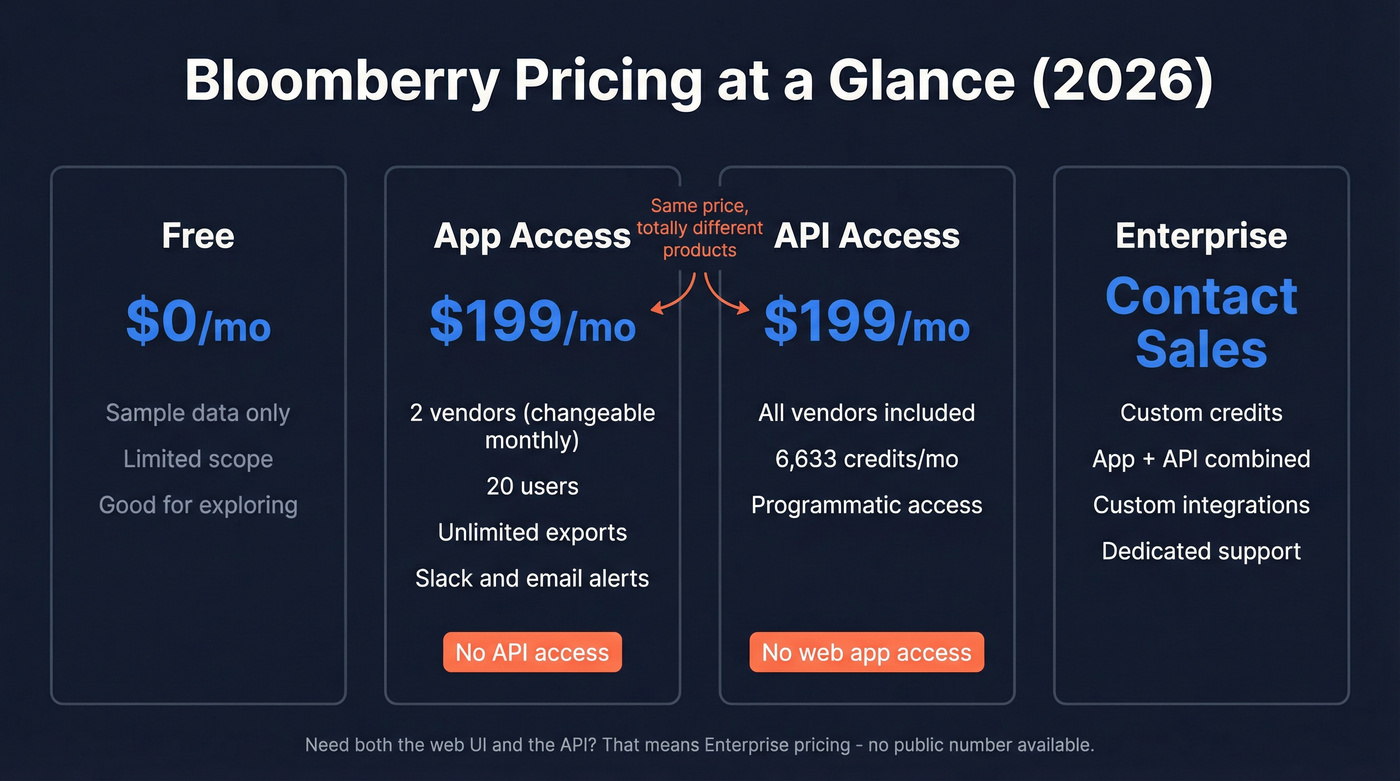
| Plan | Price | What You Get | Key Limitation |
|---|---|---|---|
| App Access | $199/mo | 2 vendors, 20 users, unlimited exports | No API |
| API Access | $199/mo | All vendors, 6,633 credits/mo | No app access |
| Free | $0 | Sample data | Limited scope |
| Enterprise | Contact sales | Custom | - |
Both paid plans run $199/mo, but they're fundamentally different products. App Access gives you a web interface limited to 2 vendors (changeable once per month) with unlimited exports and up to 20 users. API Access opens up all vendors but caps you at 6,633 credits per month with no app access.
Here's the thing: if you need both the web UI and the API, you're looking at Enterprise pricing - which means talking to sales. No public number for that tier.
Pros and Cons
Pros
Real-time adoption and churn signals are the killer feature. Bloomberry doesn't just tell you a company uses Intercom - it tells you when they stopped. In one test, Bloomberry flagged an Intercom churn event when the widget stopped functioning, even though the script was still embedded on the page. Competitors would've counted that as an active install.
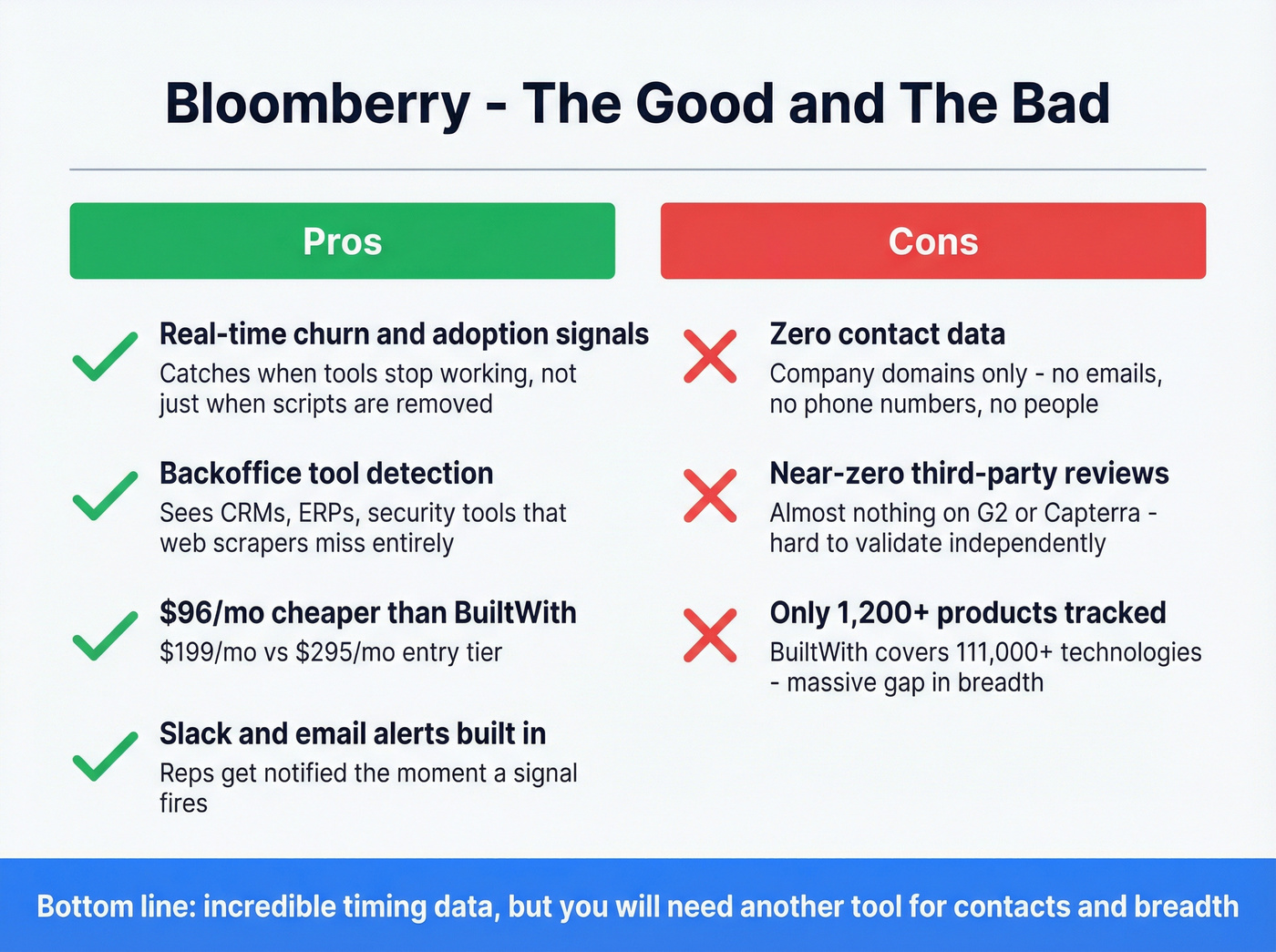
Backoffice tool detection sets it apart from BuiltWith and Wappalyzer, which only see frontend technologies. If you're selling a CRM, ERP, or security platform, Bloomberry sees what web scrapers miss entirely. At $199/mo, it's also $96/mo cheaper than BuiltWith's entry tier, and Slack plus email alerts mean your reps get notified the moment a churn or adoption signal fires - no manual checking required.
Cons
No contact-level data whatsoever. Company domains only. Zero emails, zero phone numbers. You'll need a separate data enrichment tool to turn those signals into reachable people.
Zero meaningful G2 or Capterra review footprint. We looked. There's essentially nothing there, which makes independent validation difficult and can be a dealbreaker if your procurement team requires third-party reviews for vendor approval.
Only 1,200+ products tracked versus BuiltWith's 111,000+ technologies. If you need massive frontend tech lists or addressable market sizing, this isn't the right tool.

Bloomberry's biggest gap is contact data - zero emails, zero phones. Prospeo fills that gap with 300M+ profiles, 98% verified email accuracy, and 125M+ mobile numbers. Export domains from Bloomberry, enrich them in Prospeo, and reach decision-makers the same day a churn signal fires.
Turn technographic signals into booked meetings - 75 free emails to start.
How Bloomberry Compares
| Tool | Starting Price | Best For | Contact Data? |
|---|---|---|---|
| Bloomberry | $199/mo | Real-time adopt/churn signals | No |
| BuiltWith | $295/mo | Massive web tech lists | No |
| TheirStack | Free; paid from $109/mo | Tech + hiring signals | No |
| Datanyze | $29/mo | Budget-friendly detection | Limited |
| PredictLeads | $200-$1,000+/mo | Stack accuracy, API-first | No |
| Wappalyzer | Free extension | Quick web tech lookups | No |
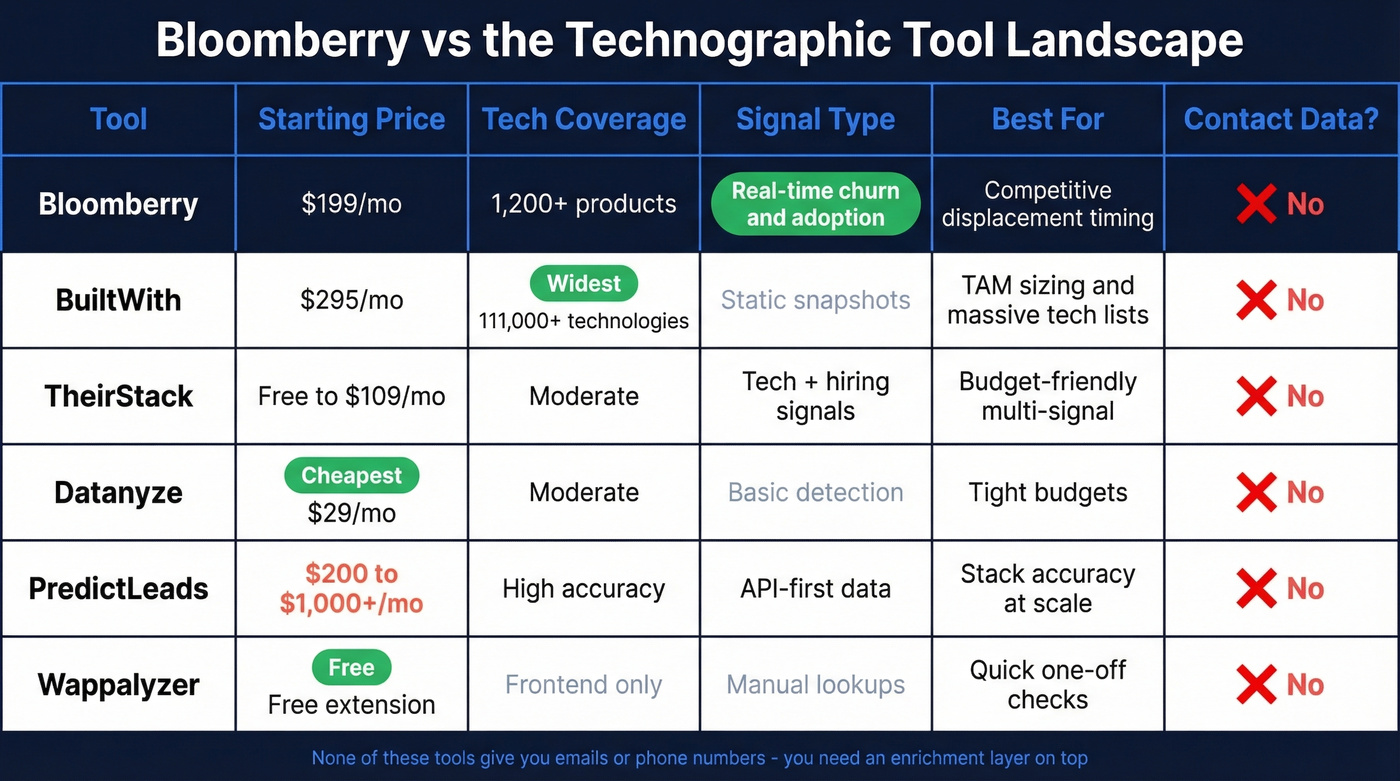
BuiltWith's strength is raw scale - 111,000+ technologies across 673 million sites. But Reddit users consistently call the pricing "brutal", and some report unresponsive support. One user on r/gtmengineering reported PredictLeads returned accurate stack data for leads that BuiltWith had incorrectly disqualified, which is worth keeping in mind if accuracy matters more to you than breadth.
Let's be honest about something: if your average deal size is under $15k, you probably don't need a dedicated technographic tool at all. A free Wappalyzer extension plus manual research gets you 80% of the way there. Bloomberry's $199/mo makes sense when you're running high-volume competitive displacement at scale and the timing of churn signals directly impacts your win rate.
Solving the Contact Data Gap
So you've exported 2,000 domains from Bloomberry that just churned from a competitor's product. Now what?
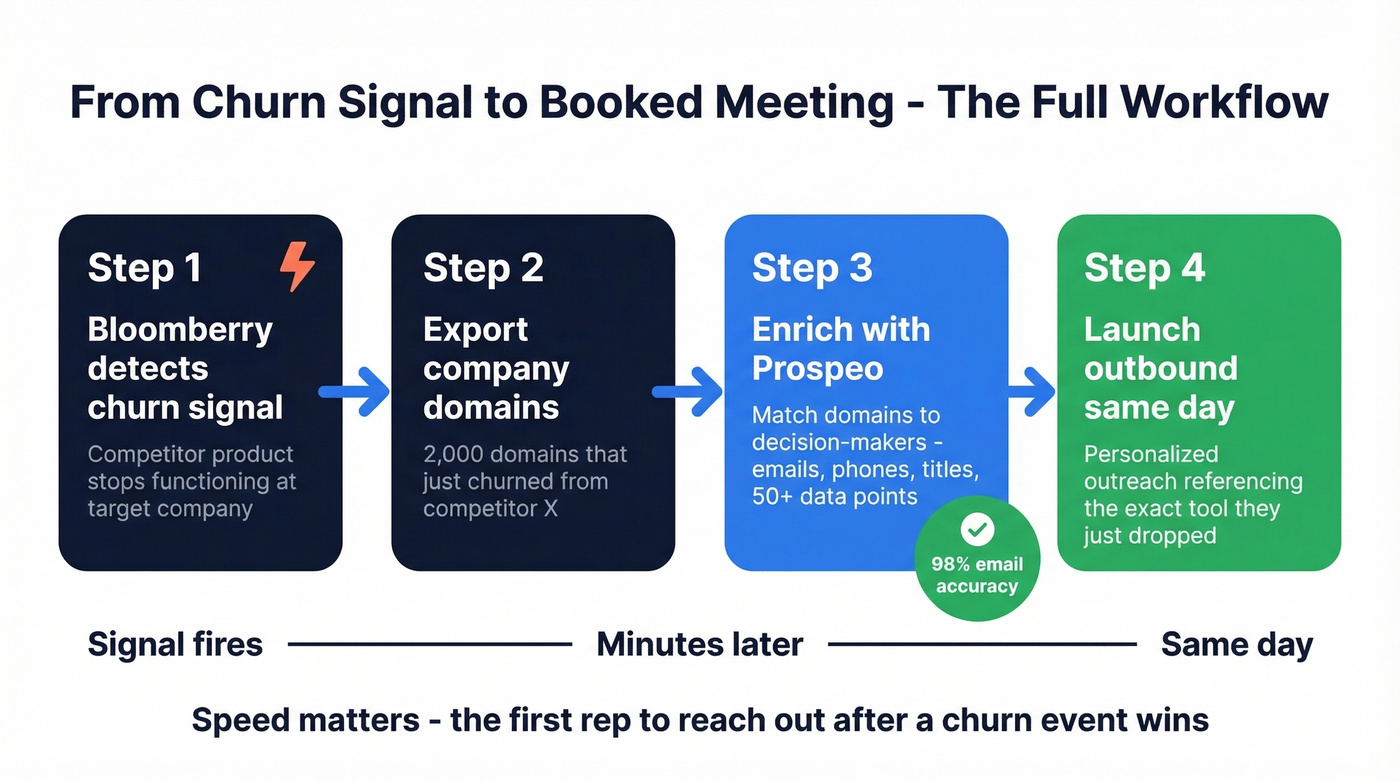
Every technographic tool on this list gives you domains, not decision-makers. That's the frustrating part - you've got perfect timing data and nobody to call.
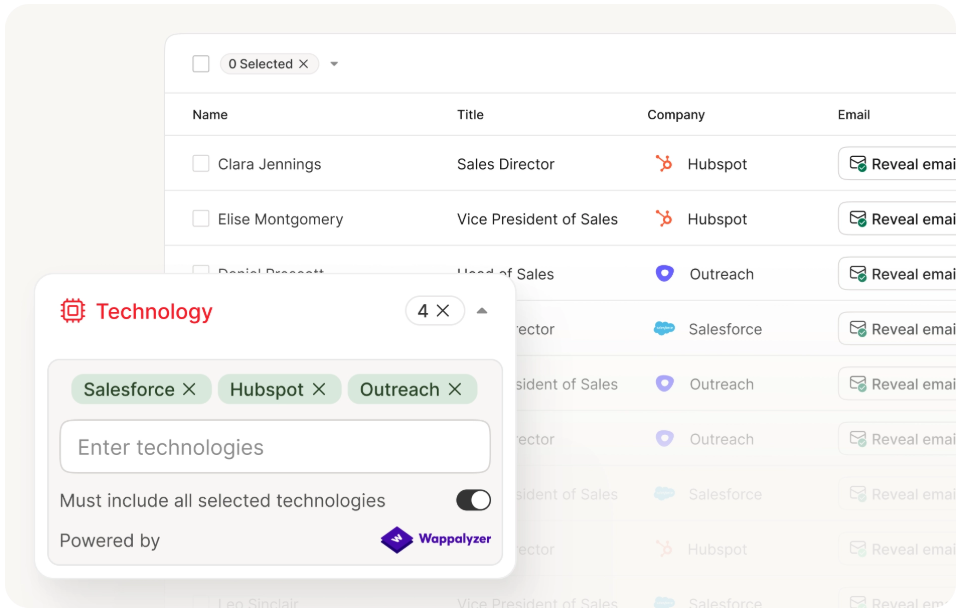
Every tool on this comparison list gives you company domains, not buyers. Prospeo's CRM and CSV enrichment returns 50+ data points per contact at a 92% match rate - so your Bloomberry churn exports become outbound-ready lists in minutes, not hours.
Stop exporting domains you can't contact. Start enriching them at $0.01 per email.
Who Should (and Shouldn't) Use Bloomberry
Use it if you sell competitive displacement and timing is everything, you need to track backoffice tools that web scrapers miss, you want adoption and churn alerts piped into Slack or email, and $199/mo fits your budget for a dedicated signal source.
Skip it if you need massive frontend tech lists or TAM sizing - use BuiltWith instead. If you're on a tight budget, start with Wappalyzer's free extension or Datanyze at $29/mo. And if your procurement team requires established third-party reviews for vendor approval, Bloomberry's near-zero review footprint will be a problem.
FAQ
Does Bloomberry offer a free plan?
Yes - free access with sample data to explore the platform. Paid plans start at $199/mo for either App Access (web UI, 2 vendors) or API Access (all vendors, 6,633 credits/mo). There's no free trial of the full product currently available.
Is Bloomberry the same as Bloomfire?
No. Bloomberry is a technographic signals platform tracking software adoption and churn. Bloomfire is a knowledge management tool with 514 G2 reviews. Completely different products despite the similar names.
Can Bloomberry find email addresses?
It can't. Bloomberry provides company-level data only, with zero individual contact information. To get verified emails and phone numbers for decision-makers at flagged companies, pair it with an enrichment tool like Prospeo's Email Finder.
How does Bloomberry compare to BuiltWith on price?
Bloomberry starts at $199/mo versus BuiltWith's $295/mo entry tier - saving you $96/mo. The tradeoff: Bloomberry tracks 1,200+ products with real-time churn signals, while BuiltWith covers 111,000+ frontend technologies with broader but more static data. We've found that the right choice depends entirely on whether you care more about timing or coverage.