

Boomerang vs Yesware: They Don't Actually Compete
Boomerang is an inbox productivity tool. Yesware is a sales engagement platform. Comparing the two is like comparing a calendar app to a CRM - they share a few surface-level features, but they're built for completely different workflows. They overlap on tracking and scheduling. The default buyer and the daily use case? Totally different. Here's how to decide which one you actually need.
30-Second Verdict
Pick Boomerang if you're a knowledge worker, consultant, or founder who wants email discipline - Send Later, reminders, Inbox Pause. It's lightweight and cheap.
Pick Yesware if you're a sales rep running outbound sequences with CRM logging. It's heavier, pricier, and built for pipeline.
Skip both if your real problem is bad contact data. Neither tool verifies email addresses. If your bounce rate is above 5%, fix your list before you invest in tracking or scheduling.
Here's the thing: most people weighing this comparison don't need either tool's paid plan. They need a clean list and a disciplined send cadence. The tool matters less than the data going into it.
What Each Tool Actually Does
Boomerang is best known for Gmail and Google Workspace, though it also has Outlook versions. It's fundamentally a scheduling and inbox management tool - Send Later, follow-up reminders, Inbox Pause, and meeting scheduling are the core. Over 233 million messages delivered across a million-plus businesses, with SOC 2 Type 2 certification. It isn't trying to be a sales platform. It's trying to make your inbox less chaotic.
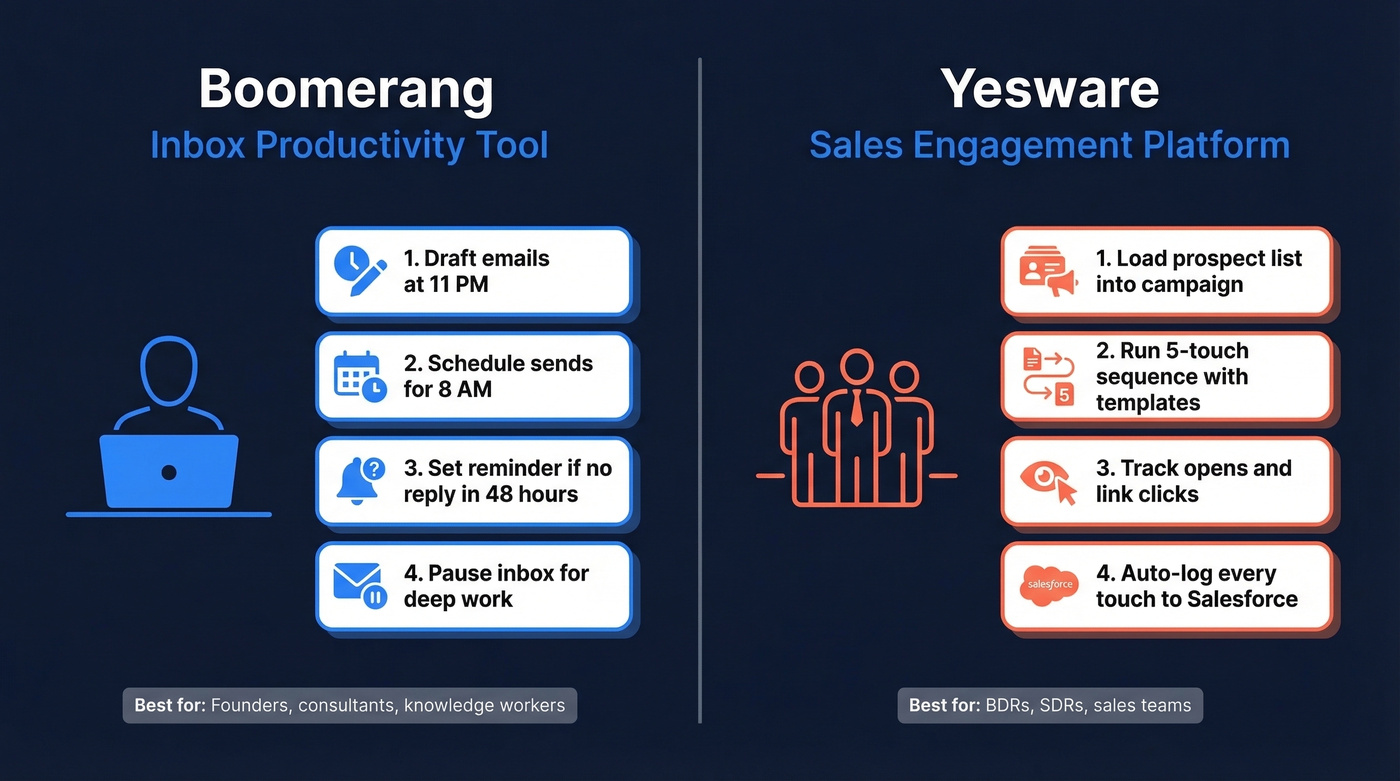
A typical Boomerang day looks like this: you draft three emails at 11 PM, schedule them for 8 AM, set a "boomerang" reminder if no reply within 48 hours, and pause your inbox until noon so you can do deep work. That's the whole value prop.
Yesware is a sales engagement layer for Gmail and Outlook. Email tracking, multi-step campaigns, templates, and CRM sync are the selling points - 1.4 million installs across 6,000+ sales teams. Vendasta acquired Yesware in October 2022 and now resells it through their marketplace, which explains the agency-friendly positioning on their site. Where Boomerang helps you manage email, Yesware helps you sell through it.
A typical Yesware day: a BDR loads a prospect list, drops them into a 5-touch campaign with personalized templates, tracks opens and link clicks, then logs every touchpoint to Salesforce automatically. The workflow is built around pipeline velocity, not inbox zen.
Pricing Breakdown
Both tools offer free plans, but what you get for free differs a lot.
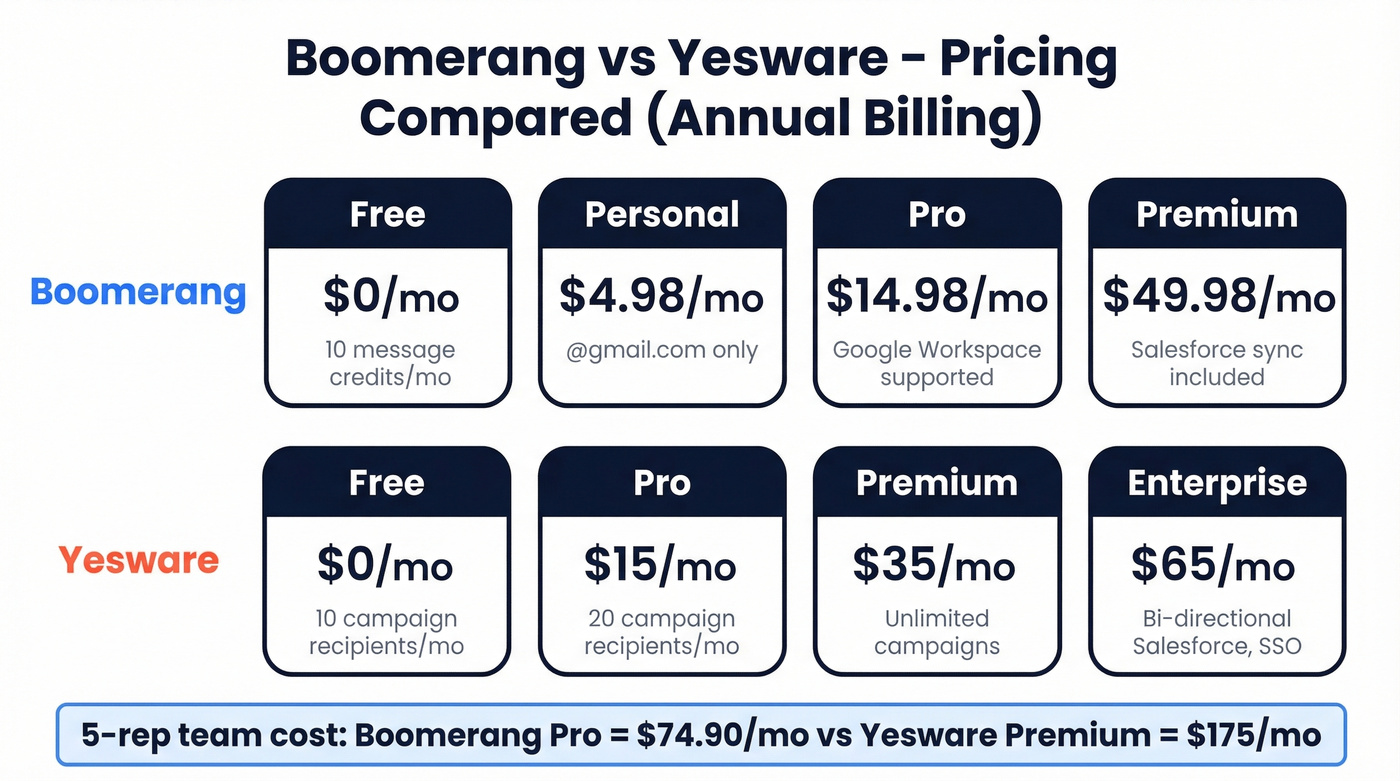
| Boomerang (annual billing) | Yesware (annual / monthly) | |
|---|---|---|
| Free | $0 - 10 message credits/mo | $0 - 10 campaign recipients/mo |
| Personal / Pro | $4.98/mo | $15/mo / $19/mo |
| Pro / Premium | $14.98/mo | $35/mo / $45/mo |
| Premium / Enterprise | $49.98/mo | $65/mo / $85/mo |
Boomerang's Personal plan ($4.98/mo) is restricted to @gmail.com addresses - if you're on Google Workspace, you need Pro at minimum. Most outbound teams end up on Yesware Premium ($35-45/seat/mo) because the Pro tier caps campaigns at 20 recipients per month. That's a cap on people you can include in campaigns, not a hard Gmail send limit, but it's still nowhere near enough for real outbound. Enterprise runs $65-85/seat/mo and is mainly for teams that need bi-directional Salesforce sync plus admin controls like SSO and trusted IP ranges.
For a 5-rep sales team on annual billing, Yesware Premium costs $175/mo. Boomerang Pro for the same team is $74.90/mo. But they're solving different problems, so the price comparison only matters if you're genuinely torn between the two.
Feature-by-Feature Comparison
| Feature | Boomerang | Yesware | Winner |
|---|---|---|---|
| Open/click tracking | Yes (credits on free) | Yes (limited on free) | Yesware (deeper analytics) |
| Send Later | Yes (core feature) | Yes | Boomerang (built around it) |
| Campaigns/sequences | No | Yes (gated by tier) | Yesware |
| Salesforce sync | Premium tier | Enterprise (bi-directional) | Yesware Enterprise |
| Templates | No | Yes | Yesware |
| Meeting scheduling | Yes (core feature) | Yes | Boomerang (more polished) |
| Inbox Pause / reminders | Yes | No | Boomerang (unique feature) |
| SSO + trusted IP ranges | Not available | Enterprise only | Yesware Enterprise |
Boomerang's credit system is straightforward but limiting on the free tier. Scheduled sends and features like read receipts consume credits. Ten credits disappears fast. Paid plans unlock unlimited credits.
Yesware's gating is more aggressive. The free plan limits you to 10 campaign recipients per month and restricts tracking to emails sent within the last 24 hours. Pro bumps that to 20 campaign recipients - still inadequate for real outbound. Premium unlocks unlimited campaigns and removes Yesware branding, while Enterprise adds bi-directional Salesforce sync, SSO, and trusted IP ranges. If Salesforce integration is a must-have, you're looking at the $65-85/seat/mo tier.
Tracking Reliability: A Gotcha Worth Knowing
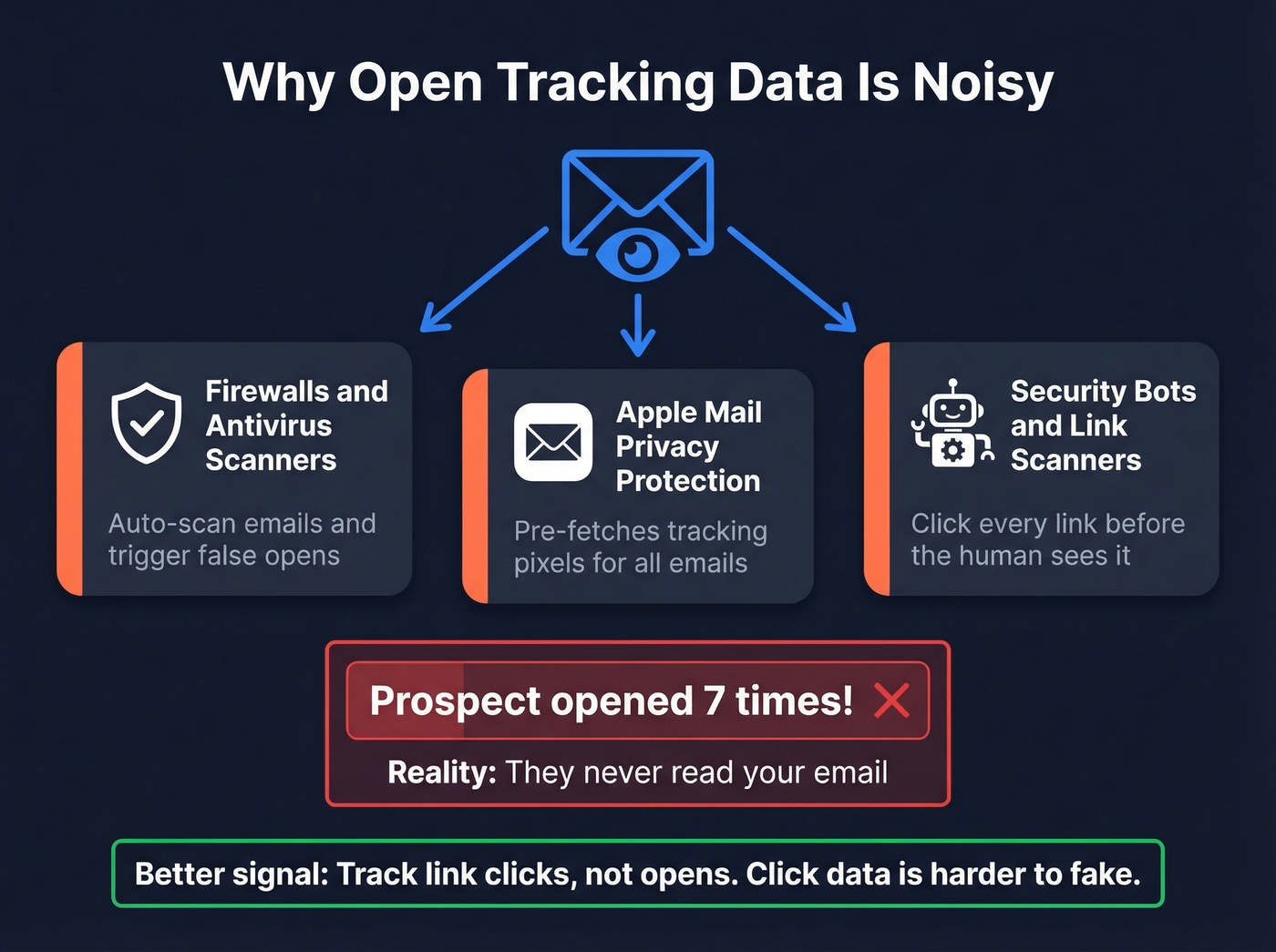
Let's be honest - teams over-index on open tracking, and the data is noisy. False opens are a known issue across email tracking tools. Firewalls, antivirus scanners, and Apple Mail Privacy Protection can trigger phantom opens. You'll see a prospect "opened 7 times" when they never actually read your email. Click tracking is more reliable, but open data alone is a poor signal for follow-up prioritization. Boomerang's tracking is simpler and less central to its value prop, which is actually a feature - you're less likely to chase ghosts.

You read it above: if your bounce rate is over 5%, no tracking tool or scheduling feature will save your outbound. Prospeo's 5-step email verification delivers 98% accuracy at $0.01/email - so every sequence you build in Yesware or Boomerang actually reaches a real inbox.
Clean your list before you optimize your sends. Start free.
Pros and Cons
Boomerang
Boomerang earns a 4.6/5 on G2 across 420 reviews, with ease of use commonly cited as a major positive. Send Later and Inbox Pause are genuinely useful productivity features that few competitors replicate as cleanly. At $4.98/mo, it's the cheapest paid option in this comparison, and SOC 2 Type 2 certification gives IT teams one less thing to worry about.
On the downside, Suggest Times is a recurring friction point in reviews - recipients hesitate to click scheduling buttons from unfamiliar senders. The mobile app lacks core functionality and draws consistent criticism. Feature bloat is creeping in too: the AI writing assistant and other recent additions feel bolted on rather than integrated. In our experience, Boomerang's value shows up when you treat it like an inbox policy tool, not a Swiss Army knife.
Yesware
Yesware's email tracking insights - opens, clicks, engagement timelines - remain the standout feature for sales reps who live in their inbox. Templates save real time for reps sending repetitive outreach. It holds a 4.4/5 on G2 across 821 reviews, a larger review base than Boomerang. TrustRadius Community Pulse data is encouraging: 88% would buy again and 91% say it's good value.
The cons are real, though. False opens inflate your analytics and mislead follow-up prioritization - this is one of the biggest complaints we've seen in reviews of tracking tools like Yesware. Campaign features are aggressively gated behind Premium and Enterprise tiers. And support gets flagged repeatedly in G2 reviews as slow or unresponsive. If you're a solo rep without an admin to troubleshoot, that matters.

Admin and Security
This matters more than most comparison articles acknowledge. Boomerang's SOC 2 Type 2 certification covers data handling and security controls - relevant if your IT team vets every Chrome extension. Yesware's Enterprise tier adds SSO and trusted IP ranges, which larger sales orgs require for compliance. Solo users or small teams won't hit a dealbreaker with either tool's security posture. Rolling out to 50+ reps with an InfoSec review process? Yesware Enterprise has the edge on admin controls.
Quick Decision Rubric
Stop overthinking it. Pick based on your primary need:
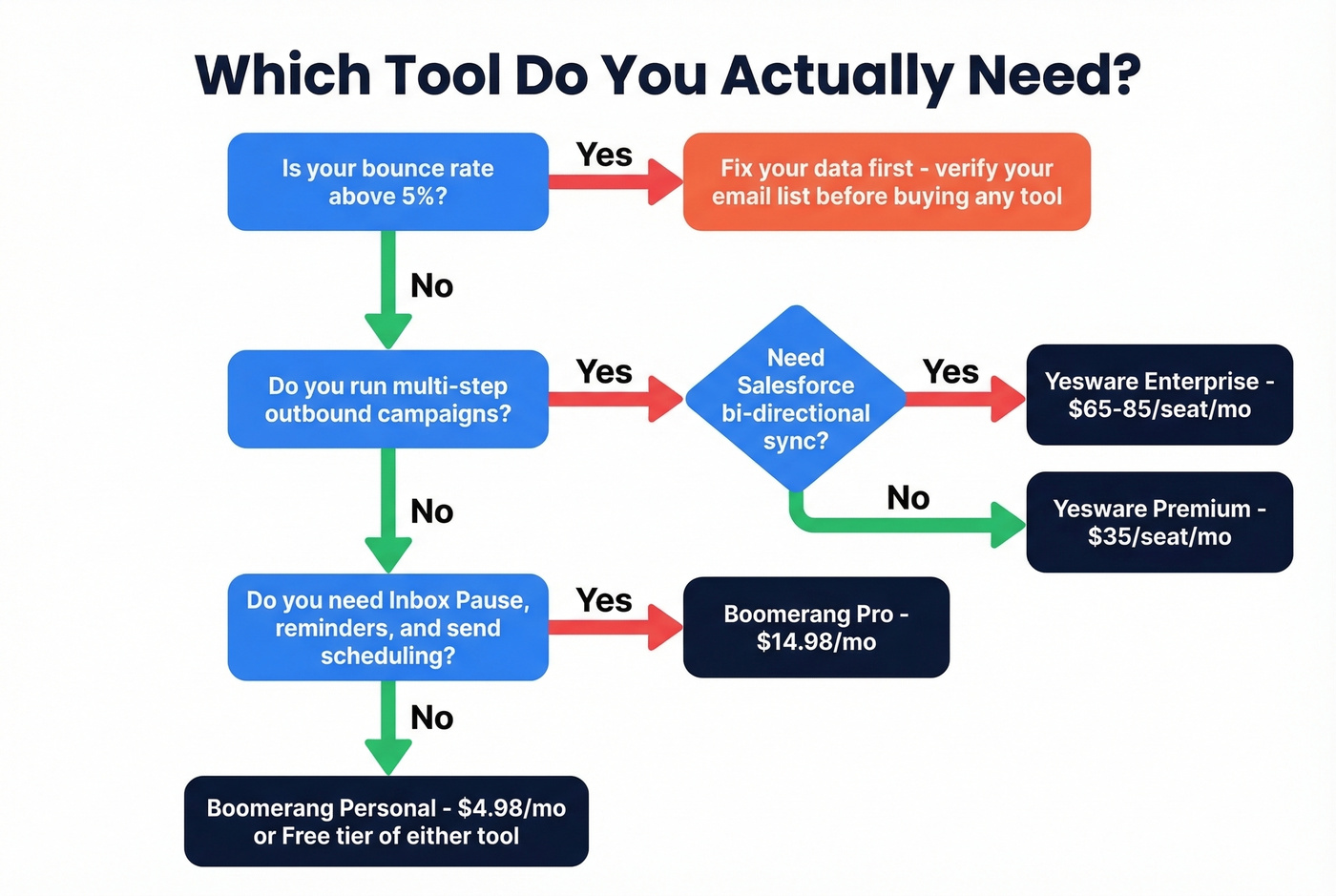
- Campaigns and multi-step sequences - Yesware Premium or Enterprise
- Inbox Pause, reminders, and send discipline - Boomerang Pro
- Salesforce bi-directional sync - Yesware Enterprise ($65-85/seat/mo)
- Simple scheduling on a budget - Boomerang Personal ($4.98/mo)
- Email templates for repetitive outreach - Yesware (paid tiers)
Who Should Pick What
You're a knowledge worker who needs inbox discipline, scheduled sends, and meeting coordination. Boomerang Pro ($14.98/mo) handles this cleanly.
You're a sales rep running outbound sequences with CRM logging. Yesware Premium ($35/mo annual) is the minimum viable tier. Go Enterprise if you need Salesforce sync.
Your bounce rate is above 5%. Neither tool helps here. As one Reddit thread on r/EmailProspecting put it, Yesware is "a bit heavy if you just need tracking." But tracking opens on emails that bounced is completely pointless. Fix your data first.
Alternatives Worth Considering
Mixmax (roughly $29-69/mo per user) splits the difference between Boomerang and Yesware. It combines email tracking with lightweight sequences and lives inside Gmail - a good fit for customer success teams or AEs who need some automation without a full sales engagement platform. The UX is cleaner than Yesware's, but campaign depth is shallower.
Streak is a Gmail-native CRM that keeps pipeline management inside your inbox without a separate tool. The free tier covers basic CRM functionality for up to 500 contacts, and paid plans run $49-129/user/mo for teams that need shared pipelines, mail merge, and reporting. Best for small teams that refuse to leave Gmail but still want deal tracking.
Skip Mixmax if you need deep Salesforce integration - it doesn't match Yesware Enterprise on that front. Skip Streak if you already have a standalone CRM you're happy with.
The Step Both Tools Skip
Neither Boomerang nor Yesware verifies whether the email address you're sending to is real. You can schedule the perfect send time and build a beautiful sequence, but if 15% of your list bounces, your domain reputation takes the hit. We've seen this pattern dozens of times with teams that come to us after burning a domain.
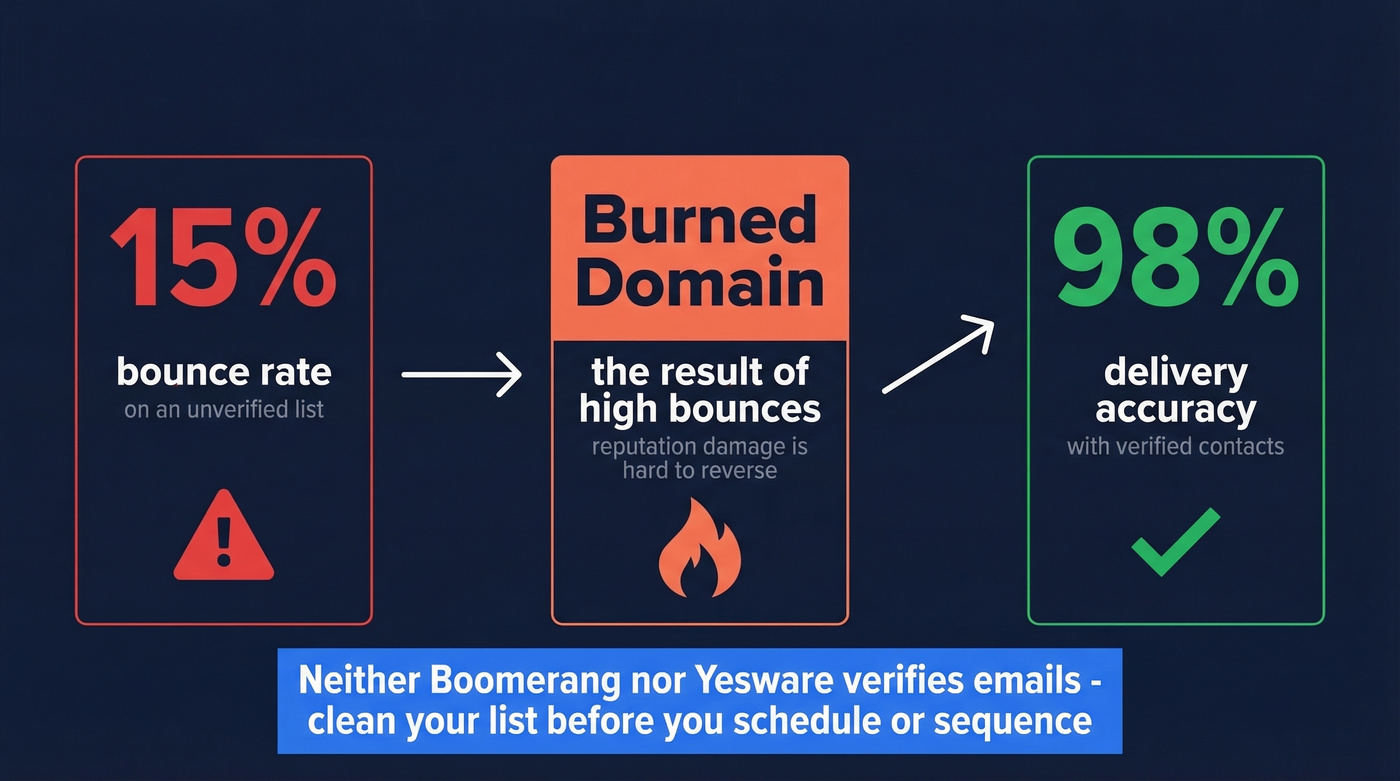
Here's how it works in practice: upload your CSV, run verification, and download a valid-only list or push directly to your CRM. The whole process takes minutes. Pair the clean output with either Boomerang or Yesware and you've got scheduling or sequencing on top of data you can actually trust.
Yesware caps campaigns at 20 recipients on Pro. Boomerang doesn't do campaigns at all. The real bottleneck isn't the tool - it's whether you have verified contacts to fill them. Prospeo gives you 300M+ profiles with 143M+ verified emails, refreshed every 7 days.
Stop sequencing dead addresses. Build a list that connects.
FAQ
Is Boomerang for Gmail free?
Yes. The Basic plan is free forever with 10 message credits per month. New accounts start with a 30-day Pro trial, no credit card required. After the trial, you keep Basic unless you upgrade. Paid plans start at $4.98/mo on annual billing.
Does Yesware work with Outlook?
Yes. Yesware supports both Gmail and Outlook. CRM features - especially bi-directional Salesforce sync - require the Enterprise tier at $65-85/seat/mo depending on whether you're on annual or monthly billing.
Can I verify emails before sending with either tool?
Neither Boomerang nor Yesware includes email verification. Use a dedicated tool like Prospeo (75 free verifications/month, 98% accuracy) to clean your list before tracking or scheduling. Sending to unverified addresses tanks deliverability regardless of which email tool you use.
How long does it take to set up either tool?
Both install as browser extensions and take about five minutes to activate. Boomerang is ready immediately - no configuration beyond granting Gmail permissions. Yesware requires more setup if you're connecting Salesforce or configuring team templates, but a solo rep can send tracked emails within minutes.