

Email Domain Reputation Lookup: The Step-by-Step Workflow That Actually Works
You just watched a campaign land 34% in spam - and every blacklist checker says you're clean. You checked the wrong thing, in the wrong place, and drew the wrong conclusion.
There's no single domain reputation score. Every mailbox provider runs its own scoring, weighing different signals, on different timelines. The only way to get an accurate picture is a multi-tool email domain reputation lookup that covers Gmail, Outlook, and third-party filters separately. Here's the exact process we use.
What You Need
Stop looking for a universal reputation score. It doesn't exist. The lookups that matter are Gmail via Google Postmaster Tools, Outlook sending infrastructure via Microsoft SNDS, and third-party filters like Talos and Spamhaus.
Start with Gmail because Google Postmaster Tools gives the most actionable domain-level signal, then check Outlook IP reputation, then validate third-party filtering and blocklists.
| Tool | What It Measures | Free? |
|---|---|---|
| Google Postmaster Tools | Gmail domain reputation grade + spam rate and authentication | Yes |
| Microsoft SNDS | Outlook/Hotmail consumer IP reputation + complaint/traffic data | Yes |
| Talos Reputation Center | Talos email reputation signal (Good/Neutral/Poor) used by many corporate filters | Yes |
| Spamhaus | Domain reputation / blocklist lookup | Yes |
| MxToolbox Multi-RBL | Aggregate blocklist check across many lists | Yes (limited) |
One critical distinction worth internalizing: delivery and deliverability aren't the same thing. Delivery means the server accepted your email - no bounce. Deliverability means it actually hit the inbox, not spam or promotions. If your inbox placement drops below 90%, investigate immediately.
Which Domain Are You Actually Checking?
This is where most people go wrong. It's the question that floods r/Emailmarketing every week: "Where do I find my domain reputation score?" Your domain shows up in multiple places in every email you send, and each surface carries its own reputation weight.
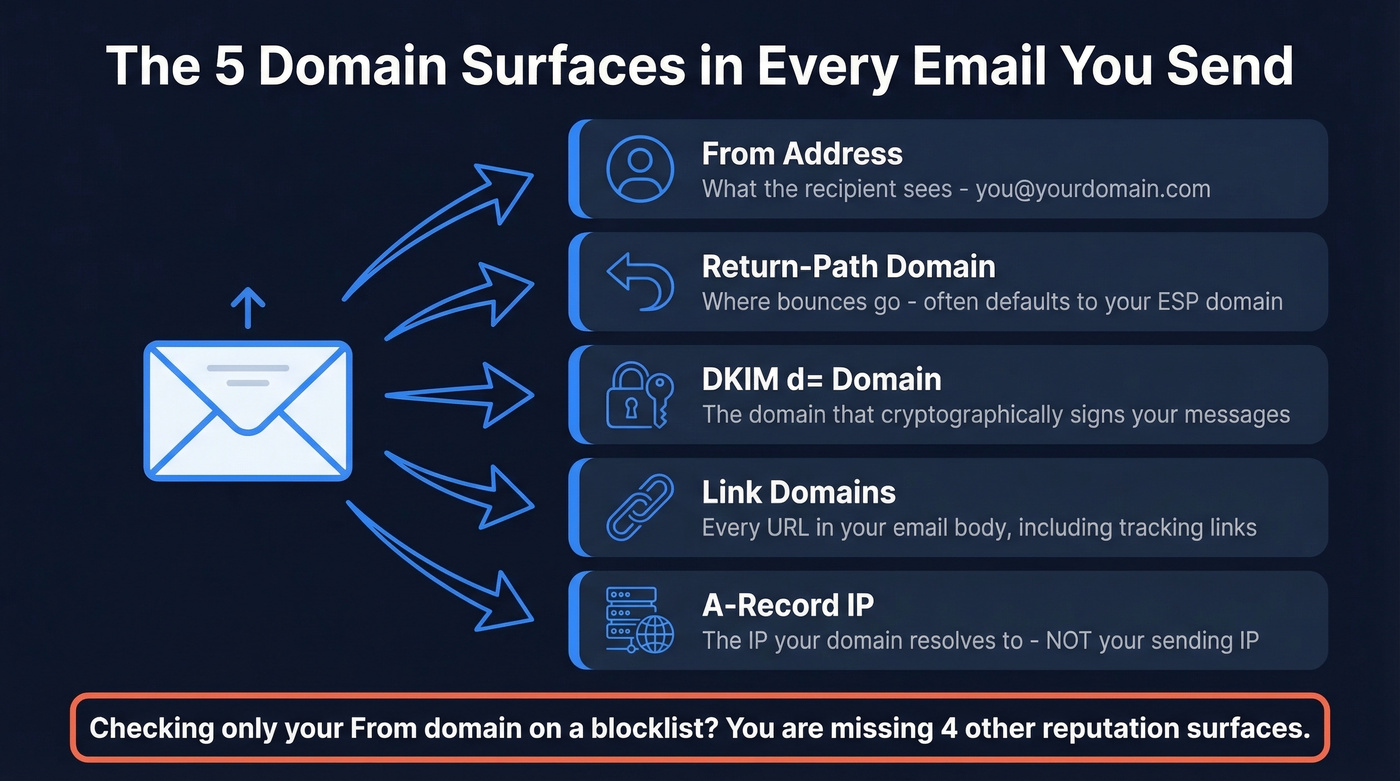
Audit these domain surfaces:
- From address - what the recipient sees, like you@yourdomain.com
- Return-Path domain - where bounces go, often defaulting to your ESP's domain
- DKIM d= domain - the domain that cryptographically signs your messages
- Link domains - every URL in your email body, including tracking links (see also: tracking links)
- A-record IP - the IP your domain resolves to, which is often completely different from your sending IP
Here's the thing: someone checks their From domain on MxToolbox, sees it's clean, and assumes they're fine. Meanwhile, their Return-Path is on their ESP's shared domain, which is flagged. Or their DKIM d= doesn't match their From domain, breaking alignment. We've seen this exact scenario play out dozens of times with teams who came to us confused about why "clean" domains were landing in spam.
Use custom DKIM and Return-Path domains. This builds standalone reputation instead of riding on your ESP's shared infrastructure. And don't confuse your domain's A-record IP with the IP your mail server actually sends from - blacklist checks on the wrong one will mislead you completely. If you need a deeper checklist, follow an email deliverability guide and confirm DMARC alignment.
Gmail Reputation via Postmaster Tools
Gmail is the single most important mailbox provider to monitor. Most guides walk you through setup first. Let's start with the gotcha that wastes the most time instead.
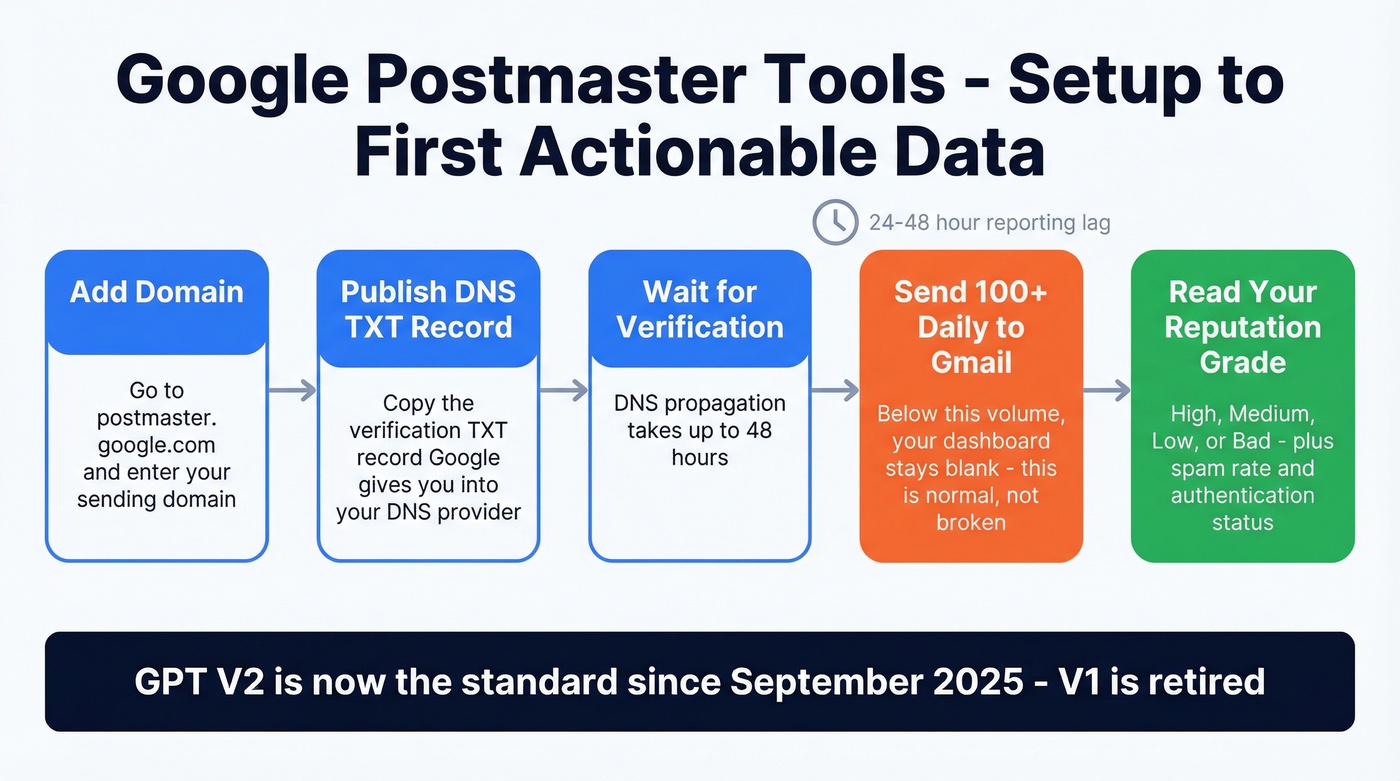
Why your dashboard is blank: Google Postmaster Tools needs roughly 100+ daily messages to unique Gmail recipients before data appears consistently. Sending 50 emails a day? You'll see nothing. We've watched new domains take the full two weeks of consistent sending before GPT shows anything useful. Low-volume days produce blank dashboards due to Google's privacy thresholds - that's normal, not broken.
Google retired the old GPT V1 interface on September 30, 2025, and GPT V2 is now the standard. The current dashboard includes a Compliance Status view alongside spam rate, domain reputation, IP reputation, authentication status for SPF/DKIM/DMARC, encryption, and delivery errors. When you have enough volume, GPT gives you Gmail's own reputation grade for your domain - High, Medium, Low, or Bad.
Setup is straightforward: add your domain at postmaster.google.com, publish the TXT record Google generates in your DNS, and wait for verification. DNS propagation can take up to 48 hours. GPT reporting isn't real-time either - expect a 24-48 hour lag on top of that. If you’re troubleshooting auth, compare against an SPF record example and run through how to verify DKIM is working.

Most domain reputation damage starts with bad email data - invalid addresses, spam traps, and outdated contacts that spike your bounce rate. Prospeo's 5-step verification with spam-trap removal and honeypot filtering delivers 98% email accuracy, keeping bounce rates under 4%.
Stop diagnosing reputation problems you could prevent with better data.
Outlook Reputation via Microsoft SNDS
Here's the key difference from GPT: SNDS measures IP reputation, not domain reputation. If you're diagnosing domain-level issues, SNDS won't give you that directly. Think of it as a complementary lens - GPT tells you how Gmail sees your domain, SNDS tells you how Outlook sees your sending IP behavior.
SNDS covers Outlook.com, Hotmail, and Live consumer domains. It does not cover Microsoft 365 or Exchange Online - a significant blind spot for B2B senders. Setup requires your sending IPv4 address and access to the WHOIS-listed email for that IP, typically abuse@ or postmaster@.
Since November 2025, SNDS network access requires authentication - no more direct access. Automated report links expire after 30 days, and JMRP (Junk Mail Reporting Program) feeds must be linked to an SNDS account. If you haven't updated your setup, do it now.
Pay attention to the RCPT vs DATA columns. A gap between the two indicates messages being rejected before delivery - often a sign you need to validate your list, remove hard bounces, and check blocklists. If you’re seeing persistent issues, start with email bounce rate benchmarks and fixes.
Third-Party Filters and Blocklists
Beyond Gmail and Outlook, dozens of corporate email filters use third-party reputation data. Running a reputation lookup against these systems closes the gap that provider-specific tools leave open.
Talos Reputation Center is your go-to if you're landing in spam at organizations using Cisco security tooling. Talos scores range from -10 to +10, grouped into Good, Neutral, and Poor. A "Neutral" rating often just means insufficient data - not a problem. Poor means active threat signals. Scores typically update within 3-5 days after fixes, making Talos one of the fastest feedback loops available.
Spamhaus gives you a clear "are we blocklisted or not" answer. For a broader sweep, MxToolbox's multi-RBL check runs an aggregate scan across many blocklists at once. If you do get listed, follow a dedicated Spamhaus blacklist removal process.
Skip the security tools unless you suspect your domain has been compromised. In that case, check VirusTotal, URLScan, and Google Safe Browsing. These won't tell you about email reputation directly, but a security flag will tank deliverability faster than anything else.
Why Results Conflict Across Tools
Every blocklist says you're clean. Mail-tester gives you 10/10. SPF/DKIM/DMARC all pass. And you're still landing in spam.
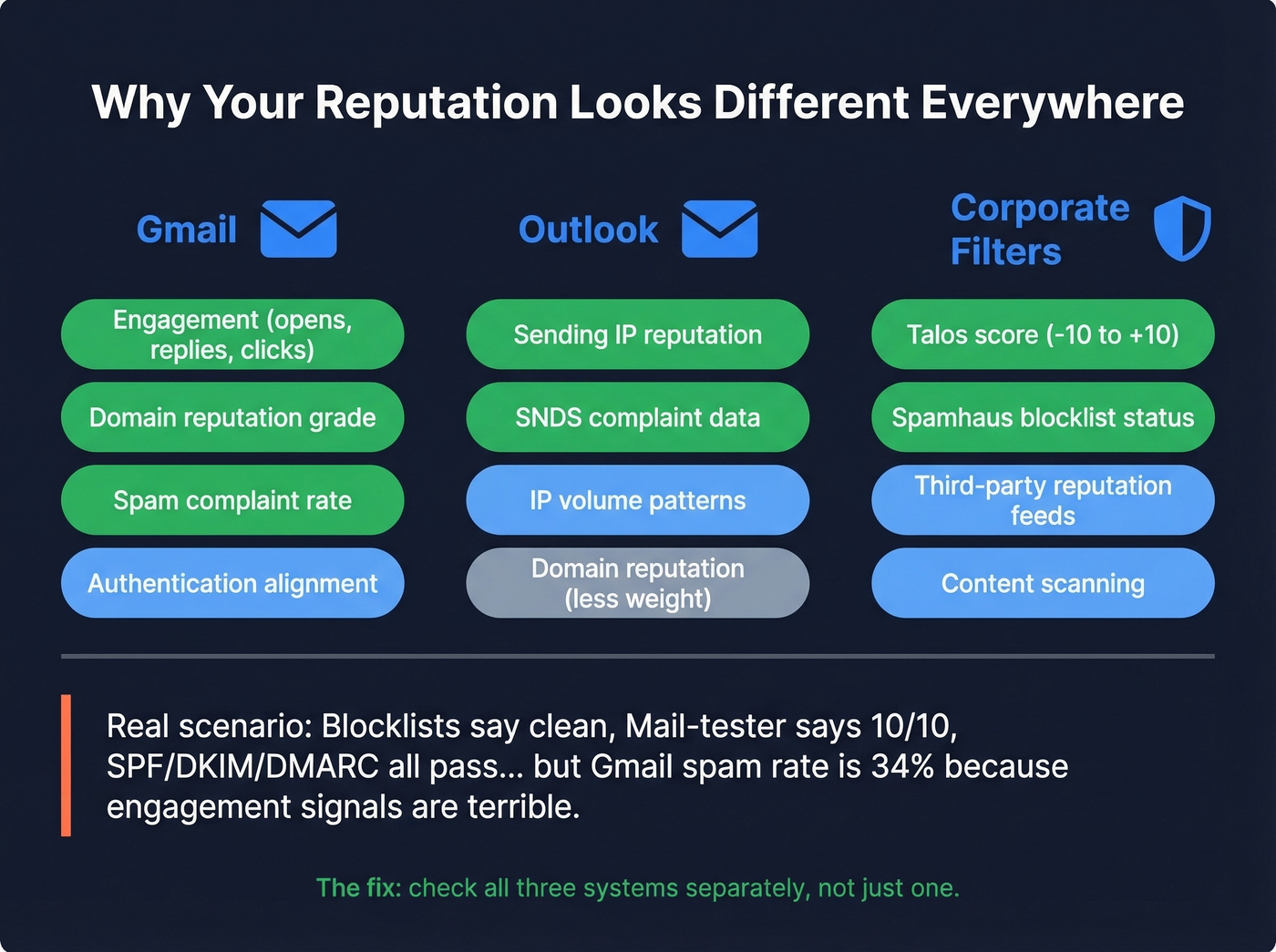
The frustration is real - we see it constantly on r/coldemail, and we've dealt with it ourselves. Results conflict because each receiver scores differently. Gmail weighs engagement heavily. Outlook leans on IP reputation. Corporate filters defer to systems like Talos or other third-party reputation feeds. A "clean" result on one system tells you nothing about another. For a broader stack view, compare against the best email reputation tools.
Once you've identified the failure point, here's the fix order - ranked by how fast each lever moves the needle.
Fix What Moves Reputation Fastest
Spam complaints below 0.1%. Google and Yahoo's bulk sender requirements make this non-negotiable. Hit 0.3% and you're in reputation freefall. Monitor this in GPT daily during recovery.
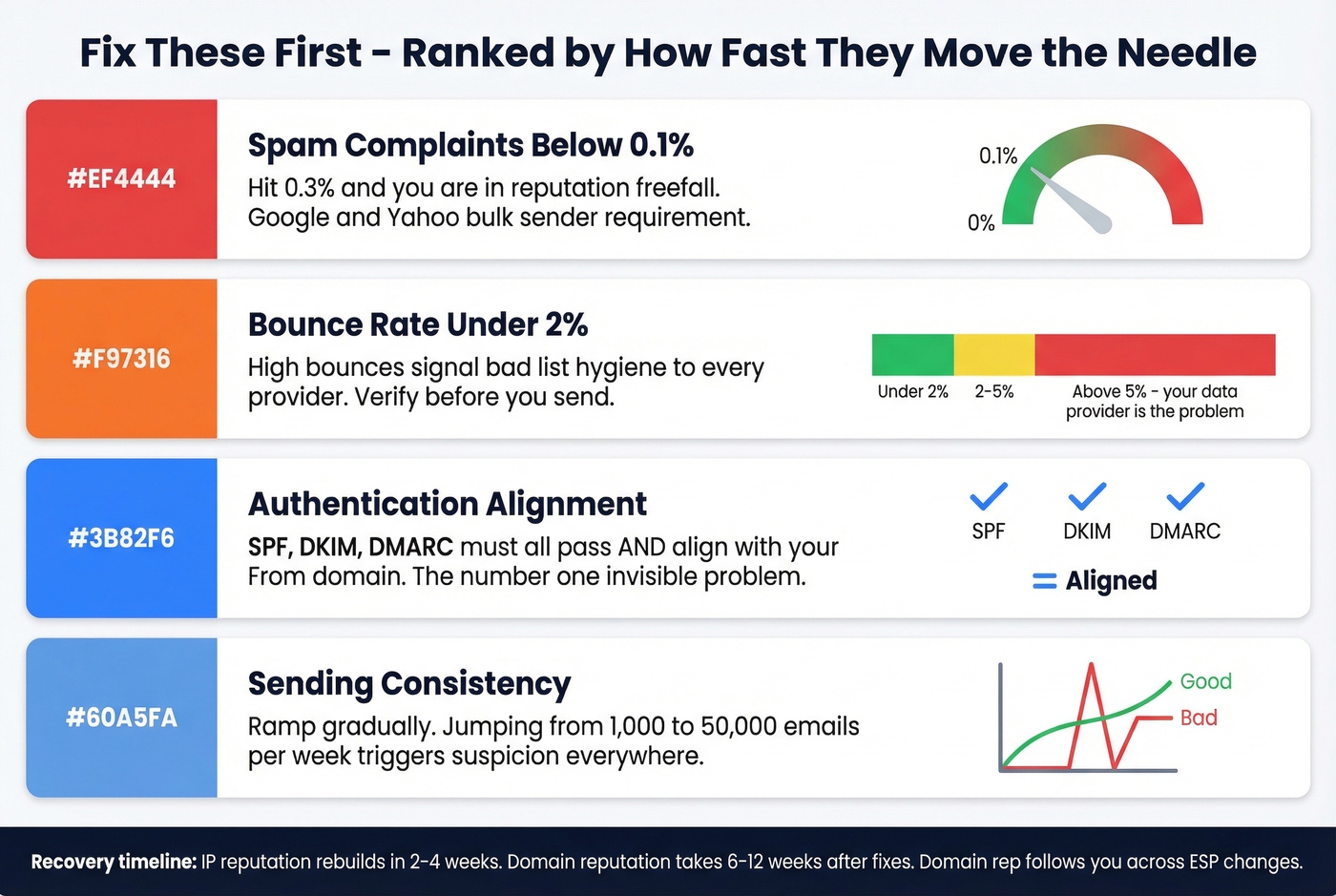
Bounce rate under 2%. High bounces signal to every mailbox provider that you're sending to bad addresses. This is the single lever you can control immediately - verify your list before the next send. Prospeo's real-time email verification catches invalid addresses before they bounce, with 98% accuracy on a 7-day refresh cycle. The free tier covers 75 emails/month, enough to spot-check a segment before blasting your full list.
Authentication alignment. SPF, DKIM, and DMARC must all pass and align with your From domain. In our testing, misalignment was the #1 "everything looks fine but isn't" problem across client accounts. It's invisible unless you check the raw headers.
Sending consistency. Don't spike from 1,000 emails/week to 50,000. Gradual ramp-ups signal legitimacy; sudden jumps trigger suspicion at every major provider. If you need guardrails, set limits using an email velocity framework.
For engagement, replies and clicks are more reliable signals than open rates, since Apple Mail Privacy Protection pre-fetches images and inflates open numbers. If engagement is low, tighten your targeting before sending more volume. Remove hard bounces immediately and suppress unengaged contacts after 90 days. If you’re rebuilding outbound performance at the same time, use a proven B2B cold email sequence.
Look - if your bounce rate is above 5%, your data provider is the problem, not your domain. We've seen teams burn through three domains before realizing their contact list was garbage. Fix the source before you buy another domain. If you suspect traps, run a proper spam trap removal cleanup.
Recovery timelines differ dramatically. IP reputation can rebuild in 2-4 weeks. Domain reputation takes 6-12 weeks, and that's after you've fixed the root cause. Domain reputation follows you across ESP changes, so switching providers won't save a burned domain.
Stack Optimize built a $1M agency on Prospeo data: 94%+ deliverability, under 3% bounce rate, zero domain flags across every client. That's what happens when your email source refreshes every 7 days - not the 6-week industry average.
Fix your reputation at the source - start with data that doesn't bounce.
FAQ
Is there a free email reputation checker?
Yes - Google Postmaster Tools, Microsoft SNDS, and Talos Reputation Center are all free. Use all three together because each measures a different system. No single free tool gives you the full picture.
How do I check a domain for reputation issues?
Start with Google Postmaster Tools for Gmail-specific data, then run your sending IP through Microsoft SNDS for Outlook insights. Follow up with Talos and Spamhaus to check against third-party blocklists. Cross-referencing all three surfaces gives you the full picture no single tool provides.
How long does domain reputation take to rebuild?
Domain reputation takes 6-12 weeks after fixing the root cause. IP reputation rebuilds faster, typically 2-4 weeks. Talos updates within 3-5 days, making it the fastest feedback loop for validating fixes.
Why does Google Postmaster Tools show no data?
GPT needs roughly 100+ daily messages to unique Gmail recipients before data appears. Low-volume days produce blank dashboards. New domains typically need 1-2 weeks of consistent sending before any metrics populate.
How do bounces affect domain reputation?
High bounce rates signal list quality problems, directly damaging reputation across all providers. Keep bounces under 2% by verifying addresses before sending. Prospeo's free tier lets you spot-check 75 emails/month with 98% accuracy on a 7-day data refresh cycle.