

The 10 Best AI Email Writers in 2026
It's Friday afternoon. You've got 23 unread emails, a cold sequence to draft before Monday, and your brain checked out somewhere around lunch. The average professional spends 4.1 hours a day managing email - half the workday gone before you touch pipeline. Meanwhile, 49% of B2B marketers already use an AI email writer to handle their outreach.
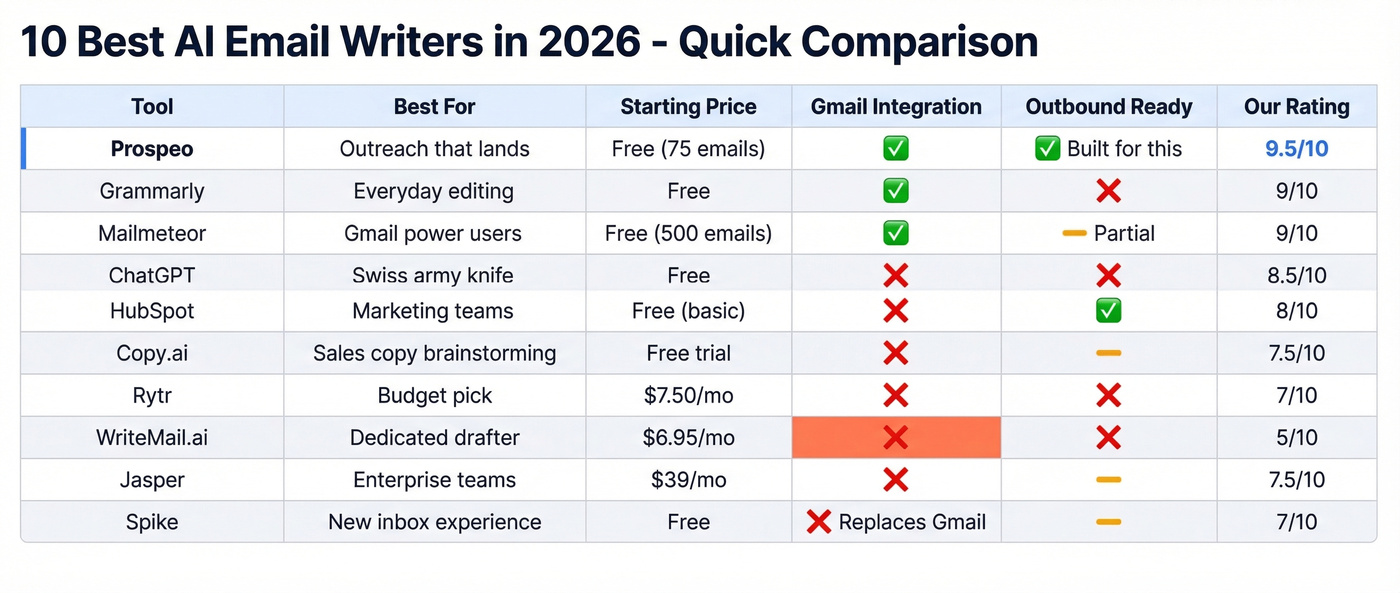
The question isn't whether to use one. It's which tool is actually worth paying for.
Our Picks
Three tools, three use cases. If you don't read anything else:
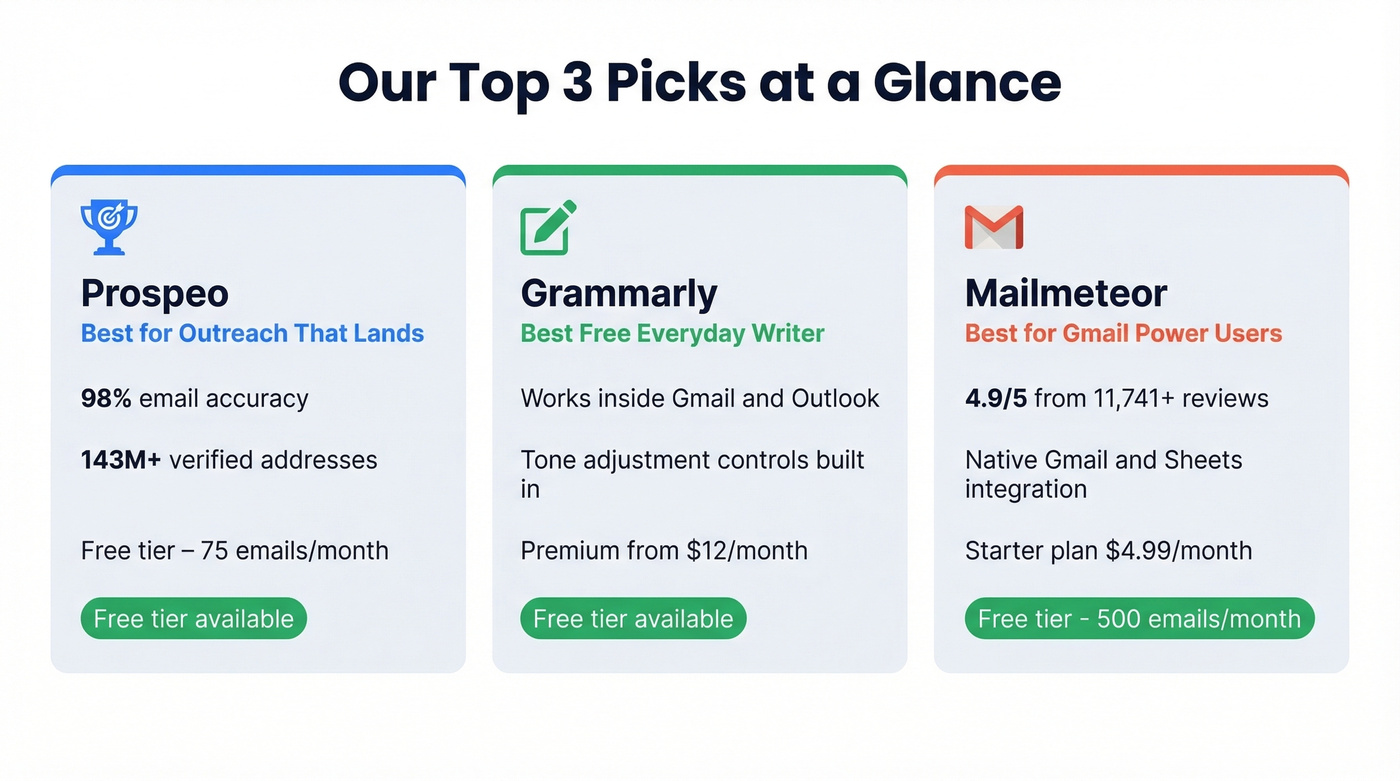
- Best for outreach that actually lands: Prospeo. Every other tool on this list writes the email. Prospeo makes sure it arrives - 98% email accuracy, 143M+ verified addresses, free tier included.
- Best free everyday email writer: Grammarly. Polishes tone, rewrites drafts, works inside Gmail and Outlook.
- Best for Gmail power users: Mailmeteor. Native Gmail integration, AI writer built in, 4.9/5 from 11,741+ reviews, and a genuinely useful free tier.
Here's the contrarian take most articles won't give you: for most people, ChatGPT is the AI email tool. Dedicated products earn their keep through workflow shortcuts - not better writing. The rest of this guide explains when those shortcuts are worth paying for.
Do You Actually Need a Dedicated Tool?
Let's be honest about something the tool vendors won't tell you. Most AI email writers produce nearly identical output because they're all wrappers around the same two or three large language models. GPT-4o, Claude, Gemini - pick your flavor. The words that come out are roughly the same quality regardless of which $10/month tool you're funneling your prompt through.
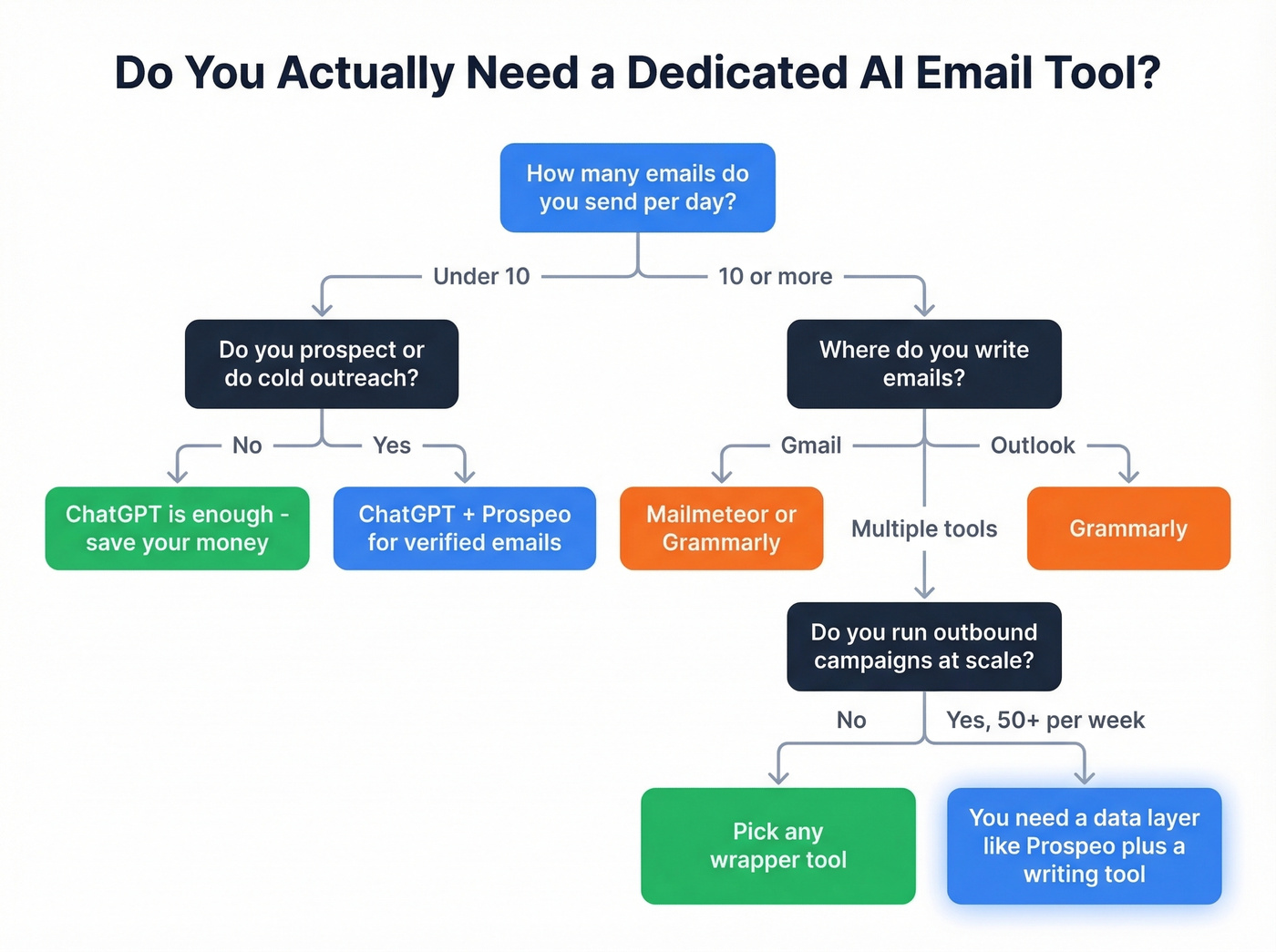
MailerLite tested seven AI email writers and arrived at the same conclusion: output quality is similar across tools because they share underlying models. The real differences are UI, integration, and pricing.
So when does a dedicated tool justify its cost?
You live in Gmail or Outlook. Tools like Grammarly and Mailmeteor sit inside your compose window. No tab-switching, no copy-pasting. That friction reduction compounds across dozens of emails per day.
You need templates and tone presets. If you're writing the same five types of emails repeatedly - follow-ups, meeting requests, cold intros - an email writer with saved templates and tone controls saves real time versus re-prompting ChatGPT every session. (If you're building sequences, these drip campaign templates help too.)
You're running outbound at scale. Once you're sending 50+ personalized emails a week, you need more than a writing assistant. You need verified recipient data, sequence integration, and deliverability infrastructure. That's a different category entirely - and it's where most AI email writers fall short. MailerLite's testing notes that high-performing teams use AI not just for efficiency but for growth, which means the best tools aren't the ones that save you five minutes but the ones that improve your reply rates. If you're scaling, it also helps to understand outbound email automation and cold email success rate benchmarks.
The consensus on r/GrowthHacking captures the same tension: people ask whether ChatGPT alone is "good enough," and the answer is usually yes - unless your daily routine demands tighter integration.
Three Types of AI Email Tools
Not all AI email tools solve the same problem. A simple taxonomy helps:
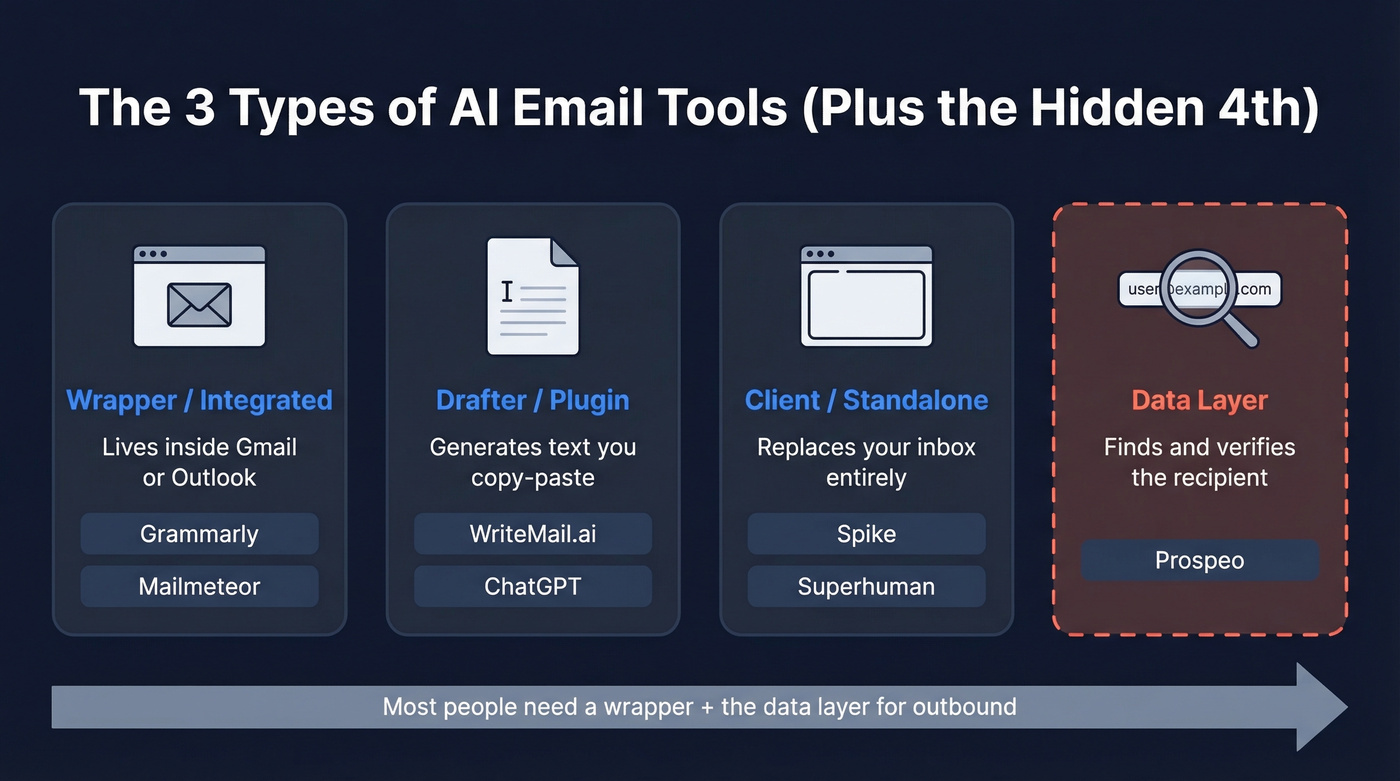
| Category | What It Does | Examples |
|---|---|---|
| Wrapper/integrated | Sits inside Gmail/Outlook | Grammarly, Mailmeteor |
| Drafter/plugin | Generates text you copy-paste | WriteMail.ai, ChatGPT |
| Client/standalone | Replaces your inbox entirely | Spike, Superhuman |
There's a fourth category most roundups ignore: the outreach data layer. Tools like Prospeo don't write your email - they find and verify the recipient's address so your carefully crafted message doesn't bounce into the void. It sits alongside any writing tool in your stack. (If you're comparing sources, start with the best B2B database and verified contact database roundups.)
The buying decision gets clearer once you know which category you need. Most people want a wrapper. Some want a drafter. Almost everyone running outbound needs the data layer too.
The 10 Best AI Email Writers in 2026
1. Prospeo - Best for Outreach That Lands
Every other tool on this list helps you write the email. None of them check whether the address you're sending to is real.
Prospeo's database covers 300M+ professional profiles with 143M+ verified emails at 98% accuracy. The Chrome extension (40,000+ users) lets you find verified contact details from any website or CRM in one click. Once you've built your list, push it straight to Smartlead, Instantly, or Lemlist - no CSV gymnastics required. If you want to go deeper on deliverability, see our guide to email reputation check.

Pricing is dead simple: the free tier gives you 75 verified emails plus 100 Chrome extension credits per month. Paid plans run about $0.01 per email with no contracts and no annual commitment. Data refreshes every seven days, which matters when you're sending cold outreach - stale data means bounces, and bounces mean domain reputation damage. (Related: check bounce and how to check domain reputation.)
Use it if you're running outbound campaigns and need verified emails before you hit send. Pair it with any AI writing tool on this list.
Skip it if you only write internal emails and never prospect externally.
2. Grammarly - Best Free Everyday Writer
Grammarly isn't really an email generator - it's an email editor. That distinction matters more than most people realize.
The free tier works inside Gmail and Outlook, adjusting tone, rewriting clunky sentences, and catching errors in real time. Where Grammarly shines is the editing loop: you draft something fast - or paste in a ChatGPT output - and Grammarly polishes it to match your voice. The tone adjustment controls are genuinely useful for shifting between "friendly check-in" and "executive escalation" without rewriting from scratch. Grammarly can generate emails from prompts too, but the editing and rewriting tools are where it earns daily use.
Premium runs about $12/mo on an annual plan ($30/mo monthly). But the free tier is so capable that most individuals won't need to upgrade.
Use it if you write 10+ emails a day and want a passive quality layer that works without thinking about it.
Skip it if you need full email generation from a blank prompt - that's not Grammarly's strength.
3. Mailmeteor - Best for Gmail Users
Mailmeteor lives entirely inside Gmail and Google Sheets, which makes it the lowest-friction option for anyone already in Google's ecosystem. The AI writer generates drafts directly in your compose window, and the mail merge functionality lets you personalize and send campaigns without leaving your inbox.

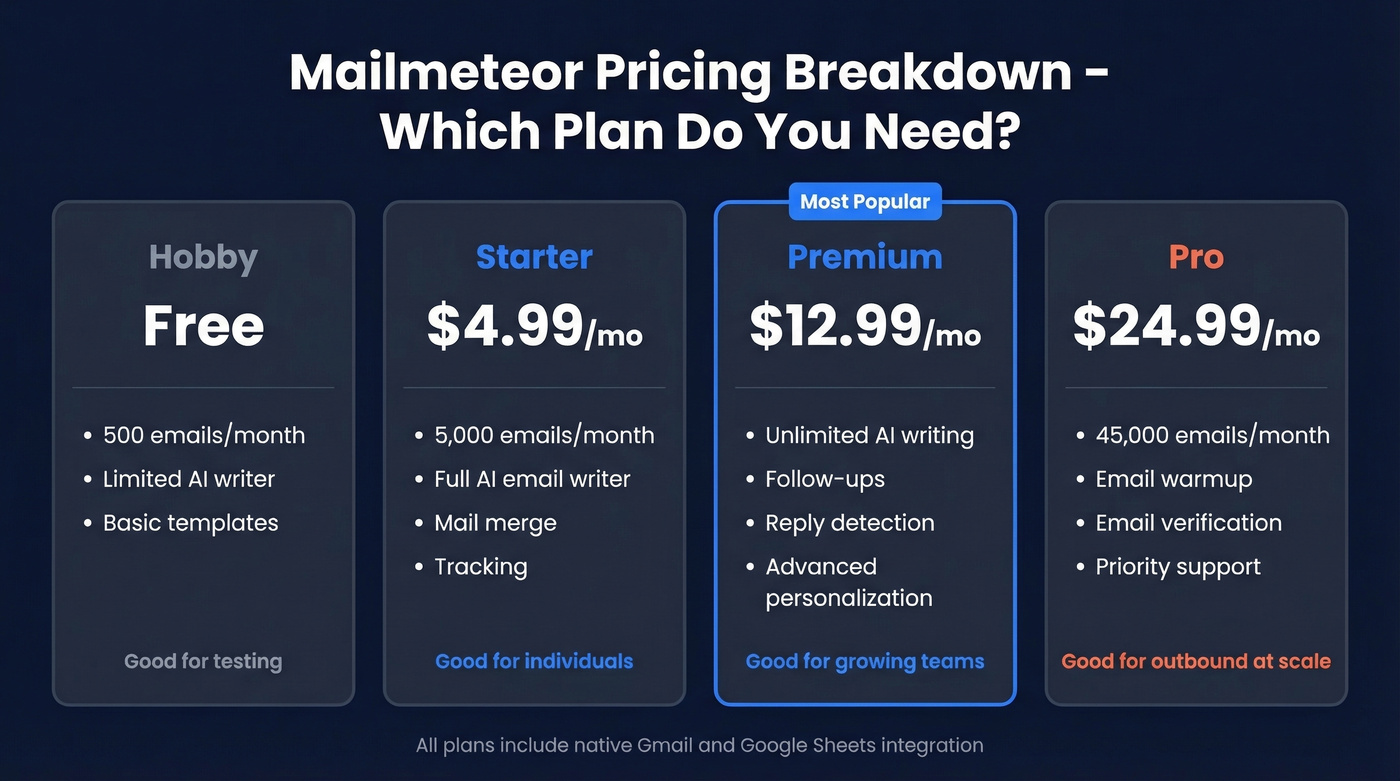
Pricing is straightforward: the free Hobby plan gives you 500 emails per month with a limited AI writer. Starter ($4.99/mo) unlocks the full email writer and 5,000 emails/month. Premium ($12.99/mo) adds unlimited AI writing, follow-ups, and reply detection. Pro ($24.99/mo) includes warmup, verification, and 45,000 emails/month.
That 4.9/5 rating from 11,741+ reviews isn't an accident - the tool does one thing well. Templates are basic compared to dedicated marketing platforms, and analytics could go deeper. But for pure Gmail-native email writing and sending, nothing else comes close.
Use it if Gmail is your primary workspace and you want writing + sending in one place.
Skip it if you're on Outlook, or you need advanced campaign analytics.
4. ChatGPT - The Swiss Army Knife
Look, we've tested a lot of these tools, and the honest truth is that ChatGPT handles email drafting, rewriting, and brainstorming extremely well. Plus runs $20/mo. The tradeoff is pure process friction - there's no native Gmail plugin, no template library, no send button. You write in one tab and paste into another.
For people sending fewer than ten emails a day, that's fine. For high-volume senders, the copy-paste tax adds up fast.
The verdict: ChatGPT is the best free option that nobody thinks of as an email writer. Start here. Graduate to a dedicated tool only when the tab-switching genuinely costs you time.
5. HubSpot - Best for Marketing Teams
HubSpot's AI email writing features are available for free inside HubSpot. But the real "price of admission" is what you'll pay once you need serious marketing automation: Marketing Hub Professional starts around $800/month.
The real strength is personalization powered by Smart CRM data. Instead of basic merge tags, HubSpot pulls behavioral and firmographic context into email drafts. Their best practices checklist is worth reading regardless of which tool you use: proofread for brand voice, send yourself a test, and independently validate accuracy before sending. (If you're evaluating systems, our CRM automation software guide can help.)
If you're already on HubSpot, the AI writer is a nice bonus. If you're not, this isn't the tool that should pull you in.
6. Copy.ai - Best for Sales Copy Brainstorming
Copy.ai gets recommended on r/DigitalMarketing for short-form sales copy and brainstorming - subject lines, cold opens, and fast angle exploration.
The free tier lets you test without committing. Paid plans start around $24/mo with a 7-day free trial. It's less useful for writing complete email sequences end-to-end. Think of it as a creative sparring partner, not a production tool. If your bottleneck is coming up with angles rather than writing the actual email, Copy.ai is the right pick.
7. Rytr - The Budget Pick
$7.50/mo. That's the full price for Rytr's paid plan, making it one of the cheapest dedicated AI writers that's actually usable. The free plan covers light usage, and multiple tone options with use-case templates make it approachable for individuals who want more structure than ChatGPT provides.
The limitation is predictable: output can feel formulaic without heavy editing. Rytr gives you a solid first draft, but you'll spend time making it sound like you. For solo founders or freelancers on tight budgets, it's a reasonable step up from raw ChatGPT. For anyone else, the savings over Copy.ai or Mailmeteor aren't worth the quality gap.
8. WriteMail.ai - Dedicated but Frustrating
WriteMail.ai charges $6.95/mo for 50 emails, $11.95/mo for 150, and $19.95/mo for 500. In 2026, a paid email tool that makes you copy-paste into Gmail because it lacks native integration defeats the purpose. Reviews commonly flag the pricing as steep for what you get - and the copy-paste setup is a dealbreaker for anyone sending more than a handful of emails daily. Skip this one.
9. Jasper - Enterprise-Grade, Enterprise-Priced
Jasper starts around $39/mo and targets teams that need brand voice guardrails across long-form marketing emails and content. If you're an individual writing daily emails, it's overkill. If you're a marketing team producing templated campaigns at scale with strict brand guidelines, it earns its price.
10. Spike - If You Want a New Inbox
Spike replaces your entire email client with a conversational interface and bakes AI writing into the experience. Free plan available, paid from $5/mo. The commitment is high - you're switching your inbox, not adding a plugin. Worth trying if you hate traditional email UX, but most people won't make the leap.
Honorable mentions: Writesonic ($39/mo, strong for marketing copy), ActiveCampaign ($15/mo, email marketing with AI assist), and MailerLite ($9/mo, AI built into their email platform).

Every AI email writer on this list produces great copy. None of them prevent your message from bouncing. Prospeo verifies 143M+ emails at 98% accuracy with a 7-day refresh cycle - so the outreach your AI drafts actually reaches a real inbox.
Start with 75 free verified emails. No credit card, no contract.
Pricing at a Glance
| Tool | Free Tier? | Paid From | Free Cap | Key Integration |
|---|---|---|---|---|
| Prospeo | Yes (75 emails/mo) | ~$0.01/email | 75 verified | Chrome, Smartlead, Instantly |
| Grammarly | Yes | ~$12/mo (annual) | Unlimited rewrites | Gmail, Outlook |
| Mailmeteor | Yes (limited AI) | $4.99/mo | 500 emails/month | Gmail, Sheets |
| ChatGPT | Yes | $20/mo (Plus) | Rate-limited | None (copy-paste) |
| HubSpot | Yes (in HubSpot) | $800/mo (Pro Hub) | Unlimited in-platform | HubSpot CRM |
| Copy.ai | Yes | ~$24/mo | Limited | Standalone |
| Rytr | Yes | $7.50/mo | Limited | Standalone |
| WriteMail.ai | Limited | $6.95/mo | 5 emails/month | None (copy-paste) |
| Jasper | Trial only | ~$39/mo | Trial credits | Standalone |
| Spike | Yes | $5/mo | Limited | Replaces inbox |
One note on the table: ChatGPT's free tier has rate limits during peak hours, and HubSpot's "free" AI writer requires being inside their platform, which stops being free the moment you need real marketing features.
Can Recipients Tell AI Wrote Your Email?
This is the question everyone asks and nobody answers honestly.
Hunter surveyed 200 decision-makers and 300 B2B professionals and found that people can only identify AI-written cold emails at about chance level - roughly 50% accuracy. We're basically flipping a coin. And 67% of decision-makers said they don't mind if AI was used to write the email.
But here's the catch: 47% of B2B professionals said they'd be less likely to reply if they suspected an email was AI-written. People can't reliably detect AI - but the perception of AI kills engagement.
The common tells aren't about grammar or fluency. A TIME essay on AI email writing nails the real giveaways: vocabulary that doesn't match the sender's normal voice, hallucinated details, and canned openers that feel tone-deaf in context. By 2017, Gmail's smart replies already accounted for 12% of daily email communication - 6.7 billion AI-generated emails per day.
The takeaway: AI is fine. Getting caught isn't.
How to Not Sound Like a Robot
You don't need an AI email writer. You need AI email editing. Here's the five-step checklist we've found works best after testing dozens of AI-generated cold emails across our own outbound campaigns:
Delete the first sentence. It's almost always generic. "I hope this email finds you well" is the AI equivalent of a throat-clear. Cut it and start with your actual point.
Replace one generic line with something specific. Mention their recent funding round, a podcast they were on, a job posting that signals they're hiring for the problem you solve. One real detail beats three paragraphs of personalization tokens. (More tactics: AI email personalization and how to personalize cold emails.)
Read it out loud. If you wouldn't say it in a conversation, rewrite it. AI loves phrases like "I wanted to reach out regarding" - nobody talks like that.
Match your actual vocabulary. HubSpot's best practices guide emphasizes matching brand voice, and it applies to individuals too. If you normally write casual emails, don't let AI make you sound like a press release. The best AI-written emails sound like you wrote them on a good day - not like a language model on autopilot.
Send yourself a test. Check formatting, preview text, and whether the tone lands. This takes 30 seconds and catches problems that proofreading in a compose window misses.
The TIME essay makes a sharp point about automation bias that's worth internalizing: iterating on prompts and editing AI output can actually take longer than writing the email yourself for high-stakes, nuanced messages. AI saves time on routine communication. For the emails where a deal hangs in the balance, write them yourself and use AI to polish.
Before You Hit Send
You spent 20 minutes crafting the perfect cold email with AI. Personalized the opening, nailed the CTA, kept it under 100 words. Then it bounced.
The address was outdated, the prospect changed companies three months ago, and your domain reputation just took a hit. This is the gap no AI email writer addresses on its own. Writing the email is the easy part. Reaching the right person at a valid address is the hard part. We've seen teams burn through domain reputation because they trusted email lists from tools that don't verify - a 5% bounce rate is manageable, but a 15% bounce rate gets your domain flagged. (If you're troubleshooting, start with outbound email spam prevention.)
Every tool on this list writes well. The difference between a campaign that converts and one that damages your sender reputation comes down to data quality - and that's a problem you solve before you write a single word.
The best-written cold email is worthless if it hits a dead address. Prospeo's database covers 300M+ professionals at $0.01 per verified email - pair it with any AI writer on this list and stop burning domain reputation on stale data.
Write the email with AI. Verify the recipient with Prospeo.
FAQ
Is ChatGPT good enough as an email writer?
Yes, for most people. Output quality matches dedicated tools because they use the same underlying language models - a consensus that shows up repeatedly on r/GrowthHacking. Dedicated tools only justify their cost if you need one-click Gmail integration, tone presets, or template libraries. If you send fewer than ten emails a day, ChatGPT is all you need.
What's the best free AI email writer?
Grammarly for everyday emails - free, works inside Gmail and Outlook. For cold outreach, pair ChatGPT's free tier with Prospeo's free plan (75 verified emails/month) to write and verify before sending. That combination costs nothing and covers both writing and deliverability.
Can AI write cold emails that actually convert?
AI generates solid first drafts, but conversion depends on relevance, targeting, and data quality. Hunter's research shows 67% of decision-makers don't mind AI-written emails - but 47% would disengage if they suspected it. Edit heavily, add specific details, and verify recipient addresses before sending.
Which AI email tool has the best Gmail integration?
Mailmeteor for writing and sending directly from Gmail (4.9/5, 11,741+ reviews). Grammarly for rewriting and tone-checking inside Gmail's compose window. Most other tools - WriteMail.ai, ChatGPT, Copy.ai - require copy-pasting, which kills the productivity benefit that justified buying a dedicated tool in the first place.