

How to Check Domain Reputation in 2026 (Full Guide)
One in six legitimate marketing emails never reaches the inbox. That's not a scare stat - it's the Validity benchmark: 83.5% inbox placement, 6.7% spam, 9.8% simply missing. And it's gotten worse since November 2025, when Gmail shifted from temporary 421 deferrals to permanent 550 rejections for non-compliant senders.
If you haven't checked your domain reputation recently, you're flying blind into the strictest enforcement environment email has ever seen.
What You Need (Quick Version)
Stop looking for one magic score. Check these five things:
- Gmail compliance - Google Postmaster Tools
- Outlook reputation - Microsoft SNDS
- Yahoo complaints - Yahoo Complaint Feedback Loop (CFL)
- Blacklist status - MxToolbox
- Authentication setup - SPF/DKIM/DMARC check
We'll walk through each one below, starting with the most important.
What Is Domain Reputation?
Domain reputation is the trust score mailbox providers assign to your sending domain. It determines whether your emails land in the inbox, get routed to spam, or get rejected outright. But here's what most guides skip: there isn't a single, universal domain reputation score. Gmail, Yahoo, and Microsoft each maintain their own scoring systems, and your reputation can differ wildly across them.
Your domain shows up in four places inside every email you send:
- From address - what the recipient sees
- Return-Path domain - where bounces go
- DKIM signing domain (d=) - your cryptographic signature
- Links and content - every URL in the body
Each touchpoint contributes signals that mailbox providers use to score you. Many reputation tools use a 0-100 scale, where above 80 is healthy and below 70 is where deliverability problems start showing up. Google's Postmaster Tools V2 puts much more emphasis on pass/fail compliance checks and spam-complaint trends than the old "reputation grade" dashboards most people remember.
Regardless of the scale, the trend matters more than the number. A score dropping from 85 to 72 over two weeks is a five-alarm fire, even though 72 isn't technically "bad."
Domain vs. IP Reputation
These two get conflated constantly, but they behave very differently.
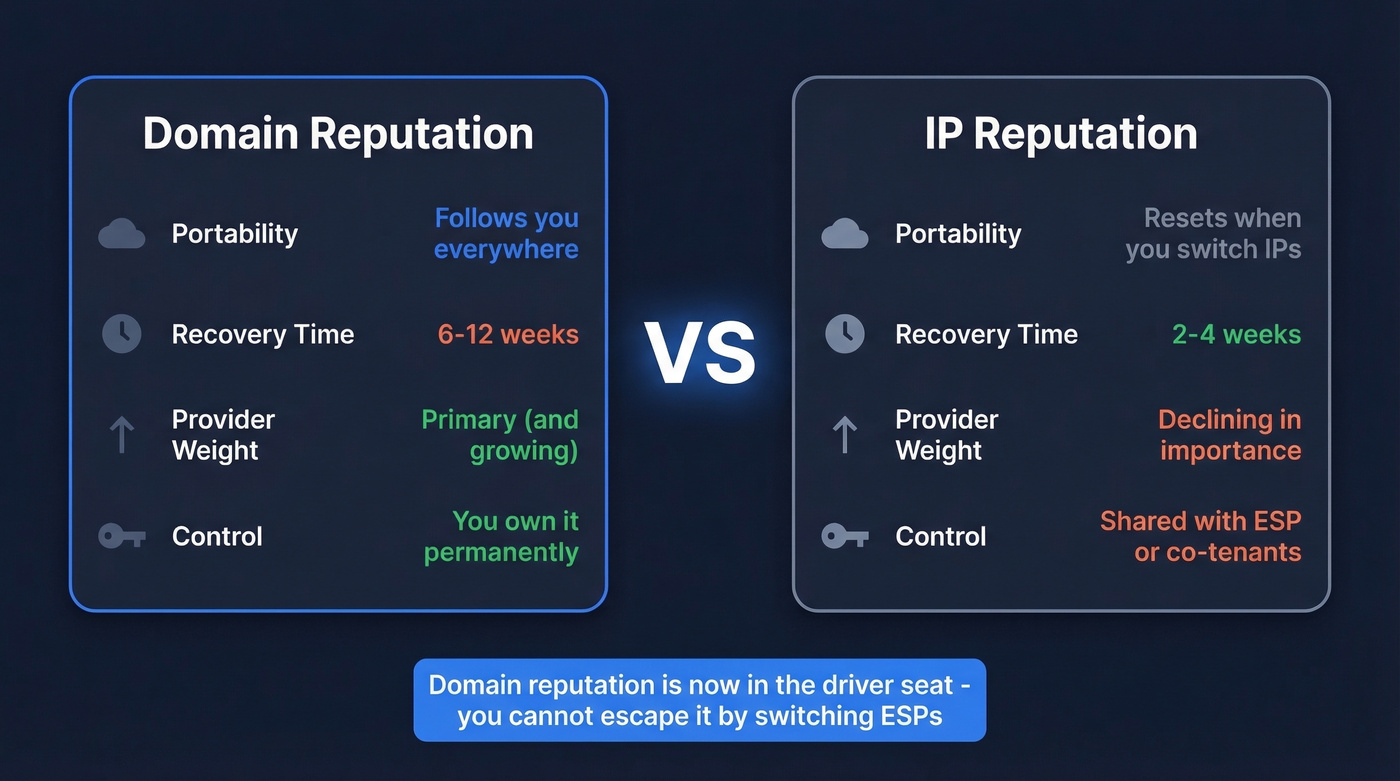
| Domain Reputation | IP Reputation | |
|---|---|---|
| Portability | Follows you everywhere | Resets when you switch IPs |
| Recovery time | 6-12 weeks | 2-4 weeks |
| Provider weight | Increasingly primary | Declining in importance |
| Control | You own it permanently | Shared with ESP/co-tenants |
Modern mailbox providers increasingly prioritize domain reputation over IP reputation. Domain is now in the driver's seat. That's both good and bad - you can't escape a damaged domain by switching ESPs, but you also don't inherit problems from a shared IP pool.
The recovery timeline difference is the detail that should keep you up at night. A bad IP can bounce back in two to four weeks. A damaged domain? Six to twelve weeks of consistent, clean sending. That's a quarter of pipeline at risk.
Signals That Feed Your Score
Mailbox providers watch everything your recipients do with your emails. Positive signals include opens, clicks, replies, forwards, and "not spam" rescues. Negative signals - the ones that hurt - are spam complaints, deleted-before-reading actions, hard bounces, and spam trap hits.
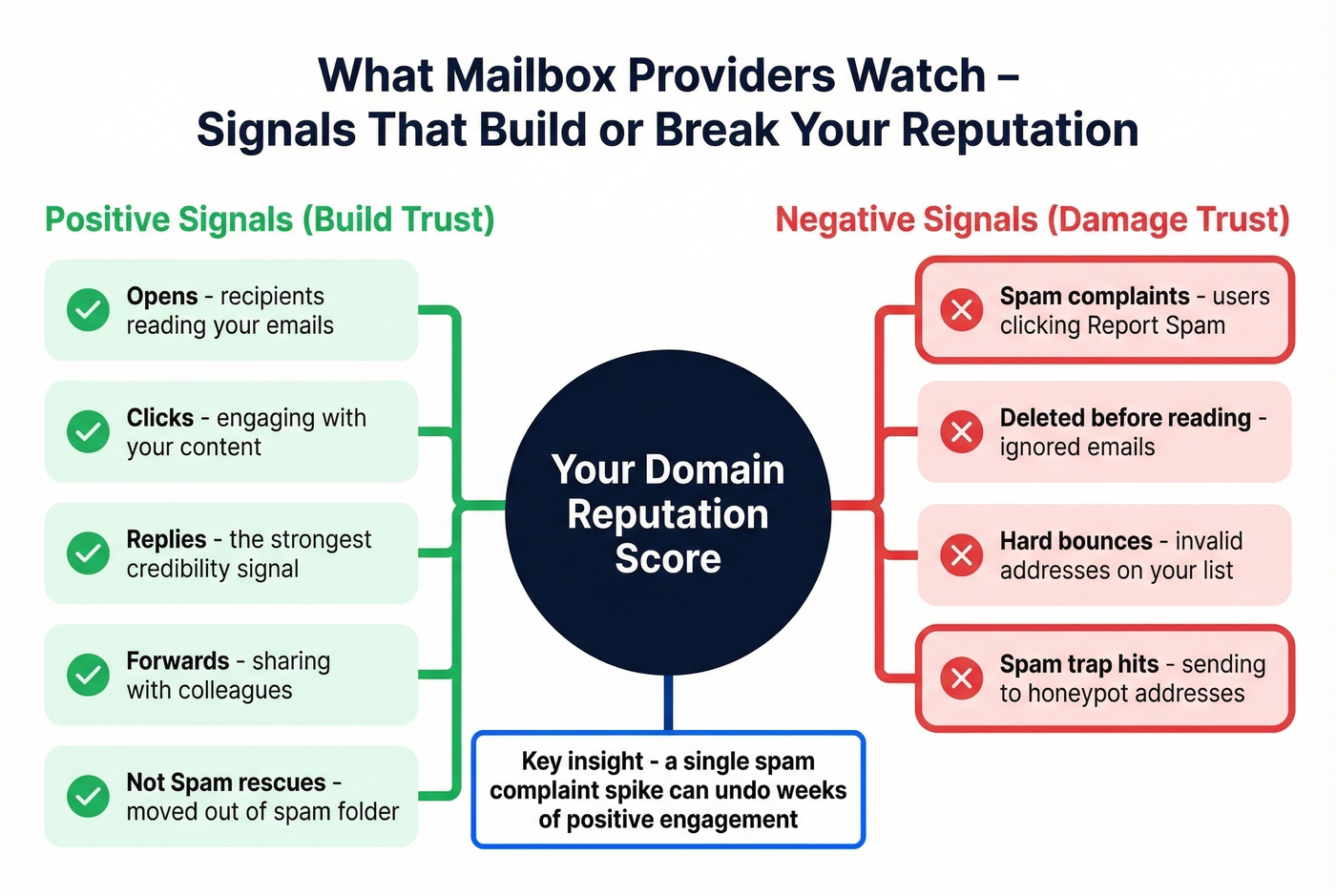
Engagement is the strongest credibility signal. A high reply rate can offset a lot of other noise. Conversely, a spike in spam complaints from a single campaign can crater your reputation overnight. Running a reputation analysis across all three major providers after any large campaign is the fastest way to catch problems before they compound.
2026 Enforcement Changes
The enforcement timeline has shifted dramatically in the last two years.
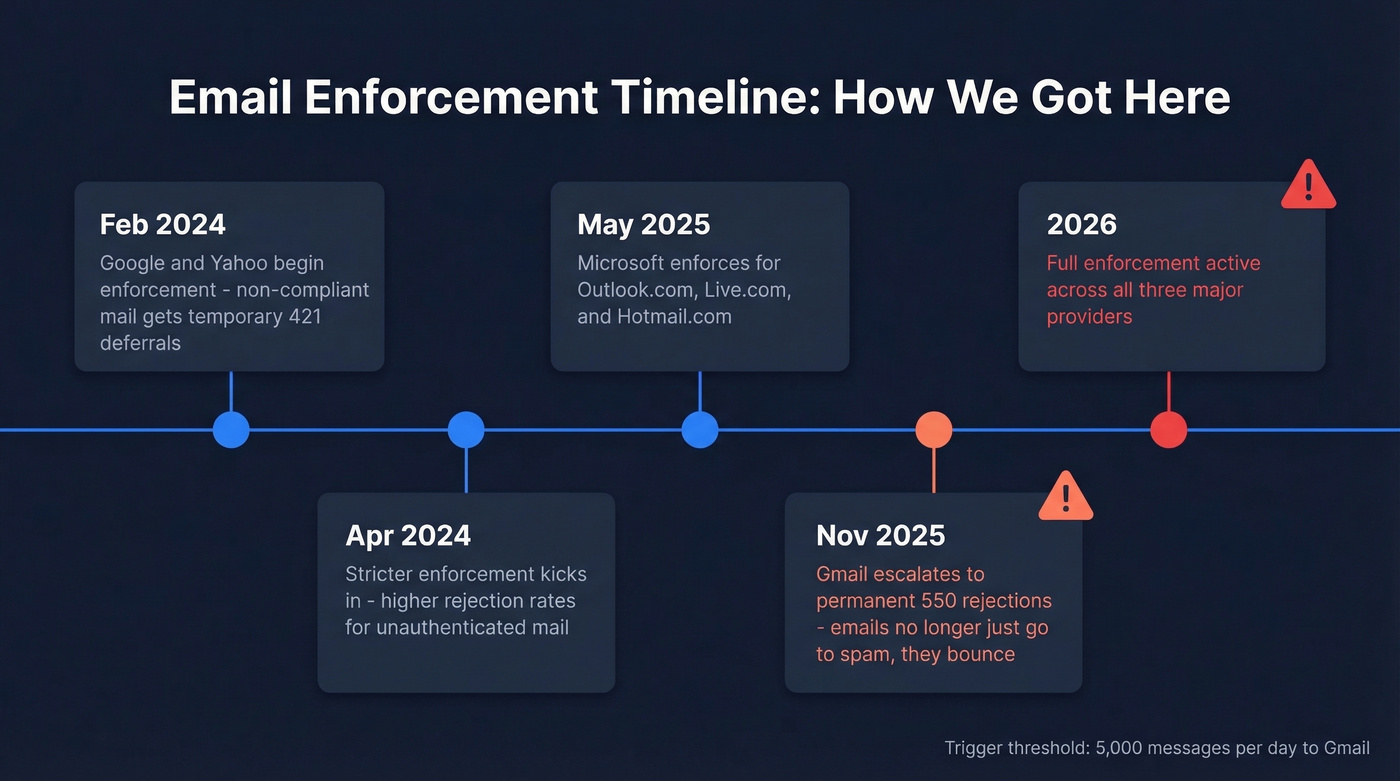
| Date | What Changed |
|---|---|
| Feb 2024 | Google/Yahoo begin enforcement; non-compliant mail gets 421 deferrals |
| Apr 2024 | Stricter enforcement; higher rejection rates for unauthenticated mail |
| May 2025 | Microsoft enforces for Outlook.com, Live.com, Hotmail.com |
| Nov 2025 | Gmail escalates to permanent 550 rejections |
| 2026 | Enforcement fully active across all three providers |
The trigger threshold is 5,000 messages per day to Gmail recipients. Cross that line and you're classified as a bulk sender, which means SPF, DKIM, and DMARC authentication are mandatory - not optional. DMARC at p=none is the minimum; p=reject is the recommended best practice.
Before November 2025, failing compliance usually meant temporary deferrals. Now it means permanent rejection with a 550 error. Your emails don't just land in spam - they don't land at all.
Benchmarks: What "Good" Looks Like
Before you start checking tools, you need to know what you're aiming for.
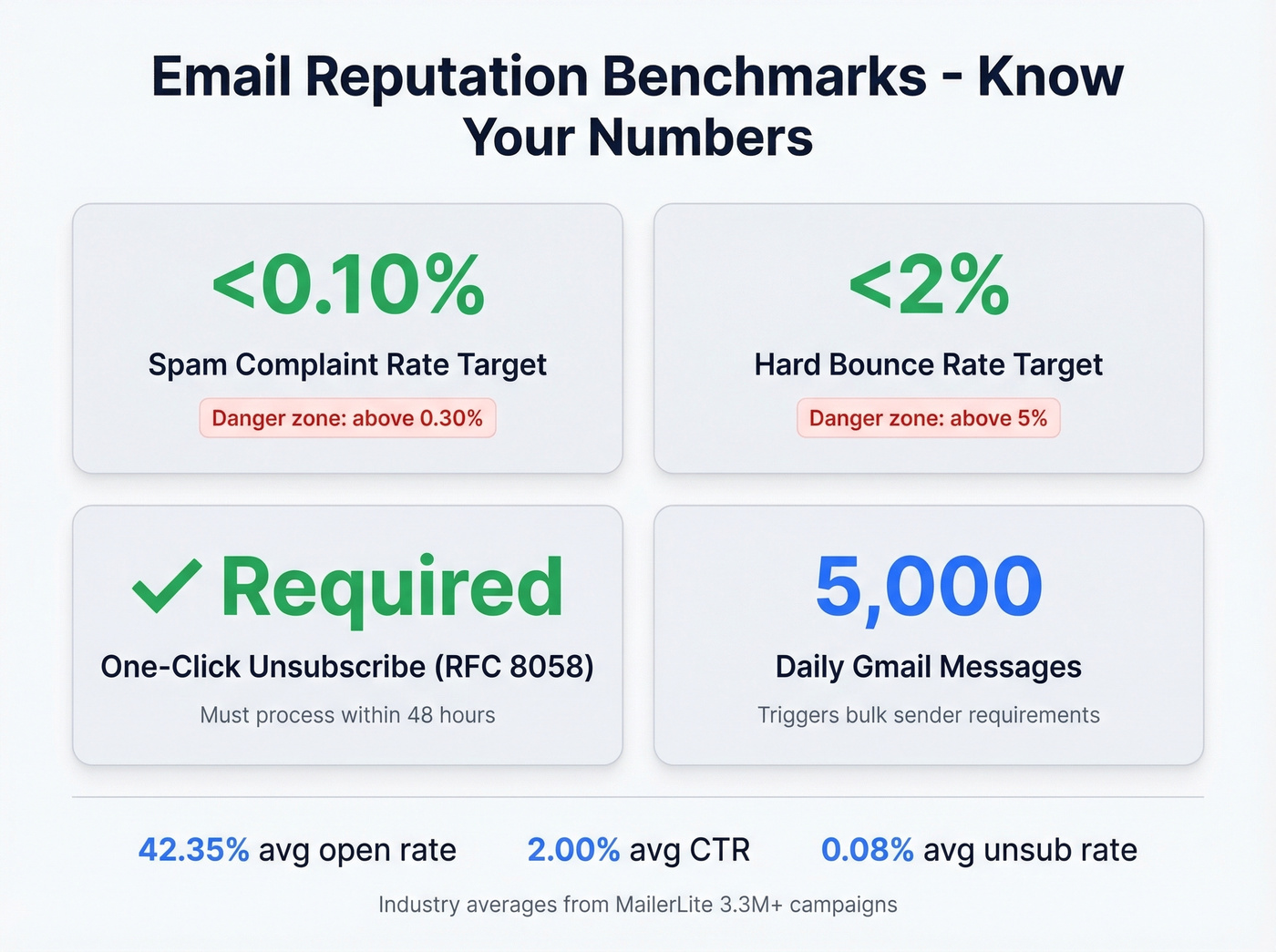
| Metric | Target | Danger Zone |
|---|---|---|
| Spam complaint rate | <0.10% | >0.30% |
| Hard bounce rate | <2% | >5% |
| One-click unsubscribe | Required (RFC 8058) | Process within 48 hrs |
| Bulk sender threshold | 5,000/day to Gmail | Triggers all requirements |
For context, MailerLite's dataset of 3.3M+ campaigns shows industry averages of 42.35% open rate, 2.00% CTR, and 0.08% unsubscribe rate. If your numbers are significantly worse than these, your sending reputation is probably suffering. We've seen domains recover in as little as four weeks when the team is disciplined about suppression - but most teams aren't, and that's where the trouble starts.
The spam complaint rate is the metric that kills you fastest. Staying under 0.10% is the target. Hitting 0.30% even once can trigger throttling or rejection that takes weeks to undo.

Most domain reputation damage starts with bad contact data - bounces, spam traps, and honeypots hiding in your lists. Prospeo's 5-step verification with spam-trap removal and honeypot filtering delivers 98% email accuracy, keeping bounce rates under 2%. Snyk's 50-person sales team went from 35-40% bounce rates to under 5% after switching.
Stop fixing reputation problems. Prevent them with verified data.
How to Check Domain Reputation
Here's the toolkit, starting with the provider that matters most.
Google Postmaster Tools
Gmail has 1.8B+ active users, so Google is the mailbox provider that matters most for nearly every sender. Google Postmaster Tools is free and gives you direct visibility into how Gmail sees your domain.
What changed: The V2 interface rolled out in late 2025 and removed the old IP Reputation and Domain Reputation dashboards - the familiar High/Medium/Low/Bad grades are gone. In their place, you get two primary views:
- Compliance Status dashboard - pass/fail checks for SPF, DKIM, DMARC, TLS, forward/reverse DNS, and one-click unsubscribe for bulk senders
- Spam Rate dashboard - a time series of user spam complaints against your domain
Setup takes about 10 minutes. Sign in at postmaster.google.com, add your domain, create the TXT verification record in your DNS, and verify. Data takes 24-48 hours to populate after verification.
You won't see data on days when you send to fewer than roughly 100-200 unique Gmail recipients. Low-volume senders find the dashboards empty - that doesn't mean your reputation is bad, it means Google doesn't have enough data to anonymize and display. Since November 2025, failures on the Compliance Status dashboard can trigger 5xx SMTP rejections, so treat this as an early warning system, not just a monitoring dashboard.
Microsoft SNDS
Microsoft's Smart Network Data Services covers Outlook.com, Hotmail, and Live.com - but not Office 365 / Microsoft 365 (Exchange Online) enterprise accounts. That's a critical distinction most guides miss.
Head to the SNDS portal, click "Request access," submit your sending IP or IP range, and verify ownership via the WHOIS-listed abuse/postmaster contact for the IP. The dashboard shows IP activity, email volume, spam complaints, spam trap hits, and spam rate. A useful trick: compare RCPT and DATA SMTP command counts. The difference estimates how many messages Microsoft rejected before even accepting the data payload.
Starting in November 2025, SNDS access approvals require authentication, JMRP reports standardized to ARF format, and automated report links expire after 30 days. If you had an older SNDS setup, re-check that your access and report workflows still work.
Yahoo Complaint Feedback Loop
Yahoo is the third provider in the enforcement triad, and skipping it is a mistake. Yahoo's Complaint Feedback Loop provides complaint data when Yahoo Mail users mark your messages as spam. If Yahoo Mail recipients make up a significant portion of your list, it's worth the time to configure.
Blacklist and Blocklist Checks
Use MxToolbox for a quick multi-blacklist sweep. Free users get one Email Health Check every 24 hours, which is enough for periodic monitoring.
Use Spamhaus when you need the authoritative answer. Spamhaus is the blocklist that matters most - if you're listed there, your deliverability is in serious trouble.
Use multiRBL.valli.org for the most comprehensive sweep. It checks more lists than MxToolbox and is completely free, though the interface is bare-bones.
Skip this if your Google Postmaster Tools and SNDS dashboards look clean. Blacklist checks are most useful when you're actively troubleshooting a deliverability drop.
Third-Party Reputation Lookups
Cisco Talos offers free domain reputation lookups, but a "neutral" result often just means Talos doesn't have enough data on your domain - not that your reputation is actually neutral. Most useful for high-volume senders.
Barracuda and McAfee reputation checks matter if your recipients sit behind corporate email gateways. Many mid-market and enterprise companies use these filters, so a poor score can block you from reaching business inboxes even when Gmail and Outlook are fine.
EasyDMARC offers a free IP/domain reputation checker plus paid DMARC monitoring plans. It's a solid option if you want ongoing DMARC reporting without building your own parsing infrastructure.
Tool Comparison
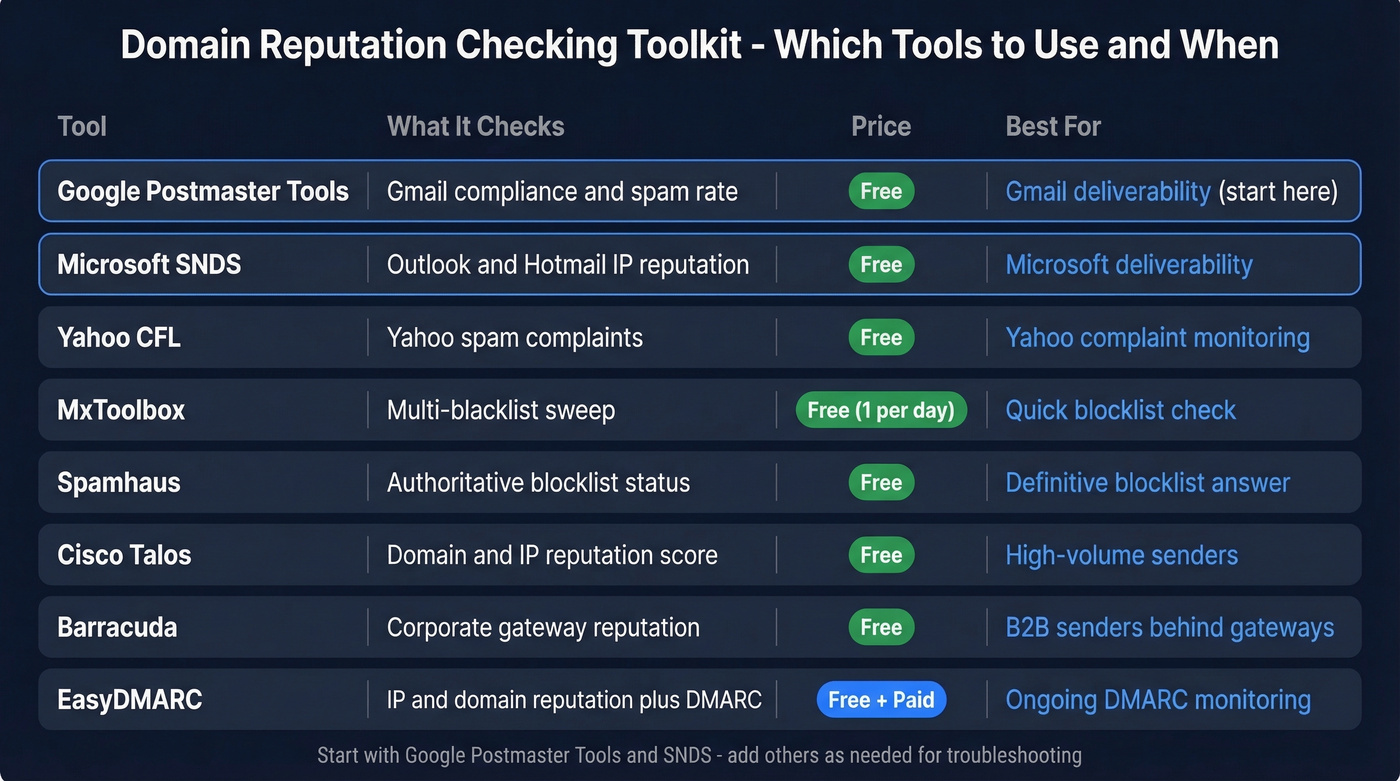
Here's how the free tools stack up:
| Tool | What It Checks | Free? | Best For |
|---|---|---|---|
| Google Postmaster Tools | Gmail compliance + spam rate | Yes | Gmail deliverability |
| Microsoft SNDS | Outlook/Hotmail IP reputation | Yes | Microsoft deliverability |
| Yahoo CFL | Yahoo spam complaints | Yes | Yahoo complaint monitoring |
| MxToolbox | Multi-blacklist sweep | 1/day free | Quick blocklist check |
| Spamhaus | Authoritative blocklist status | Manual free | Definitive blocklist answer |
| Cisco Talos | Domain/IP reputation score | Yes | High-volume senders |
| Barracuda | Corporate gateway reputation | Yes | B2B senders |
| EasyDMARC | IP/domain reputation + DMARC tooling | Free check + paid plans | Ongoing DMARC monitoring |
Security-Focused Reputation Checks
If you're investigating whether a domain is malicious - rather than checking your own sending reputation - the toolkit is different. The consensus on r/cybersecurity is to layer multiple sources:
- VirusTotal - aggregates 70+ antivirus engines and URL scanners
- URLScan - renders the page and shows all network requests
- AbuseIPDB - community-reported IP abuse database
- AlienVault OTX - open threat intelligence with domain indicators
- Google Safe Browsing - checks if Google has flagged the domain
- IPQualityScore - fraud scoring for domains and IPs
These tools answer a different question than Postmaster Tools or SNDS. They're asking "is this domain dangerous?" rather than "will my emails from this domain reach the inbox?" Don't confuse the two workflows.
How to Fix a Damaged Reputation
Recovery isn't fast, but it's predictable. Here's the playbook:
Isolate the problem provider. Check Google Postmaster Tools and SNDS separately. Your reputation might be fine on Gmail but tanked on Outlook, or vice versa.
Fix authentication first. Ensure SPF, DKIM, and DMARC all pass. Set up custom DKIM and Return-Path domains rather than relying on your ESP's defaults - this builds standalone domain reputation as your volume grows. Nothing else matters until authentication is clean. (If you want to go deeper, see DMARC alignment and SPF record specifics.)
Suppress disengaged contacts. Anyone who hasn't opened or clicked in 90+ days gets removed from active sends. This is painful but necessary.
Verify your remaining list. Run your contacts through a verification tool like Prospeo before re-engaging - sending to stale addresses during recovery is pouring gasoline on the fire. If you're seeing a lot of failures, start with email bounce rate diagnostics and spam trap removal.
Pause risky automations. Any sequence targeting cold or unverified contacts gets paused until your reputation stabilizes. (Related: cold email marketing benchmarks and guardrails.)
Gradually ramp volume. Start with your most engaged segment - people who've replied or clicked recently. Slowly increase volume over weeks, not days. In our experience, the ramp-back period is where most teams get impatient and re-damage their reputation.
Consider subdomain isolation. Move marketing email to a subdomain like mail.yourdomain.com to separate its reputation from your root domain. Start by routing only transactional emails through the subdomain to build positive engagement signals, then gradually reintroduce marketing mail. (If you're setting up infrastructure, tracking domain choices matter here too.)
Expect the full recovery cycle to take 6-12 weeks. There's no shortcut. Consistency, engagement, and restraint are the only path back.
Here's the thing: most teams don't actually have a reputation problem - they have a data quality problem wearing a reputation costume. Fix the inputs and the reputation fixes itself. The teams that jump straight to subdomain isolation and IP warming without cleaning their lists are just spreading the disease to new infrastructure.
How Bad Data Destroys Reputation
Let's walk through a scenario that plays out constantly. An SDR team uploads a purchased list of 5,000 contacts. The list is six months old. They blast a cold email sequence, 800+ emails bounce, and spam traps on the list fire. Within 48 hours, the domain's spam complaint rate spikes past 0.30%, and Google starts rejecting mail. Now the company's transactional emails - password resets, invoices, onboarding flows - are landing in spam too.
One bad import torched the entire domain.
The spiral is vicious: bounces damage reputation, damaged reputation increases spam placement, spam placement reduces engagement, and lower engagement damages reputation further. Prevention beats recovery every time. Verifying emails before sending - catching invalid addresses, spam traps, and honeypots - is the circuit breaker that stops this cycle before it starts. Prospeo's 5-step verification with catch-all handling and a 7-day data refresh cycle keeps stale data from accumulating in the first place.

You just read that a damaged domain takes 6-12 weeks to recover. One bad list import can cost you a quarter of pipeline. Prospeo refreshes all 300M+ records every 7 days - not the 6-week industry average - so stale emails and dead addresses never reach your outbound. Stack Optimize built a $1M agency with zero domain flags across all clients.
Your domain reputation is only as good as your data source.
FAQ
What is a good domain reputation score?
Many reputation tools use a 0-100 scale where above 80 is healthy and below 70 signals deliverability problems. Gmail's Postmaster Tools V2 focuses on pass/fail compliance checks and spam-complaint trends rather than a single number. Check Google Postmaster Tools and Microsoft SNDS for provider-specific data.
How long does it take to fix domain reputation?
Six to twelve weeks of consistent, low-complaint, high-engagement sending. There's no shortcut, no reset button, and no amount of money that accelerates the timeline. Most teams that recover faster were already sending to clean lists - they just had an authentication gap.
Can bad prospect data damage my domain reputation?
It's the number one cause of reputation damage for outbound teams. Bouncing off stale emails and hitting spam traps triggers immediate penalties. Verifying emails before sending prevents the problem entirely.
How often should I check my domain reputation?
Weekly at minimum if you send more than a few thousand emails per month. After any large campaign or list import, check within 24-48 hours so you can catch spikes in complaints or bounces before they snowball.
Do low-volume senders need to check?
Yes, but some tools won't show data at low volumes. Google Postmaster Tools requires roughly 100-200 daily Gmail recipients to display metrics. Start with blacklist checks via MxToolbox and authentication validation through EasyDMARC - both work regardless of send volume.