

Email Reputation Check: The 2026 Guide That Actually Helps
Your cold email campaign just tanked. Open rates cratered, replies dried up, and half your sequence is landing in spam. You run an email reputation check with three different tools, and each one gives you a different answer - one says you're fine, another says you're flagged, and the third won't even load data because your volume is too low. The frustration is real, and it's one of the most common complaints on r/Emailmarketing: "results are laughable... not sure who to trust."
Here's the thing: there isn't a single email reputation score. Your reputation lives in three different places, measured by three different systems, and no third-party tool can see all of them. Once you understand that, the confusion disappears and the fix becomes straightforward.
What You Need (Quick Version)
If you're short on time, here's the checklist:
- Google Postmaster Tools - free, covers Gmail recipients. Your most important dashboard for Google sender reputation.
- Microsoft SNDS - free, covers Outlook/Hotmail recipients.
- Yahoo Sender Hub - free, covers Yahoo/AOL recipients.
- MxToolbox or Spamhaus - blacklist lookups.
Two numbers to watch: if your bounce rate is above 5% or your Gmail spam rate is above 0.3%, your data quality is the problem. Fix that before you touch anything else. Authentication (SPF, DKIM, DMARC) is table stakes - if those aren't set up, nothing else matters.
What Sender Reputation Actually Is
Most people think of email reputation as a single score, like a credit rating. It's not. Reputation operates on three layers, and each one is tracked independently.
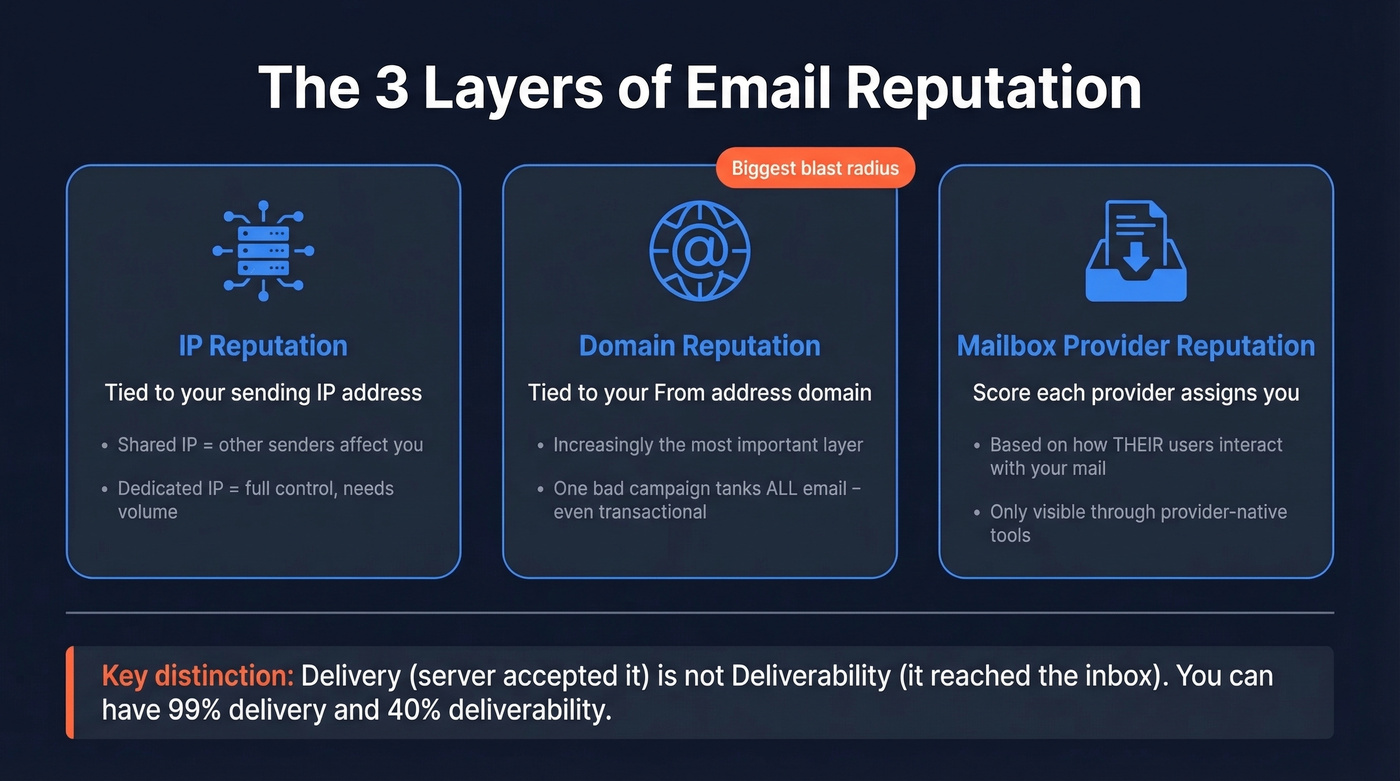
IP reputation is tied to the sending IP address your emails originate from. If you're on a shared IP through an ESP like Mailchimp or SendGrid, other senders on that IP drag your reputation up or down with theirs. Dedicated IPs give you full control but require consistent volume to maintain.
Domain reputation is tied to your sending domain - the "from" address. This is increasingly the layer that matters most. Google, Microsoft, and Yahoo all weight domain reputation heavily in filtering decisions. One team member sending to a bad list can tank deliverability for everyone on the same domain, and that includes transactional email like password resets, invoices, and onboarding sequences. The blast radius is bigger than most people realize.
Mailbox-provider reputation is the score each provider assigns you based on how their users interact with your emails. This is the layer you can't see directly from third-party tools - only the providers themselves expose it, and each one uses different signals.
An important distinction that trips people up: delivery means the receiving server accepted your email. Deliverability means it actually reached the inbox instead of spam. You can have 99% delivery and 40% deliverability - your emails are "delivered" to the spam folder.
How to Check Email Reputation
The only tools that see real reputation data are the ones run by the mailbox providers themselves. Everything else is an approximation. If you need the full context, start with an email deliverability baseline first.
Google Postmaster Tools
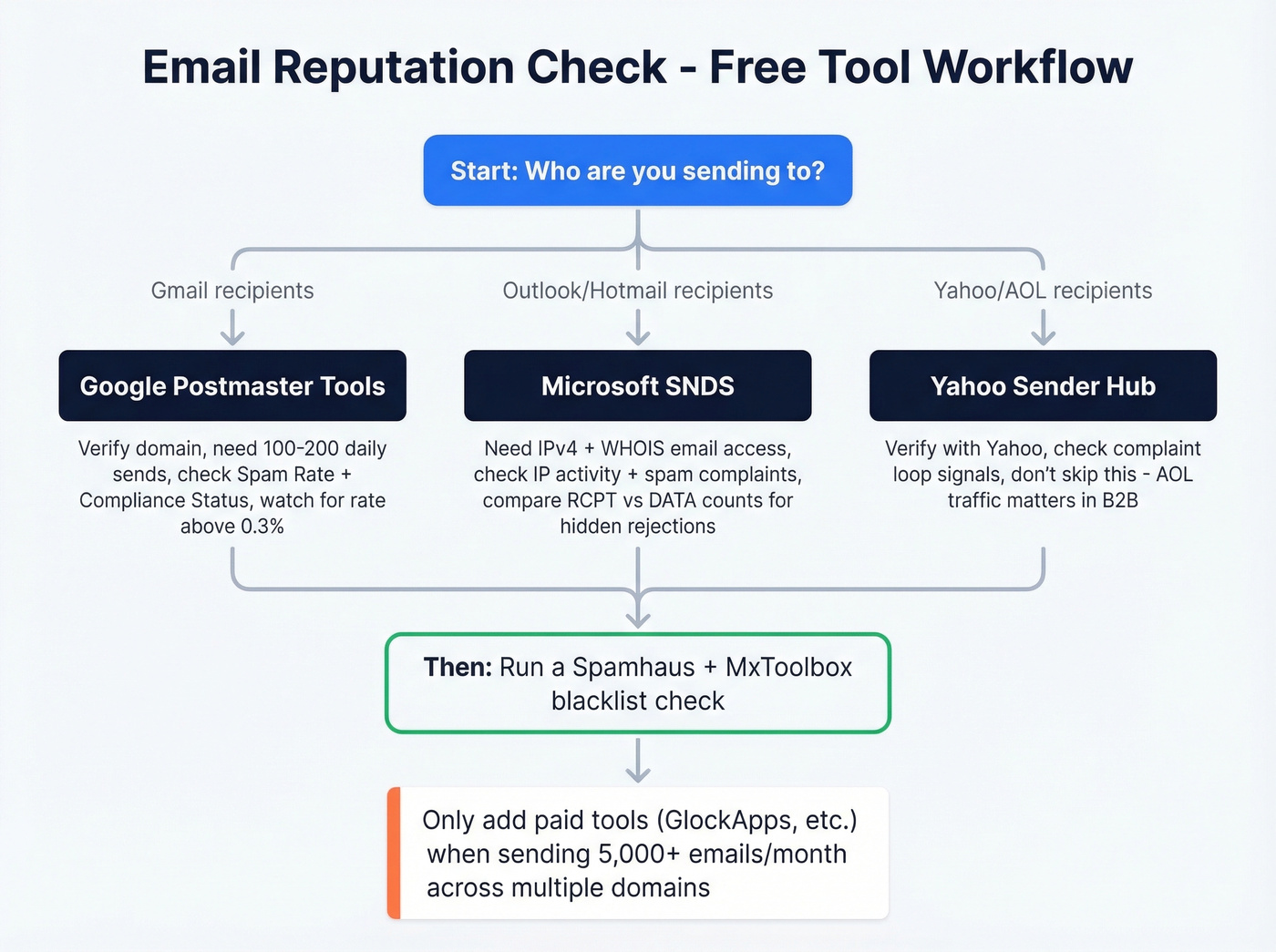
Google Postmaster Tools (GPT) is free and covers emails sent to personal Gmail accounts. It's the single most important reputation checker for most senders because Gmail dominates inbox market share.
To set it up, verify your sending domain in GPT, then wait for data to populate. You'll need to send roughly 100-200 emails per day to Gmail recipients before dashboards show meaningful data. GPT updates within 24 hours, so don't expect real-time feedback.
The dashboards you care about most are Spam Rate and Compliance Status, plus Authentication and Delivery Errors. Google's sender guidelines set the threshold at 0.3% spam rate - exceed that consistently and you'll see filtering increase.
Google has updated the GPT experience over time, and many teams now treat Spam Rate and Compliance Status as the durable metrics to track. If you're following older tutorials that focus heavily on the four-tier reputation rating (High/Medium/Low/Bad), prioritize Spam Rate + Compliance first.
A nuance most guides miss: GPT's spam rate reflects manual user spam reports, not automatic filtering to Spam or Promotions. You can have a 0.1% spam rate in GPT while Gmail still routes half your emails to Promotions. GPT tells you about user complaints, not inbox placement. We've seen teams celebrate a "clean" GPT dashboard while their actual inbox placement rate sits below 50%.
Microsoft SNDS
Microsoft's Smart Network Data Services covers Outlook.com and Hotmail recipients. It does not cover Office 365 or Exchange Online - that's a different ecosystem entirely.
Setup requires a Microsoft account, the IPv4 address your mail server uses, and access to the WHOIS-listed email for that IP (typically abuse@ or postmaster@). SNDS shows IP activity, email volume, spam complaints, spam trap hits, and spam rate for your sending IP.
A useful interpretation trick: compare the RCPT and DATA SMTP command counts. If you see 1,000 RCPT commands but only 950 DATA commands, 50 messages were rejected before delivery even completed. A growing gap between those numbers signals reputation problems building before they show up in bounce reports.
Yahoo Sender Hub
Yahoo Sender Hub rounds out the big three, covering Yahoo Mail and AOL recipients. It's free and commonly used by senders who want Yahoo/AOL-specific visibility and complaint-loop signals. Setup is similar to the other provider tools: verify what Yahoo requires, then wait for enough volume to generate data.
Don't skip this one just because Yahoo feels like a smaller player. AOL traffic alone can be significant in certain B2B verticals.
Best Tools for Email Reputation
The native provider tools give you ground truth. Third-party tools fill in the gaps - blacklist monitoring, authentication checks, and inbox placement testing. If you want a broader comparison, see our breakdown of email reputation tools.
| Tool | What It Checks | Free Tier | Paid From | Best For |
|---|---|---|---|---|
| GPT | Spam rate, auth, delivery errors | Yes | Free | Gmail reputation |
| SNDS | IP activity, complaints, traps, spam rate | Yes | Free | Outlook/Hotmail reputation |
| Yahoo Hub | Provider-side signals for Yahoo/AOL | Yes | Free | Yahoo/AOL visibility |
| MxToolbox | Blacklists, DNS | 1 check/24hrs | $129/mo | Broadest blacklist scan |
| Spamhaus | Blocklist/reputation lookup | Yes | Free | Gold-standard blocklist |
| Sender Score | Sender reputation monitoring | Yes | N/A | Legacy reputation reference |
| mail-tester.com | Spam score | Yes | Free | Quick pre-send check |
| GlockApps | Inbox placement | Limited | $85/mo | Inbox vs spam testing |
| EasyDMARC | IP/domain blacklist lookups | Yes, unlimited | Free | Fast reputation + blacklist audit |
Free tools cover 90% of what most senders need. You don't need $399/mo MxToolbox Plus unless you're managing dozens of sending domains across multiple IPs. Start with the three native tools plus a Spamhaus lookup, and only add paid tools when you're running high-volume outbound across multiple domains.
GlockApps deserves a specific callout - it's strong for actual inbox placement testing, which tells you where your emails land (inbox, spam, tabs) across providers. That's the one thing the free native tools can't show you directly.
Other tools worth knowing: InboxAlly (from $149/mo for inbox placement warming), Mailtrap (from $15/mo for email testing in staging), and TrulyInbox (from $29/mo for warm-up).

You just read it: bounce rates above 5% tank your sender reputation. Most deliverability problems trace back to bad contact data, not misconfigured DNS. Prospeo's 5-step email verification - with catch-all handling, spam-trap removal, and honeypot filtering - delivers 98% accuracy. Teams switching from other providers cut bounce rates from 35%+ to under 4%.
Fix your reputation at the source - start with data that doesn't bounce.
How to Read Your Score
Scoring systems vary wildly across tools, which is why comparing numbers between them is pointless.
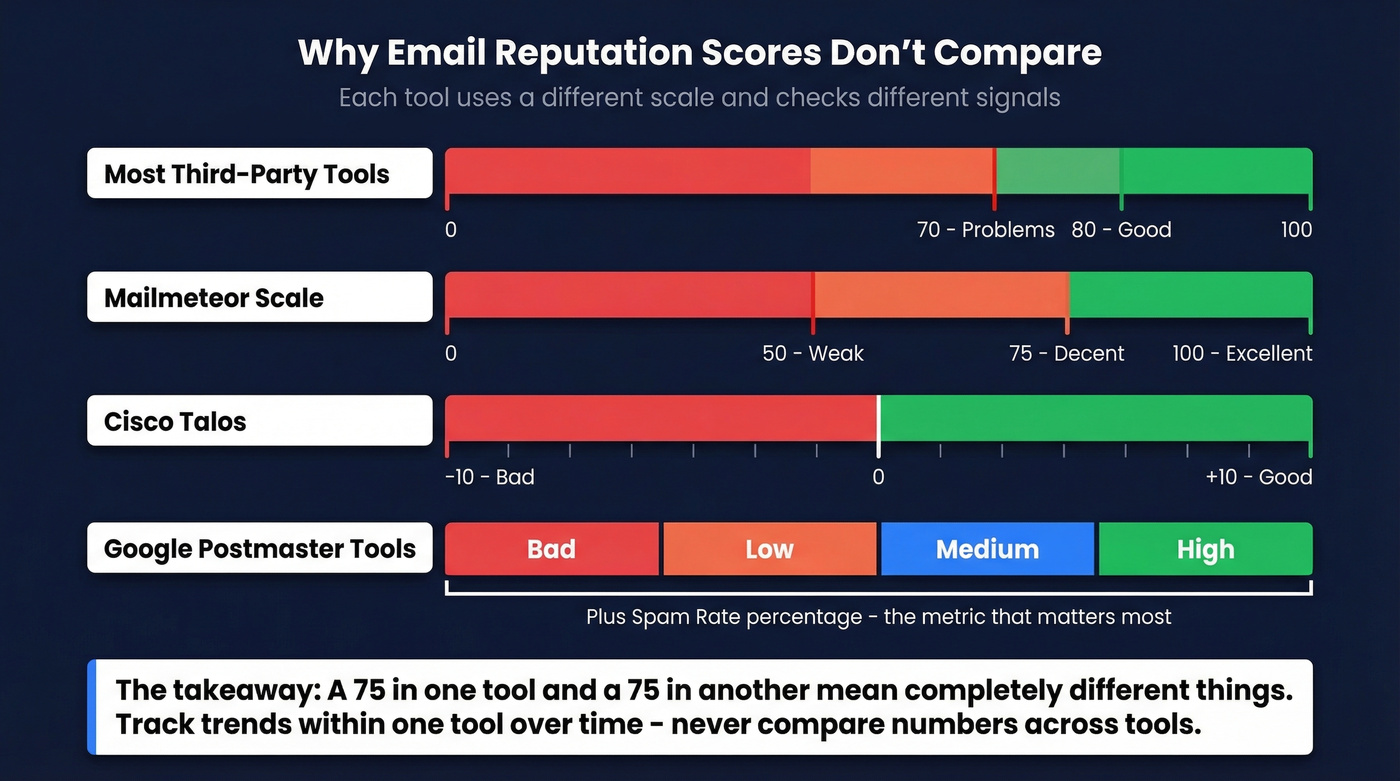
Most third-party tools use a 0-100 scale. Above 80 indicates good deliverability; below 70 signals significant problems. Mailmeteor breaks it into three bands: 75-100 is excellent, 50-75 is decent, below 50 is weak. Cisco Talos uses a completely different -10 to +10 scale.
The core point: a "75" in one tool and a "75" in another don't mean the same thing. They're checking different signals against different baselines. Don't chase a number across tools. Track trends within a single tool over time. A score dropping from 85 to 72 over two weeks tells you something useful. Comparing two different tools' numbers tells you nothing.
Why Reputation Tools Disagree
This is the question that drives people crazy on Reddit: you run three tools and get three different answers.
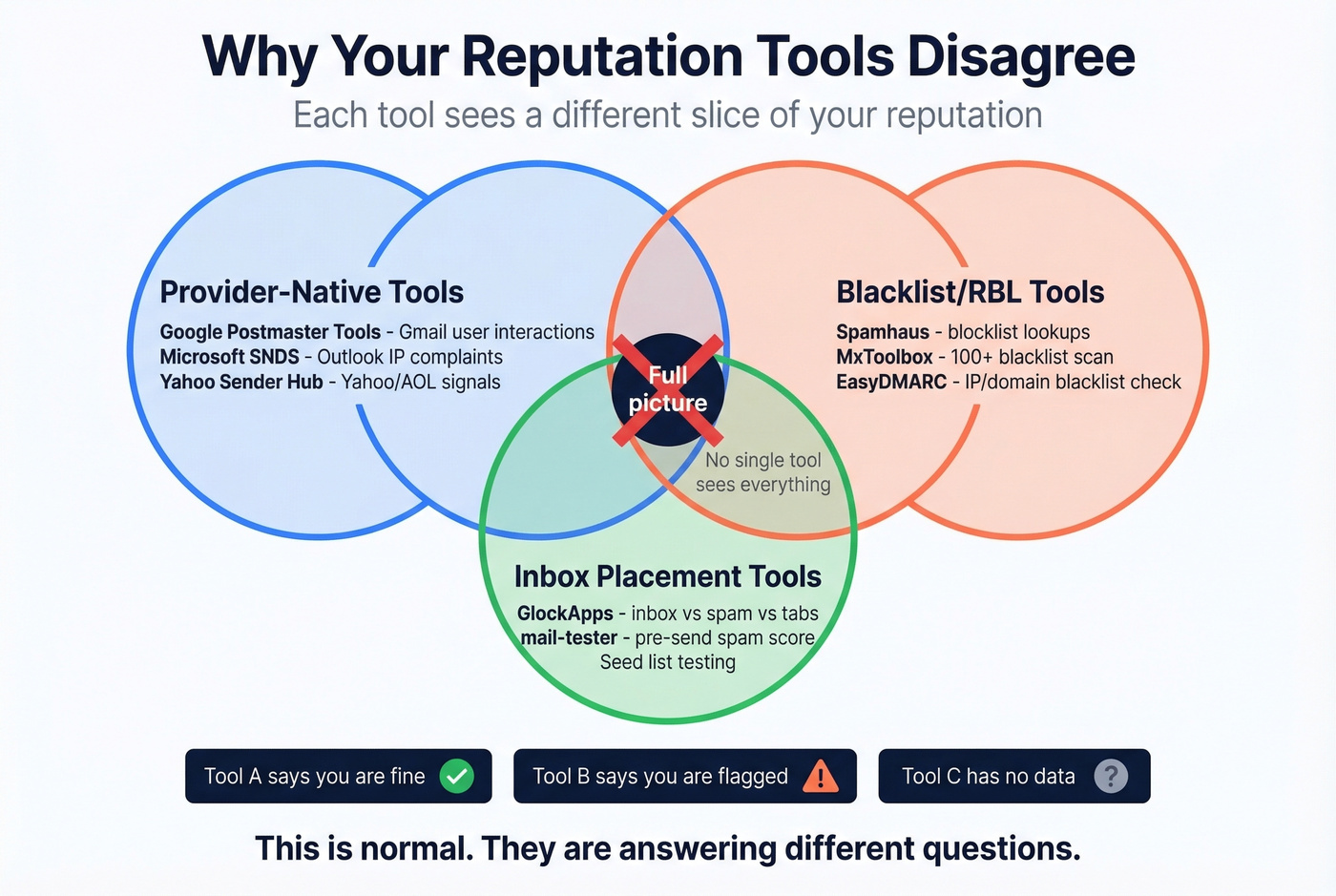
It's not a bug. Each tool checks different things. Spamhaus checks blocklists. Google Postmaster Tools checks how Gmail users interact with your emails. EasyDMARC checks IP/domain reputation across public blacklists and RBLs. They're measuring different dimensions of "reputation," and none of them sees the full picture.
Coverage matters too. GPT only sees Gmail. SNDS only sees Outlook consumer. A third-party tool might aggregate data from spam traps and blacklists that neither provider exposes. You can have a clean GPT dashboard and still be listed somewhere that Outlook checks.
In our experience, the confusion disappears once you stop trying to reconcile scores across tools. Check provider-native tools first for actual reputation data. Use third-party tools for blacklist monitoring and authentication audits only. They're answering different questions - treat them that way.
Let's be honest: if your deals average under $15k and you're sending fewer than 5,000 emails per month, you probably don't need any paid reputation tool at all. The free provider dashboards plus a Spamhaus check will tell you everything you need to know. Save the $85/mo GlockApps budget for when you're actually scaling.
How to Fix Bad Reputation
If your reputation is damaged, here's the priority order. Don't skip steps.
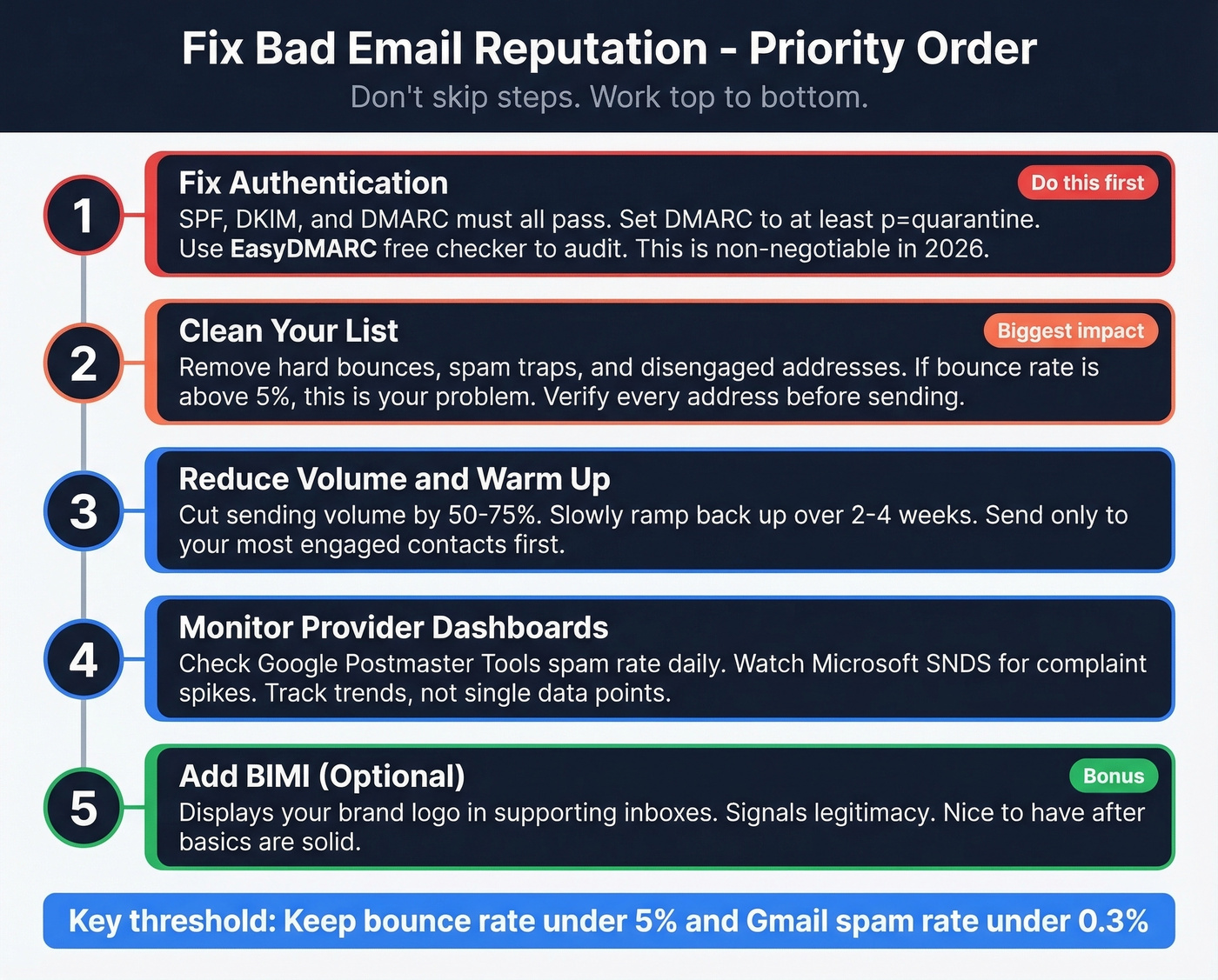
Fix authentication. SPF, DKIM, and DMARC must all pass. This is non-negotiable in 2026. Use EasyDMARC's free checker to audit your records. If DMARC isn't set to at least p=quarantine, you're leaving the door open. BIMI is a nice-to-have on top of this - it displays your brand logo in supporting inboxes and signals legitimacy - but get the basics right first. If you’re troubleshooting specifics, start with DMARC alignment and a working SPF record.
Clean your list. Remove hard bounces, spam traps, and addresses that haven't engaged in 6+ months. If your bounce rate is above 5%, this is your biggest problem. Verified email lists are the fastest way to drop bounce rates. We've watched teams go from 35% bounce rates to under 4% in a single week just by running their list through proper verification before sending. (If you’re diagnosing the mechanics, see our guide to email bounce rate and spam trap removal.)
Warm up the domain. If you're starting fresh or recovering from damage, ramp volume gradually over 2-4 weeks. Start with 20-30 emails per day to your most engaged contacts and increase by 10-20% daily. For tooling options, compare unlimited email warmup platforms.
Fix sending patterns and infrastructure. Consistent daily volume beats spikes. Sending 5,000 emails on Monday and zero on Tuesday looks suspicious to filtering algorithms. Use a custom tracking domain, remove spammy content triggers, and make sure your unsubscribe link works with one click. (More on setup: tracking domain and safe email velocity.)
Expect recovery to take 2-6 weeks of consistent, clean sending. Domain reputation recovers slower than IP reputation, so patience matters as much as the technical fixes.
How Bad Data Destroys Reputation
The root cause of most reputation problems is bad email data. The loop is vicious: you send to an unverified list, some addresses don't exist, those generate hard bounces, and mailbox providers conclude you're sending to addresses you shouldn't have. Your reputation drops. More emails get filtered to spam. Engagement drops further. Reputation drops further.
It's a death spiral, and it starts with a single bad list.
B2B email lists decay at roughly 2-3% per month as people change jobs and companies restructure - a list that was clean six months ago could have 15%+ invalid addresses today. Spam traps and honeypots are even worse. A single hit on a Spamhaus trap can blacklist your domain overnight.

Prospeo runs every email through a 5-step verification process - delivering 98% email accuracy through catch-all handling, spam-trap removal, and honeypot filtering. Stack Optimize, an outbound agency, built from zero to $1M ARR using Prospeo-verified data, maintaining 94%+ client deliverability, bounce rates under 3%, and zero domain flags across all their accounts. That's what clean data looks like in production.
Cold Email Reputation Checklist
Before you launch any cold outreach, run through this:
- Use a dedicated subdomain for cold email (protect your primary domain)
- Warm the subdomain for 2-4 weeks before scaling volume
- Implement SPF, DKIM, and DMARC on the subdomain
- Set up a custom tracking domain (never use shared tracking)
- Keep spam complaints below 0.3%
- Include a one-click unsubscribe in every email
- Run an email reputation check weekly using provider dashboards during active campaigns
- Verify every address before sending - catch invalid addresses, spam traps, and catch-all domains before they damage your reputation
The subdomain point deserves emphasis. If your cold outreach damages reputation on your primary domain, it affects every team member's email - marketing campaigns, customer success replies, even your CEO's inbox. A subdomain isolates the risk completely. Skip this step at your own peril.
Every bad email you send is a spam-trap risk and a reputation hit. At $0.01 per verified email, Prospeo costs less than the deliverability damage from a single dirty list. Data refreshes every 7 days - not 6 weeks - so you're never emailing contacts who've already churned.
Stop checking reputation dashboards and start sending to emails that actually exist.
FAQ
How do I run a free email reputation check?
Start with Google Postmaster Tools, Microsoft SNDS, and Yahoo Sender Hub - all free, and they show the provider-side data that determines inbox placement. Add a Spamhaus lookup to check for blocklisting. These four tools cover the vast majority of consumer mailbox providers and cost nothing.
What's a good email reputation score?
On a 0-100 scale, above 80 means your emails reach inboxes reliably; below 70 signals significant deliverability problems. Scores aren't comparable across tools - a "75" in Sender Score and a "75" in Mailmeteor measure different things. Track trends within one tool over time instead.
Can one bad campaign ruin my domain reputation?
Yes. A single send with a bounce rate above 5% or a Gmail spam rate spike above 0.3% can trigger reputation downgrades that take 2-6 weeks to recover from. Always verify your list before sending.
Does domain reputation affect all mailboxes on my domain?
Domain reputation is tied to the domain itself, not individual accounts. One team member sending to a purchased list can tank deliverability for sales, marketing, customer success, and leadership. This is why dedicated subdomains for outbound are essential - they isolate cold email risk from your primary domain.
How often should I check my sending reputation?
Weekly during active campaigns; daily during warm-up periods or after a deliverability incident like a bounce spike or blacklisting. Google Postmaster Tools updates within 24 hours and Microsoft SNDS refreshes daily, so checking more frequently than that won't surface new data.