

The 10 Best CRM Automation Software Tools in 2026
A RevOps lead we know ran a pilot last quarter - 3,000 contacts pushed through a shiny new CRM workflow. The result? 400+ bounced emails, a dozen "Hi Unknown!" messages to VPs, and a sender domain flagged within two weeks. The CRM worked perfectly. The data was garbage.
That's the dirty secret behind CRM automation software. 20-70% of CRM projects fail, and the leading cause isn't the software - it's what's inside it. The tools that work return an average of $8.71 for every $1 invested. The gap between those outcomes comes down to data quality, process design, and picking a tool that matches your actual workflow rather than the one with the longest feature list.
Here's the thing most CRM guides won't tell you: the CRM you pick matters less than the data you put into it. A $14/user/month Zoho instance with clean, verified contacts will outperform a $165/user/month Salesforce Enterprise setup running on stale data every single time.
Our Picks (TL;DR)
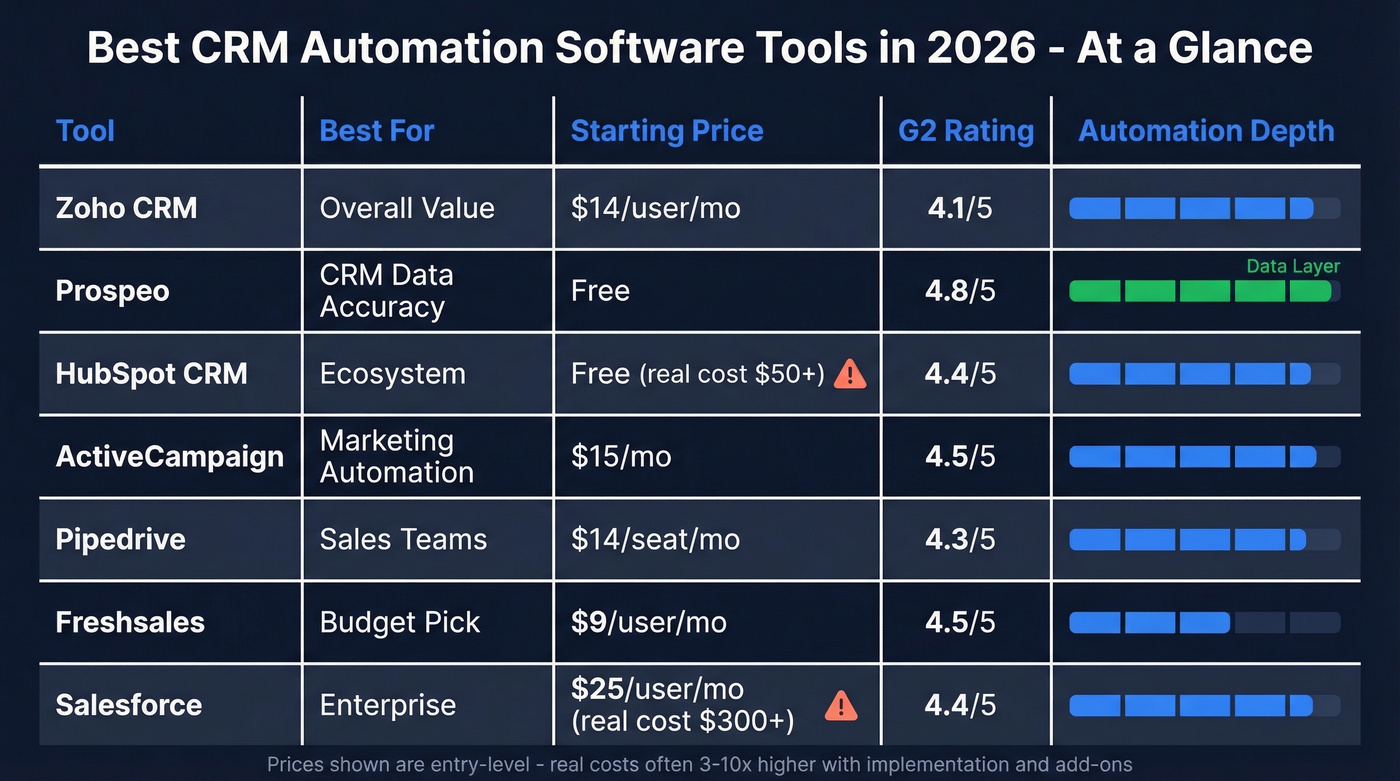
| Category | Tool | Starting Price | One-Line Verdict |
|---|---|---|---|
| Best Overall | Zoho CRM | $14/user/mo | Deep automation + AI at SMB pricing |
| Best for CRM Data Accuracy | Prospeo | Free | Fixes the data layer your automations depend on |
| Best Ecosystem | HubSpot CRM | Free (limited) | Powerful, but real automation costs $50+/seat/mo |
| Best Marketing Automation | ActiveCampaign | $15/mo | 900+ templates, but the CRM is bolted on |
| Best for Sales Teams | Pipedrive | $14/seat/mo | Clean UX with concrete automation limits |
| Best Budget Pick | Freshsales | $9/user/mo | Freddy AI punches above its price |
| Best Enterprise | Salesforce | $25/user/mo | The standard - if you can afford the real cost |
What Is CRM Automation?
CRM automation handles the repetitive work that sales and marketing teams shouldn't be doing manually - workflow triggers, email sequences, lead scoring, deal stage automation, and task routing. The CRM market is projected to hit $262B by 2032, and the reason is simple: automation turns a contact database into a revenue engine.
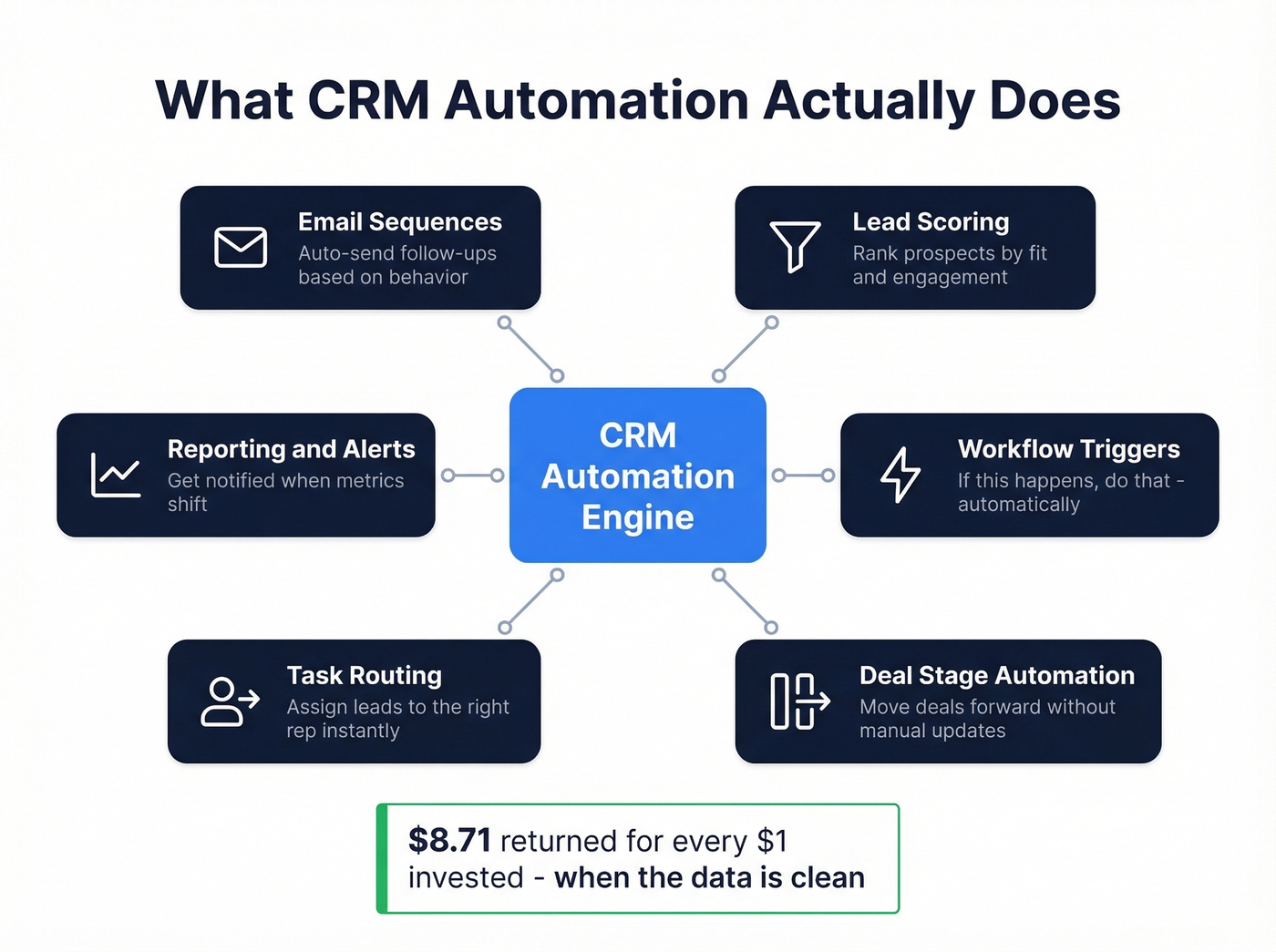
91% of companies with 10+ employees already use a CRM. The question isn't whether you need one. It's whether yours is actually automating anything. 45% of companies say automation is the main thing they want from their CRM tool, yet most are still doing it manually or running automated workflows on top of dirty data, which is arguably worse.
How Much Does It Cost?
Pricing varies wildly depending on team size and complexity:
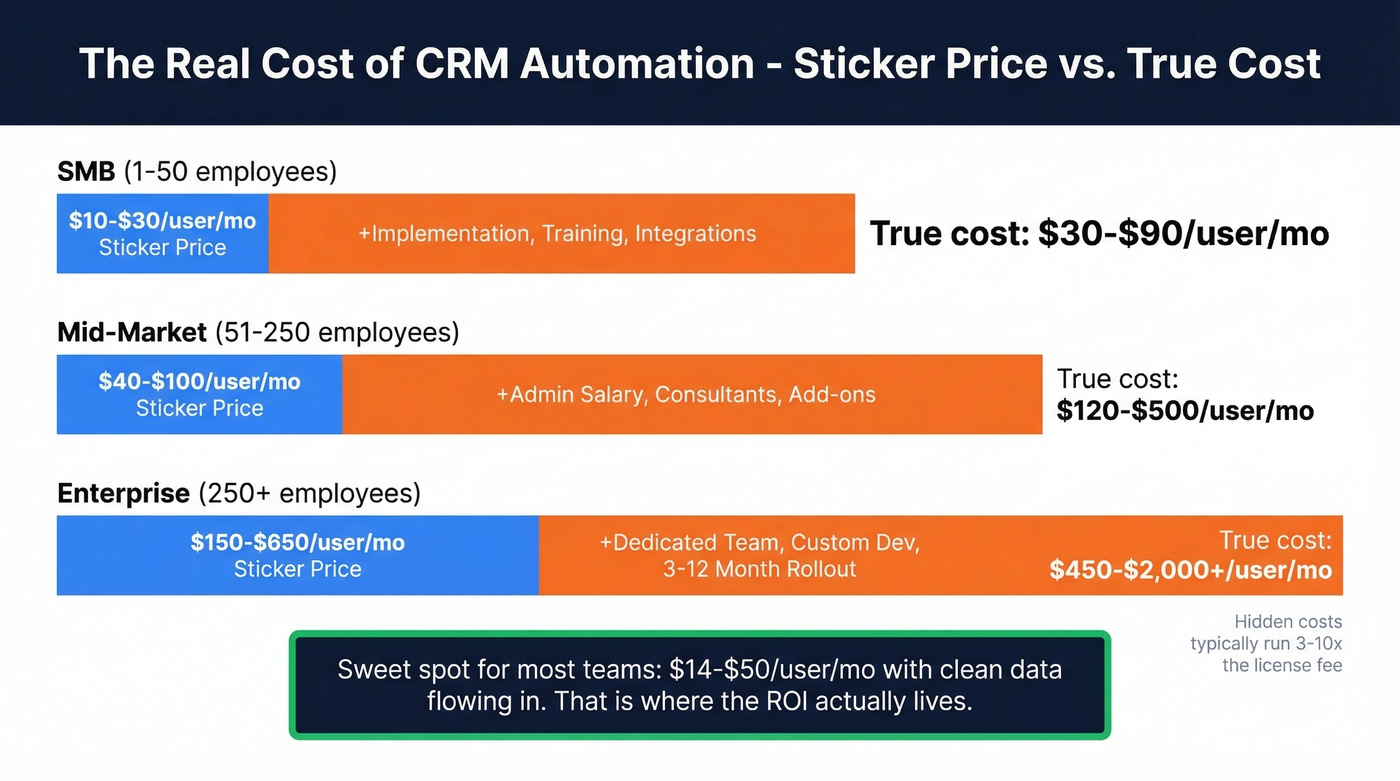
| Company Size | Employees | Typical Range | Implementation |
|---|---|---|---|
| SMB | 1-50 | $10-$30/user/mo | Days to weeks |
| Mid-Market | 51-250 | $40-$100/user/mo | Weeks to months |
| Enterprise | 250+ | $150-$650/user/mo | 3-12 months |
The sticker price is misleading. A CRM that costs $20/user/month can run 3-10x that once you factor in implementation, training, integrations, and admin overhead. A 20-person team on HubSpot Professional isn't paying $1,000/month - they're paying $1,000 plus onboarding fees, a dedicated admin's time, and whatever Zapier/Make glue holds the stack together.
Most teams reading this don't need enterprise CRM. They need a tool in the $14-$50/user/month range with solid workflow automation and clean data flowing in. That's where the ROI actually lives.


CRM automation fails when 20-70% of contact data is stale or wrong. Prospeo enriches your Salesforce or HubSpot contacts with 50+ verified data points at a 92% match rate - refreshed every 7 days, not every 6 weeks. Snyk cut bounce rates from 35% to under 5% and grew AE-sourced pipeline 180%.
Stop automating on dirty data. Enrich your CRM for $0.01 per email.
The 10 Best CRM Automation Tools
1. Zoho CRM - Best Overall
Use this if you want deep customization, AI-powered insights, and enterprise-grade automation without enterprise pricing. Zoho earned PCMag's Editors' Choice with a 4.5 Outstanding rating - it packs Zia AI for predictive lead scoring, anomaly detection, and email sentiment analysis into plans starting at $14/user/month billed annually.
Skip this if you want a plug-and-play experience. Zoho's depth is its strength and its curse. The learning curve is real, and the UI feels dated compared to Pipedrive or HubSpot. Its 4.1/5 G2 rating across 2,780 reviews reflects that friction - users love the power but gripe about the onboarding.
Pricing tiers run Standard ($14), Professional ($35), Enterprise ($50), and Ultimate ($65) per user/month billed annually, with a free plan for up to 3 users. The Enterprise tier is where the serious automation lives: multi-step workflows, custom functions, and Zia's full AI suite. For teams willing to invest setup time, Zoho is the best value in automated CRM right now.
2. Prospeo - Best for CRM Data Accuracy
Every CRM automation tool on this list assumes your contact data is accurate. Prospeo is what makes that assumption true.
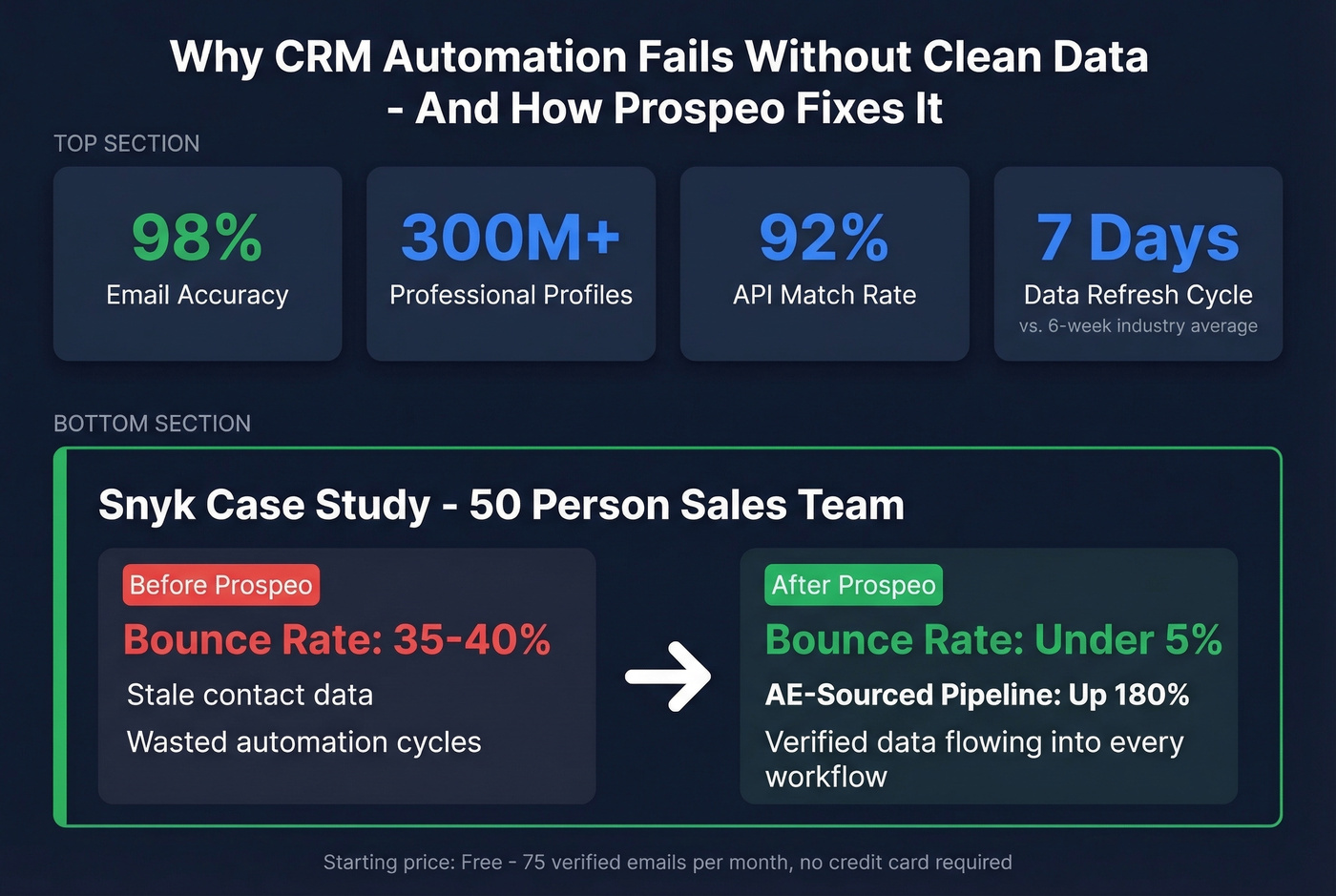
The platform covers 300M+ professional profiles with 143M+ verified emails at 98% accuracy and 125M+ verified mobile numbers delivering a 30% pickup rate. Connect it to Salesforce or HubSpot, and it enriches your existing contacts with 50+ verified data points - 92% API match rate, 83% of leads returned with contact data. Every record refreshes on a 7-day cycle, compared to the six-week industry average.

You can filter by buyer intent across 15,000 Bombora topics, technographics, job changes, and funding signals - 30+ criteria that let you build hyper-targeted lists before enriching them into your CRM. Native integrations with Salesforce, HubSpot, Lemlist, Instantly, Smartlead, Clay, Zapier, and Make mean enriched data flows directly into your automation workflows without duct tape.
The results speak for themselves: Snyk's 50-person sales team cut bounce rates from 35-40% to under 5% and saw AE-sourced pipeline increase 180% after enriching their CRM data. Pricing starts free - 75 verified emails per month plus 100 Chrome extension credits, no credit card required. Paid plans run roughly $0.01 per email with no contracts.
3. HubSpot CRM - Best Ecosystem Play
HubSpot's free CRM is a popular entry point in B2B, and the contact management, deal tracking, and basic reporting are genuinely useful at $0. The ecosystem - Marketing Hub, Sales Hub, Service Hub, Operations Hub - means you can build an entire GTM stack without leaving HubSpot, with Breeze AI baked into the platform.
Use this if you want one platform for marketing, sales, and service with a massive integration marketplace.
Skip this if you think "free CRM with automation" means what it sounds like. HubSpot's free plan limits you to one automated email per form submission. Advanced workflow automation starts at Professional: $50/seat/month. That's what catches teams off guard. You sign up for free, build your pipeline there, and then discover that the automation you actually need costs $500+/month for a 10-person team.
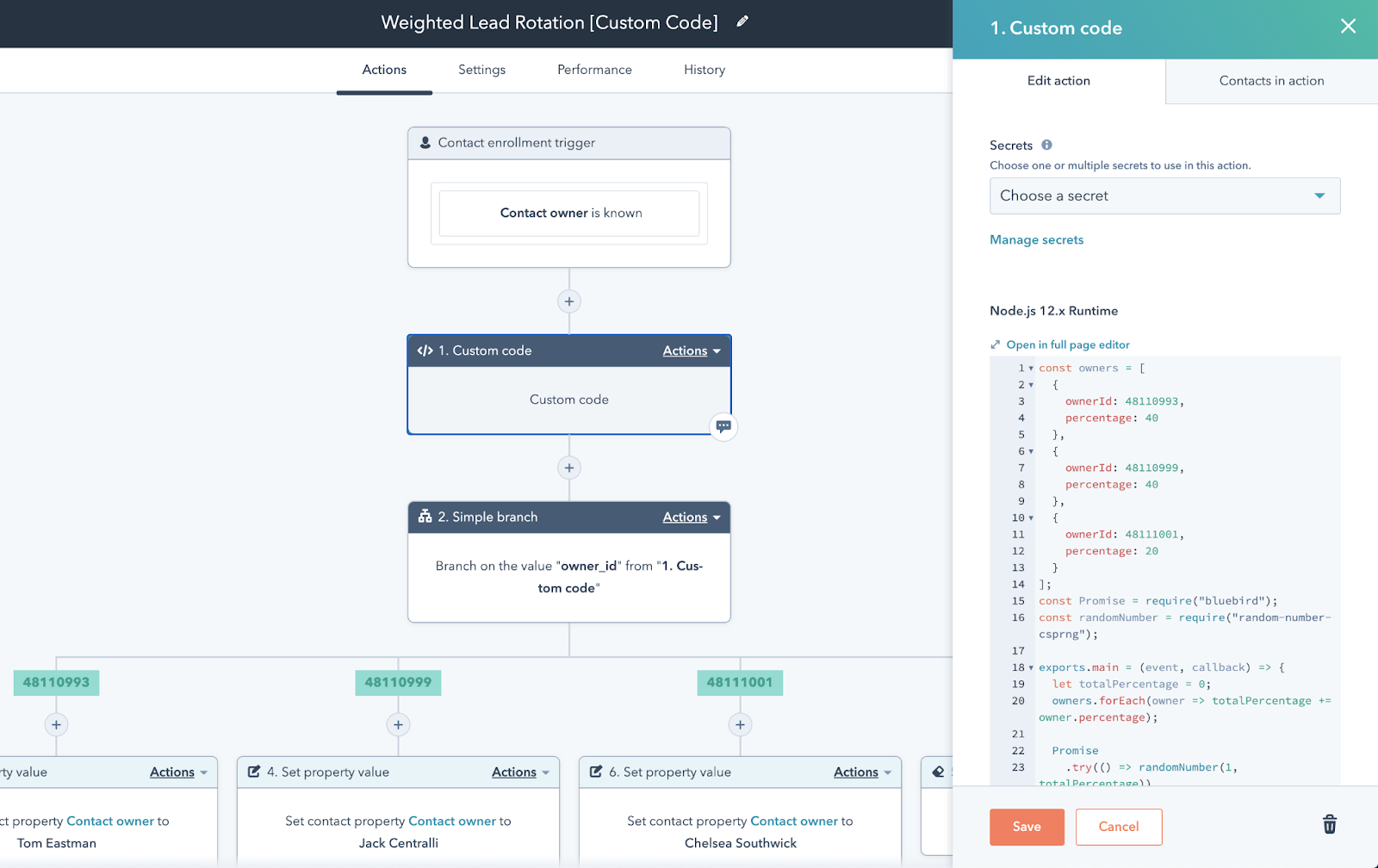
With a 4.4/5 rating across 12,965 G2 reviews, HubSpot's quality isn't in question. The question is whether you're ready for the price jump when you outgrow free.
4. ActiveCampaign - Best Marketing Automation
ActiveCampaign is the automation king. 900+ customizable workflow templates, multi-channel execution across email, SMS, and social, and a visual automation builder that's genuinely best-in-class. If you're running complex nurture sequences with dozens of branching conditions, nothing else comes close at this price point.
The caveat: ActiveCampaign's CRM is bolted on, not built in. You need the Plus plan plus the Pipelines add-on to get deal management - roughly $108/month minimum. For marketing-heavy teams that need light pipeline tracking, it's perfect. For sales-led orgs, look elsewhere.
5. Pipedrive - Best for Sales Teams
Pipedrive is the cleanest sales CRM on the market. The visual pipeline is intuitive, the mobile app is fast, and the automation builder does exactly what you'd expect without overcomplicating things.
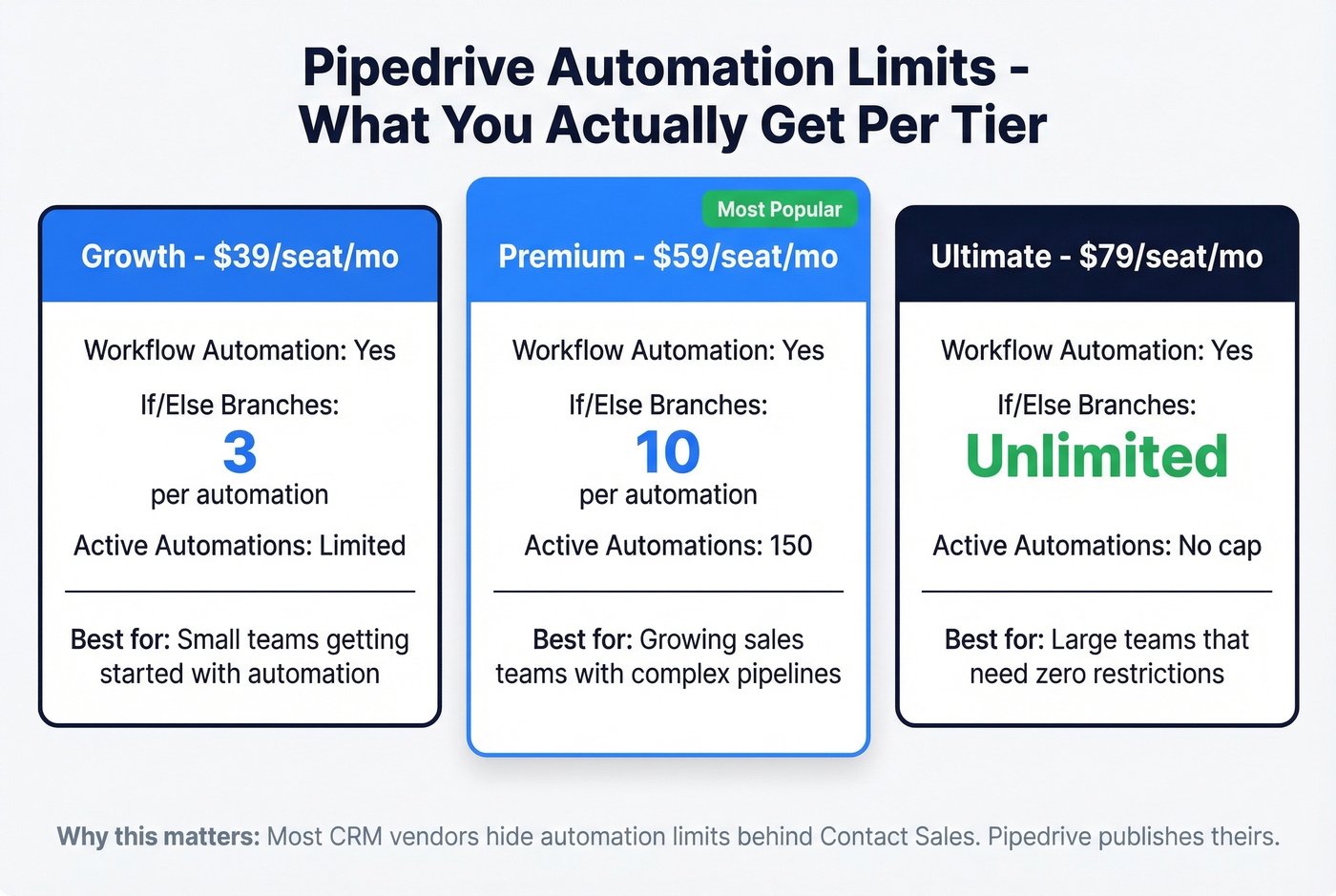
What makes Pipedrive stand out in this comparison: they actually publish their automation limits. The Growth plan at $39/seat/month unlocks workflow automation with 3 if/else branches per automation. Premium ($59/seat/month) bumps that to 10 branches and 150 active automations. Ultimate ($79/seat/month) is the least restricted tier. Those are concrete numbers you can plan around - most competitors hide this behind "contact sales."
6. Freshsales - Best Budget Pick
Freshsales starts at $9/user/month and packs in workflow automation, Freddy AI for lead scoring and deal insights, and a clean interface that doesn't require a week of training. It carries a 4.5/5 on G2 across 1,222 reviews, with users consistently praising ease of use.
The tradeoff is reporting. If you need granular sales funnel analytics or custom dashboards, you'll hit walls quickly. The Pro tier at $39/user/month helps, but Freshsales isn't where you go for deep BI. For teams that want solid automation on a tight budget and can live with simpler reporting, it's the best value under $10/month.
7. Salesforce - The Enterprise Standard
Salesforce is the 800-pound gorilla. Sales Cloud starts at $25/user/month for Starter Suite, but most teams end up on Enterprise at $165/user/month for advanced automation and scale. Factor in implementation consultants, a dedicated admin, and AppExchange add-ons, and you're looking at $300-$500/user/month all-in for a mid-market deployment.
If you're under 100 employees, the ROI math rarely works. If you're over 500, it's still the default for a reason.
8. Salesmate
Salesmate targets mid-market teams with built-in calling, texting, and email automation across three tiers: Starter ($15/user/month), Growth ($30), and Boost ($50). It's a solid all-rounder that doesn't dominate any single category but covers the bases without requiring a stack of add-ons.
9. EngageBay
EngageBay is the budget all-in-one - CRM, marketing automation, helpdesk, and live chat starting free for up to 1,000 contacts. The Basic plan runs $12.99/user/month. It won't win design awards, but for bootstrapped teams that need everything in one place, the price-to-feature ratio is hard to beat.
10. Brevo and Monday.com - Honorable Mentions
Brevo (formerly Sendinblue) is marketing-first with a CRM layer added on. The free tier gives you 300 emails/day, and the Sales Platform CRM starts at $12/month. If your primary need is email marketing with light deal tracking, Brevo works. For serious sales automation, it's too thin.
Monday.com is a work OS that added a CRM layer - not a CRM that added project management. Plans start at $8/user/month with a three-user minimum and a free plan for up to 1,000 contacts. Teams already living in Monday for project work will appreciate the unified view. Dedicated sales teams will find the contact management automation shallow compared to Pipedrive or Zoho.
Full Comparison
| Tool | Starting Price | Automation At | Best For |
|---|---|---|---|
| Zoho CRM | $14/user/mo | Standard tier | Overall value |
| Prospeo | Free | Always-on enrichment + verification | CRM data accuracy |
| HubSpot CRM | Free | Professional ($50) | Ecosystem play |
| ActiveCampaign | $15/mo | Starter tier | Marketing automation |
| Pipedrive | $14/seat/mo | Growth ($39) | Sales teams |
| Freshsales | $9/user/mo | Growth tier | Budget pick |
| Salesforce | $25/user/mo | Enterprise ($165) | Enterprise |
| Salesmate | $15/user/mo | Starter tier | Mid-market |
| EngageBay | Free | Basic ($12.99) | Budget all-in-one |
| Brevo | Free | Paid ($12/mo) | Email marketing + CRM |
| Monday.com | $8/user/mo | Standard tier | Work OS teams |

Features That Actually Matter
Not every feature on a CRM's marketing page matters for automation. Here's what to evaluate during your trial - not just on the feature comparison page.
Workflow builder quality. Can you build multi-step, branching workflows visually? Or are you stuck with simple if/then rules? We've seen teams pick a CRM based on its feature list, only to discover the automation builder is clunky enough that nobody uses it. Test the builder yourself.
Automation limits per plan. This is the hidden gotcha. Pipedrive publishes theirs - 150 active automations on Premium. Most others don't. Ask before you buy: how many active workflows, how many branches, how many actions per workflow?
Lead scoring and relationship intelligence. Automated lead scoring turns your CRM from a database into a prioritization engine. Zoho's Zia and Freshsales' Freddy both offer AI-powered scoring, while HubSpot gates it behind Professional. Newer tools are also layering in relationship intelligence - mapping stakeholder connections and engagement history to surface warm paths into accounts. If your deals involve buying committees, this matters more than almost anything else on the feature list.
Email automation and deliverability. Sending automated emails from your CRM is only useful if they land in inboxes. Check deliverability infrastructure, sending limits, and whether the tool supports custom authentication - SPF, DKIM, DMARC. A 98% delivery rate and a 92% delivery rate look similar on paper but produce wildly different pipeline numbers at scale. (If you want a deeper checklist, see our email deliverability guide.)
Integrations. Your CRM doesn't exist in isolation. Native integrations with your sequencer, enrichment tools, and marketing platform matter. Zapier and Make fill gaps, but every zap is a potential failure point. If you're wiring outbound tools into your CRM, use a repeatable setup guide instead of improvising.
Automated reporting. Can you track which workflows drive revenue, not just which ones fire? Basic CRMs often fall short here - make sure yours can generate automated pipeline reports tied to specific workflow outcomes. (For what to track, start with pipeline health.)
Five Automations That Kill ROI
Dirty data amplified by automation. This is mistake zero, and we've seen it wreck campaigns firsthand. Automation doesn't fix bad data - it scales it. If 30% of your contacts have stale emails, your automated sequences will bounce 30% of the time. That's how you get domain reputation damage, "Hi Unknown!" subject lines, and a CRM full of phantom leads. Enriching your CRM data with verified contacts before automations touch them prevents the bounce-rate spiral that kills sender reputation. If you're diagnosing bounces, start with email bounce rate benchmarks and fixes.
Automating before defining the process. If your sales process is a mess manually, automating it just creates a faster mess. Map the workflow on a whiteboard first. Identify the triggers, conditions, and actions. Then build. (If you need a framework, use sales process optimization.)
Over-automating everything. Not every touchpoint should be automated. A personalized video from an AE after a demo request converts better than a templated drip email. Automation handles the 80% of repetitive tasks so your team can focus on the 20% that requires a human touch. If you're rebuilding sequences, pull from these sales follow-up templates.
Ignoring total cost of ownership. That $20/user/month CRM can cost 3-10x more once you add implementation, training, integrations, and ongoing admin. Budget for the real number, not the sticker price.
Skipping training and adoption. The average CRM adoption rate across industries is just 26%. Teams that launch too many workflows at once, skip training, or automate on top of unverified data account for most of the 20-70% failure rate. Start with 2-3 simple automations, get your team using them daily, then expand. Trying to launch 50 workflows on day one is how you end up in the failure bucket.
You don't need a more expensive CRM - you need cleaner data inside the one you have. Prospeo's native integrations with Salesforce, HubSpot, Clay, and Zapier push 98%-accurate emails and verified mobiles directly into your workflows. No contracts, no sales calls, 75 free emails to start.
Feed your CRM automations data that actually connects to real buyers.
How to Choose: SMB vs Enterprise
| Factor | SMB (under 100 employees) | Enterprise (100+) |
|---|---|---|
| Budget | $10-$50/user/mo | $100-$300/user/mo |
| Implementation | Days to weeks | 3-12 months |
| Admin needs | Self-serve | Dedicated CRM admin |
| Top picks | Zoho, Pipedrive, Freshsales | Salesforce, HubSpot Enterprise, Dynamics |
Let's be honest: if you're under 100 employees, start with a self-serve tool - Zoho, Pipedrive, or Freshsales - and layer in enrichment and integrations as you grow. You can always migrate up. Migrating down from an enterprise CRM you're paying $150/user/month for is painful and expensive.
The best approach we've seen across our customers: pick a CRM you can deploy in under two weeks, connect it to a data enrichment layer so your contacts stay fresh, and build your first 3-5 automations around the highest-impact workflows - lead assignment, follow-up reminders, and stage-based email sequences. That foundation is where CRM automation software delivers real returns. Expand from there.
FAQ
What's the difference between CRM and marketing automation?
CRM software manages contacts, deals, and pipeline - it's your system of record for customer relationships. Marketing automation handles campaigns, nurture sequences, and lead scoring at scale. Tools like HubSpot and ActiveCampaign combine both, but the core functions serve different teams and goals.
Can I automate my existing CRM without switching platforms?
Yes. Zapier and Make connect most CRMs to external automation triggers without migration. You can also layer in enrichment tools to keep your existing data fresh automatically via API or native integrations - no platform switch required.
What's the average ROI of CRM automation?
Businesses average $8.71 back for every $1 invested in CRM. Benchmarks show 29% more revenue and 34% higher sales productivity. The key variable is adoption - teams that actually use the tool see the returns.
How long does CRM implementation take?
SMB CRMs like Zoho, Pipedrive, and Freshsales deploy in days to weeks with minimal IT involvement. Enterprise solutions like Salesforce and Microsoft Dynamics typically take 3-12 months with dedicated admin, custom integrations, and phased training rollouts.
Why do most CRM automation projects fail?
Poor user adoption is the leading cause - the average CRM adoption rate is just 26%. Teams that launch too many workflows at once, skip training, or automate on top of unverified data account for most of the 20-70% failure rate. Start simple, train thoroughly, and clean your data first.