


Browse AI Review 2026: Pricing, Reviews, Pros & Cons
You signed up for Browse AI, built your first robot, and watched it pull 500 rows from a directory in minutes. Then you checked your credit balance and realized you'd burned through half your monthly allotment on a single "premium" site scrape. That moment - the one where the credit math stops making sense - is exactly what we're going to help you avoid.
Browse AI's credit system is simultaneously its best feature and its biggest trap. Understanding the real pricing, reviews, and pros and cons before committing saves you money and frustration.
30-Second Verdict
Browse AI earns a 4.8/5 on G2 from 59 reviews, with 93% of them five stars. It's the best no-code scraper for non-technical users who need scheduled extraction from stable websites. The biggest caveat: credits burn faster than you'd expect on premium sites, and they don't roll over.
Plans start at $19/mo on annual billing, but your real cost depends entirely on credit consumption.
Here's the thing: if your average deal size is under $5k, Browse AI's credit math probably works in your favor. Above that, you'll outgrow it fast and want Apify or a custom solution.
Browse AI Pricing Breakdown
Browse AI runs on a credit-based model across four tiers. Annual billing is dramatically cheaper on Personal - roughly 60% less than monthly - and typically 20%+ cheaper on Professional depending on the credit tier you select.
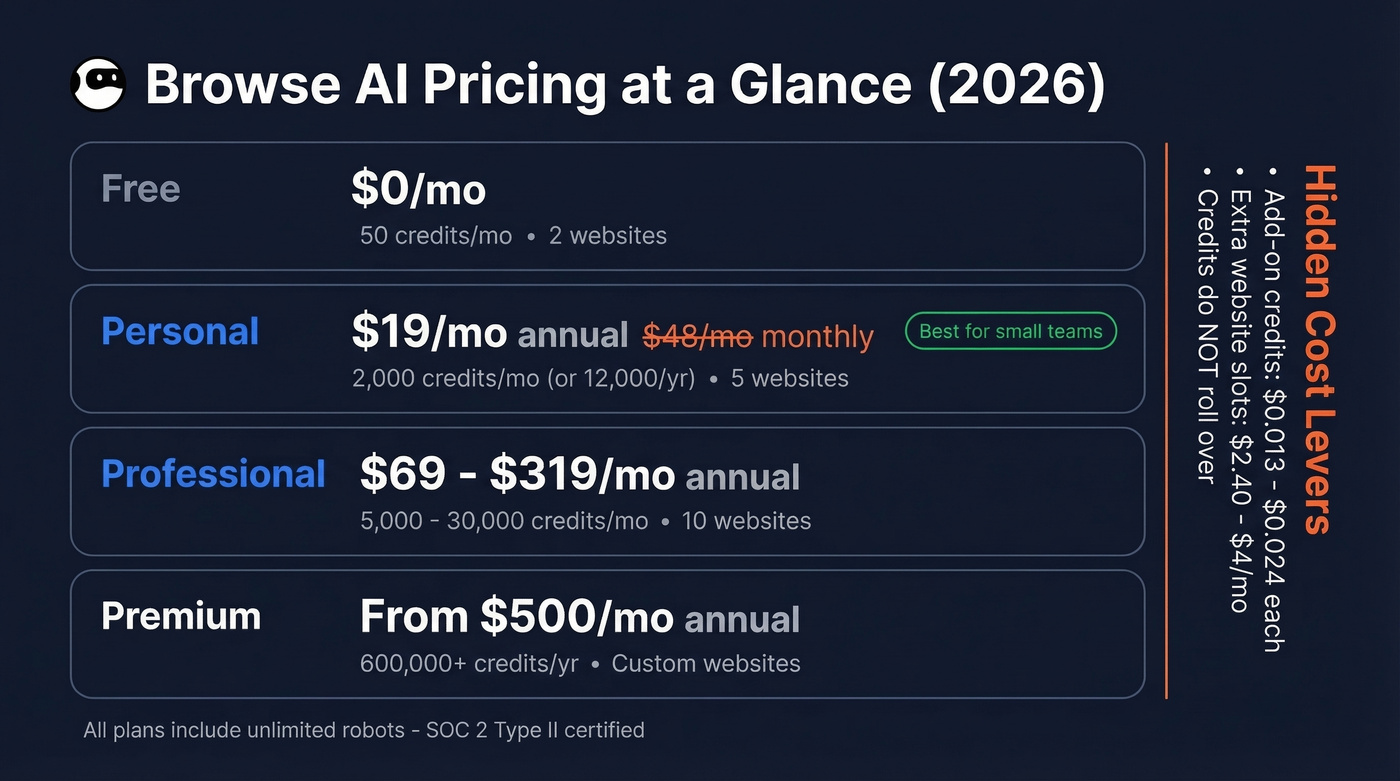
| Plan | Price | Credits | Websites |
|---|---|---|---|
| Free | $0 | 50/mo | 2 |
| Personal | $48/mo or $19/mo annual | 2k/mo or 12k/yr | 5 |
| Professional | $87-$399/mo or $69-$319/mo annual | 5k-30k/mo | 10 |
| Premium | From $500/mo annual | 600k+/yr | Custom |
All plans include unlimited robots. The real cost lever is add-on credits: $0.024/credit on Personal annual, dropping to $0.013-$0.017 on Professional annual. Need extra website slots? Those run $4/mo on Personal annual, $2.40/mo on Professional. Browse AI is SOC 2 Type II certified and GDPR/CCPA compliant.
How Credits Actually Work
This is where most users get surprised. Credit cost depends on data volume and how aggressively the target site blocks bots.
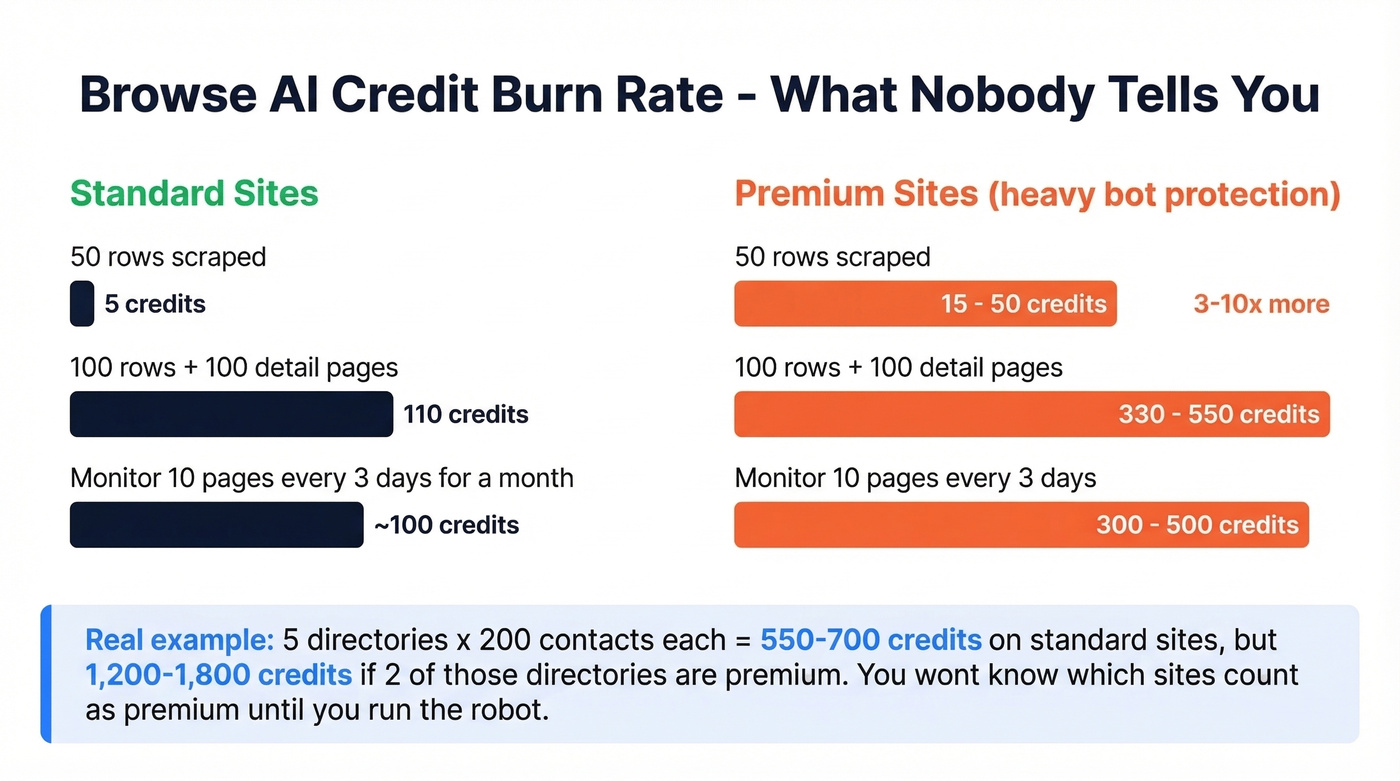
| Scenario | Credit Cost |
|---|---|
| 50 rows, standard site | 5 credits |
| 100 list rows + 100 detail pages (deep scrape) | 110 credits |
| Monitor 10 pages every 3 days | ~100 credits/mo |
On standard sites, 10 rows costs 1 credit. On premium sites with heavy bot prevention, that same 10 rows costs 2-10 credits. In our testing, premium sites typically burned 3-5x the standard rate.
Let's do the real-cost math that nobody else shows you. A typical lead-gen workflow scraping 5 directories of 200 contacts each runs roughly 550-700 credits per month on mostly standard sites - that fits comfortably on the Personal plan. Mix in two premium directories and you're looking at 1,200-1,800 credits, still within Personal limits but tighter than you'd expect. Add a third premium directory and you're shopping for Professional.

Browse AI gets you raw data. But scraped emails bounce at 15-30% - enough to torch your domain reputation. Prospeo's 5-step verification with catch-all handling and spam-trap removal turns those CSV dumps into deliverable contact lists at 98% accuracy for ~$0.01/email.
Stop burning your sender reputation on unverified scraped data.
Pros
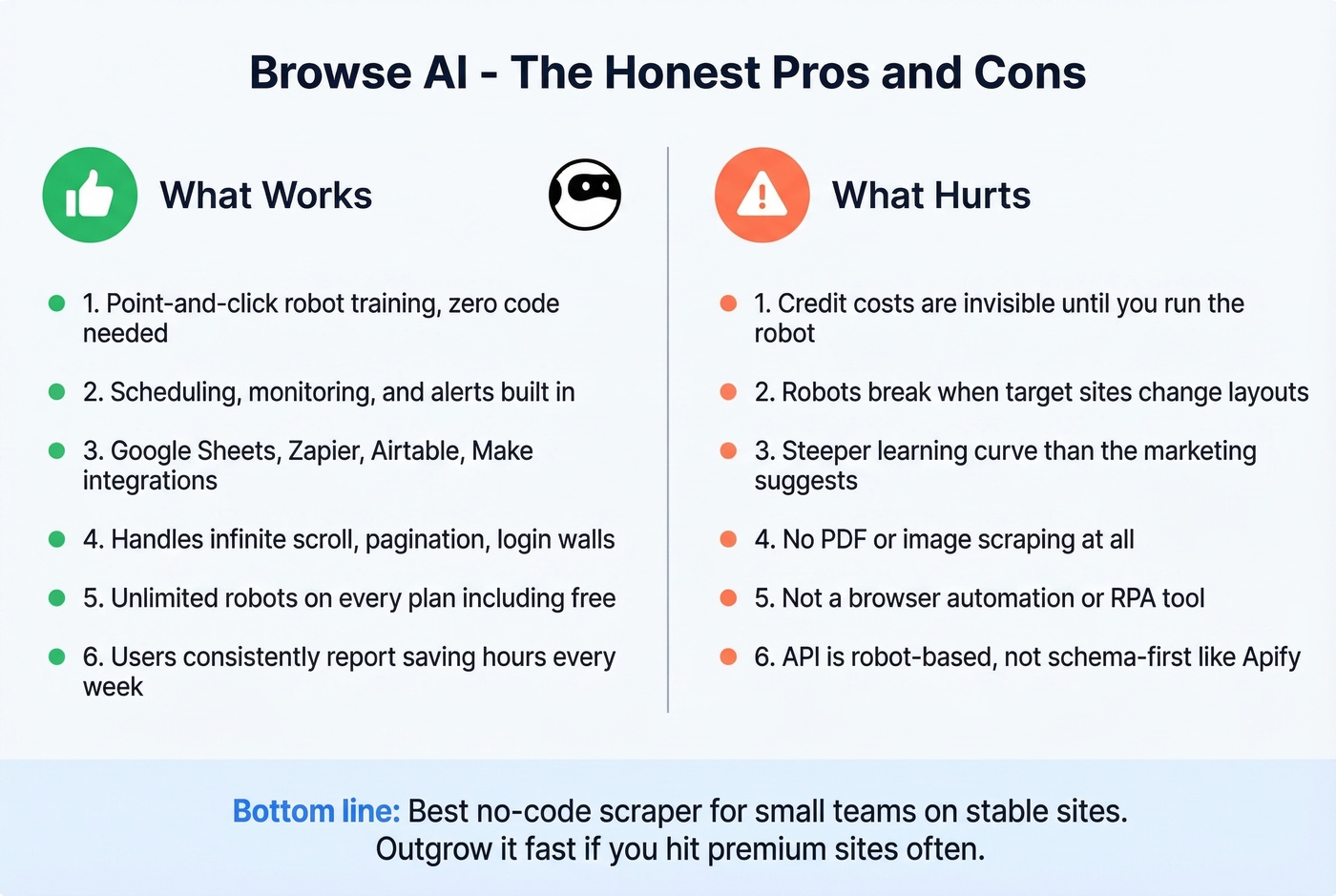
- Point-and-click robot training - no code, no CSS selectors, no dev time.
- Scheduling, monitoring, and alerts - Browse AI's killer feature for competitive intelligence and price tracking.
- Wide integration support - Google Sheets, Zapier, Airtable, Make, webhooks, and a REST API.
- Handles tricky pages - infinite scroll, pagination, and login-gated content all work once trained.
- Unlimited robots on every plan, including free.
- Consistent time savings - the top theme across G2 reviews, with users reporting hours saved every week.
Cons
- The credit system is genuinely confusing. You won't know whether a specific domain gets treated as a "premium" site until you run the robot. That 2-10x credit multiplier is invisible until it hits.
- Robots break when sites change layouts. AI change detection helps, but expect recurring maintenance on dynamic sites. We've rebuilt robots three or four times on sites that update their DOM frequently.
- Steeper learning curve than marketed. Plan on rebuilding your first 3-5 robots as you learn the quirks - the "no-code" label is accurate but doesn't mean "no effort."
- No PDF or image scraping. Document and visual extraction workflows are out of scope entirely.
- Not a browser automation tool. Users trying form-submission workflows report failures on Reddit. It's a scraper, not an RPA tool. Skip this if you need to fill out forms or click through multi-step processes.
- API is robot-based, not schema-first. Browse AI offers a REST API, but it's tied to robots you've already trained in the UI. For fully programmatic, schema-driven scraping, Apify is usually a better fit.
What Users Say in Reviews
Ratings are strong across platforms: 4.8/5 on G2 (59 reviews), 4.6/5 on Capterra (62 reviews), 4.6/5 on Software Advice (62 reviews).
The user base skews heavily small business - 46 of 59 G2 reviewers come from companies with 50 or fewer employees. This isn't an enterprise tool pretending to be one. It's built for small teams, and the reviews reflect that.
Praise centers on ease of use and time savings. Complaints center on pricing confusion and robot maintenance. The most common use cases we see mentioned: directory scraping, job board monitoring, ecommerce price tracking, and real estate listings.
Alternatives Worth Considering
| Tool | Starting Price | Usage Model | Best For |
|---|---|---|---|
| Apify | $29/mo | Compute units | Developers who want full control |
| ParseHub | $189/mo | Pages per run | JS-heavy sites |
| Octoparse | $99/mo | Visual scraping | Non-coders wanting more depth |
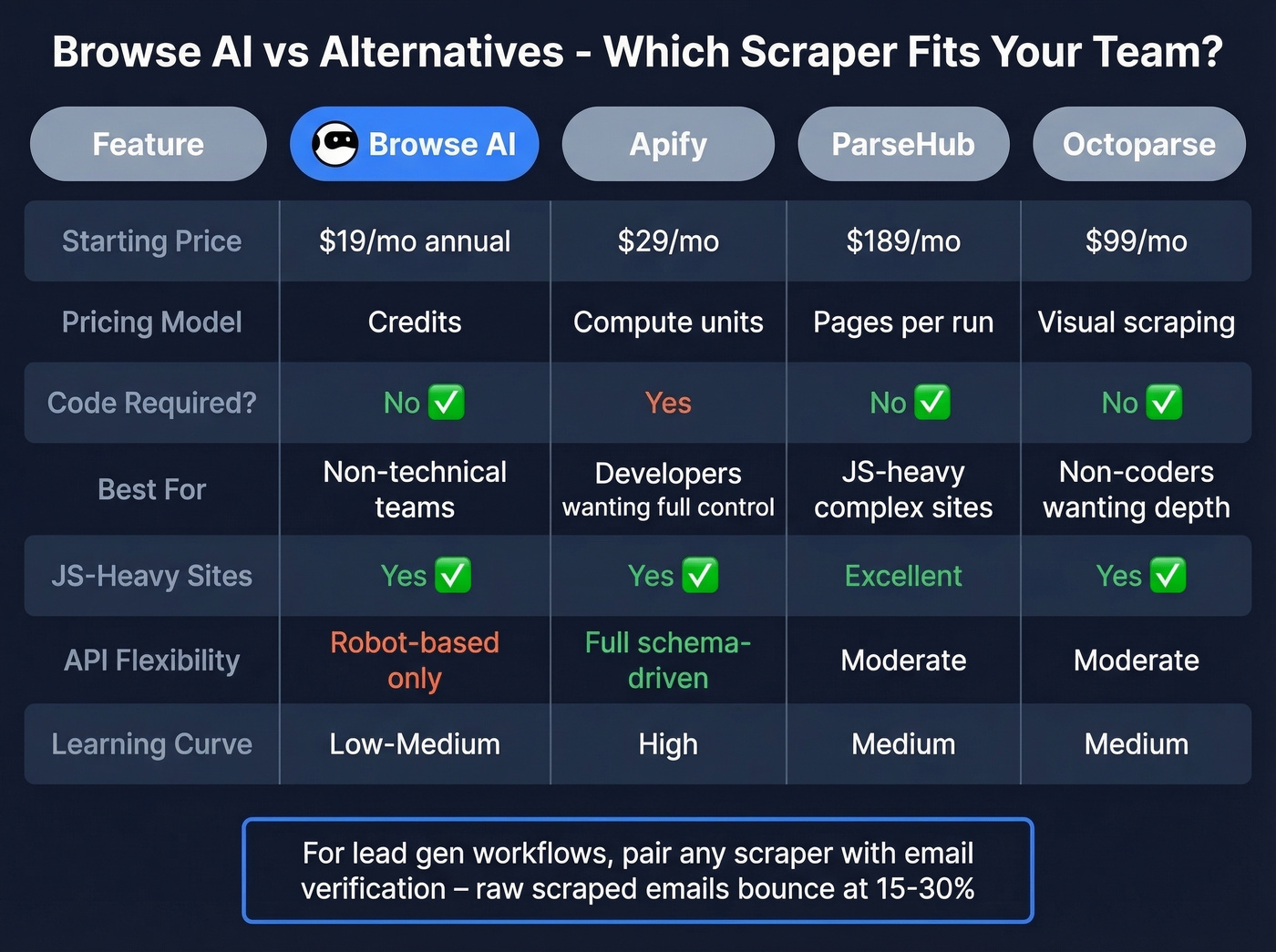
Apify is the go-to if you're comfortable with code - prebuilt actors, compute-unit pricing, and a massive community. ParseHub handles JavaScript-heavy sites well but $189/mo is steep for casual use. Octoparse sits between Browse AI and Apify on the technical spectrum.
For lead generation specifically, the extraction tool is only step one. Raw scraped emails bounce at alarming rates - we've seen 15-30% bounce rates from directory scrapes that looked perfectly clean. Prospeo verifies emails to 98% accuracy at roughly $0.01/email using a proprietary 5-step verification process with catch-all handling and spam-trap removal, turning unusable CSV dumps into safe-to-send contact lists.

If you're scraping directories for lead gen, you're paying Browse AI credits to extract contacts - then gambling on whether those emails actually work. Prospeo gives you 75 free verified emails/month with the same accuracy that cut Snyk's bounce rate from 35% to under 5%.
Scrape with Browse AI. Verify with Prospeo. Bounce rate under 4%.
FAQ
Is Browse AI free?
Yes. The free plan includes 50 credits/month, 2 websites, 3 users, and unlimited robots. That's enough for roughly 500 rows on standard sites - sufficient to test workflows, not enough for production. Premium sites will exhaust the allotment in one or two runs.
Do Browse AI credits roll over?
No. Unused credits expire at the end of each billing cycle. Budget your robot schedules accordingly, or purchase add-on credits at $0.024/credit on Personal annual plans and $0.013-$0.017 on Professional annual.
How accurate are emails scraped with Browse AI?
Browse AI pulls whatever text appears on the page, but raw scraped emails typically have 15-30% bounce rates that'll damage your sender reputation. Run them through a verification service before any outreach. Prospeo's free tier handles 75 emails/month at 98% accuracy - a solid starting point for small scraping workflows.
Is Browse AI worth it for lead generation?
For teams scraping fewer than 1,000 contacts monthly from standard directories, the Personal plan at $19/mo annual delivers strong ROI. Once you're hitting premium sites regularly or need enrichment beyond what's visible on the page, pairing Browse AI with a dedicated verification tool or switching to Apify gives you more control over both costs and data quality.