

Browse AI vs Octoparse: Which Scraper Actually Fits Your Use Case?
Your sales ops team needs data from 12 different websites, updated weekly, flowing into a CRM. You've narrowed it down to two finalists. One's a cloud-native recorder that heals itself when sites change. The other's a desktop-plus-cloud workhorse that muscles through anti-bot walls. The right pick depends entirely on what you're scraping - and whether you should be scraping at all.
30-Second Verdict
- Browse AI - best for simple monitoring and self-healing scrapers. If you need to track price changes or job listings across a handful of sites, it's the faster path.
- Octoparse - best for complex, large-scale scraping on protected sites. More setup, more power, especially on JavaScript-heavy pages with aggressive anti-bot measures.
- Skip both - if your real goal is B2B contact data for outbound. Scraping professional profiles for emails and phone numbers is a fragile, expensive workflow. A purpose-built database gets you there without crawlers, proxies, or maintenance headaches.
Feature-by-Feature Comparison
Both tools sit at 4.8/5 on G2, which tells you almost nothing. We dug into the sub-ratings and feature gaps - those paint a clearer picture:
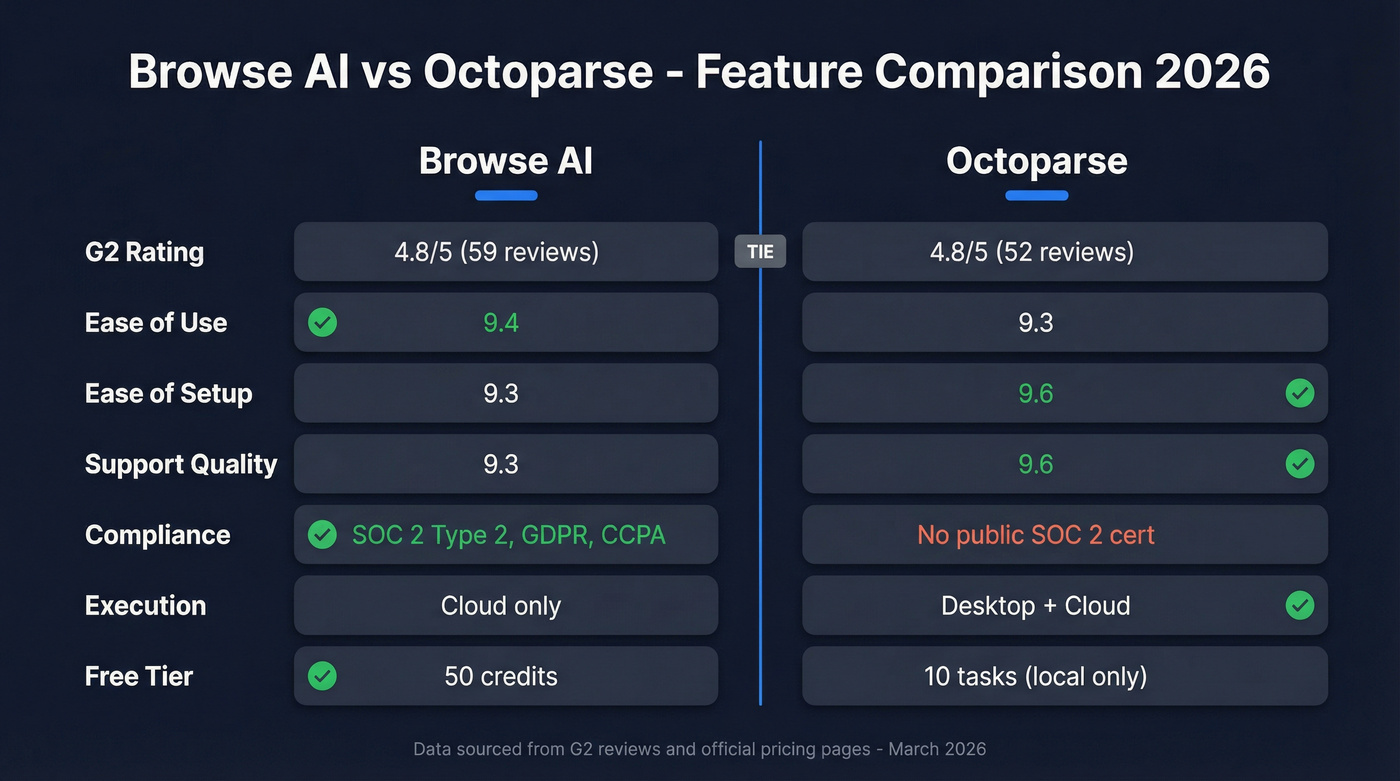
| Category | Browse AI | Octoparse | Edge |
|---|---|---|---|
| G2 Overall | 4.8/5 (59 reviews) | 4.8/5 (52 reviews) | Tie |
| Ease of Use | 9.4 | 9.3 | Browse AI |
| Ease of Setup | 9.3 | 9.6 | Octoparse |
| Quality of Support | 9.3 | 9.6 | Octoparse |
| Compliance | SOC 2 Type 2, GDPR/CCPA | No public SOC 2 Type 2 certification | Browse AI |
| Execution Model | Cloud-based | Desktop + cloud | Octoparse |
| Starting Price | Free (50 credits) | Free (10 tasks; local runs) | Browse AI |
| Integrations | Sheets, Airtable, Zapier | Zapier (Standard+), plus export options by plan | Browse AI |
Octoparse edges out Browse AI on setup and support. Browse AI wins on ease of use and is the only one publishing SOC 2 Type 2 certification and GDPR/CCPA compliance. The real differences are below the surface.
What You'll Actually Pay
Browse AI Pricing
Browse AI runs on credits. Every scraping action consumes them, and consumption varies by page complexity, pagination depth, subpages, and workflow steps:
| Plan | Monthly Price | Credits/Month |
|---|---|---|
| Free | $0 | 50 |
| Personal | $48/mo | 2,000 |
| Professional | $87/mo | 5,000 |
| Premium | From $500/mo (billed annually) | 600,000+/year |
The catch: credit consumption can feel unpredictable until you're running jobs in production. We've seen simple single-page robots burn through credits at a reasonable clip, then watched multi-step workflows with pagination eat credits three times faster than expected.
Octoparse Pricing (+ Hidden Costs)
Octoparse's plan tiers are straightforward, but your real cost can jump once you add anti-blocking:
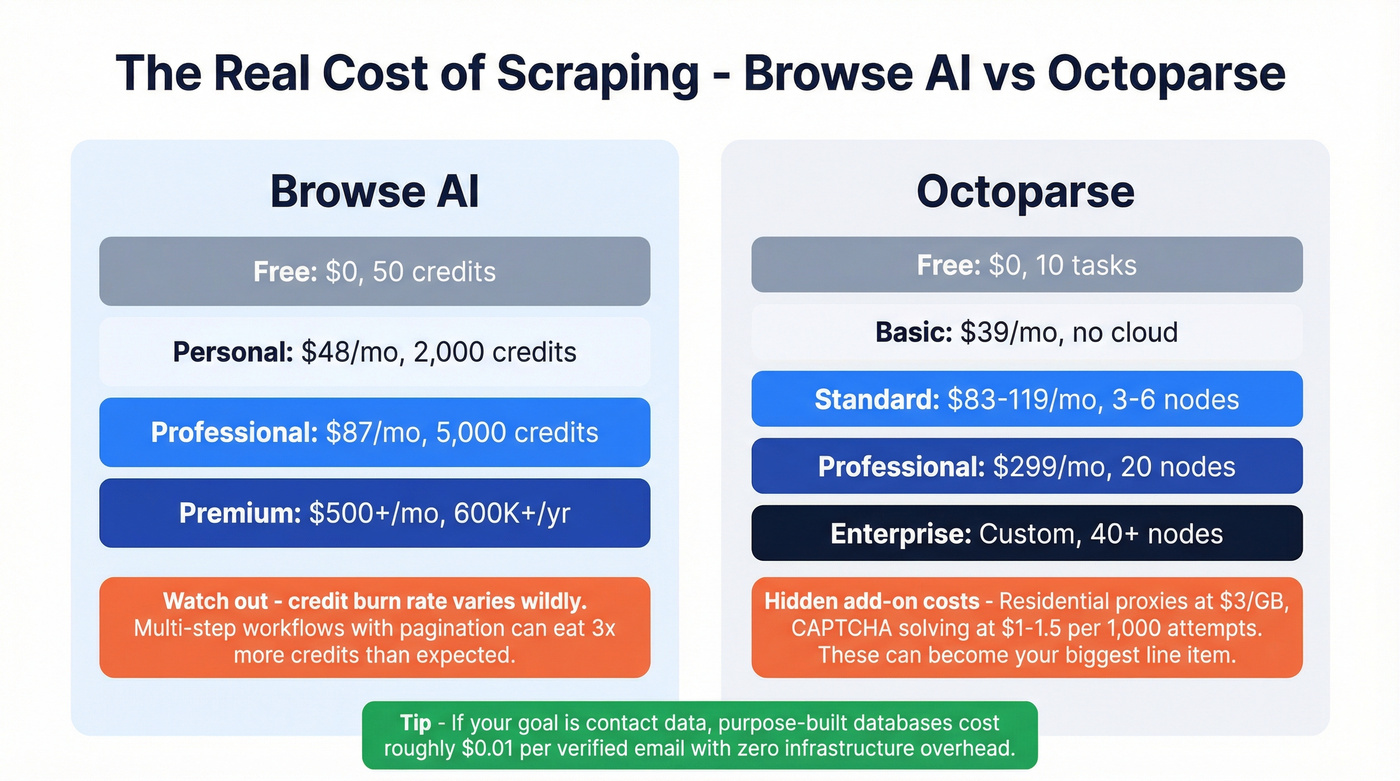
| Plan | Monthly Price | Annual Price | Cloud Nodes | Tasks |
|---|---|---|---|---|
| Free | $0 | - | None | 10 |
| Basic | $39/mo | - | None | 10 |
| Standard | $83-$119/mo | $829-$1,199/yr | 3-6 | 100 |
| Professional | $299/mo | $2,999/yr | 20 | 250 |
| Enterprise | Custom | Custom | 40+ | 750+ |
Octoparse also offers pay-per-result templates ranging from $0.001-$3 per thousand results, a Crawler Setup service starting at $399, and a managed Data Service starting at $599 if you'd rather hand off configuration entirely.
Here's the thing: those plan prices don't include the operational costs that often matter most on protected sites. Octoparse lists residential proxies at $3/GB and CAPTCHA solving at $1-$1.5 per thousand attempts. If your targets trigger lots of CAPTCHAs or burn proxy bandwidth, those add-ons can quickly become the biggest line item on your monthly bill.
Octoparse offers a 5-day money-back guarantee on paid plans. That's tight. Set a calendar reminder if you're testing.

You're comparing scrapers, but your real goal is B2B contact data. Prospeo gives you 300M+ profiles with 98% email accuracy and 125M+ verified mobiles - no crawlers, no proxy costs, no CAPTCHA credits. Data refreshes every 7 days, not whenever your scraper doesn't break.
Skip the scraping stack. Get the data directly for $0.01 per email.
Anti-Bot & CAPTCHA Handling
Over 70% of modern websites rely on JavaScript to load content dynamically, and that's where Octoparse's desktop engine and anti-bot toolkit earn their keep. It supports CAPTCHA types including ImageCaptcha, reCAPTCHA v2 reCAPTCHA v3, and Cloudflare challenges, resolving them via credit-based CAPTCHA solving. You also get proxy rotation, User-Agent switching, and automatic cookie clearing when IPs rotate.
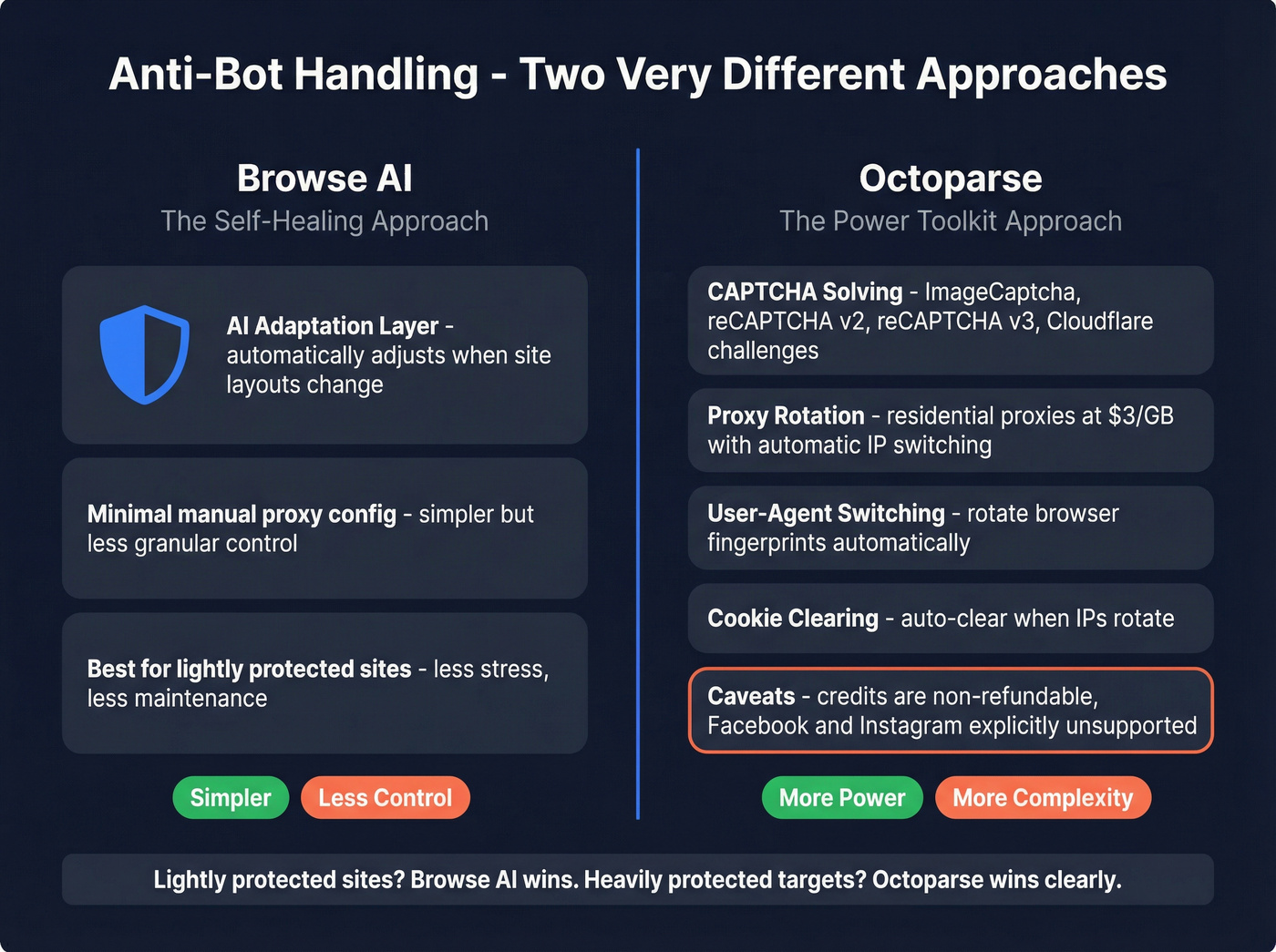
Two caveats worth knowing. First, CAPTCHA solving is credit-based: each attempt counts, one successful solve can take multiple attempts, and credits are non-refundable - they're deducted when the logs show "Complete." Second, some sites are explicitly unsupported. Facebook and Instagram can trigger an error like "Failed to start task due to website restriction."
Browse AI takes a different approach entirely. Its AI-adaptation layer tries to self-heal when site layouts change, which reduces maintenance but doesn't offer the same granular control over proxies and anti-bot measures. For lightly protected sites, Browse AI's approach is simpler and honestly less stressful. For heavily protected targets, Octoparse wins clearly.
API & Integration Depth
Browse AI integrates natively with Google Sheets and Airtable, and connects to Zapier for broader automation. Browse AI markets "7,000+ integrations" - in practice, that's largely via automation platforms rather than thousands of native connectors.
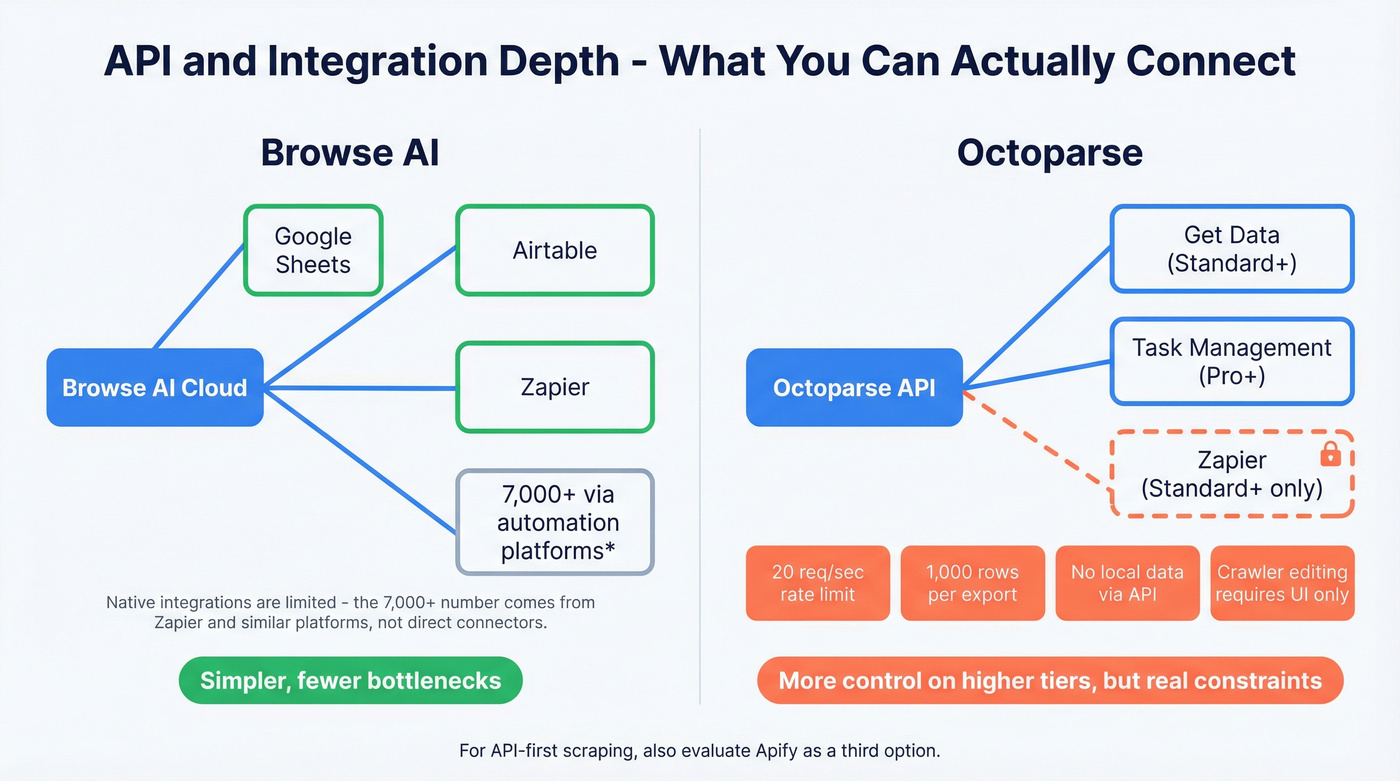
Octoparse's API capabilities depend heavily on plan. Standard includes API access for "Get Data," while Professional adds more control including task management and parameter updates. In our testing, these limitations tripped us up:
- Rate limit: 20 requests/second - exceed it and you'll hit 429 errors
- Export cap: 1,000 rows per API request, requiring pagination for larger datasets
- Can't export local extraction data via API - you have to back up local data to cloud first
- Creating or modifying crawlers still requires the app UI
- Zapier is plan-gated to Standard and above
If you're building automated pipelines, Browse AI's simpler integration model is less likely to create bottlenecks. Octoparse gives you more operational control on higher tiers, but you still have to work around meaningful API constraints. For teams that want an API-first scraping platform, Apify is worth evaluating as a third option.
What Real Users Say
The 4.8/5 overall rating both tools share is useless for decision-making, so we looked at what actually shows up in review summaries and community threads.
For Octoparse, the learning curve dominates negative feedback with 7 mentions in G2's pros/cons summary. Performance at scale gets flagged too (3 mentions of slow performance during large-scale scraping), and 2 mentions point to proxy issues and blockages. There's also a Reddit thread where a user alleges Octoparse changed its refund policy after they forgot to cancel a trial. One anecdote, sure - but the 5-day money-back window is real. Don't sleep on that cancellation deadline.
On the Browse AI side, the big practical tradeoff is the credit model. Credit-based scrapers can feel harder to forecast than flat-rate tools, especially when you're iterating on robots and dealing with occasional failed runs that still consume credits.
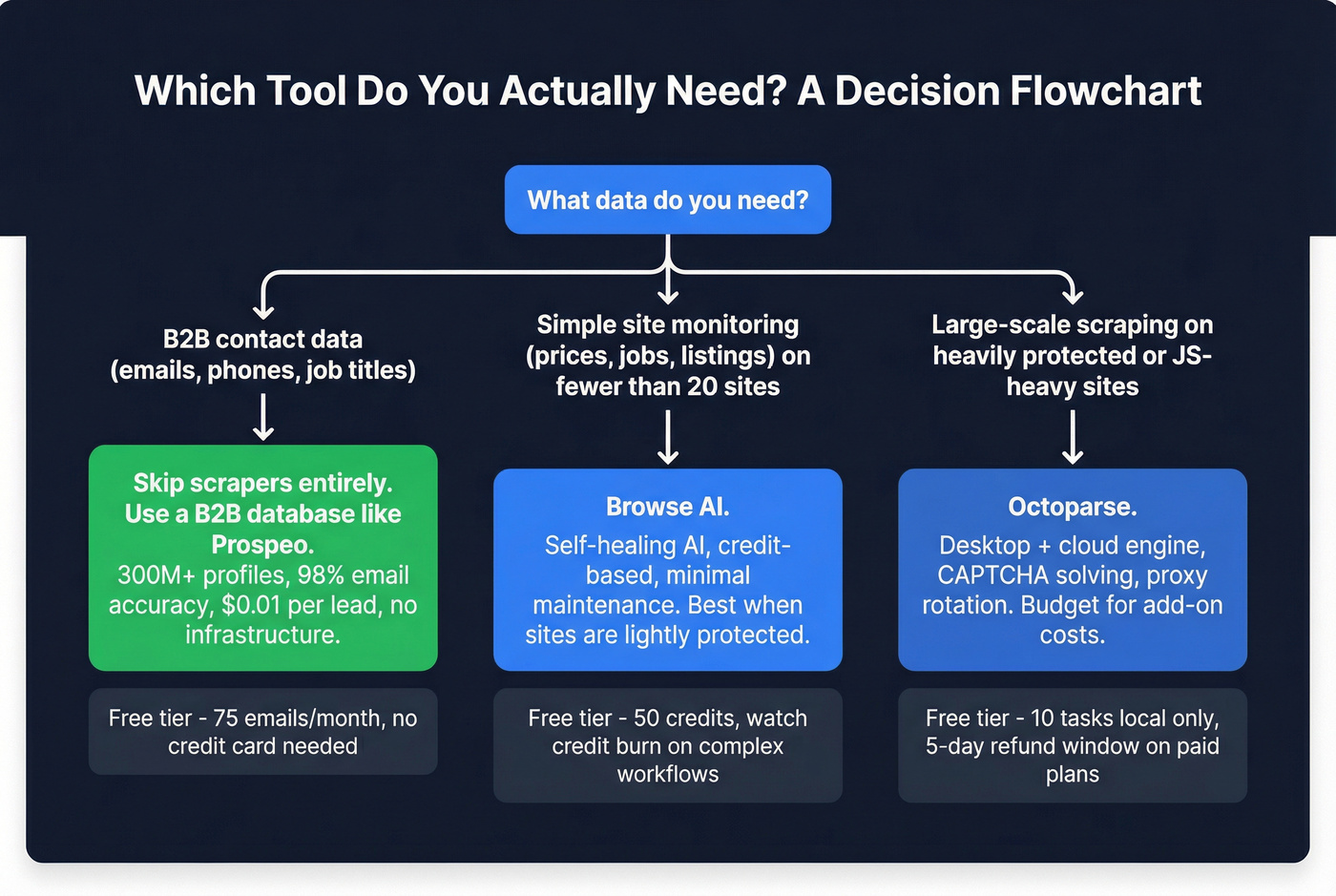
Let's be honest about the decision framework: if your average deal size is under five figures and you're scraping fewer than 20 sites, Browse AI is the better bet. The self-healing AI saves more in maintenance hours than you'll lose in credit unpredictability. Octoparse only justifies its complexity when you're scraping at real scale - hundreds of pages across dozens of protected domains.
When to Skip Both Tools
Here's a scenario we see constantly. Your sales manager asked for 5,000 decision-makers at SaaS companies in the Northeast. You opened Octoparse. Then you realized: you don't need a scraper. You need a database.

When the end goal is B2B contact data, comparing Browse AI vs Octoparse is solving the wrong problem. Prospeo gives you those 5,000 contacts with 30+ search filters - buyer intent, technographics, job changes, headcount growth - and delivers 98% verified emails plus 125M+ direct dials. No crawlers to build, no proxies to manage, no broken workflows when a site redesigns. Data refreshes every 7 days (the industry average is 6 weeks), and the free tier includes 75 emails per month so you can test before committing anything.
If you do decide to scrape for leads anyway, it’s worth reading a dedicated guide on web scraping lead generation before you commit engineering time.
Between Browse AI credits, Octoparse proxy fees, and CAPTCHA solving costs, scraping for contact data gets expensive fast - and you still can't guarantee accuracy. Prospeo delivers verified emails and direct dials through 30+ filters, CRM integrations, and an API with a 92% match rate.
Ditch the scraper maintenance. Build your pipeline in minutes, not sprints.
FAQ
Is Browse AI or Octoparse better for beginners?
Browse AI is the easier starting point. Its AI-adaptation layer means less ongoing maintenance when sites change layouts. Octoparse has a steeper learning curve - 7 mentions flag this in G2's review summary - but offers more granular control once you're past setup. For simple monitoring tasks, Browse AI gets you running faster.
Does Octoparse handle CAPTCHAs automatically?
Yes. It supports ImageCaptcha, reCAPTCHA v2/v3, and Cloudflare via a credit-based solving add-on priced at $1-$1.5 per thousand attempts. Each attempt consumes credits, and credits aren't refundable. On heavily protected sites, budget for multiple attempts per successful solve.
What's the best option if I just need B2B emails and phone numbers?
Skip web scrapers entirely. Prospeo covers 300M+ professional profiles with 98% email accuracy and 125M+ verified mobile numbers at roughly $0.01 per lead. You search by filters, export verified contacts, and push them to your sequencer - no crawling infrastructure required. The free tier gives you 75 emails per month to test.