

Campaign Click Rate Tracking: From Setup to Diagnosis
When Brevo enabled bot filtering on their own newsletter, their CTR dropped 9.4%. Not because fewer people clicked - because nearly one in ten "clicks" had been fake all along. That's the state of campaign click rate tracking in 2026: the numbers look precise, but they're often lying to you.
We've spent months digging into how ESPs define, filter, and report click data. The inconsistencies are staggering. Understanding email click rate accuracy isn't optional anymore - it's the first step toward metrics you can actually trust.
What You Need (Quick Version)
Trust CTOR, not raw CTR. click-to-open rate isolates whether your email content works. Raw CTR mixes in deliverability, subject line performance, and bot noise - a blended metric that answers three questions badly instead of one well.
Your minimum tracking stack: UTM parameters on every link, GA4 Enhanced Measurement enabled, and your ESP's bot filtering turned on (whether that's a toggle or a rules-based filter). That's the floor.
Fix list quality first. If your bounce rate is out of control, every engagement metric downstream becomes harder to trust. Verified contact data isn't a nice-to-have - it's the prerequisite for clean measurement.
CTR vs. Click Rate vs. CTOR
Even Mailchimp deliverability can't keep its own terminology straight. One Mailchimp resource says "click rate and click-through rate are often used interchangeably, and are technically the same metric" - then mixes contradictory phrasing in the same piece.
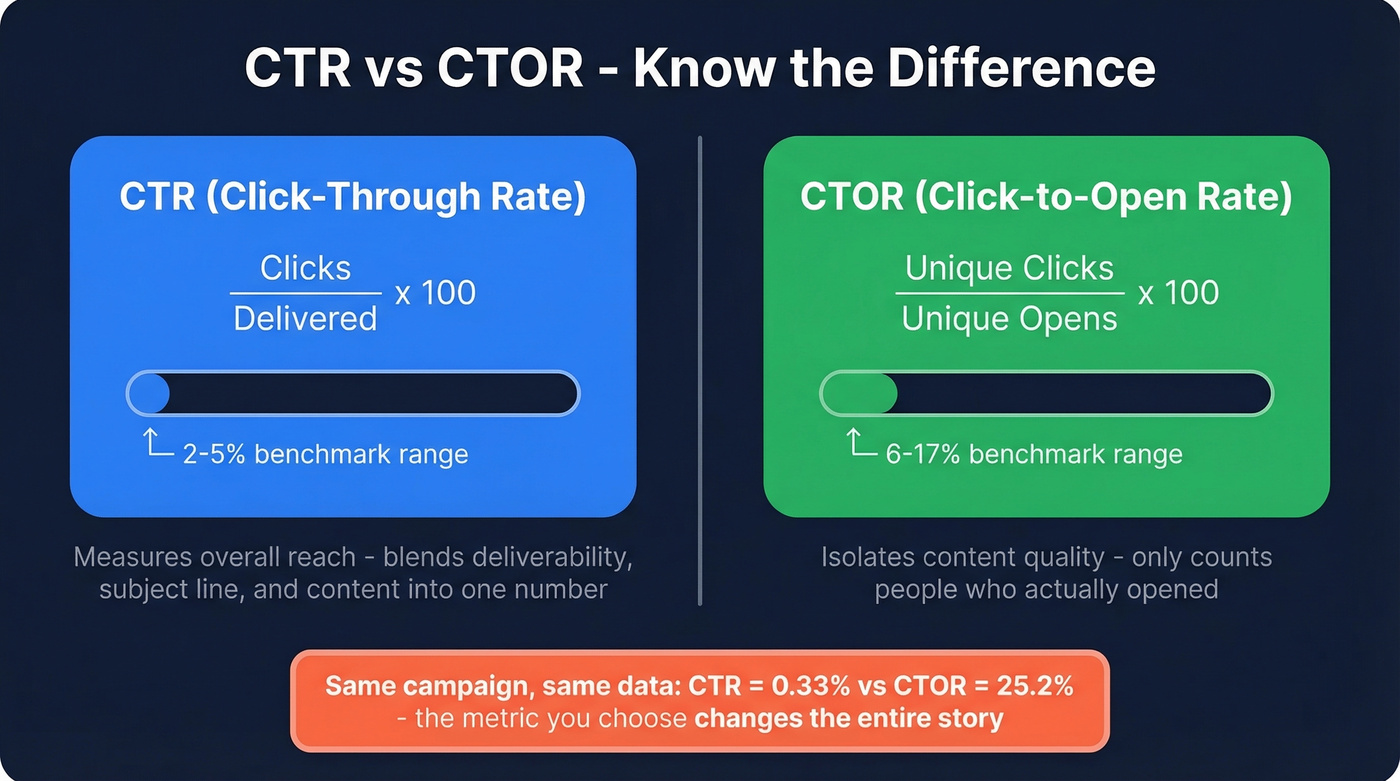
Campaign Monitor's knowledge base provides the cleanest definitions:
CTR (click-through rate) = total clicks / total delivered messages x 100. This tells you what percentage of everyone who received your email clicked something. It's a reach metric - useful for overall performance, but it blends deliverability, subject line effectiveness, and content quality into one number.
CTOR (click-to-open rate) = unique clicks / unique opens x 100. This isolates content performance. Only people who opened the email are in the denominator, so you're measuring whether the body copy and CTA did their job.
The difference is dramatic. Klipfolio ran the math on a campaign sent to 100,000 recipients where only 1,423 opened it. Traditional CTR came out to 0.334%. CTOR on the same campaign? 25.2%. Same data, wildly different story.
| Metric | Formula | Best For | Benchmark Range |
|---|---|---|---|
| CTR | Clicks / Delivered x 100 | Overall reach | 2-5% |
| CTOR | Unique clicks / Opens x 100 | Content quality | 6-17% |
| Total click rate | All clicks / Delivered x 100 | Engagement intensity | Varies |
If you're evaluating whether your email content works, CTR is the wrong metric. CTOR isolates content performance from deliverability and subject line performance. Use it.
Email Click Rate Benchmarks for 2026
Benchmarks are the most requested and most misunderstood data in email marketing. ActiveCampaign reports an overall click rate of 6.21%. Mailchimp reports 2.62%. That doesn't mean ActiveCampaign is 2.4x better - it means benchmarks without context are useless. Different customer bases, different metric definitions, different bot-filtering defaults.
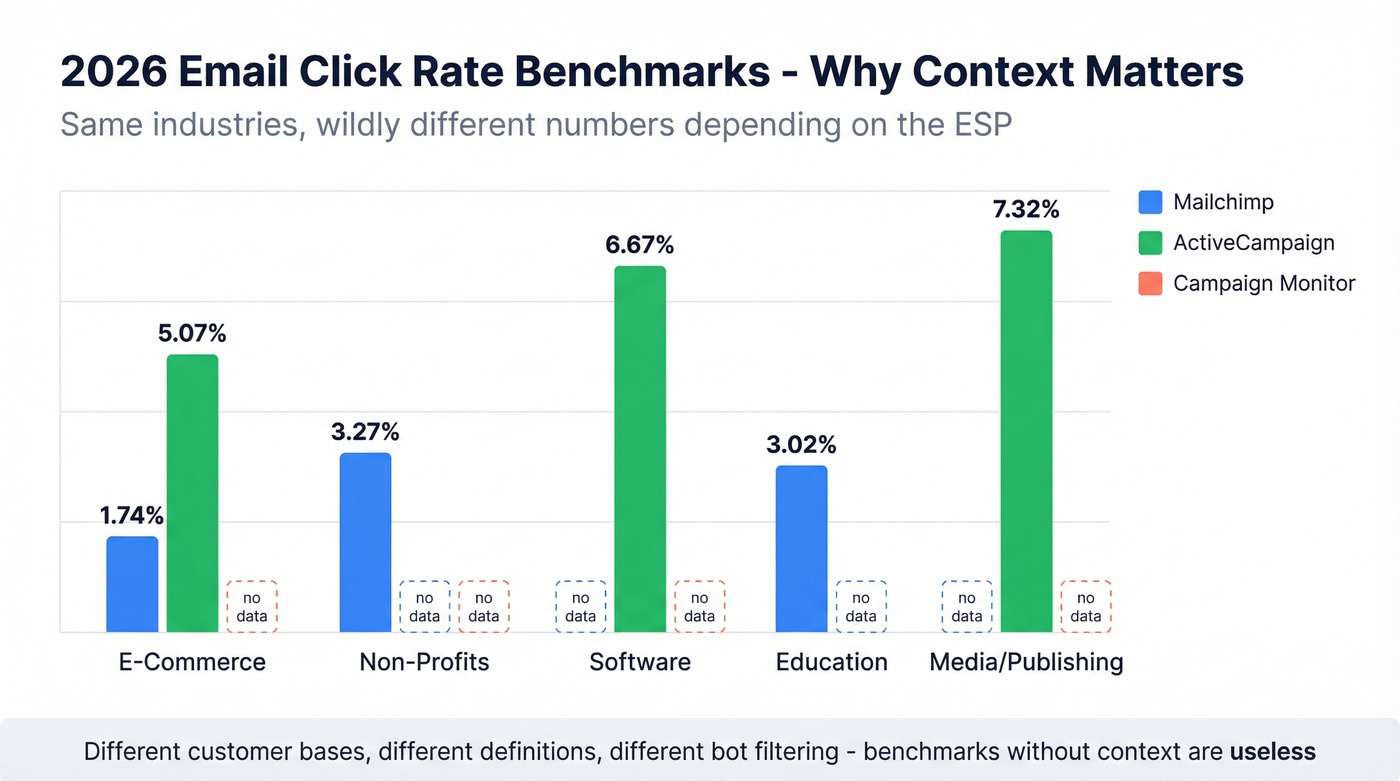
| Industry | Mailchimp | ActiveCampaign | Campaign Monitor |
|---|---|---|---|
| All/Overall | 2.62% | 6.21% | 2-5% |
| E-Commerce | 1.74% | 5.07% | - |
| Non-Profits | 3.27% | - | - |
| Software | - | 6.67% | - |
| Education | 3.02% | - | - |
| Media/Publishing | - | 7.32% | - |
Use these as directional signals, not scorecards. The only benchmark that matters is your own historical performance, segmented by campaign type.
Flows vs. Campaigns: The 3x Gap
Klaviyo's 2026 data across 183,000+ customers reveals a massive split: automated flows average a 5.58% click rate vs. 1.69% for campaigns. Flows generate roughly 41% of total email revenue from just 5.3% of sends. If you're only measuring campaign-level engagement, you're ignoring the channel that's doing most of the work.
Why Your Click Rates Are Lying
Bot Click Inflation
Here's a scenario we've seen play out dozens of times: you run an A/B test on subject lines, Version B gets 40% more clicks, you roll it out - and conversions don't move. Turns out, Version B triggered more bot clicks from corporate security scanners.
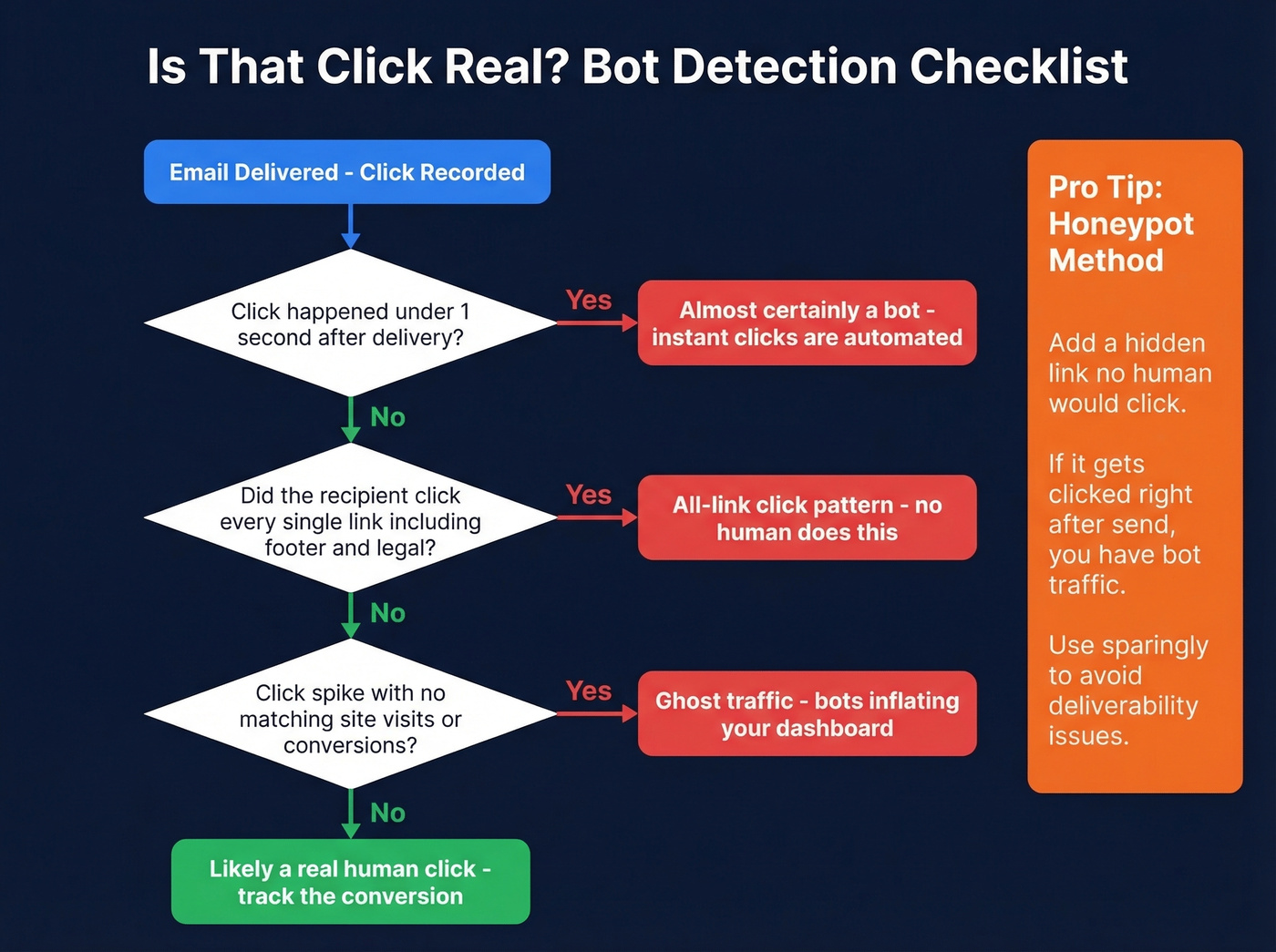
Bot clicks come from corporate security scanners, mailbox providers pre-loading links, and privacy tools interacting with URLs. They look real in your dashboard. They inflate A/B test results. They trigger automations prematurely. And they make your content look more effective than it is.
How to spot them:
- Instant clicks - anything under one second after delivery is almost certainly automated
- All-link clicks - a human doesn't click every link including the footer and legal disclaimer
- Click spikes without conversions - traffic goes up, site visits and purchases don't
The honeypot method works well: add a hidden link that no human would click, buried in punctuation or a transparent pixel. If it gets clicked immediately after send, you've got bot traffic. Use honeypots sparingly, though - hidden links can look suspicious to mailbox providers, so monitor deliverability during testing.
Every major ESP handles bot filtering differently, and the defaults are all over the map:
| ESP | Feature | Default | Limitations |
|---|---|---|---|
| ActiveCampaign | BotSense | Off (Pro/Enterprise) | Doesn't filter workflow triggers/segments |
| Klaviyo | Bot protection | On | Reporting vs. attribution differences |
| Constant Contact | Known user-agent filtering | On | Not customizable |
| HubSpot | Known-bot + custom rules | Off | Not retroactive |
| Brevo | Toggle filtering | Off | 9.4% CTR impact when enabled |
Check your ESP's settings today. Without proper bot filtering, the click data in your reports is unreliable at best.
Apple Mail Privacy Protection
Apple MPP pre-loads email content, including tracking pixels, regardless of whether the recipient actually opens the email. This inflates open rates, which makes CTOR less reliable than it used to be - your denominator includes "opens" that were really just Apple's servers fetching content.
This reinforces the case for tracking conversions and UTM-tagged site visits as your source of truth, not clicks or opens alone.
Diagnosing Click Rate Patterns
Raw numbers don't tell you much. Patterns do.
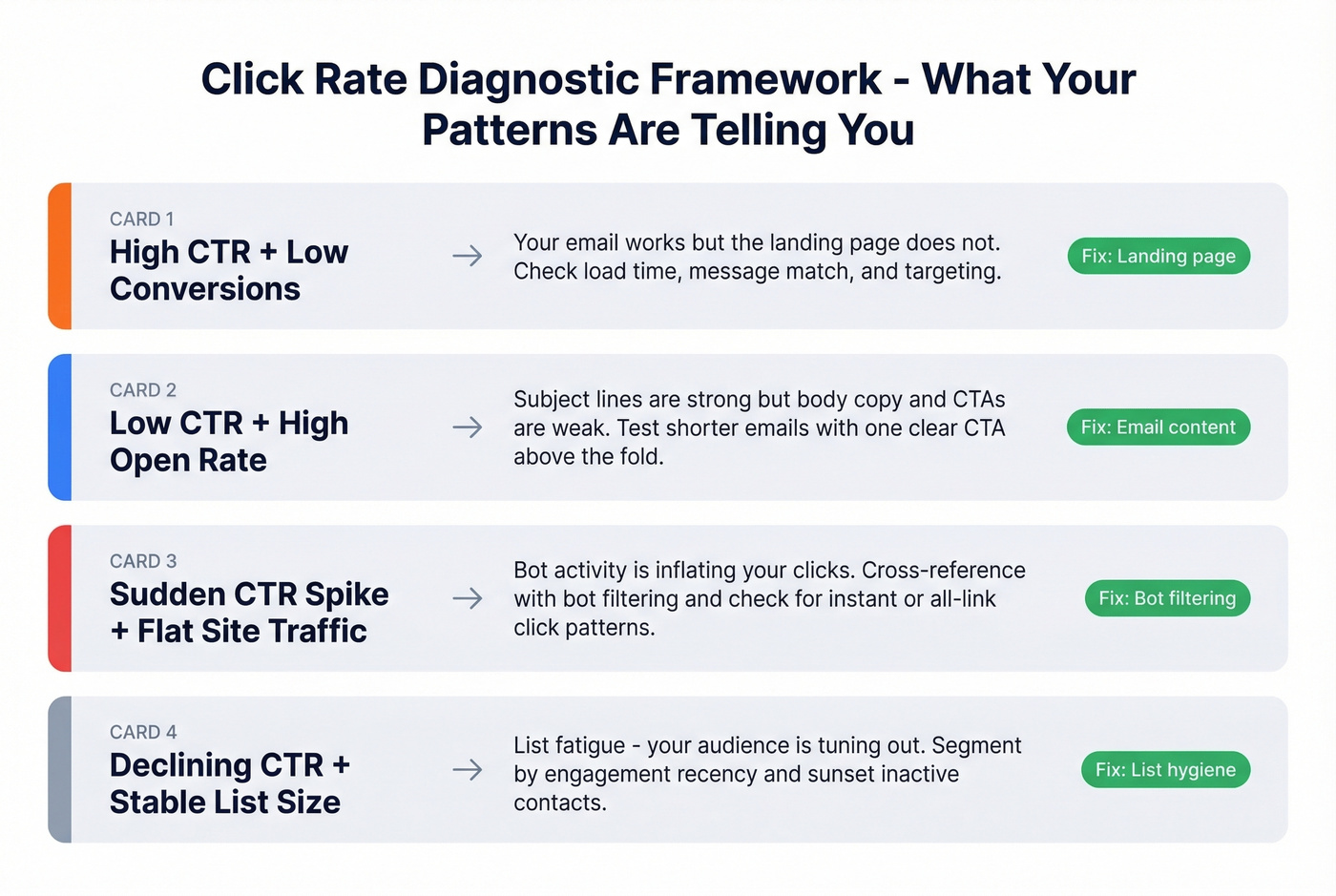
High CTR + low conversions: Your email is compelling but the landing page isn't delivering. This is one of the most common diagnostic signals - it usually points to a landing page problem, not an email problem. Check load time, message match, and audience targeting.
Low CTR + high open rate: People open your emails but don't click. Your subject lines work; your body copy and CTAs don't. Test shorter emails, a single clear CTA, and above-the-fold placement.
Sudden CTR spike with flat site traffic: Bot activity. Cross-reference with your ESP's bot filtering and check for instant clicks or all-link click patterns.
Declining CTR over time with stable list size: List fatigue. Your audience is tuning out. Segment by engagement recency and re-engage or sunset inactive contacts.
Let's be honest: if your deals typically close under $10k, you probably don't need enterprise-grade click analytics. Track reply rates, conversions, and revenue per send. Everything else is vanity.

Your click rate diagnostics are only as good as your list. When bounces inflate denominators and bad addresses trigger bot scanners, every metric downstream lies. Prospeo's 5-step email verification delivers 98% accuracy - so when someone clicks, you know it's a real person.
Fix the list first. Everything else gets easier.
Setting Up Your Tracking Stack
UTM Parameters
UTMs are the foundation of campaign attribution. Every link in every email should carry them:
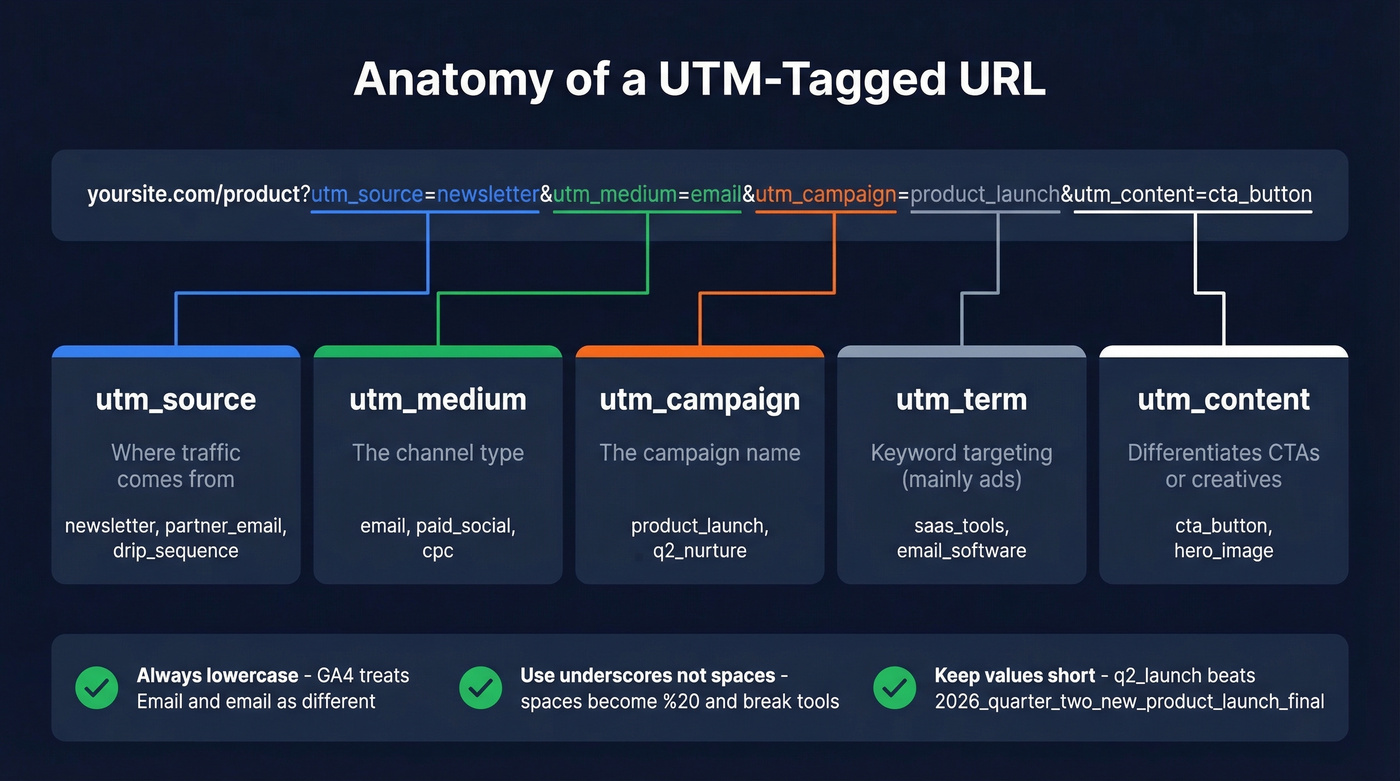
https://yoursite.com/product?utm_source=newsletter&utm_medium=email&utm_campaign=product_launch&utm_content=cta_button
The five standard parameters:
- utm_source - where the traffic comes from (newsletter, partner_email, drip_sequence)
- utm_medium - the channel type (email, paid_social, cpc)
- utm_campaign - the campaign name (product_launch, q2_nurture)
- utm_term - paid keyword targeting, mainly for search ads
- utm_content - differentiates creatives or CTAs within the same campaign (cta_button vs. hero_image)
Start with source, medium, and campaign. Add term and content only when you're running tests or multi-variant campaigns.
Hygiene rules that'll save you from fragmented reporting: lowercase only (GA4 reports "Email" and "email" separately), underscores or hyphens instead of spaces (spaces become %20 and break some tools), and short descriptive values - q2_product_launch beats 2026_quarter_two_new_product_launch_campaign_version_final. Also align with your analytics channel groupings. HubSpot buckets sources based on utm_source patterns, so values containing "adword," "ppc," or "cpc" get auto-classified as Paid Search. Bad naming can misclassify your entire channel.
One warning: if your platform already appends UTMs automatically (HubSpot email does this), manually adding your own can overwrite the default tracking and reduce granularity. Check before you layer on custom parameters.
We've seen teams waste weeks debugging attribution issues that traced back to one person using "LinkedIn" while another used "linkedin_ads." Use Google's Campaign URL Builder or an internal UTM intake form with locked dropdown values. Takes 30 minutes to set up and prevents months of dirty data.
GA4 + Google Tag Manager
GA4's Enhanced Measurement auto-tracks several click types out of the box: outbound link clicks, file downloads, scroll events, and site search. Enable it under Admin -> Data Streams -> your web stream. For most teams, this covers the basics without touching any code.
The limitation: Enhanced Measurement won't track internal high-value interactions - Add to Cart buttons, CTA clicks, navigation tabs, pricing page engagement. For those, you need Google Tag Manager. GTM lets you fire custom events based on element ID, CSS class, or data attributes, covering button clicks, link clicks, image clicks, and form submissions.
The two-tier approach works well: Enhanced Measurement for baseline coverage, GTM for the interactions that actually matter to your business.
Paid Campaign Click Identifiers
Every ad platform appends its own click identifier to URLs. These are critical for conversion attribution, offline conversion uploads, and CRM matching. One detail most teams miss: CTR directly affects Quality Score on Google Ads and relevance scoring on other ad platforms, which in turn impacts your CPC. Poor click rates don't just mean weak creative - they make your ads more expensive.
| Platform | Parameter(s) | Notes |
|---|---|---|
| Google Ads | gclid, gclsrc, wbraid, gbraid | Case-sensitive |
| Meta | fbclid | Persist in cookies |
| Microsoft Ads | msclkid | - |
| li_fat_id | First-party tracking | |
| X (Twitter) | twclid | - |
| TikTok | ttclid | - |
| Snapchat | ScCid | Case-sensitive (S, C) |
| Google Floodlight | dclid | CM360 attribution |
| Taboola | tblci | - |
The pitfalls here are subtle and expensive. Simo Ahava's breakdown covers the most common ones:
Case sensitivity kills attribution. ScCid isn't sccid. Normalizing URL parameters to lowercase - something many CMS platforms do automatically - will break Snapchat attribution silently.
Parameter stripping on page reload. Load your landing page with a click ID appended, then reload. If the parameter disappears, your attribution is broken for anyone who navigates before converting.
Cookie persistence matters. Don't rely solely on URL parameters. Store click IDs in cookies so they persist across page navigations within a session. Misconfigured cookie domains or paths are a top cause of attribution loss.
Sales Email Click Rates
Here's the thing about cold email tracking: tracking pixels and click-wrapped links add HTML that spam filters flag. The consensus on r/coldemail is pretty blunt - disable open and click tracking, send plain text, and optimize for deliverability over measurement.
That's a real tradeoff. You fly blind on engagement metrics but land in more inboxes. Sales email click-through rates tend to be lower than marketing email benchmarks anyway - recipients are colder, and the emails are shorter with fewer links. The practical middle ground: track reply rates and conversions instead of clicks. Start with verified contact data so the emails you do send actually reach real inboxes. Prospeo's 5-step verification delivers 98% email accuracy, and Meritt cut their bounce rate from 35% to under 4% after switching.
Skip click tracking entirely for cold outreach if you're sending fewer than 500 emails per week. The deliverability hit isn't worth the data you'd get.
Beyond Email: Website Click Tracking
UTMs tell you which campaign drove the visit. On-site click tracking tells you what happened after they arrived. These are complementary layers, not alternatives.
The diagnostic signals that matter most are dead clicks and rage clicks. Dead clicks happen when users click non-clickable elements, signaling confusing UI. Rage clicks are repeated rapid clicks on the same element - frustration or a broken interaction. Both are invisible in GA4 but obvious in behavior analytics tools.
Microsoft Clarity is free and captures heatmaps, session recordings, dead clicks, and rage clicks. Hotjar offers a free tier with paid plans starting around $30/mo for more volume. VWO adds testing capabilities on top of click tracking. Layer any of these on top of your UTM + GA4 stack for the full picture: campaign -> site visit -> on-site behavior -> conversion.
When Clicks Aren't Enough
Most teams track too many metrics and act on none of them. Track three things: delivery rate, click-to-open rate, and conversion rate. Everything else is context.
The hierarchy is simple: conversions > UTM-tagged site visits > clicks > opens. Each layer downstream is noisier and less reliable than the one above it. Opens are inflated by Apple MPP. Clicks are inflated by bots. Site visits can be gamed by redirects. Conversions are the only metric that's hard to fake. For ABM teams, account-level engagement - aggregating clicks across multiple contacts at the same company - can reveal buying intent that individual metrics miss entirely.
But here's what most tracking guides skip: if your list quality is poor, your deliverability tanks and then your click rate comparisons become meaningless because you're not consistently reaching real inboxes. Prospeo's 7-day data refresh cycle means you're not emailing people who left their company six weeks ago. The results are dramatic - Snyk dropped bounce rates from 35-40% to under 5%, and their AE-sourced pipeline jumped 180%. When your denominator is real, every metric downstream becomes trustworthy.
High bounce rates don't just hurt deliverability - they corrupt every engagement metric in your dashboard, including CTR and CTOR. Teams using Prospeo cut bounce rates from 35%+ to under 4% with data refreshed every 7 days, not the 6-week industry average.
Stop diagnosing click rates built on stale, unverified data.
Tools for Campaign Click Tracking
ESPs with built-in tracking - Mailchimp, Klaviyo (starting around $20+/mo depending on list size), HubSpot, and ActiveCampaign all track clicks natively. The differences are in bot filtering defaults and how they define metrics. Don't assume two ESPs calculate "click rate" the same way.
Web analytics - GA4 is free and covers campaign attribution via UTMs plus on-site click events. It's the backbone of any tracking stack.
Behavior analytics - Microsoft Clarity is free. Hotjar offers a free tier with paid plans starting around $30/mo. Both add the visual layer: heatmaps, session recordings, rage click detection. These answer "what did they do after clicking through?"
Affiliate and performance tracking - SMB click trackers typically run $50-$300/mo depending on event volume and features. Voluum sits at the higher end; ClickFlare and RedTrack are often positioned as more affordable alternatives. Databox starts with a free trial and typically runs around $50/mo for paid plans, pulling everything into unified dashboards.
FAQ
What's a good email click rate?
Broadly, 2-5% CTR is average across industries, but a CTOR of 6-17% is a better measure of content quality since it only counts people who actually opened your email. Compare against your own historical data segmented by campaign type - cross-platform benchmarks are directionally useful but not apples-to-apples.
How do I track clicks in GA4?
Enable Enhanced Measurement in your GA4 data stream settings under Admin -> Data Streams -> Web stream. It auto-tracks outbound clicks and file downloads. For internal button or CTA clicks, set up custom events via Google Tag Manager using element IDs or CSS classes.
Should I track clicks in cold email?
Generally no - click tracking adds HTML that spam filters flag, and many outbound practitioners disable it entirely. If deliverability matters more than granular engagement data (it usually does), send plain text and measure reply rates instead. Start with verified contacts to minimize bounces, then track conversions as your primary signal.
How do I filter out bot clicks?
Look for instant clicks under one second after delivery, clicks on every link including footers, and click spikes without corresponding conversions or site traffic. Add a honeypot link that no human would find, and enable your ESP's bot-filtering settings - most default to off.
What's the minimum stack for campaign click rate tracking?
Three things: your ESP's native click tracking with bot filtering enabled, UTM parameters on every link, and GA4 for attribution. Add a behavior analytics tool like Microsoft Clarity (free) or Hotjar if you want to see what happens after the click-through. For paid media, consider a dedicated tracker like ClickFlare or RedTrack.