

How to Check If an Email Is Genuine in 2026
3.4 billion phishing emails land in inboxes every single day. That's not a typo.
Whether you're staring at an "urgent" message from your bank wondering if it's a scam, or you need to confirm an email address actually exists before firing off a cold outreach campaign, the question is the same: is this email real? But the answer depends entirely on which problem you're solving. This guide covers both - spotting phishing and verifying real addresses - because we've watched too many people confuse the two and end up either clicking something dangerous or torching their sender reputation on bad data.
Two Problems, One Question
"Is this email genuine?" splits into two completely different situations.
Got a suspicious message sitting in your inbox? You need a phishing detection checklist and a quick header analysis. Jump to the 7-point checklist.
Trying to verify an address before you hit send? You need a verification tool that confirms the mailbox exists and won't bounce. Jump to the tools comparison.
How to Spot a Phishing Email
Over 90% of data breaches start with an email. Here's the thing: most phishing isn't sophisticated. It just preys on speed and inattention. If you slow down for 30 seconds and run through these seven checks, you'll catch the vast majority of attacks before they catch you.
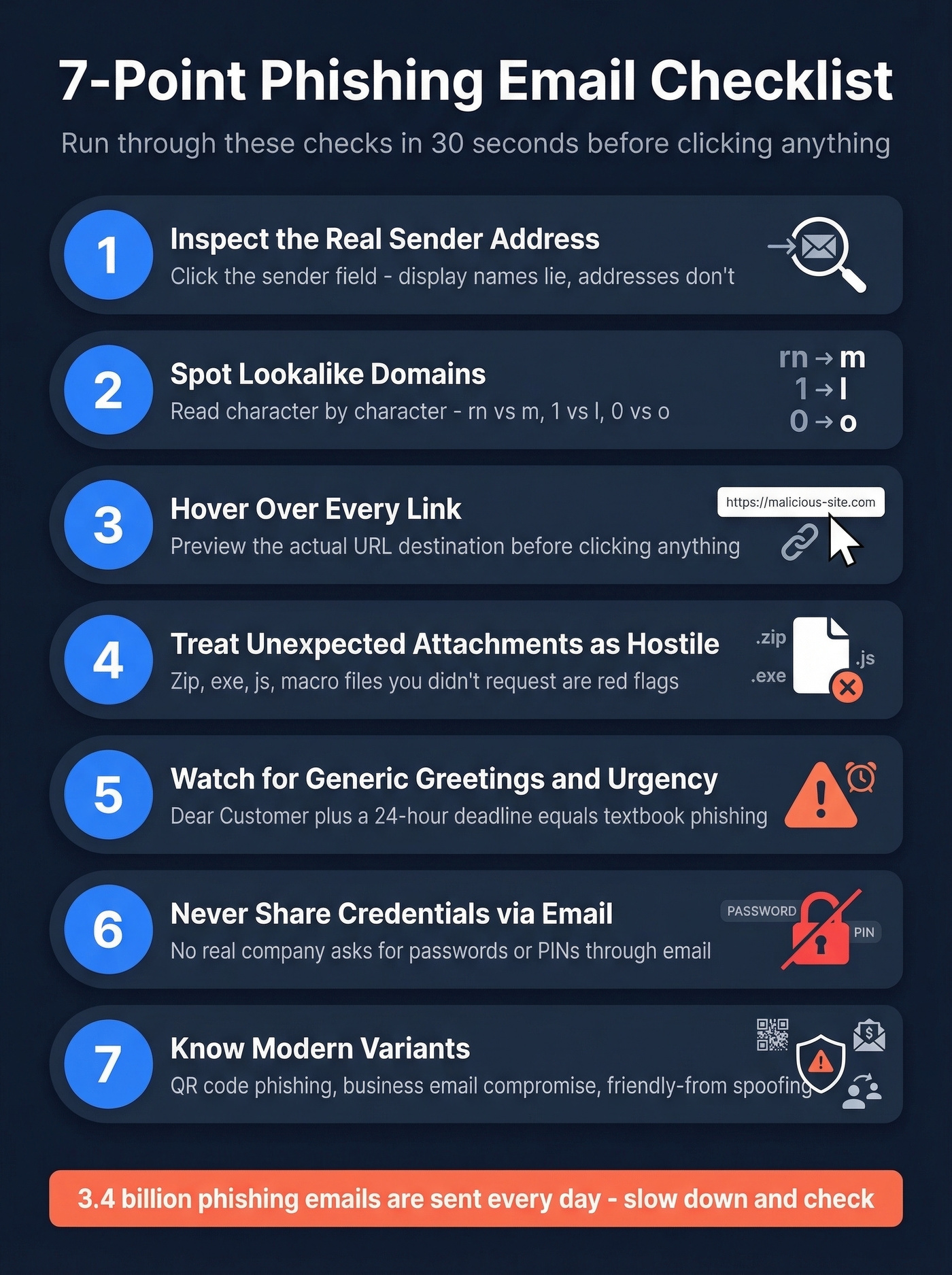
Inspect the actual sender address. Don't trust the display name. Anyone can set "PayPal Security" as their name and send from
paypal-alerts@sketchy-domain.ru. Click the sender field to reveal the real address behind it.Look for lookalike domains. Attackers swap characters that look identical at a glance -
rnforminrnicrosoft.com, the numeral1forlinpaypa1.com, a zero foroinarnaz0n.com. Read the domain character by character.Hover over every link before clicking. The display text might say
paypal.com/account, but the actual URL points topaypa1-security.com/login. On mobile, long-press to preview the destination. If the domain doesn't match, it's a phish.Treat unexpected attachments as hostile. Unsolicited "invoices" in
.zip,.exe,.js, or macro-enabled Office formats are classic delivery mechanisms. You didn't ask for it? Don't open it.Watch for generic greetings and urgency. "Dear Customer, your account will be suspended in 24 hours" is textbook phishing language. Legitimate companies use your name and don't threaten you into clicking.
Never share credentials or financial info via email. No real bank, SaaS company, or government agency will ask for your password, PIN, or SSN through email. Ever.
Know the modern variants. QR code phishing embeds malicious QR codes in emails that redirect to spoofed sites. Business Email Compromise uses spoofed executive emails to redirect invoice payments - costing over $2.7 billion annually. Attackers also fake sender identity through exact-domain spoofing, lookalike domains, and "friendly-from" spoofing using free email providers with a fake display name.
How to Read Email Headers
If the checklist leaves you uncertain, email headers are the definitive test. They contain authentication verdicts that tell you whether the sending server was actually authorized to send on behalf of that domain - the most reliable way to verify a suspicious message when visual cues aren't enough.
Finding Headers
| Email Client | How to Access |
|---|---|
| Gmail | Open message > More (three dots) > Show original |
| Outlook (desktop) | File > Properties > Internet headers |
| Outlook (web) | More actions (three dots) > View message source |
| Apple Mail | View > Message > Raw Source |
| Yahoo | More (three dots) > View raw message |
Decoding Authentication-Results
Once you've got the headers open, search for Authentication-Results. This is where SPF, DKIM, and DMARC verdicts live.
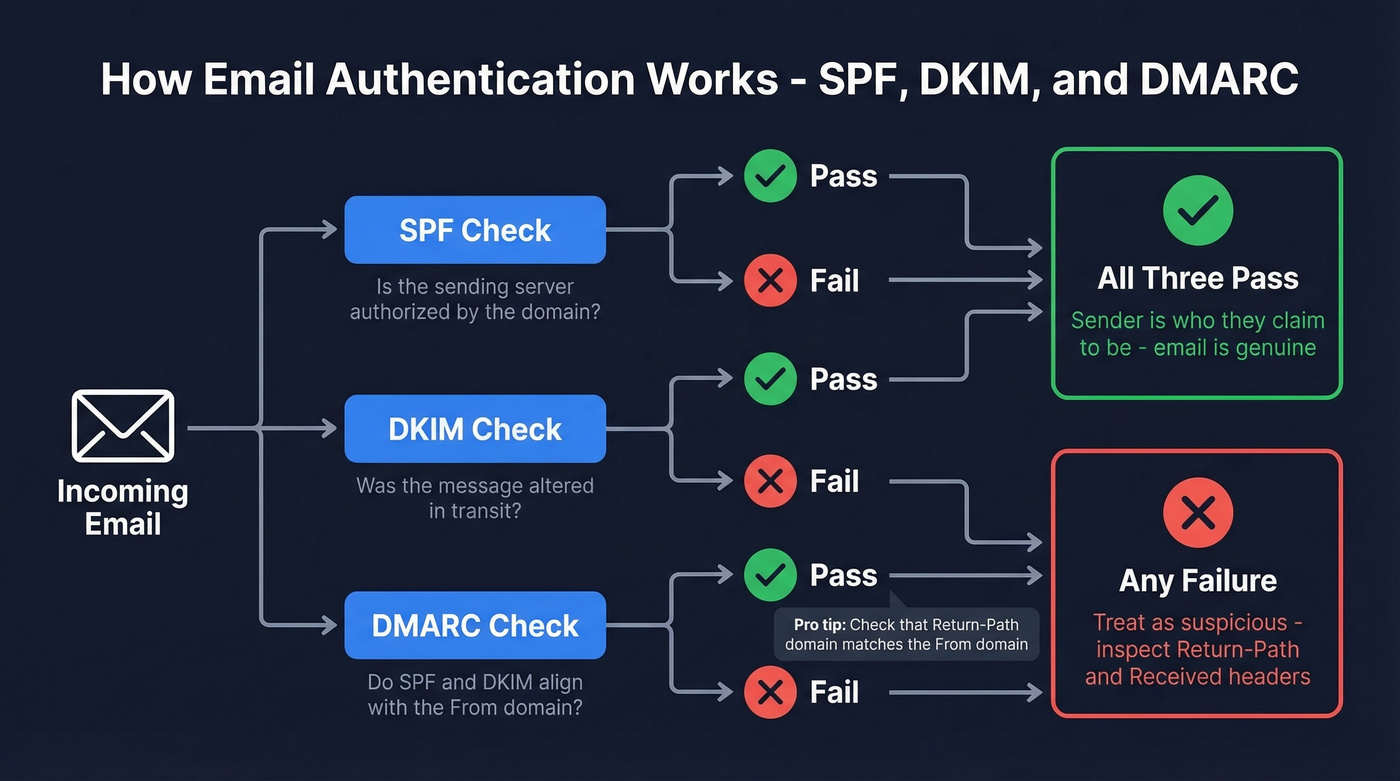
A legitimate email looks like this:
Authentication-Results: spf=pass; dkim=pass; dmarc=pass
A phishing email typically shows something like:
Authentication-Results: spf=fail; dkim=none; dmarc=fail action=reject
SPF verifies the sending server is authorized by the domain. DKIM confirms the message wasn't altered in transit. DMARC ties both checks to the visible "From" domain. All three passing means the sender is who they claim to be.
One header red flag we see constantly: a Return-Path mismatch. If the Return-Path domain doesn't match the From domain, treat it as suspicious - especially alongside SPF/DKIM/DMARC failures. Read the Received lines bottom-to-top to trace the actual delivery path; any unexpected server hops or large timestamp gaps are worth investigating. The FTC's phishing guidance covers what to do next if you confirm a message is fraudulent.

Catching phishing is half the battle. The other half is making sure the emails you send actually reach real people. Prospeo's 5-step verification - including catch-all resolution, spam-trap removal, and honeypot filtering - delivers 98% email accuracy at $0.01 per email. No bounces torching your domain.
Verify every address before you hit send - start free today.
How Email Address Verification Works
This is the other half of checking whether an email is genuine - not phishing detection, but confirming an address actually exists and can receive mail before you send to it. If you're validating addresses for outbound campaigns, this is the process your tools run behind the scenes.
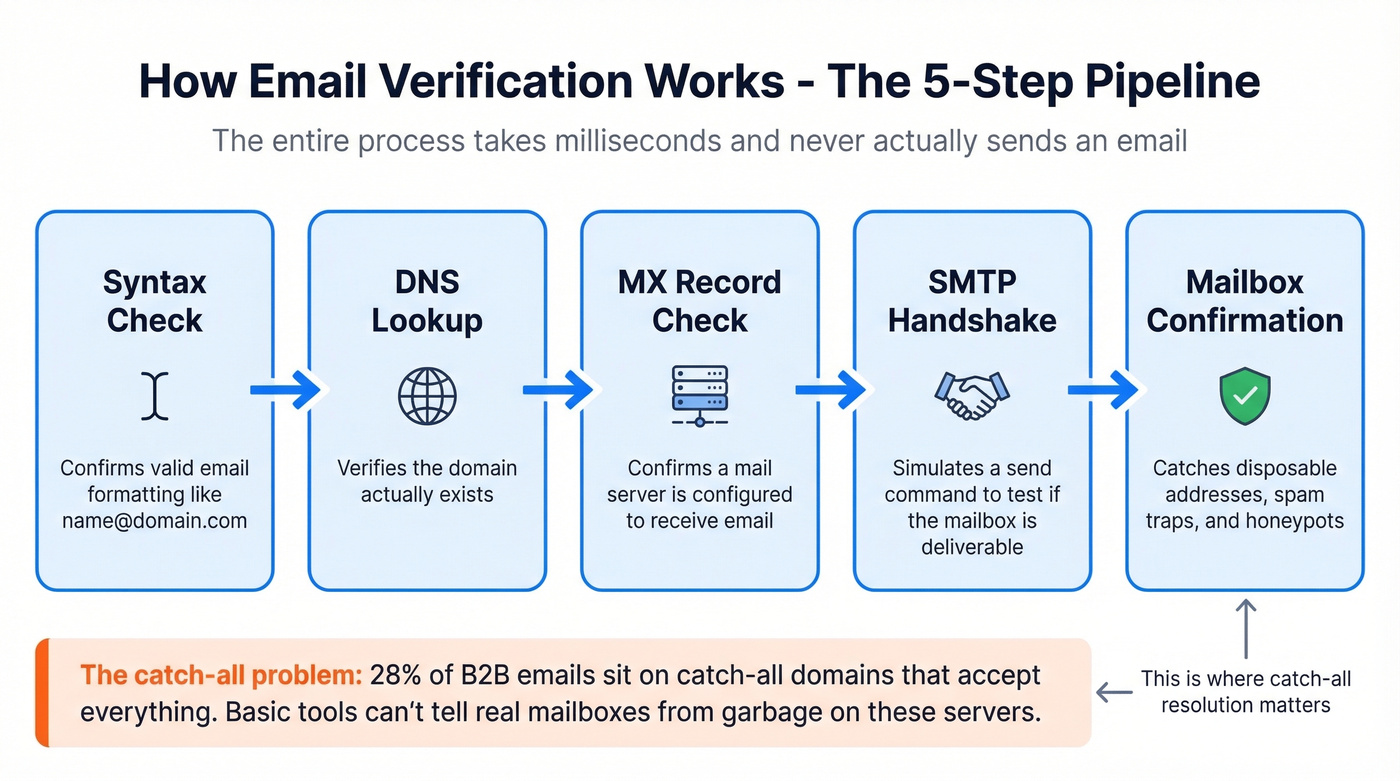
The verification pipeline runs five steps. Syntax check confirms valid formatting. DNS lookup verifies the domain exists. MX record check confirms a mail server is configured. SMTP handshake simulates a send command to see if the mailbox is deliverable. And mailbox confirmation catches disposable addresses, spam traps, and honeypots. The whole process takes milliseconds and never actually sends an email.
Here's where it gets tricky. In a 10,000-email benchmark across real B2B addresses, 28% of emails sat on catch-all domains - servers configured to accept mail for any address, valid or not. Basic verification tools can't distinguish real mailboxes from garbage on these domains, which is why catch-all resolution is the feature that separates serious verification from a glorified syntax check.
If you're doing this at scale, it's also worth tracking your email bounce rate and using email reputation tools to catch deliverability issues early.
Best Email Verification Tools
Not all verification tools are equal. That same 10,000-email benchmark showed meaningful gaps, especially on catch-all handling, which is where most outbound lists live or die.
Skip this section entirely if your bounce rate is under 2% and you're only sending 200 emails a month - you don't need a verification tool. But the moment you scale past that, bad data will torch your domain reputation faster than any spam complaint.
Prospeo
Use this if you're running B2B outbound and can't afford bounces tanking your domain reputation. Prospeo's 5-step verification process includes catch-all resolution, spam-trap removal, and honeypot filtering. The 98% email accuracy rate holds up because Prospeo runs proprietary infrastructure rather than relying on third-party verification providers.
The free tier gives you 75 emails per month for spot-checks, but the real value shows up at scale. Paid plans run about $0.01 per email with no contracts, and the 7-day data refresh cycle means you're verifying against current records - not month-old snapshots. We've seen teams cut bounce rates from 35%+ down to under 4% after switching, which is the kind of difference that saves a domain.
Hunter
Hunter offers 100 free verifications per month with an account, and you can run single checks without signing up. The interface is clean, results come back fast, and it's a strong no-cost option for occasional use. But it falls short at scale - paid plans start climbing with volume, and catch-all handling is more limited than dedicated catch-all resolution tools. For B2B campaigns where bounce rates directly impact deliverability, you'll outgrow it quickly.
If you're comparing options, see our breakdown of Hunter alternatives.
ZeroBounce
ZeroBounce scored 97.8% accuracy in that same independent benchmark and offers 100 free monthly credits when you sign up with a business domain. Paid pricing starts around $15/month for 2,000 emails. Solid mid-range option for bulk list cleaning. The dealbreaker: it only resolved 12% of catch-all addresses in the benchmark, which means a big chunk of any B2B list comes back as "unknown."
Tool Comparison
| Tool | Accuracy | Free Tier | Price/1K | Catch-All |
|---|---|---|---|---|
| Prospeo | 98% | 75/mo | ~$10 | Full resolution |
| Hunter | ~97% | 100/mo | ~$10 | Limited |
| ZeroBounce | 97.8% | 100/mo | ~$8 | 12% resolved |
| NeverBounce | 96.9% | 1,000 trial | ~$8 | 8% resolved |
| Bouncer | 96.5% | 1,000 trial | ~$7 | 15% resolved |
| MillionVerifier | ~95.8% | None | ~$0.30 | Limited |
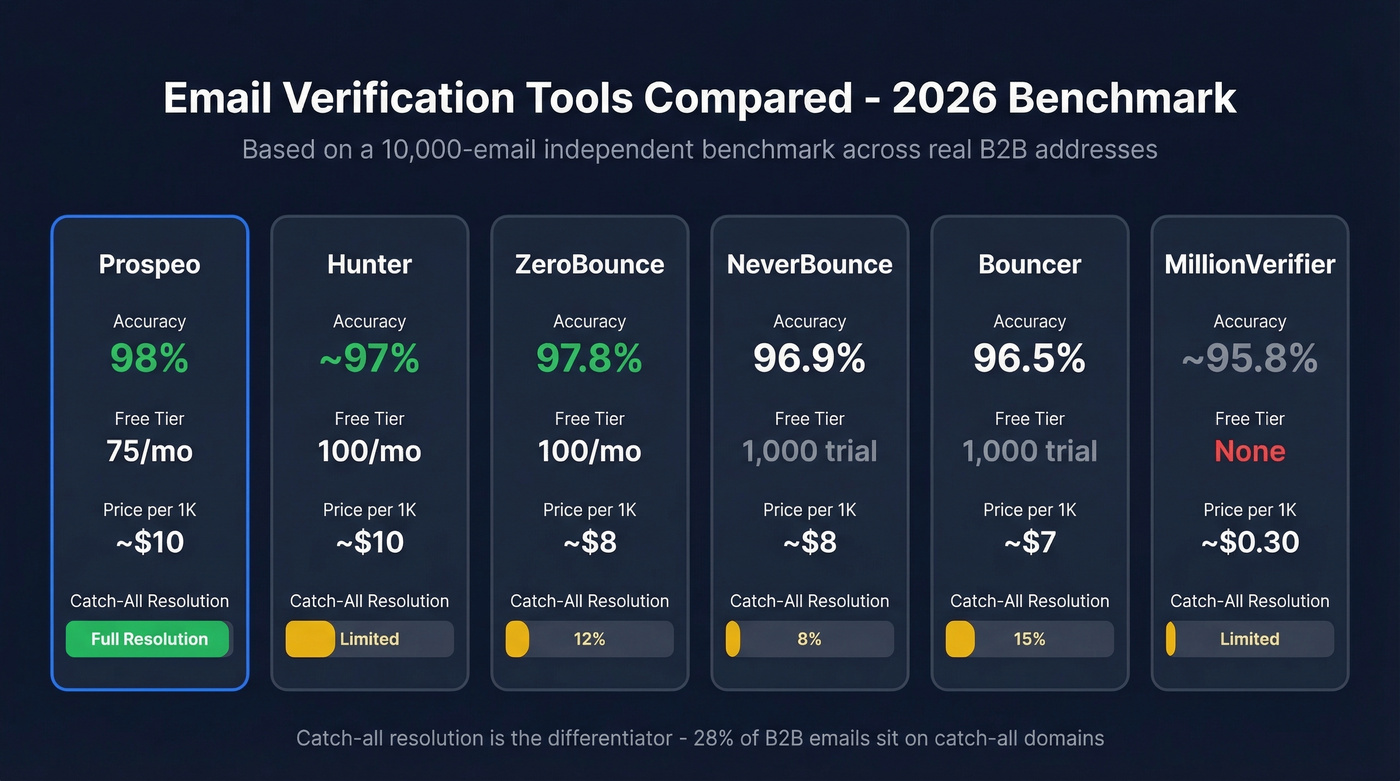
That 28% catch-all problem from the benchmark? Prospeo solves it. Our proprietary verification infrastructure resolves catch-all domains, removes spam traps, and refreshes data every 7 days - not the 6-week industry average. Teams using Prospeo keep bounce rates under 4% at scale.
Don't let catch-all domains wreck your sender reputation.
What to Do After Clicking a Phishing Link
Successful phishing breaches cost $4.8 million on average and take 254 days to detect. If you've already clicked, speed matters more than embarrassment.
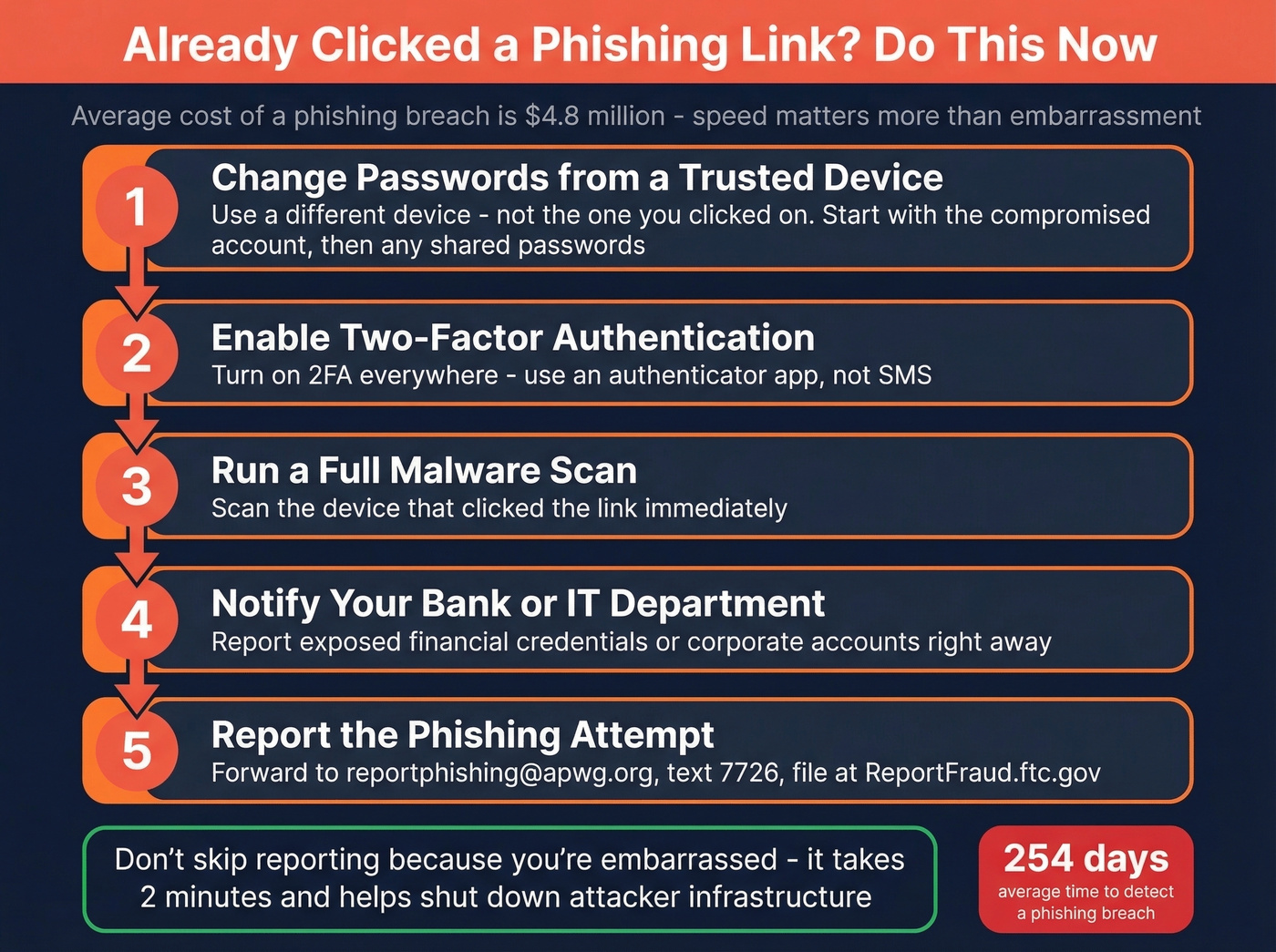
- Change passwords from a trusted device - not the one you clicked the link on. Start with the compromised account, then any account sharing the same password.
- Enable two-factor authentication on every account that supports it. Use an authenticator app, not SMS.
- Run a full malware scan on the device that clicked the link.
- Notify your bank or IT department immediately if financial credentials or corporate accounts were exposed.
- Report the phishing attempt. Forward the email to
reportphishing@apwg.org, forward phishing texts to7726, file a report at ReportFraud.ftc.gov, and if you shared personal info, visit IdentityTheft.gov for a tailored recovery plan.
Most people don't report phishing because they're embarrassed. Don't be. Reporting helps shut down the infrastructure attackers use, and it takes two minutes.
FAQ
How do I tell if an email address is real?
Inspect the sender address for lookalike domains, then check the email headers for SPF, DKIM, and DMARC verdicts - all three passing confirms the sender is authorized. To confirm an address exists before sending outreach, use a verification tool that runs SMTP-level mailbox checks.
Can you verify a sender just from the display name?
No. Display names are trivially spoofed, and lookalike domains fool most people at a glance. The definitive test is the Authentication-Results header showing SPF, DKIM, and DMARC pass verdicts, plus confirming the Return-Path matches the From domain.
What do SPF, DKIM, and DMARC mean?
SPF checks that the sending server is authorized by the domain. DKIM confirms the message wasn't altered in transit. DMARC ties both to the visible "From" address. All three passing means the sender is legitimate - any failure warrants suspicion.
How do I verify addresses before a cold outreach campaign?
Run each address through a tool that performs syntax validation, DNS/MX lookups, an SMTP handshake, and mailbox-level confirmation. Catch-all resolution matters here because 28% of B2B emails sit on catch-all servers where basic verification can't distinguish real mailboxes from dead ones.
How do I report a phishing email?
Forward it to reportphishing@apwg.org and forward phishing texts to 7726. File a report at ReportFraud.ftc.gov. If you shared personal information, visit IdentityTheft.gov for a step-by-step recovery plan.