

How to Check If an Email Address Is Valid (2026)
You exported 5,000 leads from your CRM, loaded them into your sequencer, and hit send. Two hours later, 8% bounced. Your sender reputation took a hit that'll take weeks to repair, and your deliverability for the good emails tanked too. A $30 verification run would've prevented all of it.
That's the gap between "I have emails" and "I have emails that work." Below: how verification actually works under the hood, which tools are worth paying for, and the mistakes that silently wreck your sender reputation.
What You Need (Quick Version)
- Single email check: Use Hunter's free single-check verifier or Mailmeteor's free tools. Paste an address, get a result in seconds.
- Find AND verify B2B emails in one step: Prospeo runs a 5-step verification that includes catch-all handling, spam-trap removal, and honeypot filtering - about $0.01/email, with 75 free emails per month.
How Email Verification Works
Every verification tool - whether you're paying $2 per thousand or $25 - runs some version of the same five-step process. Understanding it helps you interpret results and pick the right tool.
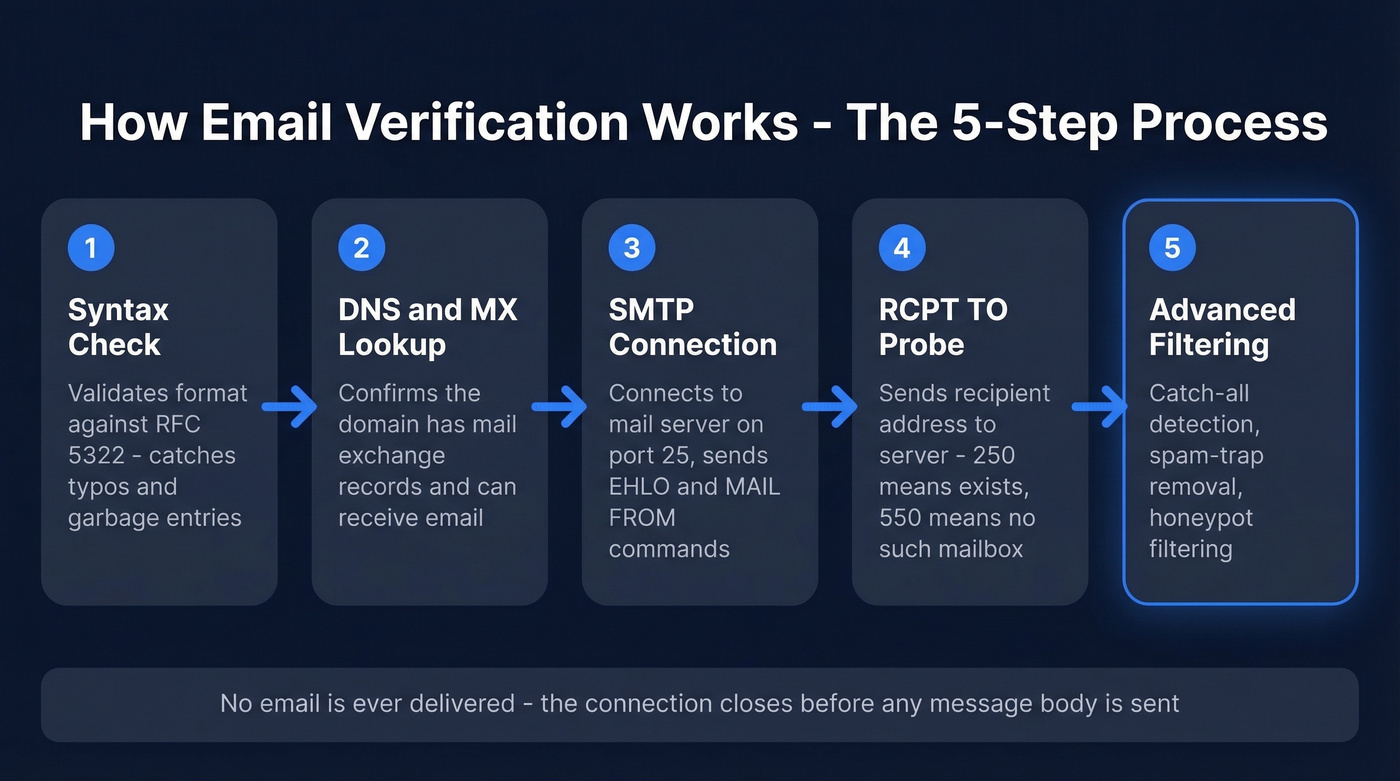
Step 1: Syntax check. The tool validates the email format against RFC 5322. Does it have an @ symbol? Is the local part valid? Are there illegal characters? This catches typos and garbage entries, but nothing more. A perfectly formatted email can still point to a dead mailbox.
Step 2: DNS and MX lookup. The tool queries the domain's DNS records - specifically the MX (Mail Exchange) records - to confirm the domain is configured to receive email. No MX record means the domain can't accept mail. Full stop.
Step 3: SMTP connection. The tool connects to the mail server on port 25 and initiates a partial handshake, sending an EHLO command to introduce itself, then a MAIL FROM to specify a sender address.
Step 4: RCPT TO probe. Here's where the real check happens. The tool sends a RCPT TO command with the email address being verified. The server responds with a status code: 250 means "this mailbox exists, I'll accept mail for it." 550 means "no such mailbox." The tool disconnects without ever sending an actual email.
Step 5: Advanced filtering. Better tools add layers on top of the basic SMTP handshake: catch-all domain detection, spam-trap removal, and honeypot filtering. These extra checks are what separate a commodity verifier from one that actually protects your sender reputation.
No email is delivered during verification. The connection closes before any message body is sent, so the recipient never knows you checked.
How to Read Your Results
Every verifier returns results in slightly different categories, but they all map to the same basic taxonomy:
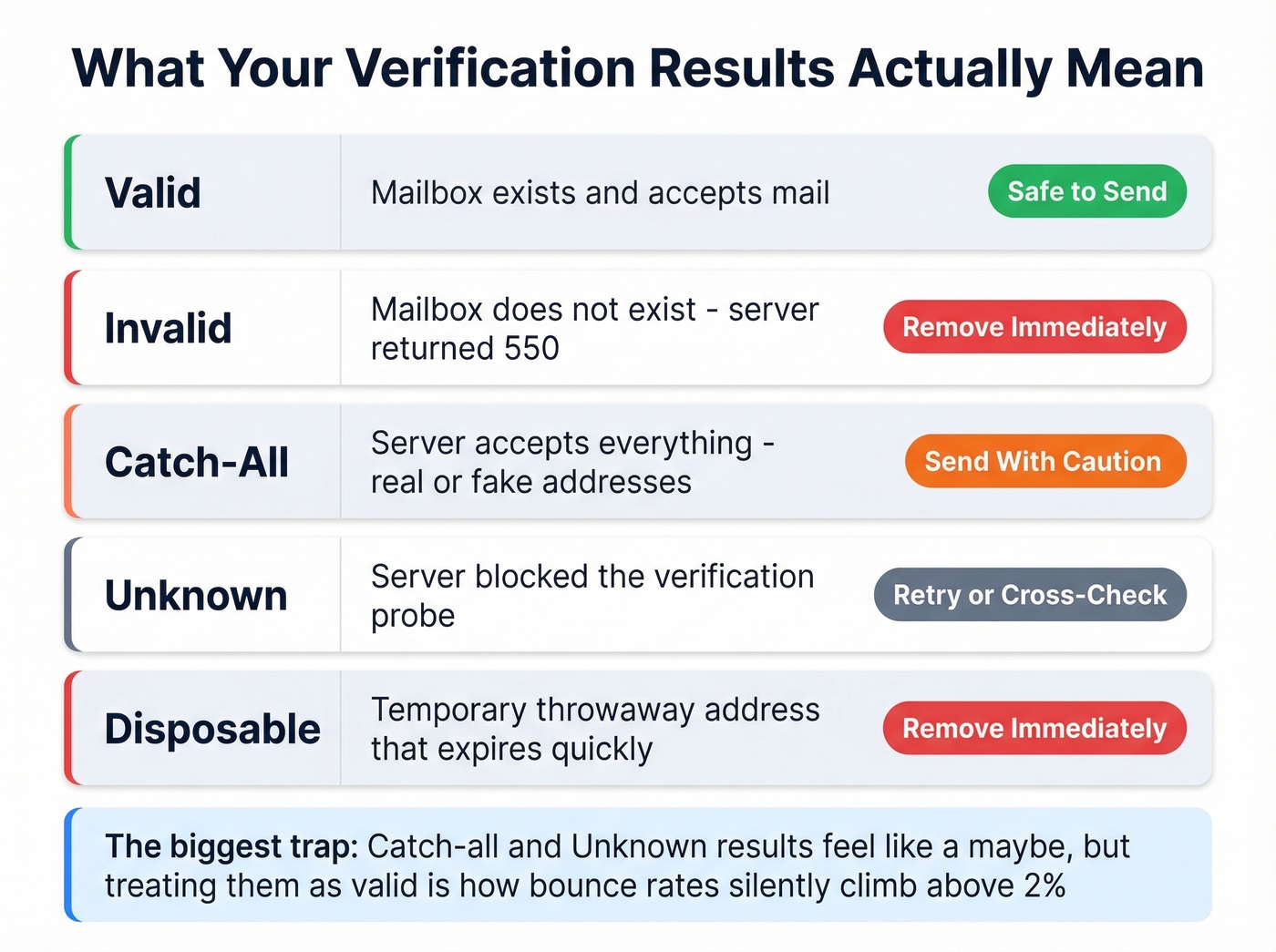
| Status | What It Means | Action |
|---|---|---|
| Valid | Mailbox exists, accepts mail | Safe to send |
| Invalid | Mailbox doesn't exist (550) | Remove immediately |
| Catch-all / Accept-all | Server accepts everything | Risky - send only if bounce rate stays under 2% |
| Unknown | Can't determine status | Retry later or cross-check with a second tool |
| Disposable | Temporary/throwaway address | Remove - these expire quickly |
The statuses that trip people up are catch-all and unknown. Both feel like "maybe," and the temptation is to treat them as valid. Don't. Catch-all addresses are one of the biggest sources of unexpected bounces in B2B outbound, and unknown results mean the server actively blocked the verification probe. Neither is a green light.
The Catch-All Problem
By industry estimates, 30-40% of B2B email addresses sit on catch-all domains. That's not a fringe edge case.
A catch-all domain is configured to accept mail for any address, whether the mailbox exists or not. Send to john.smith@company.com and it arrives. Send to asdfghjkl@company.com and the server still returns 250 OK. The standard SMTP verification probe can't tell the difference, which makes it impossible to confirm a valid mailbox using SMTP alone.
How do verifiers detect catch-all domains? They generate a random, obviously fake address at the domain and test it. If the server accepts garbage@company.com, the domain gets flagged as catch-all. Simple trick, but it works.
The second complication: enterprise security gateways like Proofpoint, Mimecast, and Barracuda actively block verification probes through greylisting and rate limiting. When a verifier can't complete the handshake, the result comes back as "unknown" - not because the email is bad, but because the server refused to answer.
Here's the thing: catch-all domains create false confidence. You verify a list, see a sea of "valid," then watch bounces climb because many of those results were accept-all responses masquerading as confirmed mailboxes. What to do with catch-all results: send cautiously, keep them in a separate segment, monitor bounce rates in real time, and pull the segment if bounces climb above 2%. Or cross-check with a second verification tool that uses signals beyond SMTP.

Prospeo doesn't just verify emails - it finds and verifies them in one step. The 5-step process covers catch-all handling, spam-trap removal, and honeypot filtering, hitting 98% accuracy. 75 free emails per month, ~$0.01 each after that.
Stop paying to clean bad data. Start with data that's already clean.
Why "99% Accuracy" Is a Lie
Every email verification tool markets "99% accuracy." It's the industry's most popular fiction.
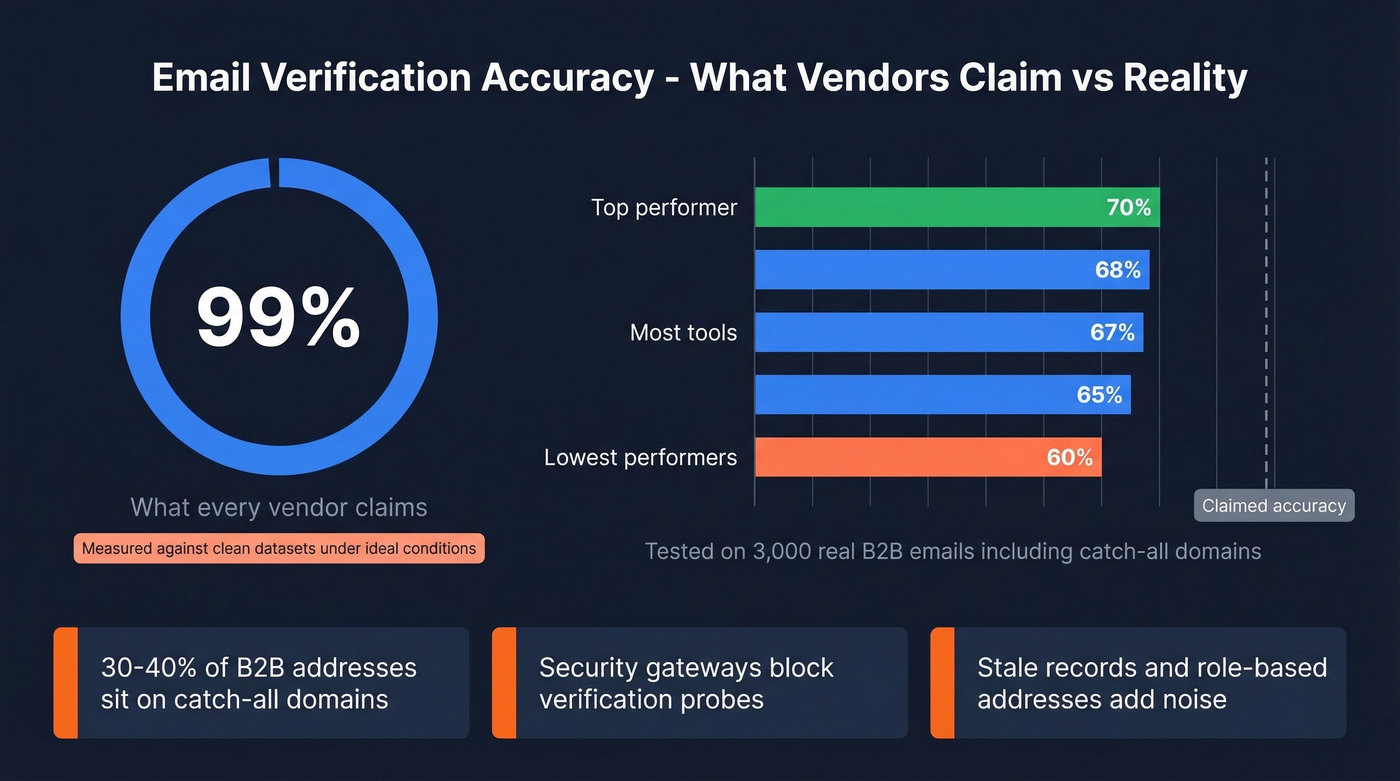
Hunter ran a benchmark of 15 email verification providers using roughly 3,000 total emails: 2,700 real business emails segmented by company size, plus 300 known invalid addresses. The top-performing tool scored 70% overall. Most clustered between 65% and 68%. That's a long way from 99%.
Three reasons for the gap. First, catch-all domains - which make up 30-40% of B2B addresses - are inherently ambiguous via SMTP. Second, greylisting and security gateways block probes, producing "unknown" results that count against accuracy. Third, the "99%" number is typically measured against a clean dataset of known-valid addresses under ideal conditions, not the messy reality of a B2B prospect list with stale records, role-based addresses, and enterprise firewalls.
Let's be honest: if your deal sizes are under $10K and you're sending fewer than 5,000 emails a month, you don't need the most expensive verifier on the market. A mid-tier tool with catch-all detection gets you 90% of the way there. Save the premium spend for when bad deliverability is actually costing you deals.
Hunter acknowledges that using email activity recorded in their own ecosystem may advantage their tool in the benchmark. But even with that caveat, the data is useful. Expect some bounces even after verification, and be deeply skeptical of any vendor promising near-perfect accuracy.
Best Tools to Verify Email Addresses
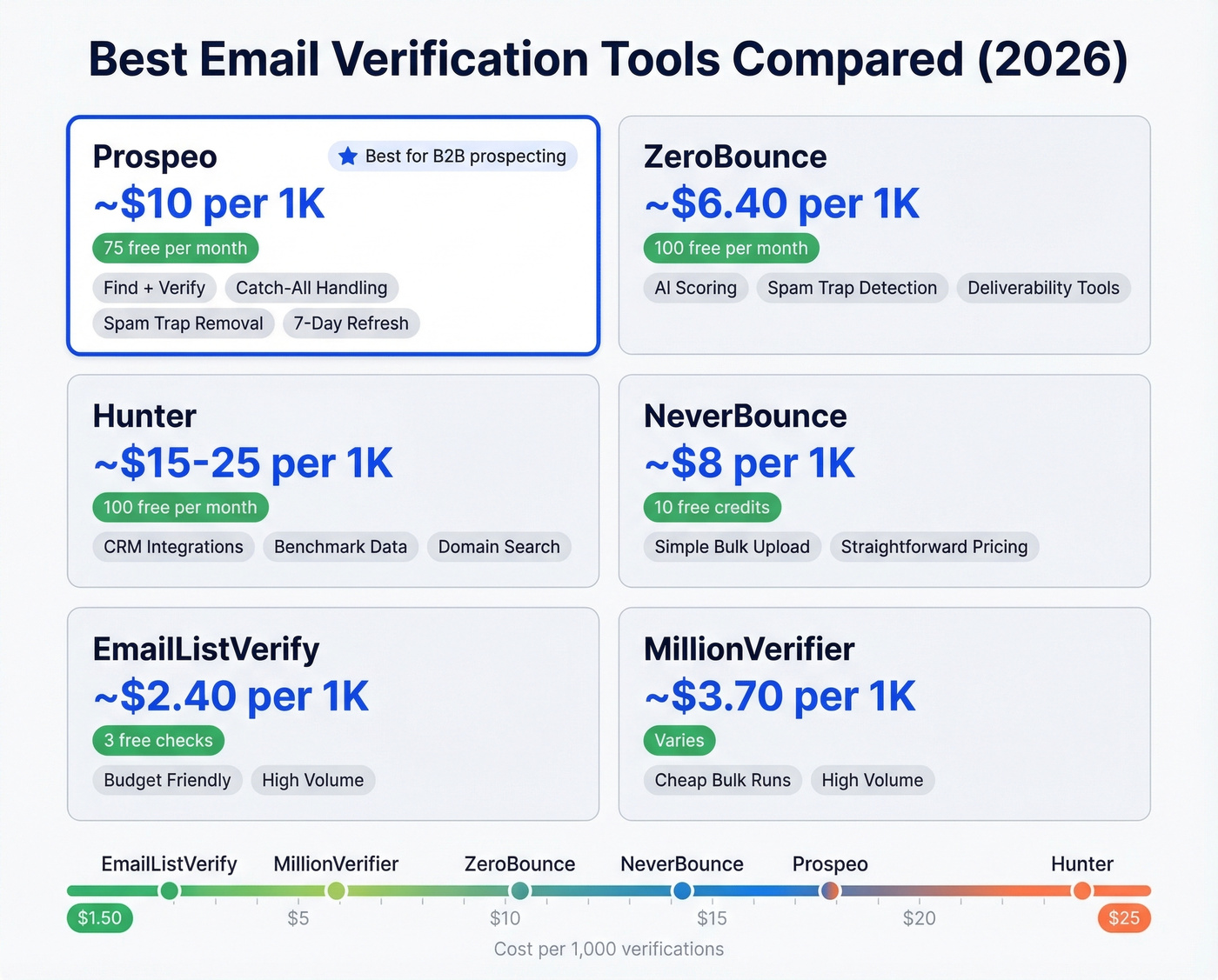
| Tool | Free Tier | Cost per 1K | Best For |
|---|---|---|---|
| Prospeo | 75 emails/mo | ~$10 | Find + verify in one step |
| ZeroBounce | 100/mo | ~$6.40 at 10K vol | Standalone bulk verification |
| Hunter | 100/mo | ~$15-$25 (varies by plan) | Light usage + CRM integrations |
| NeverBounce | 10 credits | ~$8 | Simple one-off list cleaning |
| EmailListVerify | 3 free checks | ~$2.40 | Budget bulk verification |
| Bouncer | Not public | ~$5 (monthly plan) | Pay-as-you-go flexibility |
| Mailmeteor | 50/mo (Sheets add-on) | Free | Quick single checks |
| DeBounce | Varies | ~$1.50-$2 | Budget bulk |
| MillionVerifier | Varies | ~$3.70 | Cheap high-volume runs |
Prospeo
Use this if you need to find and verify B2B emails in one workflow. Most tools on this list only verify - you bring the emails, they check them. Prospeo searches 300M+ professional profiles and runs every result through a 5-step verification process that includes catch-all handling, spam-trap removal, and honeypot filtering. The result is 98% email accuracy at roughly $0.01 per email, with data refreshed every 7 days - the industry average is 6 weeks.
The proof points are concrete. Snyk's 50-person AE team went from a 35-40% bounce rate to under 5% after switching. Stack Optimize maintains 94%+ deliverability and under 3% bounce across all their agency clients with zero domain flags. The free tier gives you 75 emails plus 100 Chrome extension credits per month - enough to test whether the data quality holds up before committing.

Skip this if you already have a clean email list and just need a standalone bulk verifier.
Catch-all domains fool most verifiers. Prospeo's proprietary infrastructure goes beyond SMTP probes with dedicated catch-all detection, spam-trap removal, and honeypot filtering - all on a 7-day refresh cycle so you're never verifying against stale records.
Get emails that actually land in inboxes, not bounce logs.
ZeroBounce
At $99/month, ZeroBounce ONE bundles verification with deliverability tools - a solid deal if you're already spending on separate deliverability monitoring. For pay-as-you-go, expect about $64 for 10,000 verifications (~$6.40/1K). The free tier gives you 100 validations per month.

The AI-powered scoring and abuse/spam-trap detection are genuinely useful additions beyond basic SMTP checks. We've run the same lists through ZeroBounce and cheaper alternatives, and ZeroBounce consistently catches more spam traps - the kind of addresses that don't bounce but quietly destroy your sender score. Where it falls short: it doesn't find emails for you. You bring the list, it cleans it.
Skip this if you need email discovery, not just verification.
Hunter
Hunter is the tool most people try first, and for good reason - the free tier is generous enough for small teams, and the CRM integrations with HubSpot and Salesforce work out of the box. At scale, though, it gets expensive. Pricing varies by plan, ranging from ~$15 to ~$25 per 1,000 verifications depending on whether you're on a dedicated verification plan or using unified credits. That's 2-6x more than most competitors.
Hunter also ran the 15-tool benchmark referenced above, which is genuinely useful even with the acknowledged methodology bias. Their transparency about potential self-advantage is refreshing in a space where most vendors slap "99% accuracy" on the homepage and call it a day.
The bottom line: great for under 500 verifications per month. Beyond that, the per-verification cost makes it hard to justify over ZeroBounce or EmailListVerify.
NeverBounce
A straightforward bulk verification tool with simple pricing. NeverBounce charges about $8 per 1,000 verifications and offers 10 free credits - barely enough to test, but enough to see the interface. The bulk upload workflow is clean: upload a CSV, get results categorized by status, download the cleaned list. No frills. Good for one-off list cleaning before a major campaign, but it doesn't offer the depth of ZeroBounce's scoring or a combined find-and-verify workflow.
EmailListVerify
The budget pick. At $24 for 10,000 verifications (~$2.40/1K), EmailListVerify is the cheapest mainstream option by a wide margin. The free tier is minimal - just 3 checks - but if you're sitting on a 50,000-record list and need to clean it without spending hundreds of dollars, start here.
We've seen teams use it as a first-pass filter before running high-value segments through a more thorough tool. That two-pass approach - cheap bulk clean, then premium verification on the survivors - is the most cost-effective workflow we've found for large lists.
Bouncer
Bouncer flies under the radar but has some of the strongest review scores in the category: 4.9 on Capterra across 233 reviews and 4.8 on G2 across 232 reviews. That kind of consistency across hundreds of reviews isn't an accident.
The pay-as-you-go model at ~$0.008/email is flexible, and the $50/month plan covers 10,000 verifications. The real-time API is solid for developers building verification into signup flows or import workflows. A good mid-tier option if you want quality without committing to a larger platform.
Mailmeteor, DeBounce, MillionVerifier
Mailmeteor is the easiest free option for single checks, plus a Google Sheets add-on that's handy for quick list hygiene without leaving your spreadsheet. The add-on includes 50 email verifications per month for free - the fastest way to verify a handful of addresses.
DeBounce runs $1.50-$2 per 1,000 verifications, making it one of the cheapest bulk options available. No frills, gets the job done for large lists on tight budgets.
MillionVerifier sits at about $3.70 per 1,000. Slightly pricier than DeBounce but handles high-volume runs well. Worth evaluating if you're processing 100K+ records regularly, though we haven't tested it deeply enough to rank it confidently against the other budget options.
Bounce Rate Benchmarks
Before you panic about your bounce rate, here's what "normal" looks like based on data spanning 44+ billion emails:
| Industry | Avg. Bounce Rate |
|---|---|
| Ecommerce | 0.19% |
| IT / Tech / Software | 0.90% |
| Financial Services | 1.20% |
| Real Estate / Design | 1.40% |
| Construction / Manufacturing | 2.20% |
Below 2% is healthy. Between 2-5% means your list has quality issues. Above 5% is a red flag that can trigger ISP throttling and domain reputation damage.
If you're in construction or manufacturing, you're already starting closer to the danger zone - which makes verification even more critical for those verticals. Google's bulk sender guidelines set explicit requirements for high-volume senders, so list hygiene matters more than ever.
Mistakes That Kill Deliverability
1. Treating verification as a one-time cleanup. Email lists decay. After four weeks, roughly 2% of a verified list will be invalid. With 41% annual workforce turnover in many industries, corporate email addresses go stale fast. Verify before every major campaign, and set a minimum cadence of every 3-4 months. In our experience, teams that verify quarterly see bounce rates stay under 2% consistently. Teams that verify once a year are playing roulette.
2. Treating catch-all results as valid. They're not. Catch-all means the server accepted the address, but the mailbox may not exist. Segment these contacts separately and monitor bounce rates in real time. If bounces climb, pull the segment.
3. Not verifying at the point of capture. If you're collecting emails through forms, imports, or manual entry, run a real-time validity check - not days later in a batch job. Bad data that enters your CRM propagates through every downstream system. We've watched teams spend weeks cleaning up data quality issues that a real-time API check at the point of entry would have prevented entirely.
4. Using one tool for every workflow. A single-check free tool, a bulk CSV verifier, and a real-time API integration are three different use cases. Don't force one tool to handle all three.
5. Waiting until after bounces to verify. By the time you see an 8% bounce rate in your campaign dashboard, the damage is done. Your sender reputation has already taken the hit. Verify before you send, every time. The cost of verification is a fraction of the cost of rebuilding domain reputation.
If you're trying to keep bounce rates stable long-term, pair verification with a basic email deliverability checklist and monitor your sender reputation as you scale.
FAQ
Can I verify an email without sending a message?
Yes. Verification tools use the SMTP handshake - specifically the RCPT TO command - to confirm whether a mailbox exists without delivering any email. The connection closes before any message body is sent, so the recipient never receives anything.
What's the difference between validation and verification?
Validation checks format - does the email comply with RFC 5322 syntax rules? Verification goes further by contacting the mail server to confirm the mailbox can actually receive mail. You need both, but verification is what prevents bounces.
Why did my "verified" email still bounce?
Most likely a catch-all domain. The server accepted the address during the SMTP probe, but the specific mailbox doesn't exist. Catch-all domains affect 30-40% of B2B emails. Use a tool with catch-all detection rather than basic SMTP-only probing.
How often should I re-verify my list?
Every 3-4 months at minimum, and always before a large campaign. Lists decay at roughly 2% per month due to job changes, company closures, and domain migrations. A list that was clean in January can have 6-8% invalid addresses by April.
How do I check if an email address is valid for free?
Mailmeteor lets you verify up to 50 emails per month through its Google Sheets add-on, Hunter provides 100 free verifications monthly, and Prospeo gives you 75 free emails plus 100 Chrome extension credits. For a one-off lookup, paste the address into any of these tools and you'll get a result in seconds.