

How to Check If an Email Will Bounce Before You Hit Send
You uploaded 2,000 contacts into your sequencer on a Friday, launched Monday morning, and woke up to a 6% bounce rate. Your domain reputation took a hit before the first reply ever came in. That scenario plays out constantly - and it's entirely preventable if you check whether an email will bounce before you send.
What You Need (Quick Version)
Either way, know this: "valid" doesn't mean "safe to send." And a bounce rate above 2% is a list-quality warning sign.
How Email Bounce Checking Works
Every verification tool - free or paid - runs the same basic SMTP handshake under the hood:
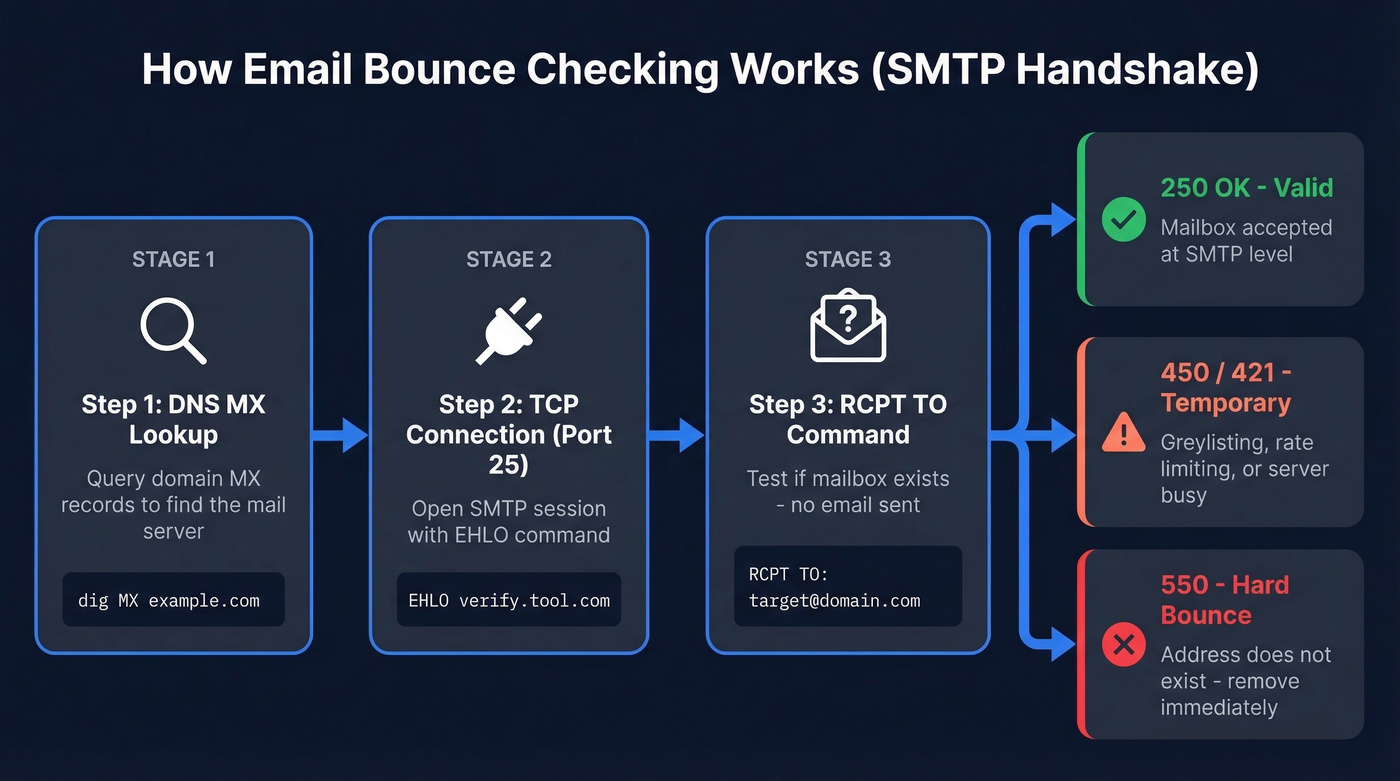
- DNS MX lookup. The tool queries the domain's MX records to find the mail server responsible for that address. A domain can receive email without hosting a website, so MX records are what matter here, not A records.
- TCP connection on port 25. It opens a connection to the highest-priority MX server and initiates an SMTP session with an
EHLOcommand. - RCPT TO command. The tool issues
MAIL FROMfollowed byRCPT TO:<target@domain.com>and reads the response code - without ever delivering a message.
A 250 2.1.5 Ok means the mailbox is accepted at the SMTP level. A 550 5.1.1 No such user means hard bounce - that address is dead. Temporary codes like 450 or 421 mean the server is busy, greylisting, or rate-limiting. Open-source validators like deep-email-validator run this same sequence plus disposable-domain blacklists and typo detection, which is why results vary between tools.
That ambiguity in temporary codes is where most verification headaches start.
Hard Bounce vs Soft Bounce
Your ESP treats these very differently, and so should you.
| Type | SMTP Codes | Cause | What to Do |
|---|---|---|---|
| Hard bounce | 5xx (550, 551, 553) | Invalid address, dead domain, permanently blocked | Remove immediately |
| Soft bounce | 4xx (450, 421) | Full mailbox, greylisting, rate limiting, temp server issue | Retry once, then remove |
Hard bounces are permanent. Remove on first occurrence - no exceptions. Soft bounces are temporary, but don't let them linger. Most ESPs handle suppression automatically; SMTP2GO, for instance, suppresses hard-bounced addresses for 7 days, then allows sending again. If it bounces a second time, it'll hard-bounce again.

Every bounce is a data problem, not a sending problem. Prospeo's 5-step verification - including catch-all handling, spam-trap removal, and honeypot filtering - runs before the email reaches your list. 98% accuracy across 143M+ verified emails, refreshed every 7 days.
Stop cleaning bad data. Start with emails that don't bounce.
Acceptable Bounce Rates
Under 2% is safe. Under 1% is ideal. Above 5% and you're actively damaging your sender reputation.
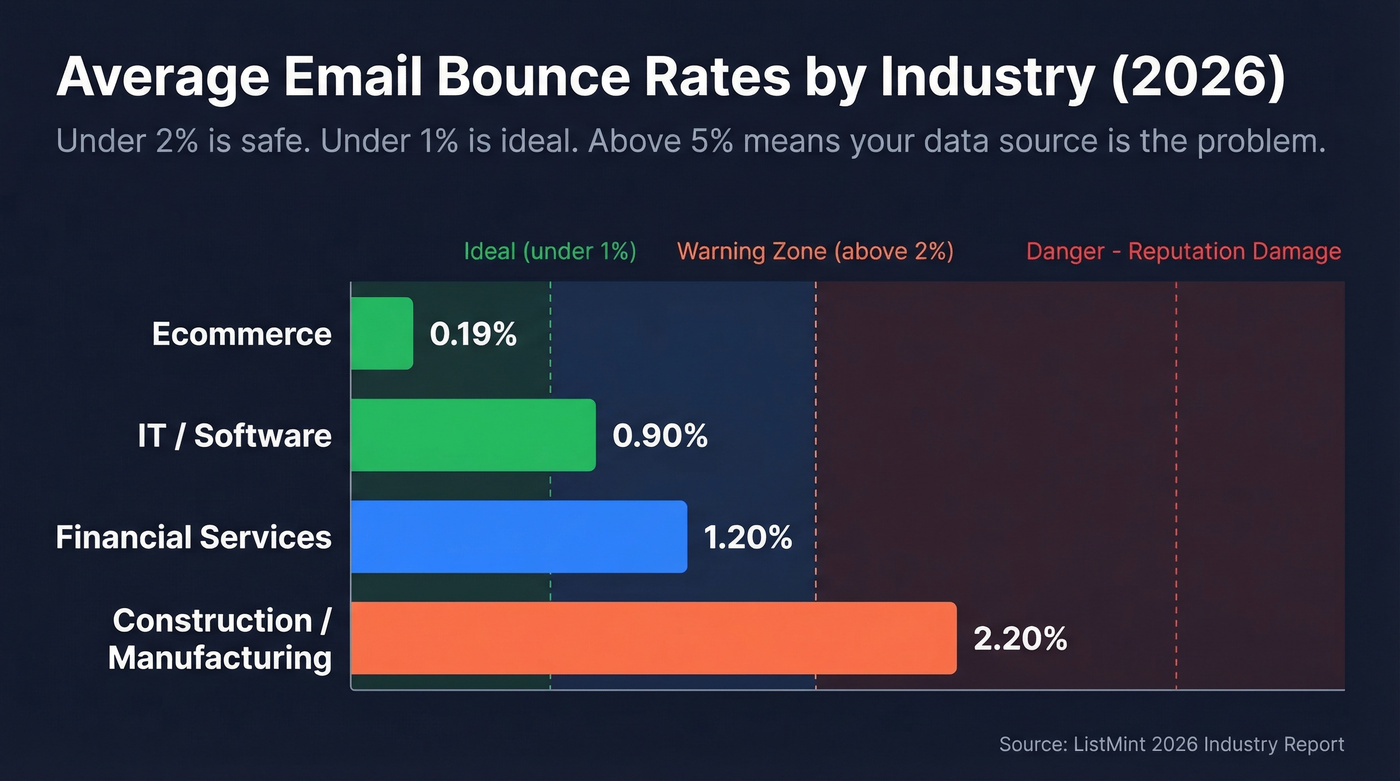
Here's how bounce rates break down by industry in 2026:
| Industry | Avg Bounce Rate |
|---|---|
| Ecommerce | 0.19% |
| IT / Software | 0.90% |
| Financial Services | 1.20% |
| Construction / Manufacturing | 2.20% |
If you're consistently above 2%, the problem isn't your sending infrastructure. It's your data source.
Why Verified Emails Still Bounce
You ran the list through a verifier, got "valid" results, and still caught bounces. In our testing, three culprits explain almost every case.
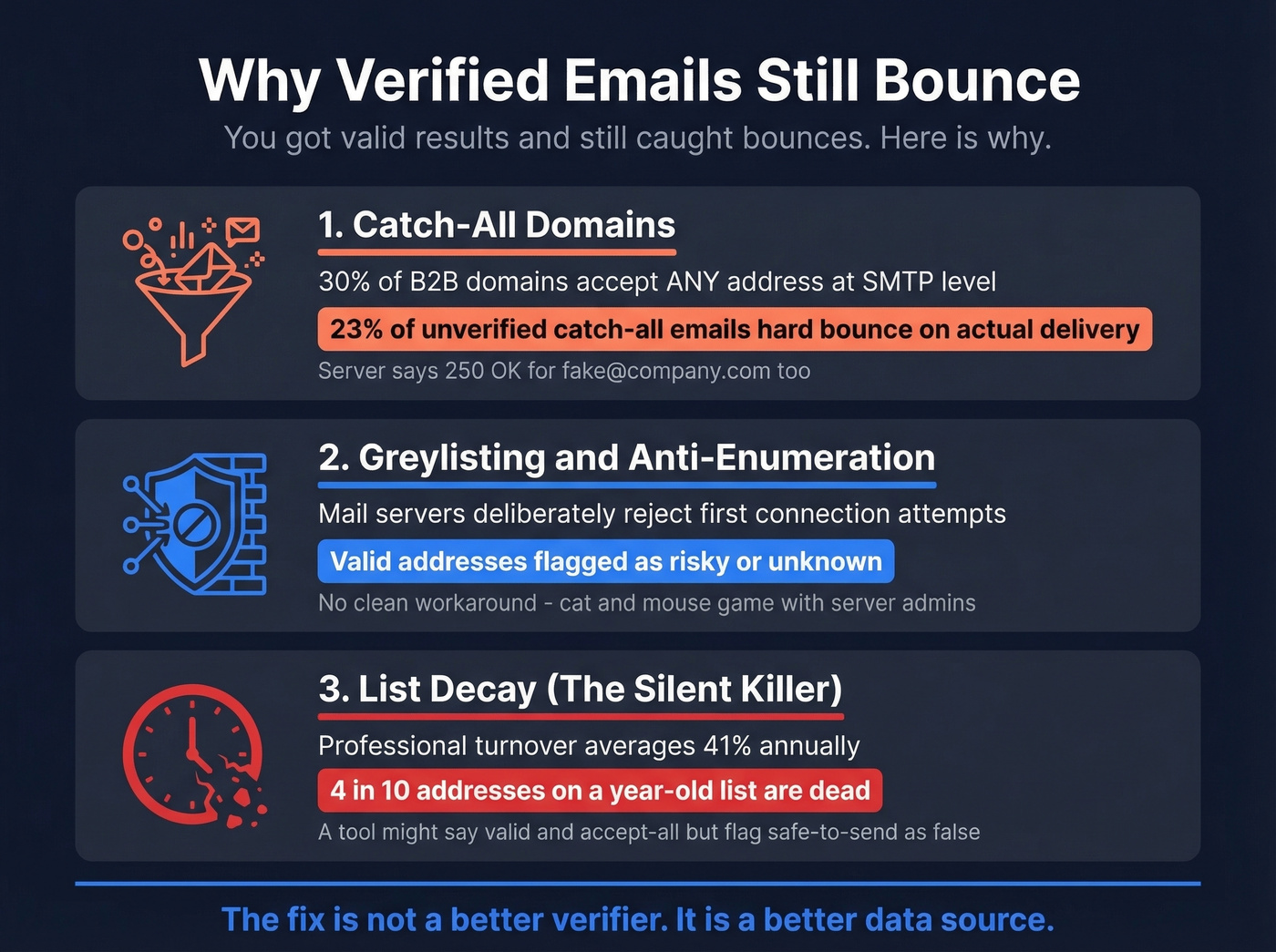
Catch-all domains are the biggest offender. Around 30% of B2B domains use catch-all configurations, meaning the server returns 250 OK for any address - real or fake. Your verifier sees "valid," but the mailbox doesn't actually exist. Roughly 23% of unverified catch-all emails hard bounce when you actually send.
Greylisting and anti-enumeration create false negatives. Some mail servers deliberately reject the first connection attempt or block automated SMTP checks entirely, making valid addresses look risky or unknown. There's no clean workaround for this one - it's a cat-and-mouse game between verification tools and mail server admins who don't want their users enumerated.
List decay is the silent killer. Average professional turnover runs around 41% annually, which means roughly 4 in 10 addresses on a year-old list are dead. A tool like QuickEmailVerification might return result: valid and accept_all: true but flag safe_to_send: false - and that distinction is the one most people ignore.
The consensus on r/Emailmarketing and r/sales threads is blunt: "Most tools work. None are perfect. The difference shows up at scale."
Best Tools to Verify Emails Before Sending
Here's the thing - the best way to avoid bounces is to start with verified data, not clean bad data after the fact. We've tested most of these, and the differences are real.
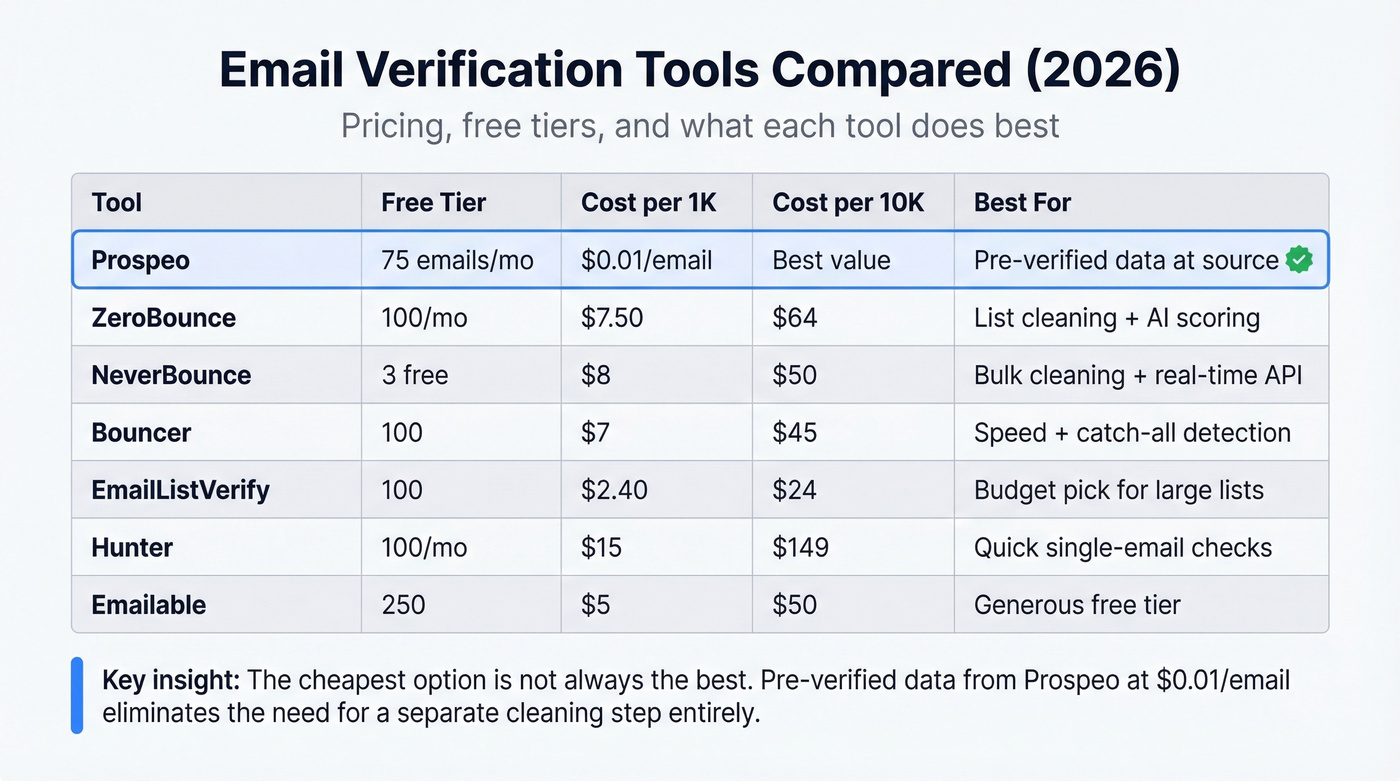
| Tool | Free Tier | ~Cost/1K | ~Cost/10K | Best For |
|---|---|---|---|---|
| Prospeo | 75 emails/mo + 100 Chrome extension credits/mo | ~$0.01/email | - | Pre-verified data at source |
| ZeroBounce | 100/mo (business domain signup) | ~$7.50 | $64 | List cleaning + AI scoring |
| NeverBounce | 3 free (quick checker) | ~$8 | ~$50 | Bulk cleaning + real-time API |
| Bouncer | 100 | ~$7 | $45 | Speed + catch-all detection |
| EmailListVerify | 100 | ~$2.40 | $24 | Budget pick for large lists |
| Hunter | Free single checks + up to 100/mo | ~$15 | $149 | Quick single-email checks |
| Emailable | 250 | ~$5 | $50 | Generous free tier |
Prospeo
Prospeo eliminates the verification step entirely. Instead of finding emails from one source and cleaning them with another tool, its proprietary 5-step verification - including catch-all handling, spam-trap removal, and honeypot filtering - runs before you ever see the address. The result: 98% email accuracy across 143M+ verified emails, with data refreshed every 7 days versus the 6-week industry average. Real-world proof: Snyk cut bounce rates from 35-40% to under 5% after switching, and Stack Optimize maintains sub-3% bounce rates across all clients with zero domain flags. At roughly $0.01 per email with 75 free monthly credits, it's the most cost-effective way to prevent bounces at the source rather than catching them after the damage is done.
ZeroBounce
ZeroBounce is the strongest standalone verifier for teams that already have lists they need to clean. The AI-powered scoring goes beyond simple valid/invalid - it flags abuse emails, spam traps, and catch-all addresses with a confidence score. You get 100 free verifications per month with a business domain signup, and bulk pricing lands at $64 per 10K on pay-as-you-go. If you're cleaning purchased lists or event-sourced contacts, this is the right tool.
NeverBounce
Reliable bulk cleaning with a solid real-time API for form verification. We've seen teams integrate it into signup flows to catch bad addresses at the point of entry, which is where it really shines. The quick checker verifies 3 emails for free. Where NeverBounce earns its keep is high-volume, recurring list hygiene - not the occasional spot check.
Bouncer, EmailListVerify, Hunter, Emailable
Bouncer processes 180K emails per hour, making it the fastest option for large batch jobs. Catch-all detection is solid, and at $45/10K it undercuts most competitors. If speed is your bottleneck, Bouncer is the pick.
EmailListVerify is the budget option at $24/10K for massive lists - skip it if you need detailed risk scoring, but it's fine for straightforward valid/invalid checks. Hunter works great for checking a single address fast but gets expensive at $149/10K for bulk work. Emailable's 250 free verifications make it worth bookmarking for occasional use.

Let's be honest: most teams spend more time cleaning bad data than it would cost to just start with good data. If your bounce rate is a recurring problem, the fix isn't a better verifier - it's a better source (or a better email list provider).
Snyk dropped bounce rates from 35-40% to under 5%. Stack Optimize runs sub-3% bounces across every client with zero domain flags. The difference? Pre-verified emails at $0.01 each instead of paying twice - once for bad data, again to clean it.
75 free verified emails per month. No credit card required.
When and How Often to Verify
Knowing how to test addresses for deliverability is only useful if you do it at the right time. Three touchpoints matter:
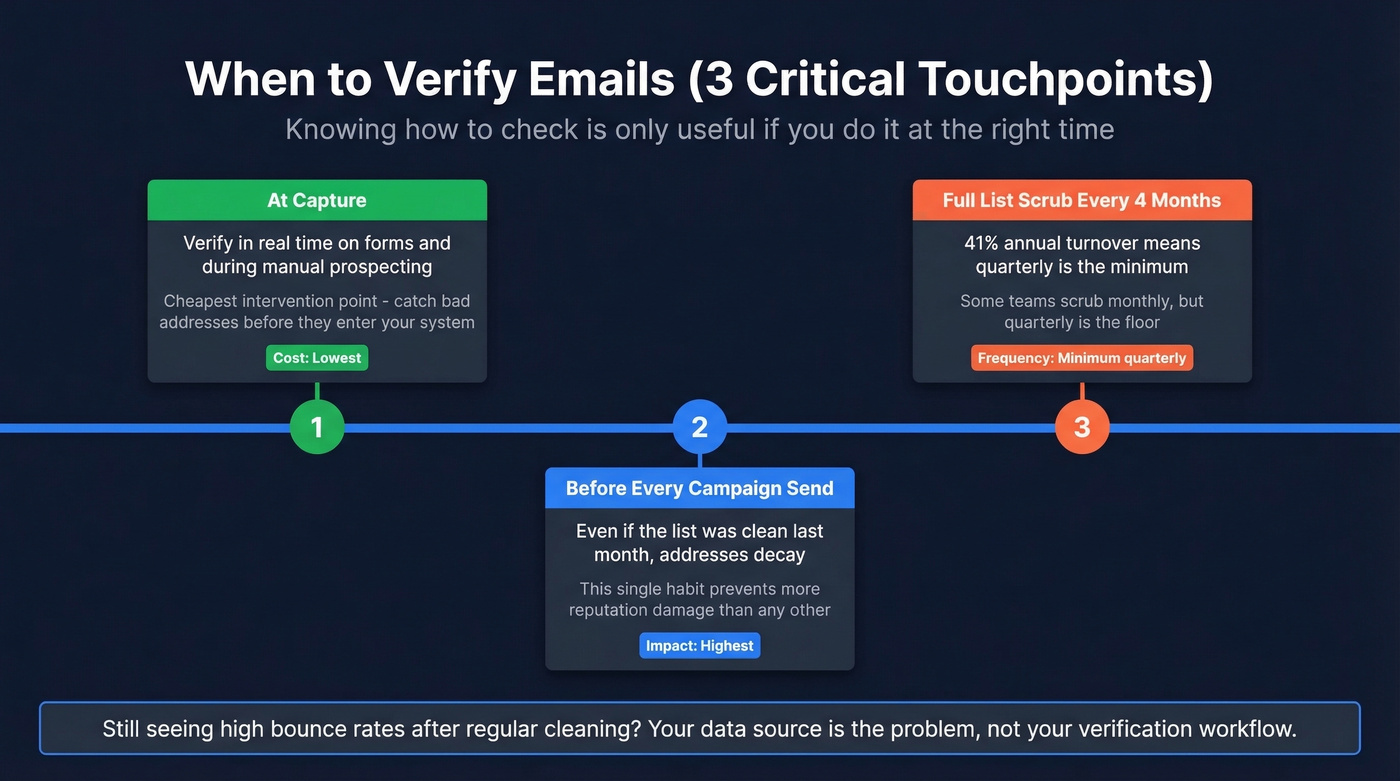
At capture. Verify emails in real time on forms and during manual prospecting. Catching bad addresses here saves you from cleaning them later - and it's the cheapest intervention point by far (especially if you use a real-time API in your stack).
Before every campaign send. Even if the list was clean last month, addresses decay. Run verification before you hit send. This single habit prevents more reputation damage than any other (and pairs well with an email deliverability guide for ongoing monitoring).
Full list scrub every 4 months minimum. With 41% annual turnover, a quarterly cadence keeps your database from rotting. Some teams we work with scrub monthly, but quarterly is the floor.
If you're cleaning lists every month and still seeing high bounce rates, your data source is the problem - not your verification workflow (see data enrichment services if you're patching missing fields).
FAQ
How do I check if an email will bounce without sending a message?
Verification tools use the SMTP RCPT TO command to test whether a mailbox exists without delivering anything. Most free tools offer 50-250 checks per month. Prospeo takes a different approach by pre-verifying all emails in its database, so you don't need a separate bounce-check step at all.
Why did my verified email still bounce?
Most likely a catch-all domain. These servers accept all addresses at the SMTP level but bounce on actual delivery. About 23% of unverified catch-all emails hard bounce. Re-verify before every send, or use a provider with built-in catch-all handling.
What's the fastest way to avoid bounces on outbound?
Use a data provider that pre-verifies emails at the source with catch-all handling, rather than finding emails first and cleaning them separately. This collapses two steps into one and keeps bounce rates under 2%.
How do I verify a large list for bounces?
Upload your CSV to a bulk verification tool like ZeroBounce, NeverBounce, or Bouncer. These services process thousands of addresses per hour, flagging invalid, risky, and catch-all emails so you can remove them before sending.