

How to Confirm an Email Address Is Real (Without Sending a Single Email)
You uploaded 5,000 leads into your sequencer, hit send, and 400 bounced. Your domain reputation just took a hit that'll haunt your deliverability for weeks. The fix isn't better copy or warmer subject lines - it's learning to confirm an email address before you ever send anything.
What You Need (Quick Version)
Checking one email right now? Use a free verification tool. Prospeo, Hunter, and Bouncer all have free options. Paste the address, get a result in seconds.
Cleaning a list of 100+ emails? You need a bulk verification tool. Manual methods won't scale.
Preventing fake signups on a form? Implement double opt-in. Skip ahead to that section - it's the only real solution for form abuse.
What Email Verification Actually Means
People search for ways to confirm an email address for three different reasons. Some want to check whether a specific address exists before emailing it. Others need to clean a marketing list before a campaign. A third group wants confirmation flows for new signups.
The industry uses three overlapping terms that create confusion. Validation checks structure - is the format correct, does the domain have MX records? It's fast but shallow. An address like nonexistent@valid-domain.com passes validation just fine. Verification goes deeper: it checks whether the actual mailbox exists, flags disposable emails, and catches spam traps. Confirmation refers to the double opt-in process where a human clicks a link to prove they own the address.
For outbound sales and list cleaning, you want verification. For signup forms, you want confirmation. Most people need one or both.
How Verification Works Under the Hood
The best verification tools check whether an email is real without ever sending an actual message. Here's the four-step process happening behind the scenes:
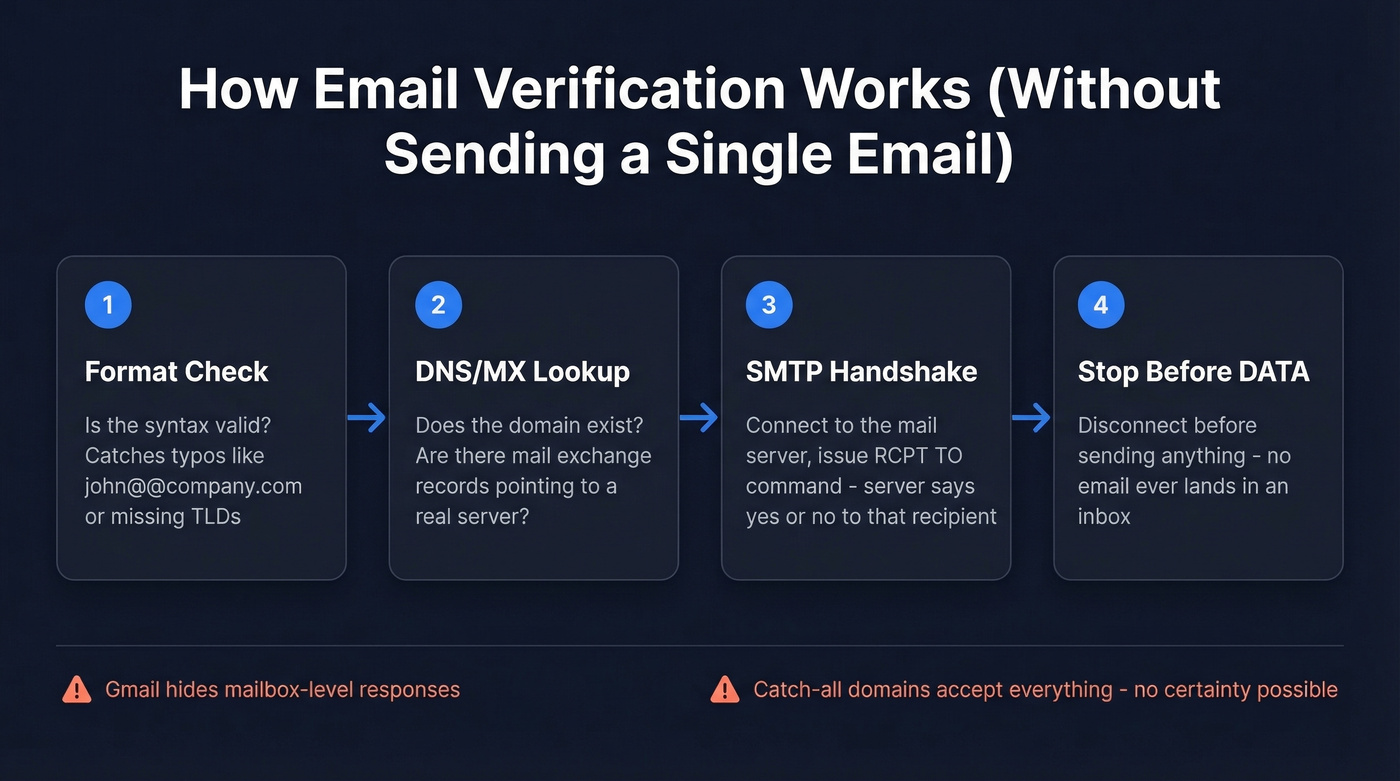
- Format check - Does the address follow valid syntax? Catches typos like
john@@company.comor missing TLDs. - DNS/MX lookup - Does the domain exist, and does it have mail exchange records pointing to a real mail server?
- SMTP handshake - The tool connects to the mail server and issues a
RCPT TOcommand with the address. The server responds with whether it'll accept mail for that recipient. - Stop before DATA - The tool disconnects before actually sending anything. No email lands in anyone's inbox.
Here's the thing: many mail servers deliberately obscure their responses. Gmail won't tell you whether a specific mailbox exists. And catch-all domains - servers configured to accept mail for any address at that domain - make mailbox-level certainty impossible. Enterprise tools layer additional checks on top of this core process, things like disposable email detection, role-based address filtering, and AI scoring. But the four steps above are the foundation everything else builds on.
That's why verification results are probabilistic, not absolute. A "valid" result means high confidence, not a guarantee.
5 Manual Methods to Check an Email
Manual methods work fine for a single address. They're useless at scale. Anyone with 100+ emails needs a tool. Full stop.
Send a test email and watch for bounces. The most obvious approach. If it hard-bounces, the address is dead. But doing this repeatedly gets your domain flagged - it's risky at volume and tells you nothing about spam traps or disposable addresses.
Check the provider's login page. Try the "forgot password" flow on Gmail, Outlook, or Yahoo. If the provider says the account doesn't exist, you have your answer. This only works for consumer email providers and is tedious for more than a handful of addresses.
Google the address. Paste it into a search engine. If it appears on a company website, social profile, or public directory, it's likely real. Absence doesn't prove anything, though.
Manual MX record lookup. Run
nslookup -type=mx domain.comin your terminal. If no MX records exist, the domain can't receive email. This confirms domain-level validity but tells you nothing about the specific mailbox.Pattern analysis. If you know a company uses
first.last@company.comand you can verify one address at that domain, you can infer the pattern for others. Useful but error-prone - people leave companies, aliases change, and some orgs use multiple formats.
None of these scale past a dozen addresses. For anything beyond spot-checks, you need a verification tool.

Manual checks don't scale, and cleaning lists after you buy them is a tax on bad data. Prospeo skips both steps - every email comes pre-verified through 5-step verification with catch-all handling, spam-trap removal, and honeypot filtering. 98% accuracy, confirmed by teams like Snyk who dropped bounce rates from 35% to under 5%.
Confirm 75 emails for free this month - zero bounces, zero risk.
Best Email Verification Tools
Every tool on this list claims around 96-99.9% accuracy. These are self-reported numbers. Your post-send bounce rate is the only honest metric. Most "free email verifiers" are lead-gen traps - they limit you to 3-100 checks, then gate everything behind a signup. The tools below have usable free options or transparent pay-as-you-go pricing.
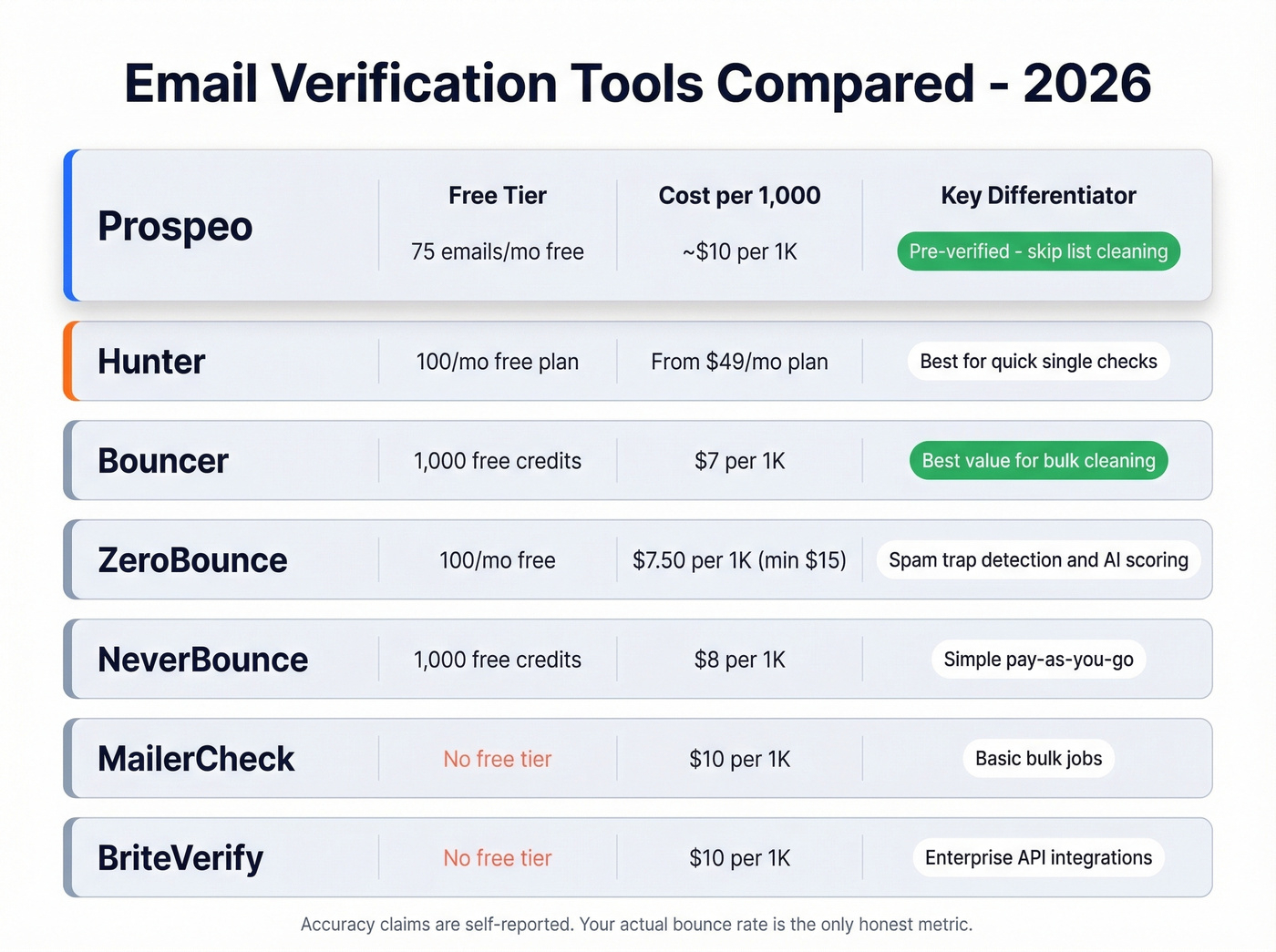
| Tool | Free Tier | Cost per 1,000 | Claimed Accuracy | Best For |
|---|---|---|---|---|
| Prospeo | 75 emails/mo | ~$10 | 98% | Pre-verified prospecting |
| Hunter | Free single checks + 100/mo plan | From $49/mo plan | 97%+ | Quick single checks |
| Bouncer | 1,000 credits | $7 | 99.5% | Bulk list cleaning |
| ZeroBounce | 100/mo | $7.50 (min $15 / 2,000) | 99.6% | Marketing lists |
| NeverBounce | 1,000 credits | $8 | 99.9% | Simple pay-as-you-go |
| MailerCheck | None | $10 | Not public | Basic bulk jobs |
| BriteVerify | None | $10 | 97% | Enterprise workflows |
Prospeo
Prospeo takes a different approach than standalone verification tools. Instead of finding emails first and cleaning them later, its email finder returns only verified addresses - so you skip the list-cleaning step entirely. Every address runs through a 5-step verification process with catch-all handling, spam-trap removal, and honeypot filtering before it ever reaches your export.

The 98% email accuracy rate shows up in real results. Snyk's team of 50 AEs dropped their bounce rate from 35-40% to under 5% after switching, and their AE-sourced pipeline jumped 180%. When reps stop wasting sequences on dead addresses, they spend more time on live prospects - that math compounds fast. The free tier gives you 75 emails per month, enough to test the accuracy yourself before committing.
Hunter
Hunter's the name most people know for email verification, and it's great for occasional checks. You can run single-email verifications for free without signing up, and the free plan includes up to 100 verifications per month.
The interface is clean, results come back fast, and it handles single-email lookups well. The limitation is scale: bulk verification means paid plans starting at $49/month, which gets expensive per-verification compared to dedicated cleaning tools.

Bouncer
Best value for pure bulk verification. Bouncer gives you 1,000 free credits to start and charges $7 per 1,000 emails after that. If you've got a 50,000-contact marketing list that hasn't been cleaned in a year, Bouncer is the pragmatic choice. We've seen it deliver solid results on large cleaning jobs, and the pricing is hard to beat for sheer volume.
ZeroBounce
ZeroBounce positions itself for marketing teams who need more than valid/invalid results. It includes spam-trap detection and an AI-based scoring system that flags risky addresses. The catch: there's a $15 minimum purchase for 2,000 verifications, so it's not ideal for small batches. For teams running regular newsletter campaigns, the extra deliverability insights justify the slight premium.
NeverBounce
Use this if you want dead-simple pay-as-you-go verification with no bells and whistles. 1,000 free credits, $8 per 1,000 after that. Upload a CSV, get results, move on.
Skip this if you want a tool that does anything beyond straightforward list cleaning.
MailerCheck
Straightforward verification at $10 per 1,000 credits. No free tier, which puts it at a disadvantage against Bouncer and NeverBounce for anyone testing the waters. It does the job, but there's no compelling reason to choose it over cheaper alternatives unless you're already in the MailerLite ecosystem.
BriteVerify
Enterprise-oriented at $10 per 1,000 with no free trial. BriteVerify is built for large organizations that need API-level integration into existing marketing stacks. If you're an individual rep or a small team, look elsewhere - the lack of a free tier and the enterprise sales process make it overkill.
You're reading this because bad emails already cost you deliverability, or you know they will. At $0.01 per email, Prospeo gives you pre-verified contacts refreshed every 7 days - not stale data from a list you need to clean with yet another tool.
Stop paying twice: once for emails, again to confirm them.
Understanding Verification Results
Not every result is a simple yes or no. Understanding the status taxonomy saves you from making bad decisions with borderline addresses.
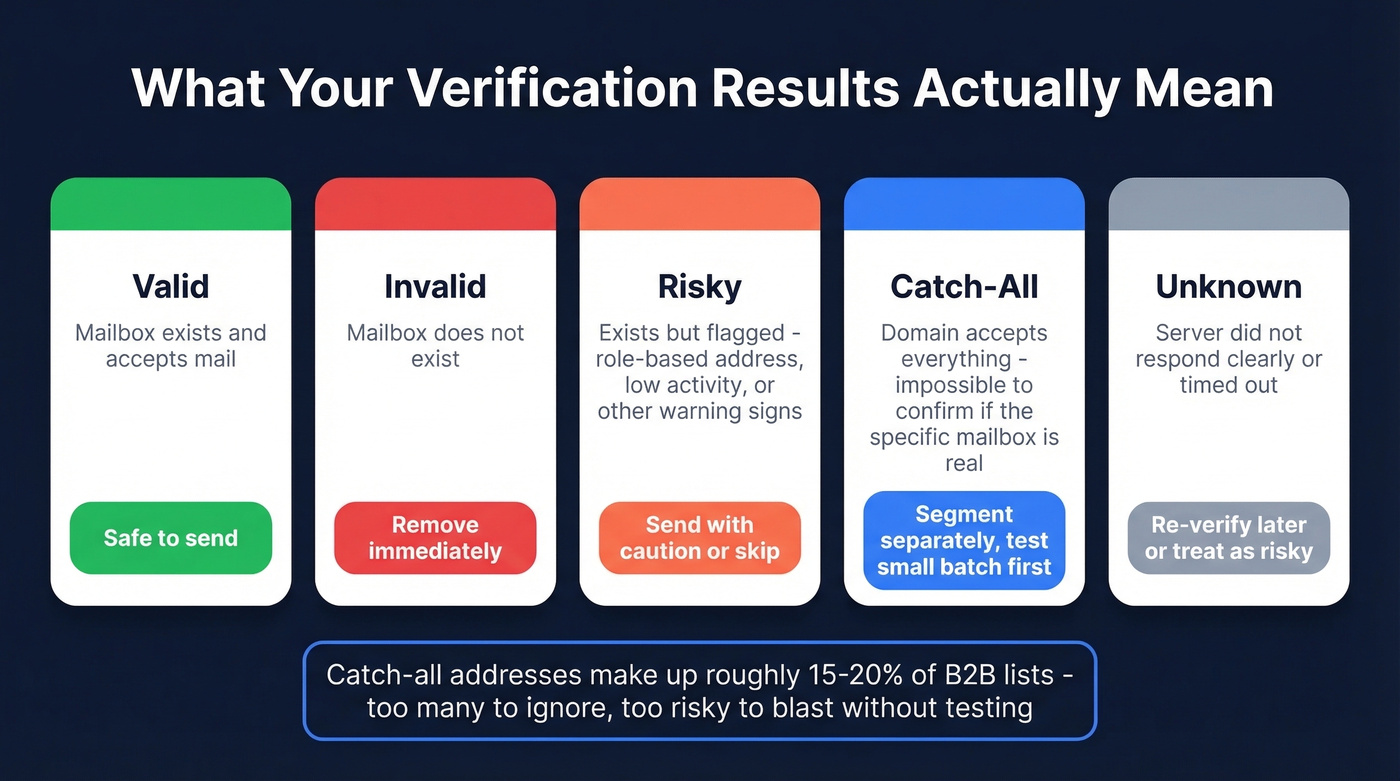
| Status | What It Means | What to Do |
|---|---|---|
| Valid | Mailbox exists, accepts mail | Safe to send |
| Invalid | Mailbox doesn't exist | Remove immediately |
| Risky | Exists but flagged (role-based, low activity) | Send with caution or skip |
| Catch-all | Domain accepts everything - can't confirm mailbox | Segment separately, monitor bounces |
| Unknown | Server didn't respond clearly | Re-verify later or treat as risky |
Catch-all domains deserve special attention. In our experience, catch-all addresses account for roughly 15-20% of B2B email lists - too many to ignore, too risky to blast without caution. When a mail server accepts mail for any address at a domain, verification tools can't distinguish real.person@company.com from gibberish123@company.com. The smart move is to segment catch-all results into a separate list and monitor bounce rates on a small test batch before sending to the full segment.
Double Opt-In for Signup Forms
Let's be honest: if you're running signup forms, you don't need a verification tool. You need to stop collecting bad emails in the first place. Double opt-in is the real fix. Verification is a band-aid for a process problem. If you already have a dirty list, the tools above will clean it. But fix the source first.
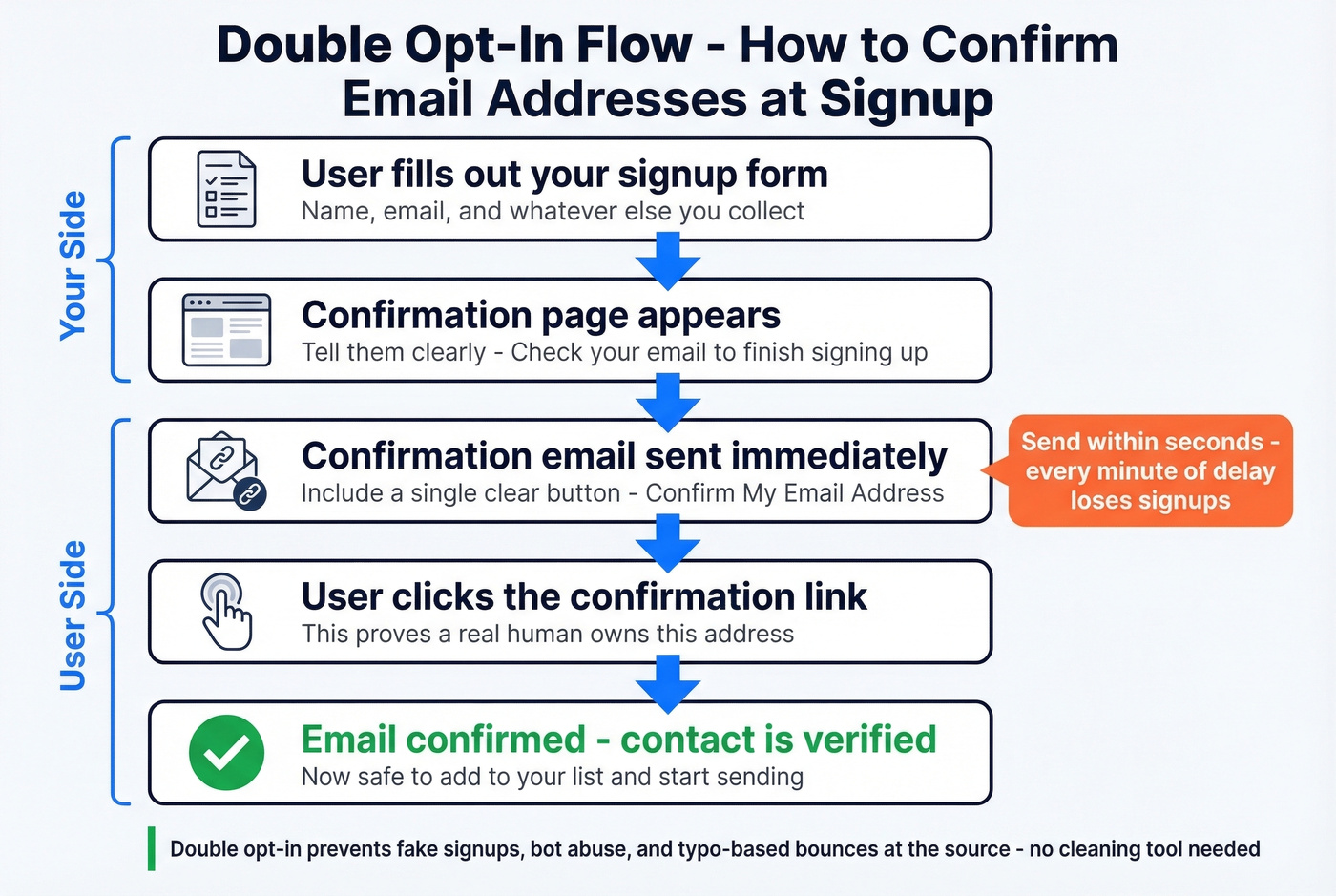
The flow is straightforward, though timing matters more than most people realize:
- User fills out your form
- They see a confirmation page saying "Check your email"
- They receive an email with a confirmation link - send this immediately, because delays kill conversion
- They click the link to verify they own the address, and only then are they added to your list
Double opt-in is legally required in Germany, Austria, Greece, Switzerland, Luxembourg, and Norway. Even where it isn't mandatory, it's smart hygiene. Typical confirmation rates run 60-85% depending on how well you set expectations on the signup page.
A sysadmin on r/sysadmin flagged that multiple services were allowing full account creation with unverified emails - leading to account misuse and confusion. That's the risk of skipping confirmation: you're not just collecting bad data, you're creating attack surface.
Bounce-Rate Benchmarks
A "good" email bounce rate sits below 2%. Below 1% is where you want to be. Cross 2%, and mailbox providers start paying attention - not in a good way.
Here's how different industries stack up per Mailchimp's published benchmarks and Campaign Monitor's data:
| Industry | Avg. Bounce Rate |
|---|---|
| Ecommerce | 0.19% |
| Business/Finance | 0.55% |
| Consulting | 0.79% |
| IT/Tech/Software | 0.90% |
| Advertising/Marketing | 1.10% |
| Financial Services | 1.20% |
| Construction/Manufacturing | 2.20% |
If you're in construction or manufacturing and seeing bounce rates above 2%, that's partly an industry problem - higher employee turnover, less standardized email infrastructure. But it's also a data quality problem you can fix.
Email addresses decay at roughly 25-30% per year due to job changes and domain shutdowns. A list you built 12 months ago has already lost a quarter of its value. Clean it or pay the deliverability tax.
FAQ
How often should I re-verify my email list?
Every 3-6 months for lists you're actively sending to, and before every major campaign for dormant lists. Email addresses decay at 25-30% per year from job changes and domain shutdowns, so a list that was clean in January is already degrading by summer.
How can I verify an email address for free?
Hunter lets you run free single checks without signing up, plus up to 100/month on its free plan. Bouncer offers 1,000 free credits. Prospeo's free tier includes 75 verified emails per month with full catch-all handling - the best option if you also need to find addresses, not just verify them.
What's the difference between a hard bounce and a soft bounce?
A hard bounce means the address doesn't exist - remove it immediately and never send again. A soft bounce is temporary: full inbox, server downtime, or message too large. Retry once on the next send. If it soft-bounces twice, treat it as a hard bounce and remove it.
How do I verify emails before sending a campaign?
Upload your list to a bulk verification tool like Bouncer or NeverBounce, remove any invalid or risky results, and segment catch-all addresses for careful test sends. This pre-send step takes minutes and can cut your bounce rate from double digits to under 2%.
The Bottom Line
Verify before you send, match the method to your scale, and protect your sender reputation like it's revenue - because it is. For one-off checks, free tools work. For list cleaning, bulk verifiers at $7-10 per thousand are a no-brainer. For signup forms, double opt-in solves the problem at the source. However you approach it, taking the time to confirm an email address before hitting send is the single highest-ROI step you can take for deliverability.