

The 12 Best CRM Companies for 2026 (And How to Actually Pick One)
Your 15-rep team just outgrew HubSpot's free plan. The contact limit hit, automations are locked behind a paywall, and half your pipeline lives in a spreadsheet someone named "LEADS_FINAL_v3." You're not alone - 91% of companies with more than 11 employees run a CRM, and a huge chunk of them are actively shopping for a better option to replace whatever they started with.
The CRM market is projected to hit $126.17 billion in 2026, with 87% of deployments now cloud-based. The average return on CRM investment sits around $8.71 for every $1 spent - but only if you pick the right platform and actually get your team to use it. Companies that nail their implementation see 17% higher lead conversion, 16% better retention, and 21% productivity gains. Companies that pick wrong just get a more expensive spreadsheet.
Here's the thing: most comparison guides rank tools by feature count. That's backwards. Features don't matter if your reps won't log in. What matters is workflow fit, pricing you can sustain, and - the part nobody talks about - whether the data inside your CRM is any good. We've spent months testing and comparing these platforms, and these are the 12 CRM companies worth evaluating right now.
Our Picks at a Glance
Short on time? Start here.
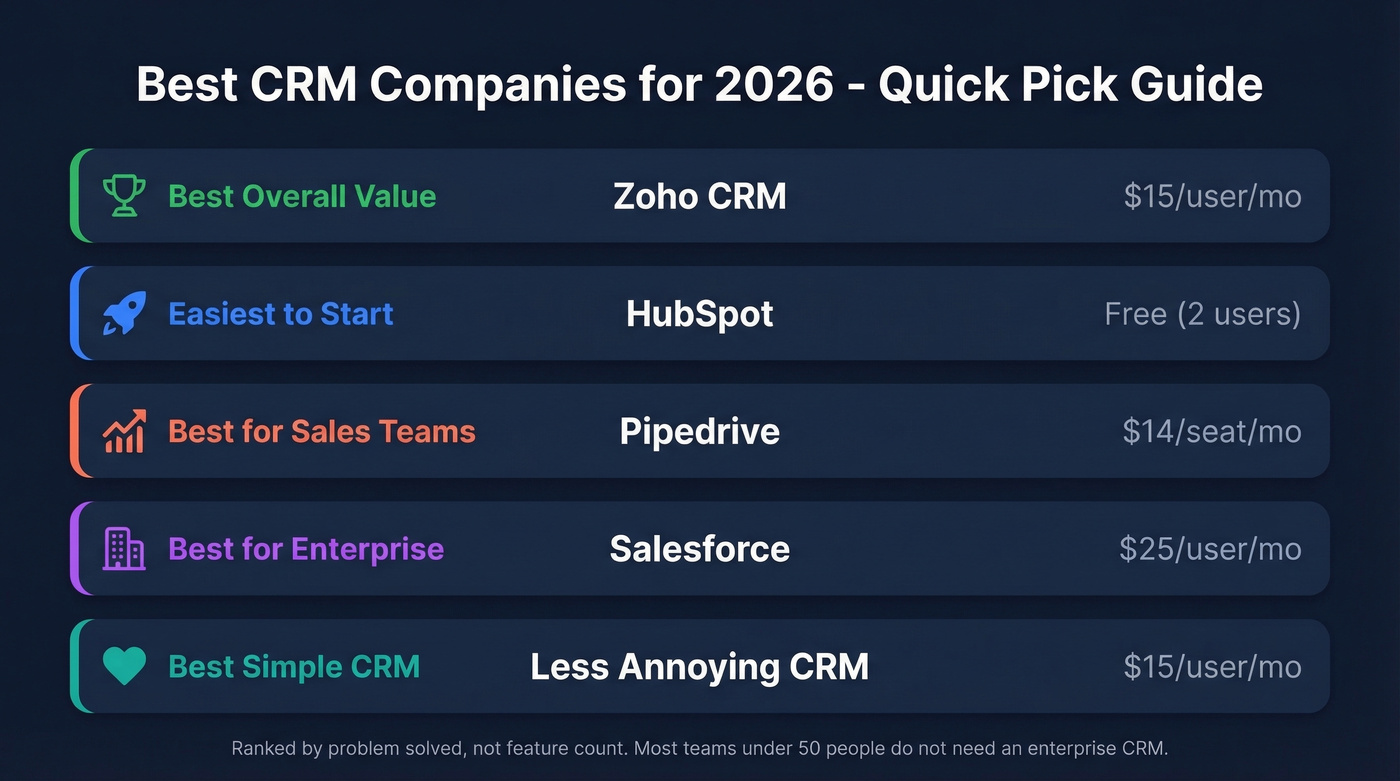
| Use Case | Pick | Starting Price |
|---|---|---|
| Best overall value | Zoho CRM | $15/user/mo |
| Easiest to start | HubSpot | Free (2 users) |
| Best for sales teams | Pipedrive | $14/seat/mo |
| Best for enterprise | Salesforce | $25/user/mo |
| Best simple CRM | Less Annoying CRM | $15/user/mo |
These aren't ranked by who has the most features. They're ranked by who solves a specific problem best. A 5-person startup and a 200-seat enterprise have completely different needs, and the "best CRM" is whichever one your team will actually use every day.
Most teams under 50 people don't need an enterprise CRM. They need a simple pipeline tool and clean data. Overspending on Salesforce when Pipedrive or Zoho would do the job is the single most common CRM mistake we see - and it's driven by brand anxiety, not actual requirements.
What to Look for in a CRM Company
Before you demo anything, get clear on six things.
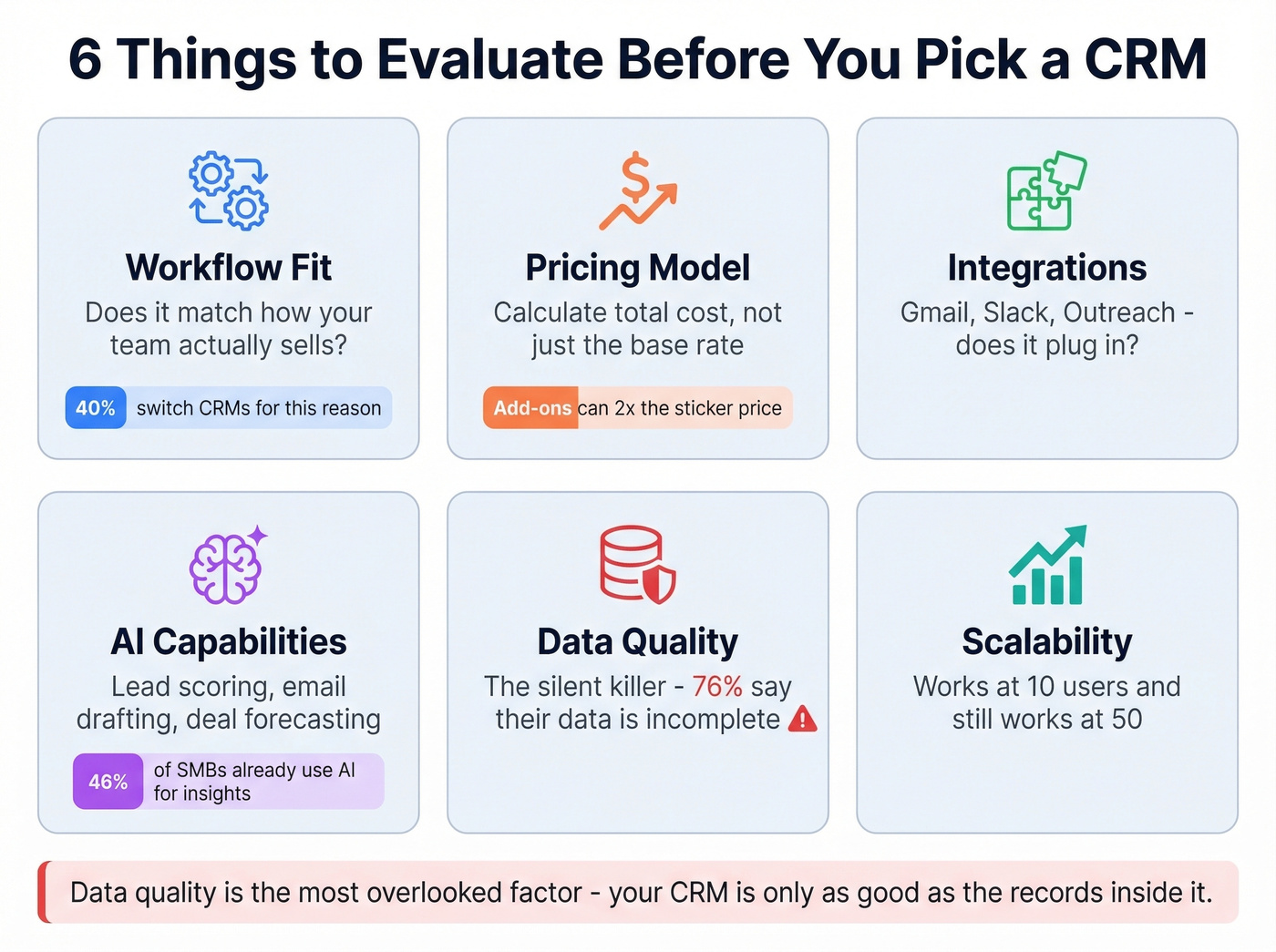
Workflow fit comes first. Map how your team actually sells - from first touch to closed deal - and see if the CRM mirrors that process or forces you to rebuild it. 40% of companies switch CRMs specifically to improve efficiency, which means their first pick didn't match how they work.
Pricing model matters more than sticker price. Per-user monthly billing sounds simple until you realize add-ons for automation, reporting, and lead scoring can double the cost. Always calculate total cost of ownership for your team size, not just the base rate.
Integrations determine whether the CRM becomes your system of record or just another tab. If your team lives in Gmail, Slack, and Outreach, the CRM needs to plug into all three without duct tape.
AI capabilities are table stakes now. 46% of SMBs already use AI for customer insights, and that number climbed 10% year-over-year. Look for AI that does something useful - lead scoring, email drafting, deal forecasting - not just a chatbot badge on the pricing page.
Data quality is the silent killer. Your CRM is only as good as the contact records inside it. If you're not enriching and refreshing data, you're building on sand. We'll dig into this below, but 76% of CRM users say less than half their data is accurate or complete. That stat alone should change how you evaluate every tool on this list.
Scalability means the CRM grows with you. A tool that's perfect at 10 users but breaks at 50 is a migration headache waiting to happen. The best CRM software bundles scalability into core plans rather than gating it behind enterprise tiers.
The 12 Best CRM Companies for 2026
Zoho CRM - Best Overall Value
Use this if you want a Salesforce-style CRM without Salesforce-style pricing. Zoho earned PCMag's Editors' Choice with a 4.5/5 Outstanding rating.
Pricing is competitive: Standard starts at $15/user/mo. From there, Professional is $25/user/mo ($20 on annual billing), Enterprise is $40/user/mo ($35 annual), and Ultimate goes up to $100/user/mo. Zoho also offers a free edition for up to 10 users - a genuinely useful starting point for small teams that want to test the waters before committing budget.
Zia, Zoho's AI assistant, handles AI-driven insights and automation support. The customization depth is impressive: custom modules, multi-step workflow automation, and native connections to the broader Zoho ecosystem (Books, Desk, Campaigns) without paying for third-party integrations.
Skip this if you need something your team can master in a day. The learning curve is steep, especially once you start customizing beyond the defaults. But for the price, Zoho is one of the strongest "power CRMs" for small and mid-size teams.
Prospeo - Best for CRM Data Quality
Every CRM on this list shares the same weakness: the data inside it. Prospeo isn't a CRM - it's the data infrastructure that makes your CRM work. With 300M+ professional profiles, 143M+ verified emails, and 125M+ verified mobile numbers, it plugs directly into Salesforce and HubSpot to keep your records fresh.

Prospeo delivers 98% email accuracy compared to 87% from ZoomInfo and 79% from Apollo. Teams using Prospeo book 26% more meetings than those on ZoomInfo and 35% more than Apollo users - because reps stop wasting time on bounced emails and disconnected numbers. One sales team saw bounce rates drop from 35-40% to under 5% after switching, with AE-sourced pipeline jumping 180%.
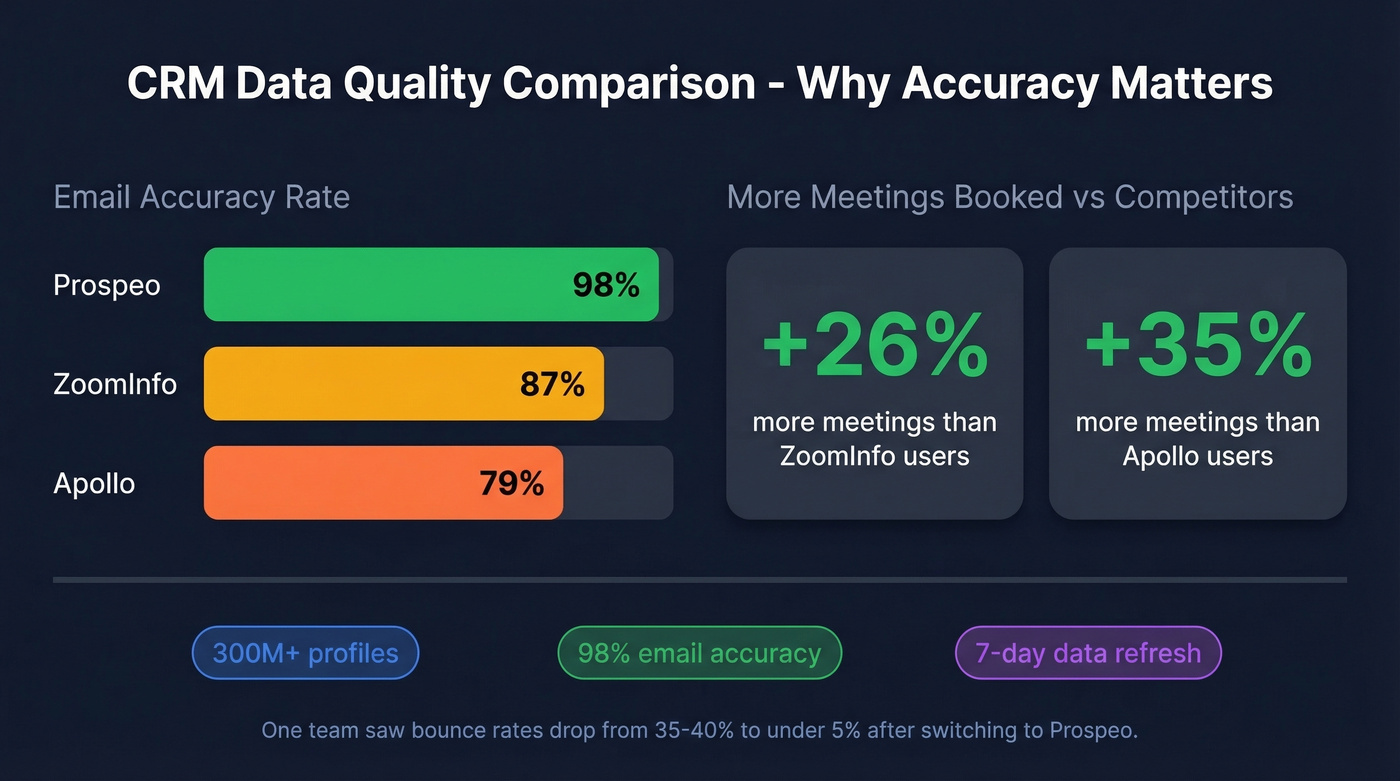
Each enriched contact returns 50+ data points - job title, direct dial, technographics, company revenue, headcount, and intent signals across 15,000 Bombora topics. The database refreshes every 7 days versus the six-week industry average. Pricing is self-serve and transparent: the free tier gives you 75 email lookups and 100 Chrome extension credits per month, and paid plans run about $0.01 per email with no annual contracts.
HubSpot - Easiest to Start
The free tier is genuinely useful: pipeline management, contact storage for up to 1,000 contacts, email tracking, and meeting scheduling for 2 users with no expiration date. The 2,000+ app marketplace means it connects to almost everything, and most teams are operational in days, not weeks. The UI is clean enough that reps actually use it without being forced.
The catch is pricing escalation. Starter runs $15/seat/mo, Professional starts at $50/seat/mo, and the Enterprise Customer Platform package hits $4,300/mo for 7 users. The #1 complaint on r/sales and r/CRM about HubSpot is price - teams love the free tier, grow into it, and then get sticker shock when they need automation or more contacts. Contact limits on the free plan push growing teams into paid tiers faster than expected.
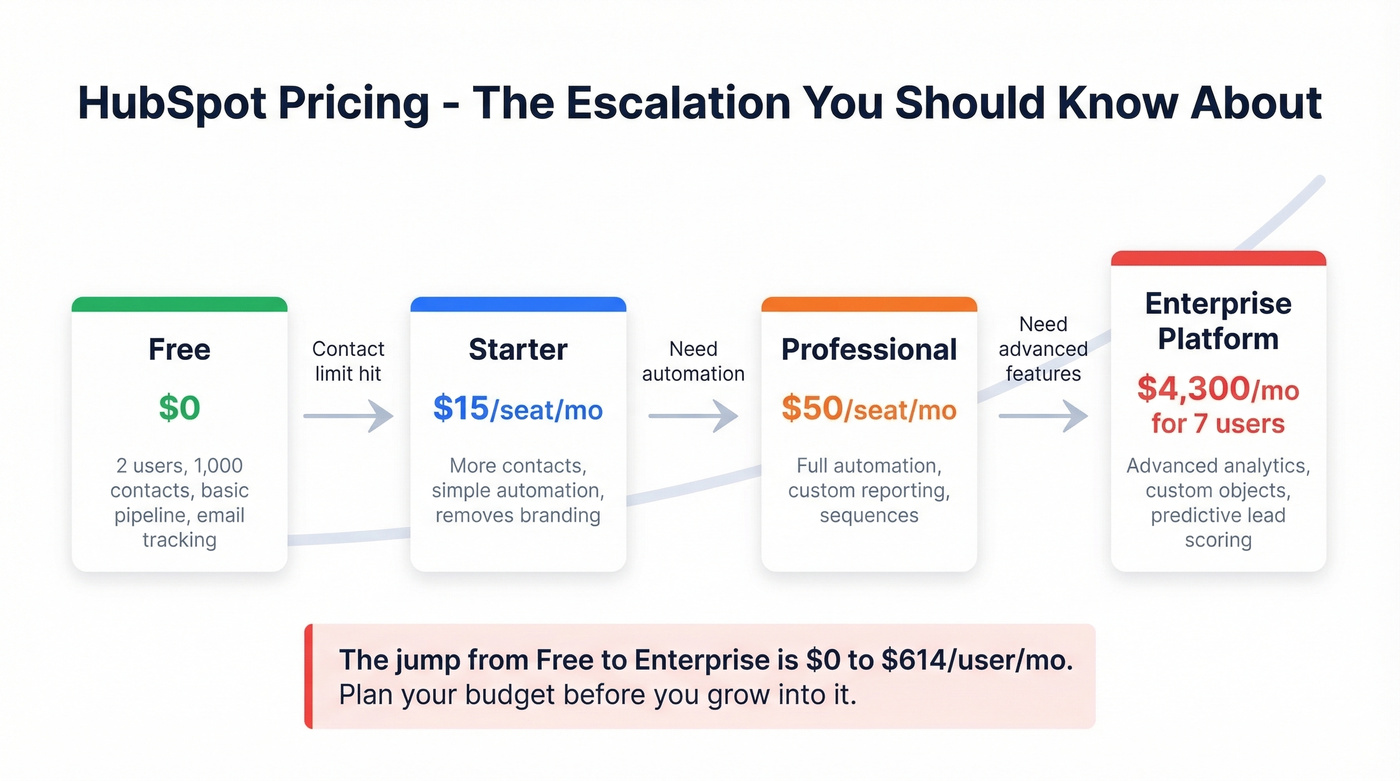
HubSpot is the best entry point in CRM. Full stop. But go in with eyes open about where the pricing lands once you need real automation and reporting. It's the CRM equivalent of a freemium mobile game - easy to start, expensive to scale.
Pipedrive - Best for Sales Teams
Use this if your team lives and dies by the deal pipeline. Pipedrive is built for salespeople, not marketers or support teams, and it shows. The visual pipeline is the best in the business, drag-and-drop deal management is intuitive, and the whole platform is oriented around moving deals forward. It's trusted by 100,000+ sales teams globally.

Pricing on annual billing: Lite at $14/seat/mo, Growth at $39, Premium at $59, and Ultimate at $79. The 14-day free trial doesn't require a credit card.
Skip this if you need marketing automation or customer service features built in. Pipedrive is a sales CRM, period. Watch the fine print too: Lite includes 0 automations, and add-ons stack up fast - LeadBooster is $32.50/mo, Web Visitors is $41/mo, and Smart Docs is another $32.50/mo. A fully loaded Pipedrive seat can run north of $120, which is a far cry from the $14 headline number.
Salesforce - Best for Enterprise
Salesforce is the most powerful CRM on the market and the most likely to sit half-unused. That's not a contradiction - it's the reality of a platform that can do virtually anything but requires serious investment to configure properly.
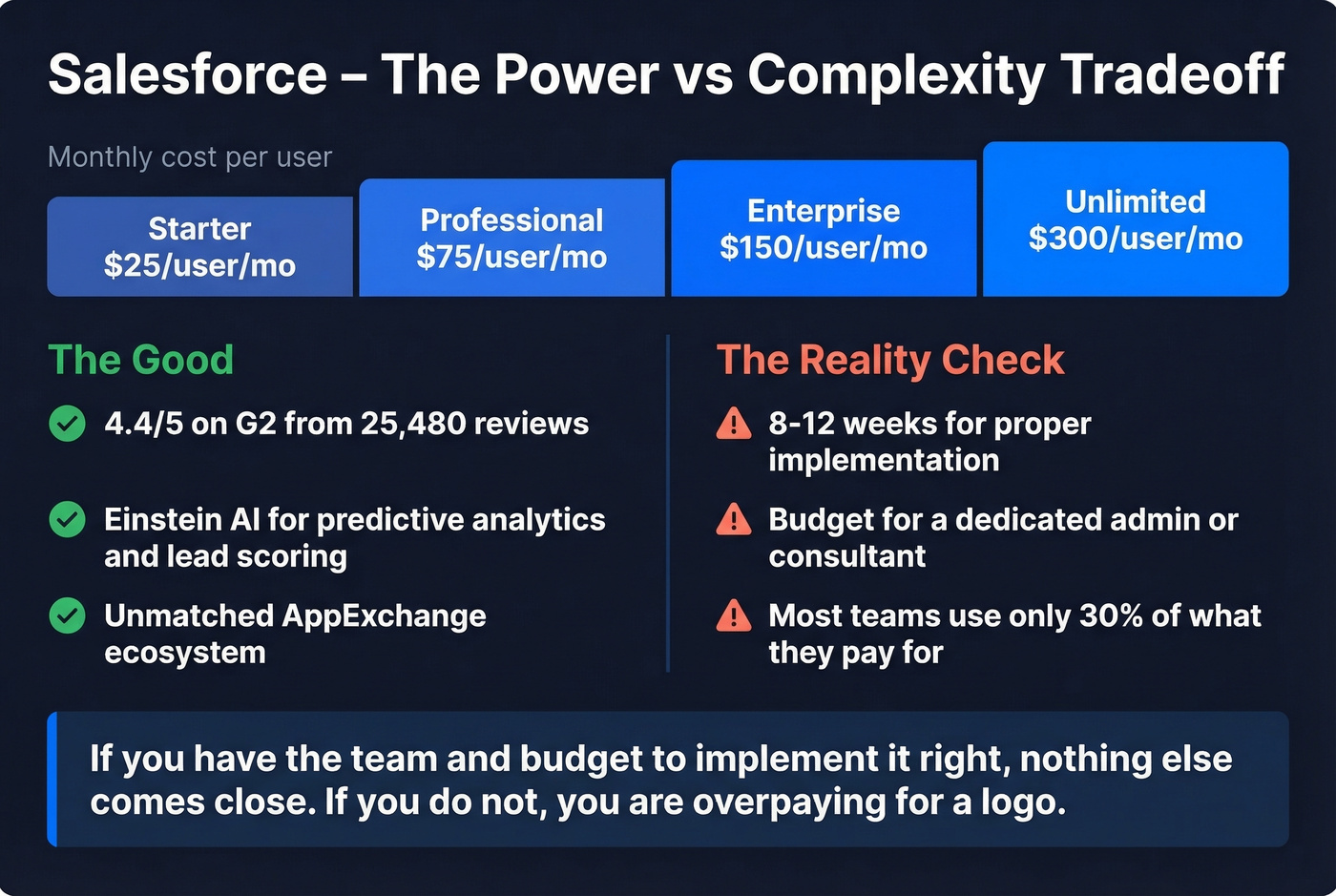
Pricing starts at $25/user/mo for the Starter Suite, then jumps to Professional at $75, Enterprise at $150, and Unlimited at $300. On G2, Salesforce Sales Cloud holds a 4.4/5 across 25,480 reviews - the sheer volume tells you how dominant it is. Einstein AI delivers predictive analytics, lead scoring, and opportunity insights that genuinely outperform what smaller CRMs offer.
The AppExchange ecosystem is unmatched. If you need a specific integration, it probably exists. But expect 8-12 weeks for a proper implementation, and budget for an admin or consultant. The mobile app has limitations - some actions that work on desktop simply aren't available on mobile.
We've seen teams buy Salesforce for the brand name, then realize six months later that they're using 30% of what they're paying for. If you have the team and budget to implement it right, nothing else comes close. If you don't, you're overpaying for a logo.
Monday CRM
Monday CRM works best for teams already living in Monday.com's project management ecosystem. The visual interface feels more like a work management tool than a traditional CRM, which is either a strength or a weakness depending on how your team thinks. There's a free option, with paid plans starting at $12/user/mo and a 14-day trial. Solid for small teams that want pipeline tracking without the overhead of a dedicated sales platform, but it lacks the depth of Pipedrive or HubSpot for serious sales workflows.
Freshsales
Freshsales (by Freshworks) is a capable mid-market CRM with a free tier and paid plans ranging from $15 to $69/user/mo. Freddy AI handles lead scoring and deal insights, and built-in phone and email channels mean fewer integrations to manage. A strong pick for teams that want sales engagement and CRM in one tool without HubSpot's pricing escalation. The Freshworks ecosystem (Freshdesk, Freshchat) adds value if you're already in that world.
Copper
Copper is the CRM for teams that live in Google Workspace. It lets you work directly in Gmail and Google Calendar to add leads, track conversations, find files, and manage tasks - less tab-switching and less manual entry. Pricing runs $23 to $99/user/mo with a free 14-day trial, no credit card required.
If your team already runs on Google Sheets, Drive, and Gmail, Copper feels like a natural extension rather than a separate tool. The tradeoff: it's tightly coupled to Google's ecosystem, so if you're on Outlook or planning to switch, look elsewhere.
Nimble
Nimble takes a relationship-first approach, pulling contact data into unified profiles. At $24.90/user/mo with all features included - no tiers, no upsells - the pricing is refreshingly transparent. Ideal for consultants, small agencies, and relationship-driven sellers who care more about context on a contact than pipeline automation. Don't expect enterprise-grade reporting.
Less Annoying CRM
$15/user/mo. One plan. Every feature included. No upsells, no tiers, no enterprise pricing page.
G2 named it "Easiest to Use." If you want a CRM that does contacts, pipelines, and tasks without any complexity, this is it. The name is the value proposition, and it delivers.
Attio
The CRM gaining the most momentum heading into 2026. Attio is a next-gen, data-driven CRM built for modern GTM teams, and G2 flags it as "Top Trending" in the category. It automatically syncs relationship data from email and calendar, builds dynamic lists, and offers flexible data modeling that feels closer to Notion than Salesforce. Free for up to 3 users, with paid plans starting around $29/user/mo and scaling to roughly $119/user/mo for Enterprise. Worth a serious look if you're a startup or growth-stage team that finds traditional CRMs too rigid.
Creatio
Enterprise-grade CRM with no-code process automation. Pricing runs $25-$100/user/mo depending on modules, with a $5,000/yr minimum to buy more AI tokens. Best for mid-market and enterprise teams that need deep process customization without developer resources.

76% of CRM users say less than half their data is accurate. Prospeo fixes that - 300M+ profiles, 98% email accuracy, and a 7-day refresh cycle that keeps your Salesforce or HubSpot records clean without manual work.
Stop building pipeline on bad data. Enrich your CRM in minutes.
CRM Pricing Compared
All prices reflect annual billing where available.
| Tool | Free Tier | Starting Price | Enterprise Price | Best For |
|---|---|---|---|---|
| Zoho CRM | Yes (up to 10 users) | $15/user/mo | $100/user/mo | Overall value |
| HubSpot | Yes (2 users) | $15/seat/mo | $4,300/mo (7 users) | Getting started |
| Pipedrive | No | $14/seat/mo | $79/seat/mo | Sales pipeline |
| Salesforce | No | $25/user/mo | $300/user/mo | Enterprise |
| Monday CRM | Yes | $12/user/mo | Custom | PM teams |
| Freshsales | Yes | $15/user/mo | $69/user/mo | Mid-market |
| Copper | No | $23/user/mo | $99/user/mo | Google teams |
| Nimble | No | $24.90/user/mo | $24.90/user/mo | Relationships |
| Less Annoying | No | $15/user/mo | $15/user/mo | Simplicity |
| Attio | Yes (3 users) | ~$29/user/mo | ~$119/user/mo | Modern GTM |
| Creatio | No | ~$25/user/mo | ~$100/user/mo | No-code process |
The pricing benchmarks break down predictably by company size. Small teams under 50 employees typically land in the $10-$30/user/mo range. Mid-size organizations running 51-250 employees pay $40-$100/user/mo once they add automation, reporting, and integrations. Large enterprises spend $150-$650/user/mo when you factor in admin costs, consulting, and add-on modules.
The sticker price is never the full story. HubSpot's free tier is genuinely free - until you need automation and suddenly you're at $50/seat/mo. Pipedrive's $14 Lite plan looks great until you add LeadBooster, Web Visitors, and Smart Docs and you're north of $120/seat. Always calculate total cost of ownership for your actual team size and feature needs.
The Data Quality Problem Nobody Talks About
Here's the stat that should change how you think about CRM: 76% of CRM users say less than half of their data is accurate or complete. That's not a minor issue. 37% say they're actively losing revenue because of bad data, and 45% say their CRM data isn't even ready for AI features.
Garbage in, garbage out - now with machine learning.

The root cause is straightforward. Only 28% of companies actively enrich their CRM data using third-party sources. The rest let records decay - job titles go stale, people change companies, email addresses bounce, phone numbers disconnect. Contact data decays roughly 30% per year if you're not refreshing it, which means a third of your database is wrong by the time you run your next campaign.
This is why data enrichment matters as much as the CRM itself. A tool like Prospeo integrates natively with Salesforce and HubSpot, enriching contacts with 50+ data points on a 7-day refresh cycle. Layer in intent data across 15,000 Bombora topics, and your reps aren't just calling accurate numbers - they're calling people who are actively researching solutions like yours.
You can pick the perfect CRM company. But if the data inside it is garbage, you've just built a very expensive filing cabinet.
Picking the right CRM company matters, but even Salesforce can't help you if reps are emailing dead addresses. Prospeo returns 50+ data points per contact at a 92% match rate - and teams see bounce rates drop from 35% to under 5%.
Clean data turns any CRM into a pipeline machine.
Five CRM Mistakes That Kill Adoption
These come from patterns we've seen across dozens of implementations - and they're echoed consistently in Reddit threads from consultants with 100+ CRM builds under their belts.
Choosing by features, not process. Map how your team actually sells before you demo anything. The platform with the longest feature list is rarely the best fit.
Building everything in phase 1. Start with 20% of the features that cover 80% of your daily workflow. Phased rollouts succeed. Big-bang launches create confusion and resentment. One consultant put it bluntly: "Every failed CRM project I've seen tried to do too much on day one."
Overcomplicating data entry. Every required field you add is a reason for a rep not to log a call. Keep required fields to the absolute minimum at launch - you can always add more once the team is bought in.
Ignoring integrations. If your CRM doesn't talk to your email, calendar, and sequencing tool from day one, reps will do duplicate work. Duplicate work kills adoption faster than a bad UI.
No CRM owner. Someone needs to own ongoing maintenance - cleaning data, updating automations, training new hires. Without a designated owner, the system drifts out of sync within months. This is the mistake that kills more implementations than any bad software choice.
How to Choose the Right CRM Company
For teams that need to be live this week, start with HubSpot. The free tier gets you a working pipeline in hours, and you can upgrade later if you outgrow it.
For enterprise customization with a 2-month runway, Salesforce is the answer. Budget for an admin or implementation partner.
For a Salesforce-style CRM without the Salesforce price tag, Zoho CRM is the obvious pick. The learning curve is real, but the value is unmatched.
For teams that live in deals and nothing else, Pipedrive. Best pure sales pipeline tool on the market.
For something modern and flexible, take a hard look at Attio. It's the CRM built for how growth teams actually work in 2026.
Let's be honest: 31% of companies switch CRMs because of feature gaps - a problem that's avoidable if you match the tool to your actual workflow and team size from the start. Don't buy the biggest CRM. Buy the one your team will use.
If you're still deciding what category you even need, start with these examples of a CRM and work backward from your workflow.
FAQ
What is a CRM company?
A CRM company builds software that helps businesses manage customer relationships - tracking contacts, deals, communications, and sales pipelines in one platform. Salesforce, HubSpot, and Zoho are the most widely recognized examples, each serving different team sizes and budgets.
What's the best free CRM in 2026?
HubSpot offers the strongest free CRM with pipeline management, contact storage, and email tracking for 2 users. Zoho CRM provides a free edition for up to 10 users, making it the better choice for slightly larger teams that don't need advanced automation yet.
How much does CRM software cost?
Small teams pay $10-$30/user/month. Mid-size companies pay $40-$100/user/month once they add automation and reporting. Enterprise deployments run $150-$650/user/month including add-ons and implementation. Always compare total cost of ownership rather than headline rates.
CRM vs spreadsheet - when should I switch?
Switch when you have more than 2-3 salespeople or regularly lose leads because nobody followed up. The tipping point usually hits around 10-15 active deals simultaneously - that's when manual tracking starts costing you real revenue.
How do I keep my CRM data accurate?
Use a data enrichment tool that connects to your CRM and refreshes contact records automatically. Without active enrichment, CRM data decays roughly 30% per year - meaning a third of your records go stale before your next annual planning cycle even starts.