

Best CRM for Sales Teams in 2026 (Tested & Compared)
Your VP just said "get a CRM," and now you're staring at 47 options that all claim to be the best. The CRM market is projected to hit $126.17B in 2026, and 91% of companies with 11+ employees already use one - so you're not early to this party. The problem isn't finding a CRM for sales. It's finding the right one before you burn a quarter on a tool your reps refuse to open.
Most sales teams need three things: a clean pipeline view, reliable automation, and contact data that doesn't bounce. CRMs typically boost sales productivity 20-30% and improve forecast accuracy up to 42%. Everything else is gravy.
Our Picks (TL;DR)
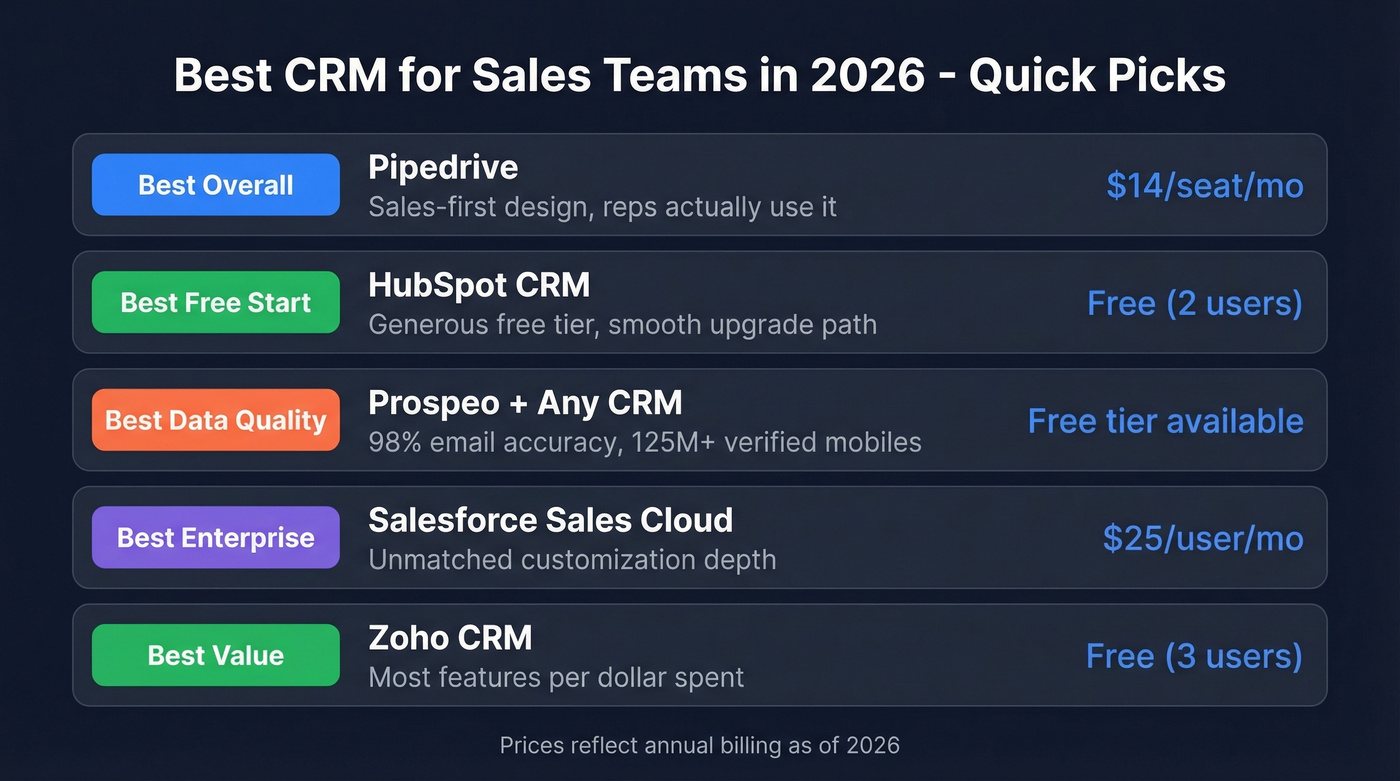
| Pick | Tool | Why | Starting Price |
|---|---|---|---|
| Best overall | Pipedrive | Sales-first design, reps use it | $14/seat/mo |
| Best free start | HubSpot CRM | Generous free tier, upgrade path | Free (up to 2 users) |
| Best for data quality | Prospeo + any CRM | 98% email accuracy, 125M+ mobiles | Free tier available |
| Best for enterprise | Salesforce Sales Cloud | Unmatched customization | $25/user/mo |
| Best value | Zoho CRM | Most features per dollar | Free (3 users) |
What a Sales CRM Actually Costs
CRM pricing is where the bait-and-switch lives. That $14/seat/mo number on the landing page? It's real - until you need automations, phone integration, or more than basic reporting. Then you're on the next tier.
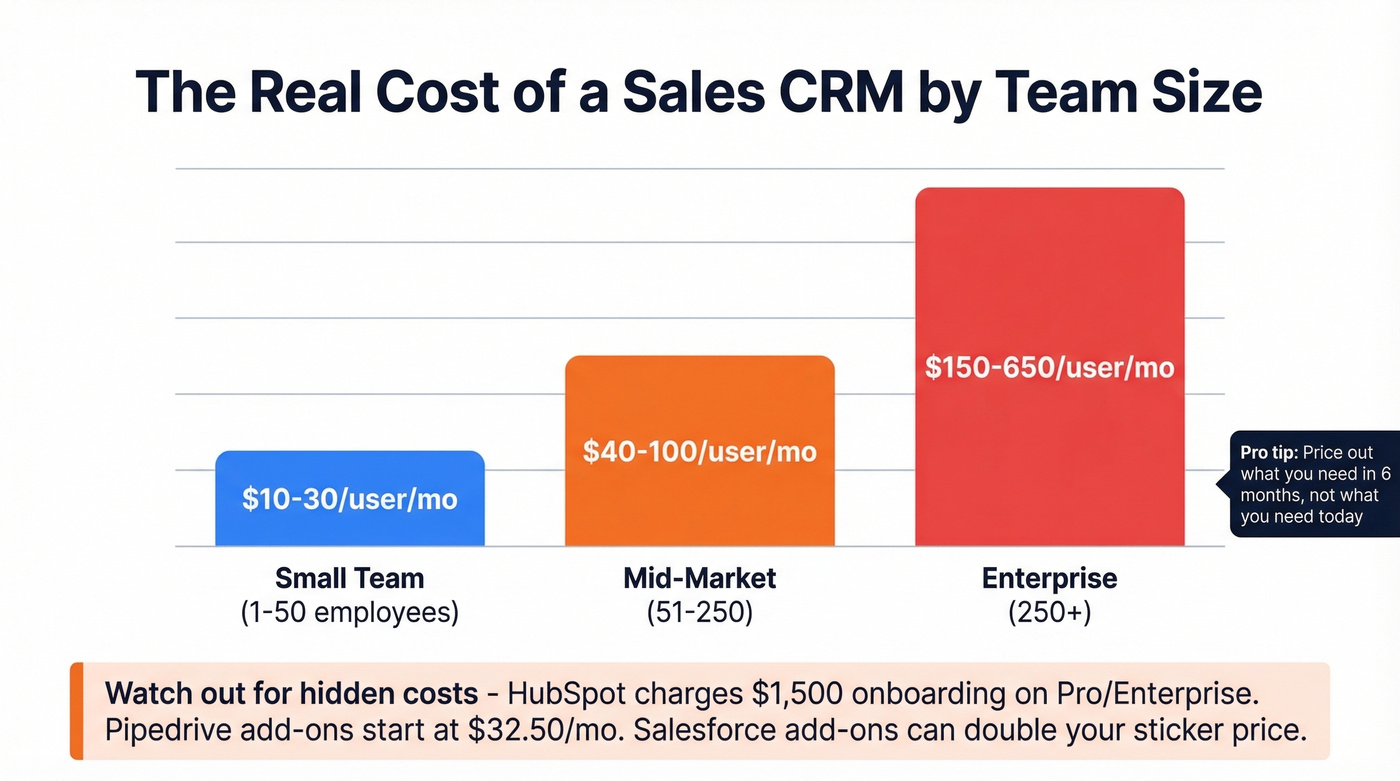
Small teams (1-50 employees) typically spend $10-30/user/month. Mid-market orgs (51-250) land at $40-100/user/month. Enterprise shops with complex workflows pay $150-650/user/month, and the gap between "entry price" and "what you'll actually pay" is where most buying regret lives.
All prices below are annual billing unless noted.
| Tool | Free Tier | Entry | Mid-Tier | Enterprise |
|---|---|---|---|---|
| Pipedrive | 14-day trial | $14/seat (Lite) | $39 (Growth) | $79 (Ultimate) |
| HubSpot CRM | Yes (2 users, 1K contacts) | $15/seat (Starter) | $50/seat (Professional) | $75/seat (Enterprise) |
| Salesforce | Free Suite (2 users) | $25/user (Starter Suite) | $100 (Pro Suite) | $175 (Enterprise) / $350 (Unlimited) |
| Zoho CRM | Yes (3 users) | $14/user | $23 (Professional) | $40 (Enterprise) |
| Freshsales | Yes (3 users) | $9/user (Growth) | $39 (Pro) | $59 (Enterprise) |
| Close CRM | None | $29/user (Startup) | $109 (Professional) | $149 (Enterprise) |
| monday CRM | None | €12/seat (Basic) | €17 (Standard) | Contact sales |
| Copper CRM | None | $23/user | $59 (Professional) | $134 (Business) |
| Less Annoying | None | $15/user | - | - |
| MS Dynamics 365 | None | $65/user (Professional) | $105 (Enterprise) | $150 (Premium) |
Hidden costs to watch: Pipedrive's LeadBooster add-on starts at $32.50/mo and Campaigns at $13.33/mo. HubSpot Sales Hub charges a $1,500 one-time onboarding fee on Professional and Enterprise. Salesforce add-ons can double your sticker price. Copper only makes sense inside Google Workspace.
Threads on r/CRM consistently flag the "cheap plan trap": teams get hooked on a low entry price, then realize the features they actually need - automations, custom reporting, phone integration - are gated two tiers up. Always price out what you'll need in six months, not what you need today.
Best Sales CRM Software (Reviewed)
Pipedrive - Reps Actually Use It
Use this if: You want a pipeline tool your reps will actually open every morning.
Skip this if: You need deep marketing automation or a free tier.
Pipedrive is built for salespeople, not marketers or support teams, and it shows. The visual sales pipeline is the best in the business - drag deals between stages, see what's stuck, know exactly where your revenue stands. Pipedrive renamed its plans in 2025 (Essential became Lite, Advanced became Growth, Professional became Premium, Enterprise became Ultimate). Current pricing runs from $14/seat/mo on Lite to $79 on Ultimate.
The Growth plan at $39 adds email tracking, sales automation, and sequences - that's the sweet spot for most teams. Add-on costs are worth watching, but for pure deal tracking and pipeline management, Pipedrive is the tool reps actually enjoy using. We've seen that matter more than any feature checklist. When reps like the tool, they log their deals. When they don't, you get a $50K/year spreadsheet.

HubSpot CRM
Use this if: You're a startup that doesn't know exactly what you need yet, or a marketing-led team that wants CRM and marketing automation under one roof.
Skip this if: You're a 20-person sales team that needs advanced pipeline features on day one.
HubSpot's free plan supports 2 users and 1,000 contacts - enough to validate whether a CRM fits your workflow before spending a dollar. PCMag positions it as "Easiest to Use", and that tracks with our experience. Onboarding friction is nearly zero.
Here's the thing: HubSpot's pricing escalates fast once you outgrow free. For a 10-person sales team on Professional, you're looking at $6,000/year in per-seat fees before add-ons and onboarding. The upgrade path is HubSpot's greatest strength and biggest trap - you start free, build workflows around it, and then the switching cost makes the price hike feel inevitable. Budget carefully before committing.
Salesforce Sales Cloud
Salesforce is the CRM equivalent of buying a house when you need an apartment. It does everything - pipeline management, AI forecasting with Einstein, conversation intelligence, custom objects - but it demands a dedicated admin to make it work. G2 gives it 4.4/5 across 25,480 reviews, with the most common complaints being complexity and a steep learning curve.
Pricing starts at $25/user/mo for Starter Suite and climbs to $550/user/mo for Agentforce 1 Sales. For enterprise teams with complex workflows, no other platform matches its depth. For everyone else, it's overkill.
Zoho CRM
PCMag rates Zoho CRM 4.5/5 (Outstanding) - the highest score in their CRM roundup. The reason is value density. Zoho packs AI-powered predictions (Zia), workflow automation, multichannel communication, and custom modules into plans starting around $14/user/mo. The free tier supports 3 users.
The tradeoff is a learning curve that rivals Salesforce. The UI isn't as intuitive as Pipedrive or HubSpot. But for budget-conscious teams who want maximum features per dollar, Zoho is hard to beat - and it's still far cheaper than Salesforce once you get beyond entry tiers.
Freshsales
Freshsales is the quiet overachiever on this list. A free tier for 3 users with 24/5 support (uncommon for free plans), built-in calling, and Freddy AI for lead scoring and forecasting. Growth starts at $9/user/mo - the cheapest paid entry point here.
The Pro plan at $39 adds AI-powered forecasting and multiple pipelines. For teams that want built-in phone and AI without Salesforce complexity, Freshsales deserves a serious trial.
Close CRM
I watched a 15-person SDR team switch from HubSpot to Close and cut their tool stack from five apps to two. Close is built for outbound-heavy teams that live on the phone and in email sequences - built-in calling, SMS, and power dialer are native, not add-ons. Startup runs $29/user/mo, Professional $109, Enterprise $149. No free tier hurts for evaluation, but if your reps make 50+ calls a day, Close pays for itself in consolidated tooling costs alone.
monday CRM
Familiar if you already use monday.com for project management. AI features are aggressive - SDR agent, AI automations, AI-powered columns - but hard caps undermine them. Basic limits you to 1,000 active contacts and deals. Standard bumps that to 10,000 but caps automations at 250/month. You'll outgrow these fast.
Copper CRM
Worth considering only if your entire team lives in Google Workspace. Copper's Gmail integration is tight - it surfaces CRM data inside your inbox without tab-switching. Pricing runs $23-$134/user/mo. Outside the Google ecosystem, there's no compelling reason to choose it.
Less Annoying CRM
$15/user/mo. One plan. No upsells. No feature gating.
Refreshingly simple for tiny teams (under 5 people) who want contact management and a basic pipeline without the complexity tax. Limited integrations mean you'll outgrow it, but that's the point - it's a starter tool, not a forever tool.
MS Dynamics 365
The right choice if your company already runs on Microsoft's stack - Outlook, Teams, Power BI. Pricing starts at $65/user/mo, which is steep for an entry tier, and the interface feels more like an enterprise ERP than a sales tool. Skip it unless you're deep in the Microsoft ecosystem.

Every CRM on this list has the same weakness: garbage in, garbage out. Prospeo enriches your CRM with 98% accurate emails, 125M+ verified mobiles, and 50+ data points per contact - refreshed every 7 days, not 6 weeks.
Stop paying for a CRM your reps hate because the data bounces.
Why CRM Data Quality Matters Most
Here's a scenario we see constantly: a team imports 5,000 contacts into their shiny new CRM, launches their first outbound sequence, and 800 emails bounce. Their domain reputation tanks. Suddenly the CRM is "broken." It's not. The data is.
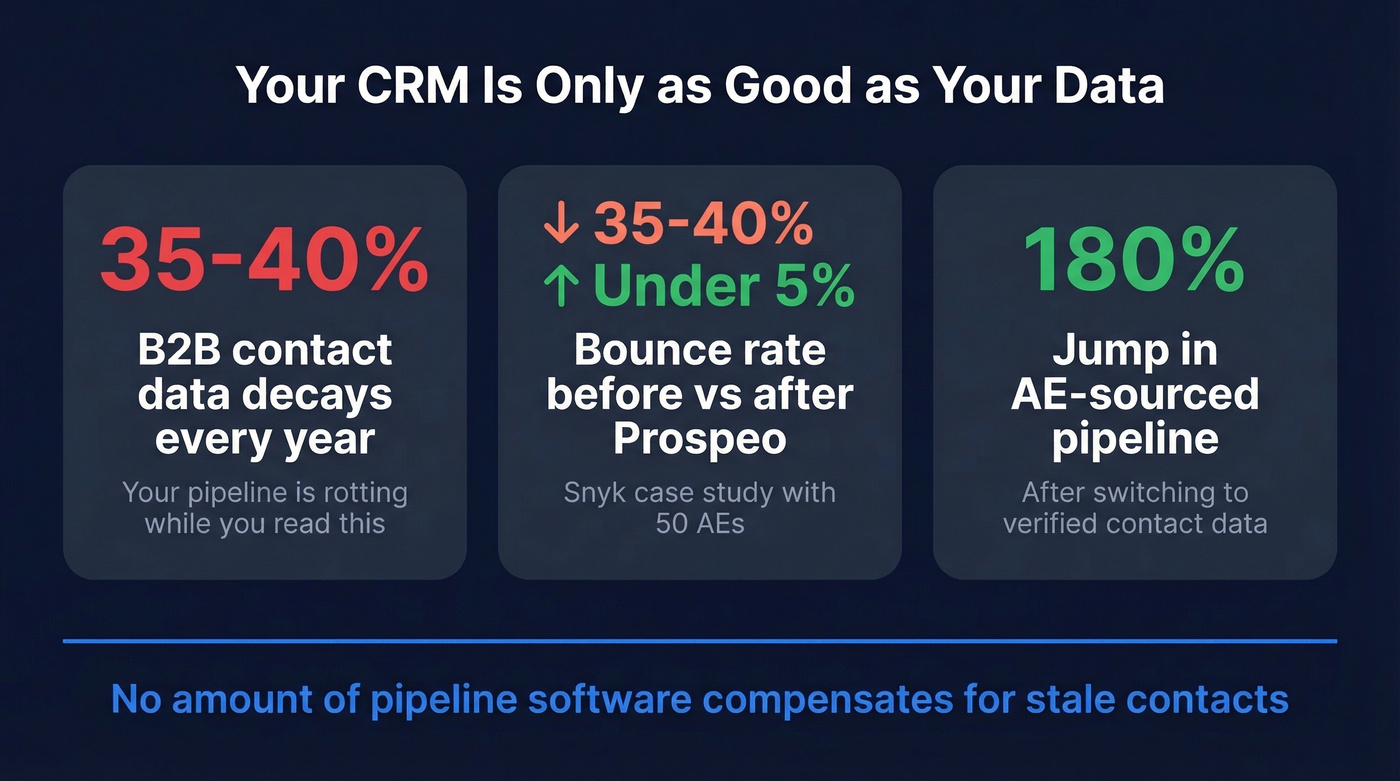
B2B contact data decays at roughly 35-40% per year. Your CRM doesn't fix this - it just stores whatever you put in. Snyk's 50 AEs were running bounce rates of 35-40% before switching to Prospeo-verified data. They dropped that to under 5%, and AE-sourced pipeline jumped 180%. That's not a CRM problem. It's a data quality problem with a data quality solution, and no amount of pipeline software compensates for stale contacts.

How to Choose the Right CRM for Sales
Look, if your average deal size is under $10k, you probably don't need Salesforce-level tooling. A $14/seat Pipedrive plan with clean data will outperform a $175/seat Salesforce deployment with garbage contacts every single time.
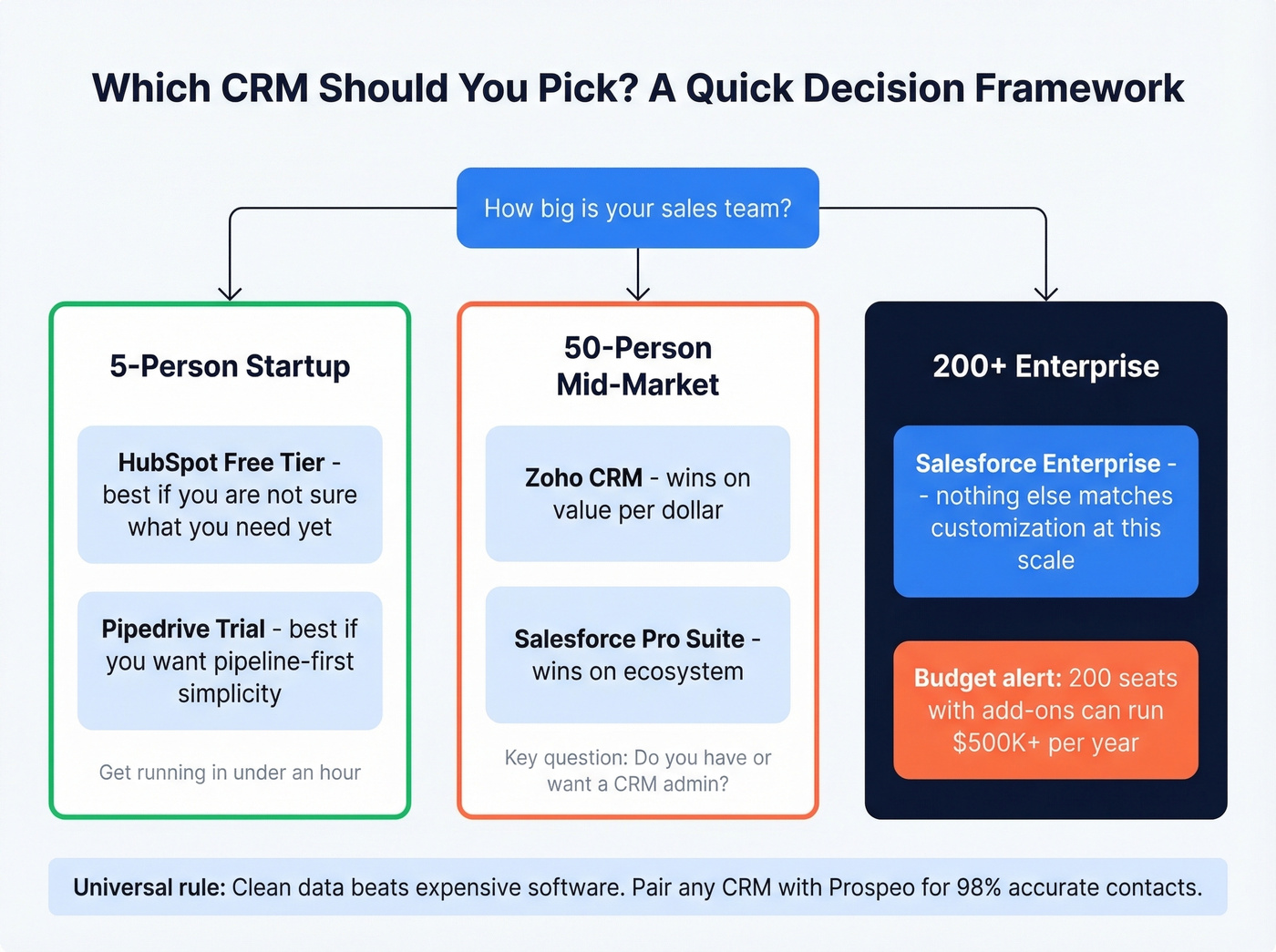
Here's a quick decision framework by team size:
5-person startup, tight budget: Start with HubSpot's free tier or Pipedrive's trial. Both get you running in under an hour.
50-person mid-market team: Zoho CRM or Salesforce Pro Suite. Zoho wins on value; Salesforce wins on ecosystem. Your deciding factor is whether you have (or want to hire) a CRM admin.
200+ enterprise org: Salesforce Enterprise. Nothing else matches the customization depth and AppExchange ecosystem at this scale. Budget accordingly - a 200-seat deployment with add-ons can run $500K+/year.
EU-based team: Consider data residency. SuperOffice is built GDPR-first with European hosting. Salesforce and HubSpot offer EU data centers on higher tiers.
Every CRM vendor is pushing "agentic AI" in 2026. Before you pay extra for it, ask three questions: What specific task should AI handle? Is it embedded in the daily workflow or buried in a settings menu? And does your data support it? AI trained on stale, bounced, or duplicate contacts produces garbage predictions. 83% of companies already use AI in their CRM - the ones getting value from it are the ones with clean data feeding the models.
Let's be honest about trials: test exactly two systems, not five. Run them for two weeks with actual sales workflows, and involve your reps from day one. The CRM your team actually uses beats the one with the best feature sheet every single time.
Mistakes That Kill CRM Adoption
43% of CRM customers use fewer than half the features they're paying for. That's not a feature problem - it's an adoption problem. Teams that get it right save 5-10 hours per week on admin and shorten sales cycles by 8-14 days. Teams that get it wrong waste money and frustrate reps.
Here's what separates the two groups:
Too much manual entry. If reps see the CRM as a surveillance tool rather than a productivity tool, they'll stop logging deals. Every field you add is friction. Start with the minimum viable data set and expand later.
Buying enterprise when you need SMB. A 15-person team doesn't need Salesforce Enterprise. They need Pipedrive or HubSpot Starter. Overbuying creates complexity that kills adoption faster than missing features ever will. One G2 reviewer put it bluntly: "We spent six months configuring Salesforce and our reps still use spreadsheets."
Falling for the cheap plan trap. That $9/user/mo entry price looks great until you realize automations, custom reporting, and phone integration are two tiers up. Always price out the tier you'll actually need in six months.
No team involvement in selection. The person buying the CRM is rarely the person using it 8 hours a day. Involve 2-3 reps in the trial. Their feedback on daily usability matters more than any analyst report.
Skipping data quality. Garbage in, garbage out. Importing unverified lists into a new CRM poisons everything downstream - forecasts, lead scoring, sequences, AI predictions. Clean your data before it hits the CRM, not after. (If you're building outbound lists, start with proven sales prospecting techniques and then verify.)
FAQ
What is a sales CRM?
A sales CRM (customer relationship management) tool helps teams track deals, manage contacts, automate follow-ups, and forecast revenue. It replaces spreadsheets with a visual pipeline so reps know which deals need attention and when. The average ROI is $8.71 for every $1 spent.
How much does a CRM cost for a small team?
Most small teams pay $10-30/user/month. Several tools offer free tiers: HubSpot (2 users, 1,000 contacts), Salesforce Free Suite (2 users), Zoho (3 users), and Freshsales (3 users). Paid plans start as low as $9/user/month with Freshsales Growth.
Is a free CRM good enough?
For teams under 5 people with simple pipelines, yes. HubSpot's free tier is the strongest option. But free plans cap contacts, automations, and reporting - most growing teams outgrow them within 6-12 months and face a pricing jump when they upgrade.
When should I switch from a spreadsheet to a CRM?
Switch when deals start falling through the cracks, when you can't tell which rep owns which account, or when your team hits 3+ people. Teams report saving 5-10 hours per week on admin after implementing a CRM, and sales cycles shorten by 8-14 days on average.
How do I keep CRM data accurate?
B2B contact data decays at 35-40% per year - people change jobs, emails go stale, phone numbers disconnect. Use a data enrichment tool to verify and refresh contact data automatically. A 7-day refresh cycle and 98% email accuracy keep your pipeline current without manual effort, and native integrations with Salesforce and HubSpot mean enrichment happens inside your existing workflow.
You just picked a CRM. Now fill it with contacts that actually connect. Prospeo integrates natively with Salesforce and HubSpot, pushing verified emails at $0.01 each - 90% cheaper than ZoomInfo.
Teams using Prospeo book 26% more meetings than ZoomInfo users.