

CRM Integration: The Practitioner's Guide to Connecting Your Stack in 2026
It's Monday morning. Your SDR opens Salesforce, finds a lead from Friday's webinar - no company size, no phone number, an email that bounced overnight. They alt-tab to a spreadsheet, cross-reference a marketing list, copy-paste a phone number from a Google search, and log the activity manually. Now multiply that by 50 reps and 200 leads a week.
The average business runs on 897 different apps, and 45% juggle more than a thousand. Only 28% are actually connected. That gap between "we have a CRM" and "our CRM works" is a CRM integration problem, and it's where revenue dies quietly.
What follows is for the ops manager who needs to fix that - not with a vendor pitch deck, but with architecture decisions, tool choices, and the data quality foundation that makes everything else work.
Three Priorities, in Order
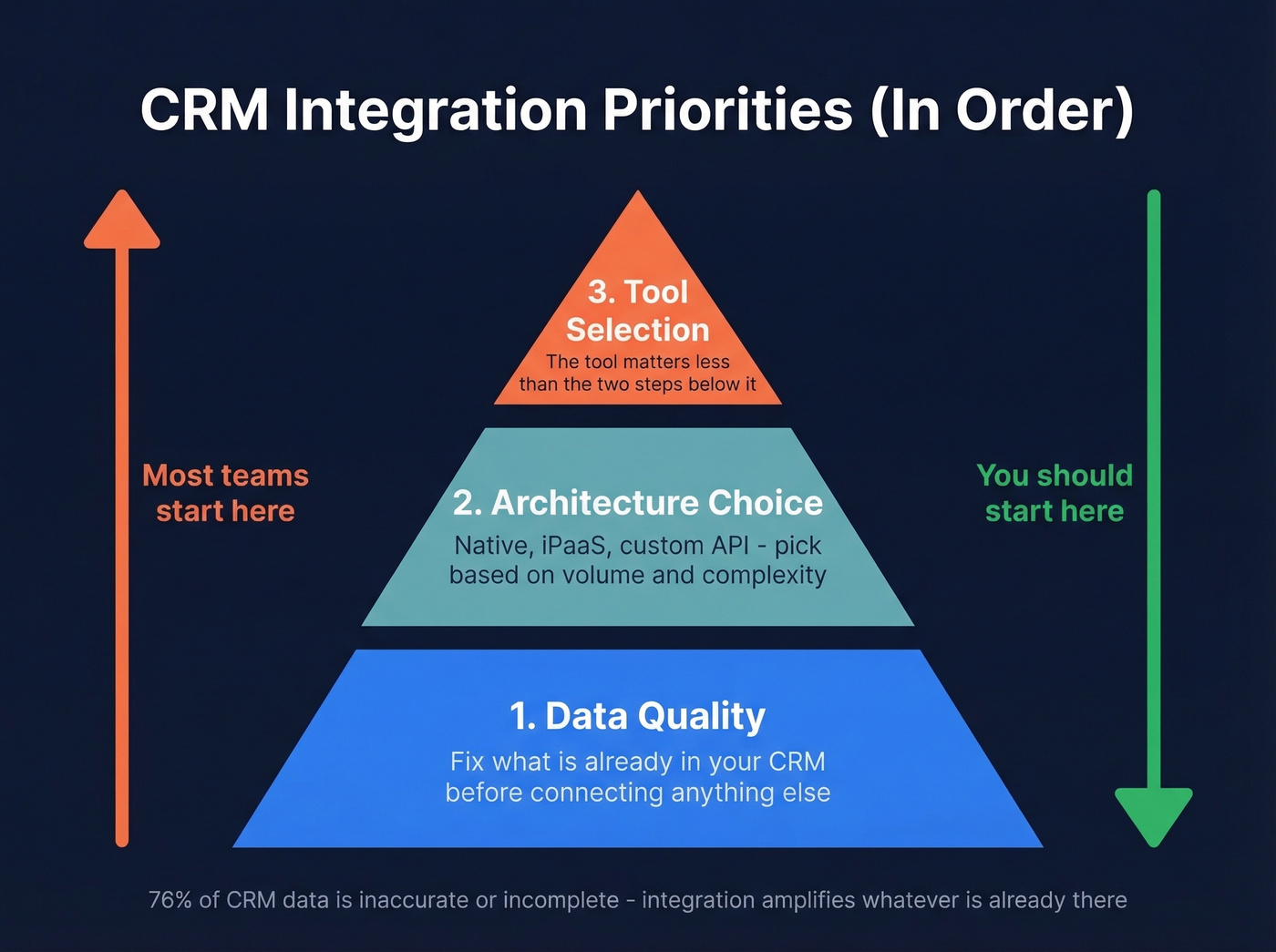
- Data quality first. Integration amplifies whatever's already in your CRM. If your records are stale, duplicated, or incomplete, connecting more tools just distributes bad data faster.
- Architecture choice second. Native integrations, iPaaS, custom API - pick based on volume, complexity, and whether this is internal or customer-facing.
- Tool selection third. The tool matters less than the two steps above.
What CRM Integration Actually Means
CRM integration is the continuous, bidirectional flow of data between your CRM and every other system your team touches - marketing automation, email, calendar, ERP, support, communications, enrichment tools. The key word is "continuous." A one-time CSV import isn't integration. A Zapier zap that pushes new contacts but never updates them isn't integration either.
Here's the thing: most "integrations" are shallow. The #1 complaint on r/CRM is that tools claiming deep connectivity really just sync basic contact records - maybe push an activity log. They don't support deep bidirectional workflows. The result is manual workarounds everywhere, which defeats the entire purpose.
76% of CRM data is inaccurate or incomplete. Meanwhile, 91% of companies with 11+ employees use a CRM. So nearly everyone has one, and nearly everyone's data inside it is broken. That's not a technology problem. It's a data quality and connectivity problem.
Why This Matters Now
The ROI case isn't theoretical. The average return is $8.71 for every $1 invested in CRM. A Forrester Total Economic Impact study found 299% ROI over three years for Salesforce Marketing Cloud users. MuleSoft's Anypoint Platform delivered 445% ROI and $7.8M in total benefits per a separate Forrester TEI study - though enterprise iPaaS contracts typically run $30K-100K+/year, so that ROI requires serious upfront commitment. Employees save 5-10 hours weekly through automation when systems are properly connected.
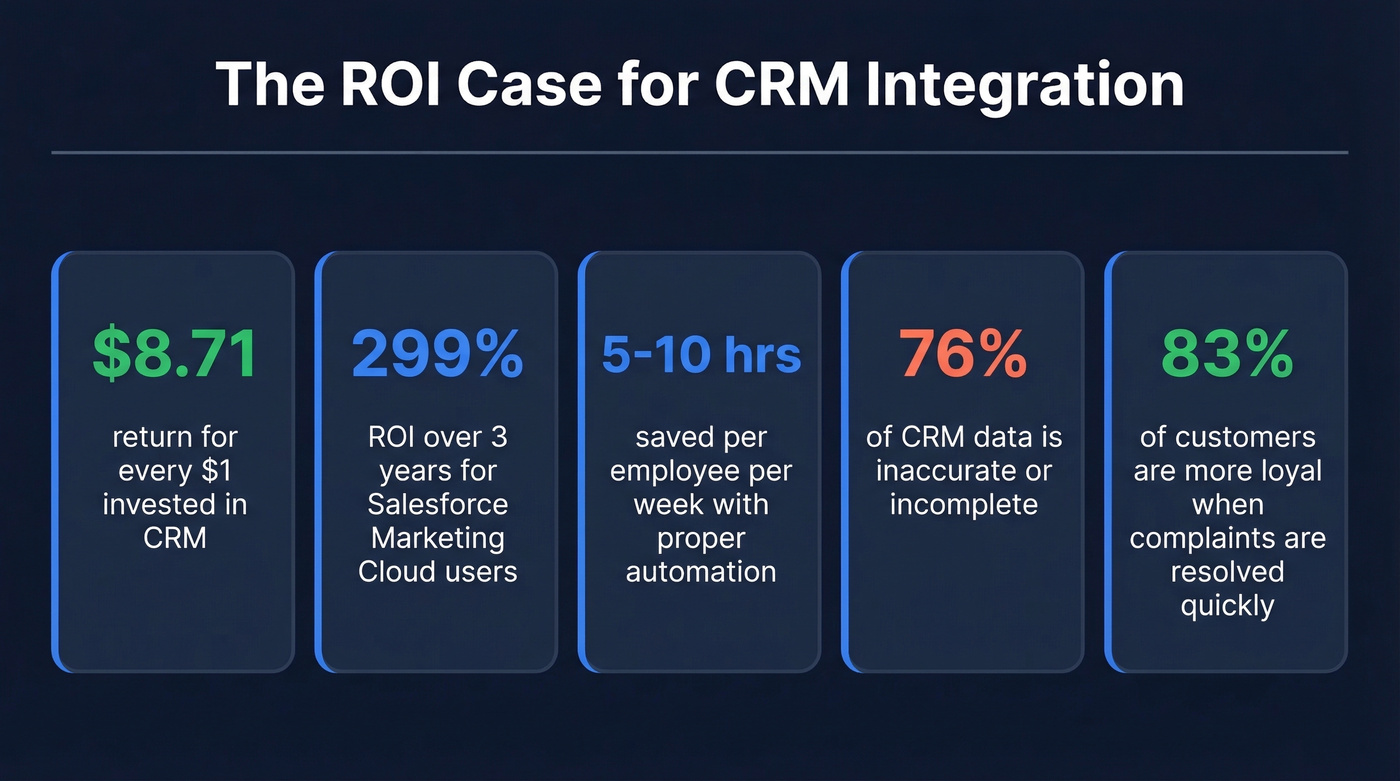
Customer experience is the other lever. 83% of customers feel more loyal to brands that respond to and resolve complaints, which requires support, sales, and marketing to share the same customer record in real time. You can't do that with disconnected tools.
And the AI angle makes this urgent. In the UK, 90% of business leaders use AI regularly, but only 16% have successfully integrated it into their CRM. AI without clean, integrated data just automates broken processes faster. Every AI feature your CRM vendor ships - lead scoring, next-step recommendations, automated notes - depends on the data flowing into it being accurate and complete.
Let's be honest: most teams are chasing AI-powered CRM features when they haven't solved basic data hygiene. If 76% of your CRM data is wrong, an AI model trained on it will confidently recommend the wrong next step. Fix the plumbing before you install the smart thermostat.
AAXIS Digital estimated $250,000 in savings after switching CRM platforms and fixing their integration architecture. Casio increased new customer sales by 26% after a CRM overhaul. These aren't outliers - they're what happens when connected systems actually work.
Common CRM Integration Types
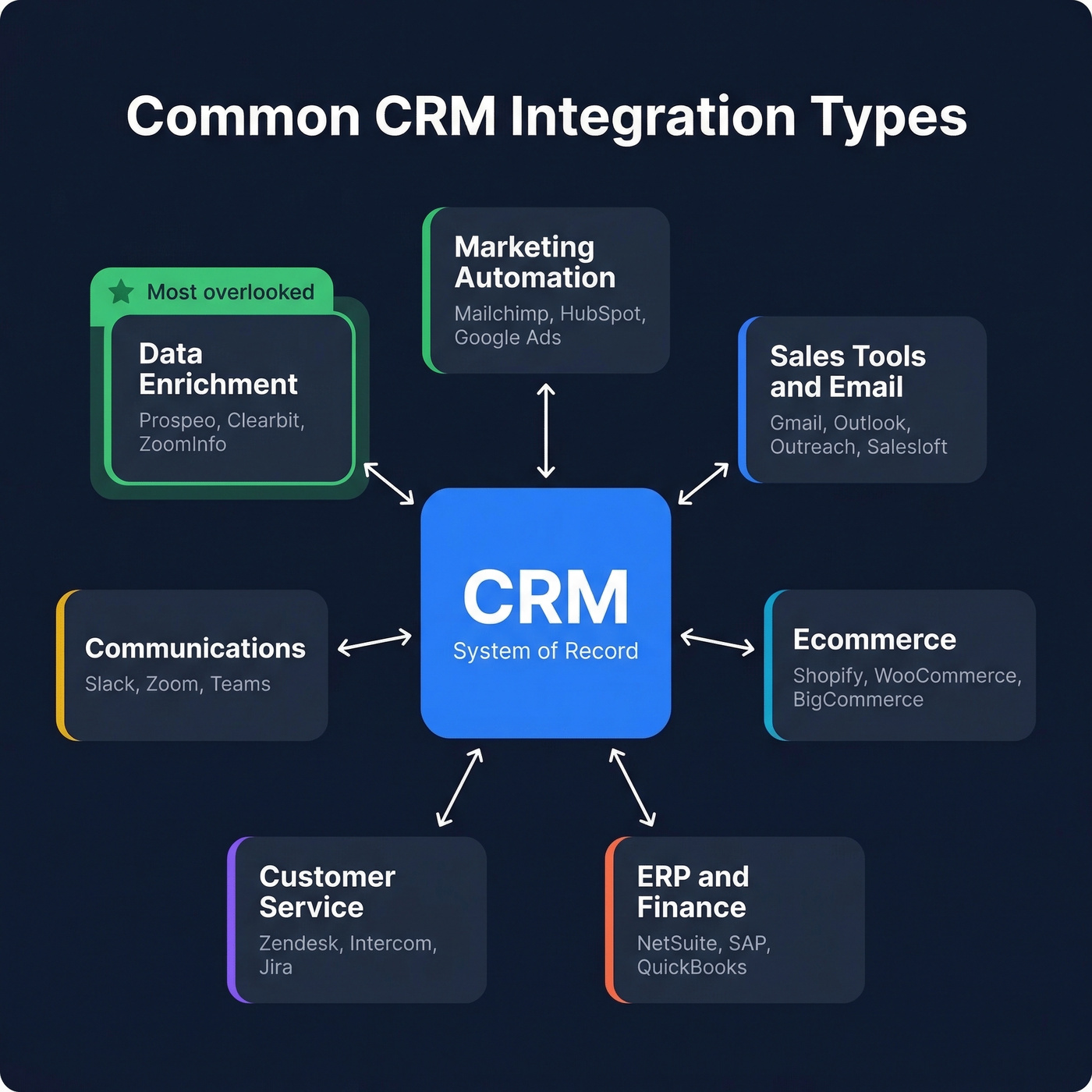
Not all integrations are equal. Here's what most teams actually connect, and what matters in each category.
Marketing Automation
Mailchimp, Klaviyo, Google Ads, HubSpot Marketing Hub. The goal is bidirectional lead flow - marketing-qualified leads push to sales, sales outcomes feed back to marketing for attribution and suppression. This is where most teams start, and where most teams stop too early. If your marketing platform can't write disposition data back to the CRM, your attribution will always be wrong.
Sales Tools and Email Sync
Email and calendar sync (Gmail, Outlook), sequencing tools (Outreach, Salesloft, Lemlist), and conversation intelligence. The CRM connects to your email provider via OAuth or API, then automatically logs sent and received messages against the matching contact or deal record. The critical piece is activity logging - every touchpoint should land in the CRM automatically, not depend on reps remembering to log calls. If you're still asking reps to manually log activities, you've already lost.
Ecommerce
Shopify, WooCommerce, BigCommerce. Purchase history, lifetime value, and product interest data flowing into CRM records. Essential for any B2B company with a self-serve motion or hybrid sales model.
ERP and Finance
NetSuite, SAP, QuickBooks. Syncing deal data with invoicing, revenue recognition, and credit holds. This is where CRM-as-system-of-engagement meets ERP-as-system-of-record. Get this wrong and your finance team will never trust the numbers in your CRM.
Customer Service
Zendesk, Intercom, Jira Service Management. Support ticket history visible to sales reps prevents the "I didn't know they had an open P1" conversation that kills renewals.
Communications
Slack, Zoom, Microsoft Teams. Deal alerts, meeting recordings linked to CRM records, and real-time notifications when key accounts take action. Nice to have, not mission-critical - prioritize this after the categories above.
Data Enrichment
This is the category most integration guides skip entirely. Enrichment tools push verified contact data - emails, direct dials, firmographics, intent signals - directly into your CRM, turning static records into data your reps can actually act on. Without enrichment, every other integration is distributing incomplete data. We'll go deeper on this below.
Choosing Your Architecture
The architecture decision matters more than the tool you pick. Here are the four patterns, and we've seen teams get burned by picking the wrong one more often than by picking the wrong vendor.
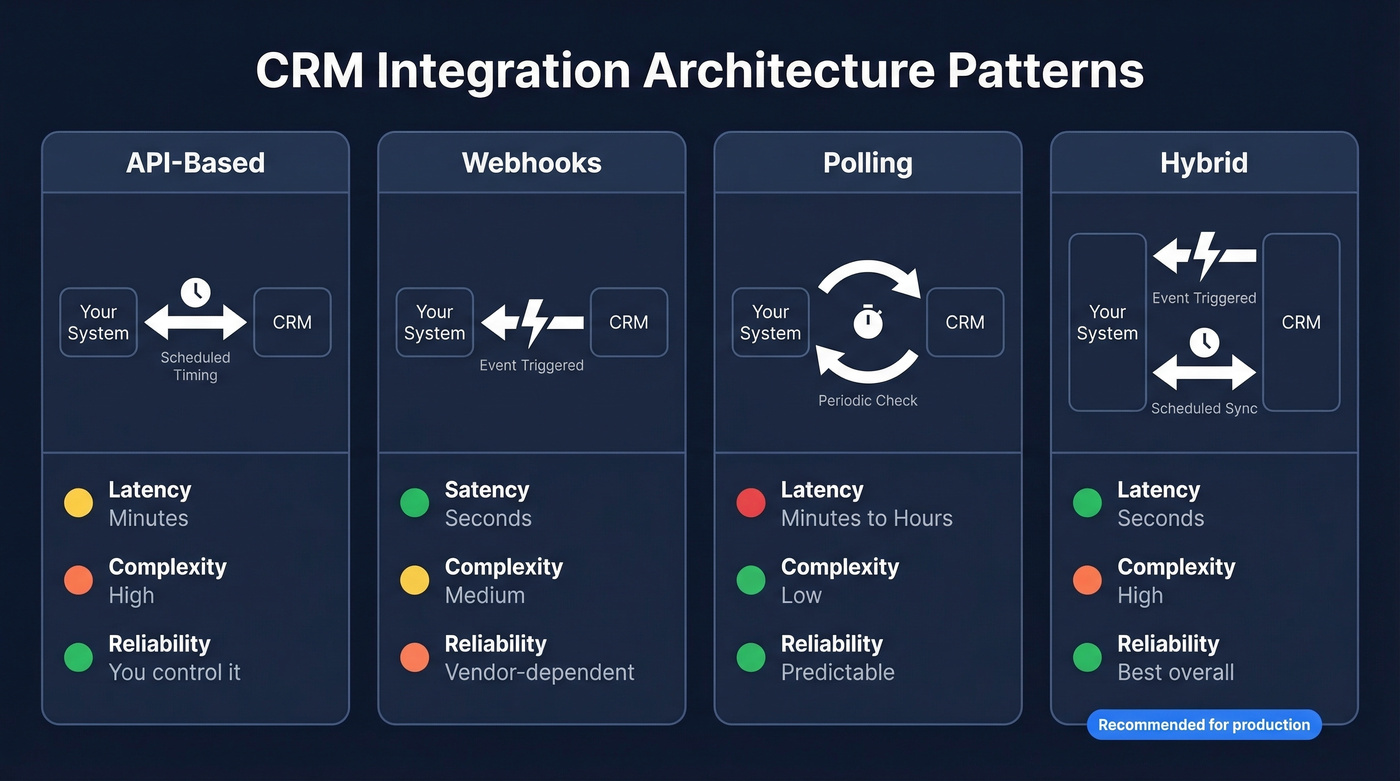
API-based integration is the workhorse. Use it for bulk syncs, historical data loads, complex queries, and controlled write-backs. You own the timing, the error handling, and the data transformation. The tradeoff is development effort - you'll need engineering hours to build and maintain it.
Webhooks give you real-time event triggers. A deal closes in your CRM; a webhook fires; your billing system creates an invoice. Fast and efficient. But webhook reliability has real failure modes: delivery isn't guaranteed, you'll get duplicates from at-least-once delivery, ordering isn't reliable, and payloads are often partial. You need retry logic, idempotency keys, and a backfill mechanism for missed events.
Polling is the simplest pattern - your system checks the CRM on a schedule. It works for low-frequency syncs where real-time doesn't matter. The tradeoff is timeliness versus API rate limits.
Hybrid is what most production systems end up using. A webhook triggers the event notification, then an API call fetches the full record and writes it back. You get real-time responsiveness with full data fidelity.
| Pattern | Best For | Latency | Complexity | Reliability |
|---|---|---|---|---|
| API | Bulk sync, queries | Minutes | High | You control it |
| Webhook | Real-time events | Seconds | Medium | Vendor-dependent |
| Polling | Low-frequency sync | Minutes-hours | Low | Predictable |
| Hybrid | Production systems | Seconds | High | Best overall |
A common three-layer API model worth understanding for any multi-system architecture: system APIs for raw data access, process APIs for business logic, and experience APIs for end-user consumption. Even if you're not on Salesforce, this layered pattern prevents the spaghetti-integration problem where every system talks directly to every other system.
One thing we've seen repeatedly: teams default to Zapier or Make because they're easy. For internal workflows - syncing a form submission to a CRM record, sending a Slack notification when a deal moves stages - they're fine. But the consensus on r/b2b_sales is clear: Zapier and Make are "decent for internal use" but "not reliable enough" for customer-facing or production-critical integrations. If your integration failing means a customer doesn't get onboarded, you need something stronger.

Your CRM integrations are only as good as the data flowing through them. Prospeo's native CRM enrichment pushes 50+ verified data points per contact directly into Salesforce or HubSpot - 98% email accuracy, 125M+ direct dials, refreshed every 7 days. 83% of records come back enriched.
Stop distributing bad data across your stack. Fix it at the source.
Integration Tools Compared
| Tool | Best For | Connectors | Starting Price | CRM Fit |
|---|---|---|---|---|
| Zapier | SMB internal | 8,000+ apps | Free / $19.99/mo | HubSpot, SF, Pipedrive |
| Make | Complex logic, budget | 1,500+ | ~$9-$20/mo | Most major CRMs |
| Workato | Mid-market production | 1,200+ | ~$10K-50K/yr | SF, HubSpot, NetSuite |
| Celigo | ERP + CRM | 250+ | ~$600-$2,000/mo | NetSuite, SF |
| MuleSoft | Enterprise, API mgmt | 400+ | ~$30K-100K+/yr | SF ecosystem |
| Azure Logic Apps | Microsoft shops | 1,400+ | Consumption-based | Dynamics 365 |
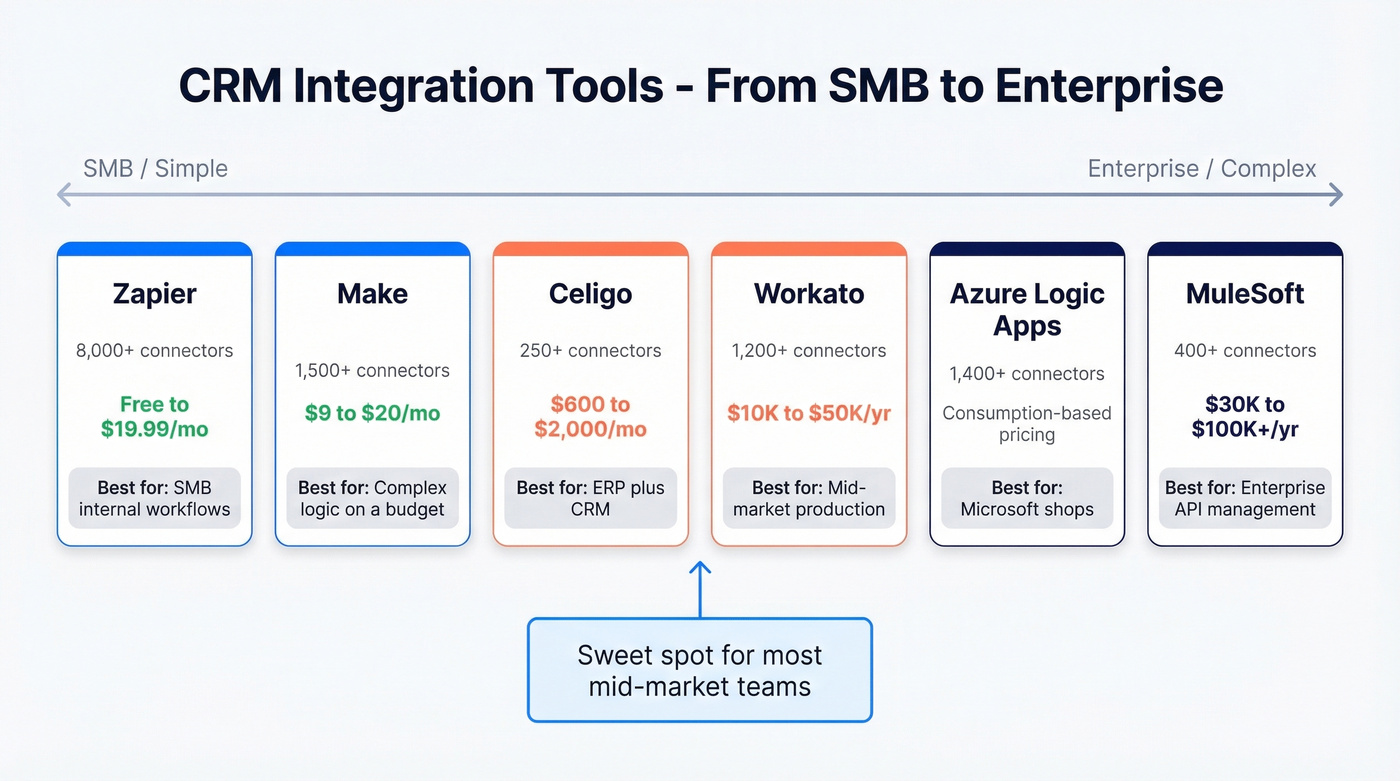
Zapier's 8,000+ connector count is impressive, but connector depth varies wildly. A Zapier integration with Salesforce isn't the same depth as a native Salesforce integration. Make offers more complex logic at a lower price point, which is why it's popular with technical solo operators and small agencies.
The fact that Workato, MuleSoft, and most enterprise iPaaS vendors don't publish pricing is frustrating - but in our experience, Celigo is often the sweet spot for mid-market teams caught between Zapier's limitations and MuleSoft's price tag. Other enterprise options worth evaluating include Tray.io, SnapLogic, and Informatica, each with specific strengths in legacy system connectivity. Skip Azure Logic Apps unless you're already deep in the Microsoft ecosystem; the learning curve isn't worth it otherwise.
Seven Mistakes That Derail ROI
1. Integrating dirty data. This is the single most common reason these projects fail. If your CRM has a high duplicate rate and stale emails, connecting it to your marketing platform just means you're sending bad emails at scale. Fix the data first. Always.
2. No integration roadmap. Teams jump straight to connecting tools without mapping data flows or defining which system is the source of truth for each field. Three months later, nobody knows why the lead count in Salesforce doesn't match HubSpot.
3. All-at-once rollout. Connecting five systems simultaneously is a recipe for cascading failures. Phased, modular rollouts let you validate each connection before adding complexity. Over-customizing workflows before validating the basic sync creates maintenance debt that outlasts the team that built it.
4. Ignoring security and compliance. GDPR, CCPA, HIPAA - these aren't optional. Every integration that moves personal data needs documented lawful basis, access controls, encryption, and audit trails. We've watched teams build beautiful architectures that had to be torn down because they violated data residency requirements.
5. Shallow integrations. Basic contact sync isn't real connectivity. If your setup only pushes names and emails but doesn't sync deal stages, activity history, or custom fields bidirectionally, you're building a system that requires manual workarounds from day one.
6. Skipping change management. The best architecture fails if reps don't use it. Appoint departmental power users. Run training sessions. Get leadership buy-in before launch, not after.
7. No monitoring post-launch. Integrations break silently. API rate limits change, field mappings drift, webhook endpoints go down. Without error handling and alerting, you won't know your sync failed until a rep complains that their leads disappeared.
One retail chain cleaned duplicates before integration and raised response rates by 18%. Another company revised their goals with end-user input and boosted sales conversions by 12% within six months. The teams that skip these steps end up redoing the work.
Implementation and Governance Checklist
Phase 1: Audit. Inventory every system that touches customer data. Document what personal data moves, the lawful basis for processing it, who can access it, and retention rules. Don't forget personal data hiding in free-text fields, Jira descriptions, and email attachments.
Phase 2: Map. Define source-of-truth for each field. Map data flows between systems. Apply data minimization - don't sync all CRM properties into every connected tool. Only move what's required for the use case.
Phase 3: Clean. Deduplicate, standardize formats, validate emails, archive stale records. This is where data enrichment tools earn their keep.
Phase 4: Pilot. Connect one integration. Test with a small user group. Validate data accuracy, sync timing, and error handling. Fix issues before scaling.
Phase 5: Rollout. Add integrations in priority order. Train users on each new workflow. Document everything.
Phase 6: Monitor. Set up alerting for sync failures, data quality degradation, and API errors. Run quarterly audits. Remember the 72-hour GDPR breach notification window. Implement role-based access controls and maintain audit trails for every data movement. Build DSAR handling into your workflow from the start, not as an afterthought.
CRM Enrichment: The Layer Nobody Talks About
Every integration guide covers marketing automation, ERP, and support tools. Almost none address the foundational problem: CRM records decay. People change jobs. Emails bounce. Phone numbers go stale. Companies get acquired. Without enrichment, you're building an increasingly sophisticated system for distributing increasingly bad data.

Prospeo solves this with continuous record refreshes. It integrates natively with Salesforce and HubSpot, enriching each record with 50+ data points - verified emails at 98% accuracy, direct dials from 125M+ verified mobiles, firmographics, and technographics. For teams running ABM, it layers in intent data across 15,000 topics via Bombora. The 7-day refresh cycle means your CRM data doesn't go stale between quarterly cleanups, and there's a free tier to test before committing.
Look, you can build the most elegant integration architecture in the world. If the contact data flowing through it is wrong, you're just automating failure.
You just read that 76% of CRM data is inaccurate. Prospeo's enrichment API returns verified emails, mobiles, firmographics, and intent signals at a 92% match rate - for $0.01 per email. Native integrations with Salesforce, HubSpot, Clay, Zapier, and Make mean no custom code required.
Clean CRM data in minutes, not months. No contracts, no sales calls.
AI and CRM Connectivity in 2026
The AI-CRM gap is real. 59% of sales and marketing leaders plan to significantly increase AI adoption over the next year, but only 16% have successfully integrated AI into their CRM systems. The intent is there. The infrastructure isn't.
The blockers are predictable: legacy infrastructure that can't support real-time data access, data quality too poor to train models on, and lack of in-house expertise to build and maintain AI integrations. These aren't AI problems. They're integration problems.
The practical AI-CRM use cases working today:
- Automated meeting notes and CRM updates that eliminate manual logging
- Intelligent next-step guidance based on deal history and engagement patterns
- Proactive data hygiene that flags stale records before they cause problems
- AI-powered lead scoring that reflects actual buying signals, not just demographic fit
Context APIs and MCP (Model Context Protocol) are emerging as the patterns that let AI agents query governed CRM data without direct database access. GraphQL is gaining traction for AI workflows because it reduces over-fetching - you request exactly the fields you need, which matters when you're paying per token. Expect these to become standard within 12-18 months.
The takeaway: AI without clean, integrated data automates broken processes. If you're planning AI-CRM initiatives, start with the data quality foundation. The AI layer is the easy part once the plumbing works.
FAQ
How long does CRM integration take?
Simple native integrations - Mailchimp to HubSpot, for example - go live in days. Complex multi-system architectures with custom APIs and data migration typically take 3-6 months from planning to full production rollout.
What's the cheapest way to connect my CRM?
Start with native integrations built into your CRM. They're free and pre-tested. Beyond that, Zapier's free tier handles basic two-step workflows, and Make starts at ~$9-$20/month with more complex branching logic, making it the best budget option for technical users.
Do I need an iPaaS or can I use Zapier?
Zapier works for internal workflows and low-volume syncs. For customer-facing integrations or anything that needs robust error handling, an iPaaS like Workato (~$10K-50K/year) or Celigo (~$600-$2,000/month) is worth the investment. If a failed sync means a customer doesn't get onboarded, don't rely on Zapier.
How do I keep CRM data accurate after integration?
Use an enrichment tool with automated refresh cycles - a 7-day refresh keeps records current between quarterly audits. Combine that with validation rules on key fields and automated deduplication to catch drift before it compounds.