

DaaS vs SaaS: Key Differences Explained (2026)
Your CFO just asked why you're evaluating a $50/user/month virtual desktop when everyone already has laptops and Google Workspace. You went looking for a clear answer and got three different definitions of DaaS, a bunch of vendor pages selling you things, and zero clarity.
Let's fix that.
The Short Answer
SaaS delivers applications - Google Workspace, Salesforce, Slack. DaaS delivers full virtual desktops streamed from the cloud - Amazon WorkSpaces, Azure Virtual Desktop, Windows 365. 85% of organizations already use SaaS, and only 2% rely on it exclusively.
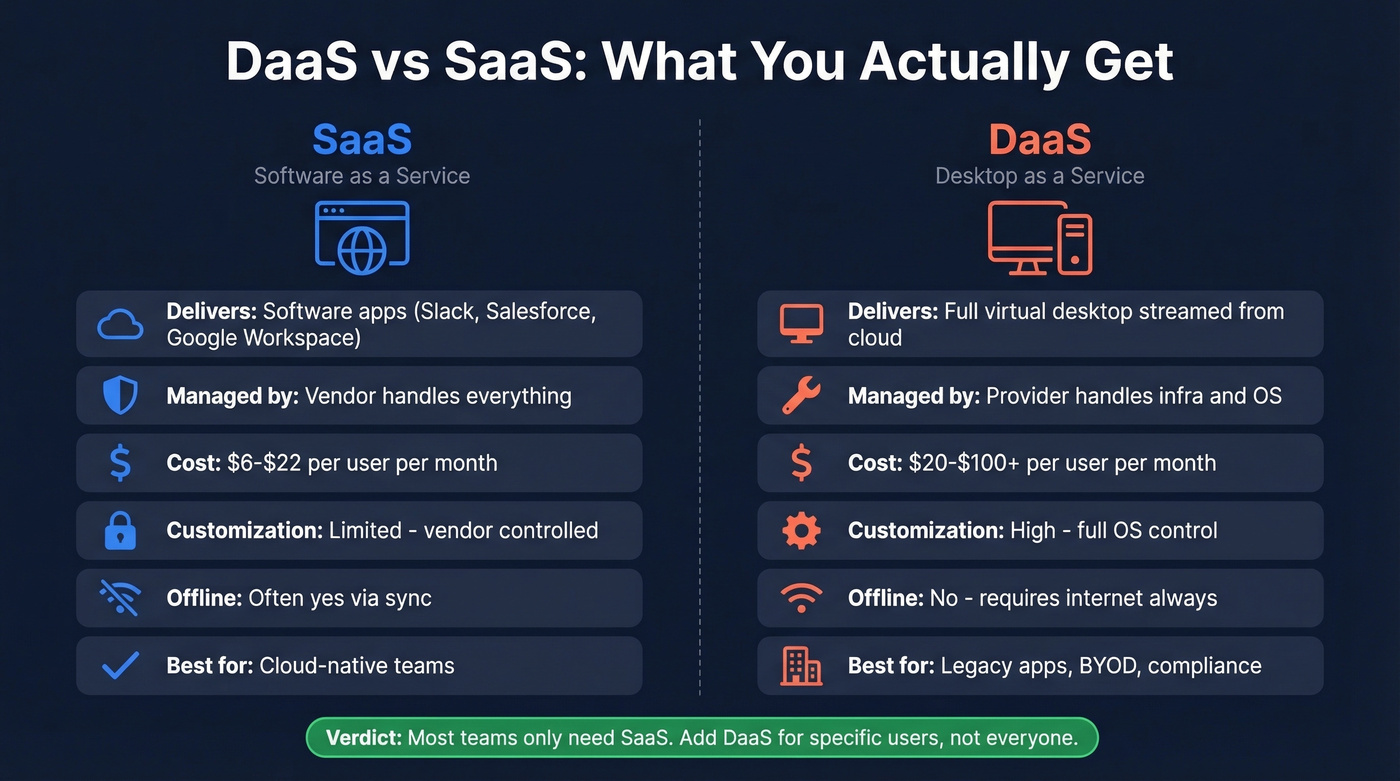
The real question isn't "which one should I pick?" It's "do I also need DaaS on top of the SaaS I'm already running?" For most organizations, the answer is no.
| Dimension | SaaS | DaaS |
|---|---|---|
| What's delivered | Software apps | Full virtual desktop |
| Who manages it | Vendor - everything | Provider - infra + OS |
| Pricing model | Per user/month | Per user/month + infra |
| Customization | Limited | High - full OS control |
| Offline access | Often yes via sync | No - needs internet |
| Best for | Cloud-native teams | Legacy apps, BYOD, compliance |
| Our pick for most teams | ✓ SaaS | Subset of users only |
Which "DaaS" Are We Talking About?
Here's where the confusion starts. DaaS means two completely different things depending on who's talking.
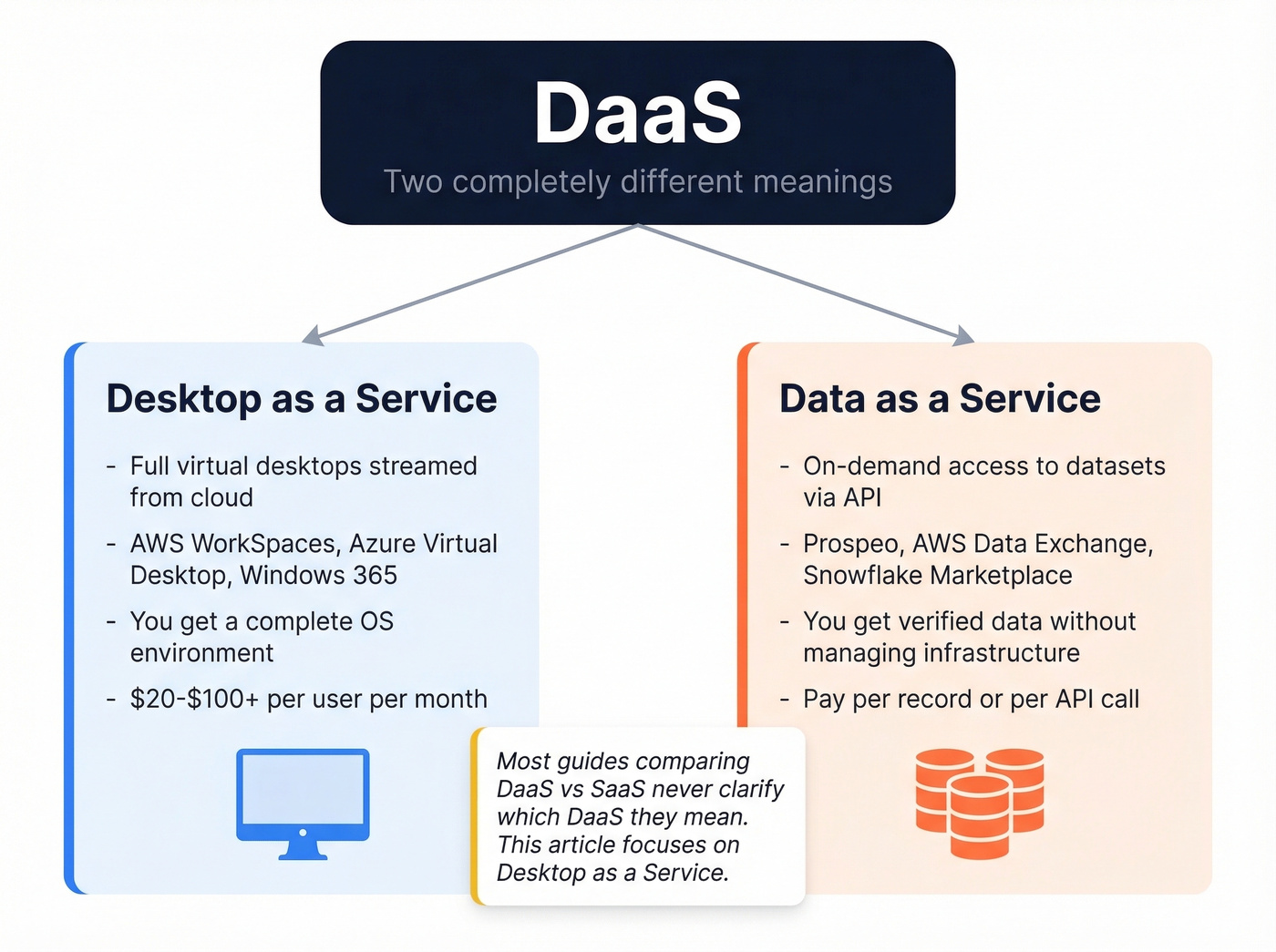
Desktop as a Service is virtual desktops streamed from the cloud - that's the focus of this article. Data as a Service is on-demand access to datasets via API, without managing any data infrastructure yourself. In the B2B sales world, Prospeo is a Data-as-a-Service platform - 300M+ verified professional profiles delivered on demand with 98% email accuracy, refreshed every 7 days. AWS Data Exchange is another example, focused on analytics and ML datasets.

For the rest of this article, DaaS means Desktop as a Service. If you're here for the data side, the distinction matters - and most guides comparing these cloud models don't bother making it.
How SaaS Works
SaaS is the model you already know. A vendor hosts the application, manages updates, handles security, and you access it through a browser or lightweight app. You pay per user per month.
The numbers tell the story: 80% of organizations deliver at least a quarter of their apps via SaaS. Microsoft 365 Business plans commonly land in the ~$6-$22/user/month range, Google Workspace sits around ~$7-$18/user/month, and Salesforce, HubSpot, Slack, and Dropbox all follow the same model. You don't think about servers. You don't patch anything. You log in and work.
If you're building a revenue stack on top of SaaS, it helps to map your RevOps Tech Stack so you don't buy overlapping tools.

SaaS apps deliver software. Data as a Service delivers pipeline. Prospeo gives you 300M+ verified professional profiles with 98% email accuracy, refreshed every 7 days - not 6 weeks. At ~$0.01 per email, it's the DaaS model that actually moves revenue.
Stop debating cloud models and start reaching real buyers.
How Desktop as a Service Works
DaaS streams a full virtual desktop from the cloud to whatever device you're sitting in front of - laptop, thin client, tablet, doesn't matter. The actual computing happens on remote servers. Only screen pixels and keyboard/mouse inputs travel over the network.
Don't confuse DaaS with VDI. VDI is the same concept, but you host and manage the servers yourself. DaaS is VDI delivered as a cloud service - the provider handles the infrastructure.
If you're evaluating this for security reasons, make sure your B2B compliance requirements actually demand centralized desktop control.
Gartner pegged DaaS spending at $4.3B in 2025, climbing to $6.0B by 2029 - a 7.9% CAGR. By 2027, virtual desktops will be cost-effective for 95% of workers, but they'll only serve as the primary workspace for about 20%.
The major vendors split into two camps. "Self-assembled" options like Azure Virtual Desktop let you bring your own licenses and pay for infrastructure separately. "Vendor-assembled" options like Windows 365 charge a flat per-user fee with Microsoft managing more of the environment. Citrix DaaS is another major player, typically sold as a per-user subscription layered on top of your cloud infrastructure.
What DaaS Actually Costs
Vendor pages love to emphasize the sticker price. The real bill depends on licensing, compute, storage, and how the service is packaged. Plan for $20-$100+/user/month all-in.
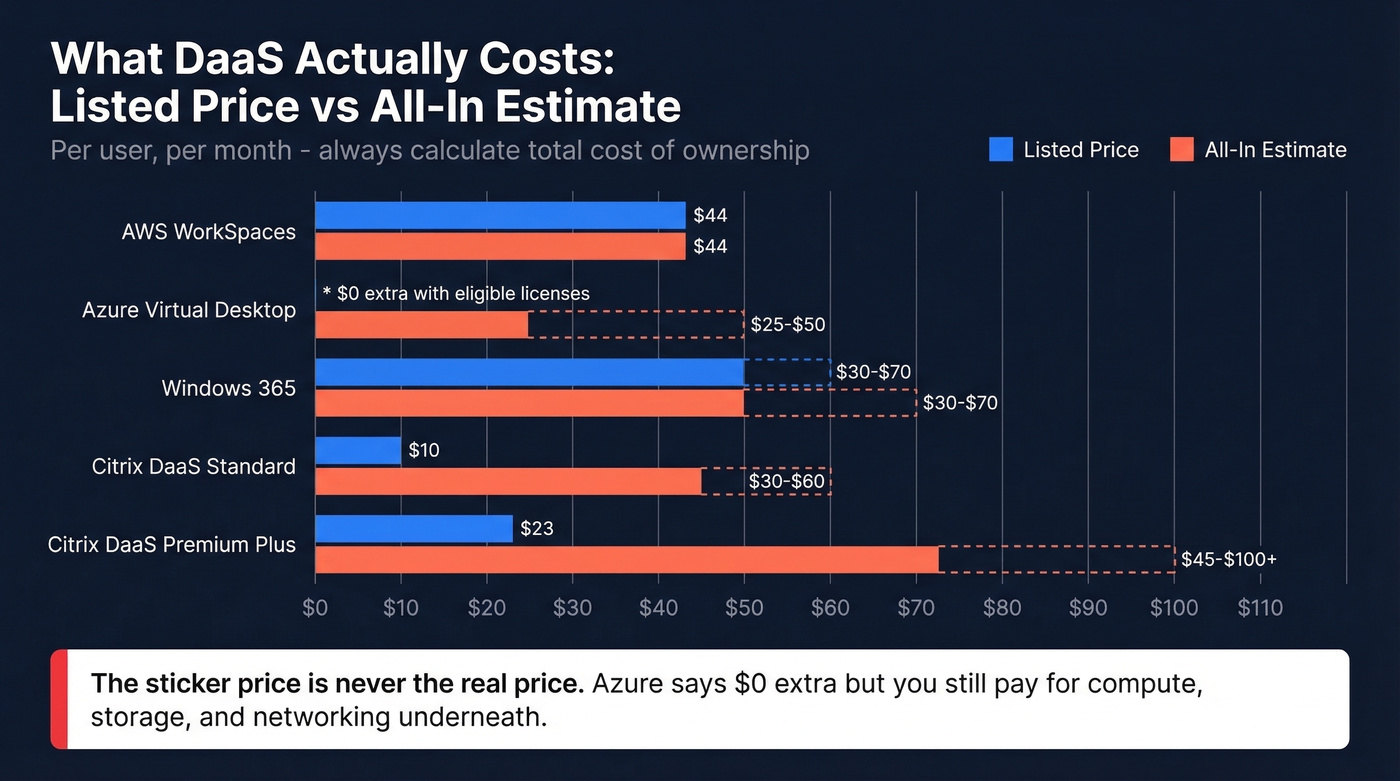
| Provider | Listed Price | All-In Estimate |
|---|---|---|
| AWS WorkSpaces | ~$44/user/mo | ~$44/user/mo |
| Azure Virtual Desktop | $0 extra for eligible licenses | ~$25-$50/user/mo |
| Windows 365 | ~$30-$70/user/mo | ~$30-$70/user/mo |
| Citrix DaaS Standard | $10/user/mo | ~$30-$60/user/mo with infra |
| Citrix DaaS Premium Plus | $23/user/mo | ~$45-$100+/user/mo with infra |
AWS WorkSpaces is one of the clearer bundles to reason about. In an MSP scenario shared on r/msp, a WorkSpaces bundle priced at $47/user/month was described as 2 vCPU, 7.5GB RAM, and a 50GB volume. Straightforward.
Azure Virtual Desktop is the trickiest. Microsoft says access is "at no additional cost" with eligible M365 or Windows Enterprise licenses. Technically true - but you're still paying for Azure compute, storage, and networking underneath. In our experience, the all-in cost lands between $25-$50/user/month for a typical knowledge worker.
Citrix layers a per-user subscription on top of your cloud infrastructure costs. The sticker price looks cheap until you add Azure or Google Cloud underneath. Vendors profit from recurring per-seat fees, but total cost of ownership depends heavily on that infrastructure layer.
For context, Gartner pegs laptop TCO at $2,440/device/year without analytics tools versus $1,936 with them. Desktop as a Service doesn't save money - it shifts where the money goes.
If you're trying to justify spend, tie it back to account executive KPIs and measurable productivity outcomes.
When DaaS Backfires
We've seen this play out more than once.
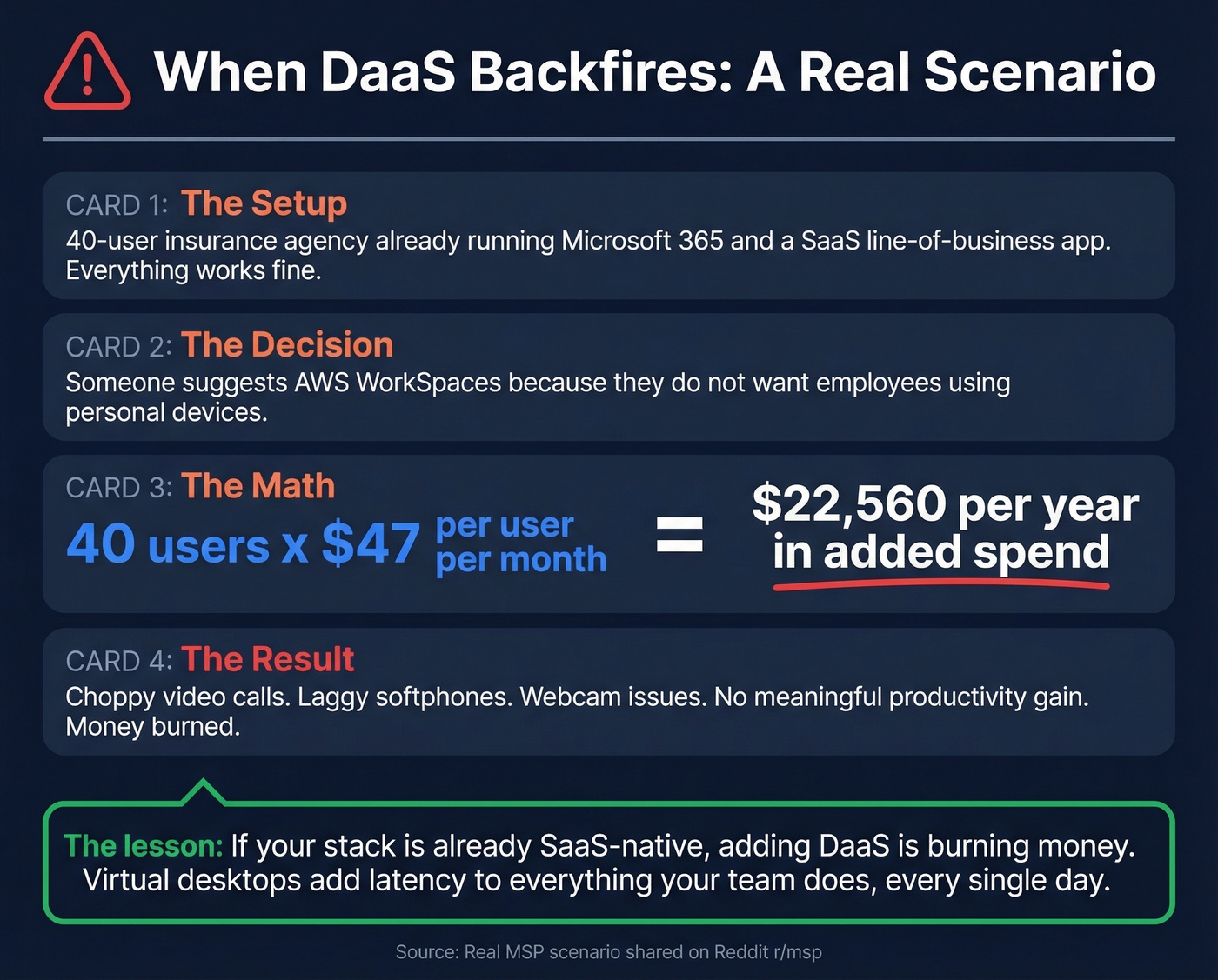
Picture a ~40-user insurance agency already running Microsoft 365 and a SaaS line-of-business app. Everything works fine. But the client doesn't want employees using personal devices, so someone suggests AWS WorkSpaces. The math: 40 users x $47/user/month = $22,560/year in added spend. The result? Choppy video calls, laggy softphones, webcam issues, and no meaningful productivity gain. MSPs on r/msp were blunt about this scenario: if your stack is already SaaS-native, adding DaaS is burning money.
In practice, teams run into performance issues for audio, video, webcams, and graphics-heavy browsing compared to local hardware. If your team lives in Zoom and Google Docs, a virtual desktop adds latency to everything they do, every single day. Switching providers is expensive and complex too - migrating user profiles, apps, and policies between platforms isn't a weekend project. Lock-in is real.
This is the same pattern you see in go-to-market: tool sprawl creates sales pipeline challenges that look like "execution problems" but are really systems problems.
How to Decide
Most guides frame this as either/or. It's not. The hybrid model is the default - 85% of orgs use SaaS, and the ones that add DaaS do it for a subset of users, not everyone.
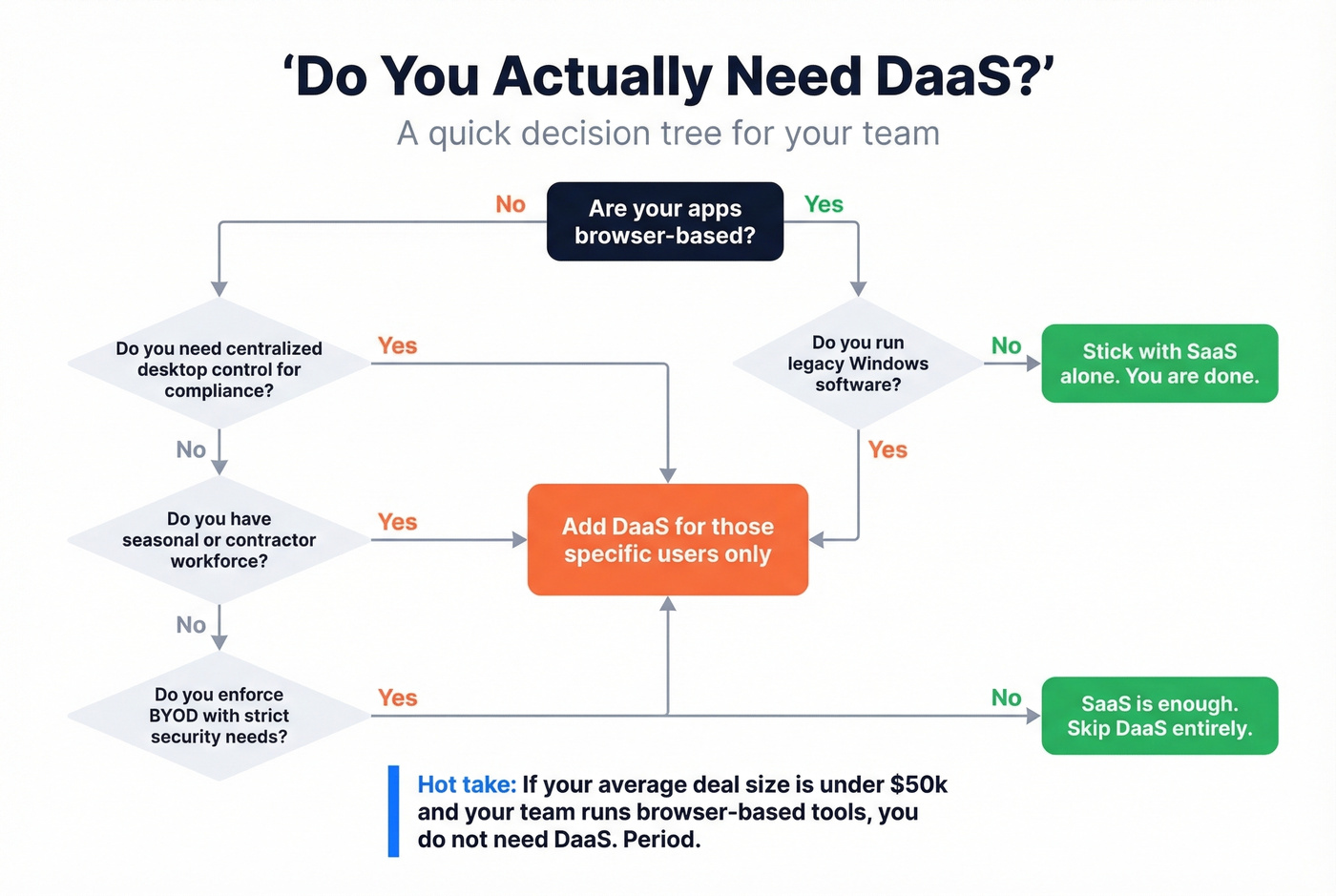
Our hot take: If your average deal size is under $50k and your team runs browser-based tools, you don't need DaaS. Period. We've watched teams waste six figures on virtual desktop deployments that solved a problem they didn't have.
If you're making this call as part of a broader growth plan, align it with your go-to-market strategy timeline so infrastructure doesn't outrun revenue.
Choose SaaS alone if:
- Your apps are browser-based
- Your team uses standard company-issued devices
- You don't run legacy Windows software
- You're budget-conscious without centralized desktop management needs
Add DaaS for specific users if:
- You have legacy Windows apps that can't run in a browser
- You enforce BYOD but need locked-down security
- You scale a seasonal or contractor workforce up and down frequently
- You're in a compliance-heavy industry requiring centralized data storage
- Your team runs heavy CAD or design workloads
Skip DaaS entirely if your whole stack is already cloud-native and your security posture doesn't require centralized desktop control. The added cost and latency aren't worth it just to check a "cloud" box.
One more wrinkle worth watching: 86% of IT leaders are considering moving at least some workloads away from the public cloud. The calculus between desktop and software delivery models may shift again as hybrid and on-prem architectures regain favor.
FAQ
Is DaaS the same as VDI?
No. VDI is self-hosted virtual desktops where you manage the infrastructure - servers, storage, networking, patching. DaaS is provider-hosted, meaning the cloud vendor handles all of that. Same concept, different operational burden. Expect 30-40% lower ops overhead with DaaS versus self-managed VDI.
Can you use DaaS and SaaS together?
Yes, and most companies that deploy DaaS do exactly this. SaaS apps run inside the virtual desktop environment. The hybrid model is the default - only 2% of organizations are SaaS-exclusive. If you need DaaS, you're almost certainly layering it on top of existing SaaS.
What does DaaS mean in a B2B data context?
Data as a Service - on-demand access to verified datasets via API without managing infrastructure. For B2B contact data, tools like Prospeo deliver verified emails and mobile numbers on demand with a 92% API match rate. It's one of the clearest examples of the data-focused DaaS model in action.
How much does DaaS cost per user?
Plan for $20-$100+/user/month all-in, depending on provider and resource allocation. AWS WorkSpaces benchmarks around $44/user/month. Azure Virtual Desktop lands at $25-$50 once you factor in compute costs. Windows 365 flat-rate plans run $30-$70. Always calculate total cost of ownership, not sticker price.
You're already paying $20-$100/user/month for virtual desktops that add latency. Prospeo's Data as a Service costs a fraction of that and connects your team to 143M+ verified emails and 125M+ direct dials - no infrastructure overhead, no lock-in.
Spend less than one DaaS desktop seat and unlock your entire target market.