

DKIM Record: Setup, Verification & Fixes (2026)
You just enabled DKIM in Microsoft Defender, published your CNAME records, ran nslookup, and got back "Bad DNS packet." The web checker says everything's fine. You're not crazy - you're dealing with DKIM's most common trap. Let's fix it, and everything else that can go wrong.
What You Need (Quick Version)
A DKIM record is a DNS TXT record that publishes your domain's public key so receiving mail servers can verify your emails weren't tampered with. Use 2048-bit RSA keys, publish the record at selector._domainkey.yourdomain.com, and pair DKIM with SPF + DMARC - bulk-sender rules since the 2024 Gmail/Yahoo changes effectively force you to have all three in place. If your authentication is already failing, jump to the troubleshooting section. The most common causes are DNS propagation delays, CNAME-vs-TXT confusion in Microsoft 365, and third-party tools modifying signed message content after signing.
What Is DomainKeys Identified Mail?
DKIM - DomainKeys Identified Mail - lets a sending mail server cryptographically sign outgoing messages so the receiving server can confirm two things: the message actually came from your domain, and nobody altered it in transit. The mechanism lives in DNS as a TXT record published at a specific subdomain.
That subdomain follows a predictable format: selector._domainkey.yourdomain.com. The selector is a label you choose (or your email provider chooses for you - Google Workspace commonly uses google, Microsoft 365 uses selector1 and selector2). The TXT record itself contains your public key, which receivers use to verify the signature and validate the hash against the message they received.
Think of it as a wax seal on a letter. The seal proves who sent it and that nobody opened the envelope. Except the seal is a 2048-bit RSA key, and the envelope is an email header.
How DKIM Signing Works
The signing and verification flow has three actors: your mail server, your DNS, and the receiving mail server.
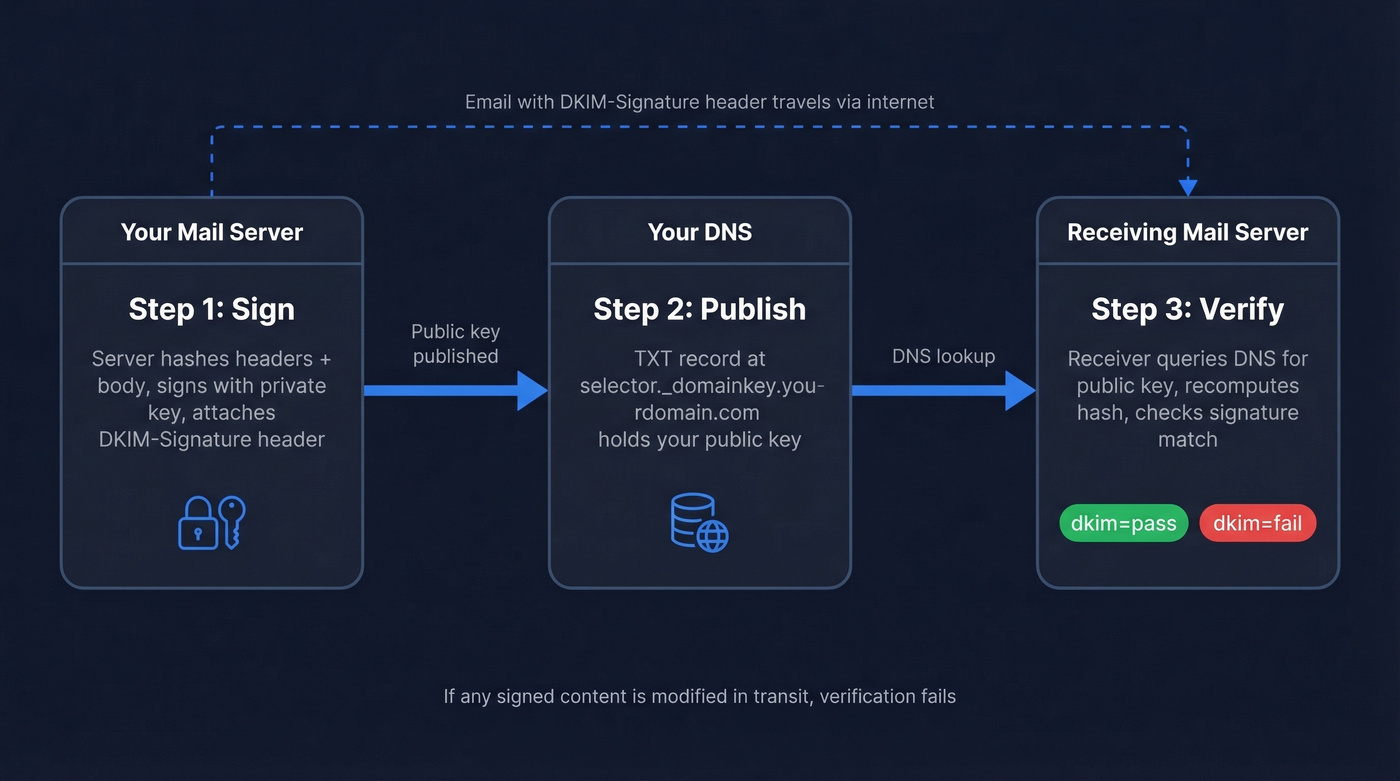
1. Your server signs the message. When an email leaves your infrastructure, the mail server generates a hash of specific headers and the message body, then signs that hash using your domain's private key. This signed data becomes the DKIM-Signature header, which rides along with the message.
2. DNS publishes the public key. Your TXT record sits in DNS, accessible to anyone who queries selector._domainkey.yourdomain.com. It contains the public half of the keypair.
3. The receiver verifies. The receiving server reads the DKIM-Signature header, extracts the selector and domain, queries DNS for the public key, and verifies the signature by computing the same hashes over the same headers and body. If everything matches, dkim=pass. If it doesn't - because something modified the message in transit - dkim=fail.
One critical nuance: DKIM signatures survive forwarding only if the signed content stays untouched. A mailing list that appends a footer to the body breaks the signature. An email signature tool that injects HTML after signing does the same.
This is where canonicalization matters. DKIM supports two modes - simple and relaxed - for both headers and body. Simple mode treats the content as-is, meaning even minor whitespace changes cause failures. Relaxed mode normalizes whitespace and header casing before hashing, absorbing the trivial modifications that intermediate servers commonly make. Almost every modern setup should use relaxed/relaxed canonicalization. Simple mode is a trap.
Record Format and Tags
A DKIM record has two parts: the DNS TXT record (what you publish) and the DKIM-Signature header (what your server attaches to each message).
DNS TXT Record Tags
Here's what goes inside the TXT record at selector._domainkey.yourdomain.com:
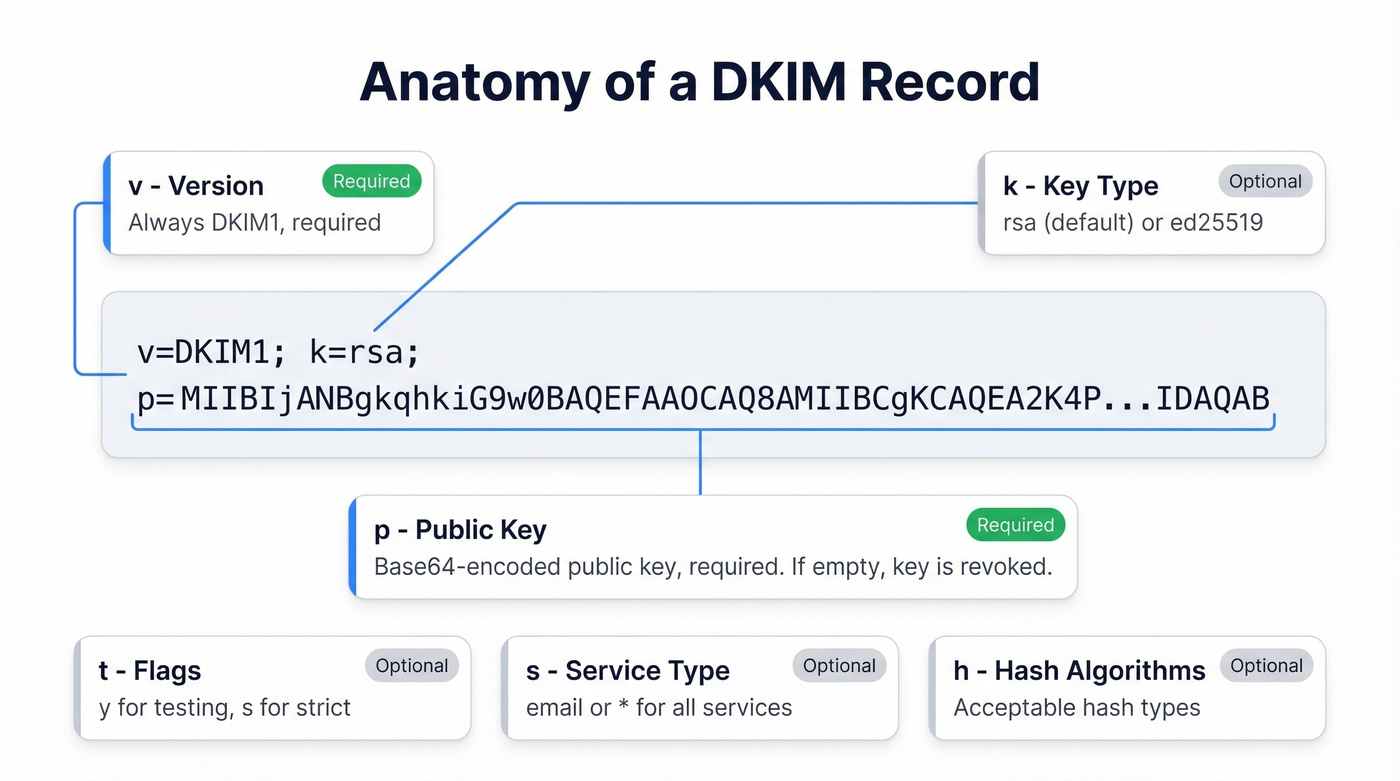
| Tag | Required | Description | Default |
|---|---|---|---|
v |
Yes | Version; always DKIM1 |
DKIM1 |
k |
No | Key type (rsa or ed25519) |
rsa |
p |
Yes | Base64-encoded public key | - |
t |
No | Flags; y = testing, s = strict |
No flags |
s |
No | Service type (email or *) |
* (all) |
h |
No | Acceptable hash algorithms | - |
n |
No | Human-readable notes | - |
A real-world example TXT record:
v=DKIM1; k=rsa; p=MIIBIjANBgkqhkiG9w0BAQEFAAOCAQ8AMIIBCgKCAQEA2K4PavXoNY8eGK2u
phCdbO0r+5MhOA...truncated...IDAQAB
The p= value is your public key. If p= is empty (p=), that's a deliberate key revocation - it tells receivers this selector is no longer valid.
DKIM-Signature Header Tags
This header gets attached to every outgoing message by your mail server:
| Tag | Description |
|---|---|
d= |
Signing domain (must align with From for DMARC) |
s= |
Selector used to find the DNS record |
h= |
List of signed headers |
bh= |
Hash of the canonicalized body used during verification |
a= |
Algorithm (rsa-sha256 or ed25519-sha256) |
b= |
Signature data (Base64) |
c= |
Canonicalization (relaxed/relaxed, etc.) |
A real DKIM-Signature header looks like this:
DKIM-Signature: v=1; a=rsa-sha256; c=relaxed/relaxed;
  d=example.com; s=google; h=from:to:subject:date:message-id;
  bh=2jUSOH9NhtVGCQWNr9BrIAPreKQjO6Sn7XIkfJVOzv8=;
  b=AuUoFEfDxTDkHlLXSZEpZj79LICEps6eda7W3deTVFOk...
The d= and s= values tell the receiver exactly where to find the public key: google._domainkey.example.com in this case.
How to Set Up DKIM Records
The setup process varies by provider, but the logic is always the same: generate a keypair, publish the public key in DNS, and tell your mail server to start signing.
Google Workspace
Open the Admin Console and navigate to Apps > Google Workspace > Gmail > Authenticate Email. Select your domain and click Generate New Record.
Choose google as the selector and select 2048-bit key length. Google will display a TXT record value - copy it. Go to your DNS provider and create a TXT record at google._domainkey.yourdomain.com with that value.
Here's the step people miss: go back to the Admin Console and click Start authentication. Publishing the DNS record alone doesn't activate signing. Google won't sign outgoing mail until you explicitly flip that switch. Propagation typically takes 5-30 minutes, though in rare cases DNS can take up to 24 hours.
Microsoft 365
Microsoft 365 uses CNAME records instead of TXT records - the single biggest source of DKIM confusion we see. You'll publish two CNAMEs:
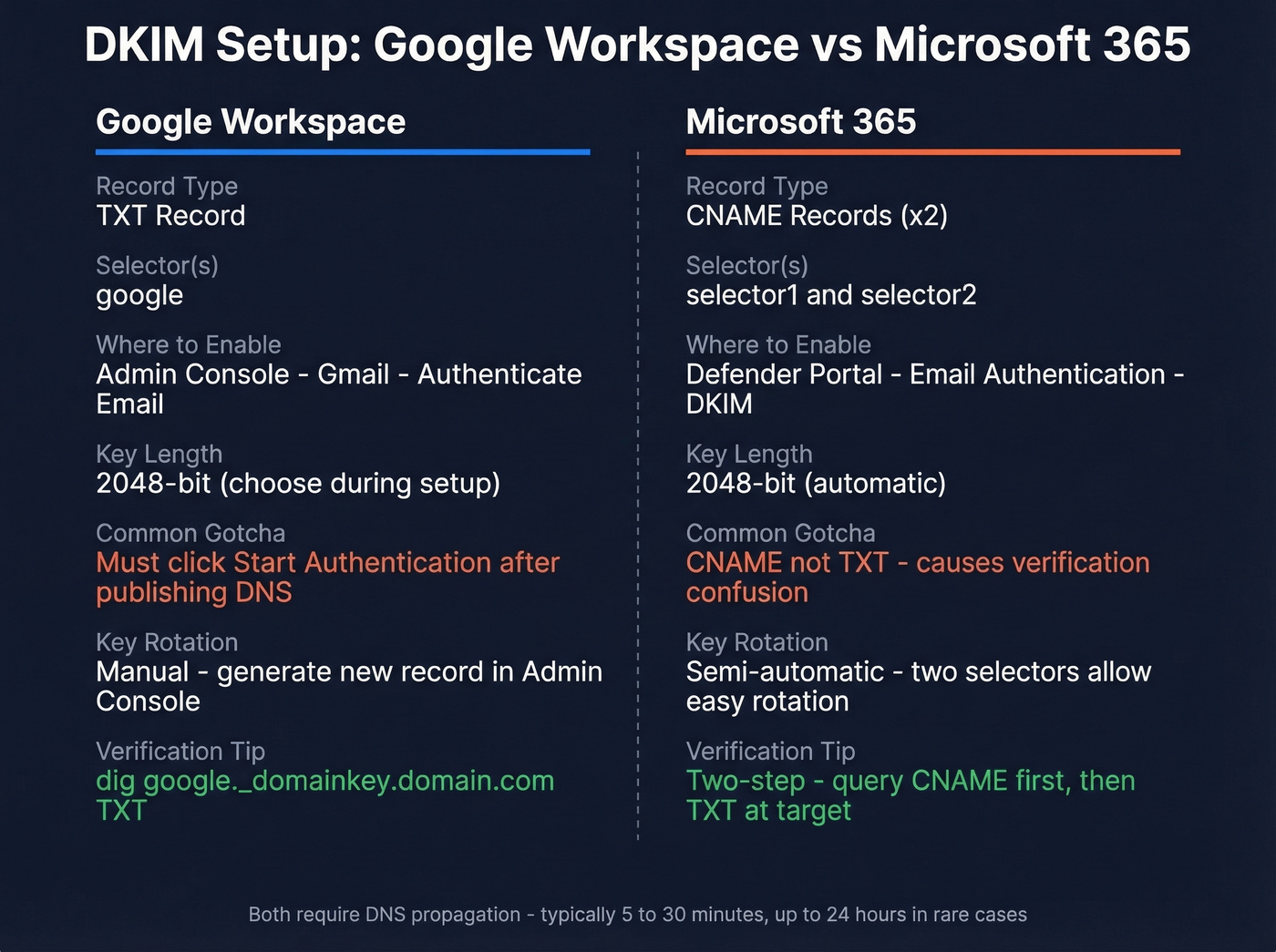
selector1._domainkey.yourdomain.com → selector1-yourdomain-com._domainkey.yourtenant.onmicrosoft.com
selector2._domainkey.yourdomain.com → selector2-yourdomain-com._domainkey.yourtenant.onmicrosoft.com
Go to the Microsoft Defender portal > Email & collaboration > Policies > Email authentication > DKIM. Select your domain. A common first-run symptom is Defender complaining about missing CNAMEs, and the UI typically shows the exact CNAME values you need to publish.
After publishing the CNAMEs and waiting for propagation, return to Defender and enable signing. Microsoft maintains two selectors - one active, one standby - which simplifies key rotation later.
Generic DNS Setup
If you're running your own mail server, generate a 2048-bit RSA keypair with openssl genrsa -out dkim_private.pem 2048 and extract the public key with openssl rsa -in dkim_private.pem -pubout -out dkim_public.pem. Publish the public key as a TXT record at yourselector._domainkey.yourdomain.com in the format v=DKIM1; k=rsa; p=<base64-encoded-public-key>. Configure your MTA or a milter like OpenDKIM to sign outgoing messages using the private key, then test with a real email before calling it done.

Perfect DKIM setup is only half the battle - you still need accurate email addresses behind those authenticated messages. Prospeo's 5-step verification and spam-trap removal keep bounce rates under 4%, so your DKIM-signed emails land in real inboxes, not blacklists.
Don't let bad data waste your perfect authentication setup.
How to Verify Your DKIM Record
Using dig and nslookup
The fastest verification is a DNS query from the command line. With dig:
dig google._domainkey.example.com TXT +short
Expected output:
"v=DKIM1; k=rsa; p=MIIBIjANBgkqhkiG9w0BAQE..."
With nslookup:
nslookup -type=txt google._domainkey.example.com
One gotcha: nslookup can fail to return TXT records when multiple TXT records exist at the same name. If it gives you nothing but you're confident the record exists, switch to dig. It's more reliable for TXT lookups.
Microsoft 365 CNAME Two-Step
Because Microsoft publishes DKIM as CNAMEs, you can't just query the selector and get a key back. You need a two-step process.
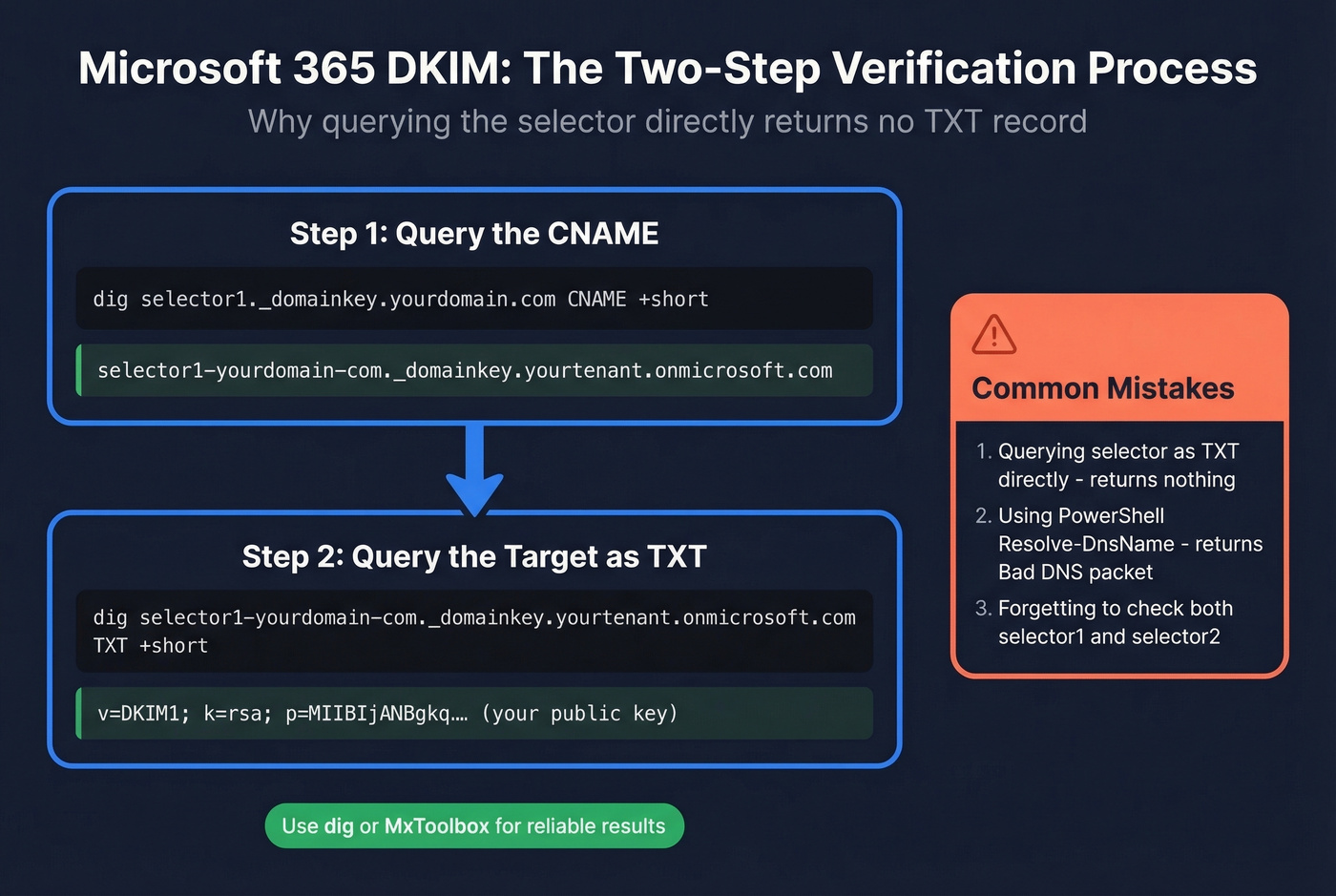
Step 1: Query the CNAME to get the target:
dig selector1._domainkey.yourdomain.com CNAME +short
Step 2: Query that target as a TXT record:
dig selector1-yourdomain-com._domainkey.yourtenant.onmicrosoft.com TXT +short
Now you'll see the actual public key. The most common M365 verification mistake is skipping step one and wondering why there's no TXT record at the selector subdomain.
PowerShell's Resolve-DnsName sometimes returns "Bad DNS packet" when querying these CNAME targets, even when the record is perfectly valid. Don't trust PowerShell for this - use dig or an online tool instead.
Online Tools and Gmail
MxToolbox's DKIM Lookup is free and handles the CNAME indirection automatically - just enter your domain and selector. EasyDMARC's DKIM Checker does the same with a cleaner interface.
For a quick end-to-end test, send an email to a Gmail account, open it, click the three dots > Show original, and look for dkim=pass with header.d=yourdomain.com. If it says dkim=pass, your signing and DNS are both working. If you want a deeper walkthrough, see how to verify DKIM is working.
Key Length: 1024 vs 2048 vs 4096
| Attribute | 1024-bit | 2048-bit | 4096-bit |
|---|---|---|---|
| Security | Adequate today | Recommended | Overkill |
| DNS compat | Fits one string | Requires splitting | Commonly hits DNS size/lookup issues |
| Recommendation | Upgrade ASAP | Use this | Skip for now |
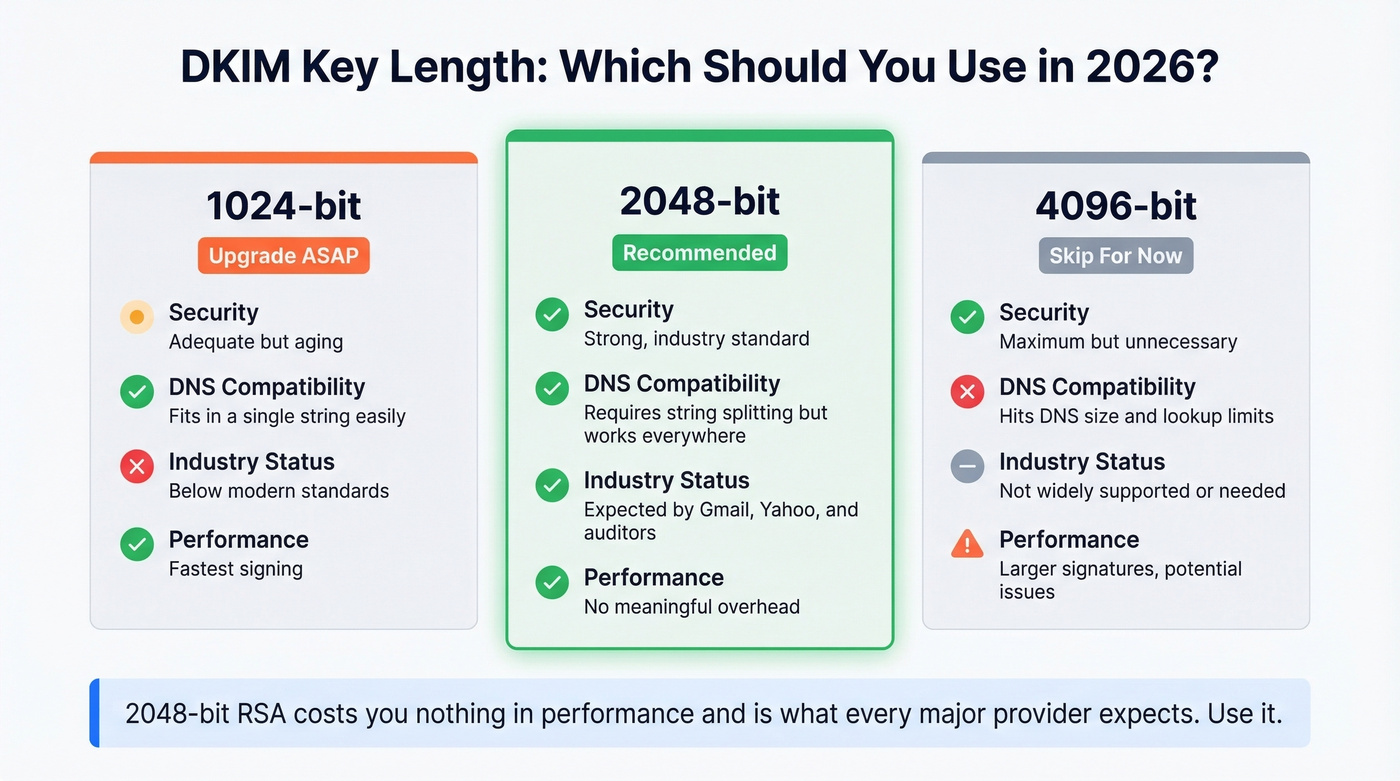
If you're still on 1024-bit keys, upgrade. Valimail recommends 2048-bit as the preferred key length, and that's the right call for 2026. The DKIM standard sets 1024-bit as the floor, not the target.
Postmark still uses 1024-bit keys to sign all customer email. Their argument is that the real-world risk of factoring a 1024-bit key within a rotation window is negligible. They're not wrong in a narrow technical sense, but 2048-bit costs you nothing in performance and it's what every major provider and security auditor expects.
With 2048-bit keys, you'll hit the 255-character-per-string limit in DNS TXT records. The solution is string splitting - your key gets published as multiple quoted strings within a single TXT record:
"v=DKIM1; k=rsa; p=MIIBIjANBgkqhkiG9w0BAQEFAAOCAQ8AMIIBCgKCAQEA..."
"...remainingKeyData...IDAQAB"
Per AWS documentation, this splitting doesn't break DKIM. Receiving servers concatenate the strings with no separator. Some DNS management UIs make this look broken when it's actually fine - if dig shows two quoted strings in one TXT record, that's correct behavior.
DKIM Key Rotation
Rotating keys limits the damage if a private key is ever compromised. The recommended cadence is every 6-12 months. Most teams never rotate. That's a risk that compounds over time.
The zero-downtime approach uses dual selectors: generate a new keypair and publish the public key on your inactive selector, wait for DNS propagation (give it 24 hours to be safe), switch your mail server to sign with the new selector and private key, then after confirming dkim=pass on the new selector, revoke the old public key by setting p= to empty.
Microsoft 365 makes this easier than most setups. The two-selector system is built for rotation - one is always active, one is always standby. When you rotate in Defender, Microsoft swaps which selector is active and keeps the second selector available for the next rotation.
DKIM, SPF, and DMARC Together
DKIM alone isn't enough. Here's what each protocol actually checks:
| Protocol | Validates | Prevents | Standalone Limit |
|---|---|---|---|
| SPF | Sending server IP | Unauthorized servers | Breaks on forwarding |
| DKIM | Message integrity | Content tampering | Doesn't check sender IP |
| DMARC | Domain alignment | Spoofing | Requires SPF or DKIM |
DMARC ties them together by requiring that either SPF or DKIM passes and aligns with the From domain. Most deployments use relaxed alignment, which is the right default.
Since 2024, Gmail and Yahoo bulk-sender enforcement pushed the ecosystem toward a simple reality: if you're sending at scale, you need SPF, DKIM, and a DMARC record in place or your mail performance collapses with spam-foldering and outright rejections.
Here's the thing: DKIM without DMARC is a half-measure. You're signing messages but not telling receivers what to do when signatures fail. That's like installing a burglar alarm and never connecting it to the monitoring service. And yet we see this configuration on the majority of domains we audit.
When forwarding breaks DKIM (and it will - mailing lists, university forwarding systems, corporate relays), ARC (Authenticated Received Chain) preserves the original authentication results across hops. ARC doesn't fix the broken signature; it lets the final receiver see that DKIM passed at an earlier hop and make a trust decision based on that chain.

Authentication protects your domain reputation from spoofing. But there's another side to deliverability that people overlook: data quality. High bounce rates from bad email addresses damage the same sender reputation that DKIM protects. Prospeo's email finder runs a 5-step verification process - including spam-trap removal and honeypot filtering - delivering 98% accuracy on verified emails. Neglecting either authentication or clean data tanks your inbox placement.
Why DKIM Fails - Common Fixes
DNS Propagation and Splitting
You published your record five minutes ago and verification fails. Before you tear anything apart, wait. DNS propagation typically takes 5-30 minutes but can stretch to 24-48 hours depending on your registrar and the querying resolver's cache TTL.
The other common cause is TXT string splitting for 2048-bit keys. Some DNS management panels require you to manually split the key into 255-character strings; others handle it automatically. If your record looks correct in the panel but dig returns an empty or malformed response, check whether your provider needs manual splitting. Also watch for stray line breaks, extra spaces, or unescaped semicolons in the DNS management UI - these are invisible record-killers that won't show up as obvious errors.
Microsoft 365 CNAME Confusion
You just enabled DKIM in Defender and it says "CnameMissing." You published the CNAMEs 20 minutes ago. You run nslookup and get nothing.
This failure has two layers. First, the CNAME indirection means standard TXT lookups against your selector subdomain won't return a key - you need the two-step query described in the verification section above. Second, PowerShell's Resolve-DnsName returns misleading "Bad DNS packet" errors on perfectly valid CNAME targets, which sends admins down a debugging rabbit hole that doesn't actually exist.
Use dig or MxToolbox. If the CNAME resolves to a valid TXT record through those tools, your DNS is fine. Go back to Defender, wait another 10 minutes, and try enabling again.
Third-Party Content Modification
This is the sneakiest failure mode. Your DNS records are configured correctly, everything looks clean, and most of your email passes - but a subset consistently fails.
The usual culprit: something in your mail flow modifies the message body or signed headers after signing. Email signature tools that inject HTML footers are the #1 offender. Bulk email platforms that rewrite tracking links can also break signatures. We've seen setups where multi-hop flows - Microsoft 365 to a signature tool, back to Microsoft 365, then outbound - create confusion about where signing actually happens.
One Reddit thread on r/DMARC documented a bulk sender responsible for 80% of DKIM failures in a short window - 23 of 29 dkim=fail events - while SPF passed cleanly. SPF passing doesn't save you when DKIM fails and DMARC policy is set to quarantine.
For forwarding and mailing list scenarios, the practical constraint is blunt: you often can't fix the forwarder. Universities, corporate relays, and legacy mailing lists will mangle headers and append footers regardless of your preferences. ARC helps receivers trust the chain, but you can't force every intermediary to implement it. If you're running a mailing list yourself, skip the footer injection or sign after appending it.
Canonicalization Mismatches
If you're using simple canonicalization and seeing intermittent failures on otherwise legitimate mail, switch to relaxed. Simple mode treats the message content byte-for-byte, meaning even trivial whitespace changes by intermediate servers cause verification to fail. Relaxed mode normalizes whitespace and header casing before hashing, absorbing these minor modifications with almost no security downside. Use c=relaxed/relaxed unless you have a specific, documented reason not to.
You just spent hours configuring DKIM, SPF, and DMARC to protect your sender reputation. One batch of unverified emails undoes all of it. Prospeo delivers 98% email accuracy at $0.01/lead with 7-day data refresh - so your domain stays clean.
Protect the reputation you just built - send only to verified contacts.
Ed25519 - Not Ready Yet
RFC 8463 defined Ed25519-SHA256 for DKIM back in 2018. The keys are dramatically shorter - an Ed25519 public key fits comfortably in a single DNS TXT string, eliminating the splitting headaches of RSA-2048. The algorithm is faster and considered more future-proof.
The problem is receiver support. Based on 2026 testing shared by practitioners and deliverability analysts:
| Provider | Signs Ed25519 | Verifies Ed25519 |
|---|---|---|
| Gmail | No | Frequently fails |
| Microsoft | No | Fails in tests |
| Yahoo | No | Fails in tests |
| Fastmail | Yes | Reliably verifies |
| ProtonMail | No | Reliably verifies |
| GMX / web.de | No | Reliably verifies |
RFC 8463 says verifiers MUST implement Ed25519-SHA256. Gmail, Microsoft, and Yahoo still don't reliably validate it in real-world tests. Going Ed25519-only today means your DKIM checks fail at the biggest mailbox providers. That's not a viable strategy.
The right approach for 2026: dual-sign with RSA-2048 as your primary and Ed25519 as a secondary signature. This is straightforward on standards-based stacks like Rspamd or OpenDKIM. You get future-proofing without breaking current deliverability. But RSA-2048 remains the only key type you can rely on universally.
Real talk: Ed25519 is the future of DKIM, but "the future" has been saying that since 2018. Don't hold your breath.
FAQ
Can I have multiple DKIM records for one domain?
Yes. Each sending service gets its own selector with its own selector._domainkey entry. Google Workspace uses google._domainkey, your marketing platform uses mktg._domainkey, and so on. There's no limit on selectors per domain.
How long does DNS propagation take?
Usually 5-30 minutes, but it can stretch to 24-48 hours. Most "broken DKIM" tickets filed within the first hour resolve themselves. Wait before troubleshooting.
What's the difference between DKIM and SPF?
SPF validates the sending server's IP address. DKIM validates that message content hasn't been altered in transit. They protect against different attack vectors, and you need both. DMARC ties them together with alignment rules.
Does a DKIM record improve deliverability?
Yes. Unauthenticated mail is far more likely to be spam-foldered or rejected, especially after the 2024 Gmail/Yahoo bulk sender requirements. But authentication is only half the battle - high bounce rates from bad email data damage sender reputation just as effectively. Pair authentication with verified contact data to protect reputation on both fronts.
What is ARC and how does it relate to DKIM?
ARC preserves authentication results across forwarding hops. When a mailing list breaks the DKIM signature, ARC lets the final receiver see that verification passed at an earlier, trusted hop. It doesn't fix the signature - it provides a chain of custody for smarter filtering decisions.