

DMARC Checker: How to Read Results, Fix Errors, and Enforce Your Policy
It's Monday morning. Your outbound sequences fired over the weekend, and you're staring at a wall of bounce notifications - 550 permanent rejections from Gmail, Outlook, and Yahoo. Your domain's DMARC record is either missing, misconfigured, or stuck at p=none.
A DMARC checker queries your domain's DNS TXT records to find, parse, and validate your DMARC policy. It tells you whether your record exists, whether the syntax is correct, and whether your SPF and DKIM settings actually align with what DMARC expects. Some checkers go further - they ingest a test email and validate your real sending infrastructure, not just the DNS entry. Think of it as a validator that catches misconfigurations before mailbox providers punish you for them.
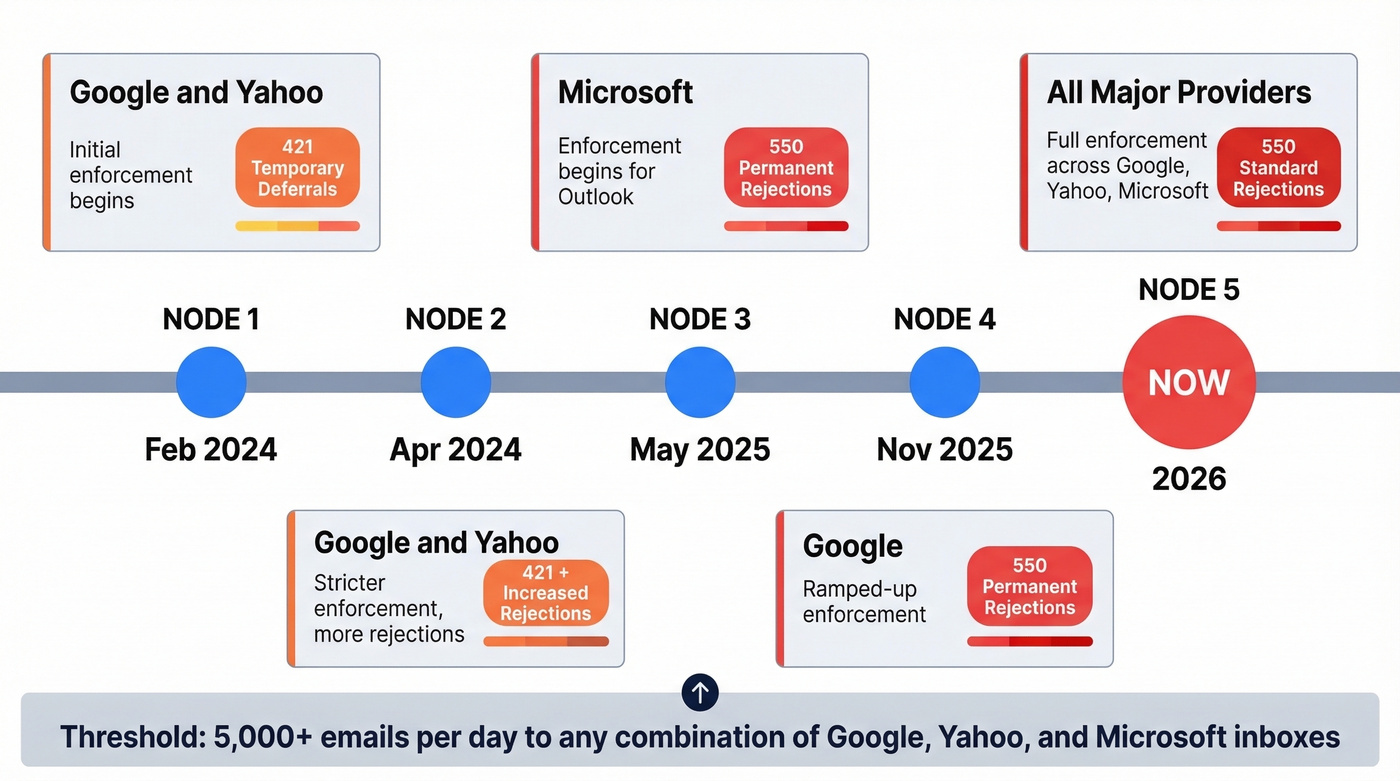
Google and Yahoo started enforcement with 421 temporary deferrals in 2024, and by 2026 all major providers issue permanent 550 rejections for non-compliant bulk traffic. If you're sending more than 5,000 emails a day and haven't locked this down, you're losing pipeline right now.
What You Need (Quick Version)
- Run a free lookup using MxToolbox or dmarcian Inspector. Takes 10 seconds - enter your domain, read the output.
- If your record is missing or set to
p=none, you have zero spoofing protection. Anyone can send email pretending to be you, and mailbox providers know it. - Google, Yahoo, and Microsoft enforcement has moved from 421 deferrals to 550 rejections as providers tightened bulk sender requirements. This isn't a warning anymore.
- After fixing DMARC, verify your sending lists. Bad data generates bounces that erode the sender reputation DMARC is protecting. Fix authentication first, then fix data quality.
Why DMARC Testing Matters in 2026
The enforcement timeline accelerated faster than most teams expected:
| Date | Provider | Action | Error Code |
|---|---|---|---|
| Feb 2024 | Google/Yahoo | Initial enforcement | 421 deferrals |
| Apr 2024 | Google/Yahoo | Stricter enforcement | 421 + increased rejections |
| May 2025 | Microsoft | Enforcement begins | 550 rejections |
| Nov 2025 | Ramped-up enforcement | 550 permanent | |
| 2026 | All three | Full enforcement | 550 standard |
The bulk sender threshold is 5,000+ emails per day to any combination of Google, Yahoo, and Microsoft inboxes. If you're running outbound at any real scale, you're above that line. (If you want the full breakdown, see our guide on the bulk sender threshold.)
The error code progression matters. Early enforcement used 421 temporary deferrals - your messages got delayed but eventually delivered. Now providers use 550 permanent rejections for non-compliant bulk traffic. Those emails never arrive. Running a regular DMARC record check isn't optional anymore; it's the baseline for deliverability.
Beyond deliverability, PCI DSS v4.0 DMARC requirements are active in 2026 for organizations handling credit card data. Google's operational targets are clear: keep spam complaint rates below 0.1%, never let them hit 0.3%. A broken DMARC record makes both targets harder because spoofed messages from your domain generate complaints you can't control.
And here's the upside most people overlook: getting to p=reject puts you in the best position to adopt BIMI (Brand Indicators for Message Identification), which shows your brand logo next to authenticated emails in supported inboxes.
How DMARC Authentication Works
DMARC doesn't authenticate email by itself. It sits on top of SPF and DKIM and adds one critical concept: alignment.
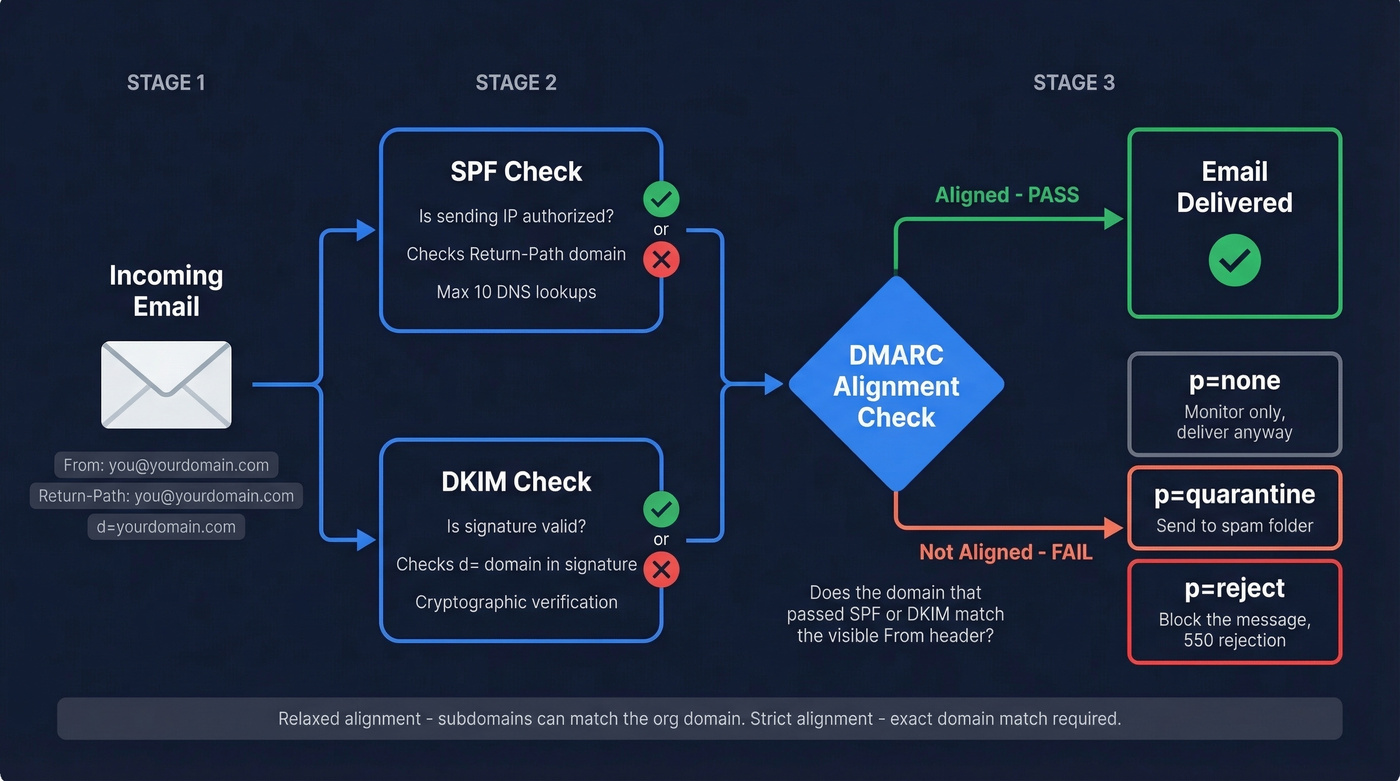
SPF validates that the sending server's IP is authorized by the domain in the Return-Path header. DKIM validates that the message hasn't been tampered with, using a cryptographic signature tied to the d= domain. Both can pass - and your email can still fail DMARC.
Why? Because DMARC checks whether the domain that passed SPF or DKIM actually matches the visible From header domain. This is alignment. Without it, an attacker could set up valid SPF and DKIM for their own domain while spoofing your From address. The technical term is identifier misbinding - SPF/DKIM pass for one domain while the human-readable sender shows another. DMARC closes this gap by requiring that at least one mechanism aligns with the From domain.
DMARC offers two alignment modes: relaxed, where subdomains can match the organizational domain, and strict, which requires an exact domain match. Most deployments use relaxed - it's the default. For forwarded messages, ARC (Authenticated Received Chain) preserves authentication results across hops. Enable it if your recipients use mailing lists or forwarding rules.
DMARC Record Tag Reference
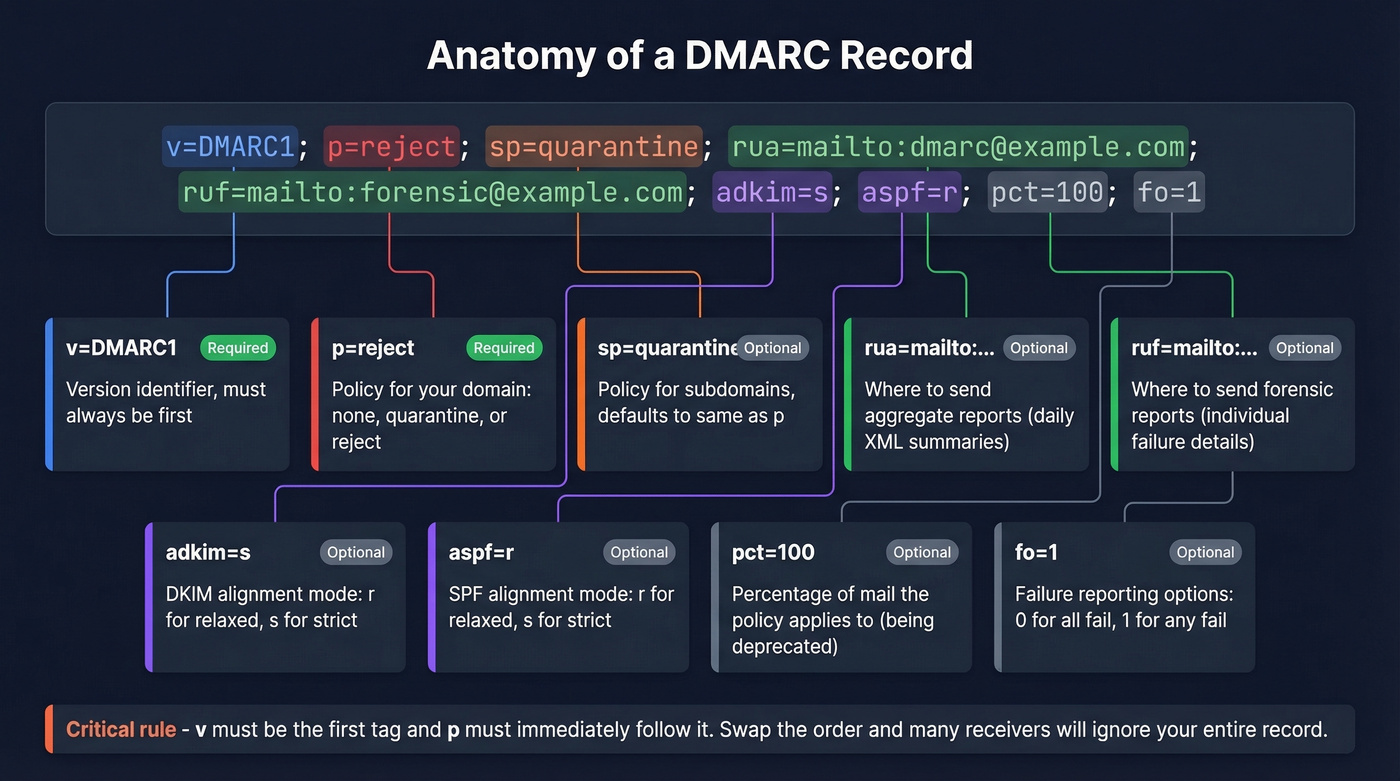
Every DMARC record is a DNS TXT entry published at _dmarc.yourdomain.com. Here's the full tag reference:
| Tag | Required? | Allowed Values | Default | Example |
|---|---|---|---|---|
| v | Yes (first) | DMARC1 | - | v=DMARC1 |
| p | Yes (second) | none, quarantine, reject | - | p=reject |
| sp | Optional | none, quarantine, reject | Same as p | sp=quarantine |
| rua | Optional | mailto: URI(s) | None | rua=mailto:dmarc@example.com |
| ruf | Optional | mailto: URI(s) | None | ruf=mailto:forensic@example.com |
| adkim | Optional | r (relaxed), s (strict) | r | adkim=s |
| aspf | Optional | r (relaxed), s (strict) | r | aspf=r |
| pct | Optional | 0-100 | 100 | pct=25 |
| fo | Optional | 0, 1, d, s | 0 | fo=1 |
| rf | Optional | afrf, iodef | afrf | rf=afrf |
| ri | Optional | Seconds (integer) | 86400 | ri=86400 |
Two critical ordering rules: v must be the first tag, and p must immediately follow it. Swap the order and many receivers will ignore the entire record. A quick check after publishing confirms you haven't introduced a syntax error.
The upcoming DMARCbis spec removes pct, rf, and ri. They still work today, but don't build your rollout strategy around pct - it's on its way out.
How to Run a DMARC Lookup
There are three ways to check your record, and they test different things.
Static DNS lookup. Enter your domain into a tool like MxToolbox, EasyDMARC's lookup tool, or dmarcian Inspector. You'll get your raw TXT record, parsed tags, and syntax warnings within seconds. This is the fastest method and catches most configuration errors.
Dynamic test via email. Tools like Red Sift Investigate generate a unique email address - you send a real message to it, and it checks DMARC, SPF, DKIM, BIMI, MTA-STS, TLS, and FCrDNS from the actual sending infrastructure. This is exactly what sysadmins on Reddit ask for: a tester where you send it an email and it checks everything, not just the DNS record. Dynamic checks catch problems static tools miss, like a Marketo instance with broken DKIM signing, an SPF record that doesn't cover your CRM's sending IP, or encryption gaps.
Command line. For the quick-and-dirty DNS check:
dig TXT _dmarc.yourdomain.com +short
Or on Windows: nslookup -type=TXT _dmarc.yourdomain.com. You'll get the raw record with no parsing or validation - but it confirms the record exists and lets you verify without leaving the terminal.
Here's the thing: static checkers tell you your record is syntactically valid. Dynamic checkers tell you your emails actually authenticate. Use both.

You just fixed DMARC to stop 550 rejections. Don't undo that work by sending to bad emails. Prospeo's 5-step verification and 98% email accuracy keep your bounce rate under 4% - the same threshold Google enforces.
Clean authentication deserves clean data. Get both right.
Common DMARC Errors and Fixes
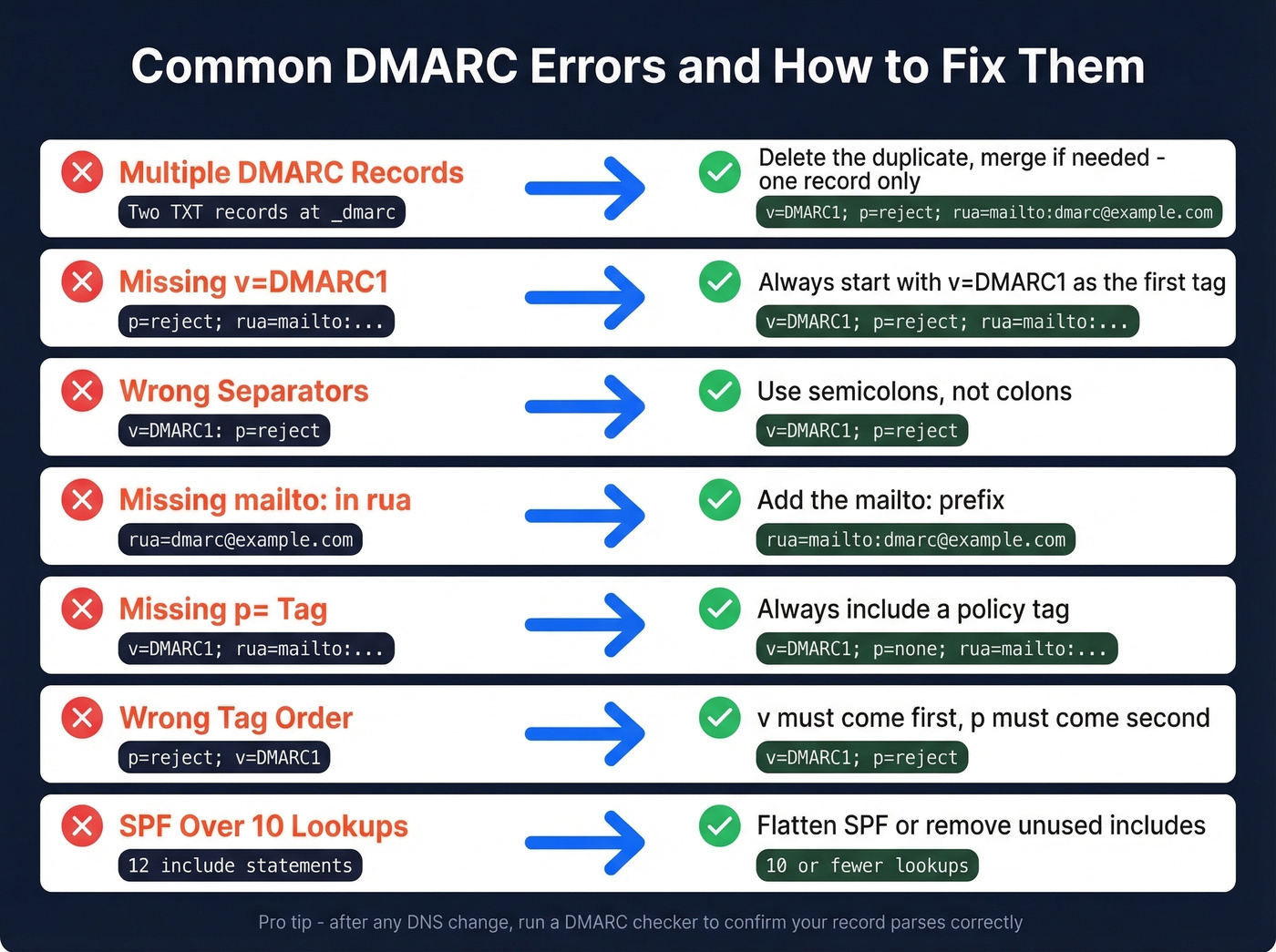
Most failures come from small DNS configuration mistakes rather than mail server problems. The r/dns community on Reddit consistently flags the same issues:
| Error | Broken Example | Correct Example | Fix |
|---|---|---|---|
| Multiple DMARC records | Two TXT records at _dmarc |
One TXT record | Delete duplicate; merge if needed |
Missing v=DMARC1 |
p=reject; rua=mailto:... |
v=DMARC1; p=reject; rua=mailto:... |
Add v=DMARC1; as first tag |
| Wrong separators | v=DMARC1: p=reject |
v=DMARC1; p=reject |
Replace colons with semicolons |
Missing mailto: in rua |
rua=dmarc@example.com |
rua=mailto:dmarc@example.com |
Add mailto: prefix |
Missing p= tag |
v=DMARC1; rua=mailto:... |
v=DMARC1; p=none; rua=mailto:... |
Add p= with valid value |
| Wrong tag order | p=reject; v=DMARC1 |
v=DMARC1; p=reject |
Move v first, p second |
| Extra characters | Curly quotes or trailing spaces | Clean ASCII, no trailing spaces | Re-type in plain text editor |
Two SPF-related issues also cause DMARC failures even when the record itself is perfect.
SPF 10-lookup limit. SPF allows a maximum of 10 DNS lookups. Every include:, redirect, and a mechanism counts. Exceed 10 and SPF returns a permanent error (permerror), which means DMARC can't use SPF for alignment. We've seen this happen constantly with teams using multiple SaaS tools - each one adds an include: to your SPF record, and suddenly you're at 12 lookups. SPF flattening helps but creates a maintenance burden. (If you need examples and provider-specific syntax, use our SPF record guide.)
Multiple SPF records. Your domain should have exactly one SPF TXT record. Two SPF records produce unpredictable results - some receivers pick one, some pick the other, some fail both. Merge them into a single record.
Best Free DMARC Checker Tools
| Tool | Type | Checks | Best For | Signup Required |
|---|---|---|---|---|
| MxToolbox | Static | DMARC, SPF, DKIM | Quick one-off checks | No |
| dmarcian Inspector | Static | DMARC (detailed) | Tag-by-tag education | No |
| EasyDMARC | Static | DMARC, SPF, DKIM | Clean UI, beginners | No |
| PowerDMARC | Static | DMARC, SPF, DKIM | Multi-protocol overview | No |
| Proofpoint | Static | DMARC, SPF wizard | Record generation + bulk (up to 100 domains) | No |
| Mimecast | Static | DMARC, SPF | Enterprise security teams | No |
| Red Sift Investigate | Dynamic | DMARC, SPF, DKIM, BIMI, MTA-STS, TLS, FCrDNS | Real-world validation | No |
| DNS Checker | Static | DMARC TXT only | Propagation checks | No |
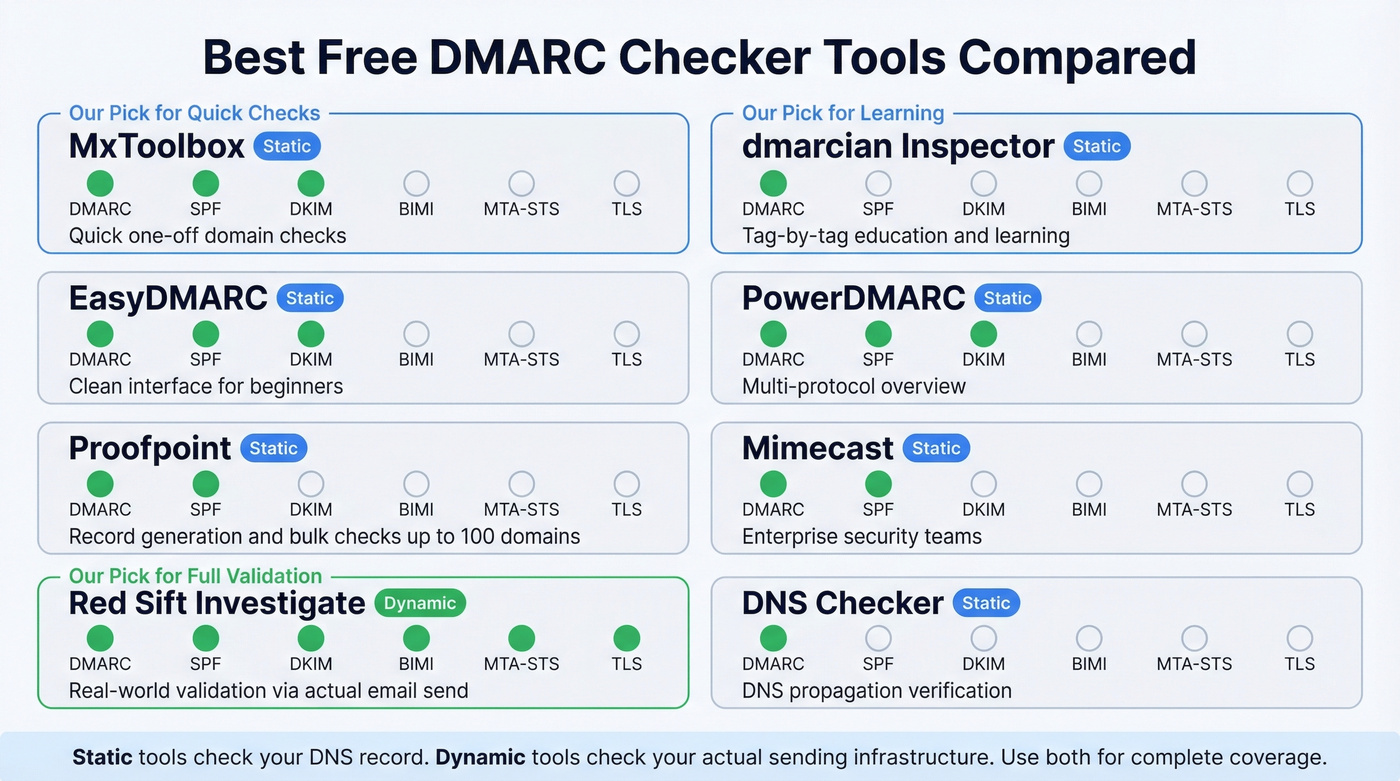
Our pick for quick one-off checks is MxToolbox - paste your domain, get results, move on. If you want tag-by-tag explanations of what your record actually means, dmarcian's tools provide the clearest guidance and double as an analyzer for teams learning the protocol. For validating that your real sending infrastructure authenticates properly, Red Sift Investigate is the best free option - it has you send an actual email and reports back on everything.
For enterprise teams, Proofpoint fits better into SIEM-driven security workflows, while dmarcian is strongest for sustained posture management. Proofpoint's DMARC wizard also generates records for you, which is useful if you're starting from scratch.
Best DMARC Monitoring Tools (With Pricing)
Free checkers validate your record at a point in time. Monitoring tools parse your aggregate reports continuously and turn raw XML into dashboards you can act on. If you're moving toward p=reject, you need monitoring - there's no way to manually read thousands of XML report files from dozens of mailbox providers. (For the broader stack, see our email reputation tools roundup.)
| Tool | Starting Price | Best For |
|---|---|---|
| PowerDMARC | $8/mo | Budget-conscious teams |
| Postmark | $14/mo | Developers, simple UI |
| Valimail | $19/mo | Automated enforcement |
| DMARC Advisor | $19/mo | Mid-market compliance |
| dmarcian | $19.99/mo | Guided rollout, education |
| Bouncer | $25/mo | Deliverability kit bundle |
| Cloudflare | $25/mo | Existing Cloudflare users |
| EasyDMARC | $35.99/mo | Full-featured dashboards |
| ZeroBounce | $99/mo | DMARC + email validation |
PowerDMARC at $8/mo is the cheapest entry point. Postmark's free DMARC monitor is genuinely free and handles the basics well - it's where we'd start if you just want to see your aggregate reports in a human-readable format. dmarcian is the best option if you want guided enforcement rollout with clear "you're ready to advance" signals.
Let's be honest: most teams under 10,000 emails/day don't need a paid monitoring tool. Postmark's free tier plus a monthly manual record check with MxToolbox will get you to p=reject just fine. Save the $20/mo for when you're managing multiple domains or need forensic-level reporting.
How to Read DMARC Reports
DMARC generates two types of reports. RUA aggregate reports arrive daily from mailbox providers and summarize authentication results across all messages from your domain. RUF forensic reports provide per-failure detail - but Gmail and Outlook rarely send them due to privacy concerns, so don't build your workflow around RUF.
Aggregate reports are XML files - machine-readable, not human-readable, which is exactly why monitoring tools exist. If you crack one open, here's what matters:
The <report_metadata> section identifies who sent the report: org name, email, report ID, and the date range in epoch timestamps. The <policy_published> section mirrors your DMARC record - domain, adkim, aspf, p, sp, pct. These two sections are mostly bookkeeping.
The real value is in the <record> entries. Each record contains a <source_ip> that identifies the server sending mail as you, a <count> showing message volume, <policy_evaluated> with the disposition and DKIM/SPF pass/fail results, and <auth_results> showing raw SPF and DKIM outcomes with their respective domains. When you see a source IP you don't recognize with high volume and DMARC failures, that's either a misconfigured legitimate sender or someone spoofing your domain. Figuring out which is the whole point of the p=none monitoring phase.
One caveat: the pct tag isn't always honored by receivers. Don't rely on it for precise rollout control.
From p=none to p=reject
The enforcement rollout follows a predictable sequence. Rushing it breaks legitimate email. Going too slow leaves you exposed for months.
- Publish at
p=nonewithrua=reporting. This gives you visibility without affecting delivery. Collect at least four weeks of aggregate report data before making any changes. - Identify and fix all legitimate sending sources. Every SaaS tool, ESP, CRM, and transactional sender needs proper SPF and DKIM alignment. This is where most teams stall - run a DMARC checker after each change to confirm alignment.
- Hit ~98% compliance across your aggregate reports before advancing. If 2% of your legitimate mail is still failing, moving to quarantine will send those messages to spam.
- Move to
p=quarantine. Failures now land in spam folders instead of inboxes. Monitor for a few weeks and watch for complaints from internal teams or customers. - Move to
p=reject. Failures are blocked entirely. This is full protection.
A few operational details that trip people up: pct is superfluous with p=none because none takes no action anyway. For parked or retired domains, skip the whole sequence and start at p=reject immediately - there's no legitimate mail to protect. Set sp= explicitly. Without it, subdomains inherit the organizational domain's policy, but many admins forget sp= exists and leave subdomains spoofable. Rotate your DKIM keys at least every six months.
DMARC enforcement protects your domain from impersonation. The other half of deliverability is data quality - sending to invalid addresses generates bounces that erode the sender reputation DMARC is protecting. Tools like Prospeo verify emails in real time before they hit your sending queue, catching dead addresses, spam traps, and honeypots through a multi-step verification process. (If you're troubleshooting bounce patterns, use our email bounce rate guide.)
DMARCbis - What's Changing
The DMARC spec is getting its first major overhaul. Draft-ietf-dmarc-dmarcbis-41, published April 2025, will obsolete the original RFC 7489 and RFC 9091 when approved. It's on track for Proposed Standard status in 2026 - a significant upgrade from the original's Informational status.
The record still starts with v=DMARC1. There's no "DMARC2." But several tags are changing:
- Removed:
pct,rf,ri - Added:
np(non-existent subdomain policy),psd(Public Suffix Domain flag),t(testing mode) t=yreplacespctfor testing. It signals that the domain is in testing mode without applying enforcement - cleaner than the oldpct=0workaround.
The biggest architectural change: organizational domain determination shifts from the Public Suffix List to a DNS Tree Walk algorithm. This affects how receivers figure out which domain "owns" a subdomain for alignment purposes.
DMARCbis also acknowledges that mailing lists and forwarding remain problematic, and discourages p=reject when mailing lists are common recipients. If your organization relies heavily on mailing lists, watch this space carefully.
DMARC enforcement means every bounce now hits harder. Prospeo refreshes 300M+ contacts every 7 days - not every 6 weeks - so you're never sending to stale addresses that tank your sender reputation.
Stop feeding your perfect DMARC setup with outdated contact data.
FAQ
What happens without a DMARC record?
Google, Yahoo, and Microsoft will defer or reject your bulk mail - especially above 5,000 messages per day. Without a record, your domain has zero spoofing protection and no policy telling receivers what to do about forged messages. Run a lookup on your domain right now to confirm whether one exists.
How often should I validate my DMARC configuration?
Check after any DNS change, monthly during enforcement rollout, and whenever you add a new sending service. Each new sender can break SPF alignment or push you past the 10-lookup limit. Use a monitoring tool for continuous visibility, and run a dynamic test whenever you onboard a new ESP.
Does DMARC protect subdomains automatically?
Only if you set sp= in your record. Without it, subdomains inherit the organizational domain's p= policy - but many admins forget this tag exists, leaving subdomains wide open. Set sp=reject explicitly once your main domain reaches full enforcement.
Can I check DMARC for free?
Yes. Every tool in our comparison table offers free validation with no signup required. MxToolbox and EasyDMARC handle static DNS lookups, while Red Sift Investigate provides free dynamic testing by analyzing a real email you send. For ongoing monitoring, Postmark offers a genuinely free tier that parses aggregate reports into readable dashboards.
How do I prevent bounces after fixing DMARC?
DMARC stops spoofing, but sending to invalid addresses still tanks your reputation. Validate every address before it enters your sending queue using a verification tool - clean authentication plus clean data is the full deliverability stack.