

DMARC Generator: Create, Publish, and Enforce Your Record
A sysadmin on r/sysadmin put it bluntly: "Fix your DMARC." The post was a rant, but the frustration was real - broken SPF records, missing alignment, spoofed domains sailing through inboxes. Google's stricter bulk sender enforcement kicked in starting late 2025, and in 2026 it's the new normal. A misconfigured DMARC record doesn't just invite phishing. It tanks your deliverability.
A DMARC generator gets you from zero to a valid p=none record in about 18 minutes. Manually? A lot of hand-written records ship with syntax or tag-order errors. Let's fix that.
The Short Version
- Generate a record using a free wizard (MxToolbox or EasyDMARC). Start with:
v=DMARC1; p=none; rua=mailto:dmarc@yourdomain.com - Publish it as a TXT record at
_dmarc.yourdomain.comin your DNS provider. - Monitor aggregate reports for 30+ days, then escalate to
p=quarantine, thenp=reject.
Median time to create a DMARC record with a wizard: 18 minutes. Manually: one to two hours, and you'll probably fix something within the first month. The tag reference covers every option. The rollout plan keeps you from breaking legitimate mail.
What Is DMARC?
DMARC - Domain-based Message Authentication, Reporting, and Conformance - is an email authentication protocol published as RFC 7489 in March 2015. It builds on SPF and DKIM by adding two things neither provides alone: a policy telling receiving servers what to do with unauthenticated mail, and a reporting mechanism showing who's sending email as your domain.
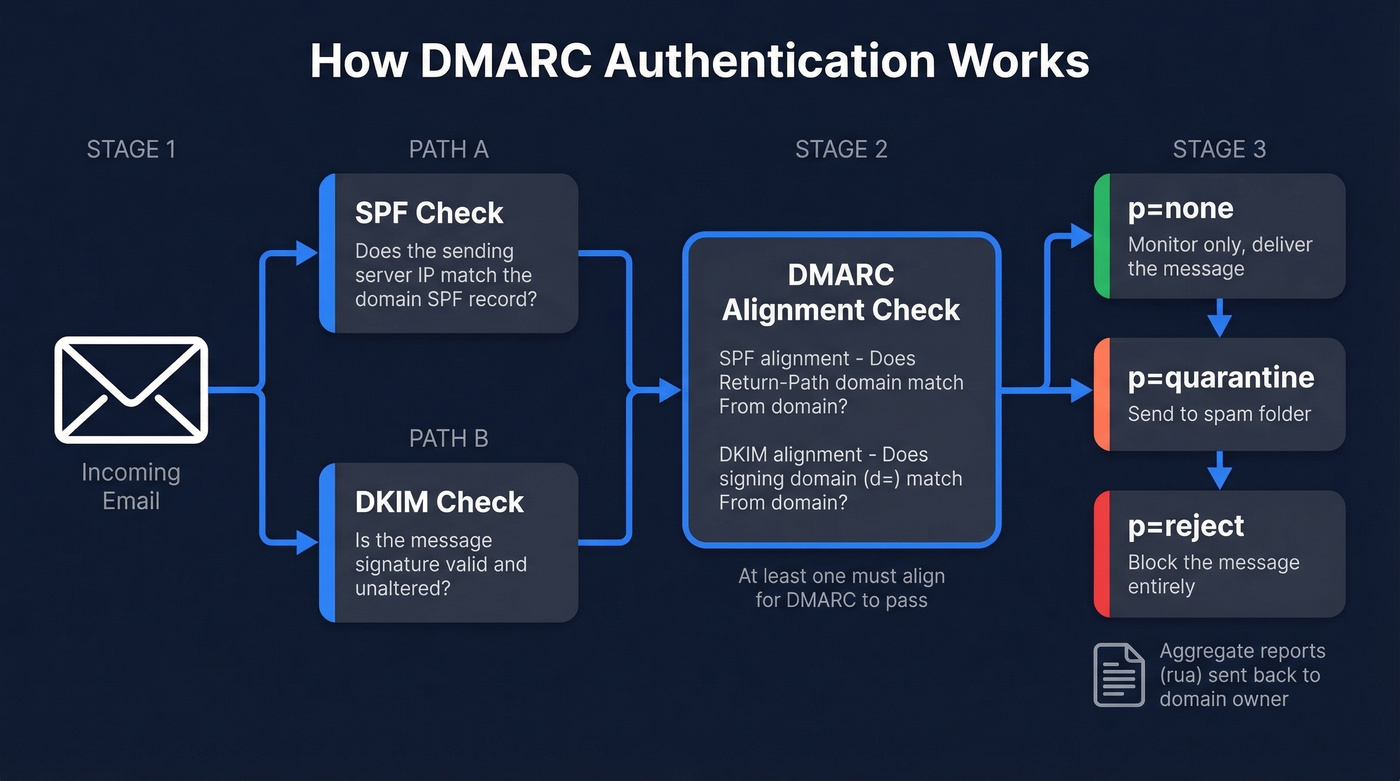
SPF validates the sending server. DKIM validates message integrity. DMARC checks that SPF-alignment or DKIM-alignment passes against the visible From address, then applies your policy: ignore, quarantine, or reject.
Here's the thing: email-based threats account for 44% of data breaches, and nearly 75% of senders with DMARC enabled are still sitting on p=none - monitoring mode with no teeth. Google requires at least p=none for anyone sending 5,000+ messages per day to Gmail. That's the floor, not the ceiling.
Why Use a DMARC Record Generator?
You could write the TXT record by hand. The data says that's a bad idea for most teams.
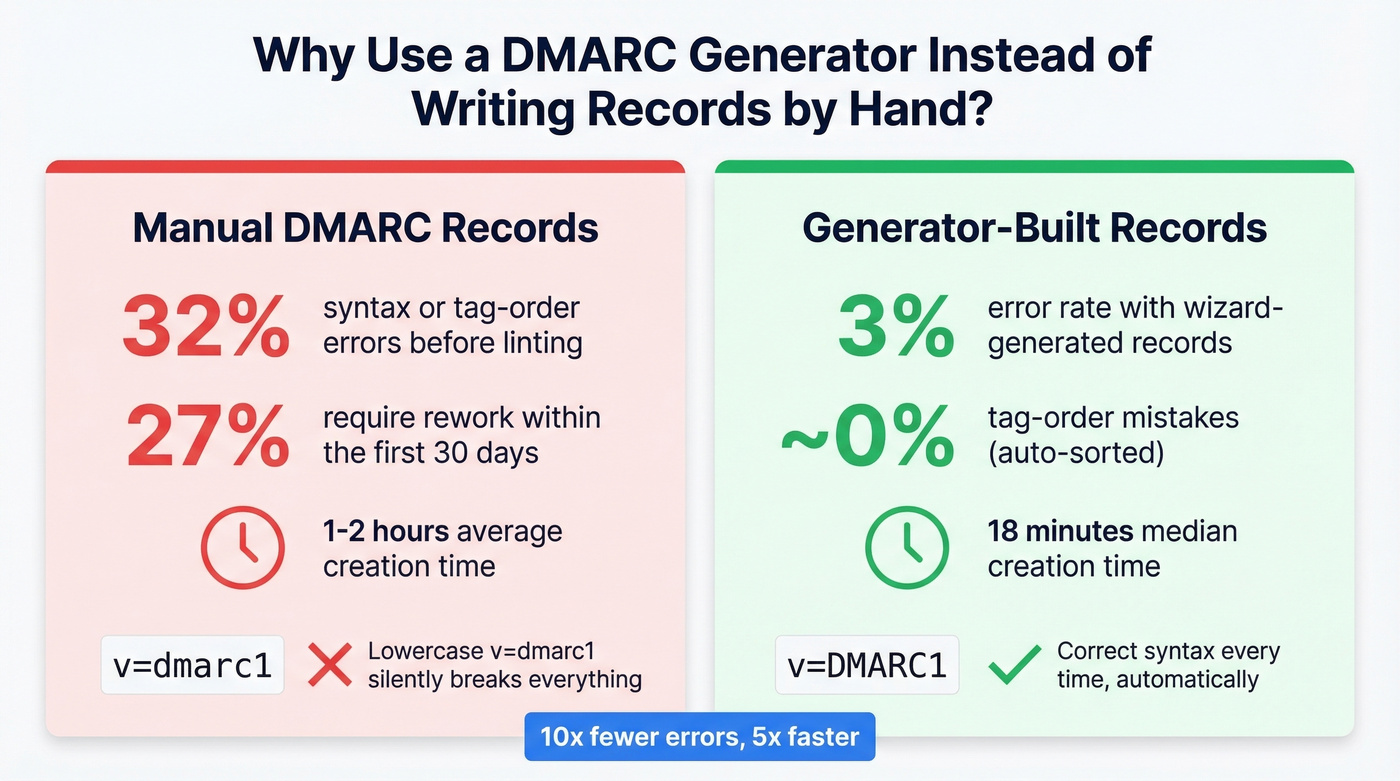
Manually written records carry a 32% syntax/tag-order error rate before linting. Wizard-generated records drop that to 3%. Within the first 30 days, 27% of manual deployments require rework - misplaced semicolons, invalid policy values, missing rua addresses. A generator eliminates the class of errors that come from typing v=dmarc1 (lowercase, invalid) instead of v=DMARC1. We've seen this exact mistake break DMARC for entire organizations that thought they were protected.
Complete DMARC Tag Reference
DMARC has 11 tags. Two are required, one is strongly recommended, and the rest have sensible defaults.
| Tag | Required? | Allowed Values | Default | What It Does |
|---|---|---|---|---|
| v | Yes | DMARC1 | - | Protocol version (must be first) |
| p | Yes | none, quarantine, reject | - | Policy for your domain |
| rua | Recommended | mailto:address | None | Aggregate report destination |
| ruf | Optional | mailto:address | None | Forensic report destination |
| sp | Optional | none, quarantine, reject | Same as p | Subdomain policy |
| pct | Optional | 0-100 | 100 | % of mail subject to policy |
| adkim | Optional | r (relaxed), s (strict) | r | DKIM alignment mode |
| aspf | Optional | r (relaxed), s (strict) | r | SPF alignment mode |
| fo | Optional | 0, 1, d, s | 0 | Failure reporting options |
| rf | Optional | afrf | afrf | Forensic report format |
| ri | Optional | Seconds (e.g., 86400) | 86400 | Aggregate report interval |
A few things generators handle that you'll forget manually:
vmust be the first tag - no exceptions.v=dmarc1in lowercase is invalid and will silently fail.- If your
ruaaddress is on a different domain than the one being protected, the receiving domain needs a DNS authorization record at<yourdomain>._report._dmarc.<reportdomain>- otherwise reports never arrive. pcthas no effect whenp=none. There's no enforcement policy to apply partially.
Most DMARC record builders default pct to 100 and alignment modes to relaxed. That's correct for initial deployment. Don't touch adkim or aspf unless you have a specific reason to go strict.
Best Free DMARC Generators
MxToolbox - Fastest Valid Record
No account required - open the page, fill in your domain and policy, copy the TXT record. The UI is bare-bones and hasn't changed much in years, which is exactly what you want from a utility tool. MxToolbox also has a strong free DNS lookup suite, so you can validate your record immediately after publishing. If you just need a free record builder and nothing else, start here.
EasyDMARC - Tag-by-Tag Guidance
EasyDMARC's generator walks you through each field with explanations. Their free tier covers around 1,000 messages per month with 14-day data retention - enough to validate a setup before committing to a paid plan. This tool covers all 11 tags, while most generators skip fo, rf, and ri.
dmarcian - Learn While You Build
Dmarcian's Record Wizard is the most educational of the bunch. Every field has a tooltip explaining not just what it does, but why you'd change it. Great for teams deploying DMARC for the first time. Skip this if you already know what you're doing and just want a record fast - MxToolbox will save you time.
PowerDMARC - Cheapest Paid Monitoring
PowerDMARC's generator handles the basics - policy, reporting address, generate - and their monitoring starts at $8/mo. A solid on-ramp if you want generation and monitoring from one vendor.
Google Admin Toolbox - For Workspace Users
If you're already in Google Workspace, the Admin Toolbox does the job without leaving the Google ecosystem. No account creation, no upsell. Limited tag coverage compared to EasyDMARC, but sufficient for a standard deployment.
How to Generate and Publish Your Record
Step 0: Check for an existing record. Before generating anything, run dig TXT _dmarc.yourdomain.com. If a record already exists, you're modifying, not creating - and publishing a second DMARC record will invalidate both.
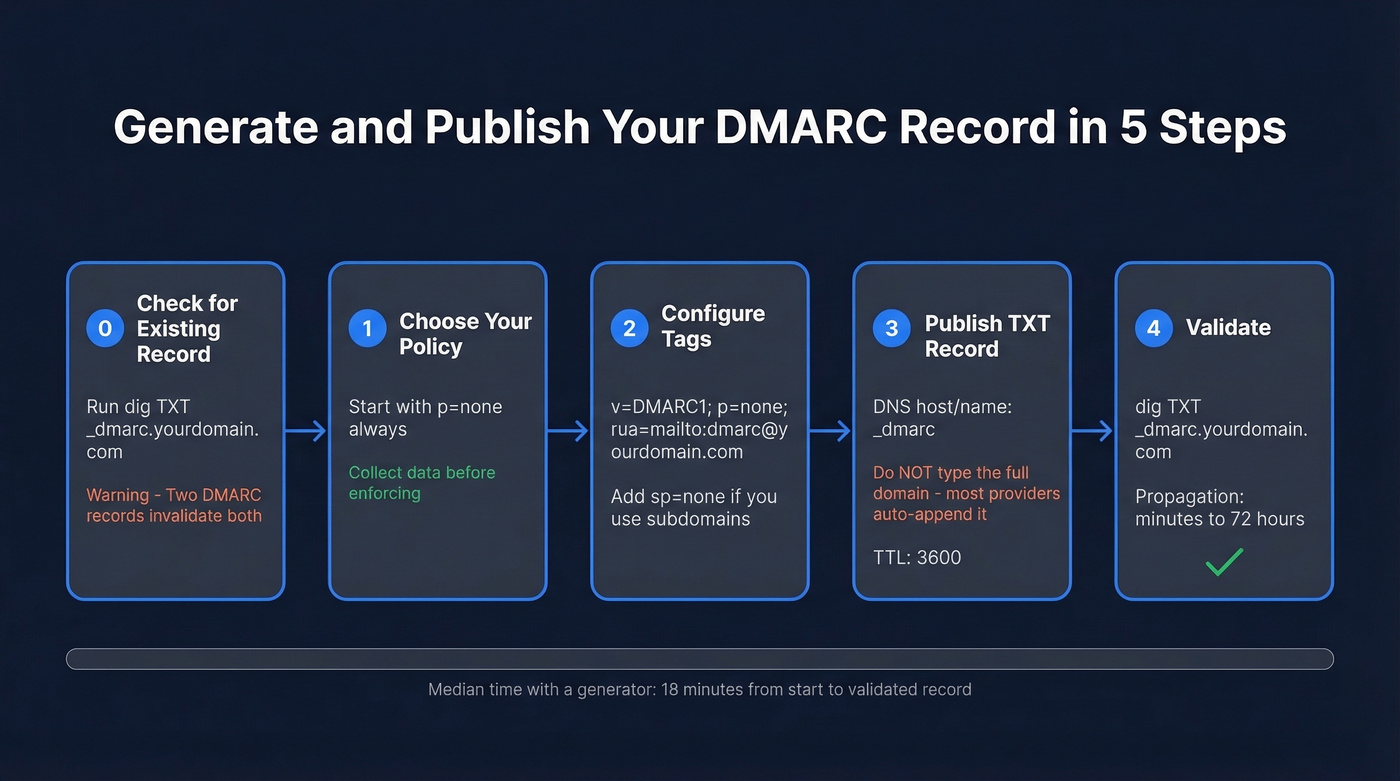
Step 1: Choose your policy. Start with p=none. Always. Even if you're confident in your SPF and DKIM setup, p=none lets you collect data without risking legitimate mail.
Step 2: Configure your tags. At minimum: v=DMARC1; p=none; rua=mailto:dmarc-reports@yourdomain.com. Add sp=none if you have active subdomains. Leave everything else at defaults.
Step 3: Generate the record. Paste your settings into any free tool from the list above. Copy the output - it's a single-line TXT value.
Step 4: Publish the TXT record. Log into your DNS provider. Create a new TXT record with the host/name _dmarc - not _dmarc.yourdomain.com. Most providers auto-append the domain. If yours does and you type the full hostname, you'll end up with _dmarc.yourdomain.com.yourdomain.com, which breaks everything.
This is one of the most common publishing mistakes we see. Set the value to your generated record. TTL of 3600 is fine.
Step 5: Validate. DNS propagation can take up to 72 hours, though most providers update within minutes. Verify with:
dig TXT _dmarc.yourdomain.com
If the record comes back clean, you're live. If it doesn't, check for the domain auto-append issue first.

DMARC keeps your domain off blocklists. But authentication only matters if you're reaching real inboxes. Prospeo's 98% email accuracy and 5-step verification mean zero spam traps, zero honeypots, and bounce rates under 4% - so the deliverability you just protected actually pays off.
Don't fix your DMARC just to send emails that bounce.
SPF and DKIM Alignment
A message can pass SPF and pass DKIM and still fail DMARC. That trips people up constantly.
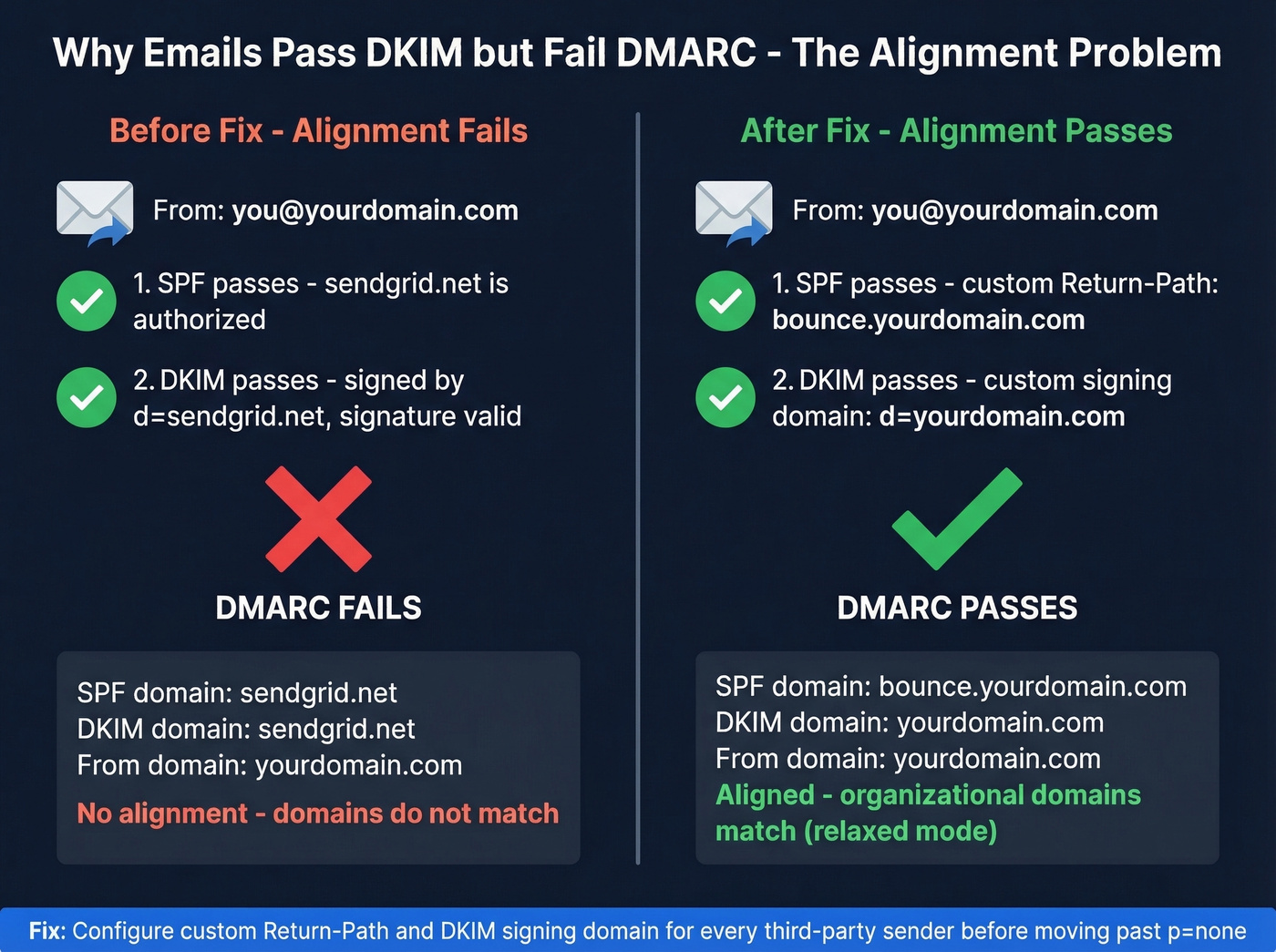
DMARC doesn't just check authentication - it checks alignment. SPF alignment means the domain in the Return-Path (RFC5321.MailFrom) matches the domain in the visible From header. DKIM alignment means at least one DKIM signing domain - the d= value - matches the From domain. Under relaxed alignment (the default), organizational domains just need to match: mail.yourdomain.com aligns with yourdomain.com. Under strict, they must be identical.
The most common alignment failure comes from third-party senders. Your marketing platform, CRM, and transactional email service all send email "from" your domain, but by default they sign with their own domain. The message passes DKIM - it was signed and unaltered - but the signing domain is sendgrid.net, not yourdomain.com. DMARC sees that mismatch and flags it.
The fix: configure each third-party sender to use your domain for SPF via a custom Return-Path and DKIM via a custom signing domain. Every major ESP has documentation for this. Do it before you move past p=none, or you'll quarantine your own marketing emails. While you're at it, check your SPF record doesn't exceed the 10 DNS lookup limit - a common issue when adding multiple third-party senders that each require their own include: directive.
Phased Rollout Plan
Rushing to p=reject is how you break legitimate email. Here's the sequence that works.
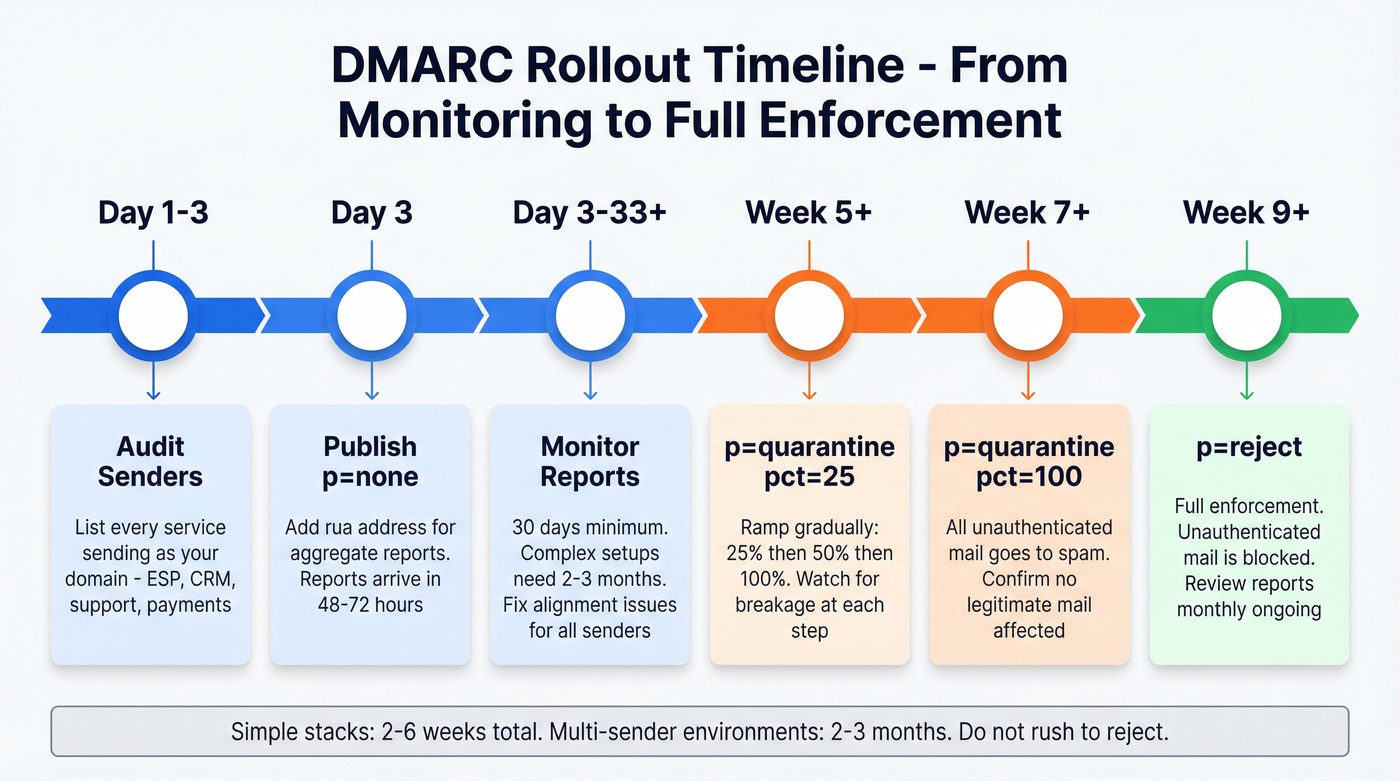
1. Audit your sending sources (Day 1-3). List every service that sends email as your domain - marketing, transactional, CRM, support desk, payment notifications. Miss one and you'll find out the hard way during enforcement.
2. Publish p=none (Day 3). Generate and publish your record with p=none and an rua address. Reports start arriving within 48-72 hours from major providers.
3. Monitor for 30+ days (Day 3-33). Look for legitimate senders failing alignment, unknown IPs sending as your domain, and forwarding-related failures. For complex environments with multiple sending services, plan on 2-3 months of monitoring before you touch enforcement.
4. Fix alignment issues. Configure SPF and DKIM for every legitimate sender. Prioritize high-volume senders first - your ESP and CRM matter more than your invoice tool sending 50 emails a month.
5. Ramp enforcement gradually. Move to p=quarantine; pct=25 first. Watch for a week. Then pct=50, then pct=100. Once quarantine is stable, move to p=reject with the same ramp.
6. Maintain. New SaaS tools, vendor changes, and infrastructure updates can break alignment. Review reports monthly.
Forwarded messages will always be noisy. When a university or mailing list forwards your email, they often break SPF and sometimes break DKIM through header modifications. ARC and SRS mitigate this, but you'll never get 100% pass rates on forwarded mail. Don't let it delay enforcement. Simple stacks take 2-6 weeks. Multi-sender environments take 2-3 months.
Common DMARC Mistakes
Leaving p=none forever. Nearly 75% of senders do this. We've seen teams sit on p=none for over a year, collecting reports nobody reads. Set a calendar reminder at 30 days to start enforcement planning. Monitoring without action is security theater.
Missing rua address. Without rua, you get zero visibility into who's sending as your domain. Always include it.
SPF/DKIM alignment failures. Authentication passes but alignment fails because third-party senders use their own domains. Configure custom Return-Path and DKIM signing for every sender.
No subdomain policy. Without sp=, subdomains inherit the parent policy. If your parent is p=reject but you haven't authenticated subdomain senders, their mail gets blocked. Set sp= explicitly.
Misunderstanding pct. pct=25 means 25% of failing mail is subject to the policy; the rest isn't. Use it for gradual rollout, not as a permanent setting.
DNS provider auto-appending the domain. You type _dmarc.yourdomain.com as the hostname, your provider appends .yourdomain.com, and the record lands at _dmarc.yourdomain.com.yourdomain.com. A common refrain on r/dns: most DMARC issues are small DNS configuration mistakes rather than mail server problems. Check your provider's docs - most only need _dmarc as the host value.
Exceeding the SPF 10-lookup limit. Every include: in your SPF record counts toward a 10 DNS query cap. Adding a fourth ESP can silently break SPF for all of them. Use dig or an SPF flattening tool to check.
How to Read DMARC Reports
DMARC generates two report types. RUA (aggregate) reports arrive daily as gzipped XML files summarizing authentication results. RUF (forensic) reports are per-message failure details - but Gmail and Outlook don't send them, so you'll only get forensic data from smaller providers.
Aggregate reports contain metadata about the reporting org, date range, and your published policy, then per-source-IP records showing message counts, disposition, and SPF/DKIM results with alignment status.
The patterns to watch: forwarded messages failing SPF but passing DKIM is normal. Unknown IPs failing both SPF and DKIM is likely spoofing - exactly what enforcement will block. Legitimate senders failing alignment need to be fixed before you enforce.
Reading gzipped XML in 2026 is absurd. Even a free tier from EasyDMARC or PowerDMARC turns those XML dumps into dashboards where you can actually see what's happening. Don't parse raw reports manually unless you enjoy suffering.
DMARC Monitoring Tools
| Tool | Starting Price | Free Tier? | Best For |
|---|---|---|---|
| PowerDMARC | $8/mo | Trial/limited | Budget monitoring |
| Postmark | $14/mo | Trial/limited | Simple dashboards |
| Valimail | $19/mo | Trial/limited | Policy management |
| DMARC Advisor | $19/mo | Trial/limited | Mid-market teams |
| dmarcian | $19.99/mo | Trial/limited | Learning + education |
| Cloudflare | $25/mo | Trial/limited | Cloudflare DNS users |
| EasyDMARC | $35.99/mo | Trial/limited | Full-featured platform |
| ZeroBounce | $49/mo | Trial/limited | Enterprise reporting |
Prices as of early 2026; check vendor sites for current rates.
You don't need a paid monitoring tool on day one. Start with a free tier, get your bearings, and upgrade when you're ready to enforce. For budget-conscious teams, PowerDMARC at $8/mo is hard to beat. For simplicity, Postmark's dashboard is clean and opinionated. For full-featured monitoring with guided enforcement, EasyDMARC justifies the higher price.
Our honest take: most domains under 5,000 emails/month don't need a paid DMARC tool at all. A free record wizard, a free monitoring tier, and 30 minutes of attention per month will get you to p=reject just fine. Save the budget for tools that directly impact revenue.
Protect Your Domain From Both Sides
DMARC handles inbound protection - it stops people from spoofing your domain. But domain reputation has an outbound side too. If your sales team is sending cold emails to bounced addresses, spam traps, and honeypots, your sender reputation degrades regardless of how tight your DMARC policy is. We've watched teams nail their DMARC setup and still land in spam because their contact data was garbage.
Prospeo's email verification catches invalid addresses, spam traps, and honeypots before they hit your sequences - 98% accuracy on a 7-day data refresh cycle. Both sides matter for domain health. If you're actively doing outbound, pair DMARC with an email deliverability checklist and keep an eye on your bounce rate as you scale.
You're investing time in SPF, DKIM, and DMARC to protect your sender reputation. Bad contact data destroys it just as fast. Prospeo refreshes 300M+ profiles every 7 days and removes catch-alls, spam traps, and honeypots before you ever hit send.
Protect your domain reputation from the data side too.
FAQ
How long does it take to create a DMARC record?
About 18 minutes with a wizard, including choosing your policy, configuring tags, and copying the output. Publishing to DNS adds 10-15 minutes. Propagation takes up to 72 hours, though most providers update much faster. Doing it manually without a record builder typically takes one to two hours.
What's the difference between p=none, p=quarantine, and p=reject?
p=none monitors only - receiving servers take no action on failures. p=quarantine routes failing messages to spam. p=reject blocks them entirely. Always start with p=none to collect data, then escalate after confirming legitimate senders pass alignment.
Do I need SPF and DKIM before setting up DMARC?
Yes. DMARC checks alignment against SPF and DKIM results. Without at least one configured and passing, every message fails DMARC regardless of your policy. Set up both first, verify they're passing with dig or an online checker, then publish your DMARC record.
How long should I stay on p=none before enforcing?
At least 30 days for simple environments with one or two sending services. Complex setups with multiple ESPs, CRMs, and transactional senders need two to three months. Enforcing before you've authenticated every legitimate sender will quarantine or reject your own mail.
Can DMARC hurt my email deliverability?
Only if you enforce before fixing legitimate sender alignment - that's why phased rollout matters. On the flip side, clean outbound data matters just as much. Sending to invalid addresses damages sender reputation regardless of your DMARC policy.