

DMARC Reports: How to Read, Interpret, and Actually Use Them
You set up a DMARC record six months ago, added the rua tag like the docs told you to, and now you've got 847 unread emails from report@dmarc.yahoo.com sitting in a folder you never open. Each one contains a .xml.gz file that looks like it was designed to punish anyone who dares to read it. Here's the thing: every one of those reports is genuinely useful. But the r/sysadmin thread asking "what am I supposed to do with these?" gets reposted every quarter, and the answer hasn't changed. You need to read them - but not with your eyes.
What You Need (Quick Version)
- Aggregate reports are daily XML summaries of who's sending email as your domain and whether it passed authentication.
- Don't try to read raw XML. Route reports to a free analyzer (Valimail Monitor or Postmark) or parse them with a script.
- The goal: move from
p=nonetop=reject. Reports tell you when it's safe to tighten policy.
Why DMARC Reporting Matters in 2026
DMARC isn't optional anymore. As of February 2024, Google and Yahoo began requiring DMARC authentication for bulk senders - anyone pushing more than 5,000 emails per day. Microsoft followed with similar expectations in early 2025. Non-compliant messages are increasingly rejected outright or routed to spam.
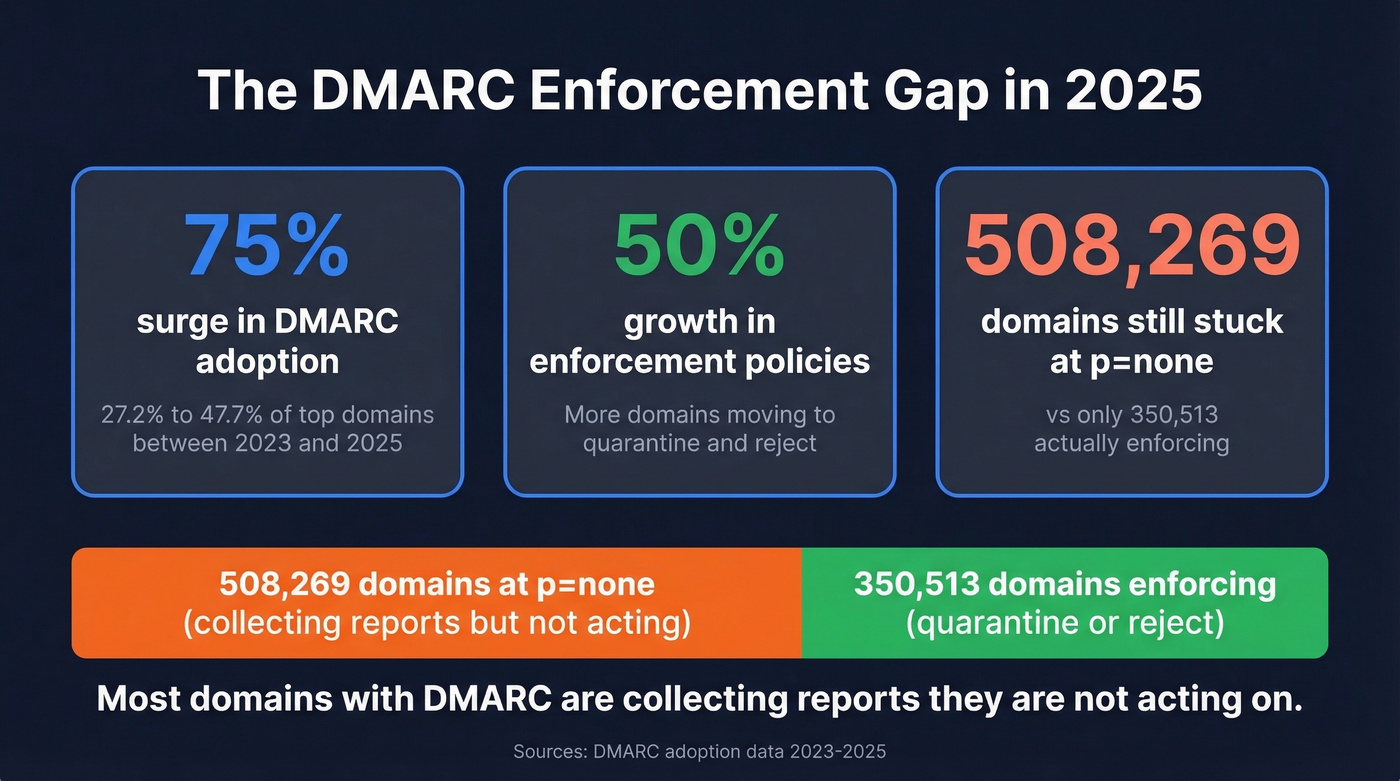
The adoption numbers reflect this pressure. DMARC adoption among top domains jumped from 27.2% to 47.7% between 2023 and 2025, a 75% surge, and enforcement policies (quarantine + reject) grew by 50% over the same period. But here's the gap that frustrates us: 508,269 domains are still sitting at p=none, compared to just 350,513 actually enforcing. The majority of domains with DMARC are collecting reports they're not acting on.
DMARC enforcement isn't just a deliverability play - it's brand protection. Every spoofed email that reaches a customer erodes trust in your domain. If you're still at p=none, this guide gets you to p=reject.
What Is a DMARC Report?
A DMARC report is an XML file generated by mailbox providers - Gmail, Yahoo, Microsoft, Comcast, and others - that summarizes how email claiming to be from your domain performed against SPF and DKIM authentication checks. Think of it as a daily scorecard for your domain's email hygiene.
Reports are triggered by the rua tag in your domain's DMARC DNS TXT record. When a mailbox provider sees that tag, it compiles authentication results for all messages it received from your domain over a reporting interval (defaults to 24 hours) and sends the summary as a compressed attachment to whatever email address you specified.
If you send to users across Gmail, Yahoo, Microsoft, and Comcast, expect at least one report per provider per day. High-volume senders get dozens. The reports aren't about individual failures - they're aggregate summaries grouped by source IP, showing counts and pass/fail results across your entire sending infrastructure.
Aggregate vs. Forensic Reports
There are two types. You only need to care about one.
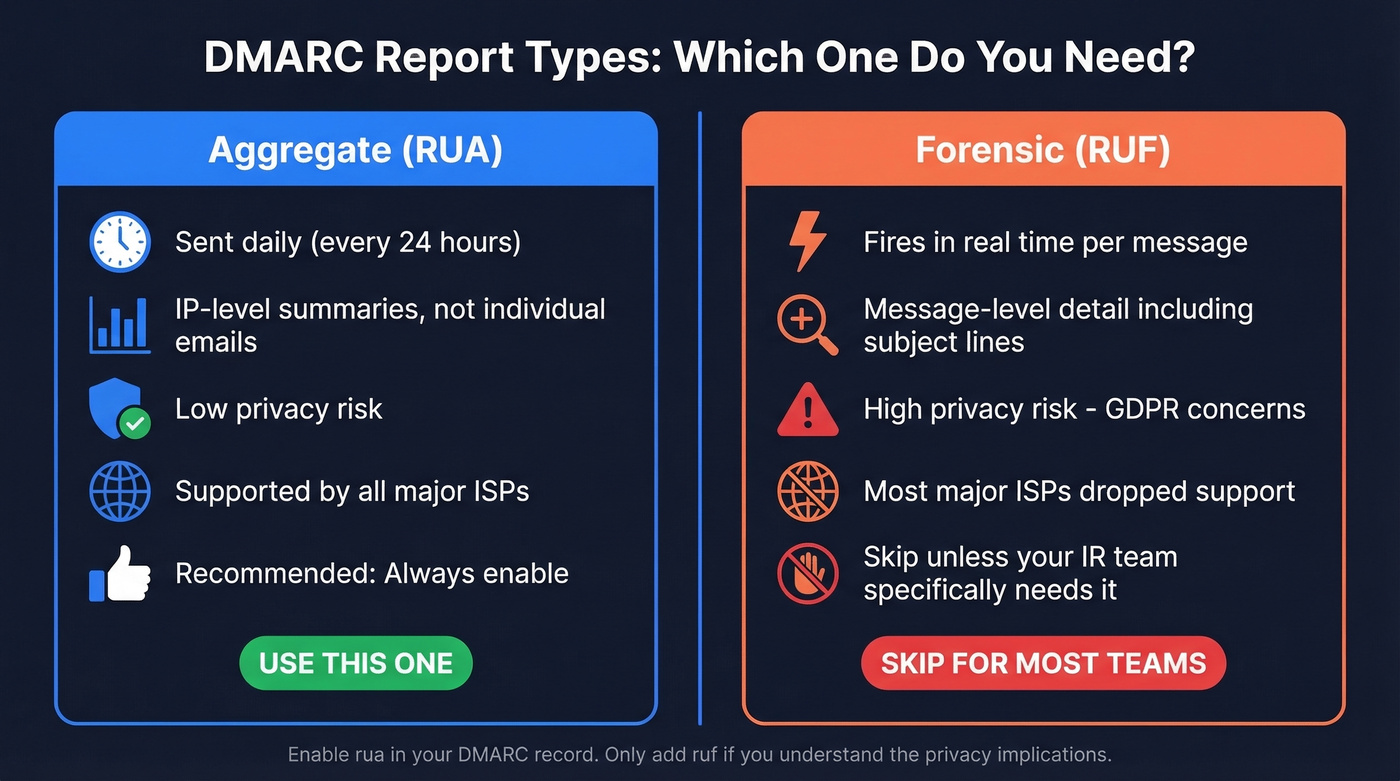
| Feature | Aggregate (RUA) | Forensic (RUF) |
|---|---|---|
| Frequency | Daily (24hr default) | Real-time |
| Content | IP-level summaries | Message-level detail |
| Privacy risk | Low | High (may include subject lines, partial/full message content) |
| ISP support | Widely supported | Most major ISPs dropped it |
| Recommendation | Enable always | Skip unless IR team needs it |
Aggregate reports give you everything you need: which IPs are sending as your domain, whether they passed SPF/DKIM, and what the receiving provider did with the message. Low-risk, widely supported, and the foundation of every DMARC workflow.
Forensic reports are a different animal. They fire in real time and can include subject lines and partial or full message content, which creates serious privacy exposure - especially under GDPR. Most major ISPs have dropped support entirely. Enable rua. Skip ruf unless you run incident response and understand the privacy implications.
How to Set Up Reporting
Your DMARC record lives as a DNS TXT record at _dmarc.yourdomain.com. A typical example:
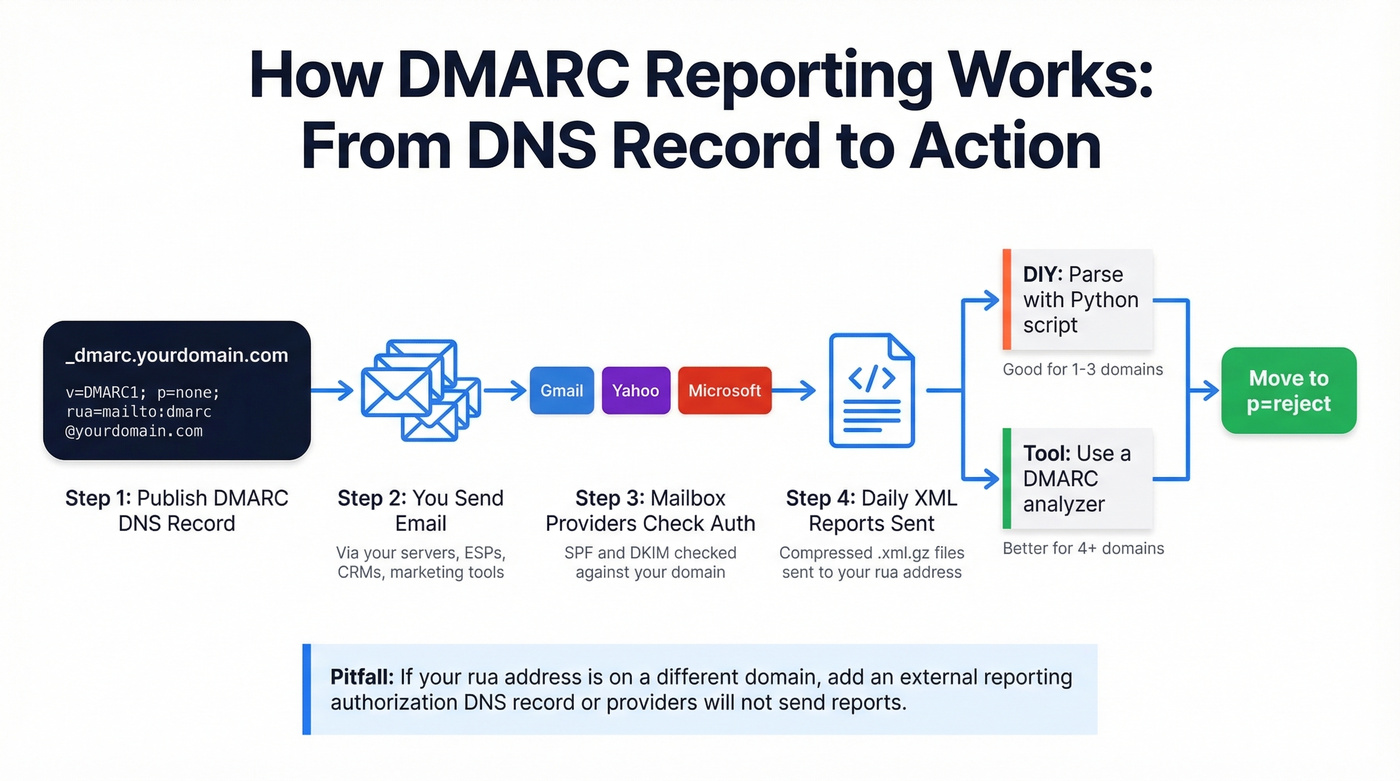
v=DMARC1; p=none; rua=mailto:dmarc@yourdomain.com; ri=86400; aspf=r; adkim=r
| Tag | Purpose | Example |
|---|---|---|
v |
Protocol version | DMARC1 |
p |
Policy (none/quarantine/reject) | none |
rua |
Aggregate report destination | mailto:dmarc@yourdomain.com |
ruf |
Forensic report destination | mailto:forensic@yourdomain.com |
ri |
Report interval in seconds | 86400 (24 hours) |
aspf |
SPF alignment (strict/relaxed) | r |
adkim |
DKIM alignment (strict/relaxed) | r |
Two setup pitfalls to avoid. First, if your rua address points to a different domain than the one being monitored, you need the external reporting authorization record in DNS so providers will actually send reports there. Second, never create two DMARC TXT records for the same domain. Duplicate records invalidate both, and some tools will happily prompt you to add a new record without checking for an existing one.
How to Read a DMARC Report
This is the section most guides skip. Understanding the XML is the single most important skill for moving from p=none to enforcement. Let's walk through an actual aggregate report structure, field by field.
<?xml version="1.0" encoding="UTF-8"?>
<!-- unknown MDX component: feedback -->
The critical logic: DMARC passes when either SPF or DKIM passes and aligns with the RFC5322.From domain. Alignment just means the domain in the authentication check matches the domain your recipient sees in the "From" field.
In the example above, SPF passes as a raw authentication check (auth_results shows SPF pass) but fails DMARC's SPF path because of alignment - the envelope domain bounce.esp.com doesn't match yourdomain.com. DKIM passes and aligns (d=yourdomain.com), so DMARC passes overall. This is exactly how many legitimate ESPs work: they send from their own infrastructure (often breaking SPF alignment) but sign with your DKIM key (passing DKIM alignment).
The fields that matter most: source_ip (who's sending), count (how much), disposition (what happened), and the SPF/DKIM results with their alignment domains. Master those six fields and you can read any aggregate report.
Result Cheat Sheet
Bookmark this. It covers every combination you'll see in practice.
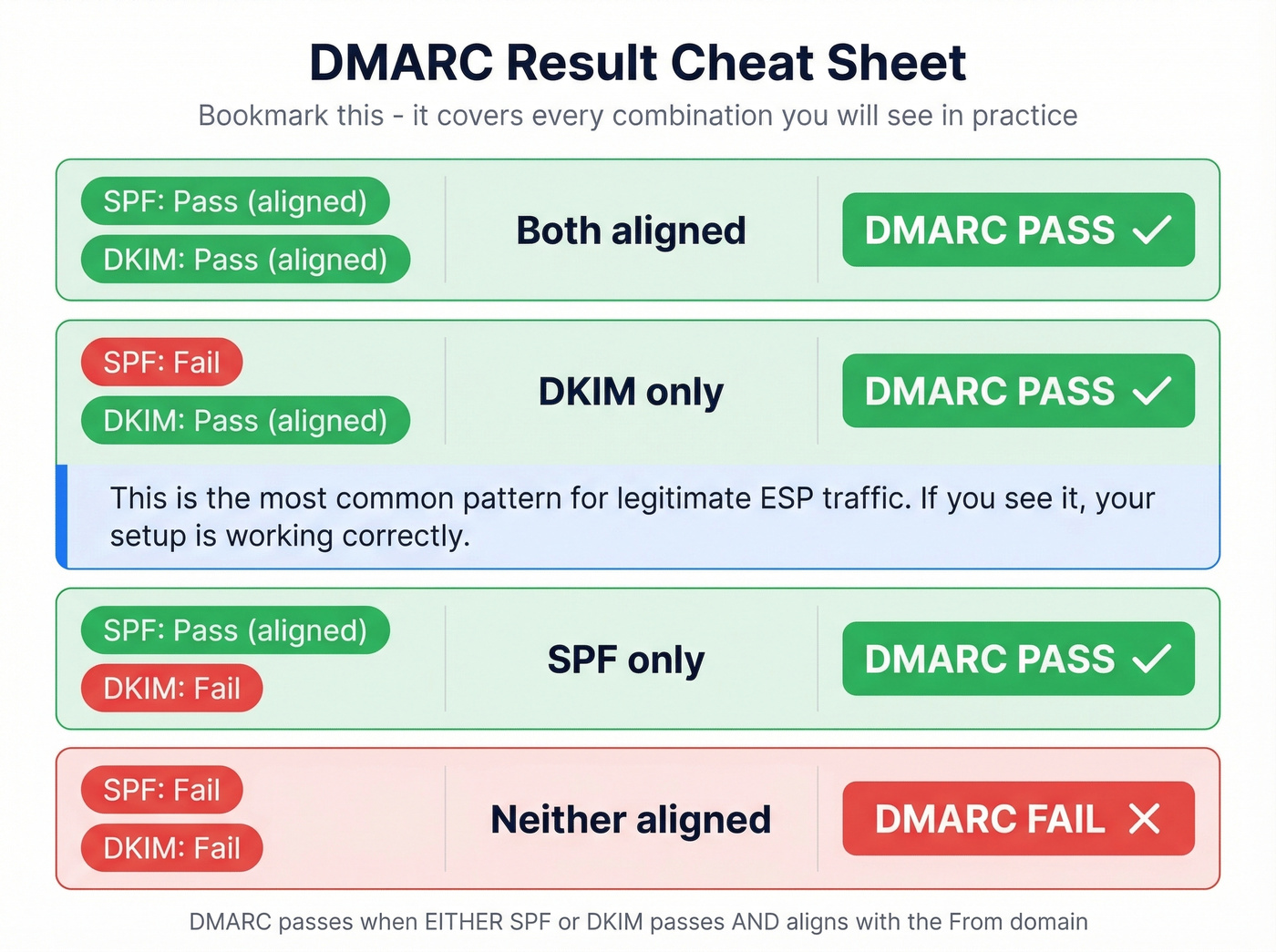
| SPF | DKIM | Alignment | DMARC Result |
|---|---|---|---|
| Pass (aligned) | Pass (aligned) | Both | Pass |
| Fail | Pass (aligned) | DKIM only | Pass |
| Pass (aligned) | Fail | SPF only | Pass |
| Fail | Fail | Neither | Fail |
The second row is the most common pattern for legitimate ESP traffic. If you see it, your setup is working correctly.

DMARC enforcement protects your domain - but it can't fix bad data. If you're sending to invalid addresses, your bounce rate still tanks deliverability. Prospeo's 5-step email verification and 98% accuracy keep bounce rates under 4%, so your newly enforced DMARC policy works with clean sending data, not against it.
You fixed authentication. Now fix the data going through it.
Five Patterns That Require Action
Once you can read the XML, you need to know what to look for. These five patterns should trigger investigation.
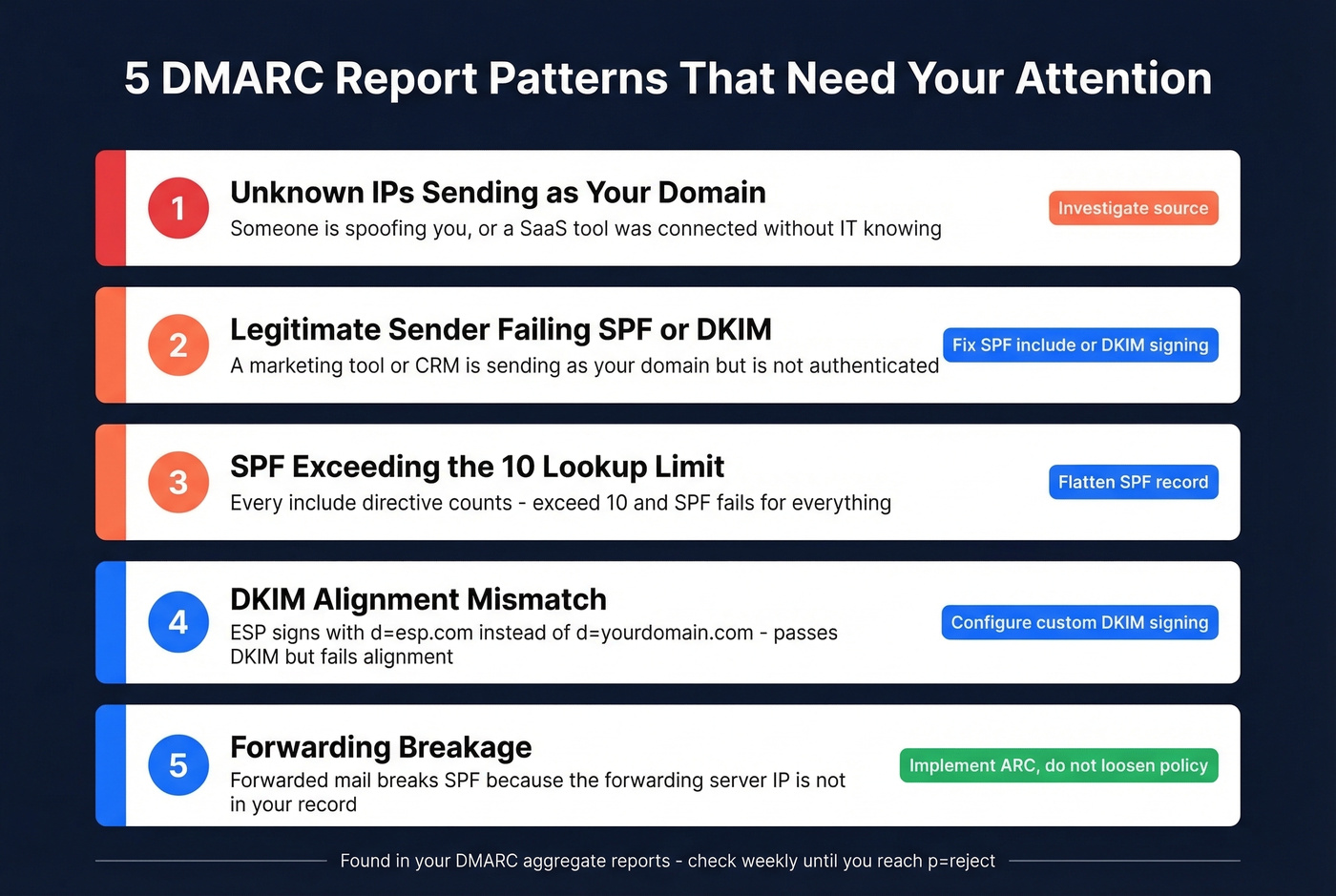
Unknown source IPs sending as your domain. IPs you don't recognize with high message counts mean someone is spoofing your domain - or a SaaS tool someone on your team connected without telling IT. Cross-reference against your known sending infrastructure.
Legitimate sender failing SPF or DKIM. This is the most common actionable finding. A marketing tool, CRM, or web form is sending as your domain but isn't properly authenticated. Fix the SPF include or DKIM signing before you tighten policy.
SPF exceeding the 10-lookup limit. SPF records are capped at 10 DNS lookups. Every include: directive counts. Exceed 10 and SPF fails for everything - even properly configured senders. This silent killer only surfaces in reports. If you need a refresher on syntax and common provider patterns, see our SPF record examples.
DKIM alignment mismatch. The d= domain in the DKIM signature must match your RFC5322.From domain. If your ESP signs with d=esp.com instead of d=yourdomain.com, DKIM passes but doesn't align - and if SPF also doesn't align, DMARC fails. (More on this in our guide to DMARC alignment.)
Forwarding breakage. When mail gets forwarded, SPF almost always fails because the forwarding server's IP isn't in your SPF record. ARC (Authenticated Received Chain) mitigates this by preserving authentication results across hops. If you see lots of SPF failures from known forwarding services, ARC is the fix - not loosening your policy.
One Reddit admin described "attack days" where reports are suddenly dominated by foreign IPs - hundreds of thousands of messages from sources that have nothing to do with the organization. That's spoofing in action, and it's exactly what p=reject stops.
DIY vs. Tool: Processing Reports
You've got two paths, and the right one depends on scale.
DIY scripting works for 1-3 domains. Auto-file incoming reports, decompress the .gz attachments with Python (zlib/gzip), parse the XML, and output a readable summary. We've parsed enough raw XML to know the DIY path works - until you hit 10 domains and realize you're spending Monday mornings on XML instead of actual security work.
Tool-based analysis is the move for anything beyond a handful of domains. Analyzers aggregate reports across all providers, visualize trends, and flag anomalies you'd miss scanning raw XML. The free tiers are genuinely useful - you don't need to pay until you hit scale.
Real talk: most teams should start with a free tool from day one, even for a single domain. The time you spend building a parser is time you're not spending on the actual goal - getting to p=reject.
Best DMARC Report Analyzers
| Tool | Free Tier | Paid From | Domains | Msg Limit |
|---|---|---|---|---|
| Valimail Monitor | Yes, unlimited | Free | Unlimited | Unlimited |
| Postmark | Yes, weekly digest | $14/mo/domain | Per domain | - |
| EasyDMARC | Yes, 14-day, 1K/mo | $35.99/mo (annual) | - | - |
| Cloudflare | Yes, with Cloudflare DNS | Free | - | - |
| MxToolbox | Yes, upload parser | Free | - | - |
| Dmarcian | 14-day trial | $199/mo | 8 | 1M |
| DMARCLY | No free tier | $69/mo | 15 | 1M |
| DMARC Report | Yes, 10K msgs/mo | $167/mo | 25 | 3M |
| PowerDMARC | 15-day trial | Custom pricing | - | - |
Valimail Monitor
Valimail Monitor is 100% free and typically starts showing useful insights in under 24 hours. Setup preserves your existing DMARC settings and adds Valimail to your rua destinations. For teams that just want visibility without commitment, it's hard to beat.
Postmark DMARC Digests
Postmark takes a different approach: reports arrive as weekly digests rather than a live dashboard. You get a snapshot of your authentication results - simple and effective for small operations. The condensed format distills the noise of daily XML into a clear summary of what passed, what failed, and what needs attention. One caveat we've seen trip people up: Postmark's setup flow can prompt you to add a new DMARC record without detecting an existing one. Two DMARC records invalidate both. Check your DNS before and after setup. Paid digests run $14/mo per domain.
EasyDMARC
EasyDMARC's setup wizard is the safest of the bunch - it scans your DNS, detects existing DMARC records, and prompts you to replace rather than duplicate. Cloudflare users get one-click integration. The free tier is limited to 14-day log retention and 1,000 emails per month, which works for low-volume domains but runs out fast for anyone with real traffic. Paid plans start at $35.99/mo billed annually.
Dmarcian
Enterprise-grade DMARC management at $199/mo for 8 domains and 1M messages. Best for organizations with complex multi-domain setups that need granular policy management and dedicated support. Skip this if you're managing fewer than five domains - you'd be paying for capacity you don't need.
DMARCLY
A cost-conscious mid-market option at $69/mo covering 15 domains and 1M messages. More domain capacity than Dmarcian at a lower price point, which makes it solid for agencies managing client domains.
Cloudflare's DMARC viewer is built into their DNS dashboard, making it a no-brainer if you're already a Cloudflare customer. MxToolbox is a simple upload-and-parse tool for one-off analysis when you just need to crack open a single report file.
Privacy With Third-Party Analyzers
When you route rua reports to a third-party analyzer, you're sharing mail flow patterns with that vendor. Aggregate reports are low-risk by design - they contain source IPs and authentication results, not message content.
But there's a nuance worth knowing. The envelope_to field is optional in the aggregate report schema but allowed by spec. Some reporting providers include it, which reveals recipient domains - essentially showing who your organization emails. For most companies this isn't sensitive. For regulated industries or competitive situations, it matters. Self-hosted parsing avoids this entirely.
From p=none to p=reject
The whole point of reading every DMARC report is to get here.
Phase 1: p=none - Collect reports, identify all legitimate sending sources, fix authentication gaps. Nothing gets blocked. This is your observation window.
Phase 2: p=quarantine - Unauthenticated mail goes to spam. Watch reports for 2-4 weeks. Zero failures from legitimate sources means you're ready for the final step.
Phase 3: p=reject - Unauthenticated mail gets dropped entirely. Your domain is now protected from spoofing.
Stopping at p=none is the single most common DMARC implementation mistake, and it's entirely fixable with 2-4 weeks of report monitoring. The 508,000+ domains stuck there either aren't reading their reports or are afraid of blocking legitimate mail. Both problems are solvable: the reports literally tell you what's safe.
There's a piece most DMARC guides miss: your outbound sending hygiene matters just as much as your authentication setup. Before you flip to p=reject, audit your outbound lists. High bounce rates signal poor domain management to mailbox providers - the opposite of what enforcement communicates. We've seen teams nail their DMARC config only to tank deliverability because 15% of their list was dead addresses. Running your contacts through a verification tool like Prospeo (98% accuracy across 143M+ verified addresses) keeps your legitimate mail clean so your domain reputation supports enforcement rather than undermining it. If you want a deeper benchmark-and-fix breakdown, start with our email deliverability guide and the email bounce rate playbook.
Moving to p=reject means every email you send has to be airtight - authentication and recipient data. Prospeo refreshes 300M+ profiles every 7 days, so you're never sending to stale addresses that spike bounces and trigger spam filters. Teams using Prospeo cut bounce rates from 35%+ to under 4%.
Your DMARC record is enforcing. Your contact list should be too.
FAQ
Are DMARC reports about individual email failures?
No. Aggregate reports summarize all authentication results for your domain over a 24-hour period, grouped by source IP. They show message counts and pass/fail results, not individual messages. Forensic reports provide message-level detail, but most ISPs no longer send them.
How often will I receive reports?
By default, every 24 hours from each mailbox provider that processes your email. Sending to Gmail, Yahoo, Microsoft, and Comcast users means at least four reports per day. High-volume senders with diverse recipient bases can receive dozens daily.
Do I need a paid analyzer?
Not if you manage fewer than five domains. Free tools like Valimail Monitor handle small-scale monitoring well - unlimited domains, unlimited messages, no credit card. Paid tools justify their cost at 10+ domains or when you need historical trend analysis and automated alerting.
Can I read the XML manually?
Technically yes - it's standard XML. At scale it's impractical. Learn the six key fields (source IP, count, disposition, SPF result, DKIM result, alignment) and use a tool or script for daily processing. In our experience, most teams that attempt manual review abandon it within a week.
How do I keep bounce rates low during enforcement?
Verify your outbound contact lists before tightening policy. High bounce rates damage sender reputation and make the transition to p=reject riskier. Cleaning your lists before enforcement - not after - is the move that separates smooth rollouts from painful ones.