

DMARC Report Analyzer: How to Read Reports, Pick the Right Tool, and Fix What's Broken
81.6% of the top 10 million domains have no DMARC record at all. Among the domains that do have a valid record, 47.7% don't have a rua reporting address configured - meaning they've set up a security camera and pointed it at the wall. A DMARC report analyzer is the single best diagnostic tool for email authentication, but most teams either ignore their reports or drown in unreadable XML.
Gmail and Yahoo's bulk sender requirements put real pressure on authentication for anyone pushing over 5,000 messages per day per domain. That's not a suggestion - it's a deliverability gate. If you're running outbound at any real scale, you need DMARC monitoring, and you need to actually understand what the reports are telling you.
Among the top 1.8 million domains analyzed by EasyDMARC, adoption surged from 27.2% to 47.7% between 2023 and 2025 - but enforcement still lags badly. Only 7.6% of the top 10M domains enforce a quarantine or reject policy. The gap between "having DMARC" and "using DMARC" is enormous.
Here's the thing: most teams don't have a DMARC problem. They have a "nobody's reading the reports" problem. Reading them isn't hard once you know what to look for, and picking the right analyzer takes about 15 minutes.
Quick Recommendations
Quick one-off parse: MxToolbox or Zoho Toolkit. Both free. Upload your XML, get a readable breakdown. Done.
Ongoing SaaS monitoring: EasyDMARC for the cleanest UX, or PowerDMARC if you want the broadest free tier (10,000 compliant emails/month vs. EasyDMARC's 1,000).
Self-hosted / full control: parsedmarc with Elasticsearch + Kibana. Free software, roughly $0-50/month for cloud infrastructure. You own everything.
One upstream factor most teams miss: bad contact data tanks sender reputation before authentication even matters. Fix the data first, and the reports start looking a lot cleaner.
What Is a DMARC Aggregate Report?
DMARC reports come in two flavors. Aggregate reports (rua) are the ones you'll spend 99% of your time with - typically daily XML summaries sent by receiving mail servers (Gmail, Yahoo, Microsoft, etc.) that tell you how your domain's email performed against SPF and DKIM checks. Forensic reports (ruf) are event-level failure notifications that include message headers and sometimes partial content. They're more granular but far less common - 73% of domains with valid DMARC don't even have a ruf tag configured, and many providers won't send them due to privacy concerns.
A DMARC aggregate report XML file contains a few key sections. Report metadata tells you which organization generated the report (e.g., google.com), the report ID, and the date range. Policy published shows your current DMARC policy (none, quarantine, or reject) and alignment requirements. Then come the record sections, grouped by source IP and message count, where each record includes the disposition (what the receiver did with the message), plus individual SPF results, DKIM results, and whether each aligned with your From domain.
That alignment piece is critical. A lot of people think "SPF passed" means "DMARC passed." It doesn't. DMARC requires SPF or DKIM to pass and align with the domain in the From header. A message can pass SPF against a completely different domain and still fail DMARC. And 47.7% of domains with valid DMARC aren't even collecting reporting data - they've deployed the policy but have zero visibility into how it's working. That's like installing a smoke detector without batteries.
How to Read an Analyzer Dashboard
When a receiving server evaluates your message, it runs this decision tree: check SPF (does the sending IP match the SPF record?), then check SPF alignment (does the envelope sender domain match the From header domain?). Same for DKIM - valid signature, then alignment with the From domain. If either SPF or DKIM passes with alignment, DMARC passes. Both fail? DMARC fails, and the receiver applies your published policy.
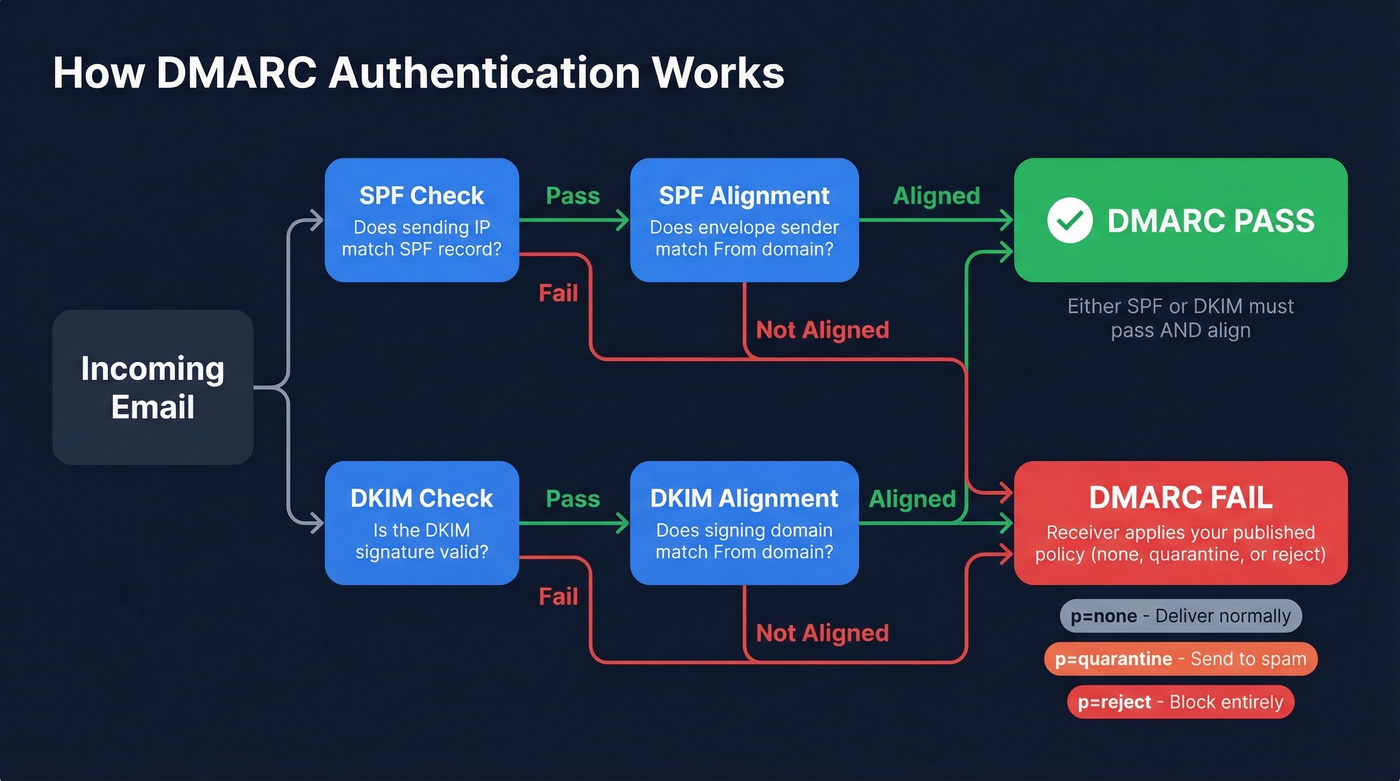
When you're reading reports - whether raw XML or through a dashboard - classify every source into four buckets:
- Compliant: Known senders, SPF/DKIM pass with alignment. Your marketing platform, transactional email service, CRM. Everything's working.
- Non-compliant: Known senders failing alignment. Usually a misconfiguration - your ESP's DKIM domain doesn't match your From domain, or your SPF record is missing an include.
- Threat / Unknown: Unrecognized source IPs sending as your domain. Spoofing or shadow IT. Investigate immediately.
- Forwarded: Messages that passed originally but broke SPF on forwarding. This is normal - DKIM usually survives forwarding, which is why having both protocols matters.
In the raw XML, a record block looks like this:
<!-- unknown MDX component: record -->
This tells you 1,247 messages came from that IP, DKIM passed, SPF failed, and the receiver took no action because your policy is p=none. If that IP is your email service provider, you've got an SPF misconfiguration to fix. If it's unknown, someone's spoofing your domain.

Most DMARC failures trace back to the same root cause: bad contact data inflating bounce rates and wrecking sender reputation. Prospeo's 98% email accuracy and 5-step verification process means fewer bounces, cleaner authentication reports, and domains that stay off blacklists.
Fix your data before you fix your DMARC. Start with 75 free verified emails.
Best DMARC Report Analyzers Compared
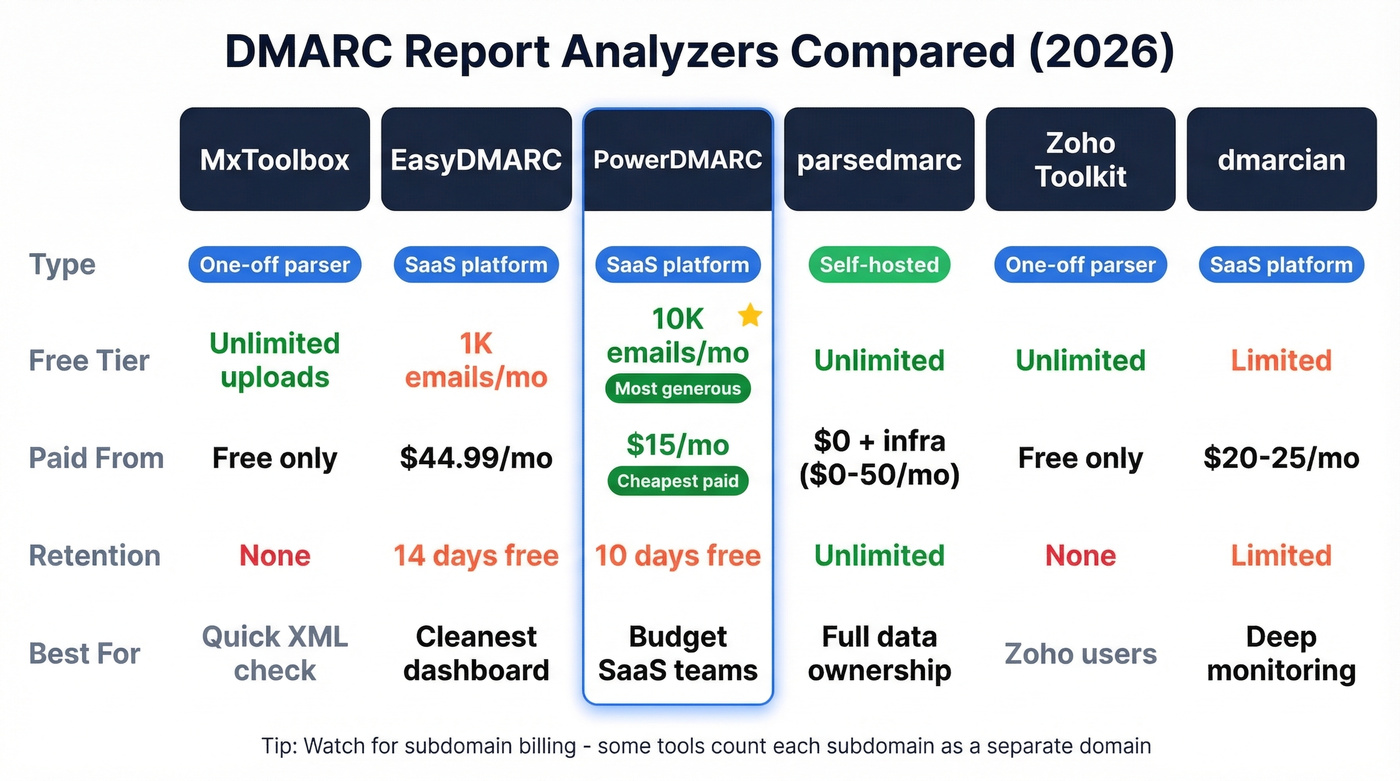
| Tool | Free Tier | Paid From | Retention (Free) | Best For |
|---|---|---|---|---|
| MxToolbox | Unlimited uploads | N/A | None (one-off) | Quick XML parsing |
| EasyDMARC | 1K emails/mo | $44.99/mo | 14 days | Best UX |
| PowerDMARC | 10K compliant emails/mo | $15/mo | 10 days | Best free tier |
| parsedmarc | Unlimited | $0 (+ infra) | Unlimited | Full control |
| Zoho Toolkit | Unlimited | N/A | None (one-off) | Zoho ecosystem |
| dmarcian | Limited | ~$20-25/mo | Limited | Deep monitoring |
MxToolbox
Use this if you've got a single XML file and just need to see what's in it - paste and go. Skip this if you need ongoing monitoring or historical trends. It's a one-off parser, not a platform.
EasyDMARC
EasyDMARC has the cleanest dashboard in the category. Parsing is intuitive, the visualizations actually help you understand what's happening, and setup takes minutes. Pricing is transparent: free tier at 1,000 emails/month, Plus at $44.99/mo (100K emails, 2 domains, 3 months retention), Premium at $89.99/mo (4 domains, 1 year retention).
The catch: if you exceed your monthly email quota, you lose access to your dashboard entirely until you upgrade. No grace period, no degraded view. Just locked out. For a growing domain, that's a real problem. The free tier's 14-day data retention means you lose historical context fast, too.
PowerDMARC
The most generous free tier in the space - 10,000 compliant emails/month with 10 days of data history, which covers most personal domains and small businesses. G2 rating sits at 4.9/5 across 237 reviews, and the Basic plan at $15/mo is genuinely affordable for small teams needing 5 domains and a year of data history. PowerDMARC also supports adjacent protocols like BIMI, MTA-STS, and TLS-RPT - useful if you want a single pane of glass for email security.
The tradeoff is UX. One G2 reviewer put it bluntly: "the user interface is not overly intuitive and finding root causes is not always that easy." If you're technical enough to navigate a slightly clunky interface, the value-for-money is hard to beat.
parsedmarc (Self-Hosted)
For teams that want full ownership of their DMARC data, parsedmarc is the answer. It's a Python CLI tool that parses aggregate, forensic, and SMTP TLS reports, then pipes them into Elasticsearch with Kibana, OpenSearch with Grafana, Splunk, or Apache Kafka. Point it at a mailbox via IMAP, Microsoft Graph, or Gmail API, and it pulls reports automatically.
The Dockerized setup is remarkably fast. One Reddit user in r/selfhosted reported having a working web interface in about 10 minutes after trying multiple solutions that "failed to work." We've seen similar results in our testing - the Docker path is by far the smoothest. The software is free; your cost is infrastructure at $0-50/month depending on volume. The tradeoff is maintenance - parsedmarc is maintained by a single developer, so you're betting on community continuity. For teams with even basic DevOps capability, it's the most powerful option per dollar.
Zoho Toolkit
Use this if you want a zero-friction XML parser and already live in the Zoho ecosystem. Skip this if you need anything beyond basic one-off parsing.
dmarcian
dmarcian is one of the original DMARC monitoring platforms, and it shows in the depth of their educational resources and domain management features. Paid plans typically start around $20-25/month and scale with volume.
One thing to watch: some tools - dmarcian included - bill subdomains as separate domains. If you've got a dozen subdomains sending mail, that pricing model adds up fast. Confirm before you commit.
Pricing Side-by-Side
| Tool | Free Tier | Paid From | Retention (Free/Paid) | Best For |
|---|---|---|---|---|
| PowerDMARC | 10K compliant emails/mo, 1 domain | $15/mo | 10 days / 1 year | Budget SaaS |
| EasyDMARC | 1K emails/mo, 1 domain | $44.99/mo | 14 days / 3 mo-1 yr | Best dashboard |
| dmarcian | Limited, 1 domain | ~$20-25/mo | Limited / varies | Deep monitoring |
| parsedmarc | Unlimited | $0 + infra | Unlimited | Self-hosted |
Two hidden differentiators most people miss. First, data retention - free tiers give you 10-14 days, which isn't enough to spot trends or prove progress to leadership. If you're serious about DMARC analysis, you need at least 3 months of history. Second, subdomain billing. Some platforms count each subdomain as a separate billable domain. If you've got marketing.yourdomain.com, support.yourdomain.com, and transactional.yourdomain.com all sending mail, a "5 domain" plan covers two actual domains at best. Always ask.
Common Mistakes to Avoid
Ignoring reports at p=none. This is backwards. The monitoring-only phase is when reports are most valuable - you're collecting data to understand your email ecosystem before enforcing anything. Skipping this step means you'll quarantine or reject legitimate mail when you tighten the policy.
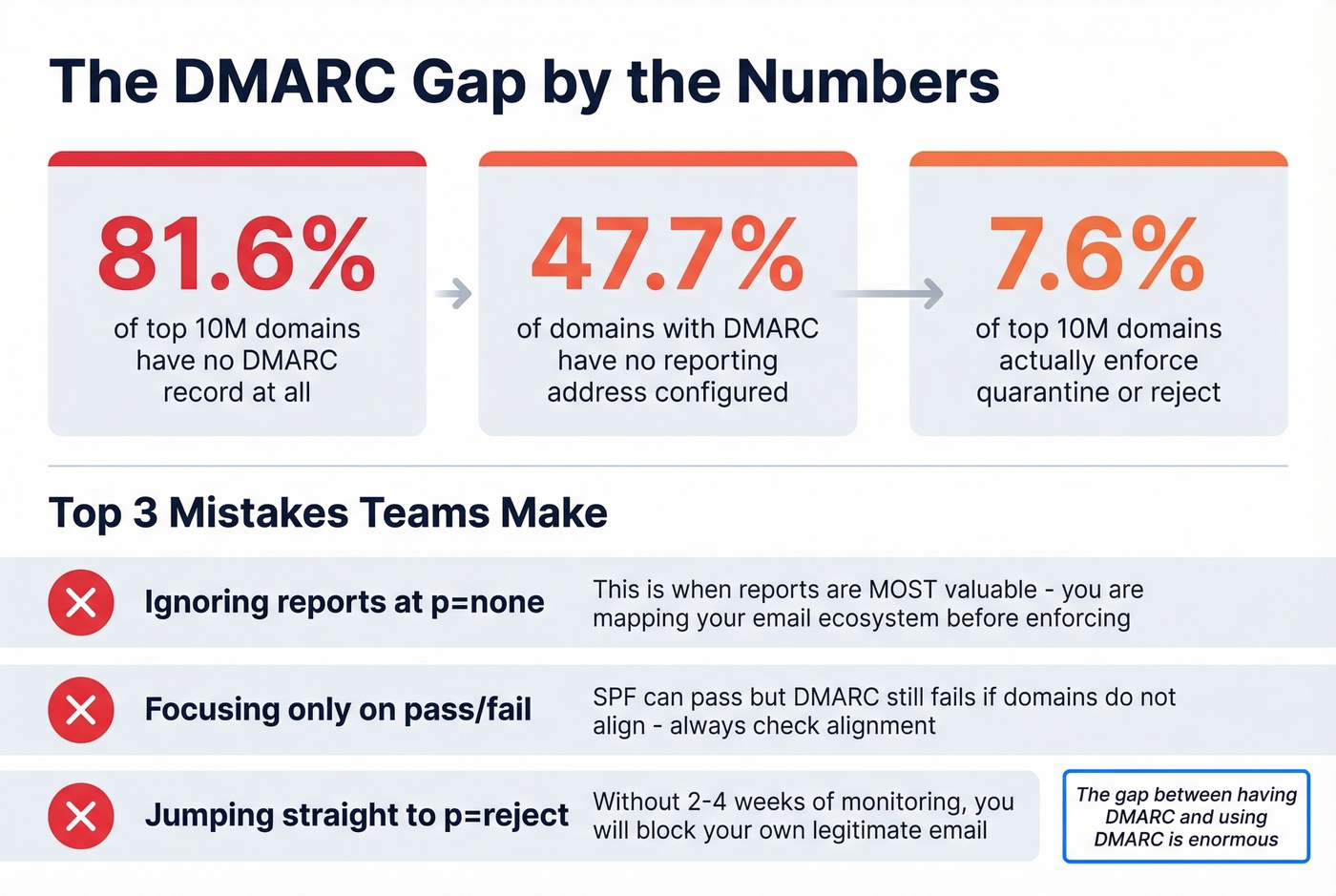
Focusing only on pass/fail. A message can pass SPF and still fail DMARC because the domains don't align. The pass/fail column in your dashboard is a starting point, not the whole story. Always check alignment.
Ignoring unrecognized source IPs. That unknown IP sending 500 messages as your domain? It's either a forgotten SaaS tool, a forwarding service, or actual spoofing. Every unrecognized source needs investigation. Don't just filter it out.
Reading raw XML instead of using a tool. Look, we respect the impulse. But raw XML at scale is unreadable. Even a free one-off parser like MxToolbox turns a wall of angle brackets into something actionable in seconds.
Ignoring subdomain policies. Your main domain might be at p=reject, but if mail.yourdomain.com has no DMARC record, attackers can spoof it freely. Only 3.9% of domains enforce reject including on subdomains. Don't be the other 96%.
What to Do After Reading Your Report
1. Authorize legitimate senders. For every compliant source IP, make sure it's in your SPF record and signing with DKIM under your domain. If a known sender is failing, this is usually a 5-minute DNS fix. (If you need a refresher on syntax, start with an SPF record example.)
2. Fix alignment issues. The most common problem we see: your ESP sends with DKIM signed under their domain, not yours. Configure custom DKIM signing so the d= value matches your From domain. This single change resolves the majority of "SPF passes but DMARC fails" scenarios that confuse people. (More detail on alignment helps here.)
3. Investigate unknown source IPs. Reverse-DNS the IP. Check it against your vendor list. If it's shadow IT, get it authorized or shut it down. If it's genuinely unknown, your DMARC policy will handle it once you move to enforcement.
4. Progress from p=none to quarantine to reject. Spend 2-4 weeks at each stage, reviewing your aggregate reports for legitimate mail that breaks. The goal is p=reject - anything less leaves your domain open to spoofing.
5. Clean your sending data. DMARC reports reveal authentication failures, but many deliverability problems start upstream - invalid addresses, spam traps, and honeypots that damage sender reputation. Prospeo's 5-step email verification catches these at 98% accuracy, including catch-all handling and spam-trap removal, so your reports stop lighting up with reputation-driven failures. If you're trying to reduce bounces systematically, use email bounce rate benchmarks and fixes, plus a plan to improve sender reputation.
Your DMARC analyzer shows the symptoms. High bounce rates and failing authentication are often caused by outdated or unverified contact data upstream. Prospeo refreshes every record on a 7-day cycle - not the 6-week industry average - so your lists stay current and your domain stays clean.
Stop sending to dead addresses. Protect your domain reputation at the source.
FAQ
How often are DMARC aggregate reports sent?
Most ISPs send aggregate reports once every 24 hours. Gmail, Yahoo, and Microsoft all follow this daily cadence. You can request a different interval with the ri= tag, but in practice, plan for daily delivery from major receivers.
Do I need DMARC if I send fewer than 5,000 emails per day?
Yes. The 5,000-message threshold triggers stricter Gmail and Yahoo requirements, but DMARC protects your domain from spoofing regardless of volume. Even if you send 50 emails a day, someone else can send 50,000 pretending to be you. Enforcement stops that.
Can I use multiple DMARC report analyzers at the same time?
Absolutely - add multiple mailto: addresses in your rua tag, separated by commas. Reports get sent to all of them. This is useful for feeding parsedmarc and a SaaS dashboard simultaneously, giving you both long-term storage and a polished UI.
What's the difference between aggregate and forensic reports?
Aggregate reports (rua) are daily XML summaries covering all messages - they show pass/fail counts by source IP with alignment results. Forensic reports (ruf) are per-message failure notifications with headers and sometimes partial content. Aggregates are your primary diagnostic tool; forensics are for investigating specific incidents. Many ISPs skip forensic reports entirely due to privacy concerns.
How do I fix DMARC failures caused by bad sending data?
Start by verifying your contact lists before sending. Invalid addresses, spam traps, and honeypots damage sender reputation, which compounds authentication failures. Tools like Prospeo, NeverBounce, or ZeroBounce catch these issues before they reach your sending infrastructure, so your DMARC reports reflect genuine authentication problems rather than data-quality noise.