

Domain Verification: What It Actually Means and How to Get It Right
Domain verification sounds simple - until you've spent 20 minutes watching a spinner in Microsoft 365, only to get a cryptic failure message while nslookup shows the TXT record sitting right there. You're not alone. The term itself means three completely different things depending on who's asking you to do it, and that confusion is where most problems start.
What You Need (Quick Version)
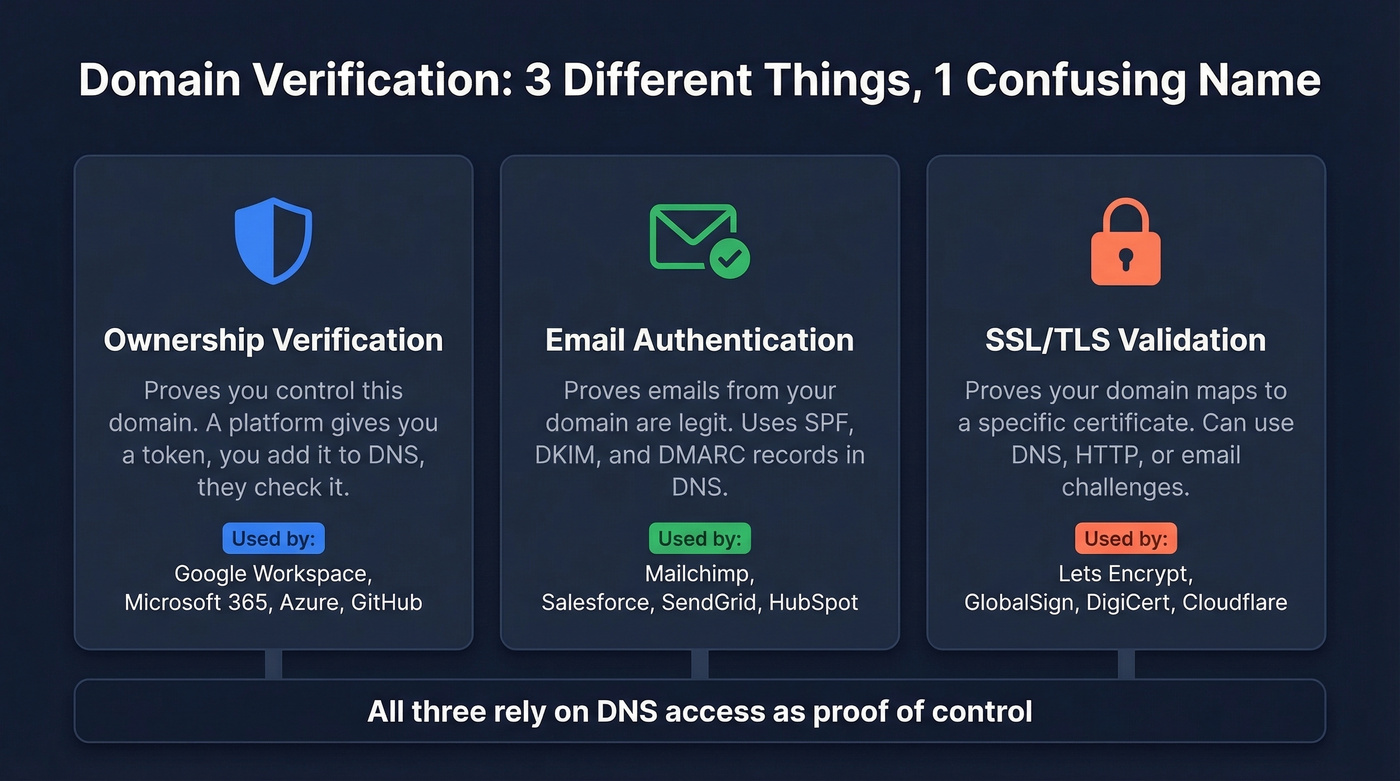
Domain verification means proving you control a domain. But the term covers three distinct contexts: ownership proof (Google Workspace, Azure), email domain authentication (SPF, DKIM, DMARC), and SSL certificate validation. DNS TXT records are the safest, most universal option for ownership verification and DNS-based SSL validation - and they're also the record type used for SPF/DKIM/DMARC.
If verification fails, the problem is usually the wrong hostname, a caching delay, a record-type conflict (especially CNAME exclusivity), or publishing the record in the wrong DNS zone. It's almost never some mysterious "the internet hasn't propagated yet" situation.
What It Actually Means
The phrase gets thrown around in SaaS dashboards, email setup wizards, and SSL certificate portals like it's one thing. It's not.
| Context | What You're Proving | Example |
|---|---|---|
| Ownership verification | You control this domain | Google Workspace, Azure, GitHub |
| Email authentication | Emails from this domain are legit | SPF, DKIM, DMARC setup |
| SSL/TLS validation | Domain maps to this certificate | Let's Encrypt, GlobalSign |
Quick disambiguation: Domain verification isn't the same as a WHOIS lookup. WHOIS shows public registration data - who registered a domain and when. Verification proves you actually control the domain's DNS or hosting infrastructure.
The Salesforce confusion is a perfect example. Their admin dashboard tells you to "verify domains for email security," which sounds like ownership verification but actually means setting up DKIM and authorized sending domains. That's authentication, not verification. The terminology overlap trips up even experienced admins, and the help docs don't clarify the distinction well.
In all three cases, the underlying mechanism is similar: a service generates a unique token, you publish it in DNS (or via another method), and the service queries for it. Proof of control via DNS access. The differences are in what happens after verification succeeds.
Why It Matters in 2026
This used to be a "set it and forget it" checkbox. That changed in 2024, and enforcement keeps getting stricter every quarter.
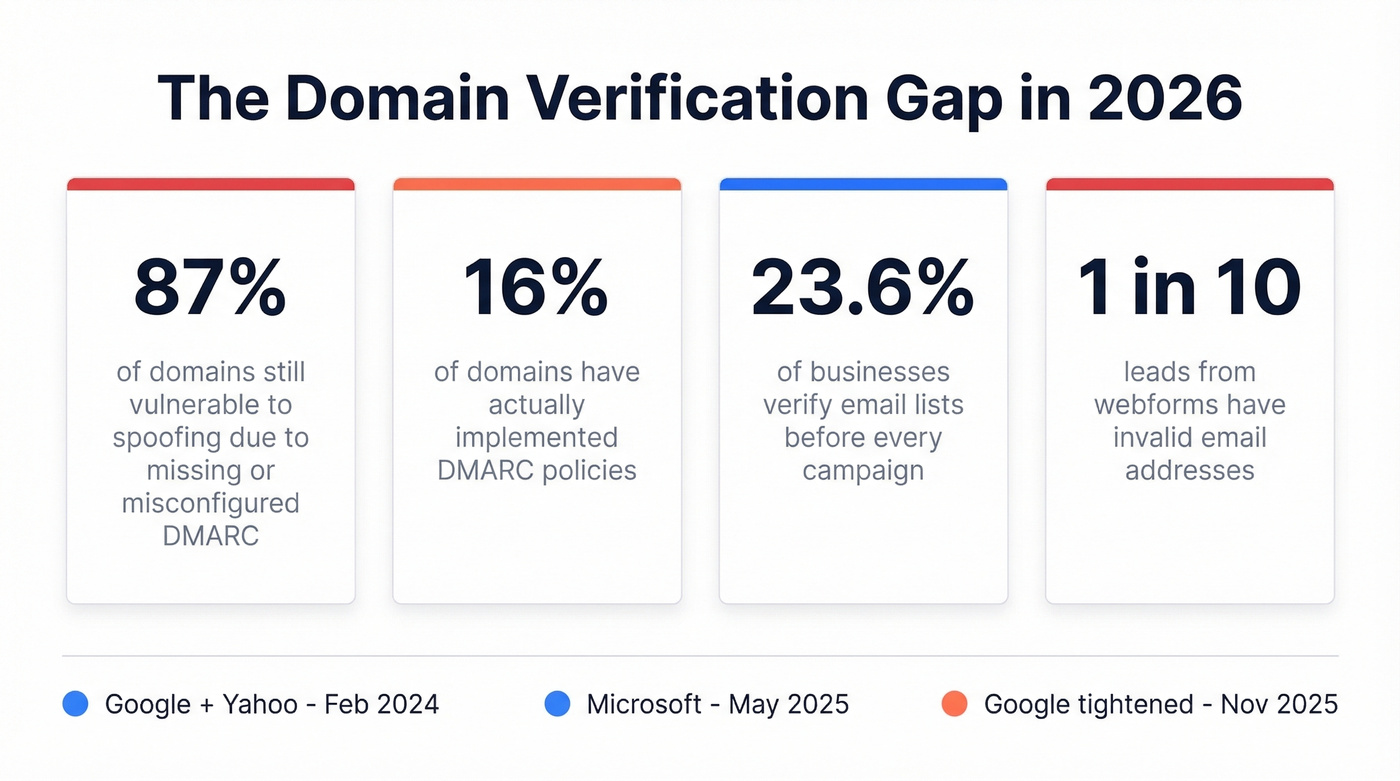
Only 16% of domains have implemented DMARC, and according to RedSift's 2026 analysis, 87% remain vulnerable to spoofing - a gap that accounts for domains with misconfigured or ineffective DMARC policies. Google and Yahoo started enforcing domain authentication requirements in February 2024. Microsoft followed in May 2025. If you're sending bulk email without proper SPF, DKIM, and DMARC records, your messages are getting quarantined or rejected outright. Without DMARC, anyone can spoof your domain to send phishing emails to your customers, partners, or prospects - and you won't even know it's happening until the damage is done.
The numbers on the contact data side are just as bad. Only 23.6% of businesses verify their email lists before every campaign, and roughly 9% of emails entered via webforms are invalid. That's nearly 1 in 10 leads with a dead address.
Proper DNS setup ensures your sending infrastructure is trusted. But it's only half the equation - contact data verification ensures you're not burning that trust on invalid addresses.

Verification Methods Explained
Five methods exist for proving domain ownership. Here's when each one makes sense - and when it doesn't.
DNS TXT Record (Default Choice)
TXT records are the safest, most universal verification method. You add a text string to your domain's DNS records, the platform queries for it, and you're verified. The key advantage: TXT records don't route traffic and don't interfere with existing services. You can stack multiple TXT records at the same hostname without conflicts.
Every major platform uses this approach with its own prefix:
- Google Workspace:
google-site-verification=... - Microsoft 365:
MS=ms12345678 - Stripe:
stripe-verification=... - Let's Encrypt (DNS-01 challenge):
_acme-challenge.example.com
Some platforms let you remove the TXT record after initial verification; others require it to stay for ongoing validation. Check your platform's docs - but when in doubt, leave it. A TXT record costs nothing.
The IETF has documented common practices and pitfalls for DNS-based verification techniques, and TXT records are the recommended default for good reason - they're non-destructive and coexist peacefully with everything else in your zone file.
DNS CNAME Record
CNAME records pull double duty: they verify ownership and route traffic. You create a CNAME at a specified subdomain pointing to the platform's hostname, and the same record often handles traffic routing after verification completes.
The tradeoff: CNAME records come with hard constraints. You can't place a CNAME at the zone apex (root domain). And a hostname with a CNAME can't have any other record types at that same name - this "exclusivity rule" is the single biggest source of verification failures for teams that aren't DNS experts. Some providers offer ALIAS or ANAME records as workarounds for apex domains, but these aren't universally supported.
HTML File Upload
Some platforms let you upload an HTML file to your web server's root directory. The platform fetches the file via HTTP to confirm you control the server. It works, but it's fragile - wrong folder paths, file renaming, and HTTPS redirect chains that block the verification crawler are common failure modes. Always test the file URL in a browser before clicking verify.
Email-Based Verification
Certificate authorities commonly use this method. They send a verification email to a predefined address like admin@yourdomain.com or webmaster@yourdomain.com. The approval mailbox must actually exist, and CA emails frequently get caught by spam filters. If you're using this method, whitelist the CA's sending domain first.
Meta Tag
Drop a <meta> tag into your homepage's <head> section. Quick for marketing tools, but requires code access and breaks if someone redesigns the page. Use it only when DNS access isn't available.
When to Use Which
| Method | Best For | Constraints | Keep After? |
|---|---|---|---|
| DNS TXT | Most platforms | DNS access required | Usually yes |
| DNS CNAME | SaaS custom domains | No apex; exclusive hostname | Yes (routes traffic) |
| HTML file | Server-hosted sites | Needs web server access | Usually yes |
| SSL certificates | Mailbox must exist | No (one-time) | |
| Meta tag | Marketing tools | Needs code access | Yes |

Domain verification protects your sending reputation. But sending to invalid addresses destroys it. Prospeo's 5-step email verification - with catch-all handling, spam-trap removal, and honeypot filtering - keeps your bounce rate under 4%.
Don't burn your authenticated domain on bad data.
Verification vs. Email Authentication
This is where the terminology gets genuinely confusing, and we've seen it trip up teams that should know better. "Verify your domain" means different things in different dashboards, and vendors don't help by using the terms interchangeably.
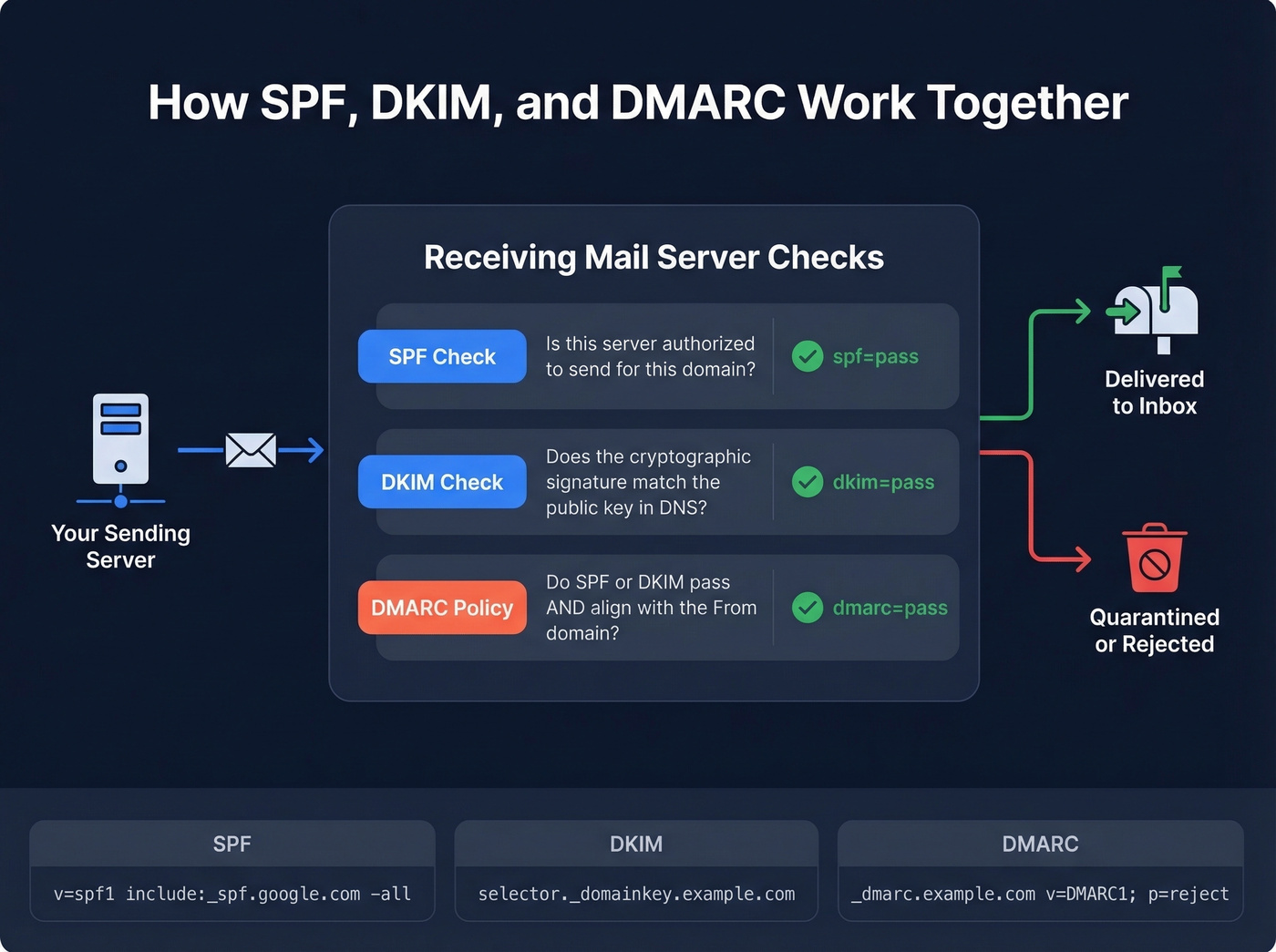
Domain verification proves ownership. Domain authentication - what email marketing platforms require - proves that emails sent from your domain are legitimate. Authentication uses three protocols, all stored as DNS TXT records, which adds to the confusion.
SPF (Sender Policy Framework) lists which servers can send email for your domain:
v=spf1 include:_spf.google.com include:sendgrid.net -all
DKIM (DomainKeys Identified Mail) adds a cryptographic signature to outgoing emails. You publish the public key at a specific subdomain:
selector._domainkey.example.com
DMARC (Domain-based Message Authentication, Reporting & Conformance) tells receiving servers what to do when SPF or DKIM fail - deliver, quarantine, or reject. Published at:
_dmarc.example.com
As Cloudflare's explainer puts it, all three work together to verify that emails actually came from the domain they claim to be from. You can check email headers for spf=pass, dkim=pass, and dmarc=pass to confirm everything's working.
Here's what "verify your domain" actually means across platforms:
| Platform | What They Mean | What You're Actually Doing |
|---|---|---|
| Google Workspace | Ownership proof | Adding a TXT record |
| Microsoft 365 | Ownership proof | Adding a TXT record |
| Mailchimp | Email authentication | Setting up DKIM |
| Salesforce | Email authentication | Configuring DKIM + SPF |
The Salesforce scenario comes up constantly on r/salesforce - admins see "verify domains for email security" and think it's an ownership check. It's not. It's DKIM setup.
How to Authenticate Email Records
The enforcement timeline has shifted dramatically. Here's the cheat sheet:
| Provider | Enforcement Date | < 5K emails/day | >= 5K emails/day |
|---|---|---|---|
| Feb 2024 | SPF or DKIM pass | SPF + DKIM + DMARC (p=none min) | |
| Yahoo | Feb 2024 | SPF or DKIM pass | SPF + DKIM + DMARC (p=none min) |
| Microsoft | May 2025 | SPF or DKIM pass | SPF + DKIM + DMARC (p=none min) |
For high-volume senders pushing 5,000+ messages per day, the requirements are strict: SPF and DKIM must both pass with alignment, DMARC must be published with at least p=none, and promotional messages need a one-click unsubscribe header. Google tightened enforcement further in November 2025, and spam complaint rates must stay below 0.3% - ideally under 0.1%.
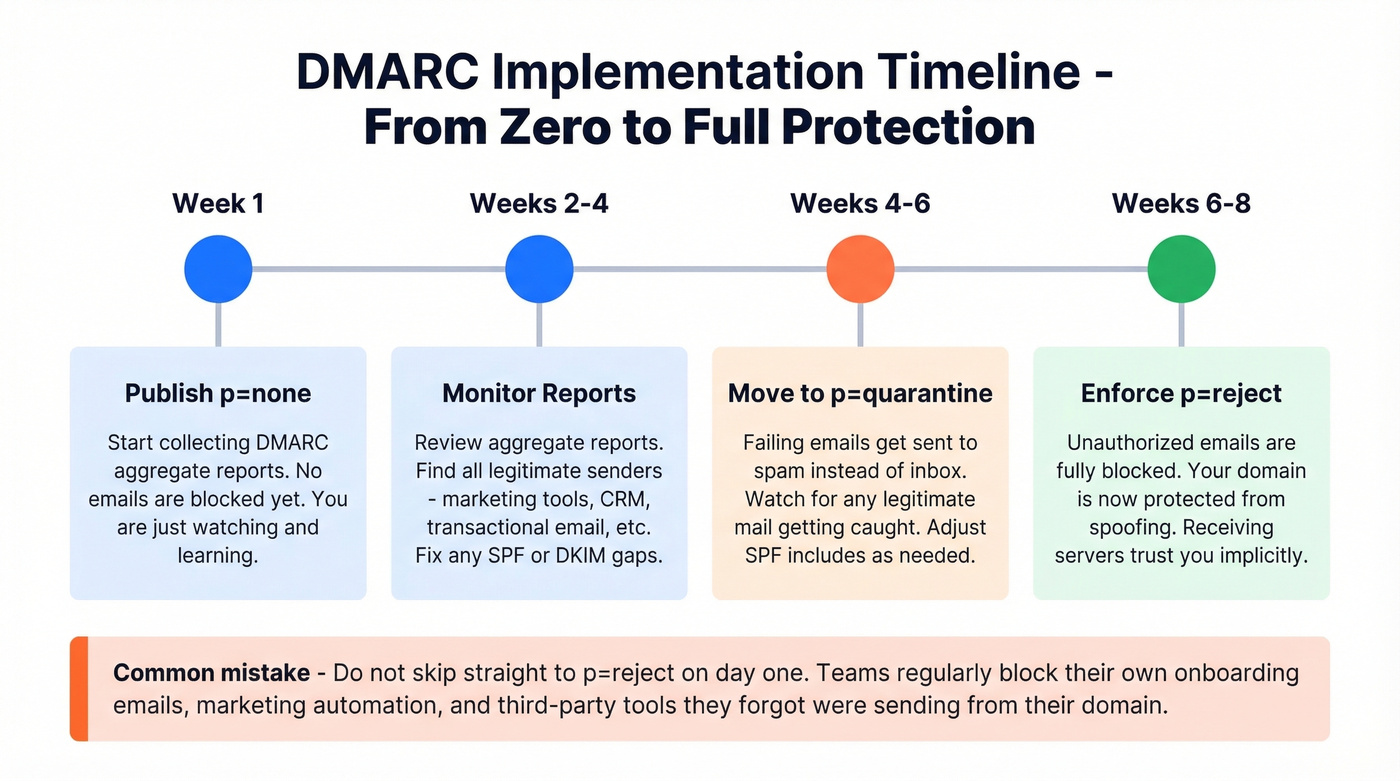
Let's be honest: DMARC implementation typically takes 6-8 weeks when done properly. Start at p=none, monitor your aggregate reports for two to four weeks, identify any legitimate senders you missed, then move to p=quarantine and eventually p=reject. Don't rush to p=reject on day one - you'll block legitimate email from third-party tools you forgot about. We've seen teams accidentally quarantine their own onboarding sequences because they forgot a marketing automation tool was sending from their domain. Once you reach p=reject, you have a fully authenticated sending domain that receiving servers trust implicitly.
Step-by-Step DNS TXT Setup
Regardless of which platform you're verifying with, the process follows the same five steps. When everything's configured correctly, verification often completes quickly - but DNS caching means it can also take a few hours, and some changes take longer.
Get your verification token. Log into the platform's admin console and find the domain verification section. Copy the unique TXT value they provide - something like
google-site-verification=abc123orMS=ms12345678.Open your DNS provider. This is wherever you manage your domain's DNS - Cloudflare, GoDaddy, Namecheap, Route 53, etc. Navigate to the DNS records section.
Add the TXT record. Create a new TXT record. Set the hostname to
@(representing the root domain) unless the platform specifies a subdomain. Paste the verification value. Set TTL to a low value like 300 seconds if available.Wait for propagation. DNS changes commonly take 2-24 hours, and some resolvers cache for 24-48 hours regardless of your TTL setting. If it's not visible after a reasonable window, something's usually wrong with the record itself.
Click verify. Go back to the platform and trigger verification. If it fails, confirm the record with
dig TXT yourdomain.comin terminal or use an online propagation checker like whatsmydns.net.
Platform-specific tips:
- Cloudflare: Make sure proxy status is set to "DNS only" (gray cloud) for any verification-related records.
- GoDaddy: After adding a TXT record, GoDaddy's interface can show a delay before the record appears in the list. Refresh the page.
- Route 53: Route 53 displays TXT values with quotes in the UI. Paste the value exactly as the platform provides it, and let Route 53 handle the formatting.
For Let's Encrypt's DNS-01 challenge, the process is identical except the record goes at _acme-challenge.yourdomain.com instead of the root.
Why Verification Fails (And Fixes)
We've seen teams burn hours on verification failures that come down to one of five causes. Here's each one and how to fix it.
DNS Propagation Delays
The standard advice is "wait 24-48 hours for propagation." That's not always helpful. DNS changes often complete in hours, but caching at multiple layers can stretch timelines - browser cache, OS cache, ISP resolver cache, and upstream resolvers. Some resolvers ignore very short TTLs and cache records for up to 24 hours. If you're still waiting after that window, check the record itself before blaming caching.
Platform Can't See My Record
This is the most frustrating failure mode. You run nslookup, the TXT record is right there, but the platform's verification button still fails. It's a common scenario on r/AZURE - users confirm propagation via nslookup, wait 48 hours, and Azure still won't verify.
The issue: platform verification servers query different resolvers than your local machine. They also check a specific hostname or zone that differs from what you expect. The fix is to check against your domain's authoritative nameservers directly: dig TXT yourdomain.com @ns1.yourdns.com. If the authoritative server shows the record correctly, the platform will eventually pick it up.
CNAME Conflicts
This is the #1 cause of verification failures for non-DNS-experts. Two rules trip people up constantly. First, you can't place a CNAME at the zone apex - example.com can't be a CNAME, only subdomain.example.com can. Second, a hostname with a CNAME can't have any other record types at that same name. If you try to mix a CNAME with other records on the same hostname, the configuration is invalid and verification fails in confusing ways.
Here's the thing: if your deal sizes are modest and you're not running a multi-domain email infrastructure, you probably don't need CNAME-based verification at all. Stick with TXT records. They're simpler, they don't conflict with anything, and they work everywhere. CNAME verification exists for platforms that need to route traffic after verification - if that's not your use case, skip the complexity.
Verification Code Expiry
Verification tokens don't last forever. GlobalSign's DNS verification codes expire after 30 days from the order date. Mailchimp's expire after seven days. If you started the process, got distracted, and came back two weeks later, the token is dead. Request a new one and start over.
SSL Wildcard Format Errors
When verifying wildcard SSL certificates for *.example.com, the dot before the domain matters. Some DNS providers strip it or format it differently. If your wildcard DV challenge keeps failing, double-check that the _acme-challenge record is set for the base domain, not for _acme-challenge.*.example.com. The asterisk doesn't appear in the DNS record - only in the certificate request.
Common Error Messages
During propagation, you'll see DNS_PROBE_FINISHED_NXDOMAIN, ERR_NAME_NOT_RESOLVED, or SSL certificate warnings in your browser. These are normal during the propagation window and don't indicate a permanent problem. If they persist beyond 24 hours, verify your nameserver configuration and check for duplicate or conflicting records.
Quick-Reference Troubleshooting
| Symptom | Likely Cause | Fix |
|---|---|---|
| Record visible locally, platform fails | Resolver mismatch | Query authoritative NS directly |
| TXT record at apex not working | CNAME conflict at same hostname | Remove conflicting CNAME |
| Verification worked, then stopped | Token expired | Generate new token, re-add record |
| Wildcard SSL challenge fails | Wrong DNS record format | Set _acme-challenge at base domain |
NXDOMAIN error after adding record |
Wrong hostname in DNS entry | Confirm hostname matches platform instructions exactly |
| Propagation exceeds 48 hours | Record misconfiguration | Re-check value, hostname, and record type |
Verify Contact Data, Not Just Your Domain
You've configured SPF, DKIM, and DMARC. Your domain is verified and authenticated. All that infrastructure work protects your sender reputation - but it can't help you if you're sending to invalid addresses.
In our experience, this is where teams get burned. They spend weeks getting authentication right, then load a purchased list into their sequencer and watch their bounce rate spike to 15%. All that DNS work, undone by bad data. Prospeo's 5-step verification process catches invalid addresses, spam traps, and honeypots before they trigger bounces - 98% accuracy across 143M+ verified emails, including catch-all domain handling.
If you're trying to keep bounces low long-term, it also helps to track your sender reputation and monitor email deliverability alongside list hygiene.
You just spent time getting SPF, DKIM, and DMARC right. The fastest way to waste that effort? Blasting emails to addresses that don't exist. Prospeo verifies 143M+ emails at 98% accuracy on a 7-day refresh cycle - so your domain reputation stays intact.
Protect what you built - verify every address before you hit send.
FAQ
Can I delete the verification TXT record after verifying?
Some platforms allow removal after initial verification; others require the record permanently for ongoing validation checks. Google Workspace and Microsoft 365 both re-check periodically. When in doubt, leave it - a TXT record costs nothing and prevents re-verification headaches down the road.
How long does domain verification take?
Most DNS-based verifications complete within 2-24 hours. In rare cases involving resolvers that ignore short TTLs, it can stretch to 48 hours. If verification still fails after 48 hours, the problem is almost always a misconfigured record - check hostname, value, and record type rather than waiting longer.
Do I need to verify subdomains separately?
Yes, in most cases. Platforms verify at the exact hostname level, not the parent domain. Verifying example.com doesn't automatically cover mail.example.com or app.example.com. Some platforms like GitHub offer organization-wide verification, but that's the exception.
What's the difference between verification and authentication?
Verification proves you own or control a domain - it's a one-time or periodic ownership check via DNS TXT, CNAME, or file upload. Authentication means configuring SPF, DKIM, and DMARC so receiving mail servers confirm emails from your domain are legitimate. Verification is about access; authentication is about trust.
How do I verify email addresses before outbound campaigns?
Use a dedicated verification tool before loading contacts into your sequencer. Upload a CSV or connect via API, and the tool checks each address for validity, catch-all status, spam traps, and honeypots. Prospeo handles this at 98% accuracy - the free tier covers 75 addresses per month with no commitment.