

Email Address Formats: Rules, Examples & Real-World Guide
Nearly 80% of Fortune 500 companies use more than one email domain or address pattern. The biggest, most organized companies on the planet haven't settled on a single format - so if you're confused about which email address formats are "right," you're in good company.
Whether you're setting up email conventions for a growing team or trying to figure out a prospect's work address, this guide covers the technical rules, the practical choices, and the fastest way to skip the guesswork entirely.
The Short Version
- Technical rules: An email address is
local-part@domain. The local-part can be up to 64 characters, the whole address maxes out at 254 characters, and you're limited to letters, digits, dots, and a handful of special characters for anything that'll actually work in the real world. - Best corporate format:
firstname.lastname@domain.comwins for readability, professionalism, and predictability. It's what most recipients expect. - Need to find someone's work email? Use a domain search tool instead of guessing patterns manually. Pattern-guessing leads to bounces, and bounces destroy your sender reputation.
Company Email Structure Explained
Every email address follows the same anatomy: local-part@domain. Take jane.doe@acme.com. The local-part is jane.doe - everything before the @ symbol. The domain is acme.com, which breaks into the second-level domain (acme) and the top-level domain, or TLD (.com). Some organizations add subdomains, giving you something like jane.doe@sales.acme.com, where sales is the subdomain.
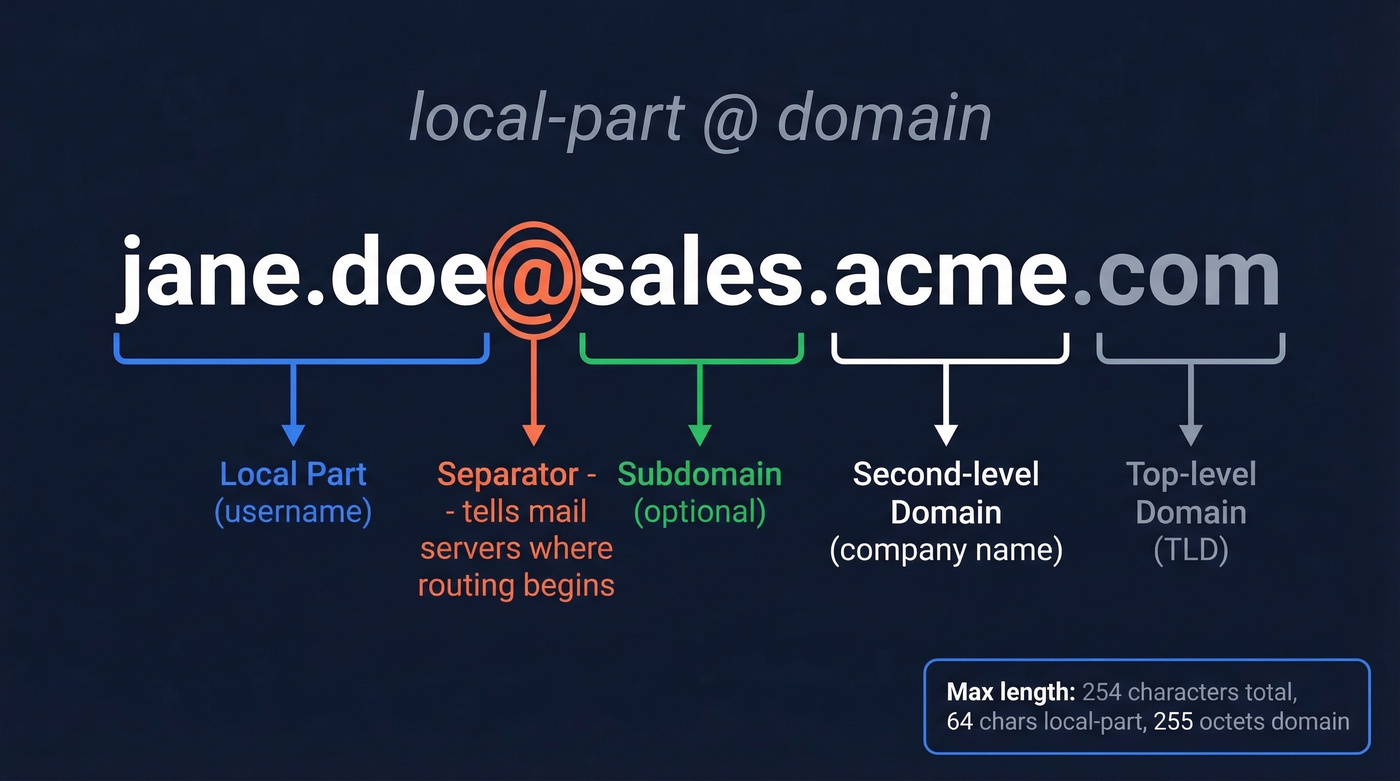
The @ symbol is the only truly universal separator - it tells mail servers where the username ends and the routing begins. Everything else is governed by a surprisingly flexible set of rules that most people never encounter, because most email providers only support a conservative subset.
Technical Rules - What's Actually Valid
The core standards behind email addressing include SMTP (RFC 5321) and the Internet Message Format (RFC 5322), plus later updates and extensions. Here's the practical summary:
| Rule | Local-Part | Domain |
|---|---|---|
| Allowed chars | A-Z, a-z, 0-9, .!#$%&'*+-/=?^_\{|}~` |
A-Z, a-z, 0-9, hyphens |
| Length limit | 64 chars | 255 octets |
| Case sensitive? | Technically yes, practically no | No |
| Dots | Not first/last, not consecutive | Standard subdomain separators |
The total address - local-part plus @ plus domain - can't exceed 254 characters per RFC 5321. So while the domain part is allowed up to 255 octets in isolation, you can't max out every component at once and still fit under the overall limit.
A few nuances worth knowing. The local-part is technically case-sensitive, meaning Jane@acme.com and jane@acme.com could theoretically route to different mailboxes. In reality, virtually every mail server treats them identically. Always default to lowercase.
Dots have specific rules: they can't appear at the start or end of the local-part, and you can't stack two consecutively (jane..doe@ is invalid). Plus-addressing is supported by many providers - jane+newsletters@acme.com routes to jane@acme.com - which is handy for filtering but irrelevant for most corporate setups.
There's also the quoted local-part, where you wrap the username in double quotes and suddenly spaces and other forbidden characters become legal ("jane doe"@acme.com). It's RFC-valid. It's also something you'll almost never see in the wild, because most systems reject it outright.
10 Common Business Email Formats
Here's what you'll actually encounter across businesses of all sizes. Each naming convention has trade-offs depending on team size, industry, and geography:
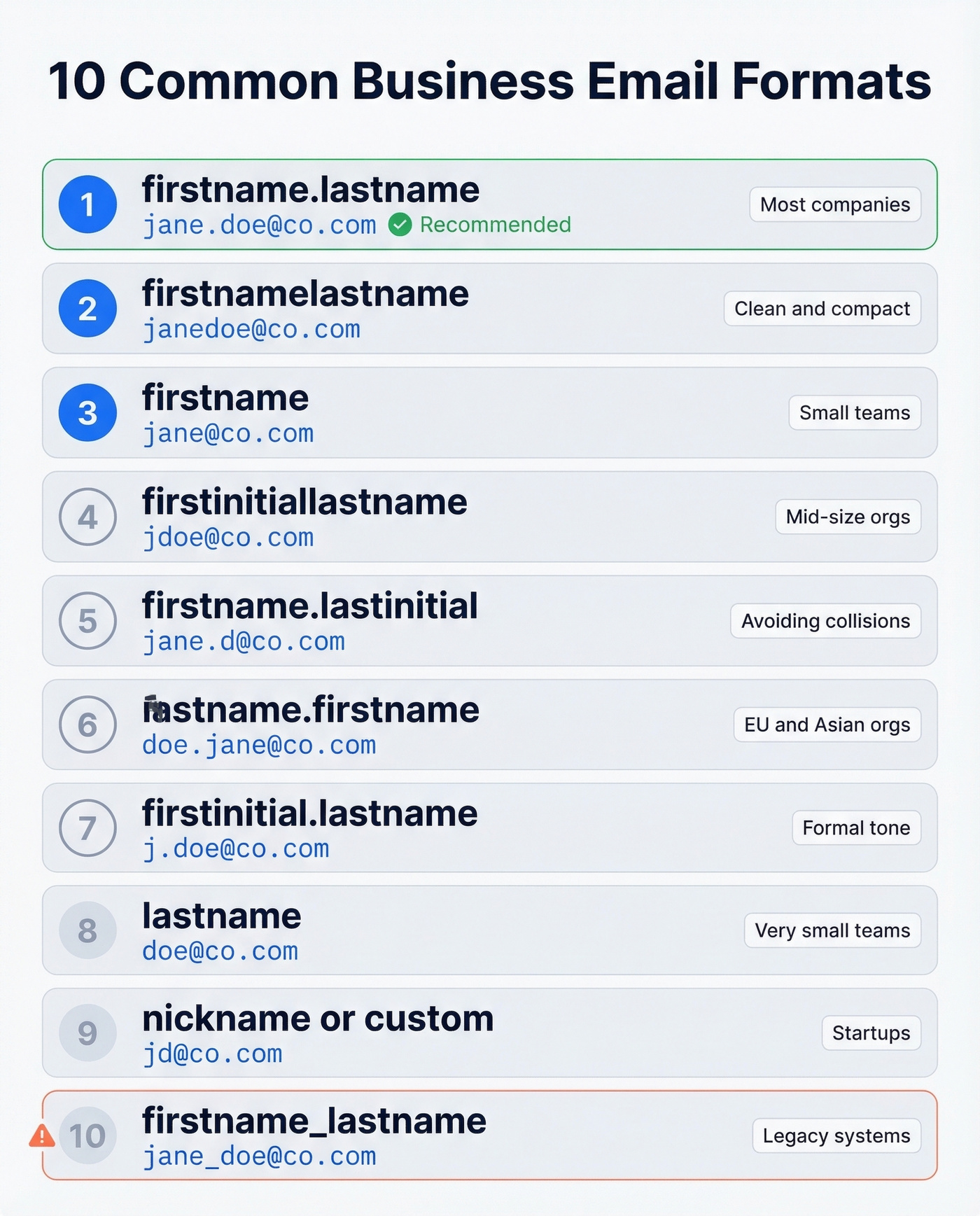
| # | Format Pattern | Example | Best For | Drawback |
|---|---|---|---|---|
| 1 | firstname.lastname | jane.doe@co.com | Most companies | Long for common names |
| 2 | firstnamelastname | janedoe@co.com | Clean, compact | Hard to parse visually |
| 3 | firstname | jane@co.com | Small teams | Duplicates fast |
| 4 | firstinitiallastname | jdoe@co.com | Mid-size orgs | Can create awkward combos |
| 5 | firstname.lastinitial | jane.d@co.com | Collision avoidance | Less recognizable |
| 6 | lastname.firstname | doe.jane@co.com | Some EU/Asian orgs | Unfamiliar to US recipients |
| 7 | firstinitial.lastname | j.doe@co.com | Formal tone | Common-name collisions |
| 8 | lastname | doe@co.com | Very small teams | Scales terribly |
| 9 | nickname/custom | jd@co.com | Startups, creative orgs | Impossible to guess |
| 10 | firstname_lastname | jane_doe@co.com | Legacy systems | Underscore issues |
An Interseller analysis highlights patterns like firstname.lastname and firstinitiallastname as common across company sizes, with smaller firms often leaning toward simpler patterns like firstname@.
Beyond personal addresses, most companies also maintain role-based inboxes: sales@, support@, hr@, hello@. Small businesses often start with a single hello@yourbusiness.com and branch out as the team grows. For a mid-size SaaS company, individual reps typically use firstname.lastname@company.com while shared inboxes follow the department@company.com pattern.

Guessing email formats leads to bounces, and bounces destroy your sender reputation. Prospeo's Email Finder searches 300M+ profiles and returns only verified addresses - 98% accuracy, no pattern-guessing required.
Skip the format guesswork. Get verified emails at $0.01 each.
Choosing the Right Format
Here's the thing: your format choice matters less than your collision and normalization policies. Pick firstname.lastname and move on - the real work is handling the edge cases. That said, the business email convention you select sets the tone for every external interaction your team has.
Separator Showdown
The ranking is straightforward: dot > no separator > hyphen > underscore.
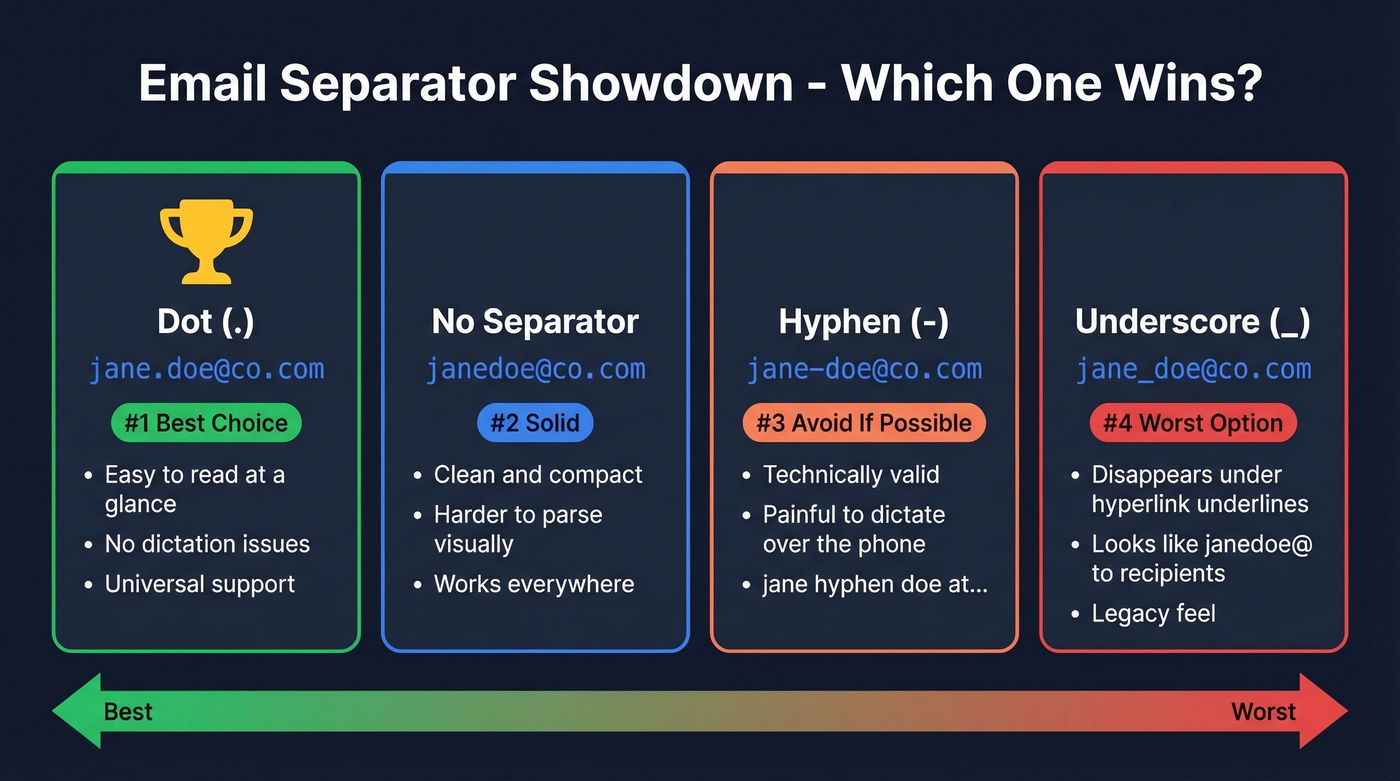
Dots win because they improve readability without any downsides. jane.doe@ is instantly parseable; janedoe@ requires a beat of mental effort, especially with unfamiliar names. Hyphens (jane-doe@) are technically fine but painful to dictate over the phone - "jane hyphen doe at..." is a mouthful nobody wants. Underscores (jane_doe@) are the worst option because they disappear when the address is underlined in a hyperlink, making the address look like janedoe@ to the recipient.
Collisions and Forbidden Usernames
The moment you hire your second John Smith, you need a collision policy. Most companies append a number (john.smith2@) or switch to a middle initial (john.m.smith@). Decide this before it happens, not after.
More entertaining is the forbidden-username problem. Automated username generation from first initial + last name once produced abuse@domain.com for an employee named A. Buse. That's a reserved address on most mail servers. Maintain a blocklist of reserved and unfortunate combinations - admin@, postmaster@, abuse@, root@, and anything that could embarrass someone in a client email.
Name Normalization
This is where IT policy gets genuinely hard. Hyphenated last names (Mary-Jane Watson), apostrophes (O'Brien), and accented characters (Jose, Muller) all create friction. The r/sysadmin consensus leans toward pragmatic normalization: strip apostrophes, convert accents to their closest ASCII equivalents, and collapse hyphens.
It's a real tension. Normalizing someone's name for deliverability also flattens their identity. The best approach we've seen is to normalize the primary address for deliverability, then add the accented version as an alias. Whatever naming convention you standardize on, document the normalization rules so every new hire gets a consistent address from day one.
Authenticate Your Domain
Once your format is set, make sure your domain is actually trusted by inbox providers. Three protocols matter:
SPF tells receiving servers which IP addresses are authorized to send on behalf of your domain. DKIM adds a cryptographic signature to each outgoing message, proving it wasn't tampered with in transit. DMARC ties SPF and DKIM together with a policy that tells receivers what to do when authentication fails - quarantine, reject, or let it through.
Skip these and your beautifully formatted corporate emails land in spam. Major email hosting providers provide guided setup for all three. Do it on day one, not after your first deliverability crisis.
How to Find Any Company's Email Format
Knowing the common patterns is useful. But when you're prospecting and need a specific person's work email, theory isn't enough.
The Prospecting Workflow
The standard approach: search for the company's domain, identify the naming pattern from known employees, guess your target's address based on that pattern, then verify before sending. You can use Google operators like "name company.com email" to surface publicly visible addresses and reverse-engineer the corporate convention.
The problem? Unverified guesses bounce. And bounces destroy your sender reputation - a few bad sends can tank deliverability for your entire domain. We've watched teams burn through three domains in a quarter because they treated email guessing as "good enough."
Look - if you're doing outbound at any meaningful volume, you can't afford to guess. High bounce rates get your domain flagged fast. Verified data isn't a luxury; it's table stakes.
Best Tools for Finding Emails
| Tool | Database Size | Accuracy | Free Tier | Starting Price |
|---|---|---|---|---|
| Prospeo | 143M+ verified | 98% | 75 emails/mo | ~$0.01/email |
| Hunter | Web-crawled | 7-step verification | 25 searches/mo | $34/mo (annual) |
| Snov.io | 200M+ contacts | 98%+ | 50 credits | $39/mo |
| Voila Norbert | - | 98% (Ahrefs-tested) | - | $39/mo (annual) |
| Apollo | 275M+ contacts | 70-80% | Yes | Not public |
| Skrapp | 200M+ professionals | 92% | 100 credits/mo | EUR39/mo |
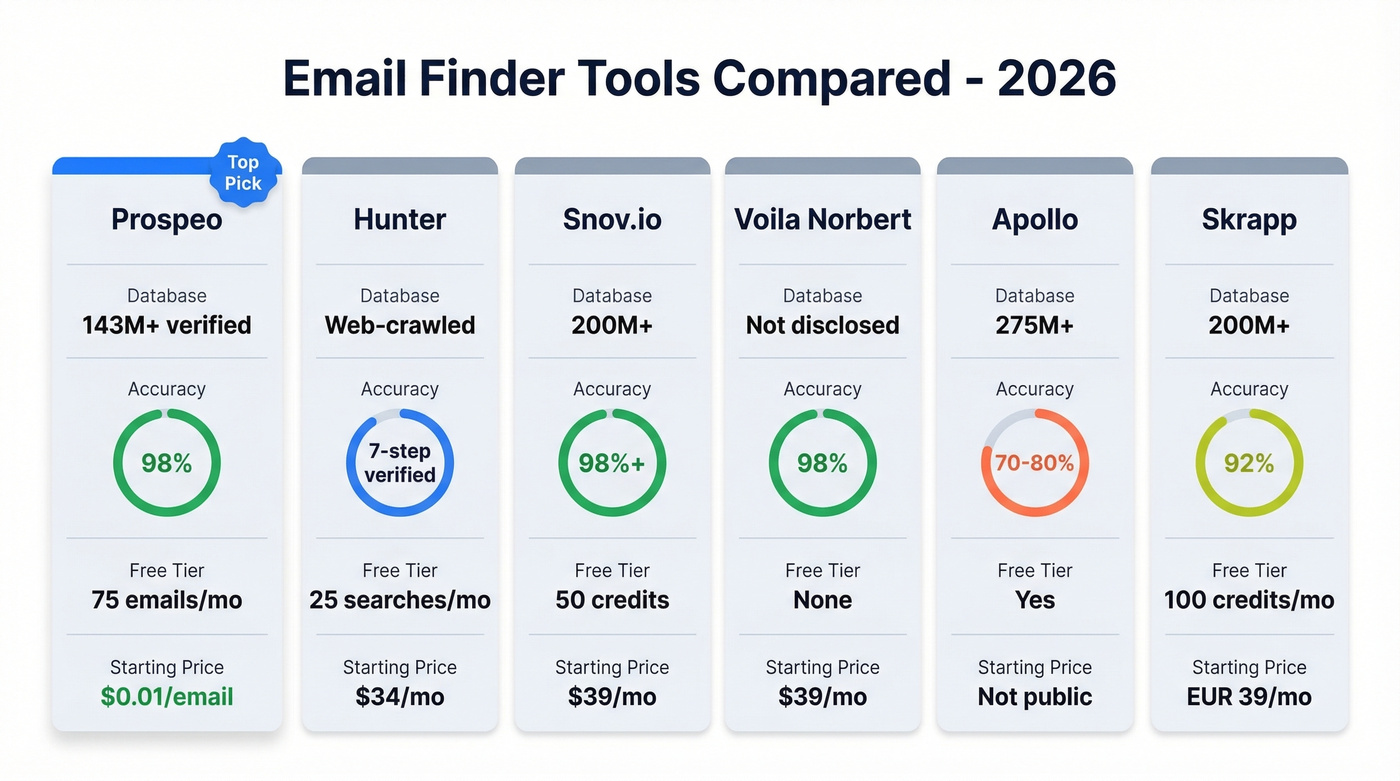
Hunter is the original domain search tool and still solid for pattern identification. Its verification process and "where found" transparency are genuinely useful. The free plan caps at 25 searches/month, which runs out fast if you're doing real prospecting.
Snov.io bundles email finding with outreach sequences, making it a decent all-in-one for small teams that want fewer tools in their stack. At $39/month to start, it's competitively priced - though you'll outgrow the bundled approach once your team scales past 3-4 reps.
Voila Norbert earned its 98% accuracy badge from independent Ahrefs testing, which carries weight. No free tier, so you're committing before you can test.
Apollo has the biggest raw database at 275M+ contacts, but accuracy runs 70-80% based on user feedback - a meaningful gap when bounces are on the line. The free tier is generous for exploration. Skip it for cold outreach without independent verification, though.
Skrapp processes roughly 5M searches daily with a 92% success rate. The 100 free credits/month and EUR39/month entry point make it accessible, especially for European teams.
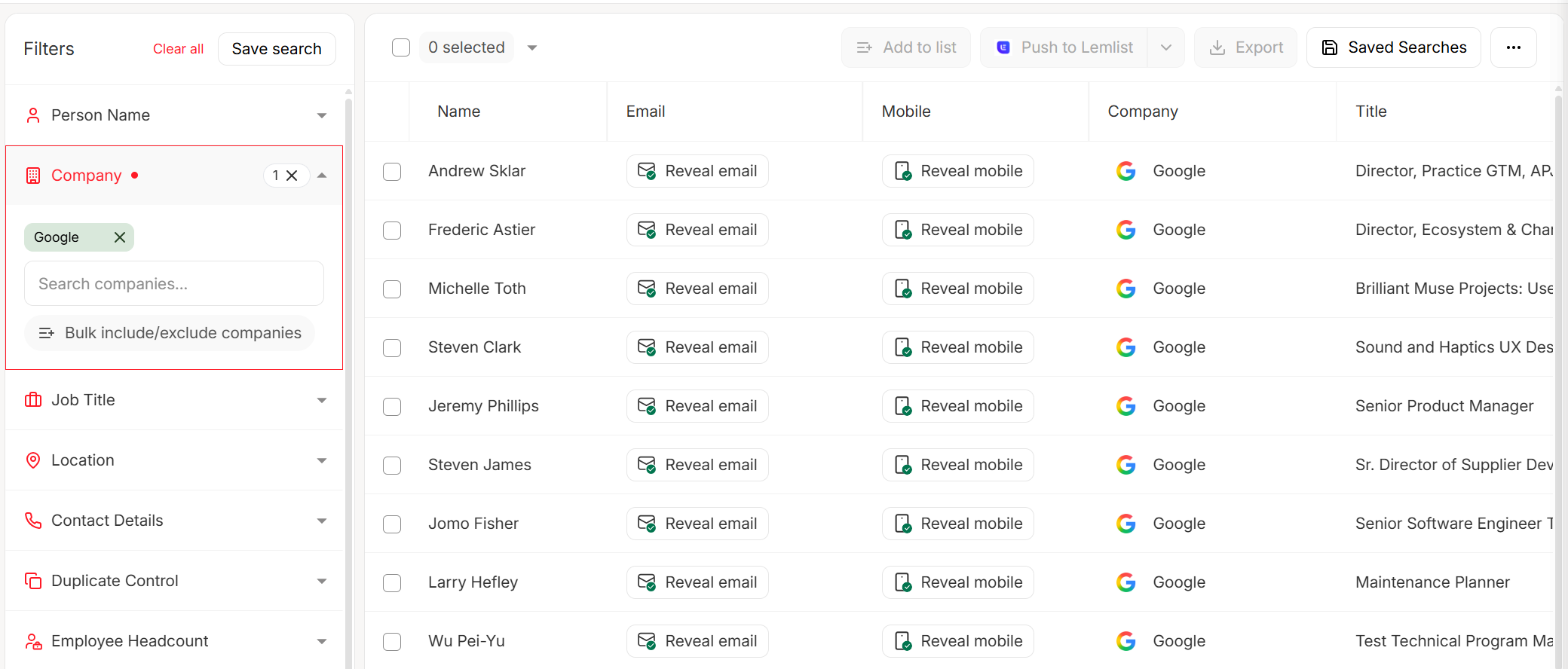
You now know every email naming convention - but real-world companies use multiple patterns, and employees change roles constantly. Prospeo refreshes its 143M+ verified emails every 7 days, so you always reach the right inbox.
Stop memorizing patterns. Let Prospeo find the exact address in one click.
Validation: Syntax to Deliverability
Finding an email format is step one. Making sure the address actually works is step two - and it's the step most people skip.
Three Layers of Validation
Syntax checks confirm the address follows local-part@domain rules. This catches typos, missing @ symbols, and illegal characters - the low-hanging fruit.
DNS/MX record lookups verify that the domain actually has mail servers configured to receive email, catching fake or expired domains. Mailbox verification confirms the specific mailbox exists on that server, filtering out former employees, typos in the local-part, and deactivated accounts.
Skip any layer and you risk hard bounces. Hard bounces signal to inbox providers that you're sending to bad addresses, which tanks your sender reputation and pushes future emails to spam. If you're seeing issues, start with email bounce rate diagnostics and a proper email deliverability guide.
Common Email Input Mistakes
If you're building forms or cleaning lists, these are the most frequent entry errors that slip through basic validation:
- Trailing periods (
jane.doe@acme.com.) - Commas instead of dots (
jane,doe@acme,com) - Semicolons or apostrophes instead of
@ - Spaces mid-address or at the end
- Bracketed notes pasted into the field (
jane.doe@acme.com (office)) - Double periods (
jane..doe@acme.com) - Domain typos:
.coninstead of.com,.cmoinstead of.com
Most of these are trivially fixable with basic input sanitization.
International Email Addresses
Email was built for ASCII. The rest of the world's alphabets came later.
RFC 6530 and RFC 6531 introduced SMTPUTF8, which allows internationalized addresses - think non-Latin scripts in both the local-part and the domain. For domains, the workaround has been Punycode encoding (RFC 3490), where a domain like muller.de with an umlaut gets encoded as its ASCII-compatible equivalent under the hood, letting legacy systems route it correctly. Support is growing but inconsistent - Gmail and Outlook handle most internationalized domain names fine, while smaller providers and older enterprise systems often choke on them.
The practical advice for teams setting up a corporate naming convention: stick to ASCII for the local-part and use internationalized domains only if your recipients' mail infrastructure supports them. Test with your actual recipient base before committing to a non-ASCII format company-wide.
FAQ
What's the most common professional email format?
firstname.lastname@company.com dominates across businesses of all sizes. It's readable, professional, and easy for recipients to remember. Most email-finding tools default to testing this pattern first because it's the single most prevalent convention in corporate environments.
Are email addresses case-sensitive?
Technically, the local-part can be case-sensitive per RFC 5322. In practice, virtually every mail server treats addresses as case-insensitive. Always use lowercase.
What's the maximum length of an email address?
254 characters total, per RFC 5321. The local-part maxes out at 64 characters, and the domain part allows up to 255 octets. You'll almost never encounter an address anywhere near these limits in real-world use.
How do I find out what format a company uses?
Paste the company domain into Prospeo's Email Finder to get the confirmed pattern along with verified individual addresses in seconds. You can also search Google for known employee emails at that domain using operators like "@company.com" email.
What special characters work in an email address?
Beyond letters and digits, the local-part allows !#$%&'*+-/=?^_{|}~` and dots (not first, not last, not consecutive). Most providers only support a subset, so stick to letters, digits, dots, and hyphens for anything you expect real humans to type.
Let's wrap this up simply. Pick firstname.lastname, set up your collision policy, authenticate your domain with SPF/DKIM/DMARC, and verify every address before you send. That's the entire playbook - everything else is edge cases.