

Email Blacklist Removal: A Practitioner's Playbook for 2026
It's Monday morning. Your sequences aren't getting replies, bounce notifications are stacking up, and someone from marketing just Slacked you: "Are our emails broken?" You check MxToolbox. Sure enough - you're on a blacklist. Maybe two.
Email blacklist removal isn't hard, but the order you do it in matters more than anything. Here's what most guides won't tell you: submitting a delisting request right now is the worst thing you can do. If you don't fix the root cause first, you'll be re-listed within days. Sometimes hours.
What to Do Right Now
If you're actively blacklisted and emails are bouncing, here's the emergency sequence:
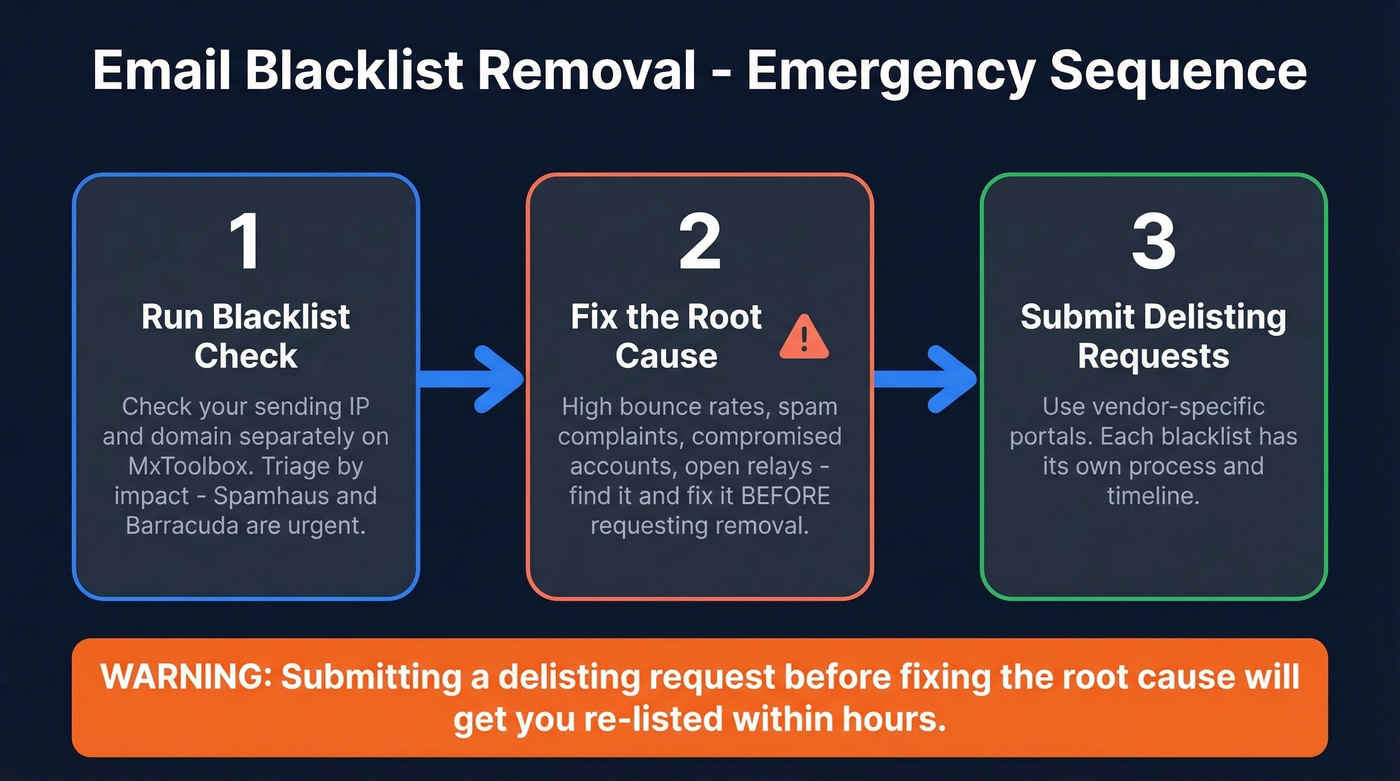
Run a blacklist check at MxToolbox. Enter your sending IP and domain separately. Identify which DNSBLs you're on and triage by impact - Spamhaus (SBL/DBL) and Barracuda BRBL are urgent. UCEProtect L2/L3 are almost always ignorable.
Fix the root cause before you request delisting. High bounce rates, spam complaints, a compromised account, an open relay - something triggered the listing. Find it. Fix it. Then move to step 3.
Submit vendor-specific delisting requests using the portal URLs and timelines below. Each blacklist has its own process, and some don't even require a manual request.
Confirm You're Actually Listed
Before you panic, make sure you're actually on a blocklist - and understand what kind of listing you're dealing with.
There's a critical distinction most people miss: IP blacklists and domain blacklists are different things. An IP blacklist flags the mail server that sent the spam. A domain blacklist flags the domain name that appeared in spam content, which doesn't necessarily mean your domain sent it. You could be on one and not the other, and that difference tells you where the problem actually lives - whether you need IP-level or domain-level delisting - and saves you from wasting time on the wrong fix.

MxToolbox checks your IP against 100+ IP-based blacklists and can also run domain-specific checks. Sender Score's blocklist lookup and BlacklistAlert.org are solid secondary diagnostics. Run both your sending IP and your domain - they can return different results.
If you see listings on obscure blacklists you've never heard of (the "s5h blacklist" confusion comes up constantly), don't assume the worst. Not all blacklists carry equal weight.
Which Blacklists Actually Matter
Some blacklists will tank your deliverability overnight. Others are background noise that most mail servers never check.
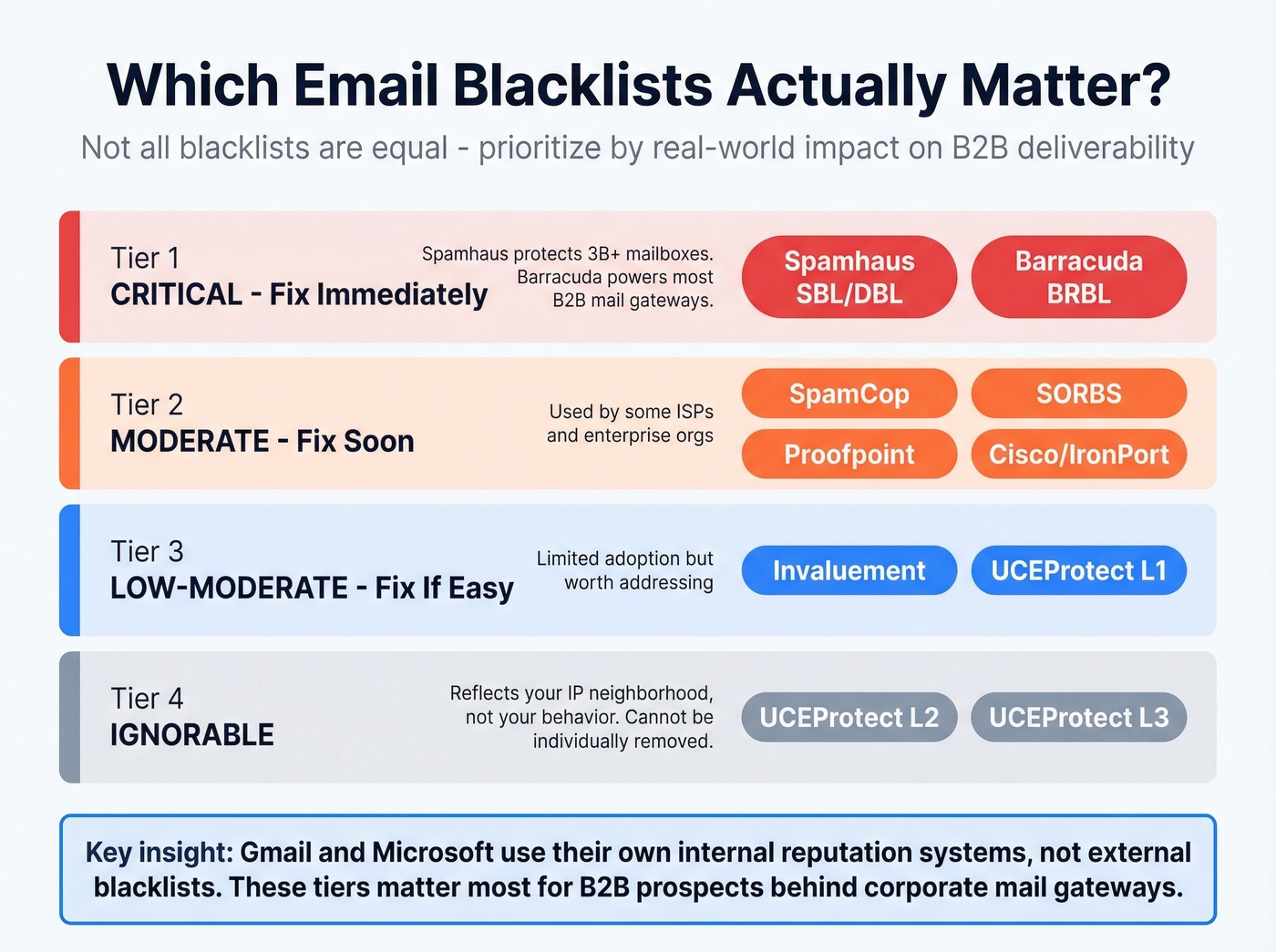
| Blacklist | Impact | Who Uses It | Action |
|---|---|---|---|
| Spamhaus (SBL/DBL) | Critical | Most corporate filters | Fix immediately |
| Barracuda BRBL | Critical | Barracuda appliances, B2B | Fix immediately |
| SpamCop | Moderate | Some ISPs, corporate | Fix soon |
| SORBS | Moderate | Some mail servers | Fix soon |
| Proofpoint | Moderate | Enterprise orgs | Fix soon |
| Cisco/IronPort | Moderate | Cisco email gateways | Fix soon |
| Invaluement | Low-Moderate | Anti-spam services | Fix if easy |
| UCEProtect L1 | Low-Moderate | Limited adoption | Fix if easy |
| UCEProtect L2/L3 | Low | Very limited | Ignorable |
Spamhaus data helps protect over 3 billion mailboxes globally. If you're on their SBL or DBL, that's a five-alarm fire. Barracuda is similarly critical because so many B2B organizations run Barracuda appliances for inbound filtering.
Here's the thing: Gmail and Microsoft rarely consult external blacklists directly. They rely on their own internal reputation systems. A Spamhaus listing won't necessarily kill your Gmail delivery - but it'll destroy your ability to reach anyone behind a corporate mail gateway, which is most of B2B.
If you're only sending to Gmail and Outlook addresses, a listing on a minor blacklist like SORBS or UCEProtect genuinely isn't worth stressing over. But if even 20% of your prospects sit behind corporate mail gateways - and in B2B, they do - Spamhaus and Barracuda listings are existential threats to your pipeline.
UCEProtect L2 and L3 listings reflect your IP neighborhood's reputation, not your individual behavior. If you're on shared hosting and your neighbors are spamming, you'll show up on these lists. Frustrating, but they generally can't be removed - and they're usually not worth losing sleep over.

Most blacklistings trace back to one thing: stale, unverified email data. Prospeo's 5-step verification catches spam traps, honeypots, and catch-all domains before they torch your sender reputation. Meritt cut their bounce rate from 35% to under 4% - and stayed off every blacklist.
Stop fixing blacklist symptoms. Eliminate the root cause at $0.01 per verified email.
Fix the Root Cause First
This is where most people get the sequence wrong. They see the listing, rush to submit a delisting request, and wonder why they're re-listed 48 hours later. The blacklist isn't the problem - it's the symptom.
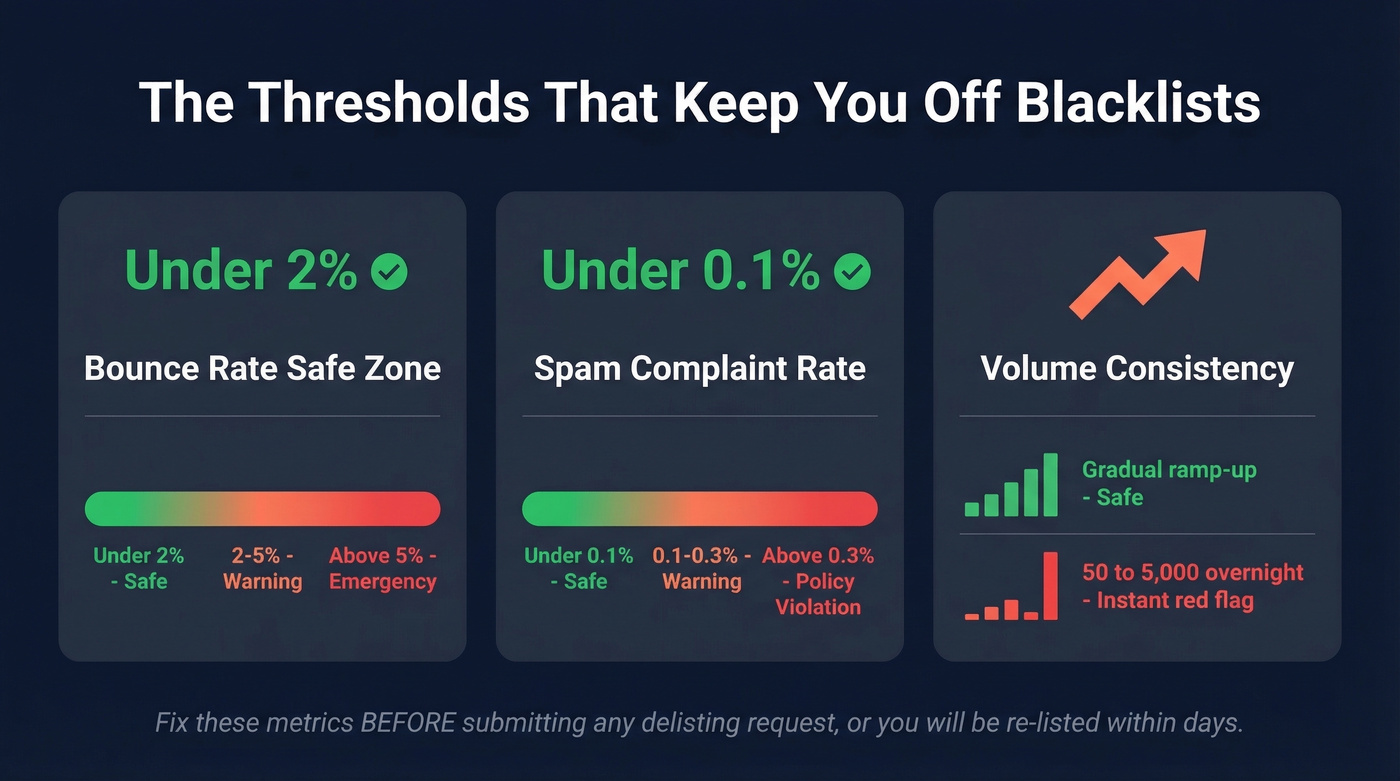
The thresholds that matter:
- Bounce rate under 2% - you're in the safe zone. Above 5% is an emergency.
- Spam complaint rate under 0.1% - above 0.3% and you're crossing into policy-violation territory with Gmail and most major providers.
- Volume spikes - going from 50 emails/day to 5,000 overnight is a red flag every filtering system watches for.
We've seen this pattern repeatedly: a team inherits a domain from a previous marketing org, loads up a purchased list, and hits a 20%+ bounce rate on the first campaign. Blacklisted within hours. One Reddit user reported cold outreach bounce rates of 18-22% that dropped to 7% in about three weeks after switching to a proper verification workflow. Their call connect rate jumped from 12% to 19% as a side benefit.

The root cause is almost always bad data. Stale emails, spam traps, honeypot addresses - they're landmines sitting in your list. Prospeo's 5-step verification with catch-all handling, spam-trap removal, and honeypot filtering is built for exactly this problem. The platform delivers 98% email accuracy with records refreshed every 7 days, compared to the six-week industry average - meaning most "verified" lists are already decaying by the time you use them.
Meritt, one of Prospeo's customers, saw their bounce rate drop from 35% to under 4% after switching from their previous data provider. That's the difference between getting blacklisted and staying clean.
If you're on shared hosting, the problem might not even be yours. One HostGator user on Reddit described cyclical deliverability issues spanning 3-4 years because their shared IP kept getting flagged by other tenants' behavior. If your host won't address it, get a dedicated IP or switch providers. No delisting request solves a bad neighbor problem.
How to Delist: Vendor-by-Vendor Playbook
Once you've fixed the root cause, here's exactly how to get removed from every major blacklist. Bookmark this section.
Spamhaus
Spamhaus has multiple lists, and each has a different delisting path. The five you'll most commonly encounter are SBL, DBL, PBL, CSS, and XBL.
SBL (Spamhaus Block List): You typically can't delist yourself. Your ISP or network owner needs to submit the request via the "Contact the SBL Team" link on your listing page. If you're on a cloud provider like AWS or GCP, you'll need to work through their abuse team.
DBL (Domain Block List): Domain owners can request removal directly, but you must use an email address on the listed domain. Gmail or Yahoo addresses won't work - Spamhaus wants proof you control the domain.
PBL (Policy Block List): Self-remove a single static IP through the Spamhaus lookup tool, provided you're running a properly configured mail server with correct DNS records.
CSS and XBL: These expire automatically once the offending activity stops. You can request early removal, but fixing the problem and waiting is usually faster than navigating the form.
Spamhaus doesn't accept payment for faster delisting. Anyone offering to "expedite" your Spamhaus removal for a fee is scamming you. Valid requests often get a response within a day or two.
Barracuda
Go to barracudacentral.org/rbl/removal-request and submit your email server IP address, email address, and phone number. There's an optional "reason for removal" field - use it. Explain what caused the listing and what you've fixed. Requests are typically processed within 12 hours. Don't submit multiple requests - Barracuda explicitly states that duplicate submissions will be ignored.
Microsoft (Outlook.com / Hotmail / Live)
Microsoft has a dedicated delist portal for Outlook.com, Hotmail, and Live.com delivery issues. Enter your sending IP, verify you're the sender, and submit. Expect 24-48 hours for straightforward cases, longer if your IP has a history of issues.
SpamCop
SpamCop is the easiest blacklist to get off of because you don't have to do anything. Listings expire automatically 24-48 hours after the last reported spam from your IP. Stop the offending traffic and wait.
Proofpoint
Real talk: Proofpoint delisting is the most frustrating process on this entire list. It's opaque, slow, and can take over a month. One mail admin on Reddit reported filing 5+ delisting requests with zero response while the issue persisted for over a month. Worse, Proofpoint can block entire subnets - so even switching to a different IP in the same range might not help.
If your SPF, DKIM, DMARC, and PTR records are all correct and you're still listed, the pragmatic move is switching to a new IP range from a different subnet while you wait for Proofpoint to respond. Not ideal, but faster than hoping their support queue moves.
SORBS & UCEProtect
SORBS listings can resolve in a few hours to several days. You'll likely need to create an account on their portal to submit a request. UCEProtect L1 listings expire for free after 7 days. They offer paid express delisting, but it's controversial and widely discouraged - the consensus on r/sysadmin is that it's basically a shakedown. UCEProtect L2 and L3 reflect your IP neighborhood, not your individual behavior. Unless you're seeing direct deliverability impact (unlikely), skip these.
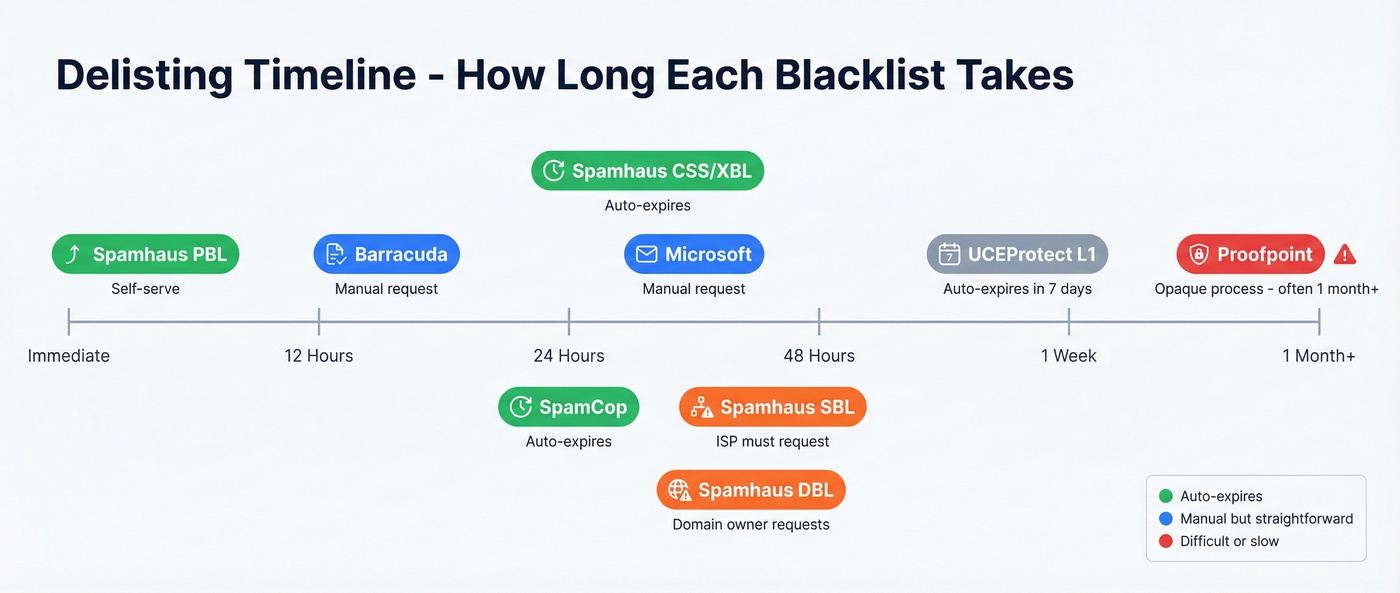
Delisting Timeline Summary
| Blacklist | Method | Who Requests | Timeline |
|---|---|---|---|
| Spamhaus SBL | Manual | ISP/network owner | 1-2 days |
| Spamhaus DBL | Manual | Domain owner | 1-2 days |
| Spamhaus PBL | Self-serve | IP owner | Immediate |
| Spamhaus CSS/XBL | Auto-expire | N/A | Hours to 24h |
| Barracuda | Manual | Sender | ~12 hours |
| Microsoft | Manual | Sender | 24-48 hours |
| SpamCop | Auto-expire | N/A | 24-48 hours |
| Proofpoint | Manual | Sender | Days to weeks+ |
| SORBS | Manual | Sender | Hours to several days |
| UCEProtect L1 | Auto-expire | N/A | 7 days (free) |
Gmail "Blacklist" Removal
Stop searching for a Gmail blacklist. It doesn't exist.
There's no public list you can check, no portal you can submit a removal request to. Gmail uses its own internal reputation system, and the only window into it is Google Postmaster Tools. If you're wondering how to escape Gmail's spam filtering, the answer is authentication compliance and sender reputation - not a delisting form.
Important distinction: Gmail's enforcement rules apply to personal Gmail accounts (@gmail.com, @googlemail.com). Internal Google Workspace delivery follows different rules. Most people confuse the two.
Since Gmail's enforcement phase kicked in late 2025, non-compliant traffic gets protocol-level rejection - not just spam-foldering. Your emails don't land in spam. They bounce. Postmaster Tools V2 shifted from reputation tiers to binary compliance checks - your authentication either passes or it doesn't. The SMTP codes tell you exactly what's wrong:
- 5.7.26: SPF or DKIM alignment failure
- 5.7.25: Missing PTR record
- 4.7.29 / 5.7.29: TLS negotiation failure
- 4.7.32: Warning - fix before it becomes a hard rejection
- 5.6.0: RFC 5322 header/syntax violation - permanent rejection
In Google Postmaster Tools, watch your spam rate like a hawk. The recommended ceiling is 0.10%. Cross 0.30% consistently and you lose mitigation support - meaning Google stops giving you the benefit of the doubt. To regain it, maintain below 0.3% for 7 consecutive days.
One quirk that trips people up: Postmaster Tools can show a 100% spam rate on days you didn't send anything. That's a reporting artifact - delayed complaints from previous sends divided by zero current sends. Don't panic over single-day spikes. Focus on 30-day trends.
Prevent Re-Listing for Good
Getting delisted is the emergency. Staying off blocklists is the real work.
Authentication isn't a best practice anymore - it's a requirement. SPF, DKIM, and DMARC must all be configured and passing. For marketing email, RFC 8058 one-click unsubscribe is now mandatory under bulk sender rules. DNS propagation for new records can take up to 72 hours, so don't wait until launch day.
Stay under these thresholds or expect delivery problems:
- Spam complaints: under 0.3% (target 0.1%)
- Bounce rate: under 2%
- Both monitored continuously by Gmail, Microsoft, and most corporate filters
Warm up new domains and IPs properly. Here's the ramp schedule that works:
| Week | Daily Volume | Notes |
|---|---|---|
| 1 | 10-20 | Engage warm contacts only |
| 2 | 20-40 | Mix warm + cold carefully |
| 3 | 40-60 | Monitor bounces closely |
| 4 | 60-80 | Increase if metrics hold |
Safe daily sending limits vary by provider: Google Workspace tops out around 100-150/day, Microsoft 365 similarly at 100-150/day, and GoDaddy at a conservative 50-75/day. The full warm-up process takes 2-4 weeks minimum, up to 12 weeks for domains with no sending history.
Verify emails before every campaign. This single habit prevents most blacklist situations before they start. Pair verification with continuous monitoring - check MxToolbox weekly, set up Google Postmaster Tools for Gmail-specific metrics, and track bounce rates per campaign. If bounces spike above 2% on any send, pause and investigate before continuing. For a deeper system, follow an email deliverability checklist, monitor email reputation, and keep an eye on email velocity as you scale.
Your competitors' data providers refresh every 6 weeks. By then, emails have gone stale, spam traps have crept in, and your domain is one campaign away from Spamhaus. Prospeo refreshes every 7 days across 300M+ profiles - 98% email accuracy, verified before you ever hit send.
Every week your data ages is a week closer to another blacklist.
FAQ
How long does email blacklist removal take?
SpamCop auto-expires in 24-48 hours with no action needed. Barracuda processes manual requests in about 12 hours. Spamhaus responds within 1-2 days for valid requests. Proofpoint is the outlier - expect days to weeks, sometimes over a month. Fix the root cause first, or you'll be re-listed faster than you got delisted.
Can I pay to get delisted faster?
Spamhaus explicitly doesn't accept payment for delisting - anyone offering to "expedite" it is running a scam. UCEProtect offers paid express removal, but the community widely views it as a shakedown. Most blacklists are free to delist from. The real cost is diagnosing and fixing your infrastructure.
What if my hosting provider's IP is blacklisted?
Shared hosting means you share IP reputation with every other tenant on that server. If your host won't address the problem, get a dedicated IP or switch providers entirely. UCEProtect L2/L3 listings often reflect IP neighborhood issues, not anything you did wrong.
Does being blacklisted affect Google search rankings?
No. Email blacklists (DNSBLs) are completely separate from Google's search index. Being on Spamhaus won't hurt your SEO. But it'll destroy your email deliverability, which is arguably worse for pipeline generation.
How do I prevent blacklisting during cold outreach?
Verify every email before sending - tools like Prospeo catch spam traps and invalid addresses before they trigger a listing. Warm up new domains over 4+ weeks. Keep bounce rates under 2%, authenticate with SPF/DKIM/DMARC, and monitor Google Postmaster Tools after every campaign.