

Email Bounce Test: How to Check Before You Send (2026)
It's Monday morning. You launched a 5,000-contact sequence on Friday, and your ESP dashboard is flashing an 8% bounce rate. Your domain reputation just took a hit that'll take weeks to recover from - and every one of those bounces was preventable. With 392.5 billion emails expected daily in 2026, inbox providers have zero patience for senders who can't keep their lists clean.
An email bounce test is the single fastest way to catch bad addresses before they torch your sender reputation. But most teams either skip it entirely or run it wrong. Here's the hot take most verification vendors won't tell you: the best bounce test is the one you never need to run, because you sourced clean data in the first place. Let's break down both sides.
What You Need (Quick Version)
- Keep total bounce rate under 2%, hard bounces under 1%. Cross 5% and you're in the danger zone - expect throttling, spam placement, and potential blocklisting. Rebuilding sender reputation takes weeks of careful warmup.
- Run every list through a multi-step verifier (syntax, MX, SMTP) before sending. Budget around $7-8 per 1,000 emails for mainstream tools.
- Set a suppression rule now: any address that soft-bounces repeatedly across separate campaigns gets permanently suppressed. No exceptions.
What Is an Email Bounce Test?
An email bounce test checks whether an address can receive mail - without actually sending a message. It's the pre-flight check for your outbound campaigns.
Three terms get thrown around interchangeably, but they mean different things. Email validation checks syntax and formatting: is this structurally a real email address? Email verification goes deeper, pinging DNS records and SMTP servers to confirm the mailbox exists. A bounce test is essentially verification framed as a pre-send prediction - will this address bounce if I email it?
None of these tools send an actual email to the recipient. They simulate the handshake process, checking whether the receiving server would accept delivery. That's why they're fast (milliseconds per check) and why they're not perfect. Some servers lie about what they'll accept.
Hard vs. Soft Bounces
Not all bounces are equal, and how you handle each type matters enormously.
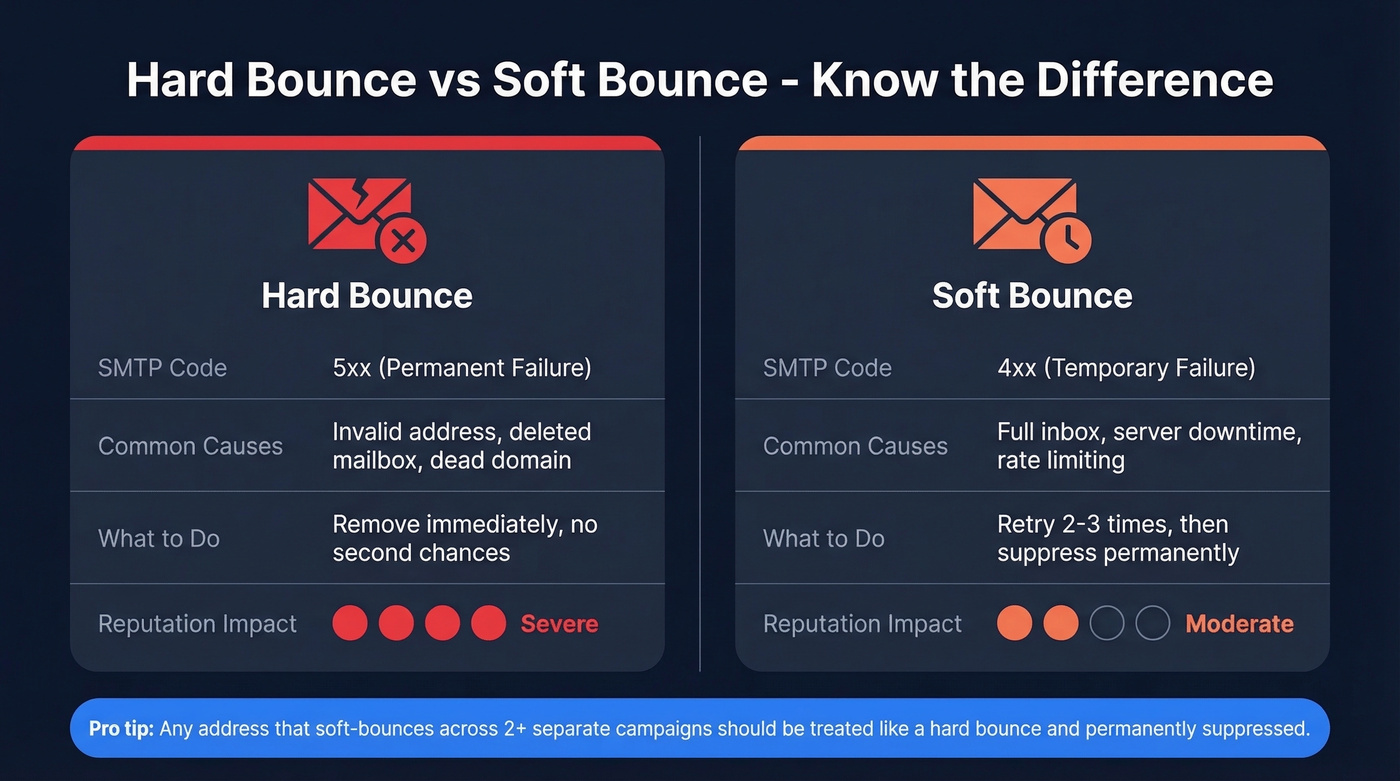
| Hard Bounce | Soft Bounce | |
|---|---|---|
| SMTP Code | 5xx (permanent) | 4xx (temporary) |
| Cause | Invalid address, domain gone | Full inbox, server down |
| Action | Remove immediately | Retry 2-3x, then suppress |
| Reputation Impact | Severe | Moderate if persistent |
A hard bounce means the address doesn't exist - the domain is dead, the mailbox was deleted, or the address was never real. SMTP 5xx codes signal permanent failure. Remove these contacts immediately. No second chances, no "let's try again next quarter."
Soft bounces are temporary. The recipient's inbox is full, their server is down, or your sending reputation triggered a deferral. ESPs typically retry delivery multiple times before giving up. The operational rule: suppress any address that soft-bounces repeatedly across separate campaigns. At that point, something is structurally wrong, and repeated attempts actively hurt your reputation.
Here's the thing most people miss: ESPs track your bounce patterns over time. A single campaign with a 3% hard bounce rate won't necessarily kill you. But two campaigns in a row at that level? That's when blocklisting conversations start. Running proper email bounce detection before each send is the only way to break that cycle.
What's an Acceptable Bounce Rate?
The common benchmark is under 2% total bounces, with hard bounces ideally below 1%. Cross 5% and you're in genuine danger territory - ISPs start throttling, filtering, and potentially blocklisting your domain.
| Industry | Avg. Bounce Rate |
|---|---|
| Advertising & Marketing | 0.27% |
| Business & Finance | 0.35% |
| IT / Tech / Software | 0.66% |
| Architecture & Construction | 0.83% |
| Manufacturing | 0.84% |
These benchmarks from Moosend skew toward marketing email, where lists are opt-in and cleaner by nature. Cold outbound lists typically run higher - which is exactly why bounce testing matters more for sales teams than for anyone else. Regional variation is real too: North American campaigns average around 3.42% bounce rates, while South American campaigns hit 4.82%. If you're running international outbound, test harder.
How Bounce Testing Works
Every verification tool runs roughly the same pipeline, whether it costs $1.50 or $24.50 per thousand checks. Think of an email bounce tester as a multi-layered filter that progressively eliminates bad addresses.
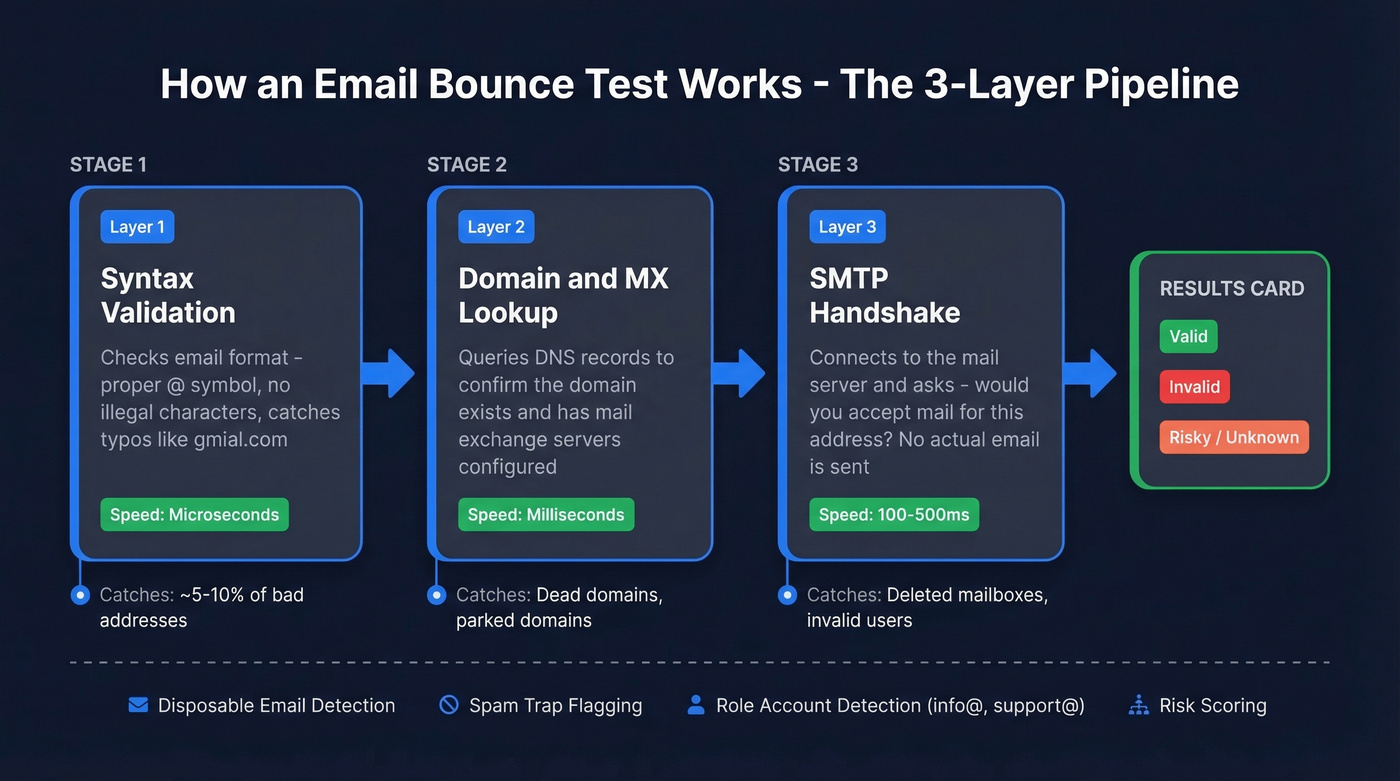
Layer 1: Syntax validation. The tool checks whether the email follows a valid format - proper @ symbol, no illegal characters, no obvious typos like "gmial.com." This catches the low-hanging fruit and runs in microseconds.
Layer 2: Domain and MX lookup. The tool queries DNS records to confirm the domain exists and has mail exchange records configured. No MX record means the domain can't receive email. Dead domain, dead address.
Layer 3: SMTP handshake. This is where the real verification happens. The tool initiates a connection with the receiving mail server and asks, essentially, "Would you accept mail for this address?" The server responds with an accept or reject signal. No message is actually delivered - the handshake stops before sending any content.
Beyond these three layers, better tools add checks for disposable emails, spam traps, role accounts like info@ and support@, and risk scores. The whole process runs in roughly 100-500 milliseconds per address.
If you're curious what this looks like under the hood, open-source libraries like deep-email-validator on npm implement the same basic pipeline - regex, typo correction, disposable blacklist, MX records, SMTP check. They work fine for basic validation. Where they fall apart is catch-all domains, which brings us to the biggest problem in email verification.

The best email bounce test is the one you never need to run. Prospeo's 5-step verification - including catch-all handling, spam-trap removal, and honeypot filtering - means every email you export is already verified to 98% accuracy. Teams using Prospeo cut bounce rates from 35%+ to under 4%.
Stop testing for bounces. Start with data that doesn't bounce.
The Catch-All Problem
Catch-all domains are the bane of email verification. These servers accept mail for any address at the domain - real or not. Send to john.smith@company.com? Accepted. Send to asdfghjkl@company.com? Also accepted.
SMTP verification can't distinguish between a real mailbox and a nonexistent one on these domains. The server says "yes" to everything. We've heard this frustration from dozens of cold email teams: catch-all domains are the single biggest reason "verified" lists still produce bounces. Even the most sophisticated bounce detector can't reliably tell real from fake on these servers.
Tools with proprietary catch-all handling reduce this risk by cross-referencing multiple signals beyond the SMTP response, but no tool eliminates it entirely. The honest operational advice: treat accept-all results as risky. Either sample-send a small batch of 50-100 first to gauge real bounce rates, or enrich those contacts with a secondary data source to confirm they're real people at real addresses. If catch-all domains make up more than 15-20% of your list, your "verified" bounce rate will still surprise you.
How Accurate Are These Tools?
Let's talk about the gap between marketing claims and reality.
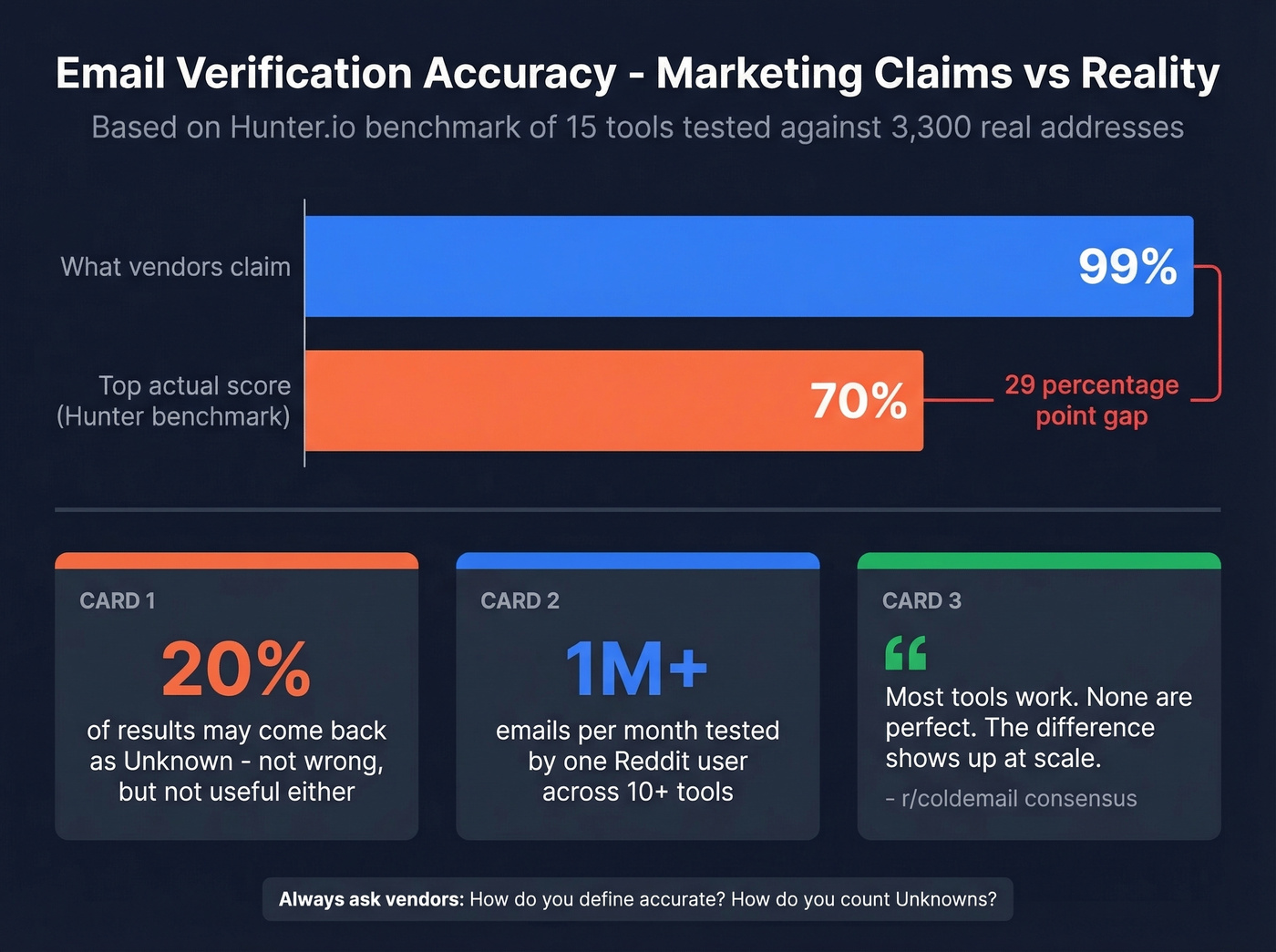
Most verification tools advertise "99% accuracy." The actual numbers are lower. Hunter ran the most transparent benchmark available - 15 tools tested against 3,000 real business emails plus 300 known-invalid addresses. The top accuracy score? 70%. Not 99%. Not 95%. Seventy percent.
Hunter acknowledges methodology bias - the dataset came from their own outreach activity, which gives their tool an edge. And accuracy depends heavily on how you count "Unknown" results. If a tool returns "Unknown" for 20% of addresses, those aren't wrong predictions, but they're not useful ones either. You still don't know whether to send.
The consensus on r/coldemail tracks with this. One poster sending roughly 1M emails/month tested 10+ verification tools and concluded: "Most tools work. None are perfect. The difference shows up at scale." That's the most honest summary of the market.
If a tool claims 99% accuracy, they're measuring something different than you think. Ask what they count as "accurate" and how they handle unknowns.
Best Email Bounce Tester Tools
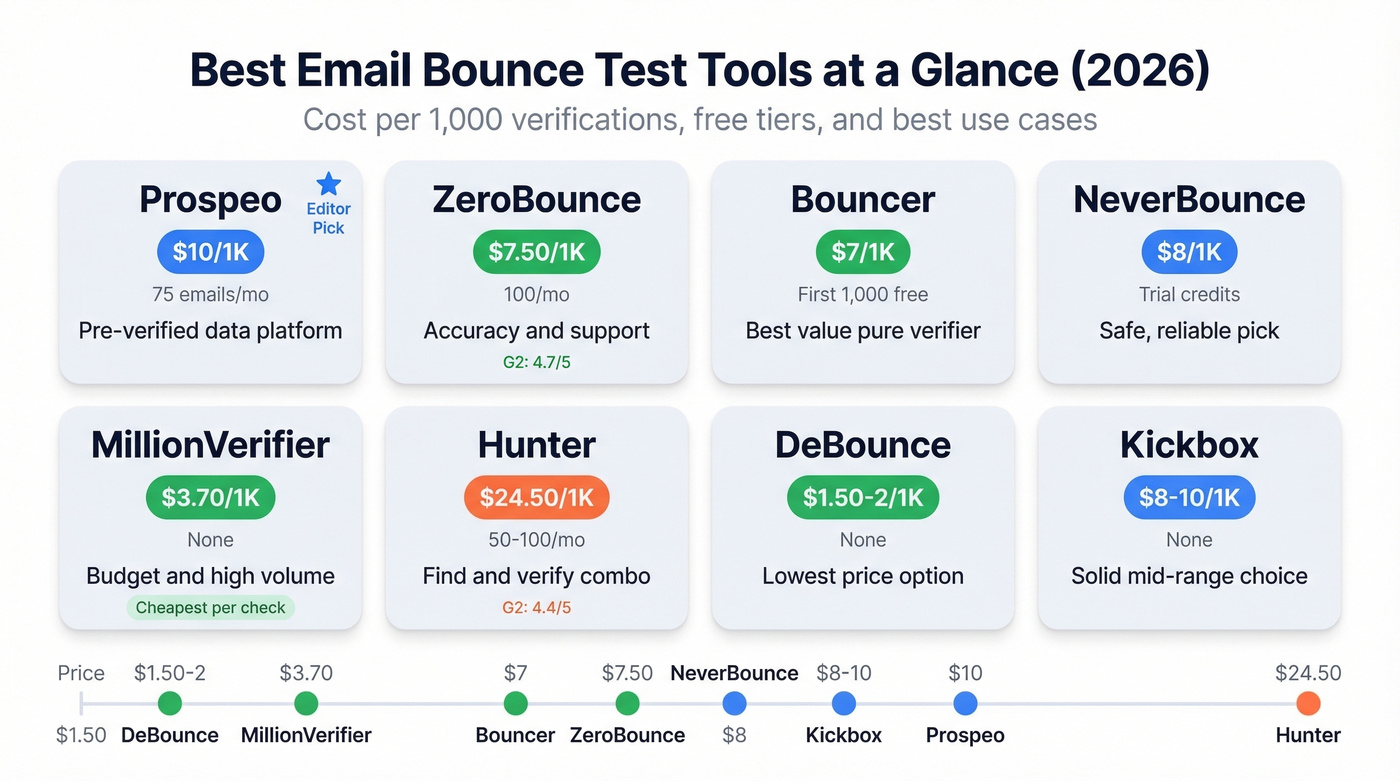
| Tool | Cost / 1K | Free Tier | G2 Rating | Best For |
|---|---|---|---|---|
| Prospeo | ~$10 | 75 emails/mo | - | Pre-verified data; data platform first |
| ZeroBounce | ~$7.50 | 100/mo | 4.7/5 | Accuracy + support |
| Bouncer | ~$7 | First 1,000 | - | Best value pure verifier |
| NeverBounce | ~$8 | Trial credits | - | Safe, reliable pick |
| MillionVerifier | ~$3.70 | - | - | Budget / high volume |
| Hunter | ~$24.50 | 50-100/mo | 4.4/5 | Find + verify combo |
| DeBounce | ~$1.50-2 | - | - | Cheapest option |
| Kickbox | ~$8-10 | - | - | Solid mid-range |
Prospeo
Most bounce test tools are rescue missions - you've already got a bad list, and you're trying to salvage it. Prospeo flips the model. Its 300M+ contact database runs 5-step verification with catch-all handling, spam-trap removal, and honeypot filtering before you ever export a contact. Emails are verified in real time and refreshed on a 7-day cycle, compared to the 6-week industry average.
The results speak for themselves. Snyk's team of 50 AEs went from a 35-40% bounce rate with their previous provider to under 5% with Prospeo. Stack Optimize maintains under 3% bounce rates across all clients with zero domain flags. At roughly $0.01 per email with a free tier of 75 emails/month, it's the upstream solution that makes post-hoc bounce testing a confirmation step rather than a crisis response.
ZeroBounce
ZeroBounce has the strongest reputation in pure email verification. A 4.7/5 rating on G2 across 1,361 reviews is hard to argue with - users consistently praise accuracy and customer support quality.
The tradeoff: pricing starts at a $15 minimum for 2,000 credits, which is competitive at volume but feels steep for small lists. Some G2 reviewers flag occasional inaccuracy on edge cases, almost certainly catch-all domains, which plague every tool. 100 free credits/month, pay-as-you-go from $7.50/1K, and enterprise plans for high-volume senders.

Bouncer
Use Bouncer if you want the best price-to-quality ratio for pure verification. At $7/1K with the first 1,000 emails free, it's the tool cold email practitioners recommend most often in communities. Bouncer scored 65.43% in the Hunter benchmark - 4th out of 15, solidly top tier among independently tested tools.
Skip Bouncer if you need email finding bundled with verification. It does one thing well and doesn't pretend to do more.
NeverBounce
NeverBounce is the Honda Civic of email verification - reliable, well-known, no surprises. At $8/1K with free trial credits on signup, it sits comfortably in the mid-range. We've seen teams use it for years without complaints, but also without enthusiasm. If you need a safe, boring pick, this is it.
MillionVerifier
The budget pick for teams sending at serious volume. At roughly $3.70/1K, MillionVerifier costs about half what mainstream tools charge. There's less public accuracy data available compared to ZeroBounce or Bouncer, so run a small test batch against a known list before committing your entire database.
Hunter
Hunter topped its own benchmark at 70% accuracy - the highest score in a 15-tool test. The catch? Verification costs roughly $24.50/1K on paid plans, which is 3x what Bouncer charges. Hunter's real value is as an email finder that includes verification, not as a standalone verifier. If you're already paying for Hunter's email finding, the verification is a natural add-on. Buying it purely for bounce testing is hard to justify at that price.
DeBounce & Kickbox
DeBounce is one of the cheapest options at $1.50-2/1K. Bare-bones interface, minimal extras, but it runs the standard verification pipeline. Kickbox sits at $8-10/1K and scored 67.53% in the Hunter benchmark - 3rd place, which is solid. Neither tool has a standout differentiator, but both get the job done for teams that just need syntax-MX-SMTP checks without bells and whistles.
Catch-all domains break every verification tool - except the one that built its own infrastructure. Prospeo's proprietary email-finding system doesn't rely on third-party providers. With a 7-day data refresh cycle and 143M+ verified emails, you get addresses that actually connect. At $0.01 per email, cleaning your list costs less than a single bounce.
Skip the bounce test. Source emails that are already verified.
How to Run a Bounce Test
The workflow depends on your volume and technical setup. Four paths, from simplest to most integrated.
Single email check. Most tools offer a free widget on their homepage. Paste an address, get a result in seconds. Good for quick spot-checks, not for production use.
Bulk CSV upload. Export your list as a CSV, upload it to your verification tool, and download the results with status codes appended. This is the most common workflow for campaign prep. ZeroBounce, Bouncer, and NeverBounce all handle this well.
API integration. For teams verifying at scale, most tools offer REST APIs that return results in real time. Connect your lead capture forms or enrichment workflows to verify on ingest - building bounce detection logic directly into your pipeline so bad data never enters your CRM in the first place.
Spreadsheet-native verification. Several tools offer Google Sheets add-ons. Hunter and Derrick both let you verify directly in a spreadsheet column, which is ideal for teams that manage lead lists in Sheets rather than a CRM. If your workflow lives in spreadsheets, this is the fastest path to clean data without switching tools.
What to Do After Your Test
Running the test is step one. What you do with the results determines whether it actually protects your domain.
Segment by result. Valid emails go into your send queue. Invalid emails get removed immediately - no exceptions, no "let's try anyway." Risky or unknown results, typically catch-all domains, get quarantined. Send a small sample batch of 50-100 to gauge real-world bounce rates before committing the full segment. If your tool assigns risk scores, set a threshold and suppress anything below 70%.
Set a re-verification cadence. B2B contact data decays at roughly 2-3% per month as people change jobs, companies restructure, and domains expire. If your data source doesn't refresh weekly, monthly re-verification is non-negotiable. A 6-month-old list without re-verification will have 10-15% stale addresses - enough to wreck a campaign.
Check your authentication. Verification catches bad addresses, but it doesn't fix authentication problems. SPF tells receiving servers which IPs can send on your behalf. DKIM adds a cryptographic signature to prove the message wasn't tampered with. DMARC ties them together with a policy for handling failures. All three need to be configured for your sending domain before you send a single email. Google's sender guidelines spell this out clearly. (If you want a practical checklist, start with DMARC and an SPF record.)
Warm up new domains properly. Don't blast your full verified list on day one from a fresh domain. Start at 20 emails per day and increase volume by roughly 20% daily over a 14-day ramp. Even a perfectly clean list will trigger spam filters if the sending domain has no reputation history. If you're scaling outbound, align warmup with safe email velocity and consider unlimited email warmup tools.
FAQ
Can I test a single email for free?
Yes. Most verification tools offer a free single-check widget on their homepage. ZeroBounce gives 100 free credits/month, Hunter provides 50-100, and Prospeo includes 75 free email verifications monthly with full enrichment data attached.
How often should I re-verify my list?
Monthly, at minimum. B2B contact data decays at roughly 2-3% per month as people change jobs and companies restructure. A 6-month-old list will have 10-15% stale addresses - enough to trigger ISP throttling on a single campaign.
Why did a "valid" email still bounce?
Most likely a catch-all domain. These servers accept all incoming mail at the SMTP level, so verification tools can't distinguish real mailboxes from nonexistent ones. Data decay between verification and send is the second most common cause - even a few days can matter for high-turnover roles.
Is email verification GDPR compliant?
Verification itself - checking if an address exists - doesn't send marketing content, so it doesn't require consent. However, how you obtained the email and what you do with it afterward must comply with GDPR. Use GDPR-compliant data sources and honor opt-outs.
What's the difference between validation and verification?
Validation checks format and syntax - is this structurally a real email address? Verification goes further, checking DNS/MX records and pinging the SMTP server to confirm the mailbox exists. An email bounce test is essentially verification applied as a pre-send quality gate.